html
<!DOCTYPE html>
<html lang="en">
<head>
    <meta charset="UTF-8">
    <meta name="viewport" content="width=device-width, initial-scale=1.0">
    <title>前端国际化示例</title>
    <style>
        * {
            margin: 0;
            padding: 0;
            box-sizing: border-box;
            font-family: 'Segoe UI', Tahoma, Geneva, Verdana, sans-serif;
        }

        body {
            background: linear-gradient(135deg, #6a11cb 0%, #2575fc 100%);
            color: #333;
            min-height: 100vh;
            padding: 20px;
        }

        .container {
            max-width: 1000px;
            margin: 0 auto;
            background-color: rgba(255, 255, 255, 0.95);
            border-radius: 15px;
            box-shadow: 0 10px 30px rgba(0, 0, 0, 0.2);
            overflow: hidden;
        }

        header {
            background: linear-gradient(90deg, #2c3e50, #4a6491);
            color: white;
            padding: 20px 30px;
            display: flex;
            justify-content: space-between;
            align-items: center;
        }

        .logo {
            font-size: 24px;
            font-weight: bold;
        }

        .language-switcher {
            display: flex;
            gap: 10px;
        }

        .lang-btn {
            background: rgba(255, 255, 255, 0.2);
            border: none;
            color: white;
            padding: 8px 15px;
            border-radius: 20px;
            cursor: pointer;
            transition: all 0.3s;
            font-weight: 500;
        }

        .lang-btn:hover {
            background: rgba(255, 255, 255, 0.3);
        }

        .lang-btn.active {
            background: white;
            color: #2c3e50;
        }

        .content {
            padding: 40px;
        }

        h1 {
            color: #2c3e50;
            margin-bottom: 20px;
            font-size: 32px;
        }

        p {
            line-height: 1.6;
            margin-bottom: 15px;
            font-size: 16px;
        }

        .card-container {
            display: grid;
            grid-template-columns: repeat(auto-fit, minmax(300px, 1fr));
            gap: 20px;
            margin-top: 30px;
        }

        .card {
            background: white;
            border-radius: 10px;
            padding: 20px;
            box-shadow: 0 5px 15px rgba(0, 0, 0, 0.1);
            transition: transform 0.3s;
        }

        .card:hover {
            transform: translateY(-5px);
        }

        .card h3 {
            color: #2c3e50;
            margin-bottom: 10px;
            font-size: 20px;
        }

        .card p {
            color: #555;
            font-size: 14px;
        }

        .info-section {
            margin-top: 30px;
            background: #f8f9fa;
            padding: 20px;
            border-radius: 10px;
        }

        .info-section h2 {
            color: #2c3e50;
            margin-bottom: 15px;
        }

        .example-item {
            display: flex;
            justify-content: space-between;
            padding: 10px 0;
            border-bottom: 1px solid #eaeaea;
        }

        .example-label {
            font-weight: 500;
            color: #555;
        }

        .example-value {
            color: #2c3e50;
            font-weight: 600;
        }

        footer {
            text-align: center;
            padding: 20px;
            color: #7f8c8d;
            font-size: 14px;
            border-top: 1px solid #eee;
        }

        @media (max-width: 768px) {
            header {
                flex-direction: column;
                gap: 15px;
            }

            .content {
                padding: 20px;
            }

            .card-container {
                grid-template-columns: 1fr;
            }
        }
    </style>
</head>
<body>
    <div class="container">
        <header>
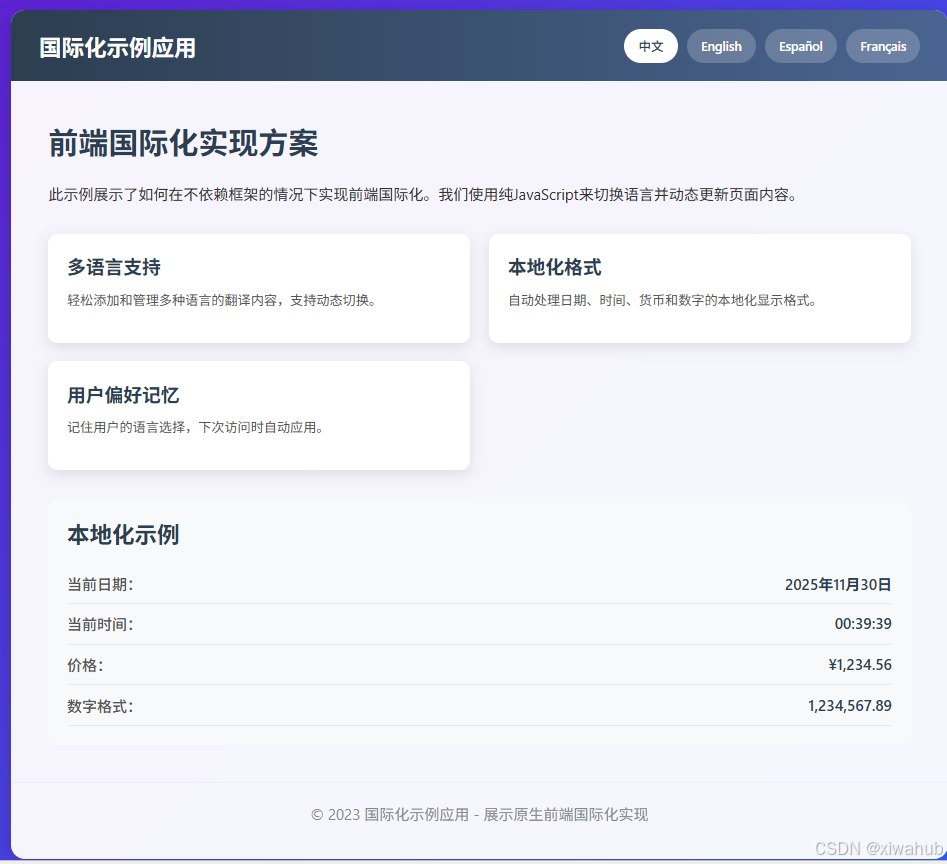
            <div class="logo" data-i18n="app.title">国际化示例应用</div>
            <div class="language-switcher">
                <button class="lang-btn active" data-lang="zh-CN">中文</button>
                <button class="lang-btn" data-lang="en-US">English</button>
                <button class="lang-btn" data-lang="es-ES">Español</button>
                <button class="lang-btn" data-lang="fr-FR">Français</button>
            </div>
        </header>

        <div class="content">
            <h1 data-i18n="content.title">前端国际化实现方案</h1>
            <p data-i18n="content.description">此示例展示了如何在不依赖框架的情况下实现前端国际化。我们使用纯JavaScript来切换语言并动态更新页面内容。</p>

            <div class="card-container">
                <div class="card">
                    <h3 data-i18n="features.1.title">多语言支持</h3>
                    <p data-i18n="features.1.description">轻松添加和管理多种语言的翻译内容,支持动态切换。</p>
                </div>
                <div class="card">
                    <h3 data-i18n="features.2.title">本地化格式</h3>
                    <p data-i18n="features.2.description">自动处理日期、时间、货币和数字的本地化显示格式。</p>
                </div>
                <div class="card">
                    <h3 data-i18n="features.3.title">用户偏好记忆</h3>
                    <p data-i18n="features.3.description">记住用户的语言选择,下次访问时自动应用。</p>
                </div>
            </div>

            <div class="info-section">
                <h2 data-i18n="examples.title">本地化示例</h2>
                <div class="example-item">
                    <span class="example-label" data-i18n="examples.date">当前日期:</span>
                    <span class="example-value" id="current-date">2023年10月15日</span>
                </div>
                <div class="example-item">
                    <span class="example-label" data-i18n="examples.time">当前时间:</span>
                    <span class="example-value" id="current-time">下午3:30:25</span>
                </div>
                <div class="example-item">
                    <span class="example-label" data-i18n="examples.currency">价格:</span>
                    <span class="example-value" id="price">¥1,234.56</span>
                </div>
                <div class="example-item">
                    <span class="example-label" data-i18n="examples.number">数字格式:</span>
                    <span class="example-value" id="number">1,234,567.89</span>
                </div>
            </div>
        </div>

        <footer>
            <p data-i18n="footer.text">© 2023 国际化示例应用 - 展示原生前端国际化实现</p>
        </footer>
    </div>

    <script>
        // 多语言资源定义
        const resources = {
            'zh-CN': {
                'app.title': '国际化示例应用',
                'content.title': '前端国际化实现方案',
                'content.description': '此示例展示了如何在不依赖框架的情况下实现前端国际化。我们使用纯JavaScript来切换语言并动态更新页面内容。',
                'features.1.title': '多语言支持',
                'features.1.description': '轻松添加和管理多种语言的翻译内容,支持动态切换。',
                'features.2.title': '本地化格式',
                'features.2.description': '自动处理日期、时间、货币和数字的本地化显示格式。',
                'features.3.title': '用户偏好记忆',
                'features.3.description': '记住用户的语言选择,下次访问时自动应用。',
                'examples.title': '本地化示例',
                'examples.date': '当前日期:',
                'examples.time': '当前时间:',
                'examples.currency': '价格:',
                'examples.number': '数字格式:',
                'footer.text': '© 2023 国际化示例应用 - 展示原生前端国际化实现'
            },
            'en-US': {
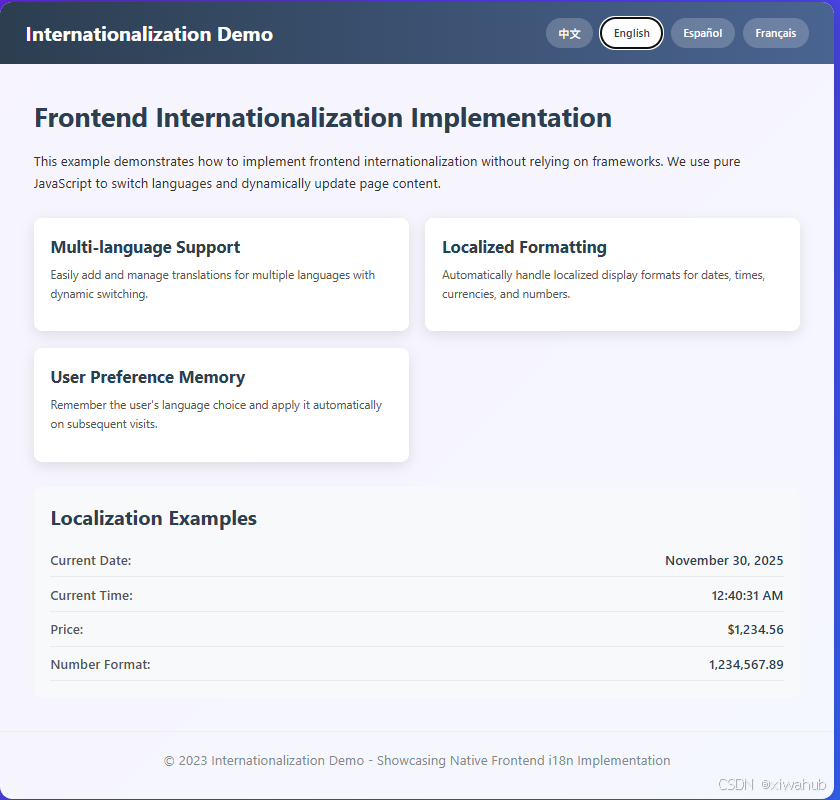
                'app.title': 'Internationalization Demo',
                'content.title': 'Frontend Internationalization Implementation',
                'content.description': 'This example demonstrates how to implement frontend internationalization without relying on frameworks. We use pure JavaScript to switch languages and dynamically update page content.',
                'features.1.title': 'Multi-language Support',
                'features.1.description': 'Easily add and manage translations for multiple languages with dynamic switching.',
                'features.2.title': 'Localized Formatting',
                'features.2.description': 'Automatically handle localized display formats for dates, times, currencies, and numbers.',
                'features.3.title': 'User Preference Memory',
                'features.3.description': 'Remember the user\'s language choice and apply it automatically on subsequent visits.',
                'examples.title': 'Localization Examples',
                'examples.date': 'Current Date:',
                'examples.time': 'Current Time:',
                'examples.currency': 'Price:',
                'examples.number': 'Number Format:',
                'footer.text': '© 2023 Internationalization Demo - Showcasing Native Frontend i18n Implementation'
            },
            'es-ES': {
                'app.title': 'Demo de Internacionalización',
                'content.title': 'Implementación de Internacionalización Frontend',
                'content.description': 'Este ejemplo demuestra cómo implementar la internacionalización frontend sin depender de frameworks. Usamos JavaScript puro para cambiar idiomas y actualizar dinámicamente el contenido de la página.',
                'features.1.title': 'Soporte Multilingüe',
                'features.1.description': 'Agregue y administre fácilmente traducciones para múltiples idiomas con cambio dinámico.',
                'features.2.title': 'Formato Localizado',
                'features.2.description': 'Maneja automáticamente formatos de visualización localizados para fechas, horas, monedas y números.',
                'features.3.title': 'Memoria de Preferencias del Usuario',
                'features.3.description': 'Recuerda la elección de idioma del usuario y la aplica automáticamente en visitas posteriores.',
                'examples.title': 'Ejemplos de Localización',
                'examples.date': 'Fecha Actual:',
                'examples.time': 'Hora Actual:',
                'examples.currency': 'Precio:',
                'examples.number': 'Formato Numérico:',
                'footer.text': '© 2023 Demo de Internacionalización - Mostrando la Implementación Nativa de i18n Frontend'
            },
            'fr-FR': {
                'app.title': 'Démonstration d\'Internationalisation',
                'content.title': 'Implémentation de l\'Internationalisation Frontend',
                'content.description': 'Cet exemple montre comment implémenter l\'internationalisation frontend sans dépendre de frameworks. Nous utilisons du JavaScript pur pour changer de langue et mettre à jour dynamiquement le contenu de la page.',
                'features.1.title': 'Support Multilingue',
                'features.1.description': 'Ajoutez et gérez facilement des traductions pour plusieurs langues avec un changement dynamique.',
                'features.2.title': 'Formatage Localisé',
                'features.2.description': 'Gère automatiquement les formats d\'affichage localisés pour les dates, heures, devises et nombres.',
                'features.3.title': 'Mémoire des Préférences Utilisateur',
                'features.3.description': 'Mémorise le choix de langue de l\'utilisateur et l\'applique automatiquement lors des visites suivantes.',
                'examples.title': 'Exemples de Localisation',
                'examples.date': 'Date Actuelle:',
                'examples.time': 'Heure Actuelle:',
                'examples.currency': 'Prix:',
                'examples.number': 'Format Numérique:',
                'footer.text': '© 2023 Démonstration d\'Internationalisation - Présentation de l\'Implémentation Native i18n Frontend'
            }
        };

        // 国际化核心功能
        class I18n {
            constructor() {
                this.currentLang = this.getSavedLanguage() || 'zh-CN';
                this.init();
            }

            // 初始化
            init() {
                this.setLanguage(this.currentLang);
                this.setupEventListeners();
                this.updateLocalizedFormats();
            }

            // 设置事件监听
            setupEventListeners() {
                const langButtons = document.querySelectorAll('.lang-btn');
                langButtons.forEach(btn => {
                    btn.addEventListener('click', () => {
                        const lang = btn.getAttribute('data-lang');
                        this.setLanguage(lang);
                    });
                });

                // 定期更新本地化格式(如时间)
                setInterval(() => {
                    this.updateLocalizedFormats();
                }, 1000);
            }

            // 设置语言
            setLanguage(lang) {
                if (!resources[lang]) return;

                this.currentLang = lang;
                this.saveLanguage(lang);
                this.updateContent();
                this.updateActiveButton();
                this.updateLocalizedFormats();
            }

            // 更新页面内容
            updateContent() {
                const elements = document.querySelectorAll('[data-i18n]');
                elements.forEach(element => {
                    const key = element.getAttribute('data-i18n');
                    if (resources[this.currentLang][key]) {
                        element.textContent = resources[this.currentLang][key];
                    }
                });
            }

            // 更新活动按钮状态
            updateActiveButton() {
                const langButtons = document.querySelectorAll('.lang-btn');
                langButtons.forEach(btn => {
                    if (btn.getAttribute('data-lang') === this.currentLang) {
                        btn.classList.add('active');
                    } else {
                        btn.classList.remove('active');
                    }
                });
            }

            // 更新本地化格式(日期、时间、货币等)
            updateLocalizedFormats() {
                const now = new Date();

                // 日期格式
                const dateOptions = { year: 'numeric', month: 'long', day: 'numeric' };
                document.getElementById('current-date').textContent =
                    now.toLocaleDateString(this.currentLang, dateOptions);

                // 时间格式
                const timeOptions = { hour: 'numeric', minute: 'numeric', second: 'numeric' };
                document.getElementById('current-time').textContent =
                    now.toLocaleTimeString(this.currentLang, timeOptions);

                // 货币格式
                const currencyOptions = {
                    style: 'currency',
                    currency: this.getCurrencyCode(this.currentLang)
                };
                document.getElementById('price').textContent =
                    (1234.56).toLocaleString(this.currentLang, currencyOptions);

                // 数字格式
                document.getElementById('number').textContent =
                    (1234567.89).toLocaleString(this.currentLang);
            }

            // 根据语言获取货币代码
            getCurrencyCode(lang) {
                const currencyMap = {
                    'zh-CN': 'CNY',
                    'en-US': 'USD',
                    'es-ES': 'EUR',
                    'fr-FR': 'EUR'
                };
                return currencyMap[lang] || 'USD';
            }

            // 保存语言偏好到本地存储
            saveLanguage(lang) {
                localStorage.setItem('preferred-language', lang);
            }

            // 从本地存储获取语言偏好
            getSavedLanguage() {
                return localStorage.getItem('preferred-language');
            }
        }

        // 初始化国际化
        document.addEventListener('DOMContentLoaded', () => {
            new I18n();
        });
    </script>
</body>
</html>