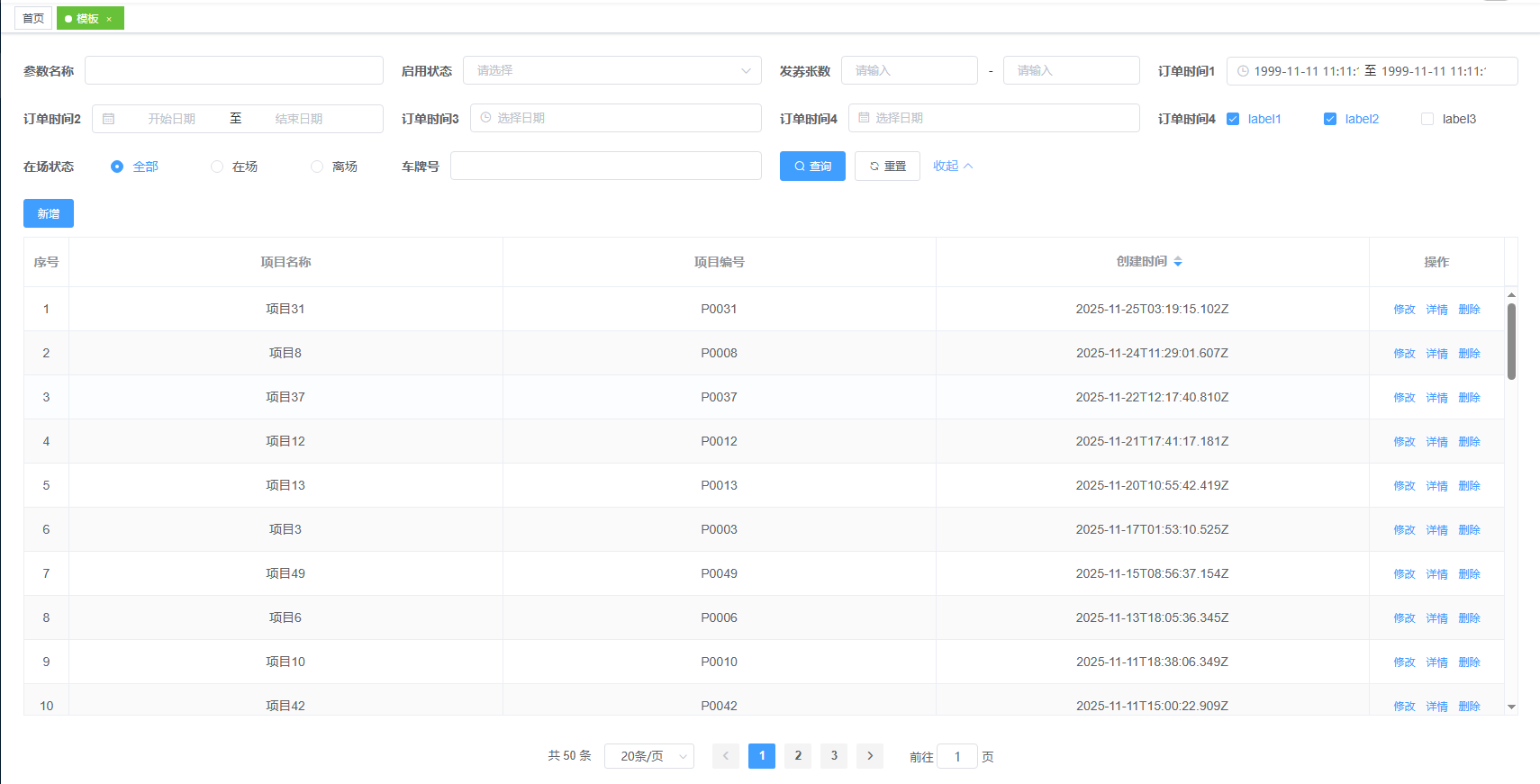
效果如下

searcherTableTemplate.vue
<!-- 通用列表页面模板 -->
<template>
  <div style="height: 100%">
    <AHMF :asideWidth="400" :rightTitleShow="false">
      <template #aside> </template>
      <template #header>
        <topSearcher :searchOptions="searchOptions" @onQuery="onQuery" @onReset="onReset" :spanPercentage="25">
        </topSearcher>
      </template>
      <template #main>
        <div style="margin-bottom: 10px; display: flex">
          <el-button type="primary" size="small" @click="onAdd">新增</el-button>
        </div>
        <custom-table :tableData="tableData" :tableColumns="tableColumns" :tableHeight="tableHeight"
          :tableLoading="tableLoading" :operateWidth="operateWidth" @sort-change="sortChange">
          <!-- 自定义操作列 -->
          <template #operate="scope">
            <el-button size="mini" type="text" @click="onEdit(scope)">修改</el-button>
            <el-button size="mini" type="text" @click="onDetail(scope)">详情</el-button>
            <el-button size="mini" type="text" @click="onDel(scope)">删除</el-button>
          </template></custom-table>
      </template>
      <template #footer>
        <div class="flex">
          <el-pagination background @size-change="handleSizeChange" @current-change="handleCurrentChange"
            :current-page="pageInfo.currPage" :page-sizes="[20, 50, 100, 500, 1000]" :page-size="pageInfo.pageSize"
            layout="total, sizes, prev, pager, next, jumper" :total="pageInfo.total">
          </el-pagination>
        </div>
      </template>
    </AHMF>
    <!-- 新增_修改_弹窗 -->
    <AddEditDialog title="" :modelValue="formData" :form-items="formItems" :rules="rules" :visible.sync="dialogVisible"
      :is-edit="isEdit" @submit="handleSubmit"></AddEditDialog>
    <!-- 详情弹窗 -->
    <detail-dialog :visible.sync="detailVisible" :material-id="currentMaterialId"
      :query-params="queryParams"></detail-dialog>
  </div>
</template>

<script>
import DetailDialog from "@/components/topSearcher/detail.vue";
import AddEditDialog from "@/components/AddEditDialog";
import topSearcher from "@/components/topSearcher/topSearcher-3more.vue";
import AHMF from "@/components/topSearcher/AHMF.vue";
import CustomTable from "@/components/topSearcher/CustomTable.vue";
import tableSortMixin from "@/mixins/tableSortMixin";
import {
  getSelectData,
} from "@/utils/publicReq.js";

export default {
  mixins: [tableSortMixin],
  components: {
    AHMF,
    topSearcher,
    AddEditDialog,
    DetailDialog,
    CustomTable,
  },
  name: "ListTemplate",

  data () {
    return {
      detailVisible: false,
      currentMaterialId: null,
      queryParams: {},
      operateWidth: 150,
      isEdit: false,
      dialogVisible: false,
      formItems: [
        {
          label: "项目名称",
          prop: "projectName",
          type: "input",
          placeholder: "请输入项目名称",
        },
        {
          label: "项目编号",
          prop: "projectCode",
          type: "input",
          placeholder: "请输入项目编号",
        },
      ],
      rules: {
        projectName: [
          { required: true, message: "请输入项目名称", trigger: "blur" },
        ],
        projectCode: [
          { required: true, message: "请输入项目编号", trigger: "blur" },
        ],
      },
      formData: {
        projectName: "",
        projectCode: "",
      },
      //表格字段
      tableColumns: [
        {
          prop: "projectName",
          label: "项目名称",
        },
        {
          prop: "projectCode",
          label: "项目编号",
        },
        {
          prop: "crTime",
          label: "创建时间",
          sortable: true,
          sortType: "desc", // 默认降序
        },
      ],
      // 搜索字段
      // 搜索字段
      searchOptions: [
        {
          type: "input",
          label: "参数名称",
          key: "paramName",
          value: "",
        },

        {
          type: "select",
          label: "启用状态",
          key: "isEnable",
          value: "",
          options: [
            { label: "已停用", value: "0" },
            { label: "已启用", value: "1" },
          ],
        },
        {
          type: "rangeInput",
          label: "发券张数",
          key1: "couNumMin",
          key2: "couNumMax",
          value1: "",
          value2: "",
        },
        {
          type: "datetimeRange",
          label: "订单时间1",
          key: "orderTime1",
          valueFormat: "yyyy-MM-dd HH:mm:ss",
          // spanPercentage: 40,
          value: ["1999-11-11 11:11:11", "1999-11-11 11:11:11"],
        },
        {
          type: "dateRange",
          label: "订单时间2",
          key: "orderTime2",
          valueFormat: "yyyy-MM-dd",
          value: [],
        },
        {
          type: "datetime",
          label: "订单时间3",
          key: "orderTime3",
          valueFormat: "yyyy-MM-dd",
          value: "",
        },
        {
          type: "date",
          label: "订单时间4",
          key: "orderTime4",
          valueFormat: "yyyy-MM-dd",
          value: "",
        },
        {
          type: "checkBox",
          label: "订单时间4",
          options: [
            {
              key: "key1",
              label: "label1",
              value: true,
              span: 8,
            },
            {
              key: "key2",
              label: "label2",
              value: true,
              span: 8,
            },
            {
              key: "key3",
              label: "label3",
              value: "",
              span: 8,
            },
          ],
        },
        {
          type: "radioGroup",
          label: "在场状态",
          key: "lotStatus",
          value: 0,
          options: [
            {
              value: 0,
              label: "全部",
            },
            {
              value: 1,
              label: "在场",
            },
            {
              value: 2,
              label: "离场",
            },
          ],
        },
        {
          type: "input",
          label: "车牌号",
          key: "carNumber1",
          value: "",
        },
      ],
      tableHeight: "随便设置的字符串,只要是字符串,表格高度就会受控于外部样式",
      searchForm: {},
      tableData: [],
      tableLoading: false,
      pageInfo: {
        currPage: 1,
        pageSize: 20,
        total: 0,
      },
      matterOptions: [],
    };
  },

  mounted () {
    this.initDefaultSort();
    // 初始化假数据
    this.getTableData();
    this.getOptions();
  },
  methods: {
    // 获取选项数据
    async getOptions () {
      try {
        Promise.all([
          getSelectData("020801013")
        ]).then(([matterOptions]) => {
          this.matterOptions = matterOptions;
        });
      } catch (error) {
        console.error("获取选项数据失败:", error);
      }
    },
    // 初始化假数据
    getTableData () {
      const mockData = [];
      for (let i = 1; i <= 50; i++) {
        mockData.push({
          id: i,
          projectName: `项目${i}`,
          projectCode: `P${String(i).padStart(4, '0')}`,
          crTime: new Date(Date.now() - Math.random() * 10000000000).toISOString(),
        });
      }
      this.tableData = mockData;
      this.pageInfo.total = 50;
    },
    refreshData () {
      this.getTableData();
    },
    onDetail (scope) {
      console.log("详情", scope.row);
      const { row } = scope;
      this.detailVisible = true;
      this.currentMaterialId = row.id;
    },

    onDel (scope) {
      const { row } = scope;
      console.log(row);

      this.$confirm(`确认删除项目 "${row.projectName}" 吗?`, "删除确认", {
        confirmButtonText: "确定",
        cancelButtonText: "取消",
        type: "warning",
      })
        .then(() => {
          // 模拟删除操作
          const index = this.tableData.findIndex(item => item.id === row.id);
          if (index > -1) {
            this.tableData.splice(index, 1);
            this.pageInfo.total--;
            this.$message.success("删除成功");
          }
        })
        .catch(() => {
          this.$message({
            type: "info",
            message: "已取消删除",
          });
        });
    },

    onEdit (scope) {
      this.isEdit = true;
      this.formData = { ...scope.row };
      this.dialogVisible = true;
      console.log("修改", this.formData, scope.row);
    },

    onAdd () {
      console.log("新增");
      this.isEdit = false;
      this.formData = {};
      this.dialogVisible = true;
    },

    handleSubmit (formData, callback) {
      if (this.isEdit) {
        // 模拟修改操作
        const index = this.tableData.findIndex(item => item.id === formData.id);
        if (index > -1) {
          this.tableData.splice(index, 1, formData);
          this.$message.success("修改成功");
        }
      } else {
        // 模拟新增操作
        const newItem = {
          ...formData,
          id: this.tableData.length + 1,
          crTime: new Date().toISOString()
        };
        this.tableData.unshift(newItem);
        this.pageInfo.total++;
        this.$message.success("新增成功");
      }
      callback();
    },

    onReset (searchForm) {
      console.log("重置", searchForm);
      this.pageInfo.currPage = 1;
      this.searchForm = {};
      this.getTableData();
    },

    onQuery (searchForm) {
      console.log("查询", searchForm);
      this.searchForm = searchForm;
      // 这里可以添加实际的查询逻辑
      this.getTableData();
    },

    handleSizeChange (val) {
      console.log(`每页 ${val} 条`);
      this.pageInfo.pageSize = val;
      this.getTableData();
    },

    handleCurrentChange (val) {
      console.log(`当前页: ${val}`);
      this.pageInfo.currPage = val;
      this.getTableData();
    },
  },
};
</script>

<style scoped>
.flex {
  display: flex;
  justify-content: flex-end;
  padding: 10px 0;
}
</style>
AHMF.vue
<!--
使用示例:
基础用法:
<AHMF>
  <template #header>头部内容</template>
  <template #main>主要内容</template>
  <template #footer>底部内容</template>
</AHMF>

完整用法:
<AHMF
  :border="true"              // 是否显示边框和阴影
  :AShow="true"                // 是否显示左侧边栏
  :FShow="true"                // 是否显示底部
  :asideWidth="200"           // 左侧边栏宽度(px)
  :headerHeight="'60px'"      // 头部高度
  :footerHeight="50"          // 底部高度(px)
  leftTitle="侧边栏标题"       // 左侧标题文字
  :rightTitleShow="true"      // 是否显示右侧标题
>
  <template #aside>左侧内容</template>
  <template #header>头部内容</template>
  <template #main>主要内容</template>
  <template #footer>底部内容</template>
</AHMF>

插槽说明:
- #aside: 左侧边栏内容
- #header: 头部内容
- #main: 主要内容区域
- #footer: 底部内容

Props说明:
- border: Boolean, default false - 是否显示边框和阴影效果
- AShow: Boolean, default false - 是否显示左侧边栏
- FShow: Boolean, default true - 是否显示底部
- asideWidth: Number, default 200 - 左侧边栏宽度(px)
- headerHeight: String, default 'auto' - 头部高度
- footerHeight: Number, default 50 - 底部高度(px)
- leftTitle: String, default '' - 左侧标题文字
- rightTitleShow: Boolean, default true - 是否显示右侧标题
-->
<template>
  <div class="container">
    <el-container>
      <el-aside :class="border ? 'large-area' : 'large-area'" :width="asideWidth + 'px'" v-if="AShow">
        <div v-if="leftTitle" class="title">
          <div>{{ leftTitle ? leftTitle : "左标题" }}</div>
        </div>
        <slot name="aside">左边内容</slot>
      </el-aside>
      <el-container style="padding: 0" :class="border ? 'large-area' : ''">
        <div v-if="rightTitleShow">
          <div class="title">右标题</div>
          <el-divider></el-divider>
        </div>
        <el-header :class="border ? 'large-area' : ''" :style="{ 'margin-bottom': border ? '10px' : '0' }"
          :height="headerHeight + 'px'">
          <slot name="header">头部</slot>
        </el-header>
        <div :class="border ? 'large-area' : ''" style="flex: 1">
          <el-main :style="{
            paddingTop: border ? '20px' : '0px',
            height: FShow ? '92%' : '99%',
          }">
            <slot name="main">主要部分</slot>
          </el-main>
          <el-footer :height="footerHeight + 'px'" v-if="FShow">
            <slot name="footer">底部</slot>
          </el-footer>
        </div>
      </el-container>
    </el-container>
  </div>
</template>
<script>
export default {
  name: "AHMF",
  data () {
    return {};
  },
  props: {
    //是否展示边框
    border: {
      type: Boolean,
      default: false,
    },
    //Aside是否展示
    AShow: {
      type: Boolean,
      default: false,
    },
    //Footer是否展示
    FShow: {
      type: Boolean,
      default: true,
    },
    //Aside宽度
    asideWidth: {
      type: Number,
      default: 200,
    },
    //header高度
    headerHeight: {
      type: String,
      default: "auto",
    },
    //footer高度
    footerHeight: {
      type: Number,
      default: 50,
    },
    //左标题是否展示
    leftTitle: {
      type: String,
      default: "",
    },
    //右标题是否展示
    rightTitleShow: {
      type: Boolean,
      default: true,
    },
  },
};
</script>

<style lang="scss" scoped>
.large-area {
  border: 1px solid #ebeef5;
  /* 浅色边框 */
  border-radius: 4px;
  /* 圆角 */
  background-color: #fff;
  /* 背景颜色 */
  box-shadow: 0 2px 12px 0 rgba(0, 0, 0, 0.1);
  /* 阴影效果 */
}

.container {
  margin: 0;
  padding: 0;
  width: 100%;
  height: calc(100vh - 84px);
  display: flex;
  justify-content: center;
  align-items: center;
}

.el-container {
  height: 100%;
  padding: 5px;
}

.el-header,
.el-footer {
  color: #333;
  text-align: center;
  display: flex;
  justify-content: center;
  align-items: center;
}

.el-header {
  padding: 10px;
  justify-content: flex-start;
}

.el-aside {
  color: #333;
  text-align: center;
  padding: 0 0 15px 0;
  margin-right: 10px;
}

.el-main {
  color: #333;
  text-align: center;
  display: flex;
  flex-direction: column;
  height: 90%;
}

body>.el-container {
  margin-bottom: 40px;
}

.title {
  font-size: 16px;
  font-weight: bold;
  margin-bottom: 10px;
  text-align: left;
  background-color: #3c9cff;
  color: #fff;
  display: flex;
  align-items: center;
  padding: 10px;
  justify-content: center;
}

.el-divider--horizontal {
  margin: 12px 0;
}
</style>
topSeacher-3more.vue
<!-- vue2+elementUI顶部可收起展开搜索组件 -->
<!--
使用示例:
基础用法:
<top-searcher :searchOptions="searchOptions" @onQuery="handleQuery" @onReset="handleReset" />

完整用法:
<top-searcher
  :spanPercentage="25"
  :queryDisabled="false"
  :searchOptions="[
    {
      label: '姓名',
      type: 'input',
      key: 'name',
      value: ''
    },
    {
      label: '年龄范围',
      type: 'rangeInput',
      key1: 'minAge',
      key2: 'maxAge',
      value1: '',
      value2: '',
      linkName: '至'
    },
    {
      label: '状态',
      type: 'select',
      key: 'status',
      value: '',
      options: [
        { label: '启用', value: 1 },
        { label: '禁用', value: 0 }
      ]
    },
    {
      label: '时间范围',
      type: 'datetimeRange',
      key: 'timeRange',
      value: [],
      valueFormat: 'yyyy-MM-dd HH:mm:ss'
    },
    {
      label: '标签',
      type: 'checkBox',
      options: [
        { key: 'tag1', label: '标签1', value: false },
        { key: 'tag2', label: '标签2', value: false }
      ]
    },
    {
      label: '性别',
      type: 'radioGroup',
      key: 'gender',
      value: '',
      options: [
        { label: '男', value: 'male' },
        { label: '女', value: 'female' }
      ]
    }
  ]"
  @onQuery="handleQuery"
  @onReset="handleReset"
  @selectChange="handleSelectChange"
  @checkboxChange="handleCheckboxChange"
  @radioChange="handleRadioChange"
  @toggle="handleToggle"
/>

Events(事件):
1. onQuery: 点击搜索按钮时触发
   - 参数:formInline (Object) - 当前所有搜索条件的值
2. onReset: 点击重置按钮时触发
   - 参数:formInline (Object) - 重置后的搜索条件
3. selectChange: 下拉框选择值改变时触发
   - 参数:item (Object) - 当前操作的搜索项配置
4. checkboxChange: 复选框状态改变时触发
   - 参数:item (Object) - 当前操作的搜索项配置
5. radioChange: 单选框选择值改变时触发
   - 参数:item (Object) - 当前操作的搜索项配置
6. toggle: 点击展开/收起按钮时触发
   - 参数:{
       isExpanded: Boolean, // 当前展开状态
       height: Number      // 搜索区域高度
     }

Props(属性):
1. spanPercentage: Number
   - 默认值:33.3
   - 说明:每个搜索项的宽度百分比
   - 示例:25 表示每行4个搜索项

2. queryDisabled: Boolean
   - 默认值:false
   - 说明:是否禁用搜索按钮

3. searchOptions: Array (必填)
   - 说明:搜索项配置数组
   - 每个配置项包含以下通用属性:
     * label: String - 搜索项名称
     * type: String - 搜索项类型
     * spanPercentage: Number - 搜索项宽度百分比(可选)
     * labelWidth: String - label宽度(可选)
     * dontClearable: Boolean - 是否禁用清除按钮(可选)

   - 根据type不同,包含特定属性:
     a) type: 'input'
        - key: String - 字段名
        - value: Any - 字段值(默认值)

     b) type: 'rangeInput'
        - key1: String - 第一个输入框字段名
        - key2: String - 第二个输入框字段名
        - value1: Any - 第一个输入框值
        - value2: Any - 第二个输入框值
        - linkName: String - 连接符(默认为'-')

     c) type: 'select'
        - key: String - 字段名
        - value: Any - 字段值
        - options: Array - 选项数组
          - label: String - 选项显示文本
          - value: Any - 选项值
        - filterable: Boolean - 是否可搜索(默认true)

     d) type: 'datetimeRange'
        - key: String - 字段名
        - value: Array - 日期范围值
        - valueFormat: String - 日期格式(默认'yyyy-MM-dd HH:mm')

     e) type: 'dateRange'
        - key: String - 字段名
        - value: Array - 日期范围值

     f) type: 'customDatePicker'
        - key: String - 字段名
        - value: Any - 日期值
        - pickType: String - 选择器类型(date/week/month/year)
        - valueFormat: String - 日期格式(默认'yyyy-MM-dd HH:mm')

     g) type: 'checkBox'
        - options: Array - 选项数组
          - key: String - 字段名
          - label: String - 显示文本
          - value: Boolean - 是否选中
          - span: Number - 选项宽度(默认8)

     h) type: 'radioGroup'
        - key: String - 字段名
        - value: Any - 选中值
        - options: Array - 选项数组
          - label: String - 显示文本
          - value: Any - 选项值
          - span: Number - 选项宽度(默认8)

     i) type: 'custom'
        - slotName: String - 插槽名称(默认'custom')
        - key: String - 字段名
        - value: Any - 字段值

Slots(插槽):
1. custom: 自定义搜索项
   - 作用域参数:
     * item: Object - 当前搜索项配置
     * value: Any - 当前值
     * input: Function - 更新值的函数
-->
<template>
  <el-form :inline="true" size="small" :model="formInline" class="demo-form-inline" ref="formInline">
    <div class="search-conditions" :class="{ expanded: isExpanded }"
      :style="{ maxHeight: needMaxHeight ? '53px' : 'none' }">
      <el-form-item :style="{
        flex: `0 0 calc(${item.spanPercentage || spanPercentage}% - 20px)`,
      }" :label="item.label" :label-width="item.labelWidth" v-for="(item, index) in searchOptions" :key="item.key"
        :prop="item.key" v-show="index < 3 || isExpanded">
        <el-input v-if="item.type == 'input'" v-model="formInline[item.key]"
          :clearable="item.dontClearable !== true"></el-input>

        <div class="range-input" v-else-if="item.type == 'rangeInput'">
          <el-col :span="11">
            <el-form-item :prop="item.key1">
              <el-input v-model="formInline[item.key1]" placeholder="请输入" size="small"
                :clearable="item.dontClearable !== true"></el-input>
            </el-form-item>
          </el-col>
          <el-col class="line" :span="2" style="text-align: center">{{ item.linkName || '-' }}</el-col>
          <el-col :span="11">
            <el-form-item :prop="item.key2">
              <el-input v-model="formInline[item.key2]" placeholder="请输入" size="small"
                :clearable="item.dontClearable !== true"></el-input>
            </el-form-item>
          </el-col>
        </div>

        <el-select v-else-if="item.type == 'select'" v-model="formInline[item.key]" @change="selectChange(item)"
          :filterable="item.filterable == false ? false : true" :clearable="item.dontClearable !== true">
          <el-option v-for="iitem in item.options" :key="iitem.value" :label="iitem.label"
            :value="iitem.value"></el-option>
        </el-select>

        <el-date-picker v-else-if="item.type == 'datetimeRange'" size="small" v-model="formInline[item.key]"
          type="datetimerange" range-separator="至" start-placeholder="开始日期" end-placeholder="结束日期"
          :value-format="item.valueFormat ? item.valueFormat : 'yyyy-MM-dd HH:mm'"
          :format="item.valueFormat ? item.valueFormat : 'yyyy-MM-dd HH:mm'" :default-time="['00:00:00', '23:59:00']"
          :clearable="item.dontClearable !== true">
        </el-date-picker>

        <el-date-picker v-else-if="item.type == 'dateRange'" size="small" style="flex: 1" v-model="formInline[item.key]"
          value-format="yyyy-MM-dd" type="daterange" range-separator="至" start-placeholder="开始日期" end-placeholder="结束日期"
          :clearable="item.dontClearable !== true">
        </el-date-picker>

        <el-date-picker v-else-if="item.type == 'customDatePicker'" v-model="formInline[item.key]" :type="item.pickType"
          :value-format="item.valueFormat ? item.valueFormat : 'yyyy-MM-dd HH:mm'"
          :format="item.valueFormat ? item.valueFormat : 'yyyy-MM-dd HH:mm'" :clearable="item.dontClearable !== true">
        </el-date-picker>

        <el-date-picker v-else-if="item.type == 'date' || item.type == 'datetime'" size="small"
          v-model="formInline[item.key]" :type="item.type" placeholder="选择日期" :value-format="item.valueFormat
            ? item.valueFormat
            : item.type == 'date'
              ? 'yyyy-MM-dd'
              : 'yyyy-MM-dd HH:mm'
            " :format="item.valueFormat
              ? item.valueFormat
              : item.type == 'date'
                ? 'yyyy-MM-dd'
                : 'yyyy-MM-dd HH:mm'
              " :clearable="item.dontClearable !== true">
        </el-date-picker>

        <div class="check-box" v-else-if="item.type == 'checkBox'">
          <el-col :span="iitem.span ? iitem.span : 8" v-for="iitem in item.options" :key="iitem.key">
            <el-form-item :prop="iitem.key">
              <el-checkbox @change="checkboxChange(item)" v-model="formInline[iitem.key]">{{ iitem.label
                }}</el-checkbox>
            </el-form-item>
          </el-col>
        </div>

        <el-radio-group v-model="formInline[item.key]" @change="radioChange(item)"
          v-else-if="item.type == 'radioGroup'">
          <el-col class="flex-center" v-for="(iitem, index) in item.options" :key="iitem.key"
            :span="iitem.span ? iitem.span : 8">
            <el-radio :label="iitem.value" :key="index">{{
              iitem.label
            }}</el-radio>
          </el-col>
        </el-radio-group>
        <!-- 自定义搜索项插槽 -->
        <slot v-else-if="item.type == 'custom'" :name="item.slotName || 'custom'" :item="item"
          :value="formInline[item.key]" :input="(val) => {
            formInline[item.key] = val;
          }
            "></slot>
        <el-input v-else v-model="formInline[item.key]" :clearable="item.dontClearable !== true"></el-input>
      </el-form-item>

      <!-- 按钮组始终显示在最后一行 -->
      <el-form-item class="button-group" style="text-align: left; flex: 1">
        <el-button size="small" type="primary" icon="el-icon-search" :disabled="queryDisabled"
          @click="onQuery">查询</el-button>
        <el-button size="small" icon="el-icon-refresh" @click="onReset('formInline')">重置</el-button>
        <span style="cursor: pointer; color: #66b1ff; margin-left: 10px" @click="toggleExpand" v-if="needMaxHeight">
          {{ isExpanded ? "收起" : "展开" }}
          <i style="color: #66b1ff" :class="isExpanded ? 'el-icon-arrow-up' : 'el-icon-arrow-down'"></i>
        </span>
      </el-form-item>
    </div>
  </el-form>
</template>


<script>
export default {
  name: "topSearcher",
  data () {
    return {
      waitShow: false,
      searchHeight: 53,
      formInline: this.initializeFormInline(),
      isExpanded: false,
    };
  },
  props: {
    spanPercentage: {
      type: Number,
      default: 33.3,
    },
    searchOptions: {
      type: Array,
      required: true,
    },
    queryDisabled: {
      type: Boolean,
      default: false,
    },
  },
  computed: {
    needMaxHeight () {
      return this.searchOptions.length > 3;
    },
  },
  mounted () {
    this.$nextTick(() => {
      this.waitShow = true;
      this.onQuery();
    });
  },
  methods: {
    initializeFormInline () {
      return this.searchOptions.reduce((acc, item) => {
        switch (item.type) {
          case "rangeInput":
            this.$set(
              acc,
              item.key1,
              item.value1 !== undefined && item.value1 !== null
                ? item.value1
                : ""
            );
            this.$set(
              acc,
              item.key2,
              item.value2 !== undefined && item.value2 !== null
                ? item.value2
                : ""
            );
            break;
          case "checkBox":
            item.options.forEach((iitem) => {
              this.$set(
                acc,
                iitem.key,
                iitem.value !== undefined && iitem.value !== null
                  ? iitem.value
                  : ""
              );
            });
            break;
          case "custom":
            this.$set(
              acc,
              item.key,
              item.value !== undefined && item.value !== null ? item.value : ""
            );
            break;
          default:
            this.$set(
              acc,
              item.key,
              item.value !== undefined && item.value !== null ? item.value : ""
            );
            break;
        }
        return acc;
      }, {});
    },
    onReset (formName) {
      this.$nextTick(() => {
        this.$refs[formName].resetFields();
        this.$emit("onReset", this.formInline);
      });
    },
    onQuery () {
      this.$emit("onQuery", this.formInline);
    },
    selectChange (item) {
      this.$emit("selectChange", item);
    },
    checkboxChange (item) {
      this.$emit("checkboxChange", item);
    },
    radioChange (item) {
      this.$emit("radioChange", item);
    },
    toggleExpand () {
      this.isExpanded = !this.isExpanded;
      this.$emit("toggle", {
        isExpanded: this.isExpanded,
        height: this.searchHeight,
      });
    },
  },
};
</script>

<style lang="scss" scoped>
.demo-form-inline {
  width: 100%;
  display: flex;
  flex-wrap: wrap;
  justify-content: right;
}

.demo-form-inline .el-form-item {
  display: flex;
  flex: 0 0 calc(33.333% - 20px);
  margin: 10px;
  box-sizing: border-box;
  text-align: left;
  align-items: center;
  min-width: 0;
  /* 防止flex子项溢出 */
}

.demo-form-inline .el-form-item .el-form-item__label {
  flex: 0 0 auto;
  /* 防止label被压缩 */
  min-width: 80px;
  /* 设置最小宽度 */
  max-width: 120px;
  /* 设置最大宽度 */
  white-space: nowrap;
  /* 防止换行 */
  overflow: hidden;
  /* 隐藏溢出内容 */
  text-overflow: ellipsis;
  /* 显示省略号 */
  padding-right: 8px;
  /* 添加右边距 */
  line-height: 32px;
  /* 与输入框高度对齐 */
}

.demo-form-inline .el-form-item .el-form-item__content {
  flex: 1;
  min-width: 0;
  /* 防止flex子项溢出 */
  width: 100% !important;
}

.demo-form-inline .el-form-item .el-form-item__content .el-select,
.demo-form-inline .el-form-item .el-form-item__content .el-date-editor,
.demo-form-inline .el-form-item .el-form-item__content .el-range-editor {
  width: 100%;
}

.demo-form-inline .el-form-item .el-form-item__content .el-radio-group {
  width: 100%;
}

.search-conditions {
  position: relative;
  width: 100%;
  display: flex;
  flex-wrap: wrap;
  justify-content: flex-start;
  overflow: hidden;
  transition: max-height 0.3s ease;
}

.search-conditions.expanded {
  max-height: none !important;
}

.button-group {
  margin-left: 10px;
  min-width: 200px;
  display: flex;
  align-items: center;
  flex-wrap: nowrap;
}

.range-input .el-form-item {
  margin: 0 !important;
}

.range-input .el-form-item .el-form-item__content {
  width: 100% !important;
}

.check-box .el-form-item {
  margin: 0 !important;
}

.check-box .el-form-item .el-form-item__content {
  width: 100% !important;
}

.flex-center {
  display: flex;
  align-items: center;
  justify-content: center;
}

/* 确保所有表单项内容都能正确占满容器 */
.el-input,
.el-select,
.el-date-editor,
.el-range-editor {
  width: 100% !important;
}

/* 处理长文本标签的tooltip显示 */
.el-form-item__label:hover {
  overflow: visible;
  white-space: normal;
  word-break: break-all;
}

::v-deep .search-conditions {
  .el-form-item__label {
    flex-shrink: 0;
    min-width: 50px !important;
  }

  .el-form-item__label-wrap {
    flex-shrink: 0;
    min-width: 50px !important;
  }

  .el-form-item__content {
    flex-grow: 1 !important;
  }
}
</style>
AddEditDialog.vue
<!-- 这个是原先:modelValue版本 -->
<template>
<el-dialog :title="dialogTitle" :visible.sync="dialogVisible" :width="width" :close-on-click-modal="false"
@close="handleClose" custom-class="center-dialog" :id="Math.random()">
<el-form ref="form" :model="formData" :rules="rules" :label-width="labelWidth" :label-position="labelPosition">
<el-form-item v-for="(item, index) in formItems" :key="index" :label="item.label" :prop="item.prop"
:label-width="item.labelWidth">
<div class="form-item-wrapper">
<!-- 只读展示 -->
<div v-if="item.readonly" class="readonly-value" :style="{ color: item.readonlyColor || '#666' }"
@click="handleReadonlyClick(item)">
{{ getDisplayValue(item) }}
</div>
<!-- 输入框 -->
<el-input v-else-if="item.type === 'input'" v-model="formData[item.prop]"
:placeholder="item.placeholder || `请输入${item.label}`" :disabled="item.disabled" clearable
:maxlength="item.maxlength" :show-word-limit="item.showWordLimit !== false"
@keyup.enter="handleEnter(item.prop)" @blur="handleBlur(item.prop)"
@change="handleChange(item.prop, $event)"></el-input>
<!-- 数字输入框 -->
<el-input-number v-else-if="item.type === 'number'" v-model="formData[item.prop]"
:placeholder="item.placeholder || `请输入${item.label}`" :disabled="item.disabled"
:min="item.min == 0 ? 0 : item.min || -Infinity" :max="item.max || Infinity" :step="item.step || 1"
:precision="item.precision == 0 ? 0 : item.precision || 2"
:controls-position="item.controlsPosition || 'right'" style="width: 100%"
@change="handleNumberChange(item.prop, $event)"></el-input-number>
<!-- 文本域 -->
<el-input v-else-if="item.type === 'textarea'" type="textarea" v-model="formData[item.prop]"
:placeholder="item.placeholder || `请输入${item.label}`" :disabled="item.disabled" :rows="item.rows || 4"
:maxlength="item.maxlength" :show-word-limit="item.showWordLimit !== false"
@blur="handleTextareaBlur(item.prop, $event)"></el-input>
<!-- 在现有的select组件后添加远程搜索选择器 -->
<el-select v-else-if="item.type === 'remoteSelect'" v-model="formData[item.prop]"
:placeholder="item.placeholder || `请选择${item.label}`" :disabled="item.disabled" style="width: 100%"
filterable remote :remote-method="(query) => handleRemoteSearch(item.prop, query)"
:loading="item.loading || false" @change="handleRemoteSelectChange(item.prop, $event)">
<el-option v-for="opt in item.options" :key="opt.value" :label="opt.label" :value="opt.value"></el-option>
</el-select>
<!-- 选择器 -->
<el-select v-else-if="item.type === 'select'" v-model="formData[item.prop]"
:placeholder="item.placeholder || `请选择${item.label}`" :disabled="item.disabled" style="width: 100%"
filterable @change="handleSelectChange(item.prop, $event)">
<el-option v-for="opt in item.options" :key="opt.value" :label="opt.label" :value="opt.value"></el-option>
</el-select>
<!-- 可输入可选择的选择器 -->
<el-select v-else-if="item.type === 'selectInput'" v-model="formData[item.prop]"
:placeholder="item.placeholder || `请选择或输入${item.label}`" :disabled="item.disabled" style="width: 100%"
filterable :allow-create="item.allowCreate == false ? false : true" default-first-option
@change="handleSelectInputChange(item.prop, $event)">
<el-option v-for="opt in item.options" :key="opt.value" :label="opt.label" :value="opt.value"></el-option>
</el-select>
<!-- 日期选择器 -->
<el-date-picker v-else-if="item.type === 'date'" v-model="formData[item.prop]" type="date"
:placeholder="item.placeholder || `请选择${item.label}`" :disabled="item.disabled" style="width: 100%"
value-format="yyyy-MM-dd" @change="handleDateChange(item.prop, $event)"></el-date-picker>
<!-- 时间选择器 -->
<el-date-picker v-else-if="item.type === 'datetime'" v-model="formData[item.prop]" type="datetime"
:placeholder="item.placeholder || `请选择${item.label}`" :disabled="item.disabled" style="width: 100%"
:value-format="item.valueFormat || 'yyyy-MM-dd HH:mm'" :format="item.format || 'yyyy-MM-dd HH:mm'"
@change="handleDateTimeChange(item.prop, $event)"></el-date-picker>
<!-- 开关 -->
<el-switch v-else-if="item.type === 'switch'" :active-text="item.activeText || ''"
:inactive-text="item.inactiveText || ''" v-model="formData[item.prop]" :disabled="item.disabled"
@change="handleSwitchChange(item.prop, $event)"></el-switch>
<!-- 单选框组 -->
<el-radio-group v-else-if="item.type === 'radio'" class="radio-group-wrapper" v-model="formData[item.prop]"
:disabled="item.disabled" @change="handleRadioChange(item.prop, $event)">
<el-radio v-for="radio in item.options" :key="radio.value" :label="radio.value">{{ radio.label }}</el-radio>
</el-radio-group>
<!-- 复选框组 -->
<el-checkbox-group v-else-if="item.type === 'checkbox'" v-model="formData[item.prop]"
:disabled="item.disabled" @change="handleCheckboxChange(item.prop, $event)">
<el-checkbox v-for="check in item.options" :key="check.value" :label="check.value">{{ check.label
}}</el-checkbox>
</el-checkbox-group>
<!-- 文件上传 -->
<el-upload v-else-if="item.type === 'upload'" class="upload-component" :action="item.action || '#'"
:headers="item.headers || {}" :multiple="item.multiple || false" :limit="item.limit || 5"
:file-list="formData[item.prop] || []" :accept="item.accept || '*'" :disabled="item.disabled"
:before-upload="beforeUpload" :on-success="(response, file, fileList) =>
handleUploadSuccess(item.prop, response, file, fileList)
" :on-error="handleUploadError" :on-remove="(file, fileList) => handleUploadRemove(item.prop, file, fileList)
" :on-exceed="handleUploadExceed" :auto-upload="item.autoUpload !== false"
:data="item.uploadData || {}">
<el-button size="small" type="primary">点击上传</el-button>
<div slot="tip" class="el-upload__tip" v-if="item.tip">
{{ item.tip }}
</div>
</el-upload>
<!-- 多图片上传组件 -->
<div v-else-if="item.type === 'multiImageUpload'">
<el-upload action="#" list-type="picture-card" :auto-upload="true"
:before-upload="(file) => beforeAvatarUpload(file, item)" :http-request="(file) => uploadFn(file, item)"
:disabled="item.disabled || uploadDisabled" :limit="item.limit || 3" :on-exceed="exceLimitFn"
:file-list="formatFileList(formData[item.prop])" :class="{
hideUploadBtn:
(formData[item.prop] &&
formData[item.prop].length >= (item.limit || 3)) ||
item.disabled,
}">
<i slot="default" class="el-icon-plus"></i>
<div slot="file" slot-scope="{ file }">
<el-image class="el-upload-list__item-thumbnail" :src="file.url"
:preview-src-list="getPreviewList(item.prop)" :z-index="9999" fit="cover" ref="imageViewer">
<div slot="error" class="image-error">
<i class="el-icon-picture-outline"></i>
</div>
</el-image>
<span class="el-upload-list__item-actions">
<span class="el-upload-list__item-preview" @click="handlePictureCardPreview(file)">
<i class="el-icon-zoom-in"></i>
</span>
<span v-if="!item.disabled" class="el-upload-list__item-delete" @click="handleRemove(file, item)">
<i class="el-icon-delete"></i>
</span>
</span>
</div>
</el-upload>
</div>
<!-- 专用文件上传 -->
<el-upload v-else-if="item.type === 'fileUpload'" class="file-upload-component" :action="item.action || '#'"
:headers="item.headers || {}" :multiple="item.multiple || false" :limit="item.limit || 5"
:file-list="formData[item.prop] || []" :accept="item.accept || '.pdf,.doc,.docx,.xls,.xlsx,.txt'"
:disabled="item.disabled" :before-upload="(file) => beforeFileUpload(file, item)" :on-success="(response, file, fileList) =>
handleUploadSuccess(item.prop, response, file, fileList)
" :on-error="handleUploadError" :on-remove="(file, fileList) => handleUploadRemove(item.prop, file, fileList)
" :on-exceed="handleUploadExceed" :auto-upload="item.autoUpload !== false"
:data="item.uploadData || {}">
<el-button size="small" type="primary">
<i class="el-icon-upload2"></i> 选择文件
</el-button>
<div slot="tip" class="el-upload__tip" v-if="item.tip">
{{ item.tip }}
</div>
</el-upload>
<!-- 表单项后的按钮 -->
<el-button v-if="item.button && !item.readonly" class="form-item-button" :type="item.button.type || 'primary'"
:icon="item.button.icon" :disabled="item.button.disabled"
@click="handleButtonClick(item.prop, item.button.event)">
{{ item.button.text }}
</el-button>
</div>
</el-form-item>
</el-form>
<div slot="footer" class="dialog-footer" v-if="!isReadonly">
<el-button v-if="showSaveWithoutClose && !isEdit" type="primary" @click="handleSubmitWithoutClose"
:loading="loading">
保存不关闭
</el-button>
<el-button type="primary" @click="handleSubmit" :loading="loading">保 存</el-button>
<el-button @click="handleCancel">关 闭</el-button>
</div>
</el-dialog>
</template>
<script>
import { getImgUrl } from "@/utils/publicReq";
import { postUpload } from "@/api/management/user";
import { postUploadFilePrivate } from "@/api/public";
export default {
name: "FormDialog",
props: {
// 是否显示保存不关闭按钮
showSaveWithoutClose: {
type: Boolean,
default: false
},
// 弹窗标题
title: {
type: String,
default: "",
},
// 弹窗宽度
width: {
type: String,
default: "500px",
},
// 表单项配置
formItems: {
type: Array,
required: true,
},
// 表单数据
modelValue: {
type: Object,
default: () => ({}),
},
// 表单验证规则
rules: {
type: Object,
default: () => ({}),
},
// 是否显示弹窗
visible: {
type: Boolean,
default: false,
},
// 表单标签位置
labelPosition: {
type: String,
default: "right",
},
// 表单标签宽度
labelWidth: {
type: String,
default: "100px",
},
// 是否是修改模式
isEdit: {
type: Boolean,
default: false,
},
// 是否是只读模式
isReadonly: {
type: Boolean,
default: false,
},
},
data () {
return {
dialogVisible: false,
loading: false,
formData: {},
dialogImageUrl: "",
uploadDisabled: false,
imagePreviewList: [],
};
},
computed: {
dialogTitle () {
if (this.isReadonly) {
return `${this.title ? this.title : "查看"}`;
}
return this.isEdit
? `${this.title ? this.title : "修改"}`
: `${this.title ? this.title : "新增"}`;
},
baseUrl () {
return this.$store.getters.baseUrl;
},
},
created () {
this.dialogVisible = false;
},
watch: {
visible (newVal) {
this.dialogVisible = newVal;
if (newVal) {
this.initForm();
}
},
dialogVisible (newVal) {
if (!newVal) {
this.$emit("update:visible", false);
}
},
modelValue: {
async handler (val) {
Object.keys(val).forEach((key) => {
if (key === "fileIds") {
if (typeof val[key] === "string") {
this.formatImageData(val[key]).then((formattedImages) => {
this.$set(this.formData, key, formattedImages);
});
} else {
this.$set(this.formData, key, val[key] || []);
}
} else {
this.$set(this.formData, key, val[key]);
}
});
},
deep: true,
immediate: true,
},
},
methods: {
// 初始化表单数据
async initForm () {
console.log("初始化表单数据", this.modelValue);
if (!this.isEdit) {
const emptyForm = {};
this.formItems.forEach((item) => {
if (item.type === "checkbox") {
emptyForm[item.prop] = [];
} else if (item.type === "switch") {
emptyForm[item.prop] = false;
} else if (item.type === "multiImageUpload") {
emptyForm[item.prop] = [];
} else {
emptyForm[item.prop] = item.defaultValue || "";
}
});
this.$set(this, "formData", emptyForm);
} else {
const newFormData = JSON.parse(JSON.stringify(this.modelValue));
const multiImageItem = this.formItems.find(
(item) => item.type === "multiImageUpload"
);
if (multiImageItem) {
if (!newFormData[multiImageItem.prop]) {
newFormData[multiImageItem.prop] = [];
} else if (typeof newFormData[multiImageItem.prop] === "string") {
newFormData[multiImageItem.prop] = await this.formatImageData(
newFormData[multiImageItem.prop]
);
}
}
this.$set(this, "formData", newFormData);
console.log("初始化表单数据", this.formData, newFormData);
}
this.$nextTick(() => {
this.$refs.form && this.$refs.form.clearValidate();
});
},
handleReadonlyClick (item) {
if (item.readonlyClick) {
item.readonlyClick(this.formData[item.prop]);
}
},
// 获取显示值
getDisplayValue (item) {
const value = this.formData[item.prop];
if (value === null || value === undefined || value === "") {
return "-";
}
switch (item.type) {
case "number":
// 如果设置了精度,则按照精度格式化显示
if (item.precision !== undefined) {
return Number(value).toFixed(item.precision);
}
return value;
case "select":
case "radio":
const option = item.options.find((opt) => opt.value === value);
return option ? option.label : value;
case "checkbox":
if (!Array.isArray(value)) return value;
return value
.map((v) => {
const opt = item.options.find((o) => o.value === v);
return opt ? opt.label : v;
})
.join(", ");
case "switch":
return value ? "是" : "否";
case "date":
case "datetime":
return value || "-";
case "multiImageUpload":
return Array.isArray(value) ? `共${value.length}张图片` : "-";
case "upload":
case "fileUpload":
return Array.isArray(value) ? `共${value.length}个文件` : "-";
default:
return value;
}
},
// 格式化文件列表
formatFileList (fileList) {
if (!fileList) return [];
if (Array.isArray(fileList)) {
return fileList;
}
if (typeof fileList === "string") {
return this.formatImageData(fileList);
}
return [];
},
// 格式化图片数据
async formatImageData (images) {
if (!images) return [];
if (typeof images === "string") {
const ids = images.split(",").filter((id) => id);
const imageList = await Promise.all(
ids.map(async (id) => {
try {
const url = await getImgUrl(id);
return {
id: id,
url: url,
name: `image_${id}`,
uid: Date.now() + Math.random(),
};
} catch (error) {
console.error("获取图片URL失败:", error);
return {
id: id,
url: "",
name: `image_${id}`,
uid: Date.now() + Math.random(),
};
}
})
);
return imageList;
}
return images;
},
// 提交表单(保存并关闭)
handleSubmit () {
if (this.isReadonly) return;
this.$refs.form.validate((valid) => {
if (valid) {
this.$emit("submit", this.formData, () => {
this.dialogVisible = false;
});
}
});
},
// 提交表单(保存不关闭)
handleSubmitWithoutClose () {
if (this.isReadonly) return;
this.$refs.form.validate((valid) => {
if (valid) {
this.$emit("submit", this.formData, () => {
this.resetForm();
});
}
});
},
// 优化了按钮的loading状态 由于要改的页面太多了先注释掉
// // 提交表单(保存并关闭)
// handleSubmit () {
// if (this.isReadonly) return;
// this.submitLoading = true;
// this.$refs.form.validate((valid) => {
// if (valid) {
// this.$emit("submit", this.formData, {
// closeDialog: () => {
// this.dialogVisible = false;
// },
// stopLoading: () => {
// this.submitLoading = false;
// },
// success: () => {
// this.dialogVisible = false;
// this.submitLoading = false;
// }
// });
// } else {
// this.submitLoading = false;
// }
// });
// },
// // 提交表单(保存不关闭)
// handleSubmitWithoutClose () {
// if (this.isReadonly) return;
// this.submitLoading = true;
// this.$refs.form.validate((valid) => {
// if (valid) {
// this.$emit("submit", this.formData, {
// resetForm: () => {
// this.resetForm();
// },
// stopLoading: () => {
// this.submitLoading = false;
// },
// success: () => {
// this.resetForm();
// this.submitLoading = false;
// }
// });
// } else {
// this.submitLoading = false;
// }
// });
// },
// 取消操作
handleCancel () {
this.dialogVisible = false;
},
// 关闭弹窗
handleClose () {
this.$emit("close");
},
// 重置表单数据
resetForm () {
// 重置表单验证
this.$refs.form && this.$refs.form.clearValidate();
// 根据是否是编辑模式决定重置方式
if (!this.isEdit) {
// 新增模式:重置所有字段为默认值
const emptyForm = {};
this.formItems.forEach((item) => {
if (item.type === "checkbox") {
emptyForm[item.prop] = [];
} else if (item.type === "switch") {
emptyForm[item.prop] = false;
} else if (item.type === "multiImageUpload") {
emptyForm[item.prop] = [];
} else {
emptyForm[item.prop] = item.defaultValue || "";
}
});
this.formData = emptyForm;
} else {
// 编辑模式:恢复到初始值
this.formData = JSON.parse(JSON.stringify(this.value));
}
// 通知父组件数据已重置
this.$emit("input", this.formData);
},
// 处理远程搜索
handleRemoteSearch (prop, query) {
if (this.isReadonly) return;
const item = this.formItems.find(item => item.prop === prop);
if (!item || !item.remoteMethod) return;
// 设置loading状态
this.$set(item, 'loading', true);
// 调用远程搜索方法
item.remoteMethod(query).then(options => {
this.$set(item, 'options', options);
this.$set(item, 'loading', false);
}).catch(() => {
this.$set(item, 'loading', false);
});
},
// 处理远程选择器值变化
handleRemoteSelectChange (prop, value) {
if (this.isReadonly) return;
this.$emit("remote-select-change", prop, value);
},
// 处理输入框内容变化事件
handleChange (prop) {
if (this.isReadonly) return;
this.$emit("change", prop, this.formData[prop], this.formData);
},
// 处理输入框失焦事件
handleBlur (prop) {
if (this.isReadonly) return;
this.$emit("blur", prop, this.formData[prop], this.formData);
},
handleEnter (prop) {
if (this.isReadonly) return;
this.$emit("enter", prop, this.formData[prop]);
},
handleNumberChange (prop, value) {
if (this.isReadonly) return;
this.$emit("number-change", prop, value, this.formData);
},
handleButtonClick (prop, eventName) {
if (this.isReadonly) return;
this.$emit(eventName, prop, this.formData[prop], this.formData);
},
handleSelectChange (prop, value) {
if (this.isReadonly) return;
this.$emit("select-change", prop, value);
},
handleSelectInputChange (prop, value) {
if (this.isReadonly) return;
const item = this.formItems.find((item) => item.prop === prop);
if (item && !item.options.some((opt) => opt.value === value)) {
this.$emit("select-input-create", prop, value);
}
this.$emit("select-input-change", prop, value, this.formData);
},
handleDateChange (prop, value) {
if (this.isReadonly) return;
this.$emit("date-change", prop, value);
},
handleDateTimeChange (prop, value) {
if (this.isReadonly) return;
this.$emit("datetime-change", prop, value);
},
handleTextareaBlur (prop, event) {
if (this.isReadonly) return;
this.$emit("textarea-blur", prop, event.target.value);
},
handleSwitchChange (prop, value) {
if (this.isReadonly) return;
this.$emit("switch-change", prop, value);
},
handleRadioChange (prop, value) {
if (this.isReadonly) return;
this.$emit("radio-change", prop, value);
},
handleCheckboxChange (prop, value) {
if (this.isReadonly) return;
this.$emit("checkbox-change", prop, value);
},
beforeUpload (file) {
if (this.isReadonly) return false;
this.$emit("before-upload", file);
return true;
},
beforeAvatarUpload (file, item) {
if (this.isReadonly) return false;
console.log("上传前", file);
},
async uploadFn (file, item) {
if (this.isReadonly) return;
let FD = new FormData();
FD.append(`file`, file.file);
try {
let data = await postUploadFilePrivate(FD);
if (data.code == 0 && data.data.bcode == 0) {
const imageUrl = await getImgUrl(data.data.bdata);
const newFile = {
name: file.file.name,
url: imageUrl,
uid: file.file.uid,
id: data.data.bdata,
status: "success",
};
const currentList = Array.isArray(this.formData[item.prop])
? this.formData[item.prop]
: [];
this.$set(this.formData, item.prop, [...currentList, newFile]);
this.$emit(
"upload-success",
item.prop,
data,
file,
this.formData[item.prop]
);
}
} catch (error) {
console.error("上传错误:", error);
}
},
handleRemove (file, item) {
if (this.isReadonly) return;
const currentList = Array.isArray(this.formData[item.prop])
? this.formData[item.prop]
: [];
const newList = currentList.filter((item) => item.uid !== file.uid);
this.$set(this.formData, item.prop, newList);
this.$emit("upload-remove", item.prop, file, newList);
},
getPreviewList (prop) {
if (!this.formData[prop] || !Array.isArray(this.formData[prop])) {
return [];
}
return this.formData[prop].map((item) => item.url);
},
handlePictureCardPreview (file) {
if (this.isReadonly) return;
if (!file || !file.url) {
console.error("文件对象不存在或URL无效");
return;
}
const item = this.formItems.find((i) => i.type === "multiImageUpload");
if (!item) return;
const imageList = this.getPreviewList(item.prop);
const currentIndex = imageList.indexOf(file.url);
this.$nextTick(() => {
const imageComponents = this.$refs.imageViewer;
if (imageComponents) {
if (!Array.isArray(imageComponents)) {
imageComponents.showViewer = true;
} else {
const targetImage = imageComponents[currentIndex];
if (targetImage) {
targetImage.showViewer = true;
}
}
}
});
},
exceLimitFn (files, fileList) {
if (this.isReadonly) return;
this.$message.warning(
`当前限制选择 3 个文件,本次选择了 ${files.length} 个文件,共选择了 ${fileList.length} 个文件`
);
this.uploadDisabled = true;
},
beforeImageUpload (file, item) {
if (this.isReadonly) return false;
const maxSize = item.maxSize || 5;
const isImage = file.type.startsWith("image/");
const isLtSize = file.size / 1024 / 1024 < maxSize;
if (!isImage) {
this.$message.error("只能上传图片文件!");
return false;
}
if (!isLtSize) {
this.$message.error(`图片大小不能超过 ${maxSize}MB!`);
return false;
}
this.$emit("before-image-upload", file);
return true;
},
beforeFileUpload (file, item) {
if (this.isReadonly) return false;
const maxSize = item.maxSize || 10;
const isLtSize = file.size / 1024 / 1024 < maxSize;
if (!isLtSize) {
this.$message.error(`文件大小不能超过 ${maxSize}MB!`);
return false;
}
this.$emit("before-file-upload", file);
return true;
},
handleUploadSuccess (prop, response, file, fileList) {
if (this.isReadonly) return;
this.formData[prop] = fileList;
this.$emit("upload-success", prop, response, file, fileList);
},
handleUploadError (err, file, fileList) {
if (this.isReadonly) return;
this.$emit("upload-error", err, file, fileList);
},
handleUploadRemove (prop, file, fileList) {
if (this.isReadonly) return;
this.formData[prop] = fileList;
this.$emit("upload-remove", prop, file, fileList);
},
handleUploadExceed (files, fileList) {
if (this.isReadonly) return;
const limit =
this.formItems.find(
(item) =>
item.type === "upload" ||
item.type === "imageUpload" ||
item.type === "fileUpload"
)?.limit || 5;
this.$message.warning(
`当前限制选择 ${limit} 个文件,本次选择了 ${files.length
} 个文件,共选择了 ${files.length + fileList.length} 个文件`
);
this.$emit("upload-exceed", files, fileList);
},
},
};
</script>
<style scoped>
.dialog-footer {
text-align: center;
}
.form-item-wrapper {
display: flex;
align-items: flex-start;
gap: 8px;
}
.form-item-wrapper> :first-child {
flex: 1;
}
.form-item-button {
flex-shrink: 0;
}
.readonly-value {
flex: 1;
padding: 0 12px;
/* line-height: 32px; */
background-color: #f5f7fa;
border-radius: 4px;
color: #606266;
}
.upload-component,
.file-upload-component {
width: 100%;
}
.upload-component .el-upload__tip,
.file-upload-component .el-upload__tip {
margin-top: 8px;
color: #909399;
font-size: 12px;
}
.image-upload-component .el-upload__tip {
margin-top: 8px;
color: #909399;
font-size: 12px;
text-align: center;
}
::v-deep .hideUploadBtn .el-upload--picture-card {
display: none;
}
::v-deep .el-upload-list--picture-card .el-upload-list__item {
width: 100px;
height: 100px;
line-height: 100px;
}
::v-deep .el-upload--picture-card {
width: 100px;
height: 100px;
line-height: 100px;
}
::v-deep .el-image {
width: 100%;
height: 100%;
}
::v-deep .el-image__inner {
width: 100%;
height: 100%;
object-fit: cover;
}
.image-error {
width: 100%;
height: 100%;
display: flex;
justify-content: center;
align-items: center;
background: #f5f7fa;
color: #909399;
}
::v-deep .el-radio-group {
display: flex;
align-items: center;
height: 40px;
}
::v-deep .el-input-number .el-input__inner {
text-align: left;
}
.center-dialog {
position: fixed;
top: 50%;
left: 50%;
transform: translate(-50%, -50%);
margin: 0 !important;
max-height: calc(100vh - 30px);
overflow: hidden;
}
.center-dialog .el-dialog__body {
max-height: calc(100vh - 150px);
overflow: auto;
}
/* 确保弹窗内容超出高度时可以滚动 */
.center-dialog .el-dialog__wrapper {
overflow: hidden;
}
::v-deep .el-switch {
display: flex;
align-items: center;
height: 40px;
}
</style>
CustomTable.vue
<template>
    <div class="custom-table" ref="tableContainer">
        <el-table :data="tableData" border :height="computedHeight" v-loading="tableLoading" @sort-change="sortChange"
            @selection-change="handleSelectionChange" ref="table" :default-sort="defaultSort" :stripe="stripe"
            :size="size">

            <!-- 选择列 -->
            <!-- showSelection控制是否显示多选框列 -->
            <el-table-column v-if="showSelection" type="selection" width="55" align="center" />

            <!-- 序号列 -->
            <!-- showIndex控制是否显示序号列,indexMethod用于自定义序号计算方式 -->
            <el-table-column v-if="showIndex" align="center" type="index" label="序号" width="50" :index="indexMethod" />

            <!-- 数据列 -->
            <template v-for="(item, index) in tableColumns">
                <!-- 多级表头处理 -->
                <!-- 当item.children存在时,渲染多级表头 -->
                <el-table-column v-if="item.children && item.children.length" :key="item.prop || index"
                    :label="item.label" :align="item.align || 'center'">

                    <!-- 循环渲染子列 -->
                    <template v-for="(child, childIndex) in item.children">
                        <el-table-column :key="child.prop || childIndex" :prop="child.prop" :label="child.label"
                            :width="child.width" :sortable="child.sortable" :formatter="child.formatter"
                            :show-overflow-tooltip="child.showOverflowTooltip !== false"
                            :align="child.align || 'center'">

                            <!-- 自定义表头插槽 -->
                            <!-- 使用命名插槽 header-{prop} 来自定义表头 -->
                            <template #header="scope">
                                <slot v-if="$scopedSlots[`header-${child.prop}`]" :name="`header-${child.prop}`"
                                    :column="scope.column" />
                                <span v-else>{{ child.label }}</span>
                            </template>

                            <!-- 自定义列内容插槽 -->
                            <!-- 使用命名插槽 col-{prop} 来自定义列内容 -->
                            <template #default="scope">
                                <slot v-if="$scopedSlots[`col-${child.prop}`]" :name="`col-${child.prop}`"
                                    :row="scope.row" :index="scope.$index" />
                                <span v-else-if="child.formatter"
                                    v-html="child.formatter(scope.row, scope.column, scope.row[child.prop], scope.$index)"></span>
                                <span v-else>{{ scope.row[child.prop] }}</span>
                            </template>
                        </el-table-column>
                    </template>
                </el-table-column>

                <!-- 普通列处理 -->
                <!-- 当item.children不存在时,渲染普通列 -->
                <el-table-column v-else :key="item.prop" :prop="item.prop" :label="item.label" :width="item.width"
                    :sortable="item.sortable" :formatter="item.formatter"
                    :show-overflow-tooltip="item.showOverflowTooltip !== false" :align="item.align || 'center'">

                    <!-- 自定义表头插槽 -->
                    <template #header="scope">
                        <slot v-if="$scopedSlots[`header-${item.prop}`]" :name="`header-${item.prop}`"
                            :column="scope.column" />
                        <span v-else>{{ item.label }}</span>
                    </template>

                    <!-- 自定义列内容插槽 -->
                    <template #default="scope">
                        <slot v-if="$scopedSlots[`col-${item.prop}`]" :name="`col-${item.prop}`" :row="scope.row"
                            :index="scope.$index" />
                        <span v-else-if="item.formatter"
                            v-html="item.formatter(scope.row, scope.column, scope.row[item.prop], scope.$index)"></span>
                        <span v-else>{{ scope.row[item.prop] }}</span>
                    </template>
                </el-table-column>
            </template>

            <!-- 操作列 -->
            <!-- showOperate控制是否显示操作列,operateWidth控制操作列宽度 -->
            <el-table-column v-if="showOperate" align="center" label="操作" :width="operateWidth" fixed="right">
                <!-- 操作列表头插槽 -->
                <template #header="scope">
                    <slot v-if="$scopedSlots['header-operate']" name="header-operate" :column="scope.column" />
                    <span v-else>操作</span>
                </template>
                <!-- 操作列内容插槽 -->
                <template #default="scope">
                    <slot name="operate" :row="scope.row" :index="scope.$index" />
                </template>
            </el-table-column>
        </el-table>
    </div>
</template>

<script>
/**
 * @description 自定义表格组件,支持多级表头、自定义列内容、排序等功能
 *
 * @example
 * <!-- 基础用法 -->
 * <custom-table
 *   :table-data="tableData"
 *   :table-columns="columns"
 *   :show-pagination="true"
 *   :show-selection="true"
 *   @selection-change="handleSelection"
 *   :indexMethod="indexMethod"
 * >
 *   <!-- 自定义表头 -->
 *   <template #header-name="{ column }">
 *     <el-tooltip content="这是姓名列" placement="top">
 *       <span>{{ column.label }}</span>
 *     </el-tooltip>
 *   </template>
 *
 *   <!-- 自定义状态列 -->
 *   <template #col-status="{ row }">
 *     <el-tag :type="row.status ? 'success' : 'danger'">
 *       {{ row.status ? '启用' : '禁用' }}
 *     </el-tag>
 *   </template>
 *
 *   <!-- 自定义操作列 -->
 *   <template #operate="{ row }">
 *     <el-button type="text" @click="handleEdit(row)">编辑</el-button>
 *     <el-button type="text" @click="handleDelete(row)">删除</el-button>
 *   </template>
 * </custom-table>
 *
 * @example
 * // 多级表头配置示例
 * const columns = [
 *   {
 *     label: '基本信息',
 *     children: [
 *       {
 *         prop: 'name',
 *         label: '姓名',
 *         width: 120
 *       },
 *       {
 *         prop: 'age',
 *         label: '年龄',
 *         width: 80
 *       }
 *     ]
 *   },
 *   {
 *     label: '联系方式',
 *     children: [
 *       {
 *         prop: 'phone',
 *         label: '电话',
 *         width: 150
 *       },
 *       {
 *         prop: 'email',
 *         label: '邮箱',
 *         width: 200
 *       }
 *     ]
 *   }
 * ]
 *
 * @example
 * // 普通列配置示例
 * const columns = [
 *   {
 *     prop: 'name',
 *     label: '姓名',
 *     sortable: true,
 *     width: 120,
 *     align: 'center',
 *     showOverflowTooltip: true,
 *     formatter: (row, column, cellValue) => {
 *       return cellValue ? cellValue.toUpperCase() : '-'
 *     }
 *   },
 *   {
 *     prop: 'status',
 *     label: '状态',
 *     width: 100
 *   }
 * ]
 */
export default {
    name: "CustomTable",
    props: {
        // 表格数据数组
        tableData: {
            type: Array,
            default: () => []
        },
        // 表格列配置数组
        tableColumns: {
            type: Array,
            default: () => []
        },
        // 表格高度,支持数字或百分比
        tableHeight: {
            type: [String, Number],
            default: "100%"
        },
        // 表格加载状态
        tableLoading: {
            type: Boolean,
            default: false
        },
        // 操作列宽度
        operateWidth: {
            type: Number,
            default: 150
        },
        // 默认排序配置
        defaultSort: {
            type: Object,
            default: () => ({ prop: 'crTime', order: 'descending' })
        },
        // 是否显示斑马纹
        stripe: {
            type: Boolean,
            default: true
        },
        // 表格尺寸:medium/small/mini
        size: {
            type: String,
            default: 'medium'
        },
        // 是否显示序号列
        showIndex: {
            type: Boolean,
            default: true
        },
        // 是否显示多选框列
        showSelection: {
            type: Boolean,
            default: false
        },
        // 是否显示操作列
        showOperate: {
            type: Boolean,
            default: true
        },
        // 自定义序号计算方法
        indexMethod: {
            type: Function,
            default: (index) => index + 1
        }
    },
    data () {
        return {
            computedHeight: null
        }
    },
    mounted () {
        this.calculateHeight();
        window.addEventListener('resize', this.calculateHeight);
    },
    beforeDestroy () {
        window.removeEventListener('resize', this.calculateHeight);
    },
    methods: {
        // 计算表格实际高度
        calculateHeight () {
            if (this.tableHeight === '100%') {
                this.$nextTick(() => {
                    const containerHeight = this.$refs.tableContainer?.clientHeight;
                    if (containerHeight) {
                        this.computedHeight = containerHeight;
                    }
                });
            } else {
                this.computedHeight = this.tableHeight;
            }
        },
        // 处理排序变化
        sortChange (...args) {
            this.$emit("sort-change", ...args);
        },
        // 处理选择变化
        handleSelectionChange (selection) {
            this.$emit("selection-change", selection);
        },
        // 清空选择
        clearSelection () {
            this.$refs.table.clearSelection();
        },
        // 切换行选择状态
        toggleRowSelection (row, selected) {
            this.$refs.table.toggleRowSelection(row, selected);
        }
    },
    watch: {
        // 监听表格高度变化
        tableHeight: {
            handler () {
                this.calculateHeight();
            },
            immediate: true
        }
    }
};
</script>

<style scoped>
.custom-table {
    width: 100%;
    height: 100%;
    display: flex;
    flex-direction: column;
    overflow: hidden;
}

.custom-table :deep(.el-table) {
    flex: 1;
}

.delete-btn {
    color: #F56C6C;
}

.delete-btn:hover {
    color: #f78989;
}
</style>
CustomDialog.vue
<!-- 使用示例 -->
<!-- <template>
    <div>
      <el-button @click="showDialog">打开弹窗</el-button>

      <custom-dialog
        title="提示"
        :visible.sync="dialogVisible"
        :loading="loading"
        @confirm="handleConfirm"
        @cancel="handleCancel"
      >
        <div>这是弹窗内容</div>
      </custom-dialog>
    </div>
  </template>

  <script>
  import CustomDialog from '@/components/CustomDialog.vue'

  export default {
    components: {
      CustomDialog
    },
    data() {
      return {
        dialogVisible: false,
        loading: false
      }
    },
    methods: {
      showDialog() {
        this.dialogVisible = true
      },
      handleConfirm() {
        this.loading = true
        // 模拟异步操作
        setTimeout(() => {
          this.loading = false
          this.dialogVisible = false
          this.$message.success('操作成功')
        }, 1000)
      },
      handleCancel() {
        this.$message.info('已取消操作')
      }
    }
  }
  </script> -->

<template>
    <el-dialog
      :title="title"
      :visible.sync="dialogVisible"
      :width="width"
      :close-on-click-modal="false"
      @close="handleClose"
      custom-class="center-dialog"
      :id="Math.random()"
    >
      <slot></slot>
      <div slot="footer" class="dialog-footer" v-if="showFooter">
        <slot name="footer">
          <el-button @click="handleCancel">取 消</el-button>
          <el-button type="primary" @click="handleConfirm" :loading="loading">
            确 定
          </el-button>
        </slot>
      </div>
    </el-dialog>
  </template>

  <script>
  export default {
    name: "BaseDialog",
    props: {
      // 弹窗标题
      title: {
        type: String,
        default: "",
      },
      // 弹窗宽度
      width: {
        type: String,
        default: "60%",
      },
      // 是否显示弹窗
      visible: {
        type: Boolean,
        default: false,
      },
      // 是否显示底部按钮
      showFooter: {
        type: Boolean,
        default: true,
      },
      // 确认按钮加载状态
      loading: {
        type: Boolean,
        default: false,
      },
    },
    data() {
      return {
        dialogVisible: false,
      };
    },
    watch: {
      visible: {
        handler(newVal) {
          this.dialogVisible = newVal;
        },
        immediate: true,
      },
      dialogVisible(newVal) {
        this.$emit("update:visible", newVal);
      },
    },
    methods: {
      // 关闭弹窗
      handleClose() {
        this.dialogVisible = false;
        this.$emit("close");
      },
      // 取消按钮
      handleCancel() {
        this.dialogVisible = false;
        this.$emit("cancel");
      },
      // 确认按钮
      handleConfirm() {
        this.$emit("confirm");
      },
    },
  };
  </script>

  <style scoped>
  .dialog-footer {
    text-align: center;
  }

  .center-dialog {
    position: fixed;
    top: 50%;
    left: 50%;
    transform: translate(-50%, -50%);
    margin: 0 !important;
    max-height: calc(100vh - 30px);
    overflow: hidden;
  }

  .center-dialog .el-dialog__body {
    max-height: calc(100vh - 150px);
    overflow: auto;
  }
  </style>