验证方式
首先现在常见的验证方式有,指纹、人脸、虹膜、声纹、短信验证码、动态令牌、U盾、APP/扫码、手势、PIN码/密码、滑块/拼图、行为分析(无感)等,从不同角度可以进行不同的划分,比如说是生物特征类(指纹、人脸、虹膜、声纹)、物理数字持有类(短信验证码、动态令牌、U盾、APP/扫码)、知识记忆类(手势、PIN码/密码)、行为和图灵测试类(滑块/拼图、行为分析)。
从交互流程中又可以分为以下几种
PKI挑战-签名-验证
适用于 U盾、FIDO 安全密钥、以及带有安全隔区的手机生物识别认证
| 前端/客户端 (Client) | 业务服务器 (Relying Party / RP) | 身份认证服务 (Auth Service) | 安全硬件/安全隔区 (Enclave) |
|---|---|---|---|
| 开始认证请求 | |||
| <math xmlns="http://www.w3.org/1998/Math/MathML"> → \rightarrow </math>→ 登录/操作请求 | 接收请求,识别用户 | ||
| <math xmlns="http://www.w3.org/1998/Math/MathML"> → \rightarrow </math>→ 请求挑战随机数 <math xmlns="http://www.w3.org/1998/Math/MathML"> N N </math>N | |||
| 1. 生成 Nonce <math xmlns="http://www.w3.org/1998/Math/MathML"> N N </math>N (保证唯一性) | |||
| <math xmlns="http://www.w3.org/1998/Math/MathML"> ← \leftarrow </math>← 返回 <math xmlns="http://www.w3.org/1998/Math/MathML"> N N </math>N | |||
| <math xmlns="http://www.w3.org/1998/Math/MathML"> ← \leftarrow </math>← 发送挑战 <math xmlns="http://www.w3.org/1998/Math/MathML"> N N </math>N | |||
| 接收挑战 <math xmlns="http://www.w3.org/1998/Math/MathML"> N N </math>N | |||
| <math xmlns="http://www.w3.org/1998/Math/MathML"> → \rightarrow </math>→ 触发用户认证(指纹/PIN) | |||
| 2. 身份验证/解锁私钥 ( <math xmlns="http://www.w3.org/1998/Math/MathML"> K p r i v K_{priv} </math>Kpriv) | |||
| 3. 使用 <math xmlns="http://www.w3.org/1998/Math/MathML"> K p r i v K_{priv} </math>Kpriv 对 <math xmlns="http://www.w3.org/1998/Math/MathML"> N N </math>N 进行签名 <math xmlns="http://www.w3.org/1998/Math/MathML"> S S </math>S | |||
| <math xmlns="http://www.w3.org/1998/Math/MathML"> ← \leftarrow </math>← 返回签名 <math xmlns="http://www.w3.org/1998/Math/MathML"> S S </math>S (Response) + 上下文 | |||
| 发送签名 <math xmlns="http://www.w3.org/1998/Math/MathML"> S S </math>S (Response) | |||
| <math xmlns="http://www.w3.org/1998/Math/MathML"> → \rightarrow </math>→ 发送 <math xmlns="http://www.w3.org/1998/Math/MathML"> S S </math>S + 用户ID | 接收签名 <math xmlns="http://www.w3.org/1998/Math/MathML"> S S </math>S | ||
| <math xmlns="http://www.w3.org/1998/Math/MathML"> → \rightarrow </math>→ 请求验证签名 ( <math xmlns="http://www.w3.org/1998/Math/MathML"> S S </math>S, <math xmlns="http://www.w3.org/1998/Math/MathML"> N N </math>N) | |||
| 4. 检索用户公钥 <math xmlns="http://www.w3.org/1998/Math/MathML"> K p u b K_{pub} </math>Kpub | |||
| 5. 验证: <math xmlns="http://www.w3.org/1998/Math/MathML"> Verify ( N , S , K p u b ) \text{Verify}(N, S, K_{pub}) </math>Verify(N,S,Kpub) | |||
| <math xmlns="http://www.w3.org/1998/Math/MathML"> → \rightarrow </math>→ [签名是否有效?] | |||
| 否 :返回失败/拒绝 <math xmlns="http://www.w3.org/1998/Math/MathML"> ← \leftarrow </math>← 通过 :返回成功/授予 <math xmlns="http://www.w3.org/1998/Math/MathML"> ← \leftarrow </math>← | |||
| 接收验证结果 | |||
| <math xmlns="http://www.w3.org/1998/Math/MathML"> → \rightarrow </math>→ [验证通过?] | |||
| 否:拒绝访问 | |||
| 通过:授予访问权限 | |||
| <math xmlns="http://www.w3.org/1998/Math/MathML"> ← \leftarrow </math>← 结果通知 (成功/失败) | |||
| 流程结束 |
核心步骤
| 步骤 | 节点名称 | 关键安全点 |
|---|---|---|
| 1. | 生成 Nonce <math xmlns="http://www.w3.org/1998/Math/MathML"> N N </math>N | 防重放攻击: 确保 <math xmlns="http://www.w3.org/1998/Math/MathML"> N N </math>N 是随机且一次性的。一旦验证完成, <math xmlns="http://www.w3.org/1998/Math/MathML"> N N </math>N 必须立即失效。 |
| 2. | 身份验证/解锁私钥 | 防远程伪造: 生物识别或 PIN 码是本地操作,成功后在安全隔区内解锁私钥 <math xmlns="http://www.w3.org/1998/Math/MathML"> K p r i v K_{priv} </math>Kpriv,确保"人"在场。 |
| 3. | 使用 <math xmlns="http://www.w3.org/1998/Math/MathML"> K p r i v K_{priv} </math>Kpriv 对 <math xmlns="http://www.w3.org/1998/Math/MathML"> N N </math>N 进行签名 <math xmlns="http://www.w3.org/1998/Math/MathML"> S S </math>S | 不可伪造性: <math xmlns="http://www.w3.org/1998/Math/MathML"> K p r i v K_{priv} </math>Kpriv 不离开安全隔区。生成的签名 <math xmlns="http://www.w3.org/1998/Math/MathML"> S S </math>S 证明了私钥拥有者(即用户)在特定时间针对特定的挑战 <math xmlns="http://www.w3.org/1998/Math/MathML"> N N </math>N 进行了操作。 |
| 4. | 检索用户公钥 <math xmlns="http://www.w3.org/1998/Math/MathML"> K p u b K_{pub} </math>Kpub | 验证依据: <math xmlns="http://www.w3.org/1998/Math/MathML"> K p u b K_{pub} </math>Kpub 是在用户首次注册时,服务器存储的。服务器不需要存储或知道任何用户的秘密。 |
| 5. | 验证: <math xmlns="http://www.w3.org/1998/Math/MathML"> Verify ( N , S , K p u b ) \text{Verify}(N, S, K_{pub}) </math>Verify(N,S,Kpub) | 最终裁决: 服务器执行验证。如果签名有效且 <math xmlns="http://www.w3.org/1998/Math/MathML"> N N </math>N 未过期,则身份得到确认。 |
- 业务服务器 (RP): 只负责 转发 挑战和签名,并根据最终结果执行业务逻辑(如创建会话)。它不关心加密细节。
- 身份认证服务 (Auth Service): 专注于 安全细节 (生成 <math xmlns="http://www.w3.org/1998/Math/MathML"> N N </math>N、存储 <math xmlns="http://www.w3.org/1998/Math/MathML"> K p u b K_{pub} </math>Kpub、执行 <math xmlns="http://www.w3.org/1998/Math/MathML"> Verify \text{Verify} </math>Verify),是信任的核心。
- 安全硬件 (Enclave): 负责 秘密存储 和 签名操作,防止本地软件攻击。
一次性密码(OTP,如短信/TOTP)认证
这类流程的特点是客户端直接向服务器传输临时凭证(即 OTP 码本身)。
| 前端/客户端 (Client) | 业务服务器 (Business System) | 一次性密码服务 (OTP Service) |
|---|---|---|
| 开始认证请求 | ||
| <math xmlns="http://www.w3.org/1998/Math/MathML"> → \rightarrow </math>→ 请求 OTP (例如:手机号) | 接收请求,识别用户 | |
| <math xmlns="http://www.w3.org/1998/Math/MathML"> → \rightarrow </math>→ 请求生成/发送 OTP | ||
| 1. 生成 OTP 码(随机数或基于时间) | ||
| 2. 记录 OTP 及其有效期/计数器 | ||
| 3. 发送 OTP 码(短信、邮件或推送到 App) | ||
| <math xmlns="http://www.w3.org/1998/Math/MathML"> ← \leftarrow </math>← 收到 OTP 码 | ||
| 用户输入 OTP 码 | ||
| <math xmlns="http://www.w3.org/1998/Math/MathML"> → \rightarrow </math>→ 发送 OTP 码 | 接收 OTP 码 | |
| <math xmlns="http://www.w3.org/1998/Math/MathML"> → \rightarrow </math>→ 请求验证 OTP 码 | ||
| 4. OTP 验证: 匹配数据库中存储的码、校验是否过期/是否已使用、校验计数器 | ||
| <math xmlns="http://www.w3.org/1998/Math/MathML"> → \rightarrow </math>→ [OTP 码是否有效?] | ||
| 否 :返回失败 <math xmlns="http://www.w3.org/1998/Math/MathML"> ← \leftarrow </math>← 通过 :返回成功 <math xmlns="http://www.w3.org/1998/Math/MathML"> ← \leftarrow </math>← | ||
| 接收验证结果 | ||
| <math xmlns="http://www.w3.org/1998/Math/MathML"> → \rightarrow </math>→ [验证通过?] | ||
| 否:拒绝访问 | ||
| 通过:授予访问权限 | ||
| <math xmlns="http://www.w3.org/1998/Math/MathML"> ← \leftarrow </math>← 结果通知 (成功/失败) | ||
| 流程结束 |
- 核心区别点: 客户端发送的 OTP 码 就是验证的秘密凭证。服务器验证的是这个秘密凭证本身,而不是像 C-R 那样验证一个签名。
- 安全性: 主要依赖 时效性 (例如 60 秒失效)和 单次使用 来抵抗重放攻击。
图灵测试/行为验证(CAPTCHA/滑块)
这类流程不用于身份识别("Who"),而用于判断操作主体是否为人类("Human"),通常作为风控前置或辅助环节。
| 前端/客户端 (Client) | 业务服务器 (Business System) | 图灵验证服务 (CAPTCHA Service) |
|---|---|---|
| 开始业务操作/请求 | ||
| <math xmlns="http://www.w3.org/1998/Math/MathML"> → \rightarrow </math>→ 请求业务 | 接收请求,风控初判 | |
| <math xmlns="http://www.w3.org/1998/Math/MathML"> → \rightarrow </math>→ 请求生成验证难题 | ||
| 1. 生成验证难题 (图片/滑块/运算题) | ||
| 2. 生成 Session Token 并记录难度/答案 | ||
| <math xmlns="http://www.w3.org/1998/Math/MathML"> ← \leftarrow </math>← 返回难题内容 + Session Token | ||
| <math xmlns="http://www.w3.org/1998/Math/MathML"> ← \leftarrow </math>← 接收难题内容 | ||
| 用户进行交互操作 | ||
| <math xmlns="http://www.w3.org/1998/Math/MathML"> → \rightarrow </math>→ 发送操作结果 (如滑块终点坐标、行为轨迹) + Session Token | 接收结果 | |
| <math xmlns="http://www.w3.org/1998/Math/MathML"> → \rightarrow </math>→ 请求验证结果 | ||
| 3. 行为分析: 校验轨迹是否自然、计算最终答案是否正确 | ||
| <math xmlns="http://www.w3.org/1998/Math/MathML"> → \rightarrow </math>→ [判定为人类?] | ||
| 否 :返回失败/Bot <math xmlns="http://www.w3.org/1998/Math/MathML"> ← \leftarrow </math>← 通过 :返回成功/Human <math xmlns="http://www.w3.org/1998/Math/MathML"> ← \leftarrow </math>← | ||
| 接收验证结果 | ||
| <math xmlns="http://www.w3.org/1998/Math/MathML"> → \rightarrow </math>→ [验证通过?] | ||
| 否:阻止业务/返回错误 | ||
| 通过:继续执行业务操作 | ||
| <math xmlns="http://www.w3.org/1998/Math/MathML"> ← \leftarrow </math>← 结果通知 (通过/失败) | ||
| 流程结束 |
- 核心区别点: 客户端发送的是 交互结果 或 行为数据 。服务器验证的不是秘密,而是 行为模式 是否符合人类特征。
- 应用场景: 通常用于防止自动化攻击(如机器人注册、灌水、爬虫)。
总结:流程的根本差异
| 流程类型 | 客户端发送的核心数据 | 服务器验证的核心对象 | 主要安全机制 |
|---|---|---|---|
| 挑战-响应 (C-R/PKI) | 加密签名 <math xmlns="http://www.w3.org/1998/Math/MathML"> S S </math>S | 公钥 <math xmlns="http://www.w3.org/1998/Math/MathML"> K p u b K_{pub} </math>Kpub 是否能解开签名 <math xmlns="http://www.w3.org/1998/Math/MathML"> S S </math>S | 秘密(私钥)永不离设备,防重放。 |
| 一次性密码 (OTP) | 验证码 <math xmlns="http://www.w3.org/1998/Math/MathML"> V V </math>V | 验证码 <math xmlns="http://www.w3.org/1998/Math/MathML"> V V </math>V 是否匹配存储的秘密。 | 秘密传输但有时效性,防暴力破解。 |
| 图灵验证 (CAPTCHA) | 操作结果/行为数据 | 操作轨迹 是否符合人类行为模式。 | 增加机器攻击成本,防自动化脚本。 |
业务决策挑战验证
前面说的这都是为了这个流程
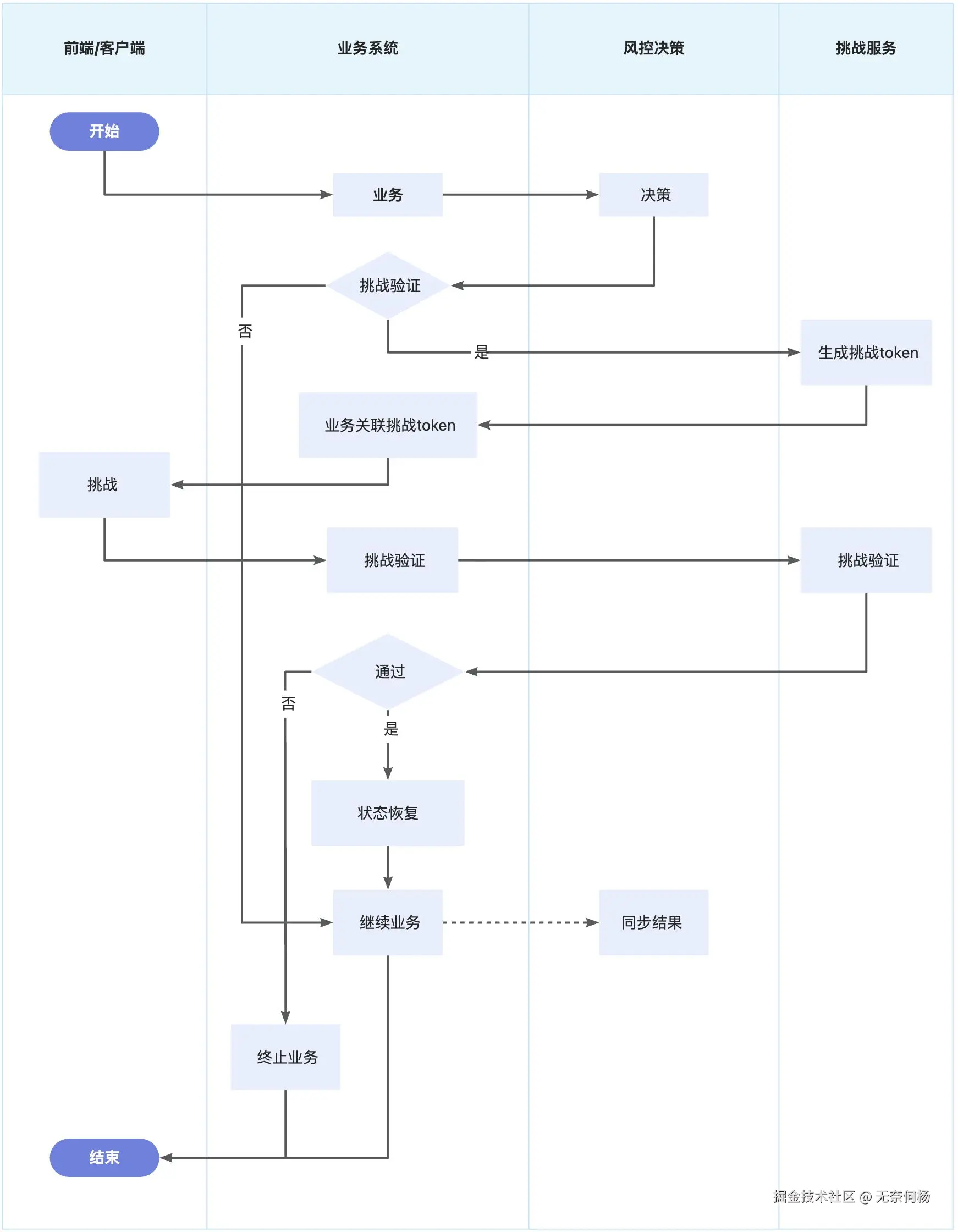
风控引擎
- 不直接干预业务流程,只是为业务提供决策参考,具体如何使用决策由业务决定
- 对于验证过程不关心,但需要业务结果
业务系统
- 统筹整个流程,风控决策,挑战验证,保留现场,恢复现场等等
挑战服务
- 挑战验证、幂等、并发保证
当然有一点,感觉有点废话,但还是说一下,业务系统把控全部流程,就要串起整个流程,不仅仅是链路号的问题,还要有业务决策记录、挑战记录,分别对应风控决策和挑战服务,多边要对得上。
业务决策对接
从上面来看验证方式是有很多差异的,不同业务系统发起的,其支持的验证方式通常是会有差异的。
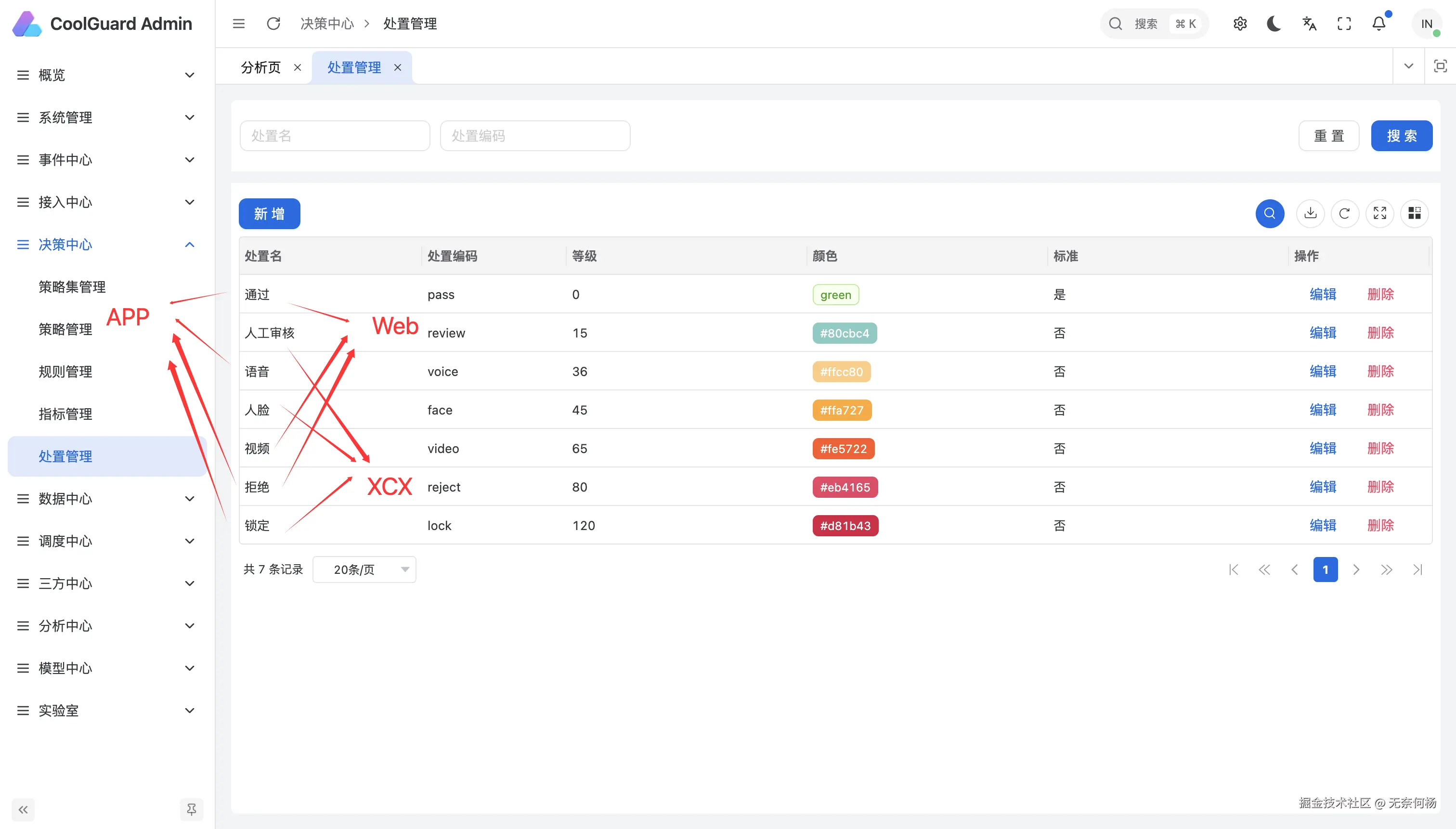
所以在业务确认要接入风控决策时,就可以先构想一下,我的业务可以支持那些决策(如APP支持指纹、人脸;网页端支持APP扫码验证;都支持短信验证等等),不同的业务系统支持度肯定是不同的,对应在风控决策系统中配置一些需要的决策结果。
同时作为业务系统,在接入风控决策时可以自己定制化适配一套公共的接口,包含对接风控决策,对决策进行处理,联合挑战验证,保留恢复业务现场等等,除此之外最好前端/客户端也适配一套通用sdk。
还有一些做解决方案的想要把整个系统糅一下,包含提供服务端、客户端sdk,实现全流程的控制,当然这个想法非常不错,但这个实现难度,以及实现后的应用推广相当困难。
租户数据隔离?
如果你的公司很大,旗下有很多APP、网页,他们用户体系和后台有关联也有独立。做租户肯定是一种想法,你可以为他们划分不同的决策结果,策略规则也更清晰,但是租户就意味着数据隔离,对于风控决策来说数据肯定是越全面越好。
这样的话,租户数据隔离就不是那么合适了,想更好的管控,最好还是有一种ID映射关系,能将用户或设备或其他什么维度关联起来,这样做的风控决策也会更好。
比如:同一个用户用同一个证件号,分别在你家的APP1上先注册申请了一笔贷款,紧接着又在你家的另一个APP2上申请贷款,对于数据完整的风控系统,这肯定是可以设置策略防护的,但如果是设置租户,保留数据隔离,那么就不是很合适了。