word解析
在word对比一文中,我们用到了mammoth库,在这篇文章,我们将实现一个word解析工具
word对比详细请见:word对比
🌰demo
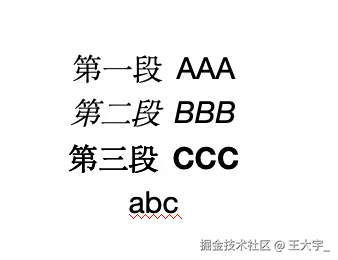
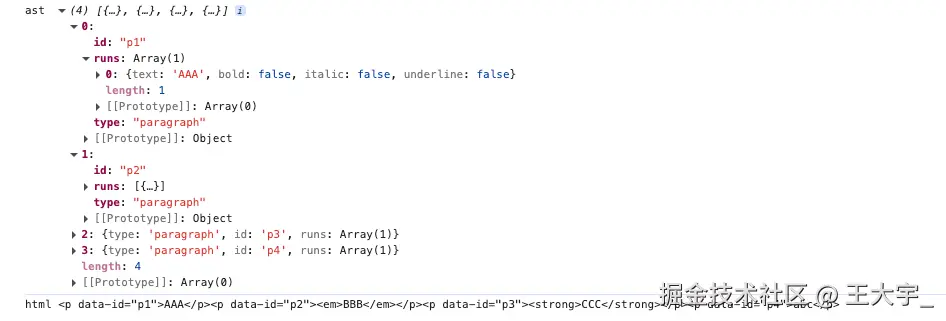
思路
word的本质是XML格式的文件,.docx文件是ZIP压缩包,里面包含多个XML文件和其他资源文件
- 解压docx
- 解析XML为DOM对象
- 解析段落元素
- 解析表格元素
- 解析其余
- 统一配置
实现
解压word
拿到数据并将其解析为ZIP对象
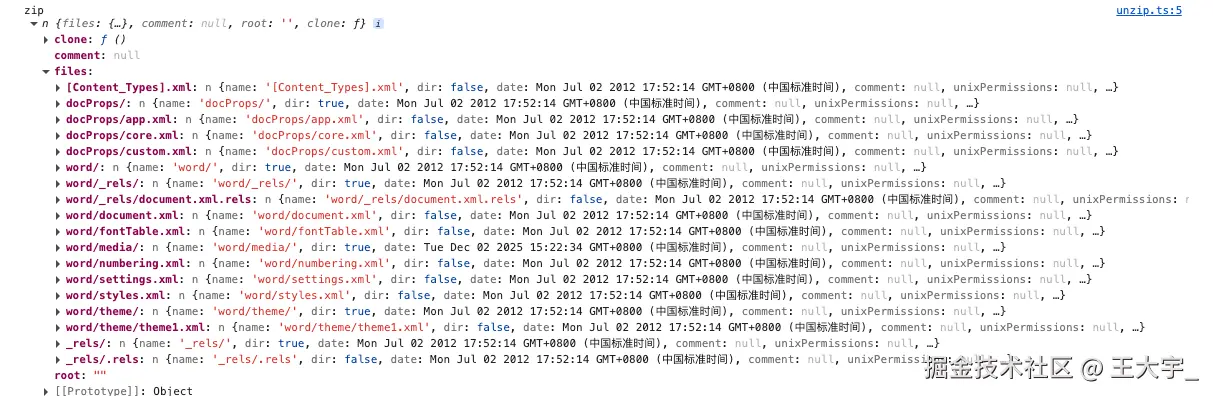
从ZIP中获取文档主要内容
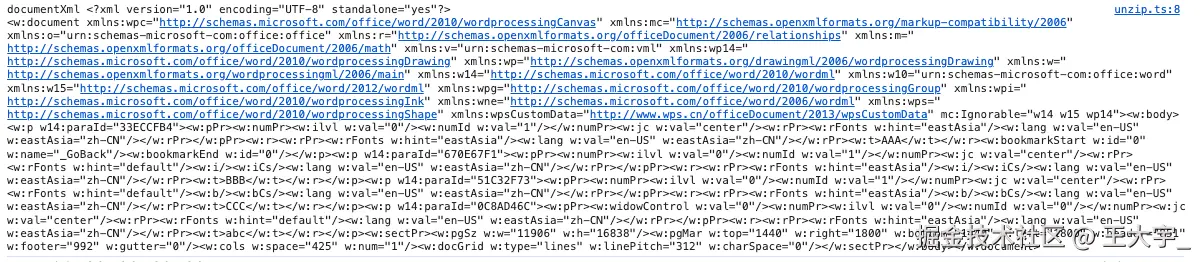
从ZIP中获取文档内资源关系映射

从ZIP中获取文档样式定义
遍历word/media文件夹中所有文件,将它们转化为base64编码
jsx
import JSZip from 'jszip';

export async function unzipDocx(arrayBuffer: ArrayBuffer) {
  const zip = await JSZip.loadAsync(arrayBuffer);

  const documentXml = await zip.file('word/document.xml')?.async('string');
  const relsXml = await zip
    .file('word/_rels/document.xml.rels')
    ?.async('string');
  const stylesXml = await zip.file('word/styles.xml')?.async('string');

  const media: Record<string, Promise<string>> = {};

  zip.folder('word/media')?.forEach((path, file) => {
    media[path] = file.async('base64');
  });

  return {
    documentXml,
    relsXml,
    stylesXml,
    media,
  };
}
解析XML
我们需要将XML转化为可操作的DOM对象
jsx
<?xml version="1.0" encoding="UTF-8"?>
<w:document xmlns:w="http://schemas.openxmlformats.org/wordprocessingml/2006/main">
  <w:body>
    <w:p>
      <w:r>
        <w:t>Hello World</w:t>
      </w:r>
    </w:p>
  </w:body>
</w:document>
jsx
export function parseXml(xml: string) {
  return new DOMParser().parseFromString(xml, 'application/xml');
}
解析文本与样式
上面我们已经将XML解析为了DOM对象
我们需要将其文本内容与一些样式解析出来
jsx
export function parseRun(rNode: Element) {
  const t = rNode.getElementsByTagName('w:t')[0];
  const text = t?.textContent ?? '';

  const rPr = rNode.getElementsByTagName('w:rPr')[0];

  return {
    text,
    bold: !!rPr?.getElementsByTagName('w:b').length,
    italic: !!rPr?.getElementsByTagName('w:i').length,
    underline: !!rPr?.getElementsByTagName('w:u').length,
  };
}
解析段落
将段落内容提取
jsx
<w:p>
  <w:r>
    <w:t>Hello </w:t>
  </w:r>
  <w:r>
    <w:rPr><w:b/></w:rPr>
    <w:t>World</w:t>
  </w:r>
</w:p>
解析为:
jsx
{
  type: 'paragraph',
  id: 'p1',
  runs: [
    {
      text: 'Hello ',
      bold: false,
      italic: false,
      underline: false
    },
    {
      text: 'World',
      bold: true,
      italic: false,
      underline: false
    }
  ]
}
jsx
import { parseRun } from './parseRun';

let pid = 0;

export function parseParagraph(pNode: Element) {
  const runs = [...pNode.getElementsByTagName('w:r')].map(parseRun);

  return {
    type: 'paragraph',
    id: `p${++pid}`,
    runs,
  };
}
解析表格
将嵌套结构解析并展开,word中还有很多嵌套结构(列表、文本框等),此处以表格为例
jsx
<w:tbl>
  <w:tr>
    <w:tc>
      <w:p><w:r><w:t>Cell 1</w:t></w:r></w:p>
    </w:tc>
    <w:tc>
      <w:p><w:r><w:t>Cell 2</w:t></w:r></w:p>
    </w:tc>
  </w:tr>
  <w:tr>
    <w:tc>
      <w:p><w:r><w:t>Cell 3</w:t></w:r></w:p>
    </w:tc>
    <w:tc>
      <w:p><w:r><w:t>Cell 4</w:t></w:r></w:p>
    </w:tc>
  </w:tr>
</w:tbl>
jsx
{
  type: 'table',
  id: 'tbl1',
  rows: [
    [  // 第一行
      [  // 第一个单元格
        {  // 段落对象
          type: 'paragraph',
          id: 'p1',
          runs: [{ text: 'Cell 1', bold: false, italic: false, underline: false }]
        }
      ],
      [  // 第二个单元格
        {  // 段落对象
          type: 'paragraph',
          id: 'p2',
          runs: [{ text: 'Cell 2', bold: false, italic: false, underline: false }]
        }
      ]
    ],
    [  // 第二行
      [  // 第一个单元格
        {  // 段落对象
          type: 'paragraph',
          id: 'p3',
          runs: [{ text: 'Cell 3', bold: false, italic: false, underline: false }]
        }
      ],
      [  // 第二个单元格
        {  // 段落对象
          type: 'paragraph',
          id: 'p4',
          runs: [{ text: 'Cell 4', bold: false, italic: false, underline: false }]
        }
      ]
    ]
  ]
}
入口
-
解压docx
-
解析XML为DOM对象
-
解析段落元素
-
解析表格元素
-
解析其余

jsx
import { unzipDocx } from './unzip';
import { parseXml } from './parseXml';
import { parseParagraph } from './parseParagraph';
import { parseTable } from './parseTable';

export async function parseDocx(arrayBuffer: ArrayBuffer) {
  const { documentXml } = await unzipDocx(arrayBuffer);
  const doc = parseXml(documentXml!);

  const body = doc.getElementsByTagName('w:body')[0];
  const children = [...(body.childNodes as unknown as Element[])];

  const result = [];

  for (const node of children) {
    if (node.nodeName === 'w:p') {
      result.push(parseParagraph(node));
    }
    if (node.nodeName === 'w:tbl') {
      result.push(parseTable(node));
    }
  }

  return result;
}
转为html
jsx
export function toHtml(ast) {
  return ast
    .map(block => {
      if (block.type === 'paragraph') {
        const runs = block.runs
          .map(run => {
            let html = run.text;
            if (run.bold) html = `<strong>${html}</strong>`;
            if (run.italic) html = `<em>${html}</em>`;
            return html;
          })
          .join('');

        return `<p data-id="${block.id}">${runs}</p>`;
      }

      if (block.type === 'table') {
        const rows = block.rows
          .map(row => {
            const cells = row
              .map(cell => {
                const html = cell.map(p => toHtml([p])).join('');

                return `<td>${html}</td>`;
              })
              .join('');
            return `<tr>${cells}</tr>`;
          })
          .join('');

        return `<table data-id="${block.id}">${rows}</table>`;
      }
    })
    .join('\n');
}
使用
将word对比中的handleUpload进行调整
jsx
  async function handleUpload(file: File, type: 'old' | 'new') {
    const arrayBuffer = await file.arrayBuffer();

    const ast = await parseDocx(arrayBuffer);
    const html = toHtml(ast);


    const tempDiv = document.createElement('div');
    tempDiv.innerHTML = html;
    const text = tempDiv.textContent || tempDiv.innerText || '';

    if (type === 'old') {
      setOldText(text);
    } else {
      setNewText(text);
    }
  }