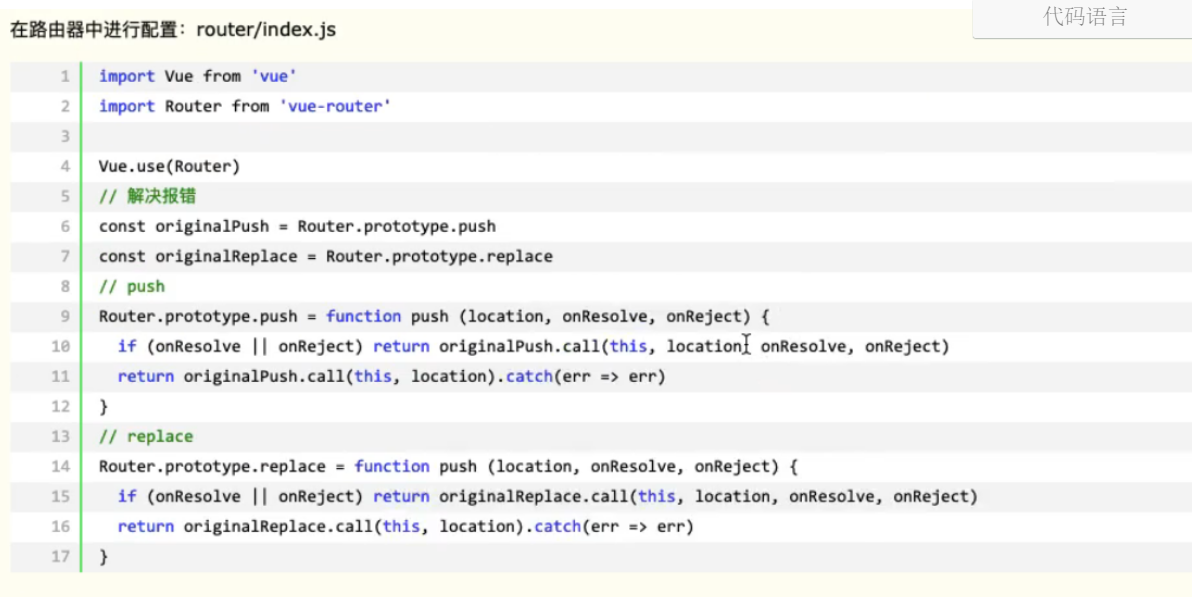
const originalPush = Router.prototype.push
const originalReplace = Router.prototype.replace

// push
Router.prototype.push = function push (location,onResolve,onReject) {
	if (onResolve || onReject) return originalPush.call(this,location, onResolve,onReject)
	return originalPush.call(this,location).catch(err => err)
}

// replace
Router.prototype.replace = function push(location,onResolve,onReject) {
	if (onResolve || onReject) return originalReplace.call(this,location,onResolve,onReject)
	return originalReplace.call(this,location).catch(err => err)
}


自己的
const originalPush = VueRouter.prototype.push
const originalReplace = VueRouter.prototype.replace

// push
VueRouter.prototype.push = function push(location, onResolve, onReject) {
	if (onResolve || onReject) return originalPush.call(this, location, onResolve, onReject)
	return originalPush.call(this, location).catch(err => err)
}

// replace
VueRouter.prototype.replace = function push(location, onResolve, onReject) {
	if (onResolve || onReject) return originalReplace.call(this, location, onResolve, onReject)
	return originalReplace.call(this, location).catch(err => err)
}
1, src/router/index.js

import Vue from "vue";
import VueRouter from "vue-router";
import Home from "../views/Home.vue";

const originalPush = VueRouter.prototype.push
const originalReplace = VueRouter.prototype.replace

// push
VueRouter.prototype.push = function push(location, onResolve, onReject) {
	if (onResolve || onReject) return originalPush.call(this, location, onResolve, onReject)
	return originalPush.call(this, location).catch(err => err)
}

// replace
VueRouter.prototype.replace = function push(location, onResolve, onReject) {
	if (onResolve || onReject) return originalReplace.call(this, location, onResolve, onReject)
	return originalReplace.call(this, location).catch(err => err)
}

Vue.use(VueRouter);


const routes = [{
		path: "/home",
		name: "Home",
		component: Home,
	},
	{
		path: "/",
		redirect: "/home", // 重定向
	}, {
		path: "/list",
		name: "List",
		component: () =>
			import("../views/List.vue"),
	}, {
		path: "/cart",
		name: "Cart",
		meta: {
			keepAlive: true, // 此组件需要被缓存
		},
		component: () =>
			import("../views/Cart.vue"),
	}, {
		path: "/my",
		name: "My",
		component: () =>
			import("../views/My.vue"),
	},
	{
		path: "/search",
		children: [{
			path: "/",
			name: "index",
			component: () =>
				import("../views/search/Search-index.vue"),
		}, {
			path: "/search/list",
			name: "Search-list",
			component: () =>
				import("../views/search/Search-list.vue"),
		}],
		component: () =>
			import("../views/Search.vue"),
	},
	{
		path: "/detail",
		name: "Detail",
		meta: {
			keepAlive: true, // 此组件需要被缓存
		},
		component: () =>
			import("../views/Detail.vue"),
	},
	{
		path: "/login",
		name: "Login",
		component: () =>
			import("../views/login/Login.vue"),
	},
	{
		path: "/userLogin",
		name: "UserLogin",
		component: () =>
			import("../views/login/UserLogin.vue"),
	},
	{
		path: "/register",
		name: "Register",
		component: () =>
			import("../views/login/Register.vue"),
	},
	{
		path: "/recovery",
		children: [{
			path: "/",
			name: "RecoveryIndex",
			component: () =>
				import("../views/recovery/RecoveryIndex.vue"),
		}, {
			path: "/recovery/btn",
			name: "RecoveryBtn",
			component: () =>
				import("../views/recovery/RecoveryBtn.vue"),
		}],
		component: () =>
			import("../views/recovery/Recovery.vue"),
	},
	{
		path: "/path",
		children: [{
			path: "/",
			name: "Path-Index",
			component: () =>
				import("../views/path/Path-Index.vue"),
		}, {
			path: "/path/path-list",
			name: "Path-List",
			component: () =>
				import("../views/path/Path-List.vue"),
		}, {
			path: "/path/path-province-city",
			name: "Path-Province-City",
			component: () =>
				import("../views/path/Path-Province-City_bak.vue"),
		}, {
			path: "/path/path-address",
			name: "Path-Address",
			component: () =>
				import("../views/path/Path-Address_bak.vue"),
		}],
		component: () =>
			import("../views/Path.vue"),
	},
	{
		path: "/order",
		name: "Order",
		meta: {
			keepAlive: true, // 此组件需要被缓存
		},
		component: () =>
			import("../views/Order.vue"),
	},
	{
		path: "/payment",
		name: "Payment",
		component: () =>
			import("../views/Payment.vue"),
	}
];

const router = new VueRouter({
	mode: "history",
	base: process.env.BASE_URL,
	routes,
});

// 拦截需要验证页面必须为登录状态才可以进入
router beforeEach((to, from, next) => {
	// 哪些页面需要验证在此加入即可
	let nextRoute = ['Payment', 'Cart', 'Path', 'Order', 'Path-Index', 'Path-List'];

	// 判断 是否为登录中
	let userInfo = JSON.parse(localStorage.getItem('teaUserInfo'));

	// 当前进入的页面,是不是需要验证的哪些页面
	if (nextRoute.indexOf(to.name) >= 0) {
		// 验证是否为登录状态
		if (!userInfo) {
			// 跳转到登录页面
			router.push('/login');
		}
	}

	next();

	// console.log(to, from, next);
})

export default router;