参考:
本实验基于Windows中WSL环境,安装过程可以参考:
DAY1-Open Harmony PC 命令行适配指南(Windows版)环境准备篇
https://blog.csdn.net/m0_38139250/article/details/155377715
DAY2-Open Harmony PC 命令行适配指南(Windows版)-Tree命令行工具下载篇
https://blog.csdn.net/m0_38139250/article/details/155462142
DAY3-Open Harmony PC 命令行适配指南(Windows版)-Tree命令行构建编译篇
错误提示
在完成PC的Ubuntu安装,SDK下载,Python环境安装,tree源码下载后,进行编译
开始编译下看看
Bash
cd  ~/build
# 执行构建并强制输出详细编译日志 VERBOSE=1
./build.sh --sdk /home/ubuntu/ohos-sdk/linux
提示如下错误
Bash
ubuntu@zjpc:~/build/code/cmdtree$ cd  ~/build
# 执行构建并强制输出详细编译日志 VERBOSE=1
./build.sh --sdk /home/ubuntu/ohos-sdk/linux
Build in: <Linux zjpc 5.15.167.4-microsoft-standard-WSL2 #1 SMP Tue Nov 5 00:21:55 UTC 2024 x86_64 x86_64 x86_64 GNU/Linux> by cross tool chains.
mkdir: missing operand
Try 'mkdir --help' for more information.
python  : Python 3.10.6
CC      : /home/ubuntu/ohos-sdk/linux/native/llvm/bin/clang
CXX     : /home/ubuntu/ohos-sdk/linux/native/llvm/bin/clang++
HOSTCC  : /home/ubuntu/ohos-sdk/linux/native/llvm/bin/clang
HOSTCXX : /home/ubuntu/ohos-sdk/linux/native/llvm/bin/clang++
CPP     : /home/ubuntu/ohos-sdk/linux/native/llvm/bin/clang++
AS      : /home/ubuntu/ohos-sdk/linux/native/llvm/bin/llvm-as
LD      : /home/ubuntu/ohos-sdk/linux/native/llvm/bin/ld.lld
STRIP   : /home/ubuntu/ohos-sdk/linux/native/llvm/bin/llvm-strip
RANLIB  : /home/ubuntu/ohos-sdk/linux/native/llvm/bin/llvm-ranlib
OBJDUMP : /home/ubuntu/ohos-sdk/linux/native/llvm/bin/llvm-objdump
OBJCOPY : /home/ubuntu/ohos-sdk/linux/native/llvm/bin/llvm-objcopy
NM      : /home/ubuntu/ohos-sdk/linux/native/llvm/bin/llvm-nm
AR      : /home/ubuntu/ohos-sdk/linux/native/llvm/bin/llvm-ar
mkdir: cannot create directory 'code': File exists
clone ...
['git', 'clone', '-b', '2.2.1_ohos', 'git@gitcode.com:OpenHarmonyPCDeveloper/cmdtree.git', 'tree']
ERROR:
Cloning into 'tree'...
git@gitcode.com: Permission denied (publickey).
fatal: Could not read from remote repository.

Please make sure you have the correct access rights
and the repository exists.

tree 中未找到 build.sh 脚本
clone ...
['git', 'clone', '-b', 'openssl-3.6_ohos', 'git@gitcode.com:OpenHarmonyPCDeveloper/openssl.git', 'openssl']
ERROR:
Cloning into 'openssl'...
git@gitcode.com: Permission denied (publickey).
fatal: Could not read from remote repository.

Please make sure you have the correct access rights
and the repository exists.

openssl 中未找到 build.sh 脚本
clone ...
['git', 'clone', '-b', 'v1.3.1_ohos', 'git@gitcode.com:OpenHarmonyPCDeveloper/zlib.git', 'zlib']
ERROR:
Cloning into 'zlib'...
git@gitcode.com: Permission denied (publickey).
fatal: Could not read from remote repository.

Please make sure you have the correct access rights
and the repository exists.

zlib 中未找到 build.sh 脚本
clone ...
['git', 'clone', '-b', 'v6.4_ohos', 'git@gitcode.com:OpenHarmonyPCDeveloper/ncurses.git', 'ncurses']
ERROR:
Cloning into 'ncurses'...
git@gitcode.com: Permission denied (publickey).
fatal: Could not read from remote repository.

Please make sure you have the correct access rights
and the repository exists.

ncurses 中未找到 build.sh 脚本
clone ...
['git', 'clone', '-b', 'v5.8.1_ohos', 'git@gitcode.com:OpenHarmonyPCDeveloper/xz.git', 'xz']
ERROR:
Cloning into 'xz'...
git@gitcode.com: Permission denied (publickey).
fatal: Could not read from remote repository.

Please make sure you have the correct access rights
and the repository exists.

xz 中未找到 build.sh 脚本
clone ...
['git', 'clone', '-b', 'v2.15.0_ohos', 'git@gitcode.com:OpenHarmonyPCDeveloper/libxml2.git', 'libxml2']
ERROR:
Cloning into 'libxml2'...
git@gitcode.com: Permission denied (publickey).
fatal: Could not read from remote repository.

Please make sure you have the correct access rights
and the repository exists.

libxml2 中未找到 build.sh 脚本
clone ...
['git', 'clone', '-b', 'v1.1.43_ohos', 'git@gitcode.com:OpenHarmonyPCDeveloper/libxslt.git', 'libxslt']
ERROR:
Cloning into 'libxslt'...
git@gitcode.com: Permission denied (publickey).
fatal: Could not read from remote repository.

Please make sure you have the correct access rights
and the repository exists.

libxslt 中未找到 build.sh 脚本
clone ...
['git', 'clone', '-b', 'v1.67.1_ohos', 'git@gitcode.com:OpenHarmonyPCDeveloper/nghttp2.git', 'nghttp2']
ERROR:
Cloning into 'nghttp2'...
git@gitcode.com: Permission denied (publickey).
fatal: Could not read from remote repository.

Please make sure you have the correct access rights
and the repository exists.

nghttp2 中未找到 build.sh 脚本
clone ...
['git', 'clone', '-b', '1_37_0_ohos', 'git@gitcode.com:OpenHarmonyPCDeveloper/busybox.git', 'busybox']
ERROR:
Cloning into 'busybox'...
git@gitcode.com: Permission denied (publickey).
fatal: Could not read from remote repository.

Please make sure you have the correct access rights
and the repository exists.

busybox 中未找到 build.sh 脚本
clone ...
['git', 'clone', '-b', '1.0.8_ohos', 'git@gitcode.com:OpenHarmonyPCDeveloper/bzip2.git', 'bzip2']
ERROR:
Cloning into 'bzip2'...
git@gitcode.com: Permission denied (publickey).
fatal: Could not read from remote repository.

Please make sure you have the correct access rights
and the repository exists.

bzip2 中未找到 build.sh 脚本
clone ...
['git', 'clone', '-b', 'v1.51.0_ohos', 'git@gitcode.com:OpenHarmonyPCDeveloper/libuv.git', 'libuv']
ERROR:
Cloning into 'libuv'...
git@gitcode.com: Permission denied (publickey).
fatal: Could not read from remote repository.

Please make sure you have the correct access rights
and the repository exists.

libuv 中未找到 build.sh 脚本
clone ...
['git', 'clone', '-b', 'v3.2.1_ohos', 'git@gitcode.com:OpenHarmonyPCDeveloper/gperf.git', 'gperf']
ERROR:
Cloning into 'gperf'...
git@gitcode.com: Permission denied (publickey).
fatal: Could not read from remote repository.

Please make sure you have the correct access rights
and the repository exists.

gperf 中未找到 build.sh 脚本
一、错误核心原因
git@gitcode.com``: Permission denied (publickey) 是 SSH 公钥认证失败 导致的:GitCode 仓库采用 SSH 协议克隆时,需要本地生成 SSH 密钥对,并将公钥配置到你的 GitCode 账户中,否则服务器无法验证你的身份,拒绝访问仓库。
二、分步解决方法(优先推荐 SSH 方式,也可备选 HTTPS)
步骤1:检查本地是否已有 SSH 密钥对
首先查看本地是否生成过 SSH 密钥(默认路径 ~/.ssh/):
Bash
ls -la ~/.ssh/- 如果输出中有
id_rsa(私钥)和id_rsa.pub(公钥),说明已有密钥,直接跳到步骤3; - 如果无此文件,执行步骤2生成新密钥。
本机输出如下
Bash
ubuntu@zjpc:~/build$ ls -la ~/.ssh/
total 12
drwx------ 2 ubuntu ubuntu 4096 Dec  1 20:16 .
drwxr-x--- 5 ubuntu ubuntu 4096 Dec  2 11:28 ..
-rw-r--r-- 1 ubuntu ubuntu  442 Dec  1 20:16 known_hosts
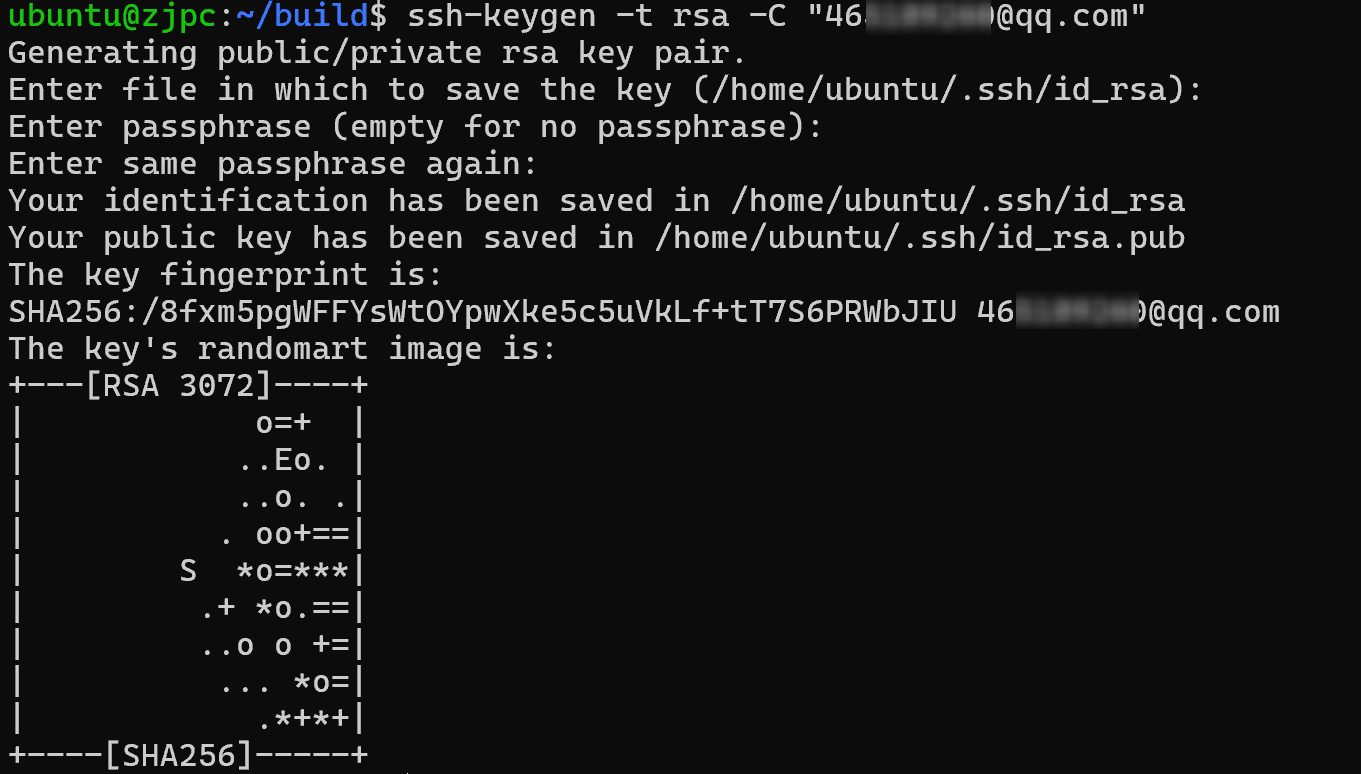
步骤2:生成 SSH 密钥对(无密钥时执行)
执行以下命令生成 RSA 密钥(一路回车,无需设置密码,除非你需要密码保护):
Bash
ssh-keygen -t rsa -C "你的GitCode注册邮箱"- 示例:
ssh-keygen -t rsa -C "``zhangsan@example.com``" - 生成后,密钥会保存在
~/.ssh/id_rsa(私钥)和~/.ssh/id_rsa.pub(公钥)。
输出如下:
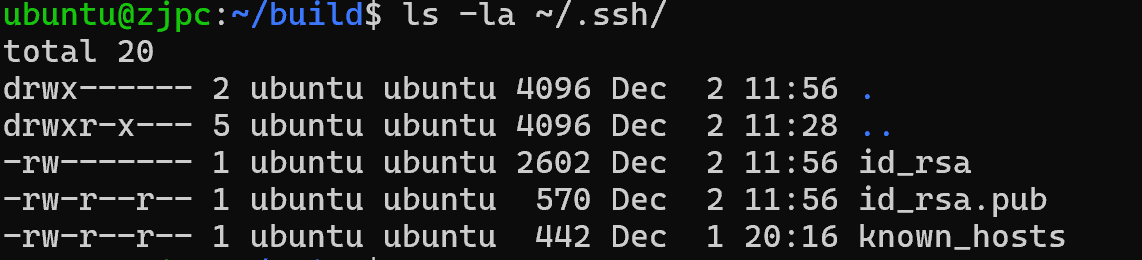
查看生成的文件
Bash
cd ~/.ssh/
ls -la ~/.ssh/
生成如下:
步骤3:将公钥添加到 ssh-agent(确保密钥被代理加载)
避免因 ssh-agent 未启动导致密钥未生效:
Bash
# 启动 ssh-agent
eval "$(ssh-agent -s)"

# 将私钥添加到 ssh-agent(默认密钥路径)
ssh-add ~/.ssh/id_rsa- 如果提示
Could not open a connection to your authentication agent,先执行ssh-agent bash重启终端环境,再重新添加。
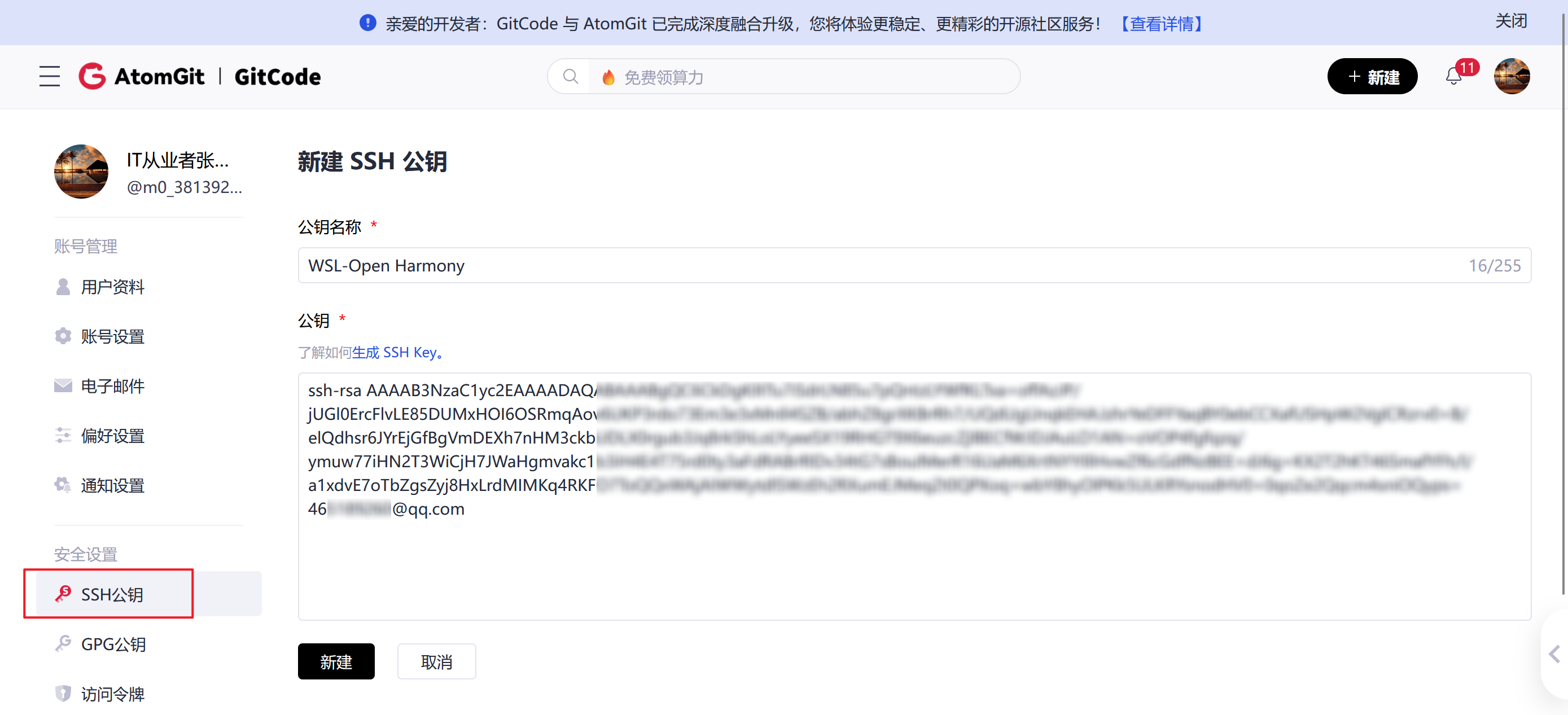
步骤4:将公钥配置到 GitCode 账户
-
复制本地公钥内容(全选,包括
ssh-rsa开头到邮箱结尾):
1.Bashcat ~/.ssh/id_rsa.pub
输出如下:

- 登录 GitCode 官网(https://gitcode.com/),进入「个人设置」→「SSH 公钥」→「添加公钥」:
- 标题:自定义(如「Ubuntu 机器」);
- 公钥内容:粘贴刚才复制的全部内容;
- 点击「添加」,验证密码后完成配置。
步骤5:验证 SSH 连接是否正常
执行以下命令测试与 GitCode 的 SSH 连接:
Bash
ssh -T git@gitcode.com- 若输出
Welcome to GitCode, [你的用户名]!,说明认证成功; - 若仍报错,检查公钥是否复制完整、账户是否匹配。
输出如下:
Bash
ubuntu@zjpc:~/build$ ssh -T git@gitcode.com
remote: Welcome to GitCode, m0_38139250
步骤6:重新执行克隆命令
认证成功后,重新克隆仓库:
Bash
git clone -b openssl-3.6_ohos git@gitcode.com:OpenHarmonyPCDeveloper/openssl.git openssl三、备选方案:改用 HTTPS 协议克隆(无需配置 SSH)-未选用
如果暂时不想配置 SSH,可直接用 HTTPS 地址克隆(输入 GitCode 账号密码即可):
Bash
git clone -b openssl-3.6_ohos https://gitcode.com/OpenHarmonyPCDeveloper/openssl.git openssl- 若提示记住密码,可执行
git config --global credential.helper store保存凭证,避免重复输入。
四、额外排查点(若仍失败)-未选用
-
检查仓库是否存在:访问
https://gitcode.com/OpenHarmonyPCDeveloper/openssl,确认仓库可访问、分支openssl-3.6_ohos存在; -
密钥文件权限:确保私钥权限为
600(否则 SSH 会拒绝使用):
1.Bashchmod 600 ~/.ssh/id_rsa chmod 644 ~/.ssh/id_rsa.pub chmod 700 ~/.ssh/ -
若使用多个 SSH 密钥(比如同时关联 GitHub/GitCode):需配置
~/.ssh/config区分主机:
1.Bash# 编辑 config 文件 vi ~/.ssh/config # 添加以下内容 Host gitcode.com HostName gitcode.com User git IdentityFile ~/.ssh/id_rsa # 你的 GitCode 密钥路径
再次执行安装
Bash
cd  ~/build
# 执行构建并强制输出详细编译日志 VERBOSE=1
./build.sh --sdk /home/ubuntu/ohos-sdk/linux
输出如下
Bash
ubuntu@zjpc:~/build$ cd  ~/build
# 执行构建并强制输出详细编译日志 VERBOSE=1
./build.sh --sdk /home/ubuntu/ohos-sdk/linux
Build in: <Linux zjpc 5.15.167.4-microsoft-standard-WSL2 #1 SMP Tue Nov 5 00:21:55 UTC 2024 x86_64 x86_64 x86_64 GNU/Linux> by cross tool chains.
mkdir: missing operand
Try 'mkdir --help' for more information.
python  : Python 3.10.6
CC      : /home/ubuntu/ohos-sdk/linux/native/llvm/bin/clang
CXX     : /home/ubuntu/ohos-sdk/linux/native/llvm/bin/clang++
HOSTCC  : /home/ubuntu/ohos-sdk/linux/native/llvm/bin/clang
HOSTCXX : /home/ubuntu/ohos-sdk/linux/native/llvm/bin/clang++
CPP     : /home/ubuntu/ohos-sdk/linux/native/llvm/bin/clang++
AS      : /home/ubuntu/ohos-sdk/linux/native/llvm/bin/llvm-as
LD      : /home/ubuntu/ohos-sdk/linux/native/llvm/bin/ld.lld
STRIP   : /home/ubuntu/ohos-sdk/linux/native/llvm/bin/llvm-strip
RANLIB  : /home/ubuntu/ohos-sdk/linux/native/llvm/bin/llvm-ranlib
OBJDUMP : /home/ubuntu/ohos-sdk/linux/native/llvm/bin/llvm-objdump
OBJCOPY : /home/ubuntu/ohos-sdk/linux/native/llvm/bin/llvm-objcopy
NM      : /home/ubuntu/ohos-sdk/linux/native/llvm/bin/llvm-nm
AR      : /home/ubuntu/ohos-sdk/linux/native/llvm/bin/llvm-ar
mkdir: cannot create directory 'code': File exists
clone ...
['git', 'clone', '-b', '2.2.1_ohos', 'git@gitcode.com:OpenHarmonyPCDeveloper/cmdtree.git', 'tree']

/data/service/hnp//tree.org/tree_2.2.1

[INFO][HNP][hnpcli_main.c:84]native manager process start.
[ERROR][HNP][hnp_file.c:118]realpath unsuccess. path=/data/service/hnp//tree.org/tree_2.2.1
[ERROR][HNP][hnp_pack.c:160]source dir path=/data/service/hnp//tree.org/tree_2.2.1 is invalid.
[INFO][HNP][hnpcli_main.c:99]native manager process exit. ret=8393217
clone ...
['git', 'clone', '-b', 'openssl-3.6_ohos', 'git@gitcode.com:OpenHarmonyPCDeveloper/openssl.git', 'openssl']

ERROR:(1)
./build_ohos.sh: line 3: make: command not found
./build_ohos.sh: line 11: make: command not found
./build_ohos.sh: line 12: make: command not found
cp: cannot create regular file '/data/service/hnp//openssl.org/openssl_3.6/': No such file or directory
./build_ohos.sh: line 15: pushd: /data/service/hnp//openssl.org/openssl_3.6/../: No such file or directory
tar: openssl_3.6: Cannot stat: No such file or directory
tar: Exiting with failure status due to previous errors
./build_ohos.sh: line 18: popd: directory stack empty

clone ...
['git', 'clone', '-b', 'v1.3.1_ohos', 'git@gitcode.com:OpenHarmonyPCDeveloper/zlib.git', 'zlib']

ERROR:(1)
CMake Warning:
  No source or binary directory provided.  Both will be assumed to be the
  same as the current working directory, but note that this warning will
  become a fatal error in future CMake releases.


CMake Error: CMake was unable to find a build program corresponding to "Unix Makefiles".  CMAKE_MAKE_PROGRAM is not set.  You probably need to select a different build tool.
./build_ohos.sh: line 10: -DARM_NEON=OFF: command not found
./build_ohos.sh: line 15: make: command not found
./build_ohos.sh: line 16: make: command not found
cp: cannot create regular file '/data/service/hnp//zlib.org/zlib_v1.3.1/': No such file or directory
./build_ohos.sh: line 19: pushd: /data/service/hnp//zlib.org/zlib_v1.3.1/../: No such file or directory
tar: zlib_v1.3.1: Cannot stat: No such file or directory
tar: Exiting with failure status due to previous errors
./build_ohos.sh: line 22: popd: directory stack empty

clone ...
['git', 'clone', '-b', 'v6.4_ohos', 'git@gitcode.com:OpenHarmonyPCDeveloper/ncurses.git', 'ncurses']
总结
核心是「SSH 公钥未配置」导致认证失败,优先通过「生成密钥→配置到 GitCode→验证连接」解决;若嫌麻烦,直接改用 HTTPS 克隆更快捷。配置完成后,克隆命令即可正常执行。
解决完这个问题,还有新的问题,我们继续解决