提示:文章写完后,目录可以自动生成,如何生成可参考右边的帮助文档
文章目录
前言
提示:这里可以添加本文要记录的大概内容:
例如:随着人工智能的不断发展,机器学习这门技术也越来越重要,很多人都开启了学习机器学习,本文就介绍了机器学习的基础内容。
提示:以下是本篇文章正文内容,下面案例可供参考
一、样式图
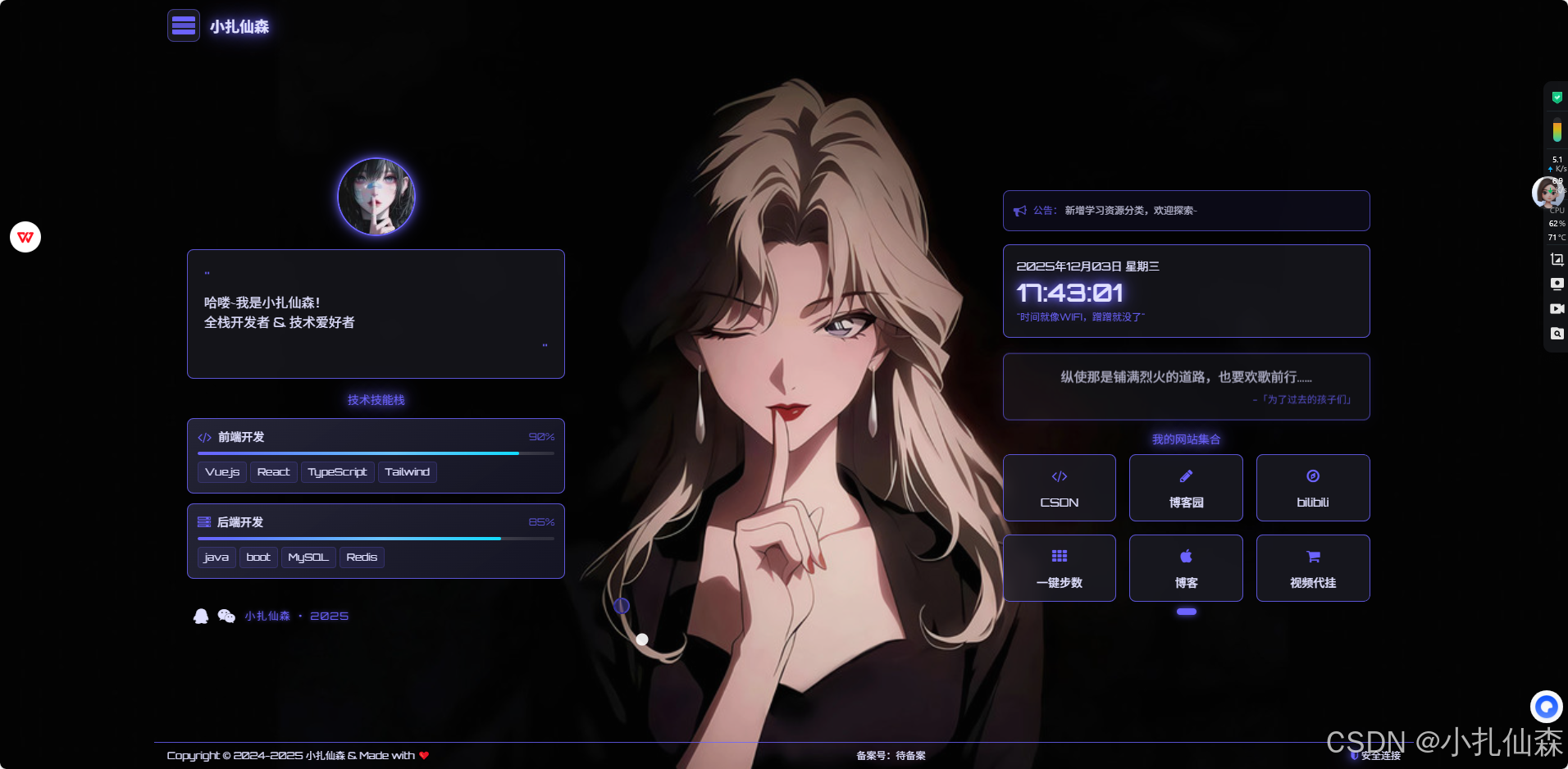
二、使用步骤
最近写了一个页面引导页,有想用的就拿去吧,js,css有能力分出来的就分一下,我没时间搞了
1.html代码
html
<!DOCTYPE html>
<html lang="zh-CN">
<head>
<meta charset="UTF-8">
<meta name="viewport" content="width=device-width, initial-scale=1.0">
<title>小扎仙森 - 个人技术空间</title>
<!-- SEO优化 -->
<meta name="description" content="小扎仙森的个人技术空间 - 技术资源聚合与分享">
<meta name="keywords" content="小扎仙森,技术,编程,资源,导航,博客,工具">
<meta name="author" content="小扎仙森">
<!-- Open Graph -->
<meta property="og:title" content="小扎仙森 - 个人技术空间">
<meta property="og:description" content="技术资源聚合与分享">
<meta property="og:image" content="https://i.postimg.cc/yNkZLyr5/0ddf7f1be8d076f4f0b1adc2f53388fe.jpg">
<meta property="og:url" content="https://xzxs8.com">
<meta property="og:type" content="website">
<!-- 网站图标 -->
<link rel="icon" href="data:image/svg+xml,<svg xmlns=%22http://www.w3.org/2000/svg%22 viewBox=%220 0 100 100%22><text y=%22.9em%22 font-size=%2290%22>👨💻</text></svg>">
<link rel="apple-touch-icon" href="data:image/svg+xml,<svg xmlns=%22http://www.w3.org/2000/svg%22 viewBox=%220 0 100 100%22><text y=%22.9em%22 font-size=%2290%22>👨💻</text></svg>">
<!-- 预连接 -->
<link rel="preconnect" href="https://fonts.googleapis.com">
<link rel="preconnect" href="https://cdn.jsdelivr.net">
<link rel="preconnect" href="https://fonts.gstatic.com" crossorigin>
<!-- 外部资源 -->
<script src="https://cdn.tailwindcss.com"></script>
<link href="https://cdn.jsdelivr.net/npm/font-awesome@4.7.0/css/font-awesome.min.css" rel="stylesheet">
<link href="https://fonts.googleapis.com/css2?family=Orbitron:wght@400;600&display=swap" rel="stylesheet">
<!-- Tailwind配置 -->
<script>
tailwind.config = {
theme: {
extend: {
colors: {
dark: '#0F0F17',
neon: '#6C63FF',
light: '#E0E0FF',
gray: '#2D2D3A',
card: 'rgba(30, 30, 40, 0.7)',
'neon-green': '#00FF9D',
'neon-blue': '#00D9FF'
},
fontFamily: {
cyber: ['Orbitron', 'sans-serif'],
},
animation: {
'float': 'float 6s ease-in-out infinite',
'pulse-glow': 'pulse-glow 2s ease-in-out infinite',
'slide-up': 'slide-up 0.5s ease-out',
}
},
}
}
</script>
<!-- 自定义样式 -->
<style type="text/tailwindcss">
@layer utilities {
.text-glow {
text-shadow:
0 0 10px rgba(108, 99, 255, 1),
0 0 20px rgba(108, 99, 255, 0.8),
0 0 30px rgba(108, 99, 255, 0.6);
}
.text-glow-green {
text-shadow:
0 0 10px rgba(0, 255, 157, 1),
0 0 20px rgba(0, 255, 157, 0.8),
0 0 30px rgba(0, 255, 157, 0.6);
}
.bg-blur {
backdrop-filter: blur(8px);
}
.card-hover {
transition: all 0.3s ease;
}
.card-hover:hover {
transform: translateY(-3px);
background: rgba(108, 99, 255, 0.25);
box-shadow: 0 4px 25px rgba(108, 99, 255, 0.5);
}
.page-indicator {
width: 8px;
height: 8px;
border-radius: 50%;
transition: all 0.3s ease;
}
.page-indicator.active {
width: 24px;
border-radius: 4px;
background: #6C63FF;
box-shadow: 0 0 8px rgba(108, 99, 255, 0.8);
}
/* 直接在现有的 .avatar-glow 样式基础上修改 */
.avatar-glow {
box-shadow:
0 0 10px rgba(108, 99, 255, 0.8),
0 0 20px rgba(108, 99, 255, 0.5);
transition: all 0.5s ease;
}
.avatar-glow:hover {
animation: avatarRotate 0.6s ease-out forwards;
box-shadow:
0 0 15px rgba(108, 99, 255, 0.9),
0 0 30px rgba(108, 99, 255, 0.7),
0 0 45px rgba(108, 99, 255, 0.5);
border-color: #00D9FF;
transform: scale(1.05);
}
@keyframes avatarRotate {
0% { transform: rotate(0deg) scale(1.05); }
100% { transform: rotate(360deg) scale(1.05); }
}
}
</style>
<style>
/* 全局样式 */
html, body {
margin: 0;
padding: 0;
overflow: hidden;
height: 100vh;
background-size: cover;
background-position: center;
background-attachment: fixed;
font-family: 'Orbitron', sans-serif;
cursor: none; /* 隐藏默认光标 */
}
/* 移动端样式 - 允许滚动 */
@media (max-width: 768px) {
html, body {
overflow: auto;
height: auto;
min-height: 100vh;
}
body {
cursor: auto;
}
/* 为卡片容器添加触摸优化 */
#card-container {
-webkit-overflow-scrolling: touch;
user-select: none;
}
.card-pages {
touch-action: pan-y pinch-zoom;
}
/* 确保卡片在移动端可点击 */
.card-hover {
touch-action: manipulation;
}
}
/* 自定义鼠标光标 */
.custom-cursor {
position: fixed;
width: 20px;
height: 20px;
border-radius: 50%;
background: rgba(108, 99, 255, 0.3);
border: 2px solid rgba(108, 99, 255, 0.6);
pointer-events: none;
z-index: 9999;
transform: translate(-50%, -50%);
transition: transform 0.1s ease, width 0.3s ease, height 0.3s ease;
mix-blend-mode: difference;
}
.cursor-dot {
position: fixed;
width: 15px;
height: 15px;
border-radius: 50%;
background: rgba(255, 255, 255, 0.9);
pointer-events: none;
z-index: 9999;
transform: translate(-50%, -50%);
transition: transform 0.05s ease;
}
/* 鼠标点击效果 */
.cursor-click {
position: fixed;
width: 40px;
height: 40px;
border-radius: 50%;
border: 2px solid rgba(108, 99, 255, 0.8);
pointer-events: none;
z-index: 9998;
transform: translate(-50%, -50%) scale(0);
animation: ripple 0.6s ease-out;
}
@keyframes ripple {
0% { transform: translate(-50%, -50%) scale(0); opacity: 1; }
100% { transform: translate(-50%, -50%) scale(2); opacity: 0; }
}
/* 动画 */
@keyframes float {
0%, 100% { transform: translateY(0); }
50% { transform: translateY(-10px); }
}
@keyframes pulse-glow {
0%, 100% { opacity: 1; }
50% { opacity: 0.7; }
}
@keyframes slide-up {
from { opacity: 0; transform: translateY(20px); }
to { opacity: 1; transform: translateY(0); }
}
@keyframes fadeIn {
0% { opacity: 0.7; transform: translateY(5px); }
100% { opacity: 1; transform: translateY(-5px); }
}
@keyframes popIn {
0% { transform: scale(0.8); opacity: 0; }
100% { transform: scale(1); opacity: 1; }
}
/* 组件样式 */
.quote {
animation: fadeIn 4s ease-in-out infinite alternate;
box-shadow: 0 0 15px rgba(108, 99, 255, 0.1);
}
.social-icon {
transition: all 0.3s ease;
}
.social-icon:hover {
color: #6C63FF;
transform: translateY(-3px);
text-shadow: 0 0 10px rgba(108, 99, 255, 1),
0 0 15px rgba(108, 99, 255, 0.8);
}
.decor-dot {
background: rgba(108, 99, 255, 1);
animation: pulse 3s infinite alternate;
box-shadow: 0 0 6px rgba(108, 99, 255, 0.8);
}
@keyframes pulse {
0% { opacity: 0.6; transform: scale(0.9); }
100% { opacity: 1; transform: scale(1.3); }
}
.decor-line {
background: rgba(108, 99, 255, 0.6);
animation: fade 4s infinite alternate;
}
@keyframes fade {
0% { opacity: 0.4; }
100% { opacity: 0.9; }
}
.card-pages {
transition: transform 0.5s ease;
}
.card-page {
min-width: 100%;
display: grid;
grid-template-columns: repeat(3, 1fr);
gap: 1rem;
}
/* 技能栈卡片样式 */
.skill-card {
transition: all 0.4s cubic-bezier(0.175, 0.885, 0.32, 1.275);
background: linear-gradient(145deg, rgba(40, 40, 60, 0.8), rgba(20, 20, 35, 0.9));
position: relative;
overflow: hidden;
}
.skill-card::before {
content: '';
position: absolute;
top: 0;
left: -100%;
width: 100%;
height: 100%;
background: linear-gradient(90deg, transparent, rgba(108, 99, 255, 0.2), transparent);
transition: left 0.7s ease;
}
.skill-card:hover::before {
left: 100%;
}
.skill-card:hover {
transform: translateY(-5px) scale(1.02);
box-shadow: 0 10px 30px rgba(108, 99, 255, 0.3),
0 0 40px rgba(108, 99, 255, 0.1);
}
.skill-level-bar {
height: 4px;
background: rgba(255, 255, 255, 0.1);
border-radius: 2px;
overflow: hidden;
position: relative;
}
.skill-level-fill {
height: 100%;
background: linear-gradient(90deg, #6C63FF, #00D9FF);
border-radius: 2px;
position: relative;
transition: width 1.5s ease-out;
}
.skill-level-fill::after {
content: '';
position: absolute;
top: 0;
left: 0;
width: 100%;
height: 100%;
background: linear-gradient(90deg, transparent, rgba(255, 255, 255, 0.3), transparent);
animation: shine 2s infinite;
}
@keyframes shine {
0% { transform: translateX(-100%); }
100% { transform: translateX(100%); }
}
/* 弹窗动画 */
#wechat-modal .bg-gray\/80,
#qq-modal .bg-gray\/80 {
animation: popIn 0.3s ease;
}
/* 移动端优化 */
@media (max-width: 768px) {
.social-icon, .card-hover, .nav-item {
min-height: 44px;
min-width: 44px;
display: flex;
align-items: center;
justify-content: center;
}
.card-page {
grid-template-columns: repeat(2, 1fr);
}
.container {
padding-left: 1rem;
padding-right: 1rem;
}
/* 移动端恢复默认光标 */
.custom-cursor, .cursor-dot {
display: none;
}
/* 移动端布局调整 */
.lg\:col-span-1\.5 {
margin-top: 1rem !important;
}
.lg\:col-span-0\.5 {
display: none;
}
.lg\:col-span-1,
.lg\:col-span-1\.5 {
width: 100%;
}
.pl-6 {
padding-left: 1rem;
}
.mt-32 {
margin-top: 1rem !important;
}
.mt-14 {
margin-top: 1rem !important;
}
.mt-8 {
margin-top: 1rem !important;
}
.grid-cols-1 {
gap: 1rem;
}
}
/* 无障碍焦点样式 */
:focus-visible {
outline: 2px solid #6C63FF;
outline-offset: 2px;
}
/* 语言切换按钮 */
.theme-toggle {
transition: all 0.3s ease;
}
.theme-toggle:hover {
transform: rotate(30deg);
}
/* 年份文字 */
.year-text {
color: #6C63FF;
font-size: 0.8rem;
letter-spacing: 0.1em;
text-shadow: 0 0 5px rgba(108, 99, 255, 0.7);
margin-left: 8px;
}
</style>
</head>
<body class="bg-dark text-light" style="background-image: url('https://i.postimg.cc/yNkZLyr5/0ddf7f1be8d076f4f0b1adc2f53388fe.jpg');">
<!-- 鼠标光标 -->
<div class="custom-cursor" id="custom-cursor"></div>
<div class="cursor-dot" id="cursor-dot"></div>
<div class="fixed inset-0 bg-dark/10 z-0"></div>
<!-- 主容器 -->
<div class="relative z-10 h-full flex flex-col">
<!-- 头部 -->
<header class="container mx-auto px-4 py-3 flex justify-between items-center">
<div class="flex items-center space-x-3">
<div class="w-10 h-10 rounded-lg bg-gray/50 border border-neon/50 flex items-center justify-center animate-float">
<div class="w-7 h-7 flex flex-col justify-center">
<div class="w-full h-1.5 bg-neon rounded-t-sm"></div>
<div class="w-full h-1.5 bg-neon/80 my-0.5"></div>
<div class="w-full h-1.5 bg-neon rounded-b-sm"></div>
</div>
</div>
<span class="text-lg font-bold text-glow" id="site-title">小扎仙森</span>
</div>
</header>
<!-- 主体内容 -->
<main class="flex-1 container mx-auto px-4 py-4 mt-6">
<div class="grid grid-cols-1 lg:grid-cols-3 gap-6">
<!-- 左侧欢迎区和技能栈 -->
<div class="lg:col-span-1 flex flex-col justify-start relative pl-6 mt-14">
<!-- QQ头像 -->
<div class="flex justify-center mb-4 mt-8">
<img
src="https://q1.qlogo.cn/g?b=qq&nk=1046406274&s=100"
alt="小扎仙森的QQ头像"
class="w-24 h-24 rounded-full border-2 border-neon avatar-glow object-cover cursor-pointer transition-all duration-300"
title="点击联系QQ"
loading="lazy"
onerror="this.onerror=null;this.src='data:image/svg+xml;base64,PHN2ZyB3aWR0aD0iMTAwIiBoZWlnaHQ9IjEwMCIgdmlld0JveD0iMCAwIDEwMCAxMDAiIGZpbGw9Im5vbmUiIHhtbG5zPSJodHRwOi8vd3d3LnczLm9yZy8yMDAwL3N2ZyI+PGNpcmNsZSBjeD0iNTAiIGN5PSI1MCIgcj0iNDgiIGZpbGw9IiM2QzYzRkYiIGZpbGwtb3BhY2l0eT0iMC4yIi8+PHRleHQgeD0iNTAiIHk9IjU1IiB0ZXh0LWFuY2hvcj0ibWlkZGxlIiBmb250LWZhbWlseT0iQXJpYWwiIGZvbnQtc2l6ZT0iMjQiIGZpbGw9IiNGRkZGRkYiPno8L3RleHQ+PC9zdmc+'"
>
</div>
<!-- 欢迎语 -->
<div class="bg-gray/40 bg-blur p-5 rounded-lg border border-neon/80 mb-4 relative z-10 animate-slide-up">
<div class="text-neon text-xl mb-1">"</div>
<p class="text-base mb-2" data-i18n="welcome.message">
哈喽~我是小扎仙森!<br>
全栈开发者 & 技术爱好者
</p>
<div class="text-neon text-xl text-right">"</div>
</div>
<!-- 技能栈卡片 - 只保留前端和后端 -->
<div class="mb-6">
<h3 class="text-center text-neon mb-3 text-glow text-sm">技术技能栈</h3>
<div class="space-y-3">
<!-- 前端技能 -->
<div class="skill-card bg-card bg-blur rounded-lg p-3 border border-neon/80">
<div class="flex items-center mb-2">
<i class="fa fa-code text-neon mr-2"></i>
<span class="text-light font-medium text-sm">前端开发</span>
<span class="ml-auto text-xs text-neon/80">90%</span>
</div>
<div class="skill-level-bar">
<div class="skill-level-fill" style="width: 90%"></div>
</div>
<div class="mt-2 flex flex-wrap gap-1">
<span class="px-2 py-1 bg-neon/10 text-xs rounded border border-neon/20">Vue.js</span>
<span class="px-2 py-1 bg-neon/10 text-xs rounded border border-neon/20">React</span>
<span class="px-2 py-1 bg-neon/10 text-xs rounded border border-neon/20">TypeScript</span>
<span class="px-2 py-1 bg-neon/10 text-xs rounded border border-neon/20">Tailwind</span>
</div>
</div>
<!-- 后端技能 -->
<div class="skill-card bg-card bg-blur rounded-lg p-3 border border-neon/80">
<div class="flex items-center mb-2">
<i class="fa fa-server text-neon mr-2"></i>
<span class="text-light font-medium text-sm">后端开发</span>
<span class="ml-auto text-xs text-neon/80">85%</span>
</div>
<div class="skill-level-bar">
<div class="skill-level-fill" style="width: 85%"></div>
</div>
<div class="mt-2 flex flex-wrap gap-1">
<span class="px-2 py-1 bg-neon/10 text-xs rounded border border-neon/20">java</span>
<span class="px-2 py-1 bg-neon/10 text-xs rounded border border-neon/20">boot</span>
<span class="px-2 py-1 bg-neon/10 text-xs rounded border border-neon/20">MySQL</span>
<span class="px-2 py-1 bg-neon/10 text-xs rounded border border-neon/20">Redis</span>
</div>
</div>
</div>
</div>
<!-- 社交图标 -->
<div class="flex items-center space-x-3 ml-2 relative z-10 mt-2">
<!-- QQ改为弹窗链接 -->
<a href="#qq-modal" class="social-icon text-light hover:text-neon" title="QQ联系" aria-label="查看QQ联系方式">
<i class="fa fa-qq text-lg"></i>
</a>
<a href="#wechat-modal" class="social-icon text-light hover:text-neon" title="微信联系" aria-label="查看微信二维码">
<i class="fa fa-weixin text-lg"></i>
</a>
<span class="year-text">小扎仙森 · 2025</span>
</div>
</div>
<!-- 中间占位 -->
<div class="lg:col-span-0.5"></div>
<!-- 右侧信息区 - 位置下降 -->
<div class="lg:col-span-1.5 flex flex-col justify-start mt-32">
<!-- 公告 -->
<div class="bg-neon/10 bg-blur p-3 rounded-lg border border-neon/80 mb-4 max-w-md flex items-center animate-pulse-glow">
<i class="fa fa-bullhorn text-neon text-base mr-2"></i>
<div>
<p class="text-light text-xs" data-i18n="announcement.text">
<span class="text-neon font-medium" data-i18n="announcement.title">公告:</span> 新增学习资源分类,欢迎探索~
</p>
</div>
</div>
<!-- 时间 -->
<div class="bg-gray/40 bg-blur p-4 rounded-lg border border-neon/80 mb-4 max-w-md animate-slide-up">
<div class="text-sm text-gray-300 mb-1" id="current-date">2025年11月28日 星期五</div>
<div class="text-3xl font-bold text-glow mt-1" id="current-time">11:30:45</div>
<div class="text-xs text-neon mt-1" data-i18n="time.quote">"时间就像WIFI,蹭蹭就没了"</div>
</div>
<!-- 语录 -->
<div class="quote bg-gray/40 bg-blur p-4 rounded-lg border border-neon/80 mb-4 max-w-md">
<p class="text-center text-base mb-2" data-i18n="quote.text">
纵使那是铺满烈火的道路,也要欢歌前行......
</p>
<p class="text-neon text-right text-xs" data-i18n="quote.author">
-「为了过去的孩子们」
</p>
</div>
<!-- 网站列表 -->
<div class="mb-2 max-w-md" id="card-container">
<span class="text-center text-neon block mb-2 text-glow text-sm" data-i18n="websites.title">我的网站集合</span>
<div class="relative overflow-hidden rounded-lg">
<div class="card-pages flex" style="transform: translateX(0);">
<!-- 第一页 -->
<div class="card-page">
<a href="https://blog.csdn.net/weixin_44538590" target="_blank" rel="noopener noreferrer" class="block" aria-label="访问CSDN">
<div class="bg-card bg-blur rounded-lg p-3 flex flex-col items-center justify-center card-hover border border-neon/80 cursor-pointer">
<i class="fa fa-code text-neon text-lg mb-2"></i>
<span class="text-light font-medium text-sm" data-i18n="websites.tech">CSDN</span>
</div>
</a>
<a href="https://www.cnblogs.com/yaoyaobky" target="_blank" rel="noopener noreferrer" class="block" aria-label="访问博客园">
<div class="bg-card bg-blur rounded-lg p-3 flex flex-col items-center justify-center card-hover border border-neon/80 cursor-pointer">
<i class="fa fa-pencil text-neon text-lg mb-2"></i>
<span class="text-light font-medium text-sm" data-i18n="websites.blog">博客园</span>
</div>
</a>
<a href="https://space.bilibili.com/392169253" target="_blank" rel="noopener noreferrer" class="block" aria-label="访问bilibili">
<div class="bg-card bg-blur rounded-lg p-3 flex flex-col items-center justify-center card-hover border border-neon/80 cursor-pointer">
<i class="fa fa-compass text-neon text-lg mb-2"></i>
<span class="text-light font-medium text-sm" data-i18n="websites.nav">bilibili</span>
</div>
</a>
<a href="http://zhangshuaiii.3vdo.club/bu" target="_blank" rel="noopener noreferrer" class="block" aria-label="访问步数">
<div class="bg-card bg-blur rounded-lg p-3 flex flex-col items-center justify-center card-hover border border-neon/80 cursor-pointer">
<i class="fa fa-th text-neon text-lg mb-2"></i>
<span class="text-light font-medium text-sm" data-i18n="websites.soft">一键步数</span>
</div>
</a>
<a href="https://xzxs8.com/" target="_blank" rel="noopener noreferrer" class="block" aria-label="访问博客资源">
<div class="bg-card bg-blur rounded-lg p-3 flex flex-col items-center justify-center card-hover border border-neon/80 cursor-pointer">
<i class="fa fa-apple text-neon text-lg mb-2"></i>
<span class="text-light font-medium text-sm" data-i18n="websites.hackintosh">博客</span>
</div>
</a>
<a href="https://www.sphgz.net/register/dddbd2" target="_blank" rel="noopener noreferrer" class="block" aria-label="访问视频代挂">
<div class="bg-card bg-blur rounded-lg p-3 flex flex-col items-center justify-center card-hover border border-neon/80 cursor-pointer">
<i class="fa fa-shopping-cart text-neon text-lg mb-2"></i>
<span class="text-light font-medium text-sm" data-i18n="websites.shop">视频代挂</span>
</div>
</a>
</div>
</div>
</div>
<!-- 页码指示器 -->
<div class="flex items-center justify-center space-x-2 mt-2" id="page-indicators">
<div class="page-indicator active bg-neon/40"></div>
<!-- 如果添加二页 复制一行即可
<div class="page-indicator bg-neon/20"></div>
-->
</div>
</div>
</div>
</div>
</main>
<!-- 底部 -->
<footer class="container mx-auto px-4 py-2 border-t border-neon/80 mt-2">
<div class="flex flex-col md:flex-row justify-between items-center text-xs text-gray-400">
<div data-i18n="footer.copyright">Copyright © 2024-2025 小扎仙森 & Made with ❤️</div>
<div class="mt-1 md:mt-0">备案号:待备案</div>
<div class="mt-1 md:mt-0 flex items-center">
<i class="fa fa-shield text-neon mr-1 text-glow"></i>
<span data-i18n="footer.security">安全连接</span>
</div>
</div>
</footer>
</div>
<!-- 微信二维码弹窗 -->
<div id="wechat-modal" class="fixed inset-0 bg-dark/80 bg-blur z-50 flex items-center justify-center hidden">
<div class="bg-gray/80 p-6 rounded-lg border border-neon/50 text-center max-w-sm mx-4">
<span class="text-neon text-2xl font-bold block mb-4" data-i18n="modal.wechat.title">微信联系</span>
<img src="https://xzxs8.com/bu/wx/wx.png" alt="小扎仙森的微信二维码"
class="w-48 h-48 mx-auto mb-4 rounded-lg border border-neon/30"
loading="lazy"
onerror="this.onerror=null;this.src='data:image/svg+xml;base64,PHN2ZyB3aWR0aD0iMjAwIiBoZWlnaHQ9IjIwMCIgdmlld0JveD0iMCAwIDIwMCAyMDAiIGZpbGw9Im5vbmUiIHhtbG5zPSJodHRwOi8vd3d3LnczLm9yZy8yMDAwL3N2ZyI+PHJlY3Qgd2lkdGg9IjIwMCIgaGVpZ2h0PSIyMDAiIGZpbGw9IiMyRDIkM0EiLz48dGV4dCB4PSIxMDAiIHk9IjEwMCIgdGV4dC1hbmNob3I9Im1pZGRsZSIgZm9udC1mYW1pbHk9IkFyaWFsIiBmb250LXNpemU9IjE0IiBmaWxsPSIjRkZGRkZGIj5XZWNoYXQgUVIgQ29kZTwvdGV4dD48L3N2Zz4='">
<p class="text-light text-sm mb-4" data-i18n="modal.wechat.description">扫码添加好友(备注:小扎仙森)</p>
<button id="close-wechat-modal" class="px-4 py-2 bg-neon/20 hover:bg-neon/40 rounded-lg transition-colors" data-i18n="modal.wechat.close">关闭</button>
</div>
</div>
<!-- QQ联系方式弹窗 -->
<div id="qq-modal" class="fixed inset-0 bg-dark/80 bg-blur z-50 flex items-center justify-center hidden">
<div class="bg-gray/80 p-6 rounded-lg border border-neon/50 text-center max-w-sm mx-4">
<span class="text-neon text-2xl font-bold block mb-4">QQ联系</span>
<div class="flex flex-col items-center mb-4">
<div class="w-48 h-48 bg-dark/60 rounded-lg border border-neon/30 flex flex-col items-center justify-center mb-4">
<i class="fa fa-qq text-8xl text-neon mb-4"></i>
<span class="text-light text-xl font-bold">1046406274</span>
</div>
<p class="text-light text-sm mb-2">QQ号码:1046406274</p>
<p class="text-light text-sm mb-4">昵称:小扎仙森</p>
</div>
<a href="tencent://message/?uin=1046406274&Site=qq&Menu=yes"
class="block mb-4 px-4 py-3 bg-neon/30 hover:bg-neon/40 rounded-lg transition-colors border border-neon/50 text-light"
target="_blank" rel="noopener noreferrer">
<i class="fa fa-external-link mr-2"></i>
点击打开QQ聊天
</a>
<button id="close-qq-modal" class="px-4 py-2 bg-neon/20 hover:bg-neon/40 rounded-lg transition-colors">关闭</button>
</div>
</div>
<!-- 回到顶部按钮 -->
<button id="back-to-top" class="fixed bottom-6 right-6 bg-neon/30 hover:bg-neon/50 w-12 h-12 rounded-full flex items-center justify-center border border-neon/50 text-light transition-all opacity-0 invisible backdrop-blur-sm" aria-label="回到顶部">
<i class="fa fa-arrow-up"></i>
</button>
<!-- JavaScript -->
<script>
// ==================== 防抖函数 ====================
function debounce(func, wait) {
let timeout;
return function executedFunction(...args) {
const later = () => {
clearTimeout(timeout);
func(...args);
};
clearTimeout(timeout);
timeout = setTimeout(later, wait);
};
}
// ==================== 卡片轮播模块 ====================
const CardSlider = {
currentPage: 0,
totalPages: 1, // 如果添加二页 加一
isTransitioning: false,
cardPages: null,
pageIndicators: null,
init() {
this.cardPages = document.querySelector('.card-pages');
this.pageIndicators = document.querySelectorAll('.page-indicator');
const cardContainer = document.getElementById('card-container');
if (window.innerWidth > 768) {
cardContainer.addEventListener('wheel', debounce((e) => {
e.preventDefault();
this.handlePageChange(e.deltaY > 0 ? 'next' : 'prev');
}, 100), { passive: false });
}
},
handlePageChange(direction) {
if (this.isTransitioning) return;
if (direction === 'next' && this.currentPage < this.totalPages - 1) {
this.currentPage++;
} else if (direction === 'prev' && this.currentPage > 0) {
this.currentPage--;
} else {
return;
}
this.goToPage(this.currentPage);
},
goToPage(page) {
if (this.isTransitioning || page < 0 || page >= this.totalPages) return;
this.isTransitioning = true;
this.currentPage = page;
this.cardPages.style.transform = `translateX(-${this.currentPage * 100}%)`;
this.pageIndicators.forEach((indicator, index) => {
indicator.classList.toggle('active', index === this.currentPage);
});
setTimeout(() => {
this.isTransitioning = false;
}, 500);
}
};
// ==================== 移动端滚动支持 ====================
const MobileScroll = {
init() {
if (window.innerWidth <= 768) {
const cardContainer = document.getElementById('card-container');
if (cardContainer) {
let touchStartX = 0;
let touchStartY = 0;
let touchEndX = 0;
let isHorizontalSwipe = false;
cardContainer.addEventListener('touchstart', (e) => {
touchStartX = e.touches[0].clientX;
touchStartY = e.touches[0].clientY;
isHorizontalSwipe = false;
}, { passive: true });
cardContainer.addEventListener('touchmove', (e) => {
if (!isHorizontalSwipe) {
const touchMoveX = e.touches[0].clientX;
const touchMoveY = e.touches[0].clientY;
const deltaX = Math.abs(touchMoveX - touchStartX);
const deltaY = Math.abs(touchMoveY - touchStartY);
if (deltaX > deltaY && deltaX > 5) {
isHorizontalSwipe = true;
e.preventDefault();
}
}
}, { passive: false });
cardContainer.addEventListener('touchend', (e) => {
if (!isHorizontalSwipe) return;
touchEndX = e.changedTouches[0].clientX;
const swipeDistance = touchEndX - touchStartX;
const swipeThreshold = 30;
if (Math.abs(swipeDistance) < swipeThreshold) return;
if (swipeDistance > 0) {
CardSlider.goToPage(CardSlider.currentPage - 1);
} else {
CardSlider.goToPage(CardSlider.currentPage + 1);
}
}, { passive: true });
}
}
}
};
// ==================== 鼠标光标系统 ====================
const CursorSystem = {
cursor: null,
dot: null,
mouseX: 0,
mouseY: 0,
cursorX: 0,
cursorY: 0,
dotX: 0,
dotY: 0,
init() {
if (window.innerWidth > 768) {
this.cursor = document.getElementById('custom-cursor');
this.dot = document.getElementById('cursor-dot');
document.addEventListener('mousemove', (e) => {
this.mouseX = e.clientX;
this.mouseY = e.clientY;
});
document.addEventListener('mousedown', (e) => {
this.createClickEffect(e.clientX, e.clientY);
this.cursor.style.transform = `translate(-50%, -50%) scale(0.8)`;
});
document.addEventListener('mouseup', () => {
this.cursor.style.transform = `translate(-50%, -50%) scale(1)`;
});
const interactiveElements = document.querySelectorAll('a, button, .card-hover, .skill-card, .social-icon');
interactiveElements.forEach(el => {
el.addEventListener('mouseenter', () => {
this.cursor.style.width = '40px';
this.cursor.style.height = '40px';
this.cursor.style.background = 'rgba(108, 99, 255, 0.5)';
this.cursor.style.border = '2px solid rgba(108, 99, 255, 0.8)';
});
el.addEventListener('mouseleave', () => {
this.cursor.style.width = '20px';
this.cursor.style.height = '20px';
this.cursor.style.background = 'rgba(108, 99, 255, 0.3)';
this.cursor.style.border = '2px solid rgba(108, 99, 255, 0.6)';
});
});
this.animate();
}
},
animate() {
if (window.innerWidth > 768) {
this.cursorX += (this.mouseX - this.cursorX) * 0.1;
this.cursorY += (this.mouseY - this.cursorY) * 0.1;
this.dotX += (this.mouseX - this.dotX) * 0.3;
this.dotY += (this.mouseY - this.dotY) * 0.3;
if (this.cursor) {
this.cursor.style.left = `${this.cursorX}px`;
this.cursor.style.top = `${this.cursorY}px`;
}
if (this.dot) {
this.dot.style.left = `${this.dotX}px`;
this.dot.style.top = `${this.dotY}px`;
}
requestAnimationFrame(() => this.animate());
}
},
createClickEffect(x, y) {
if (window.innerWidth > 768) {
const effect = document.createElement('div');
effect.className = 'cursor-click';
effect.style.left = `${x}px`;
effect.style.top = `${y}px`;
document.body.appendChild(effect);
setTimeout(() => {
effect.remove();
}, 600);
}
}
};
// ==================== 时间更新模块 ====================
const DateTimeUpdater = {
update() {
const now = new Date();
const year = now.getFullYear();
const month = String(now.getMonth() + 1).padStart(2, '0');
const day = String(now.getDate()).padStart(2, '0');
const weekdays = ['星期日', '星期一', '星期二', '星期三', '星期四', '星期五', '星期六'];
const weekday = weekdays[now.getDay()];
document.getElementById('current-date').textContent = `${year}年${month}月${day}日 ${weekday}`;
const hours = String(now.getHours()).padStart(2, '0');
const minutes = String(now.getMinutes()).padStart(2, '0');
const seconds = String(now.getSeconds()).padStart(2, '0');
document.getElementById('current-time').textContent = `${hours}:${minutes}:${seconds}`;
},
init() {
this.update();
setInterval(() => this.update(), 1000);
}
};
// ==================== 弹窗管理模块 ====================
const ModalManager = {
wechatModal: null,
qqModal: null,
wechatIcon: null,
qqIcon: null,
closeWechatModal: null,
closeQqModal: null,
init() {
this.wechatModal = document.getElementById('wechat-modal');
this.qqModal = document.getElementById('qq-modal');
this.wechatIcon = document.querySelector('a[href="#wechat-modal"]');
this.qqIcon = document.querySelector('a[href="#qq-modal"]');
this.closeWechatModal = document.getElementById('close-wechat-modal');
this.closeQqModal = document.getElementById('close-qq-modal');
this.wechatIcon.addEventListener('click', (e) => {
e.preventDefault();
this.wechatModal.classList.remove('hidden');
});
this.closeWechatModal.addEventListener('click', () => {
this.wechatModal.classList.add('hidden');
});
this.wechatModal.addEventListener('click', (e) => {
if (e.target === this.wechatModal) this.wechatModal.classList.add('hidden');
});
this.qqIcon.addEventListener('click', (e) => {
e.preventDefault();
this.qqModal.classList.remove('hidden');
});
this.closeQqModal.addEventListener('click', () => {
this.qqModal.classList.add('hidden');
});
this.qqModal.addEventListener('click', (e) => {
if (e.target === this.qqModal) this.qqModal.classList.add('hidden');
});
document.querySelector('img[alt="小扎仙森的QQ头像"]').addEventListener('click', (e) => {
e.preventDefault();
this.qqModal.classList.remove('hidden');
});
}
};
// ==================== 回到顶部模块 ====================
const ScrollManager = {
backToTop: null,
init() {
this.backToTop = document.getElementById('back-to-top');
window.addEventListener('scroll', debounce(() => {
if (window.scrollY > 300) {
this.backToTop.classList.remove('opacity-0', 'invisible');
this.backToTop.classList.add('opacity-100', 'visible');
} else {
this.backToTop.classList.add('opacity-0', 'invisible');
this.backToTop.classList.remove('opacity-100', 'visible');
}
}, 100));
this.backToTop.addEventListener('click', () => {
window.scrollTo({ top: 0, behavior: 'smooth' });
});
}
};
// ==================== 技能卡片动画 ====================
const SkillsAnimation = {
init() {
setTimeout(() => {
const skillBars = document.querySelectorAll('.skill-level-fill');
skillBars.forEach(bar => {
const width = bar.style.width;
bar.style.width = '0';
setTimeout(() => {
bar.style.width = width;
}, 100);
});
}, 500);
}
};
// ==================== 事件监听模块 ====================
const EventHandlers = {
init() {
document.querySelectorAll('img').forEach(img => {
img.addEventListener('error', function() {
console.log('图片加载失败:', this.src);
});
});
document.addEventListener('keydown', (e) => {
if (e.key === 'Escape') {
document.getElementById('wechat-modal').classList.add('hidden');
document.getElementById('qq-modal').classList.add('hidden');
}
});
}
};
// ==================== 初始化所有模块 ====================
document.addEventListener('DOMContentLoaded', () => {
try {
MobileScroll.init();
CursorSystem.init();
DateTimeUpdater.init();
CardSlider.init();
ModalManager.init();
ScrollManager.init();
EventHandlers.init();
SkillsAnimation.init();
console.log('🎉 小扎仙森网站初始化完成!');
} catch (error) {
console.error('初始化错误:', error);
}
});
// ==================== 窗口大小变化处理 ====================
window.addEventListener('resize', debounce(() => {
if (window.innerWidth <= 768) {
document.documentElement.style.overflow = 'auto';
document.body.style.overflow = 'auto';
document.getElementById('custom-cursor').style.display = 'none';
document.getElementById('cursor-dot').style.display = 'none';
} else {
document.documentElement.style.overflow = 'hidden';
document.body.style.overflow = 'hidden';
document.getElementById('custom-cursor').style.display = 'block';
document.getElementById('cursor-dot').style.display = 'block';
}
}, 250));
// ==================== 离线检测 ====================
window.addEventListener('offline', () => {
const announcement = document.querySelector('.bg-neon\\/10');
if (announcement) {
const originalHTML = announcement.innerHTML;
announcement.innerHTML = `
<i class="fa fa-wifi text-red-500 text-base mr-2"></i>
<div>
<p class="text-light text-xs">
<span class="text-red-500 font-medium">离线状态:</span> 您当前处于离线状态
</p>
</div>
`;
window.addEventListener('online', () => {
announcement.innerHTML = originalHTML;
});
}
});
</script>
</body>
</html>总结
提示:这里对文章进行总结:
例如:以上就是今天要讲的内容,本文仅仅简单介绍了pandas的使用,而pandas提供了大量能使我们快速便捷地处理数据的函数和方法。