我的运行环境:react
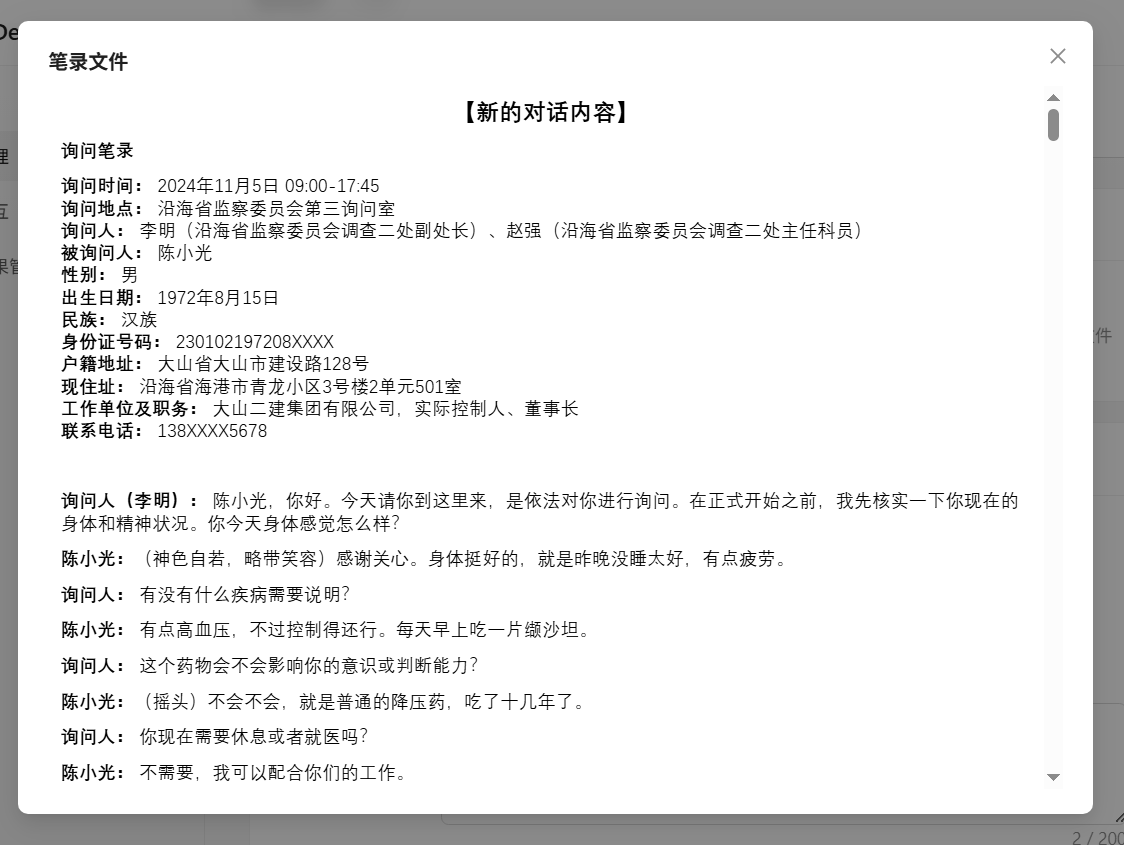
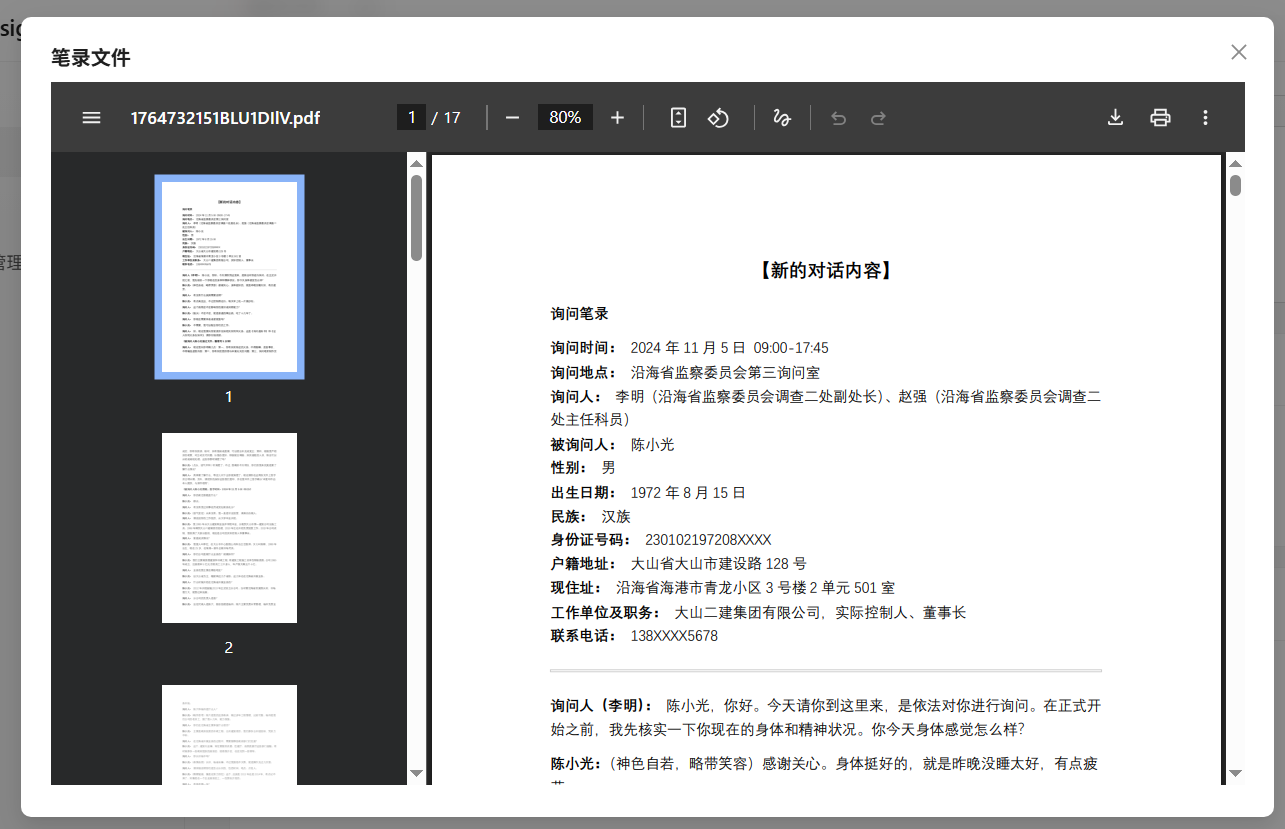
实现原理:pdf用iframe,docx用docx-preview插件(不支持预览doc)
相关代码:
import { renderAsync } from 'docx-preview';
const DocxViewer = ({ blob }: { blob?: Blob }) => {
  const containerRef = useRef<HTMLDivElement>(null);

  useEffect(() => {
    if (blob && containerRef.current) {
      renderAsync(blob, containerRef.current, undefined, {
        className: 'docx-content',
        inWrapper: true,
      })
    }
  }, [blob]);

  return (
    <div style={{ maxHeight: '80vh', overflow: 'auto', }}>
       <style>{`
        .docx-container section.docx-content {
          padding: 10px !important; /* 强制覆盖原文档的页边距 */
          width: 100% !important;
          min-height: auto !important;
          box-shadow: none !important;
        }
        /* 兼容可能存在的 wrapper 结构 */
        .docx-container {
           background: transparent !important;
           padding: 0 !important;
        }
        .docx-content-wrapper {
          padding: 0 !important;
          background: transparent !important;
        }
      `}</style>
      <div ref={containerRef} className="docx-container"></div>
    </div>
  );
};
<Modal
  open={previewState.open}
  title={previewState.title || '文件预览'}
  footer={null}
  onCancel={() => setPreviewState(prev => ({ ...prev, open: false }))}
  width="80%"
  destroyOnClose
  style={{ top: 20 }}
>
  {previewState.type === 'pdf' && (
    <iframe src={previewState.url} style={{ width: '100%', height: '80vh', border: 'none' }} />
  )}
  {previewState.type === 'docx' && (
    <DocxViewer blob={previewState.blob} />
  )}
</Modal>
效果示例:
完整代码:
import React, {useEffect, useRef, useState} from 'react';
import { message, Upload, Modal, Button, Space, Tooltip } from 'antd';
import { renderAsync } from 'docx-preview';
import { PageContainer, ProForm, ProFormText, ProFormSelect, ProFormTextArea, ProFormUploadButton, ProCard } from '@ant-design/pro-components';
import type { ProFormInstance } from '@ant-design/pro-components';
import { history, request, useLocation } from '@umijs/max';
import { addCase, getCase, updateCase } from '@/services/case';
import { getDictValueEnum } from '@/services/system/dict';


const DocxViewer = ({ blob }: { blob?: Blob }) => {
  const containerRef = useRef<HTMLDivElement>(null);

  useEffect(() => {
    if (blob && containerRef.current) {
      renderAsync(blob, containerRef.current, undefined, {
        className: 'docx-content',
        inWrapper: true,
      })
    }
  }, [blob]);

  return (
    <div style={{ maxHeight: '80vh', overflow: 'auto', }}>
       <style>{`
        .docx-container section.docx-content {
          padding: 10px !important; /* 强制覆盖原文档的页边距 */
          width: 100% !important;
          min-height: auto !important;
          box-shadow: none !important;
        }
        /* 兼容可能存在的 wrapper 结构 */
        .docx-container {
           background: transparent !important;
           padding: 0 !important;
        }
        .docx-content-wrapper {
          padding: 0 !important;
          background: transparent !important;
        }
      `}</style>
      <div ref={containerRef} className="docx-container"></div>
    </div>
  );
};

const CaseCreatePage: React.FC = () => {
  const formRef = useRef<ProFormInstance>();
  const [caseTypeOptions, setCaseTypeOptions] = useState<any>([])
  const [previewState, setPreviewState] = useState<{
    open: boolean;
    type: 'pdf' | 'docx' | 'other';
    url?: string;
    blob?: Blob;
    title?: string;
  }>({ open: false, type: 'other' });

  const location = useLocation();
  const searchParams = new URLSearchParams(location.search);
  const editId = searchParams.get('id');
  const [initValues, setInitValues] = useState<any>({
    case_name: '',
    case_type: undefined,
    case_desc: '',
    scene_desc: '',
  });
  useEffect(() => {
    getDictValueEnum('case_type').then((data) => {
      setCaseTypeOptions(data);
    });
  }, [])
  useEffect(() => {
    if (editId) {
      getCase(editId).then((res) => {
        if (res?.code === 200) {
          const d = res.data || {};
          const formData = {
            case_name: d.case_name,
            case_type: d.case_type,
            case_desc: d.case_desc,
            scene_desc: d.case_scene,
            scene: d.scene_img ? [{
              uid: '-1',
              name: '场景图片',
              status: 'done',
              url: d.scene_img,
            }] : [],
            records: d.case_note ? [{
              uid: '-1',
              name: '笔录文件',
              status: 'done',
              url: d.case_note,
            }] : [],
          };
          setInitValues(formData);
          formRef.current?.setFieldsValue(formData);
        }
      }).catch(() => {});
    }
  }, [editId])
  return (
    <PageContainer title={editId ? `编辑案例 #${editId}` : '新建案例'}>
      <ProForm
        formRef={formRef}
        layout="horizontal"
        grid
        initialValues={initValues}
        submitter={{
          render: (_, dom) => <div style={{ display: 'flex', justifyContent: 'center', gap: 12 }}>{dom}</div>,
        }}
        onFinish={async (values) => {
          // 处理图片和文件上传结果,转换为字符串URL
          let sceneUrl = '';
          if (values.scene && values.scene.length > 0) {
            // 如果是新上传的,取 response.data (根据 customRequest 逻辑)
            // 如果是回显的,取 url
            const file = values.scene[0];
            sceneUrl = file.url || (file.response && file.response.data) || '';
          }

          let recordUrl = '';
          if (values.records && values.records.length > 0) {
             const file = values.records[0];
             recordUrl = file.url || (file.response && file.response.data) || '';
          }

          const payload = {
            ...values,
            scene_img: sceneUrl,
            case_note: recordUrl,
            case_scene: values.scene_desc, // 映射回后端字段
          };

          if (editId) {
            const res = await updateCase(editId, payload);
            if (res?.code === 200) {
              message.success('案例更新成功');
              history.push('/training/cases');
              return true;
            }
            message.error(res?.msg || '更新失败');
            return false;
          } else {
            const res = await addCase(payload);
            if (res?.code === 200) {
              message.success('案例创建成功');
              history.push('/training/cases');
              return true;
            }
            message.error(res?.msg || '创建失败');
            return false;
          }
        }}
      >
        <ProFormText name="case_name" label="案例名称" rules={[{ required: true, message: '请输入案例名称' }]} colProps={{ span: 24 }} />
        <ProFormSelect
          name="case_type"
          label="案例类型"
          colProps={{ span: 24 }}
          rules={[{ required: true, message: '请选择案例类型' }]}
          valueEnum={caseTypeOptions}
          showSearch
        />
        {/* <ProFormSelect
            options={caseTypeOptions}
            name="projectId"
            label='项目名称'
            colProps={{ md: 12, xl: 24 }}
            labelCol={{ span: 6 }}
            wrapperCol={{ span: 18 }}
            showSearch
            rules={[
                { required: true, message: '请选择项目名称' },
            ]}
        /> */}
        <ProFormTextArea name="case_desc" label="案例描述" colProps={{ span: 24 }} fieldProps={{ rows: 6 }} />

        <ProCard title="笔录文件管理" headerBordered bordered style={{ marginBottom: 16 }}>
          <ProFormUploadButton
            name="records"
            label="笔录上传(PDF/Word)"
            max={1}
            fieldProps={{
              accept: '.pdf,.docx',
              multiple: false,
              listType: 'text',
              showUploadList: { showPreviewIcon: true, showRemoveIcon: true, showDownloadIcon: true },
              customRequest: async (options: any) => {
                const { file, onSuccess, onError, onProgress } = options;
                try {
                  const formData = new FormData();
                  formData.append('file', file as Blob);
                  const res = await request('/vadmin/system/upload/file/to/oss', {
                    method: 'POST',
                    data: formData,
                    requestType: 'form',
                    onUploadProgress: (event: any) => {
                      const percent = event?.percent || (event?.loaded && event?.total ? (event.loaded / event.total) * 100 : 0);
                      onProgress?.({ percent });
                    },
                  });
                  const url = res?.data;
                  if (url) {
                    (file as any).url = url;
                  }
                  onSuccess?.(res, file);
                  message.success('笔录上传成功');
                } catch (e: any) {
                  message.error(e?.message || '笔录上传失败');
                  onError?.(e);
                }
              },
              onPreview: async (file: any) => {
                const url = file?.url || file?.thumbUrl || (file?.originFileObj ? URL.createObjectURL(file.originFileObj) : '');
                const name = (file.name || '').toLowerCase();
                if (!url && !file.originFileObj) {
                  message.info('暂无预览内容');
                  return;
                }

                if (url.endsWith('.pdf')) {
                  setPreviewState({
                    open: true,
                    type: 'pdf',
                    url: url,
                    title: file.name
                  });
                } else if (url.endsWith('.docx')) {
                  let blob = file.originFileObj;
                  if (!blob && url) {
                      try {
                          const res = await fetch(url);
                          blob = await res.blob();
                      } catch (e) {
                          message.error('获取文件失败');
                          return;
                      }
                  }
                  setPreviewState({
                    open: true,
                    type: 'docx',
                    blob: blob,
                    title: file.name
                  });
                } else {
                   if (url) window.open(url);
                }
              },
              onDownload: async (file: any) => {
                const url = file?.url || (file?.originFileObj ? URL.createObjectURL(file.originFileObj) : '');
                if (url) {
                  window.open(url);
                } else {
                  message.info('暂无下载链接');
                }
              },
              onChange: ({ file, fileList }) => {
                if (fileList.length > 1) {
                  fileList.splice(0, fileList.length - 1);
                }
                if (file.status === 'removed') {
                  message.success('已删除笔录');
                }
              },
              beforeUpload: (file) => {
                const name = file.name.toLowerCase();
                const ok = name.endsWith('.pdf') || name.endsWith('.doc') || name.endsWith('.docx');
                if (!ok) {
                  message.error('仅支持上传 PDF/Word 文件');
                  return Upload.LIST_IGNORE as any;
                }
                if (file.size / 1024 / 1024 > 20) {
                  message.error('文件大小不能超过20MB');
                  return Upload.LIST_IGNORE as any;
                }
                return true;
              },
            }}
            formItemProps={{
              extra: '支持PDF/Word,单个文件≤20MB;可预览、下载、删除;重新上传覆盖当前文件',
            }}
            colProps={{ span: 24 }}
          />
        </ProCard>

        <ProCard title="场景背景管理" headerBordered bordered style={{ marginBottom: 16 }}>
          <ProFormUploadButton
            name="scene"
            label="场景背景图片(JPG/PNG)"
            max={1}
            fieldProps={{
              accept: '.jpg,.jpeg,.png',
              listType: 'picture-card',
              customRequest: async (options: any) => {
                const { file, onSuccess, onError, onProgress } = options;
                try {
                  const formData = new FormData();
                  formData.append('file', file as Blob);
                  const res = await request('/vadmin/system/upload/image/to/oss', {
                    method: 'POST',
                    data: formData,
                    // 不手动设置 Content-Type,浏览器会自动添加 multipart 边界
                    requestType: 'form',
                    onUploadProgress: (event: any) => {
                      const percent = event?.percent || (event?.loaded && event?.total ? (event.loaded / event.total) * 100 : 0);
                      onProgress?.({ percent });
                    },
                  });
                  const url = res?.data;
                  if (url) {
                    // Antd 会把 response 挂到 file.response;设置 url 便于预览
                    (file as any).url = url;

                  }
                  onSuccess?.(res, file);
                  message.success('图片上传成功');
                } catch (e: any) {
                  message.error(e?.message || '图片上传失败');
                  onError?.(e);
                }
              },
              beforeUpload: (file) => {
                const name = file.name.toLowerCase();
                const ok = name.endsWith('.jpg') || name.endsWith('.jpeg') || name.endsWith('.png');
                if (!ok) {
                  message.error('仅支持上传 JPG/PNG 图片');
                  return Upload.LIST_IGNORE as any;
                }
                if (file.size / 1024 / 1024 > 10) {
                  message.error('图片大小不能超过10MB');
                  return Upload.LIST_IGNORE as any;
                }
                return true;
              },
            }}
            formItemProps={{
              extra: '推荐分辨率1920x1080,≤10MB;支持替换:重新上传会覆盖当前图片',
            }}
            colProps={{ span: 24 }}
          />

          <ProFormTextArea
            name="scene_desc"
            label="场景描述(选填)"
            placeholder="例如:某单位会议室、调查室等,补充环境设定细节"
            colProps={{ span: 24 }}
            fieldProps={{ rows: 4, maxLength: 200, showCount: true }}
          />
        </ProCard>
      </ProForm>
      <Modal
        open={previewState.open}
        title={previewState.title || '文件预览'}
        footer={null}
        onCancel={() => setPreviewState(prev => ({ ...prev, open: false }))}
        width="80%"
        destroyOnClose
        style={{ top: 20 }}
      >
        {previewState.type === 'pdf' && (
          <iframe src={previewState.url} style={{ width: '100%', height: '80vh', border: 'none' }} />
        )}
        {previewState.type === 'docx' && (
          <DocxViewer blob={previewState.blob} />
        )}
      </Modal>
    </PageContainer>
  );
};

export default CaseCreatePage;