需要实现的效果:
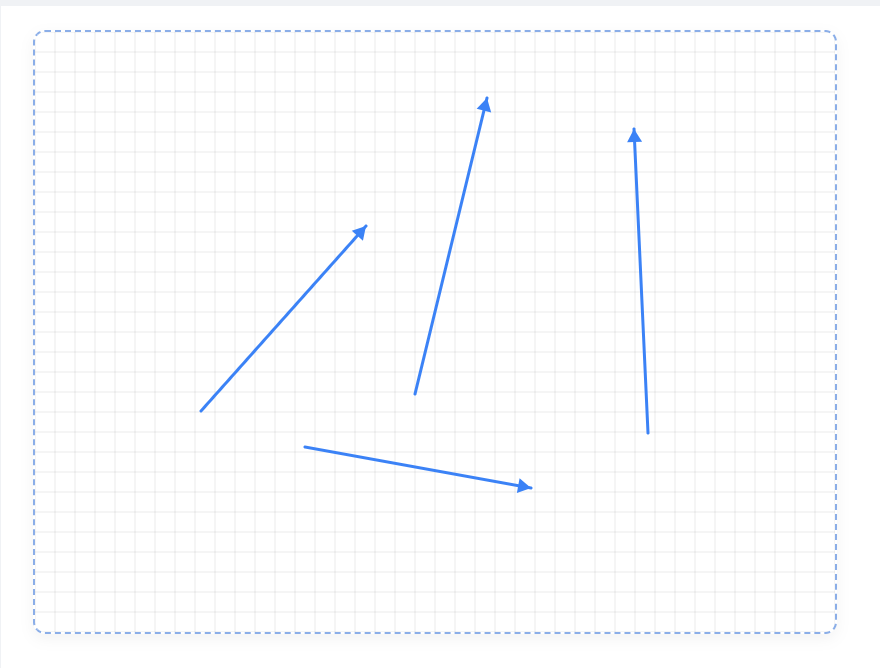
直接上代码:
html
<template>
    <div class="arrow-canvas-container">
        <canvas
            ref="canvas"
            class="arrow-canvas"
            :width="canvasWidth"
            :height="canvasHeight"
            @mousedown="handleMouseDown"
            @mousemove="handleMouseMove"
            @mouseup="handleMouseUp"
            @touchstart="handleTouchStart"
            @touchmove="handleTouchMove"
            @touchend="handleTouchEnd"
        ></canvas>
    </div>
</template>

<script>
export default {
    name: 'ArrowCanvas',
    emits: ['arrow-drawn', 'canvas-cleared'],
    props: {
        width: {
            type: Number,
            default: 800
        },
        height: {
            type: Number,
            default: 600
        },
        lineColor: {
            type: String,
            default: '#3b82f6'
        },
        lineWidth: {
            type: Number,
            default: 3
        },
        arrowStyle: {
            type: String,
            default: 'single',
            validator: (value) => ['single', 'double'].includes(value)
        },
        showGrid: {
            type: Boolean,
            default: false
        }
    },
    data() {
        return {
            canvas: null,
            ctx: null,
            isDrawing: false,
            startPoint: null,
            endPoint: null,
            arrows: []
        }
    },
    computed: {
        canvasWidth() {
            return this.width;
        },
        canvasHeight() {
            return this.height;
        }
    },
    mounted() {
        this.canvas = this.$refs.canvas;
        this.ctx = this.canvas.getContext('2d');
        this.initCanvas();
    },
    methods: {
        initCanvas() {
            this.ctx.clearRect(0, 0, this.canvasWidth, this.canvasHeight);
            if (this.showGrid) {
                this.drawGrid();
            }
        },

        handleMouseDown(event) {
            this.startDrawing(this.getCanvasCoordinates(event));
        },

        handleMouseMove(event) {
            this.drawing(this.getCanvasCoordinates(event));
        },

        handleMouseUp(event) {
            this.stopDrawing(this.getCanvasCoordinates(event));
        },

        handleTouchStart(event) {
            event.preventDefault();
            const touch = event.touches[0];
            this.startDrawing(this.getCanvasCoordinates(touch));
        },

        handleTouchMove(event) {
            event.preventDefault();
            const touch = event.touches[0];
            this.drawing(this.getCanvasCoordinates(touch));
        },

        handleTouchEnd(event) {
            event.preventDefault();
            this.stopDrawing();
        },

        getCanvasCoordinates(event) {
            const rect = this.canvas.getBoundingClientRect();
            return {
                x: event.clientX - rect.left,
                y: event.clientY - rect.top
            };
        },

        startDrawing(point) {
            this.isDrawing = true;
            this.startPoint = point;
            this.endPoint = point;
        },

        drawing(point) {
            if (!this.isDrawing || !this.startPoint) return;

            this.endPoint = point;
            this.redraw();
        },

        stopDrawing() {
            if (this.isDrawing && this.startPoint && this.endPoint) {
                const arrow = {
                    start: { ...this.startPoint },
                    end: { ...this.endPoint },
                    color: this.lineColor,
                    width: this.lineWidth,
                    style: this.arrowStyle,
                    timestamp: Date.now()
                };

                this.arrows.push(arrow);
                this.$emit('arrow-drawn', arrow);
            }

            this.isDrawing = false;
            this.startPoint = null;
            this.endPoint = null;
        },

        redraw() {
            this.ctx.clearRect(0, 0, this.canvasWidth, this.canvasHeight);

            if (this.showGrid) {
                this.drawGrid();
            }

            this.arrows.forEach(arrow => {
                this.drawSingleArrow(arrow);
            });

            if (this.isDrawing && this.startPoint && this.endPoint) {
                this.drawSingleArrow({
                    start: this.startPoint,
                    end: this.endPoint,
                    color: this.lineColor,
                    width: this.lineWidth,
                    style: this.arrowStyle
                });
            }
        },

        drawSingleArrow(arrow) {
            const { start, end, color, width, style } = arrow;
            const headLength = 15;
            const angle = Math.atan2(end.y - start.y, end.x - start.x);

            this.ctx.save();
            this.ctx.strokeStyle = color;
            this.ctx.fillStyle = color;
            this.ctx.lineWidth = width;
            this.ctx.lineCap = 'round';

            // 绘制线条
            this.ctx.beginPath();
            this.ctx.moveTo(start.x, start.y);
            this.ctx.lineTo(end.x, end.y);
            this.ctx.stroke();

            // 绘制箭头头部
            this.ctx.beginPath();
            this.ctx.moveTo(end.x, end.y);
            this.ctx.lineTo(
                end.x - headLength * Math.cos(angle - Math.PI / 6),
                end.y - headLength * Math.sin(angle - Math.PI / 6)
            );
            this.ctx.lineTo(
                end.x - headLength * Math.cos(angle + Math.PI / 6),
                end.y - headLength * Math.sin(angle + Math.PI / 6)
            );
            this.ctx.closePath();
            this.ctx.fill();

            // 双箭头样式
            if (style === 'double') {
                this.ctx.beginPath();
                this.ctx.moveTo(start.x, start.y);
                this.ctx.lineTo(
                    start.x + headLength * Math.cos(angle - Math.PI / 6),
                    start.y + headLength * Math.sin(angle - Math.PI / 6)
                );
                this.ctx.lineTo(
                    start.x + headLength * Math.cos(angle + Math.PI / 6),
                    start.y + headLength * Math.sin(angle + Math.PI / 6)
                );
                this.ctx.closePath();
                this.ctx.fill();
            }

            this.ctx.restore();
        },

        drawGrid() {
            this.ctx.strokeStyle = 'rgba(0, 0, 0, 0.08)';
            this.ctx.lineWidth = 1;

            const gridSize = 20;

            // 垂直线
            for (let x = 0; x <= this.canvasWidth; x += gridSize) {
                this.ctx.beginPath();
                this.ctx.moveTo(x, 0);
                this.ctx.lineTo(x, this.canvasHeight);
                this.ctx.stroke();
            }

            // 水平线
            for (let y = 0; y <= this.canvasHeight; y += gridSize) {
                    this.ctx.beginPath();
                    this.ctx.moveTo(0, y);
                    this.ctx.lineTo(this.canvasWidth, y);
                    this.ctx.stroke();
                }
            },

            clearCanvas() {
                this.arrows = [];
                this.initCanvas();
                this.$emit('canvas-cleared');
        },

        undo() {
            if (this.arrows.length > 0) {
                this.arrows.pop();
                this.redraw();
            }
        },

        exportImage() {
                return this.canvas.toDataURL('image/png');
            }
        },

        watch: {
            lineColor() {
                this.redraw();
            },
            lineWidth() {
                this.redraw();
            },
            arrowStyle() {
                this.redraw();
            },
            showGrid() {
                this.redraw();
            }
        }
    };
</script>

<style scoped>
.arrow-canvas-container {
    position: relative;
    width: 100%;
    height: 100%;
}

.arrow-canvas {
    border: 2px dashed #d1d5db;
    border-radius: 12px;
    background-color: white;
    cursor: crosshair;
    transition: all 0.3s ease;
}

.arrow-canvas:hover {
    border-color: #3b82f6;
    box-shadow: 0 10px 30px rgba(0, 0, 0, 0.1);
}
</style>
以上代码可以直接复制使用~
如有问题,欢迎留言讨论~