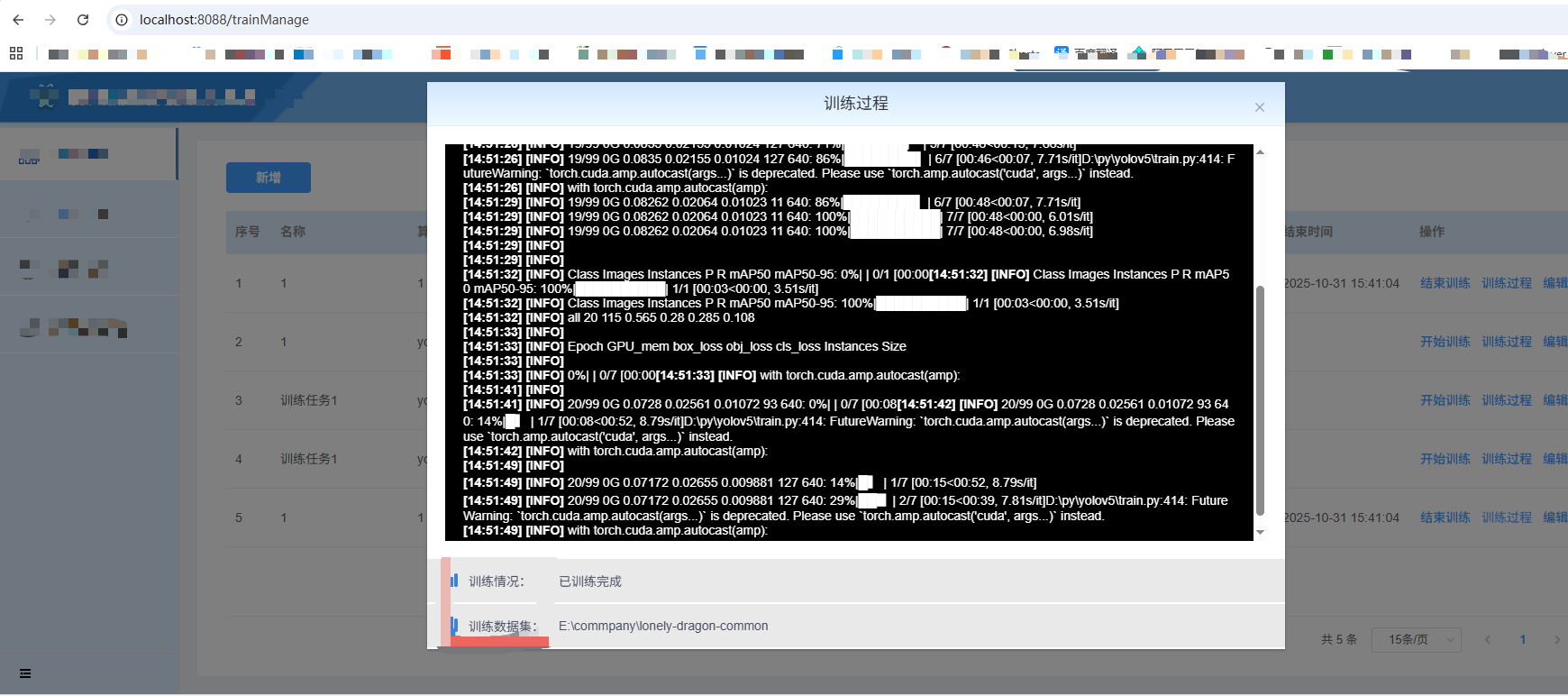
我们在看视频时经常会看到黑客入侵别人电脑会在屏幕上显示一串代码,并且代码不断插入自动滚动,看起来很厉害的样子,现在就在此纪录实现此功能:
首先下载websocket相关插件 sockjs-client 、 @stomp/stompjs,主要用来接收后端发过来的消息
javascript
npm install sockjs-client -save
npm install @stomp/stompjs --save
# 或者
yarn add @stomp/stompjs
yarn add sockjs-client
在页面中引入
javascript
import SockJS from 'sockjs-client';
import { Client, Stomp } from '@stomp/stompjs';
可直接复制代码:
这里业务需要才传入info字段,若不需要可自行删除相关代码
html
<template>
  <el-dialog title="训练过程" :visible.sync="show" width="50%" :close-on-click-modal="false" center :before-close="closeDialog">
    <div ref="container" class="trainContent" v-html="content"></div>
    <div class="rows">
        <span class="line"></span>
        <span>训练情况:</span>
        <span>{{ info.status }}</span>
    </div>
    <div class="rows">
        <span class="line"></span>
        <span>训练数据集:</span>
        <span>{{ info.datasetUrl }}</span>
    </div>
  </el-dialog>
</template>
<script>
import SockJS from 'sockjs-client';
import { Client, Stomp } from '@stomp/stompjs';
import {getTrianEnviroListAll, getDatasetListAll} from "@/api/trainManage";
export default {
  props: {
    show: {
      type: Boolean,
      default: false,
    },
    info: {
      type: Object
    }
  },
  data() {
    return {
        content:"",
        timer:null,
        num:0,
        form:{
            name:""
        },
        socket: null,
        messages: [],
        stompClient:null,
    };
  },
  methods: {
    scrollToBottom() {
      const container = this.$refs.container; // 假设你的滚动容器有一个ref="container"
      container.scrollTop = container.scrollHeight;
    },
    connect() {
      this.socket = new SockJS(window.websocketUrl);
      this.stompClient = Stomp.over(this.socket);
      // this.stompClient =  Stomp.client(window.websocketUrl);
      this.stompClient.connect(
        {},
        frame => {
        this.stompClient.subscribe('/topic/training/logs', message => {
          // 处理接收到的消息
          const log = JSON.parse(message.body);
          this.content = this.content + `<br /><strong>[${new Date().toLocaleTimeString()}]</strong> <strong>[${log.level}]</strong> ${log.message}`;
          this.scrollToBottom();
        });
        },err => {
          console.log(err)
        });
    },
    _getDatasetListAll(){
      getDatasetListAll(res => {
        let arr = res.data.filter(item => {
          return item.id == this.info.datasetId
        })
        this.info.datasetUrl = arr[0].rootUri;
      })
    },
    closeDialog() {
      this.$emit("close");
    },
  },
  watch:{
    show(boo){
      if(boo) {
        this.content = "";
        this.socket = null;
        this.stompClient = null;
        this.connect();
        this._getDatasetListAll();
      }else{
        if (this.stompClient !== null) {
          this.stompClient.disconnect(function() {
            this.content = this.content + `<strong>[${new Date().toLocaleTimeString()}]</strong> <strong>已断开连接</strong>`
          })
        }
      }
    }
  }
};
</script>
<style lang="scss" scoped>
/deep/.el-dialog__body{
    padding: 0 !important;
}
.trainContent{
    width: calc(100% - 80px);
    height: 400px;
    background: #000;
    color: #fff;
    margin: 20px;
    padding: 20px;
    overflow-y: scroll;
    .row{
      margin-left: 20%;
    }
}

.rows{
    display: flex;
    align-items: center;
    background: #E9E9E9;
    color: #484D60;
    font-size: 14px;
    padding: 14px 0;
    border-bottom: 2px solid #FFFFFF;
    .line{
        display: inline-block;
        width: 4px;
        height: 15px;
        background: #4083D0;
        border-radius: 2px;
        margin-left: 30px;
    }
    span:nth-child(2){
        width: 100px;
        margin-left: 12px;
    }
}
</style>
这样运行出来就是
如有问题,欢迎留言讨论~