docker启动onlyoffice
shell
sudo docker run -i -t -d -p 8001:80 --restart=always \
    -v /home/xnai/src/onlyoffice/DocumentServer/logs:/var/log/onlyoffice \
    -v /home/xnai/src/onlyoffice/DocumentServer/data:/var/www/onlyoffice/Data \
    -v /home/xnai/src/onlyoffice/DocumentServer/lib:/var/lib/onlyoffice \
    -v /home/xnai/src/onlyoffice/DocumentServer/db:/var/lib/postgresql \
    -e JWT_SECRET= \
	-e JWT_ENABLED=false \
    -e REQUEST_INBOX_ACCEPT_PRIVATE_HOST=true \
    onlyoffice/documentserver
进入容器
bash
docker exec -it f3 bash修改如下配置
bash
 cd /etc/onlyoffice/documentserver
 nano default.json
搜索内容ctrl+Q,allowPrivateIPAddress
bash
 "request-filtering-agent" : {
        "allowPrivateIPAddress": true,
        "allowMetaIPAddress": true
},
重启容器
bash
docker restart f3nginx服务中使用以下文件index.html
html
<!DOCTYPE html>
<html style="height: 100%;">
<head>
    <meta http-equiv="Content-Type" content="text/html; charset=utf-8"/>
    <title>文件预览</title>
    <style>
        html, body {
            height: 100%;
            margin: 0;
            padding: 0;
            overflow: hidden;
            font-family: "Microsoft YaHei", sans-serif;
        }
        #placeholder {
            width: 100%;
            height: 100%;
        }
        /* 可选:隐藏 ONLYOFFICE 默认标题栏(谨慎使用)*/
        /* .sdkui-header { display: none !important; } */
    </style>
</head>
<body>
<div id="placeholder"></div>

<!-- ONLYOFFICE API -->
<script type="text/javascript" src="http://192.168.1.145:8001/web-apps/apps/api/documents/api.js"></script>
<!-- jQuery(用于简化逻辑) -->
<script src="js/jquery-3.3.1.min.js"></script>

<script type="text/javascript">
    var docEditor;

    $(function () {
        // 获取 URL 参数
        function getQueryString(name) {
            var reg = new RegExp("(^|&)" + name + "=([^&]*)(&|$)", "i");
            var r = window.location.search.substr(1).match(reg);
            return r ? decodeURIComponent(r[2]) : null;
        }

        // 获取文件扩展名
        function getFileExtension(filename) {
            const ext = filename.slice(((filename.lastIndexOf(".") - 1) >>> 0) + 2);
            return ext ? ext.toLowerCase() : '';
        }

        // 判断文件类型是否匹配
        function containedFileTypes(types, fileName) {
            if (fileName.indexOf(".") > -1) {
                const p = fileName.lastIndexOf(".");
                let strPostfix = fileName.substring(p).toLowerCase() + '|';
                return types.indexOf(strPostfix) > -1;
            }
            return false;
        }

        const fileName = getQueryString("fileName") || '未命名文件';
        const fileType = getFileExtension(fileName) || '';
        const encodedFileName = encodeURIComponent(fileName);
        const baseURL = "http://192.168.1.145:8090/doc/";
        const encodedUrl = baseURL + encodedFileName;

        let documentType = "text"; // 默认为文本
        if (containedFileTypes('.xls|.xlsx|.xlsm|.xlt|.xltx|.xltm|.ods|.fods|.ots|.csv|', fileType)) {
            documentType = 'spreadsheet';
        } else if (containedFileTypes('.pps|.ppsx|.ppsm|.ppt|.pptx|.pptm|.pot|.potx|.potm|.odp|.fodp|.otp|', fileType)) {
            documentType = 'presentation';
        }

        // 初始化 ONLYOFFICE 编辑器
        docEditor = new DocsAPI.DocEditor("placeholder", {
            document: {
                fileType: fileType,
                title: fileName,
                url: encodedUrl
            },
            documentType: documentType,
            editorConfig: {
                mode: "view", // 只读预览
                lang: "zh-CN",
                user: {
                    id: "guest_viewer",
                    name: "预览访客"
                },
                customization: {
                    // 返回按钮:指向新诺北斗官网
                    goback: {
                        url: "https://www.xinuo.com/"
                    },
                    forcesave: false,
                    chat: false,
                    help: false,
                    feedback: {
                        visible: false
                    }
                }
            },
            events: {
                onReady: function () {
                    console.log("ONLYOFFICE 文档加载完成,尝试自动收起工具栏...");
                    // 延迟执行,确保 UI 已渲染
                    setTimeout(() => {
                        // 方法1:标准折叠按钮(v7.0+)
                        let btn = document.querySelector('.sdkui-panel-toolbar__collapse');
                        if (btn && btn.offsetParent !== null) {
                            btn.click();
                            console.log("工具栏已自动收起(方法1)");
                            return;
                        }
                        // 方法2:通过 aria-label 或 title 匹配
                        btn = document.querySelector('[aria-label="Collapse toolbar"], [title="Collapse toolbar"]');
                        if (btn && btn.offsetParent !== null) {
                            btn.click();
                            console.log("工具栏已自动收起(方法2)");
                            return;
                        }
                        // 方法3:遍历所有按钮尝试点击(兜底)
                        const allButtons = document.querySelectorAll('button');
                        for (let b of allButtons) {
                            if (b.innerText.includes('Collapse') || b.getAttribute('data-hint') === 'Collapse toolbar') {
                                b.click();
                                console.log("工具栏已通过兜底方案收起");
                                return;
                            }
                        }
                        console.warn("未能自动收起工具栏,请检查 ONLYOFFICE 版本或 DOM 结构");
                    }, 1500);
                },
                onError: function (err) {
                    console.error("ONLYOFFICE 加载出错:", err);
                    alert("文档加载失败,请检查文件路径或 ONLYOFFICE 服务状态。");
                }
            }
        });
    });
</script>
</body>
</html>
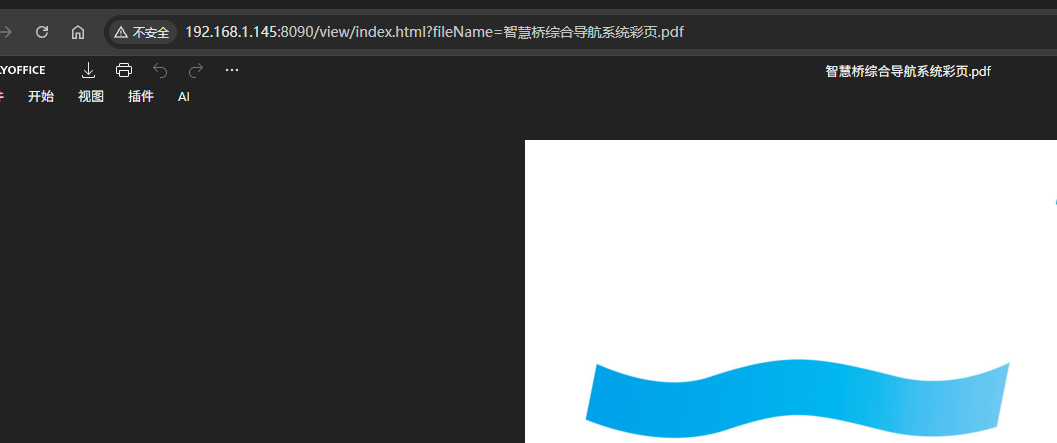
然后就可以访问页面了,这里的fileName就是文件名,文件服务器地址在index.html中,也可以改成参数。
html
http://192.168.1.145:8090/view/index.html?fileName=智慧桥综合导航系统彩页.pdf