1、源代码,使用writer.fill()这种方式,生成的excel发现最下边的边框消失,我的模版最下边的是厚实线,导出后,变成了细实线
ExcelWriter writer = EasyExcel.write(response.getOutputStream())
        .registerWriteHandler(customStyleHandler)
        .withTemplate(getInputStream("Y4-06.xlsx"))
        .build();
WriteSheet writeSheet = EasyExcel.writerSheet().build();
writer.fill(data, writeSheet);
writer.fill(dataList, writeSheet);
writer.finish();
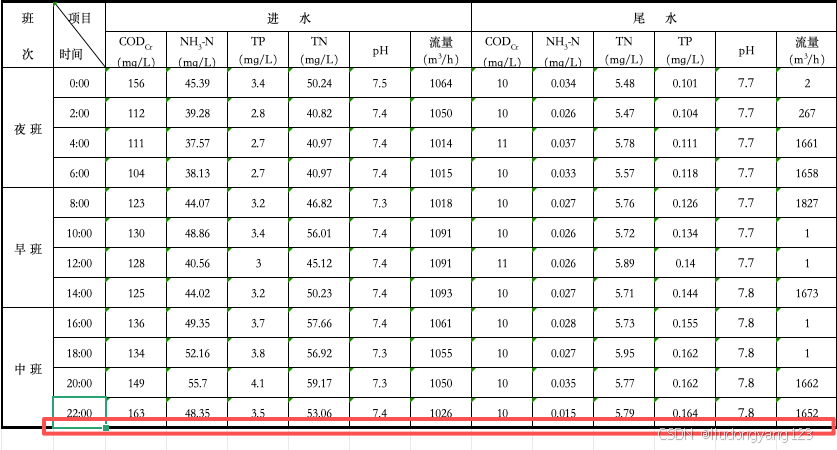
2、解决办法
第一种:如果你的数据载体是对象,那么你可以直接在对象的实体上加上一下注解 ,但是这种的会让你导出的每一行的底边框全部为注解设置的样式。
@ContentStyle(borderBottom = BorderStyleEnum.THICK)第二种:增加自定义样式处理器,直接上代码
import com.alibaba.excel.write.handler.CellWriteHandler;
import com.alibaba.excel.write.handler.context.CellWriteHandlerContext;
import com.alibaba.excel.write.metadata.style.WriteCellStyle;
import org.apache.poi.ss.usermodel.BorderStyle;
import org.apache.poi.ss.usermodel.CellStyle;
import org.apache.poi.ss.usermodel.Workbook;

public class CustomCellStyleHandler implements CellWriteHandler {
    @Override
    public void afterCellDispose(CellWriteHandlerContext context) {
        if (context.getHead()) return; // 跳过表头

        Workbook workbook = context.getWriteWorkbookHolder().getWorkbook();

        if (context.getCell().getRowIndex() == 15) {
            CellStyle style = workbook.createCellStyle();
            style.cloneStyleFrom(context.getCell().getCellStyle());

            WriteCellStyle writeCellStyle = new WriteCellStyle();
            writeCellStyle.setBorderBottom(BorderStyle.THICK);
            context.getCellDataList().get(0).setWriteCellStyle(writeCellStyle);
        }
    }
}
以上代码有几个点要注意:
接口类CellWriteHandler
重写方法afterCellDispose
最为重点的是context.getCellDataList().get(0).setWriteCellStyle(writeCellStyle),一定要用WriteCellStyle来设置你的样式,我看网上有的用CellStyle,不起作用,这个我查了下,WriteCellStyle是EasyExcel自己的,CellStyle是POI的,不知道具体什么个原因。
CellWriteHandler customStyleHandler = new CustomCellStyleHandler();
ExcelWriter writer = EasyExcel.write(response.getOutputStream())
        .registerWriteHandler(customStyleHandler)
        .withTemplate(getInputStream("Y4-06.xlsx"))
        .build();
WriteSheet writeSheet = EasyExcel.writerSheet().build();
writer.fill(data, writeSheet);
writer.fill(dataList, writeSheet);
writer.finish();