前言
Xmind 是全球领先的思维导图软件,能够快速整理思路、激发灵感、规划项目与高效协作,操作起来也很方便。
本文做一个简单版的类似Xmind的思维导图Demo,可供学习参考。
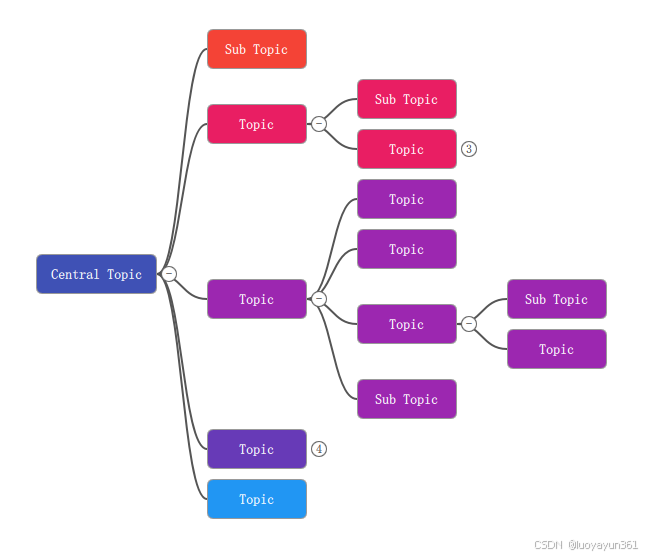
本文测试运行环境:Qt5.15+vs2019
Demo使用简介
跟Xmind的快捷键一样,选中当前节点后,
Enter:创建同级节点
Tab:创建子节点
键盘方向键:切换当前节点
Delete:删除当前节点
点击节点交接处:可折叠所有子节点树,折叠后数字显示下一级的节点数量(不会递归遍历;
拖动根节点:可以移动整个节点树;
拖动根节点到右侧和下侧边缘,自动拓展画布,保证节点树完整显示在画布中;
关键代码
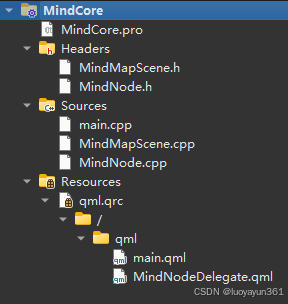
目录结构:
节点代码:
cpp
import QtQuick 2.15
import QtQuick.Shapes 1.15
import QtQuick.Controls 2.15
import MindCore 1.0

Item {
    id: root
    property MindNode node
    property real pressSceneX: 0
    property real pressSceneY: 0
    property int rootStartX: 0
    property int rootStartY: 0
    property bool draggingRoot: false

    // Position is controlled by C++ Layout
    x: (node && node.parentNode) ? (node.x - node.parentNode.x) : (node ? node.x : 0)
    y: (node && node.parentNode) ? (node.y - node.parentNode.y) : (node ? node.y : 0)

    width: bg.width
    height: bg.height

    // Push size changes to Node
    onWidthChanged: {
        if (node && node.width !== width) {
            node.width = width
            debouncedLayoutUpdate.restart()
        }
    }
    onHeightChanged: {
        if (node && node.height !== height) {
            node.height = height
            debouncedLayoutUpdate.restart()
        }
    }

    Timer {
        id: debouncedLayoutUpdate
        interval: 10
        repeat: false
        onTriggered: mindMapScene.updateLayout()
    }

    // Connection Line (Canvas-based to reduce jagged edges)
    Item {
        id: linkLayer
        visible: node && node.parentNode
        z: -1
        property real gap: (node && node.parentNode) ? (node.x - node.parentNode.x - node.parentNode.width) : 0
        property real extendLeft: Math.max(0, gap)
        property real parentCenterRel: (node && node.parentNode) ? (node.parentNode.y - node.y) + (node.parentNode.height / 2) : 0
        property real childCenter: root.height / 2
        property int vpad: 6
        x: -extendLeft
        y: Math.min(parentCenterRel, childCenter) - vpad
        width: root.width + extendLeft
        height: Math.abs(parentCenterRel - childCenter) + vpad * 2

        Canvas {
            id: connectionCanvas
            anchors.fill: parent
            antialiasing: true
            onPaint: {
                var ctx = connectionCanvas.getContext('2d')
                ctx.clearRect(0, 0, width, height)
                ctx.lineWidth = 2
                ctx.strokeStyle = (node && node.selected) ? '#2196F3' : '#555'
                ctx.lineJoin = 'round'
                ctx.lineCap = 'round'

                var parentX = (node && node.parentNode) ? node.parentNode.x : 0
                var parentY = (node && node.parentNode) ? node.parentNode.y : 0
                var parentW = (node && node.parentNode) ? node.parentNode.width : 0
                var parentH = (node && node.parentNode) ? node.parentNode.height : 0
                var myX = node ? node.x : 0
                var myY = node ? node.y : 0

            var startX = 0
            var startY = linkLayer.parentCenterRel - linkLayer.y
            var endX = linkLayer.extendLeft
            var endY = linkLayer.childCenter - linkLayer.y
            var cpOffset = Math.abs(endX - startX) / 2

                ctx.beginPath()
                ctx.moveTo(startX, startY)
                ctx.bezierCurveTo(startX + cpOffset, startY, endX - cpOffset, endY, endX, endY)
                ctx.stroke()
            }
            onVisibleChanged: if (visible) connectionCanvas.requestPaint()
            onWidthChanged: connectionCanvas.requestPaint()
            onHeightChanged: connectionCanvas.requestPaint()
            Component.onCompleted: connectionCanvas.requestPaint()
        }
        Connections {
            target: node
            function onXChanged() { connectionCanvas.requestPaint() }
            function onYChanged() { connectionCanvas.requestPaint() }
            function onWidthChanged() { connectionCanvas.requestPaint() }
            function onHeightChanged() { connectionCanvas.requestPaint() }
            function onSelectedChanged() { connectionCanvas.requestPaint() }
        }
        Connections {
            target: node ? node.parentNode : null
            function onXChanged() { connectionCanvas.requestPaint() }
            function onYChanged() { connectionCanvas.requestPaint() }
            function onWidthChanged() { connectionCanvas.requestPaint() }
            function onHeightChanged() { connectionCanvas.requestPaint() }
        }
        Connections {
            target: linkLayer
            function onExtendLeftChanged() { connectionCanvas.requestPaint() }
            function onYChanged() { connectionCanvas.requestPaint() }
            function onHeightChanged() { connectionCanvas.requestPaint() }
            function onParentCenterRelChanged() { connectionCanvas.requestPaint() }
            function onChildCenterChanged() { connectionCanvas.requestPaint() }
        }
    }

    // Node Visual
    Rectangle {
        id: bg
        // Size determined by text
        width: Math.max(100, textInput.contentWidth + 30)
        height: Math.max(40, textInput.contentHeight + 20)

        radius: 6
        color: (node && node.selected) ? "#E3F2FD" : ((node && node.color) || "#E0E0E0")
        border.color: (node && node.selected) ? "#2196F3" : "#999"
        border.width: (node && node.selected) ? 3 : 1

        TextInput {
            id: textInput
            anchors.centerIn: parent
            text: node ? node.text : ""
            color: (node && node.selected) ? "black" : "white"
            font.pixelSize: 14
            font.bold:true
            selectByMouse: true

            // Update node text
            onTextEdited: if (node) node.text = text

            // Prevent Enter from adding new line, instead trigger "done"
            Keys.onReturnPressed: {
                if (node) node.text = text
                parent.forceActiveFocus() // De-focus
            }

            activeFocusOnTab: false
        }

        MouseArea {
            id: dragArea
            anchors.fill: parent
            propagateComposedEvents: true
            preventStealing: true
            acceptedButtons: Qt.LeftButton

            onPressed: {
                if (node) {
                    mindMapScene.selectNode(node)
                    root.forceActiveFocus()
                }
                if (node && !node.parentNode) {
                    var p = dragArea.mapToItem(canvas, mouse.x, mouse.y)
                    pressSceneX = p.x
                    pressSceneY = p.y
                    rootStartX = node.x
                    rootStartY = node.y
                    draggingRoot = true
                    console.log('[Drag] press at scene(', pressSceneX, ',', pressSceneY, ') rootStart(', rootStartX, ',', rootStartY, ')')
                }
            }

            onPositionChanged: {
                if (draggingRoot) {
                    var p = dragArea.mapToItem(canvas, mouse.x, mouse.y)
                    mindMapScene.setRootPosition(rootStartX + (p.x - pressSceneX), rootStartY + (p.y - pressSceneY))
                    console.log('[Drag] move to scene(', p.x, ',', p.y, ')')
                }
            }

            onReleased: {
                draggingRoot = false
                console.log('[Drag] released')
            }

            onDoubleClicked: {
                textInput.forceActiveFocus()
                textInput.selectAll()
            }
        }
    }
    // Collapse toggle button at junction when node has children
    Rectangle {
        id: toggleBtn
        width: 16
        height: 16
        radius: 8
        color: "#FFFFFF"
        border.color: "#666"
        border.width: 1
        x: bg.width + 4
        y: bg.height / 2 - height / 2
        visible: node && node.childNodes && node.childNodes.length > 0
        z: 10
        MouseArea {
            anchors.fill: parent
            onClicked: {
                mindMapScene.toggleCollapse(node)
            }
        }
        Text {
            text: (node && node.childNodes && node.childNodes.length > 0) ? (node.collapsed ? String(node.childNodes.length) : "-") : ""
            anchors.centerIn: parent
            font.pixelSize: 12
            color: "#333"
        }
    }


    // Recursively render children
    Repeater {
        model: (node && !node.collapsed) ? node.childNodes : null
        delegate: Loader {
            // Use Loader to break recursive dependency at parse time
            source: "MindNodeDelegate.qml"

            // Pass the node to the loaded delegate
            onLoaded: {
                if (item) {
                    item.node = modelData
                }
            }

            // Ensure the binding stays active if modelData changes
            Binding {
                target: item
                property: "node"
                value: modelData
                when: item !== null
            }
        }
    }
}
主场景代码,C++实现
cpp
// 在指定父节点下添加一个子节点,并自动选中与重新布局
void MindMapScene::addNode(MindNode* parent)
{
    if (!parent) return;

    MindNode* newNode = new MindNode(this);
    newNode->setText("Sub Topic");
    parent->addChild(newNode);
    qDebug() << "[addNode] parent=" << parent->text() << ", children after=" << parent->children().size();
    // Auto select new node
    selectNode(newNode);
    updateLayout();
}

// 在当前节点的同一父节点下添加一个兄弟节点
void MindMapScene::addSibling(MindNode* node)
{
    if (!node) return;
    if (node == m_rootNode) return; // Root has no sibling

    MindNode* parent = node->parentNode();
    if (parent) {
        MindNode* newNode = new MindNode(this);
        newNode->setText("Topic");
        parent->addChild(newNode);
        qDebug() << "[addSibling] base=" << node->text() << ", parent=" << parent->text() << ", children after=" << parent->children().size();
        selectNode(newNode);
        updateLayout();
    }
}

// 递归平移整棵子树,用于拖拽根节点移动
void MindMapScene::translateTree(MindNode* node, int dx, int dy)
{
    if (!node) return;
    node->setX(node->x() + dx);
    node->setY(node->y() + dy);
    for (MindNode* child : node->children()) {
        translateTree(child, dx, dy);
    }
}

// 为当前选中节点添加子节点
void MindMapScene::addChildToSelected()
{
    if (m_selectedNode) {
        addNode(m_selectedNode);
    }
}

// 为当前选中节点添加兄弟节点
void MindMapScene::addSiblingToSelected()
{
    if (m_selectedNode) {
        addSibling(m_selectedNode);
    }
}

// 切换选中节点(仅一个选中态)
void MindMapScene::selectNode(MindNode* node)
{
    if (m_selectedNode) {
        m_selectedNode->setSelected(false);
    }
    m_selectedNode = node;
    if (m_selectedNode) {
        m_selectedNode->setSelected(true);
        qDebug() << "[selectNode]" << m_selectedNode->text() << "pos(" << m_selectedNode->x() << "," << m_selectedNode->y() << ")";
    }
}

// Helper to store calculated subtree heights
struct NodeLayoutInfo {
    int totalHeight;
};
QMap<MindNode*, NodeLayoutInfo> layoutCache;

// 计算某节点子树的垂直占用高度(用于自顶向下布局)
int MindMapScene::calculateSubtreeHeight(MindNode* node)
{
    if (node->children().isEmpty() || node->collapsed()) {
        int h = node->height();
        layoutCache[node] = { h };
        // qDebug() << "[height]" << node->text() << "leaf height=" << h;
        return h;
    }

    int childrenHeight = 0;
    for (MindNode* child : node->children()) {
        childrenHeight += calculateSubtreeHeight(child);
    }
    // Add spacing
    childrenHeight += (node->children().count() - 1) * 10; // 10px vertical gap

    int totalH = qMax(node->height(), childrenHeight);
    layoutCache[node] = { totalH };
    // qDebug() << "[height]" << node->text() << "childrenH=" << childrenHeight << "selfH=" << node->height() << "totalH=" << totalH;
    return totalH;
}

void recursiveSetPos(MindNode* node, int x, int centerY) {
    // Set current node position
    // node->y should be top-left
    node->setX(x);
    node->setY(centerY - node->height() / 2);
    if (!node->parentNode()) {
        qDebug() << "[layout-root] x=" << x << " centerY=" << centerY << " topLeftY=" << node->y();
    }

    if (node->children().isEmpty() || node->collapsed()) return;

    int startY = centerY - layoutCache[node].totalHeight / 2;

    // If node height is larger than children total height, we center children relative to node?
    // Or we just use the total height which covers both.
    // Actually, if children height < node height, we should center children.
    // But layoutCache[node].totalHeight is max(node->h, childrenH).

    // Recalculate exact startY for children to be centered
    int childrenTotalHeight = 0;
    for (MindNode* child : node->children()) {
        childrenTotalHeight += layoutCache[child].totalHeight;
    }
    childrenTotalHeight += (node->children().count() - 1) * 10;

    int currentChildY = centerY - childrenTotalHeight / 2;

    for (MindNode* child : node->children()) {
        int childH = layoutCache[child].totalHeight;
        recursiveSetPos(child, x + node->width() + 50, currentChildY + childH / 2);
        currentChildY += childH + 10;
    }
}

// 重新计算并应用整棵树的布局,保持根节点位置(已移动过)不变
void MindMapScene::updateLayout()
{
    layoutCache.clear();
    calculateSubtreeHeight(m_rootNode);

    // Start layout from center of the view?
    // For now, let's say root is at (50, 50 + totalHeight/2)
    // Or just (50, totalHeight/2)

    int totalH = layoutCache[m_rootNode].totalHeight;
    if (m_rootNode->x() == 0 && m_rootNode->y() == 0) {
        const int canvasW = 2000;
        const int canvasH = 2000;
        int rootX = canvasW / 2 - m_rootNode->width() / 2;
        int rootCenterY = canvasH / 2;
        qDebug() << "[updateLayout] first layout, center root at" << rootX << "," << rootCenterY << " totalH=" << totalH;
        recursiveSetPos(m_rootNode, rootX, rootCenterY);
    } else {
        recursiveSetPos(m_rootNode, m_rootNode->x(), m_rootNode->y() + m_rootNode->height() / 2);
    }
    setNodeColorRecursive(m_rootNode, 0);

    // 根据树的包围盒调整画布尺寸与位置
    updateContentSizeAndClampToEdges();

    emit layoutChanged();
}

// 拖拽根节点时的移动(整棵树平移)
void MindMapScene::moveRootNode(int deltaX, int deltaY)
{
    if (m_rootNode) {
        qDebug() << "[moveRootNode] dx=" << deltaX;
        translateTree(m_rootNode, deltaX, deltaY);
        updateContentSizeAndClampToEdges();
        emit layoutChanged();
    }
}

// 精确设置根节点位置(按鼠标场景坐标)
void MindMapScene::setRootPosition(int x, int y)
{
    if (!m_rootNode) return;
    int dx = x - m_rootNode->x();
    int dy = y - m_rootNode->y();
    qDebug() << "[setRootPosition] target(" << x << "," << y << ") dx=" << dx << " dy=" << dy;
    translateTree(m_rootNode, dx, dy);
    updateContentSizeAndClampToEdges();
    emit layoutChanged();
}