效果图
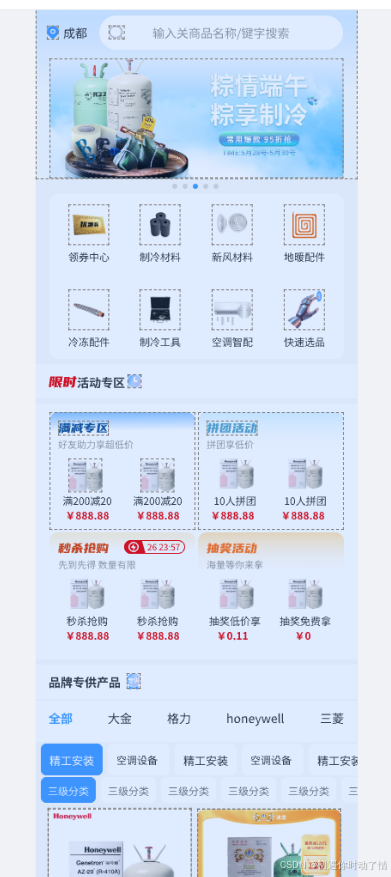
实现上面的UI需要如下
tabbar页面配置
router/TabNavigator.tsx
import { createBottomTabNavigator } from "@react-navigation/bottom-tabs";
import Home from "../pages/home/HomeScreen";
// import CategoryScreen from "../screens/CategoryScreen";
// import CartScreen from "../screens/CartScreen";
import UserScreen from "../pages/user/UserScreen";

import ProfileIcon from "@/components/tabbar/ProfileIcon";
import iconDefault from '@assets/4-001.png';
import iconActive from '@assets/4-002.png';
import { s } from "@/utils/scale";
const Tab = createBottomTabNavigator();
// const iconActive=require('@/assets/4-002.png')
// const iconDefault=require('@/assets/4-001.png')
export default function TabNavigator() {
  return (
    <Tab.Navigator screenOptions={{
      headerShown:false, //隐藏默认导航栏
      tabBarActiveTintColor:"#0094FF",
      tabBarStyle: {
      height: s(60),           // 自定义高度
      paddingBottom: 0,     // 去掉默认 safe area padding
      paddingTop: 5,
    },
    tabBarLabelStyle: {
      fontSize: 12,         // 标签文字大小
    },
     }}>
      <Tab.Screen name="Home" component={Home} options={{ title:"首页" }}/>
      {/* <Tab.Screen name="Category" component={CategoryScreen} options={{ title:"分类" }}/>
      <Tab.Screen name="Cart" component={CartScreen} options={{ title:"购物车" }}/> */}
      {/* <Tab.Screen name="Profile" component={UserScreen} options={{ title:"我的" }}/> */}
      <Tab.Screen
  name="Profile"
  component={UserScreen}
  options={{
    title: "我的",
    tabBarIcon: ({ focused }) => <ProfileIcon focused={focused} defUrl={iconDefault} actUrl={iconActive} />,
  }}
/>
    </Tab.Navigator>
  );
}
自定义tabbar页面
StackNavigator。tsx配置
import { createNativeStackNavigator } from "@react-navigation/native-stack";
import TabNavigator from "./TabNavigator";
import ProductDetail from "../pages/home/pages/deteail/product";
import { RootStackParamList } from "./type";

const Stack = createNativeStackNavigator<RootStackParamList>(); // ★ 类型加上

export default function StackNavigator() {
  return (
    <Stack.Navigator>
      <Stack.Screen name="Tabs" component={TabNavigator} options={{ headerShown:false }}/>
      <Stack.Screen name="Detail" component={ProductDetail} options={{ title:"商品详情" }}/>
    </Stack.Navigator>
  );
}


app.tsx
/**
 * Sample React Native App
 * https://github.com/facebook/react-native
 *
 * @format
 */

import React from 'react';
import { SafeAreaProvider, SafeAreaView } from 'react-native-safe-area-context';
import { StatusBar, StyleSheet } from 'react-native';
import { NavigationContainer } from '@react-navigation/native';

import StackNavigator from './src/router/StackNavigator';

function App() {
  return (
    <SafeAreaProvider>
      {/* 状态栏样式,可根据主题调整 */}
      <StatusBar barStyle="dark-content" backgroundColor="#fff" />

      {/* SafeAreaView 全局包裹 */}
      <SafeAreaView style={styles.container}>
        <NavigationContainer>
          <StackNavigator />
        </NavigationContainer>
      </SafeAreaView>
    </SafeAreaProvider>
  );
}

const styles = StyleSheet.create({
  container: {
    flex: 1, // 必须填充全屏
    backgroundColor: '#af2222ff', // App 默认背景色
  },
});

export default App;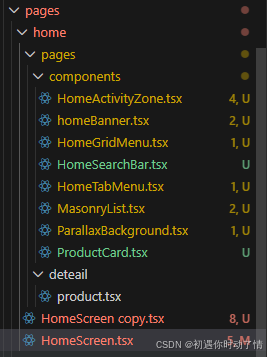
页面目录 首页
HomeActivityZone.tsx
// src/components/home/ActivityZone.tsx
import React from "react";
import { View, Text, Image, StyleSheet } from "react-native";
import LinearGradient from "react-native-linear-gradient";
import type { Activity } from "@/type/home.d";

type Props = { activities: Activity[] };
export default function ActivityZone({ activities = [] }: Props) {
  return (
    <View style={{ padding: 12 }}>
      {activities.map(act => (
        <View key={act.id} style={styles.card}>
          <View style={styles.header}>
            {act.cover ? <Image source={{ uri: act.cover }} style={styles.cover} /> : null}
            <View style={{ marginLeft: 8 }}>
              <Text style={styles.title}>{act.title}</Text>
              {act.subtitle ? <Text style={styles.sub}>{act.subtitle}</Text> : null}
            </View>
          </View>

          <View style={{ flexDirection: "row", marginTop: 8 }}>
            {act.products.slice(0, 2).map(p => (
              <LinearGradient key={p.id} colors={act.bgColors ?? ["#fff", "#fff"]} style={styles.product}>
                <Image source={{ uri: p.image }} style={styles.pImage} />
                <View style={{ flex: 1 }}>
                  <Text numberOfLines={2} style={styles.pTitle}>{p.title}</Text>
                  <Text style={styles.pSold}>销量 {p.sold}</Text>
                </View>
              </LinearGradient>
            ))}
          </View>
        </View>
      ))}
    </View>
  );
}
const styles = StyleSheet.create({
  card: { marginBottom: 12, borderRadius: 8, padding: 8, backgroundColor: "#fff", elevation: 2 },
  header: { flexDirection: "row", alignItems: "center" },
  cover: { width: 48, height: 48, borderRadius: 6 },
  title: { fontSize: 16, fontWeight: "600" },
  sub: { fontSize: 12, color: "#666" },
  product: { flex: 1, flexDirection: "row", padding: 8, borderRadius: 8, alignItems: "center", marginRight: 8 },
  pImage: { width: 64, height: 64, borderRadius: 6, marginRight: 8 },
  pTitle: { fontSize: 14, fontWeight: "600" },
  pSold: { fontSize: 12, color: "#666", marginTop: 6 },
});
homeBanner.tsx
// src/components/home/BannerCarousel.tsx
import React, { useRef, useState } from "react";
import { View, FlatList, Image, Dimensions, StyleSheet } from "react-native";
import type { Banner } from "@/type/home.d";
const { width: SCREEN_W } = Dimensions.get("window");
type Props = { banners: Banner[]; indicatorColor?: string; height?: number };
export default function BannerCarousel({ banners = [], indicatorColor = "#fff", height = 180 }: Props) {
  const [active, setActive] = useState(0);
  const onViewRef = useRef(({ viewableItems }: any) => {
    if (viewableItems.length) setActive(viewableItems[0].index || 0);
  });
  return (
    <View style={{ width: SCREEN_W, height }}>
      <FlatList
        horizontal
        pagingEnabled
        data={banners}
        keyExtractor={(i) => i.id}
        showsHorizontalScrollIndicator={false}
        renderItem={({ item }) => <Image source={{ uri: item.image }} style={{ width: SCREEN_W, height }} />}
        onViewableItemsChanged={onViewRef.current}
        viewabilityConfig={{ viewAreaCoveragePercentThreshold: 50 }}
      />
      <View style={styles.dots}>
        {banners.map((_, i) => (
          <View key={i} style={[styles.dot, i === active ? { backgroundColor: indicatorColor, width: 18 } : { backgroundColor: "#fff", width: 8 }]} />
        ))}
      </View>
    </View>
  );
}
const styles = StyleSheet.create({
  dots: { position: "absolute", bottom: 8, left: 12, flexDirection: "row", alignItems: "center" },
  dot: { height: 8, borderRadius: 4, marginRight: 6 },
});
HomeGridMenu.tsx
// src/components/home/GridMenuPager.tsx
import React, { useMemo } from "react";
import { View, FlatList, Image, Text, TouchableOpacity, StyleSheet, Dimensions } from "react-native";
import type { MenuItem } from "@/type/home.d";
const { width: SCREEN_W } = Dimensions.get("window");
type Props = { menus: MenuItem[]; onPress?: (item: MenuItem) => void };
export default function GridMenuPager({ menus = [], onPress }: Props) {
  const per = 8;
  const pages = useMemo(() => {
    const arr = [];
    for (let i = 0; i < menus.length; i += per) arr.push(menus.slice(i, i + per));
    return arr;
  }, [menus]);

  return (
    <View style={{ height: 200 }}>
      <FlatList
        data={pages}
        horizontal
        pagingEnabled
        showsHorizontalScrollIndicator={false}
        keyExtractor={(_, idx) => "page" + idx}
        renderItem={({ item }) => (
          <View style={[styles.page, { width: SCREEN_W }]}>
            {item.map((m) => (
              <TouchableOpacity key={m.id} style={styles.item} onPress={() => onPress?.(m)}>
                <Image source={{ uri: m.icon }} style={styles.icon} />
                <Text style={styles.title} numberOfLines={1}>{m.title}</Text>
              </TouchableOpacity>
            ))}
          </View>
        )}
      />
    </View>
  );
}
const styles = StyleSheet.create({
  page: { flexDirection: "row", flexWrap: "wrap", padding: 10, justifyContent: "space-between" },
  item: { width: (SCREEN_W - 40) / 4, height: 80, justifyContent: "center", alignItems: "center", marginBottom: 8 },
  icon: { width: 48, height: 48, borderRadius: 8, marginBottom: 6 },
  title: { fontSize: 12, textAlign: "center" },
});
HomeSearchBar.tsx
// src/components/home/HomeSearchBar.tsx
import React from "react";
import { View, Text, TextInput, TouchableOpacity, StyleSheet, StatusBar } from "react-native";

type Props = {
  city?: string;
  onCityPress?: () => void;
  onSearch?: (q: string) => void;
};
export default function HomeSearchBar({ city = "定位中", onCityPress, onSearch }: Props) {
  return (
    <View style={[styles.container]}>
      <TouchableOpacity style={styles.city} onPress={onCityPress}>
        <Text style={styles.cityText}>{city}</Text>
      </TouchableOpacity>
      <View style={styles.inputWrap}>
        <TextInput
          placeholder="搜索商品、店铺"
          returnKeyType="search"
          style={styles.input}
          onSubmitEditing={(e) => onSearch?.(e.nativeEvent.text)}
        />
      </View>
    </View>
  );
}
const styles = StyleSheet.create({
  container: { marginTop: (StatusBar.currentHeight || 24) + 12, marginHorizontal: 12, flexDirection: "row", alignItems: "center", zIndex: 20 },
  city: { width: 80, height: 40, borderRadius: 20, backgroundColor: "#fff", justifyContent: "center", alignItems: "center", marginRight: 8 },
  cityText: { color: "#333" },
  inputWrap: { flex: 1, height: 40, borderRadius: 20, backgroundColor: "#fff", justifyContent: "center", paddingHorizontal: 12 },
  input: { height: 40, fontSize: 14 },
});
HomeTabMenu.tsx
// src/components/home/ThreeLevelMenu.tsx
import React from "react";
import { View, ScrollView, TouchableOpacity, Text, StyleSheet } from "react-native";

type Props = {
  first: string[]; second: string[]; third: string[];
  activeFirst: number; activeSecond: number; activeThird: number;
  onFirst: (i:number)=>void; onSecond:(i:number)=>void; onThird:(i:number)=>void;
};
export default function ThreeLevelMenu({ first, second, third, activeFirst, activeSecond, activeThird, onFirst, onSecond, onThird }: Props) {
  return (
    <View style={{ backgroundColor: "#fff", padding: 8 }}>
        <Text>进来了吗</Text>
      <ScrollView horizontal showsHorizontalScrollIndicator={false} style={styles.row}>
        {first.map((t,i)=>(
          <TouchableOpacity key={t} style={[styles.chip, activeFirst===i && styles.chipActive]} onPress={()=>onFirst(i)}>
            <Text style={activeFirst===i?styles.chipTextActive:styles.chipText}>{t}</Text>
          </TouchableOpacity>
        ))}
      </ScrollView>

      <ScrollView horizontal showsHorizontalScrollIndicator={false} style={styles.row}>
        {second.map((t,i)=>(
          <TouchableOpacity key={t} style={[styles.chipSmall, activeSecond===i && styles.chipSmallActive]} onPress={()=>onSecond(i)}>
            <Text style={activeSecond===i?styles.chipTextActive:styles.chipTextSmall}>{t}</Text>
          </TouchableOpacity>
        ))}
      </ScrollView>

      <ScrollView horizontal showsHorizontalScrollIndicator={false} style={styles.row}>
        {third.map((t,i)=>(
          <TouchableOpacity key={t} style={[styles.chipSmall, activeThird===i && styles.chipSmallActive]} onPress={()=>onThird(i)}>
            <Text style={activeThird===i?styles.chipTextActive:styles.chipTextSmall}>{t}</Text>
          </TouchableOpacity>
        ))}
      </ScrollView>
    </View>
  );
}
const styles = StyleSheet.create({
  row:{maxHeight:48,marginBottom:6},
  chip:{paddingHorizontal:12,paddingVertical:8,borderRadius:20,backgroundColor:'#f2f2f2',marginRight:8},
  chipActive:{backgroundColor:'#FF6347'},
  chipText:{color:'#333'},
  chipTextActive:{color:'#fff'},
  chipSmall:{paddingHorizontal:10,paddingVertical:6,borderRadius:16,backgroundColor:'#f5f5f5',marginRight:8},
  chipSmallActive:{backgroundColor:'#FF6347'},
  chipTextSmall:{color:'#666'},
});
MasonryList.tsx
// src/components/home/MasonryList.tsx
import React from "react";
import { FlatList, } from "react-native";
import type { Product } from "@/type/home.d";
import ProductCard from "./ProductCard";

export default function MasonryList({ products, onEndReached }: { products: Product[]; onEndReached?: ()=>void }) {
  return (
    <FlatList
      data={products}
      keyExtractor={(i)=>i.id}
      numColumns={2}
      columnWrapperStyle={{ justifyContent: "space-between", marginBottom: 12 }}
      renderItem={({ item }) => <ProductCard product={item} />}
      contentContainerStyle={{ paddingHorizontal: 10, paddingBottom: 60 }}
      onEndReached={onEndReached}
      onEndReachedThreshold={0.5}
      showsVerticalScrollIndicator={false}
    />
  );
}
ParallaxBackground.tsx
import React from "react";
import { Animated, ImageBackground, StyleSheet, Dimensions } from "react-native";

const { width: SCREEN_W } = Dimensions.get("window");

type Props = {
  imageUri: string;
  translateY: Animated.AnimatedInterpolation<number>;
  height?: number;
};

export default function ParallaxBackground({ imageUri, translateY, height = 200 }: Props) {
  const src = typeof imageUri === "string" ? { uri: imageUri } : undefined;

  return (
    <Animated.View
      style={[
        styles.wrap,
        {
          height,
          transform: [{ translateY }],
          zIndex: -1, // 确保在所有内容下面
        },
      ]}
    >
      {src && (
        <ImageBackground
          source={src}
          style={[styles.bg, { height }]}
          resizeMode="cover"
        />
      )}
    </Animated.View>
  );
}

const styles = StyleSheet.create({
  wrap: {
    position: "absolute",
    top: 0,
    left: 0,
    width: SCREEN_W,
    overflow: "hidden",
  },
  bg: { width: "100%" },
});
ProductCard.tsx
// src/components/home/ProductCard.tsx
import React from "react";
import { View, Text, Image, StyleSheet } from "react-native";
import type { Product  } from "@/type/home.d";

export default function ProductCard({ product }: { product: Product }) {
  const ratio = product.aspectRatio ?? 1;
  return (
    <View style={styles.card}>
      <Image source={{ uri: product.image }} style={[styles.image, { aspectRatio: ratio }]} resizeMode="cover" />
      <Text style={styles.title} numberOfLines={2}>{product.title}</Text>
      <View style={styles.row}>
        <Text style={styles.price}>¥{product.price}</Text>
        {product.oldPrice ? <Text style={styles.old}>¥{product.oldPrice}</Text> : null}
      </View>
      <Text style={styles.sold}>销量 {product.sold}</Text>
      <Text style={styles.shop} numberOfLines={1}>{product.shop} · {product.distanceKm}km</Text>
    </View>
  );
}
const styles = StyleSheet.create({
  card:{width:'48%', backgroundColor:'#fff', borderRadius:8, padding:8},
  image:{width:'100%', borderRadius:6, backgroundColor:'#eee', marginBottom:8},
  title:{fontSize:14,height:44,lineHeight:22},
  row:{flexDirection:'row',alignItems:'center'},
  price:{fontSize:16,fontWeight:'700',marginRight:8},
  old:{fontSize:12,textDecorationLine:'line-through',color:'#999'},
  sold:{fontSize:12,color:'#666',marginTop:4},
  shop:{fontSize:12,color:'#888',marginTop:6},
});
瀑布流
import React, { useCallback } from "react";
import { View, ActivityIndicator, useWindowDimensions, Text } from "react-native";
import { FlashList } from "@shopify/flash-list";
import FastImage from "react-native-fast-image";

interface ItemProps {
  id: number | string;
  width: number;  // 原图宽
  height: number; // 原图高
  uri: string;
}

interface Props {
  data: ItemProps[];
  loadMore: () => void;
  loading: boolean;
  numColumns?: number;  // 默认2列
}

export default function WaterfallList({
  data,
  loadMore,
  loading,
  numColumns = 2,
}: Props) {

  const { width: screenWidth } = useWindowDimensions();
  const ITEM_MARGIN = 6;
  const itemWidth = (screenWidth - ITEM_MARGIN * (numColumns + 1)) / numColumns;

  const renderItem = useCallback(({ item }: { item: ItemProps }) => {
    const scale = item.height / item.width; // 计算高度比例
    return (
      <View style={{ width: itemWidth, margin: ITEM_MARGIN }}>

        <FastImage
          source={{ uri: item.uri }}
          style={{
            width: itemWidth,
            height: itemWidth * scale,  // 根据宽高比动态计算真实高度
            borderRadius: 8,
            backgroundColor: "#e5e5e5"
          }}
          resizeMode={FastImage.resizeMode.cover}
        />

        {/* 文字示例,让每项高度不一样 */}
        <Text numberOfLines={1} style={{ marginTop: 4, fontSize: 13 }}>
          哈哈哈哈 {item.id}
        </Text>
      </View>
    );
  }, [itemWidth]);
//  estimatedItemSize={200}  // ⚠ v2可不写,但写了更稳
  return (
    <FlashList<ItemProps>
      data={data}
      numColumns={numColumns}
      renderItem={renderItem}
      keyExtractor={(item) => item.id.toString()}
      onEndReached={() => !loading && loadMore()}
      onEndReachedThreshold={0.15}
      ListFooterComponent={
        loading ? <ActivityIndicator style={{ padding: 15 }} /> : null
      }

    />
  );
}
HomeScreen.tsx
import {  Animated, StyleSheet, Text, View } from "react-native"

import ParallaxBackground from "./pages/components/ParallaxBackground";
import { useEffect, useRef, useState } from "react";
import { ms, s } from "@/utils/scale";
import HomeSearchBar from "./pages/components/HomeSearchBar";
import ThreeLevelMenu from "./pages/components/HomeTabMenu";
import ActivityZone from "./pages/components/HomeActivityZone";
import BannerCarousel from "./pages/components/HomeSearchBar";
import MasonryList from "./pages/components/MasonryList";
import GridMenuPager from "./pages/components/HomeGridMenu";
import { HomeModuleConfig, Product } from "@/type/home";
import { fetchHomeConfig } from "@/services/homeApi";

const MOCK_PRODUCTS: Product[] = new Array(30).fill(0).map((_,i)=>({
  id:'pd'+i, image:`https://picsum.photos/400/600?random=${i+50}`, title:`商品 ${i+1}`, price:(Math.random()*200).toFixed(2),
  oldPrice:(Math.random()*200+200).toFixed(2), sold:Math.floor(Math.random()*9999), shop:`店铺${i%5}`, distanceKm:Math.round(Math.random()*50)
}));
const Home=()=>{
    const imageUri="https://pics3.baidu.com/feed/b7fd5266d0160924969c0179408342f5e7cd34ae.jpeg@f_auto?token=ff69846d83ce6fcef343d438f6d42003"


const [config, setConfig] = useState<HomeModuleConfig[]>([]);
  const [bgImage, setBgImage] = useState<string | null>(null);

  useEffect(()=>{ fetchHomeConfig().then(cfg=>{ setConfig(cfg); const bg = cfg.find(c=>c.type==='background'); if(bg) setBgImage(bg.data?.image); }); },[]);

  // parallax
  const scrollY = useRef(new Animated.Value(0)).current;
  const translateY = scrollY.interpolate({
  inputRange: [0, 200],   // 滚动范围
  outputRange: [0, -100], // 位移范围(可实现视差)
  extrapolate: 'clamp'
});
  const bgTranslate = scrollY.interpolate({ inputRange:[0,200], outputRange:[0,-80], extrapolate:'clamp' });

  // three-level menu states
  const [first] = useState<string[]>(['分类A','分类B','分类C','分类D','分类E']);
  const [second,setSecond] = useState<string[]>(['子1','子2','子3']);
  const [third,setThird] = useState<string[]>(['三级1','三级2']);
  const [af,setAf] = useState(0); const [as,setAs] = useState(0); const [at,setAt] = useState(0);
  const [bottomProducts,setBottomProducts] = useState<Product[]>(MOCK_PRODUCTS);

  function onFirst(i:number){ setAf(i); setSecond(['子A','子B','子C']); setAs(0); }
  function onSecond(i:number){ setAs(i); setThird(['三级X','三级Y']); setAt(0); }
  function onThird(i:number){ setAt(i); setBottomProducts(MOCK_PRODUCTS.filter((_,idx)=>idx % 3 === i % 3)); }

  const onScroll = Animated.event([{ nativeEvent: { contentOffset: { y: scrollY } } }], { useNativeDriver: true });
    return(
        <View style={[styles.main,{ flex: 1 }]}>

            <ParallaxBackground imageUri={imageUri} translateY={translateY} />
            <Animated.ScrollView
        scrollEventThrottle={16}
        onScroll={onScroll}
        contentContainerStyle={{ paddingTop: 200 }} // keep space for parallax
      >
        {/* render modules from backend config */}
        {config.map((m, idx) => {
          if (!m.enabled && m.enabled !== undefined) return null;
          switch (m.type) {
            case "search": return <HomeSearchBar key={idx} city="台北市" />;
            case "banner": return <BannerCarousel key={idx} banners={m.data?.banners ?? []} indicatorColor={m.data?.indicatorColor} />;
            case "grid_menu": return <GridMenuPager key={idx} menus={m.data?.menus ?? []} />;
            case "activity": return <ActivityZone key={idx} activities={m.data?.activities ?? []} />;
            case "tab_menu": return (
              <View key={idx}>
                <Text>这是三级菜单</Text>
                <ThreeLevelMenu
                  first={first} second={second} third={third}
                  activeFirst={af} activeSecond={as} activeThird={at}
                  onFirst={onFirst} onSecond={onSecond} onThird={onThird}
                />
                <MasonryList products={bottomProducts} />
              </View>
            );
            default: return null;
          }
        })}
      </Animated.ScrollView>
        </View>
    )
}
const styles=StyleSheet.create({
    main:{
        width:"100%",height:"100%"
    },
    connc:{
        height:s(800)
    },
    text:{
        fontSize:ms(24)
    }
})
export default Home;
运行效果
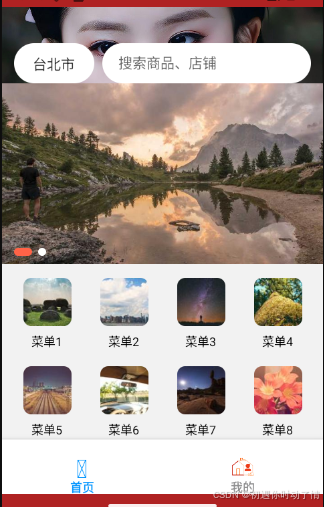
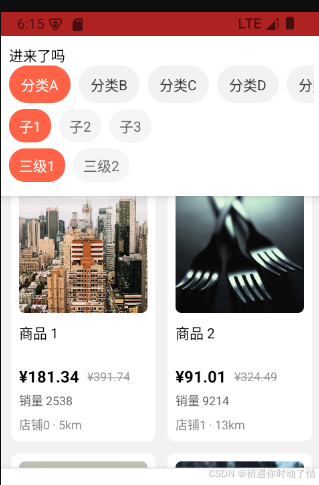
插件说明
yarn add @shopify/flash-list   //瀑布流插件
yarn add react-native-fast-image  # 建议替换 Image,更快更省内存
当前项目依赖说明
| 包名 | 用途说明 | 是否建议保留 |
|---|---|---|
| react / react-native | RN 必备核心 | ✔ 必须 |
| @shopify/flash-list | 大数据高性能列表,比 FlatList / VirtList 更强 | ✔ 推荐 |
| react-native-fast-image | 更快 & 支持缓存的图片组件 | ✔ 推荐 |
| @react-navigation/native | React Native 路由核心库 | ✔ 必备(如需导航) |
| @react-navigation/native-stack | 原生动画 + 更快的栈导航 | ✔ 推荐替代 createStackNavigator |
| @react-navigation/bottom-tabs | 底部 TabBar 导航 | ✔ 推荐 |
| react-native-safe-area-context | 用于处理 iOS 安全区(刘海屏适配) | ✔ 推荐 |
| react-native-screens | 导航性能优化,配合 navigation 必装 | ✔ 推荐 |
| react-native-linear-gradient | 渐变背景组件 UI美化必备 | ✔ 好用可留 |
| react-native-responsive-screen | vw/vh 响应式布局 hp()/wp() |
⚠ 可用但推荐 react-native-responsive-dimensions |
| react-native-size-matters | dp→自动缩放,随屏幕大小适配 | ✔ 新 UI 适配友好 |
项目已装的核心库 --- 必会用法示例
-
① FlashList --- 高性能列表
import { FlashList } from "@shopify/flash-list";
<FlashList
data={list}
renderItem={({ item }) =>- }
estimatedItemSize={120} // ← 必写(渲染速度差异巨大)
/> - }
-
FastImage --- 图片带缓存、加载更快
import FastImage from "react-native-fast-image"
<FastImage
source={{ uri:'https://xx.jpg', priority:'high' }}
style={{ width:120, height:180 }}
resizeMode={FastImage.resizeMode.cover}
/> -
Navigation --- 路由使用示例
import { NavigationContainer } from '@react-navigation/native';
import { createNativeStackNavigator } from '@react-navigation/native-stack';const Stack = createNativeStackNavigator();
export default () => (
<Stack.Navigator>
<Stack.Screen name="Home" component={Home}/>
<Stack.Screen name="Detail" component={Detail}/>
</Stack.Navigator>
); -
渐变背景 LinearGradient
import LinearGradient from 'react-native-linear-gradient'
<LinearGradient
colors={['#4facfe', '#00f2fe']}
style={{ padding:20, borderRadius:10 }}<Text style={{color:'#fff'}}>按钮
-
响应式适配 size-matters
import { scale, verticalScale } from "react-native-size-matters";
<View style={{ width: scale(120), height: verticalScale(80) }} />
RN项目常用插件
| 插件 | 用途 |
|---|---|
| zustand / jotai / recoil | 更轻更快的全局状态管理 |
| react-native-mmkv | 替代 AsyncStorage,读写100x更快 |
| react-native-reanimated | 高性能动画 + 手势 |
| react-native-gesture-handler | 官方手势库 必备 |
| lottie-react-native | 高级动画 UI精致必备 |
| react-native-device-info | 获取设备型号、唯一ID |
| react-native-localize | 多语言 i18n 适配 |
| react-native-bootsplash | 启动闪屏过渡优化 |
| react-native-permissions | 权限统一处理(相机/存储/GPS) |