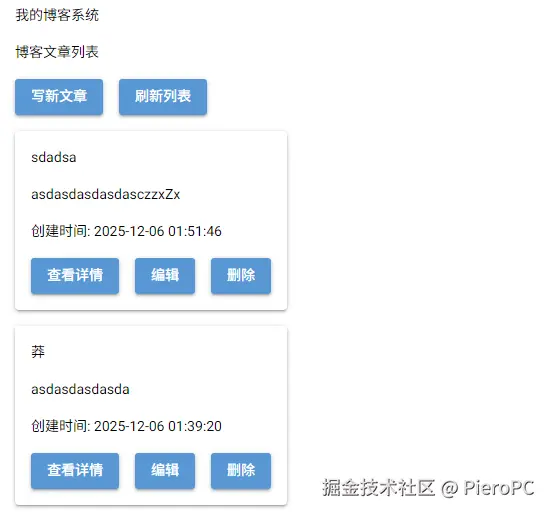
原生版 图:
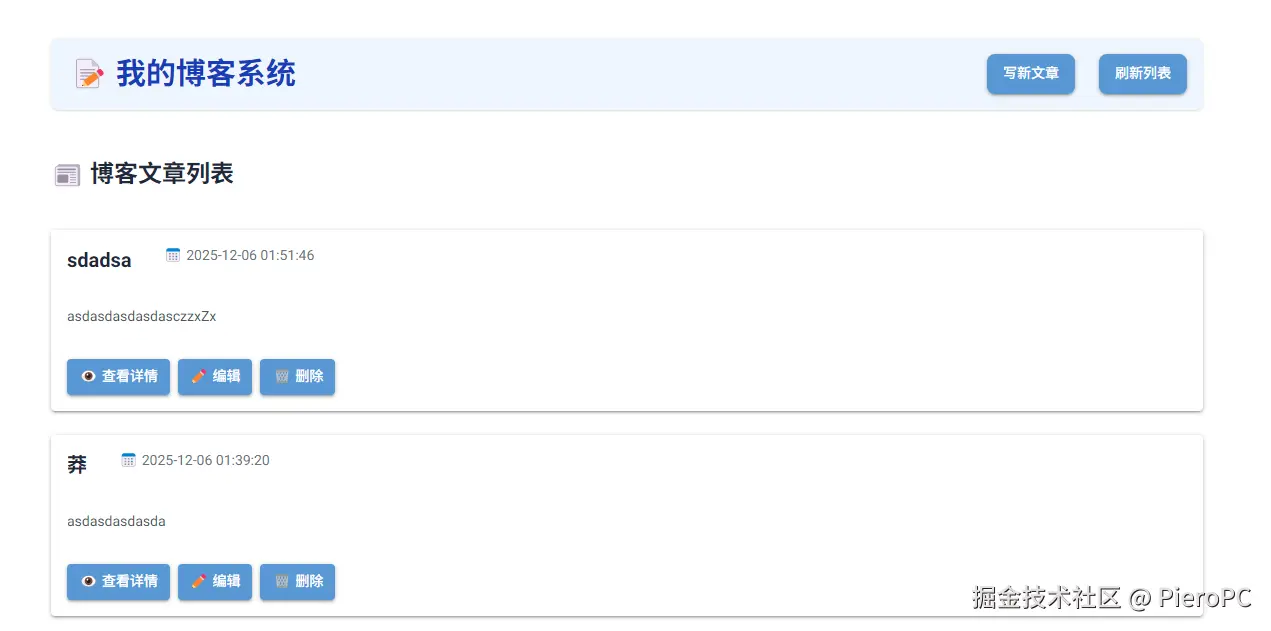
美化版 图:
数据库sqlite3(database.py):
python
import sqlite3
from datetime import datetime

class BlogDB:
    def __init__(self, db_name='blog.db'):
        self.db_name = db_name
        self.init_db()

    def init_db(self):
        """初始化数据库表"""
        conn = sqlite3.connect(self.db_name)
        cursor = conn.cursor()

        # 创建文章表
        cursor.execute('''
        CREATE TABLE IF NOT EXISTS posts (
            id INTEGER PRIMARY KEY AUTOINCREMENT,
            title TEXT NOT NULL,
            content TEXT NOT NULL,
            created_at TIMESTAMP DEFAULT CURRENT_TIMESTAMP,
            updated_at TIMESTAMP DEFAULT CURRENT_TIMESTAMP
        )
        ''')

        # 创建评论表
        cursor.execute('''
        CREATE TABLE IF NOT EXISTS comments (
            id INTEGER PRIMARY KEY AUTOINCREMENT,
            post_id INTEGER,
            author TEXT NOT NULL,
            content TEXT NOT NULL,
            created_at TIMESTAMP DEFAULT CURRENT_TIMESTAMP,
            FOREIGN KEY (post_id) REFERENCES posts (id) ON DELETE CASCADE
        )
        ''')

        conn.commit()
        conn.close()

    def get_connection(self):
        """获取数据库连接"""
        conn = sqlite3.connect(self.db_name)
        conn.row_factory = sqlite3.Row  # 返回字典格式
        return conn

    # 文章相关操作
    def create_post(self, title, content):
        """创建新文章"""
        conn = self.get_connection()
        cursor = conn.cursor()
        cursor.execute(
            'INSERT INTO posts (title, content) VALUES (?, ?)',
            (title, content)
        )
        post_id = cursor.lastrowid
        conn.commit()
        conn.close()
        return post_id

    def get_all_posts(self):
        """获取所有文章"""
        conn = self.get_connection()
        cursor = conn.cursor()
        cursor.execute('SELECT * FROM posts ORDER BY created_at DESC')
        posts = cursor.fetchall()
        conn.close()
        return posts

    def get_post(self, post_id):
        """获取单篇文章"""
        conn = self.get_connection()
        cursor = conn.cursor()
        cursor.execute('SELECT * FROM posts WHERE id = ?', (post_id,))
        post = cursor.fetchone()
        conn.close()
        return post

    def update_post(self, post_id, title, content):
        """更新文章"""
        conn = self.get_connection()
        cursor = conn.cursor()
        cursor.execute(
            'UPDATE posts SET title = ?, content = ?, updated_at = CURRENT_TIMESTAMP WHERE id = ?',
            (title, content, post_id)
        )
        conn.commit()
        conn.close()
        return cursor.rowcount > 0

    def delete_post(self, post_id):
        """删除文章"""
        conn = self.get_connection()
        cursor = conn.cursor()
        cursor.execute('DELETE FROM posts WHERE id = ?', (post_id,))
        conn.commit()
        conn.close()
        return cursor.rowcount > 0

    # 评论相关操作
    def add_comment(self, post_id, author, content):
        """添加评论"""
        conn = self.get_connection()
        cursor = conn.cursor()
        cursor.execute(
            'INSERT INTO comments (post_id, author, content) VALUES (?, ?, ?)',
            (post_id, author, content)
        )
        conn.commit()
        conn.close()

    def get_comments(self, post_id):
        """获取文章的评论"""
        conn = self.get_connection()
        cursor = conn.cursor()
        cursor.execute(
            'SELECT * FROM comments WHERE post_id = ? ORDER BY created_at DESC',
            (post_id,)
        )
        comments = cursor.fetchall()
        conn.close()
return comments原生代码(main.py):
python
from nicegui import ui
import database

# 初始化数据库
db = database.BlogDB()

def create_blog_ui():
    """创建博客界面"""

    # 状态变量
    current_post_id = None
    edit_mode = False

    # 标题
    ui.label('我的博客系统')

    # 创建容器 - 用于切换视图
    main_container = ui.column()
    edit_container = ui.column()

    def show_main_view():
        """显示主视图(文章列表)"""
        edit_container.clear()
        edit_container.visible = False
        main_container.clear()
        main_container.visible = True

        with main_container:
            # 标题
            ui.label('博客文章列表')

            # 功能按钮
            with ui.row():
                ui.button('写新文章', on_click=show_create_post)
                ui.button('刷新列表', on_click=show_main_view)

            # 文章列表
            posts = db.get_all_posts()

            if not posts:
                ui.label('暂无文章,点击"写新文章"开始创作')
                return

            for post in posts:
                with ui.card():
                    # 文章标题
                    ui.label(post['title'])

                    # 预览内容
                    preview = post['content']
                    if len(preview) > 200:
                        preview = preview[:200] + '...'
                    ui.label(preview)

                    # 时间信息
                    ui.label(f'创建时间: {post["created_at"]}')

                    # 操作按钮
                    with ui.row():
                        ui.button('查看详情', on_click=lambda p=post: show_post_detail(p['id']))
                        ui.button('编辑', on_click=lambda p=post: show_edit_post(p['id']))

                        # 删除按钮 - 带确认
                        def delete_with_confirm(p_id):
                            def confirm_delete():
                                db.delete_post(p_id)
                                ui.notify('文章已删除')
                                show_main_view()

                            # 使用对话框确认
                            with ui.dialog() as dialog:
                                with ui.card():
                                    ui.label('确认删除')
                                    ui.label('确定要删除这篇文章吗?')
                                    with ui.row():
                                        ui.button('确定', on_click=lambda: [dialog.close(), confirm_delete()])
                                        ui.button('取消', on_click=dialog.close)
                            dialog.open()

                        ui.button('删除', on_click=lambda p=post: delete_with_confirm(p['id']))

    def show_create_post():
        """显示创建文章界面"""
        nonlocal current_post_id, edit_mode
        current_post_id = None
        edit_mode = True

        main_container.visible = False
        edit_container.clear()
        edit_container.visible = True

        with edit_container:
            ui.label('创建新文章')

            # 标题输入
            title_input = ui.input('文章标题')

            # 内容输入
            content_input = ui.textarea('文章内容')

            # 按钮
            with ui.row():
                ui.button('保存文章', on_click=lambda: save_post(title_input, content_input))
                ui.button('取消', on_click=show_main_view)

    def show_edit_post(post_id):
        """显示编辑文章界面"""
        nonlocal current_post_id, edit_mode
        current_post_id = post_id
        edit_mode = True

        post = db.get_post(post_id)
        if not post:
            ui.notify('文章不存在')
            show_main_view()
            return

        main_container.visible = False
        edit_container.clear()
        edit_container.visible = True

        with edit_container:
            ui.label('编辑文章')

            # 标题输入
            title_input = ui.input('文章标题')
            title_input.value = post['title']

            # 内容输入
            content_input = ui.textarea('文章内容')
            content_input.value = post['content']

            # 按钮
            with ui.row():
                ui.button('保存修改', on_click=lambda: save_post(title_input, content_input))
                ui.button('取消', on_click=show_main_view)

    def save_post(title_input, content_input):
        """保存文章"""
        nonlocal current_post_id

        title = title_input.value.strip()
        content = content_input.value.strip()

        if not title:
            ui.notify('请输入文章标题')
            return

        if not content:
            ui.notify('请输入文章内容')
            return

        try:
            if current_post_id is None:
                # 创建新文章
                db.create_post(title, content)
                ui.notify('文章创建成功')
            else:
                # 更新文章
                db.update_post(current_post_id, title, content)
                ui.notify('文章更新成功')

            show_main_view()
        except Exception as e:
            ui.notify(f'保存失败: {str(e)}')

    def show_post_detail(post_id):
        """显示文章详情"""
        nonlocal current_post_id
        current_post_id = post_id

        post = db.get_post(post_id)
        if not post:
            ui.notify('文章不存在')
            show_main_view()
            return

        main_container.visible = False
        edit_container.clear()
        edit_container.visible = True

        with edit_container:
            # 返回按钮
            ui.button('返回列表', on_click=show_main_view)

            # 文章内容
            ui.label(post['title'])
            ui.label(f'发布时间: {post["created_at"]}')

            with ui.card():
                # 显示多行内容
                lines = post['content'].split('\n')
                for line in lines:
                    ui.label(line)

            # 操作按钮
            with ui.row():
                ui.button('编辑文章', on_click=lambda: show_edit_post(post_id))

                # 删除按钮
                def delete_post():
                    def confirm_delete():
                        db.delete_post(post_id)
                        ui.notify('文章已删除')
                        show_main_view()

                    # 确认对话框
                    with ui.dialog() as dialog:
                        with ui.card():
                            ui.label('确认删除')
                            ui.label('确定要删除这篇文章吗?')
                            with ui.row():
                                ui.button('确定', on_click=lambda: [dialog.close(), confirm_delete()])
                                ui.button('取消', on_click=dialog.close)
                    dialog.open()

                ui.button('删除文章', on_click=delete_post)

            # 评论部分
            ui.label('评论')

            # 添加评论
            with ui.card():
                comment_author = ui.input('你的名字')
                comment_content = ui.textarea('评论内容')

                def add_comment():
                    author = comment_author.value.strip()
                    content = comment_content.value.strip()

                    if not author:
                        ui.notify('请输入名字')
                        return

                    if not content:
                        ui.notify('请输入评论内容')
                        return

                    try:
                        db.add_comment(post_id, author, content)
                        ui.notify('评论发表成功')
                        comment_author.value = ''
                        comment_content.value = ''
                        load_comments()
                    except Exception as e:
                        ui.notify(f'评论失败: {str(e)}')

                ui.button('发表评论', on_click=add_comment)

            # 评论列表
            comments_container = ui.column()

            def load_comments():
                comments_container.clear()
                comments = db.get_comments(post_id)

                if not comments:
                    ui.label('暂无评论')
                    return

                for comment in comments:
                    with comments_container:
                        with ui.card():
                            ui.label(f'{comment["author"]}')
                            ui.label(comment['content'])
                            ui.label(f'评论时间: {comment["created_at"]}')

            # 初始加载评论
            load_comments()

    # 初始显示主视图
    show_main_view()

# 创建界面
create_blog_ui()

# 运行应用
ui.run(title='我的博客系统', port=8080)
特性说明
这个版本完全使用 NiceGUI 的原生功能:
-
不使用
.style():依赖默认样式 -
不使用
.classes():不使用 CSS 类 -
使用原生组件:
ui.label()显示文本ui.button()创建按钮ui.input()和ui.textarea()用于输入ui.card()创建卡片容器ui.dialog()创建对话框ui.column()和ui.row()布局
-
功能完整:
- 文章列表展示
- 创建、编辑、删除文章
- 查看文章详情
- 添加评论
- 确认对话框
运行方式:
bash
复制下载
css
pip install nicegui
python main.py
访问 http://localhost:8080 即可使用博客系统。
美化版代码:
python
from nicegui import ui
import database
# 初始化数据库
db = database.BlogDB()
def create_blog_ui():
"""创建博客界面"""
# 状态变量
current_post_id = None
edit_mode = False
# 主容器 - 使用固定宽度居中布局
with ui.column().classes('mx-auto my-8 w-full max-w-6xl'):
# 顶部标题栏
with ui.row().classes('w-full justify-between items-center p-4 bg-blue-50 rounded-lg shadow mb-8'):
ui.label('📝 我的博客系统').classes('text-3xl font-bold text-blue-800')
with ui.row():
ui.button('写新文章', on_click=lambda: show_create_post()).classes('bg-green-500 text-white hover:bg-green-600 px-4 py-2 rounded-lg')
ui.button('刷新列表', on_click=lambda: show_main_view).classes('bg-blue-500 text-white hover:bg-blue-600 px-4 py-2 rounded-lg ml-2')
# 主内容区域
main_container = ui.column().classes('w-full')
edit_container = ui.column().classes('w-full')
def show_main_view():
"""显示主视图(文章列表)"""
edit_container.visible = False
main_container.clear()
main_container.visible = True
with main_container:
# 页面标题
ui.label('📰 博客文章列表').classes('text-2xl font-bold text-gray-800 mb-6')
# 文章列表
posts = db.get_all_posts()
if not posts:
with ui.card().classes('w-full p-8 text-center'):
ui.icon('edit_note', size='xl').classes('text-gray-400 mb-4')
ui.label('暂无文章').classes('text-xl text-gray-600 mb-2')
ui.label('点击"写新文章"按钮开始您的创作之旅').classes('text-gray-500')
return
# 文章网格布局
with ui.grid(columns=1).classes('w-full gap-6'):
for post in posts:
with ui.card().classes('w-full hover:shadow-lg transition-shadow duration-300'):
# 卡片头部
with ui.row().classes('justify-between items-start mb-4'):
ui.label(post['title']).classes('text-xl font-bold text-gray-800 truncate flex-grow')
ui.label(f'📅 {post["created_at"]}').classes('text-sm text-gray-500 ml-4')
# 文章内容预览
preview = post['content']
if len(preview) > 300:
preview = preview[:300] + '...'
ui.label(preview).classes('text-gray-600 mb-4 line-clamp-3')
# 操作按钮区域
with ui.row().classes('justify-end gap-2'):
ui.button('👁️ 查看详情', on_click=lambda p=post: show_post_detail(p['id'])).classes('bg-blue-100 text-blue-700 hover:bg-blue-200 px-3 py-1 rounded')
ui.button('✏️ 编辑', on_click=lambda p=post: show_edit_post(p['id'])).classes('bg-yellow-100 text-yellow-700 hover:bg-yellow-200 px-3 py-1 rounded')
# 删除按钮 - 带确认
def delete_with_confirm(p_id, p_title):
def confirm_delete():
db.delete_post(p_id)
ui.notify(f'文章"{p_title}"已删除', type='positive')
show_main_view()
# 使用对话框确认
with ui.dialog() as dialog:
with ui.card().classes('p-6 w-96'):
ui.icon('warning', color='red', size='xl').classes('mx-auto mb-4')
ui.label('确认删除').classes('text-xl font-bold text-center mb-2')
ui.label(f'确定要删除文章"{p_title}"吗?此操作不可恢复。').classes('text-gray-600 text-center mb-6')
with ui.row().classes('justify-center gap-4'):
ui.button('确定删除', on_click=lambda: [dialog.close(), confirm_delete()]).classes('bg-red-500 text-white hover:bg-red-600 px-4 py-2 rounded')
ui.button('取消', on_click=dialog.close).classes('bg-gray-200 text-gray-700 hover:bg-gray-300 px-4 py-2 rounded')
dialog.open()
ui.button('🗑️ 删除', on_click=lambda p=post: delete_with_confirm(p['id'], p['title'])).classes('bg-red-100 text-red-700 hover:bg-red-200 px-3 py-1 rounded')
def show_create_post():
"""显示创建文章界面"""
nonlocal current_post_id, edit_mode
current_post_id = None
edit_mode = True
main_container.visible = False
edit_container.clear()
edit_container.visible = True
with edit_container:
# 页面标题
with ui.row().classes('items-center mb-6'):
ui.icon('add_circle', color='green', size='lg')
ui.label('创作新文章').classes('text-2xl font-bold text-gray-800 ml-2')
# 表单区域
with ui.card().classes('w-full p-6'):
# 标题输入
ui.label('文章标题').classes('text-lg font-semibold text-gray-700 mb-2')
title_input = ui.input(placeholder='请输入文章标题...').classes('w-full p-3 border rounded-lg mb-6 focus:ring-2 focus:ring-blue-500 focus:border-blue-500')
# 内容输入
ui.label('文章内容').classes('text-lg font-semibold text-gray-700 mb-2')
content_input = ui.textarea(placeholder='开始创作您的内容...').classes('w-full h-96 p-3 border rounded-lg focus:ring-2 focus:ring-blue-500 focus:border-blue-500')
# 操作按钮
with ui.row().classes('justify-end gap-4 mt-8'):
ui.button('保存文章', on_click=lambda: save_post(title_input, content_input)).classes('bg-green-500 text-white hover:bg-green-600 px-6 py-3 rounded-lg text-lg')
ui.button('取消', on_click=show_main_view).classes('bg-gray-300 text-gray-700 hover:bg-gray-400 px-6 py-3 rounded-lg text-lg')
def show_edit_post(post_id):
"""显示编辑文章界面"""
nonlocal current_post_id, edit_mode
current_post_id = post_id
edit_mode = True
post = db.get_post(post_id)
if not post:
ui.notify('文章不存在', type='warning')
show_main_view()
return
main_container.visible = False
edit_container.clear()
edit_container.visible = True
with edit_container:
# 页面标题
with ui.row().classes('items-center mb-6'):
ui.icon('edit', color='yellow', size='lg')
ui.label('编辑文章').classes('text-2xl font-bold text-gray-800 ml-2')
# 表单区域
with ui.card().classes('w-full p-6'):
# 标题输入
ui.label('文章标题').classes('text-lg font-semibold text-gray-700 mb-2')
title_input = ui.input(placeholder='请输入文章标题...').classes('w-full p-3 border rounded-lg mb-6 focus:ring-2 focus:ring-blue-500 focus:border-blue-500')
title_input.value = post['title']
# 内容输入
ui.label('文章内容').classes('text-lg font-semibold text-gray-700 mb-2')
content_input = ui.textarea(placeholder='开始编辑您的内容...').classes('w-full h-96 p-3 border rounded-lg focus:ring-2 focus:ring-blue-500 focus:border-blue-500')
content_input.value = post['content']
# 操作按钮
with ui.row().classes('justify-end gap-4 mt-8'):
ui.button('保存修改', on_click=lambda: save_post(title_input, content_input)).classes('bg-yellow-500 text-white hover:bg-yellow-600 px-6 py-3 rounded-lg text-lg')
ui.button('取消', on_click=show_main_view).classes('bg-gray-300 text-gray-700 hover:bg-gray-400 px-6 py-3 rounded-lg text-lg')
def save_post(title_input, content_input):
"""保存文章"""
nonlocal current_post_id
title = title_input.value.strip()
content = content_input.value.strip()
if not title:
ui.notify('请输入文章标题', type='warning')
return
if not content:
ui.notify('请输入文章内容', type='warning')
return
try:
if current_post_id is None:
# 创建新文章
db.create_post(title, content)
ui.notify('🎉 文章创建成功!', type='positive')
else:
# 更新文章
db.update_post(current_post_id, title, content)
ui.notify('✅ 文章更新成功!', type='positive')
show_main_view()
except Exception as e:
ui.notify(f'保存失败: {str(e)}', type='negative')
def show_post_detail(post_id):
"""显示文章详情"""
nonlocal current_post_id
current_post_id = post_id
post = db.get_post(post_id)
if not post:
ui.notify('文章不存在', type='warning')
show_main_view()
return
main_container.visible = False
edit_container.clear()
edit_container.visible = True
with edit_container:
# 返回按钮和标题
with ui.row().classes('justify-between items-center mb-6'):
ui.button('← 返回列表', on_click=show_main_view).classes('bg-gray-200 text-gray-700 hover:bg-gray-300 px-4 py-2 rounded-lg')
ui.label('文章详情').classes('text-2xl font-bold text-gray-800')
# 文章内容卡片
with ui.card().classes('w-full p-8 mb-8'):
# 文章标题
ui.label(post['title']).classes('text-3xl font-bold text-gray-800 mb-4')
# 时间信息
with ui.row().classes('items-center text-gray-500 mb-6'):
ui.icon('schedule', size='sm')
ui.label(f'发布时间: {post["created_at"]}').classes('ml-2')
# 文章内容
content_lines = post['content'].split('\n')
with ui.column().classes('gap-4'):
for line in content_lines:
if line.strip(): # 只显示非空行
ui.label(line).classes('text-gray-700 leading-relaxed')
# 操作按钮区域
with ui.card().classes('w-full p-6 mb-8'):
ui.label('文章操作').classes('text-lg font-semibold text-gray-700 mb-4')
with ui.row().classes('gap-4'):
ui.button('✏️ 编辑文章', on_click=lambda: show_edit_post(post_id)).classes('bg-yellow-500 text-white hover:bg-yellow-600 px-6 py-3 rounded-lg')
# 删除按钮
def delete_post():
def confirm_delete():
db.delete_post(post_id)
ui.notify('文章已删除', type='positive')
show_main_view()
# 确认对话框
with ui.dialog() as dialog:
with ui.card().classes('p-6 w-96'):
ui.icon('warning', color='red', size='xl').classes('mx-auto mb-4')
ui.label('确认删除').classes('text-xl font-bold text-center mb-2')
ui.label('确定要删除这篇文章吗?此操作不可恢复。').classes('text-gray-600 text-center mb-6')
with ui.row().classes('justify-center gap-4'):
ui.button('确定删除', on_click=lambda: [dialog.close(), confirm_delete()]).classes('bg-red-500 text-white hover:bg-red-600 px-4 py-2 rounded')
ui.button('取消', on_click=dialog.close).classes('bg-gray-200 text-gray-700 hover:bg-gray-300 px-4 py-2 rounded')
dialog.open()
ui.button('🗑️ 删除文章', on_click=delete_post).classes('bg-red-500 text-white hover:bg-red-600 px-6 py-3 rounded-lg')
# 评论区域
with ui.card().classes('w-full p-6'):
ui.label('💬 评论').classes('text-2xl font-bold text-gray-800 mb-6')
# 添加评论表单
with ui.card().classes('bg-gray-50 p-6 mb-8'):
ui.label('添加新评论').classes('text-lg font-semibold text-gray-700 mb-4')
with ui.grid(columns=1).classes('gap-4'):
comment_author = ui.input(placeholder='请输入您的名字').classes('w-full p-3 border rounded-lg focus:ring-2 focus:ring-blue-500')
comment_content = ui.textarea(placeholder='请输入评论内容...').classes('w-full h-32 p-3 border rounded-lg focus:ring-2 focus:ring-blue-500')
def add_comment():
author = comment_author.value.strip()
content = comment_content.value.strip()
if not author:
ui.notify('请输入名字', type='warning')
return
if not content:
ui.notify('请输入评论内容', type='warning')
return
try:
db.add_comment(post_id, author, content)
ui.notify('评论发表成功!', type='positive')
comment_author.value = ''
comment_content.value = ''
load_comments()
except Exception as e:
ui.notify(f'评论失败: {str(e)}', type='negative')
ui.button('发表评论', on_click=add_comment).classes('bg-blue-500 text-white hover:bg-blue-600 px-6 py-2 rounded-lg mt-4')
# 评论列表
comments_container = ui.column().classes('gap-4')
def load_comments():
comments_container.clear()
comments = db.get_comments(post_id)
if not comments:
with ui.card().classes('text-center p-8'):
ui.icon('chat', size='xl').classes('text-gray-400 mb-4')
ui.label('暂无评论').classes('text-gray-600')
ui.label('快来发表第一条评论吧!').classes('text-gray-500 text-sm')
return
for comment in comments:
with comments_container:
with ui.card().classes('p-6'):
# 评论头部
with ui.row().classes('justify-between items-center mb-3'):
with ui.row().classes('items-center'):
ui.icon('person', color='blue', size='sm')
ui.label(comment['author']).classes('font-bold text-gray-800 ml-2')
ui.label(f'📅 {comment["created_at"]}').classes('text-sm text-gray-500')
# 评论内容
ui.label(comment['content']).classes('text-gray-700 ml-8 mt-2')
# 初始加载评论
load_comments()
# 初始显示主视图
show_main_view()
# 创建界面
create_blog_ui()
# 运行应用
ui.run(title='📝 我的博客系统', port=8080, favicon='📝')主要美化特性:
1. 布局美化
- 使用 Tailwind CSS 类进行响应式布局
- 居中容器,最大宽度限制
- 卡片式设计,阴影效果
- 网格和列布局
2. 颜色方案
- 蓝色系主色调(标题、按钮)
- 绿色表示创建/成功
- 黄色表示编辑/警告
- 红色表示删除/危险
- 灰色用于背景和辅助信息
3. 组件美化
- 按钮:圆角、悬停效果、内边距
- 输入框:聚焦效果、圆角边框
- 卡片:阴影、内边距、背景色
- 图标:使用表情符号和图标增强视觉
4. 交互反馈
- 按钮悬停效果
- 输入框聚焦效果
- 成功/警告/错误通知
- 确认对话框美化
5. 实用CSS类
mx-auto my-8:居中布局w-full max-w-6xl:响应式宽度p-4/p-6/p-8:内边距rounded-lg:圆角shadow/hover:shadow-lg:阴影效果bg-{color}-500:背景色text-{color}-700:文字颜色hover:bg-{color}-600:悬停效果
6. 图标和表情
- 使用表情符号增强可读性
- 适当使用图标组件
- 统一视觉语言
这个美化版本保持了原有功能,但提供了更好的用户体验和视觉效果。所有样式都通过 .classes() 方法添加,没有使用 .style() 方法。