当一个类的初始化参数非常多时,如果继续使用 构造函数初始化 ,不仅会出现"超长参数列表",还非常 容易传错顺序 ,导致代码难读、难维护。如果改用 逐个字段赋值,虽然能避免参数顺序问题,但会降低代码复用性,还容易遗漏某些字段。
为了解决这些问题,我们可以引入 建造者(Builder)设计模式 ------
将对象的构建过程与对象本身解耦,通过链式调用的方式优雅地完成初始化。
① 创建 Monster 脚本(怪物类)
Monster 是一个包含大量属性的类,若用构造函数初始化会非常麻烦且容易出错。
我们让 Monster 专注于"怪物自身的行为",而不是负责初始化过程。
cs
using System.Collections.Generic;
using UnityEngine;

// 定义怪物的 AI 类型
public enum MonsterAIType
{
    Passive,
    Aggressive,
    Patrol,
    Boss
}
// 定义怪物的稀有度
public enum MonsterRarity
{
    Normal,
    Elite,
    Rare,
    Legendary
}

public class Monster : MonoBehaviour
{
    // ------ 基础属性 ------
    public string monsterName;
    public int level;
    public float maxHP;
    public float attack;
    public float defense;
    public float moveSpeed;
    public float attackRange;
    public float detectRange;

    // ------ 扩展属性 ------
    public MonsterAIType aiType;
    public MonsterRarity rarity;
    public bool canFly;
    public bool isUndead;
    public Vector3 size;

    // ------ 掉落相关 ------
    public List<string> dropItems = new List<string>();

    // ------ 技能相关 ------
    public List<string> skills = new List<string>();

    public void PrintInfo()
    {
        Debug.Log(
            $"怪物信息:\n" +
            $"名字: {monsterName}\n" +
            $"等级: {level}\n" +
            $"稀有度: {rarity}\n" +
            $"HP: {maxHP}, 攻击: {attack}, 防御: {defense}\n" +
            $"速度: {moveSpeed}\n" +
            $"AI: {aiType}\n" +
            $"能飞: {canFly}\n" +
            $"不死族: {isUndead}\n" +
            $"掉落物: {string.Join(",", dropItems)}\n" +
            $"技能: {string.Join(",", skills)}"
        );
    }
}
② 创建 MonsterBuilder 脚本(怪物构建者)
你只需要构建怪物时所需的方法,最后用 .Build() 返回最终怪物对象即可。这种链式写法不仅更清晰,也避免了参数过多导致的混乱。
cs
using System.Collections;
using System.Collections.Generic;
using System.Threading;
using UnityEngine;

public class MonsterBuilder
{
    private Monster monster;

    public MonsterBuilder()
    {
        monster = new GameObject("Monster").AddComponent<Monster>();
        //这里可以设置怪物的父对象
    }

    public MonsterBuilder SetName(string name)
    {
        monster.name = name;
        monster.monsterName = name;
        return this;
    }

    public MonsterBuilder SetLevel(int level)
    {
        monster.level = level;
        return this;
    }

    public MonsterBuilder SetStats(float hp, float atk, float def)
    {
        monster.maxHP = hp;
        monster.attack = atk;
        monster.defense = def;
        return this;
    }

    public MonsterBuilder SetMovement(float speed, float atkRange, float detectRange)
    {
        monster.moveSpeed = speed;
        monster.attackRange = atkRange;
        monster.detectRange = detectRange;
        return this;
    }

    public MonsterBuilder SetAI(MonsterAIType type)
    {
        monster.aiType = type;
        return this;
    }

    public MonsterBuilder SetRarity(MonsterRarity rarity)
    {
        monster.rarity = rarity;
        return this;
    }

    public MonsterBuilder SetTags(bool canFly, bool isUndead)
    {
        monster.canFly = canFly;
        monster.isUndead = isUndead;
        return this;
    }

    public MonsterBuilder SetSize(Vector3 size)
    {
        monster.size = size;
        return this;
    }

    public MonsterBuilder AddSkill(string skill)
    {
        monster.skills.Add(skill);
        return this;
    }

    public MonsterBuilder AddDrop(string drop)
    {
        monster.dropItems.Add(drop);
        return this;
    }

    public Monster Build()
    {
        return monster;
    }
}
③ 创建 CreatMonsterManage(怪物生成脚本)
创建怪物生成脚本CreatMonsterManage(这里设置了4个怪物,最后一个测试怪物模拟的是假如一个怪物你不想让他有某些属性的时候直接不调用对应方法即可)。在实际生产中,这个脚本可以替换成 MonsterFactory(工厂类),让各类怪物的创建更集中、更可复用。
cs
using System.Collections;
using System.Collections.Generic;
using UnityEngine;

public class CreatMonsterManage : MonoBehaviour
{
    void Start()
    {
        //史莱姆
        var monster = CreateSlime();
        monster.PrintInfo();
        //狼人
        var monster2 = CreateEliteWolf();
        monster2.PrintInfo();
        //亡灵
        var monster3 =  CreateRareGhost();
        monster3.PrintInfo();
        //测试怪物//模拟未设置参数的情况
        var monster4 = CreateTextMonster();
        monster4.PrintInfo();
    }
    // 创建史莱姆
    public static Monster CreateSlime()
    {
        return new MonsterBuilder()
            .SetName("史莱姆")
            .SetLevel(1)
            .SetStats(50, 10, 5)
            .SetMovement(2f, 1f, 3f)
            .SetAI(MonsterAIType.Passive)
            .SetRarity(MonsterRarity.Normal)
            .SetTags(false, false)
            .SetSize(new Vector3(0.5f, 0.5f, 0.5f))
            .AddDrop("史莱姆凝胶")
            .AddSkill("弹跳")
            .Build();
    }
    // 创建狼人
    public static Monster CreateEliteWolf()
    {
        return new MonsterBuilder()
            .SetName("狂暴野狼")
            .SetLevel(5)
            .SetStats(300, 45, 20)
            .SetMovement(5f, 1.5f, 8f)
            .SetAI(MonsterAIType.Aggressive)
            .SetRarity(MonsterRarity.Elite)
            .SetTags(false, false)
            .SetSize(new Vector3(1.2f, 1.2f, 1.2f))
            .AddSkill("撕咬")
            .AddSkill("扑击")
            .AddDrop("野狼皮")
            .AddDrop("野兽之牙")
            .Build();
    }
    // 创建亡灵
    public static Monster CreateRareGhost()
    {
        return new MonsterBuilder()
            .SetName("幽魂")
            .SetLevel(12)
            .SetStats(500, 70, 15)
            .SetMovement(3f, 2f, 6f)
            .SetAI(MonsterAIType.Patrol)
            .SetRarity(MonsterRarity.Rare)
            .SetTags(true, true) // 会飞,亡灵
            .SetSize(new Vector3(1f, 1.5f, 1f))
            .AddSkill("穿墙")
            .AddSkill("灵魂吸取")
            .AddDrop("幽魂布")
            .Build();
    }
    public static Monster CreateTextMonster()
    {
        return new MonsterBuilder()
            .SetName("测试怪物")
            .Build();
    }
}
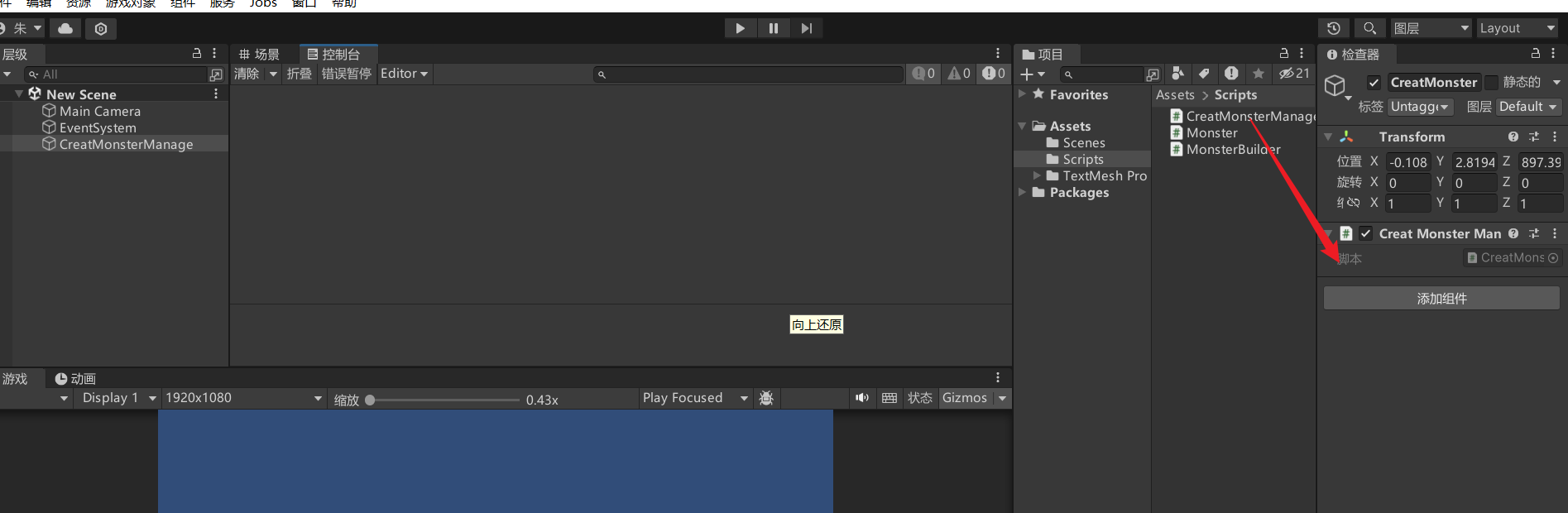
最后将CreatMonsterManage添加到场景中的一个空对象上然后运行游戏即可。
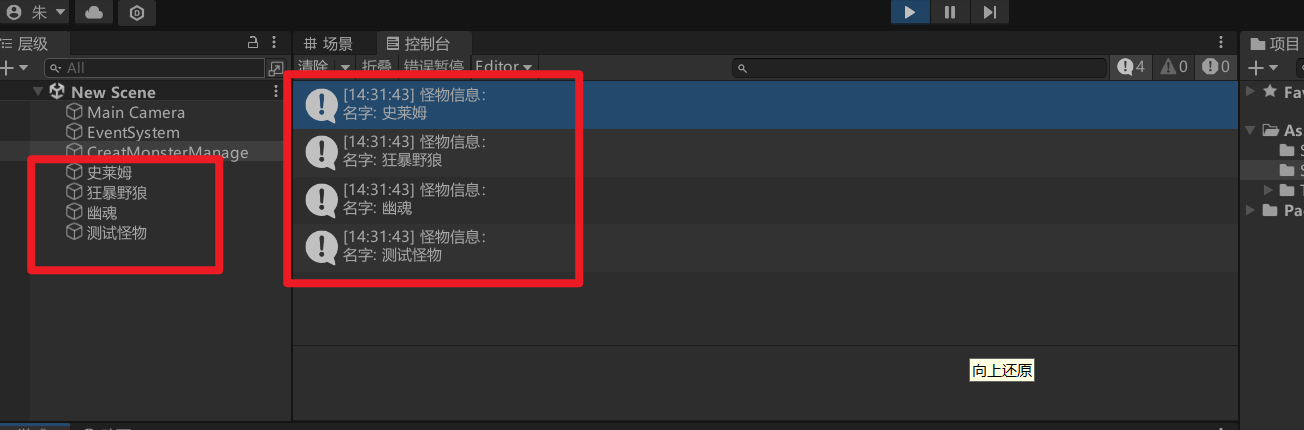
可以看到我们预设的怪物都已经创建了出来并且也打印了相关属性。