背景说明
1、源端是AWS、目标端是阿里云
2、最后个割接环境,客户能接受停机迁移
3、源端数据量比较大,大概3T
官方迁移文档
Elasticsearch迁移方案选取指南_检索分析服务 Elasticsearch版(ES)-阿里云帮助中心
将AWS中的ES数据迁移到阿里云ES中_检索分析服务 Elasticsearch版(ES)-阿里云帮助中心
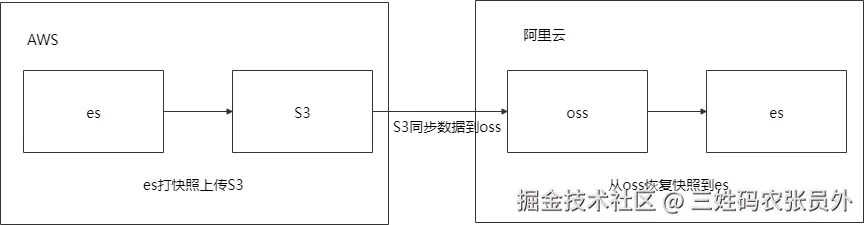
ES迁移整体流程
优化目标端ES配置项
修改下面的配置可以有效加速快照恢复的速度。
增加恢复带宽
bash
PUT /_cluster/settings
{
    "transient": {
        "indices.recovery.max_bytes_per_sec": "300mb"
    }
}
GET /_cluster/settings?include_defaults=true&flat_settings=true
1、限制恢复带宽: 将 indices.recovery.max_bytes_per_sec 参数设置为 300mb(默认是40mb)
2、临时生效: 使用 transient 配置,重启后失效
3、影响范围: 控制分片恢复、重新平衡等操作的网络传输速度
调整集群分片分配并发度: 配置 Elasticsearch 集群中分片恢复和分配的并发数量
默认值是4
bash
PUT _cluster/settings
{
  "persistent": {
    "cluster.routing.allocation.node_concurrent_recoveries" : "16",
    "cluster.routing.allocation.node_initial_primaries_recoveries" : "16"
  }
}
cluster.routing.allocation.node_concurrent_recoveries:
- 设置每个节点上同时进行的分片恢复操作数量为 16
- 影响集群重新平衡、节点重启后的数据恢复速度
cluster.routing.allocation.node_initial_primaries_recoveries:
- 设置每个节点上同时进行的主分片初始恢复操作数量为 16
- 主要影响新索引创建或集群启动时的主分片分配速度
配置特点
- 持久化设置: 使用 persistent 配置,重启后仍然有效
- 性能优化: 增加并发度可以加快集群恢复和重新平衡速度
- 资源管理: 需要根据节点硬件资源合理设置,避免过度消耗系统资源
适用场景
- 集群扩容或缩容时加速分片重新分配
- 节点维护后快速恢复服务
- 大规模数据迁移时提高效率
总结的迁移步骤
第一次快照恢复动作
1、在AWS上的es创建快照并上传到S3
bash
GET _snapshot
# 创建仓库
PUT _snapshot/ali_backup
{
  "type": "s3",
  "settings": {
    "bucket": "AWS云S3桶名称",
    "base_path": "桶下面的路径",
    "region": "cn-north-1",
    "endpoint": "s3.cn-north-1.amazonaws.com.cn"
  }
}
# 第一个版本快照
PUT _snapshot/ali_backup/prd_01
{
  "indices": "*",
  "ignore_unavailable": true,
  "include_global_state": false
}
# 查看快照进度
GET _cat/snapshots/ali_backup?v
2、启动S3到oss的数据同步任务:经过上面的步骤AWS的es数据已经同步到S3,配置数据同步将S3数据同步到阿里云OSS并观察数据同步结果
3、在阿里云ES上恢复快照
bash
# 更新仓库
PUT _snapshot/ali_backup
{
"type": "oss",
"settings": {
            "base_path": "桶下面的路径",
            "endpoint": "http://oss-cn-beijing-internal.aliyuncs.com",
            "access_key_id": "*************",
            "secret_access_key": "*************",
            "bucket": "oss桶",
            "compress": true
      }
}

# 查看快照
GET _snapshot/ali_backup/prd_01

# 全量恢复快照(排除系统索引,注意这里是第一次恢复所以不需要关闭索引)
POST _snapshot/ali_backup/prd_01/_restore
{
    "indices": "*,-.*,-system*,-ilm*,-kibana*,-.kibana*"
}
# * 恢复镜像中的所有索引
# -.*  排除系统索引
# -system*
# -ilm* 排除ILM索引
# -kibana*,-.kibana*  排除kibana索引
第二次快照恢复动作
1、在AWS上的es创建快照并上传到S3,第2个版本prd_02
bash
# 第2个版本快照
PUT _snapshot/ali_backup/prd_02
{
  "indices": "*",
  "ignore_unavailable": true,
  "include_global_state": false
}
# 查看快照进度
GET _cat/snapshots/ali_backup?v
2、启动S3到oss的数据同步任务
3、在阿里云ES上恢复快照
bash
# 查看快照
GET _snapshot/ali_backup/prd_02

# 关闭所有索引主要要排除系统索引,不然kibana会报错就没法操作了
POST /*,-.*,-system*,-ilm*,-kibana*,-.kibana*/_close

# 全量恢复快照排除系统索引
POST _snapshot/ali_backup/prd_02/_restore
{
    "indices": "*,-.*,-system*,-ilm*,-kibana*,-.kibana*"
}
总结说明
快照恢复比较简单高效,当据量大的情况下第一次打快照和恢复快照时间较长,后面做增量快照和恢复增量快照比较快。
es生成快照脚本
下面是基于python开发的生成快照、关闭索引、恢复索引、打开索引、查看恢复状态、查看索引版本的工具,方便进行多次打快照恢复快照避免在kibana上频繁操作误操作。
es_ba_config.toml
ini
[AWS-es01]
es_host = "xxxxx.ssss.net.cn"
es_port = 9200
protocol = "https"
username = "elastic"  # 用户名
password = "xxxxxxxxxxxxxx"  # 密码

[AWS-es02]
es_host = "xxxxx.ssss.cn"
es_port = 9200
protocol = "https"
username = "elastic"  # 用户名
password = "XXXXXXXXP"  # 密码
es_re_config.toml
ini
[ALI-es-01]
es_host = "XXXXXXXXXXXXXXXXXXXXXXXXxx.aliyuncs.com"
es_port = 9200
protocol = "https"
username = "elastic"  # 用户名
password = "XXXXXXXXX"  # 密码

[ALI-es-02]
es_host = "XXXXXXXXXXXXXXXXXXXXXXXXxx.aliyuncs.com"
es_port = 9200
protocol = "https"
username = "elastic"  # 用户名
password = "XXXXXXXXX"  # 密码
python
import requests
import toml
from flask import Flask, jsonify, request
app = Flask(__name__)

#----------------------------加载配置文件---------------------------#
def set_config(config_name):
    """
    获取配置信息并设置全局变量
    """
    global ES_HOST, ES_PORT, PROTOCOL, USERNAME, PASSWORD

    try:
        file_path = r"D:\work\es_ba_config.toml"
        config = toml.load(file_path)[config_name]

        # 设置全局变量
        ES_HOST = config.get('es_host')
        ES_PORT = config.get('es_port')
        PROTOCOL = config.get('protocol')
        USERNAME = config.get('username')
        PASSWORD = config.get('password')

        print({
            'ES_HOST': ES_HOST,
            'ES_PORT': ES_PORT,
            'PROTOCOL': PROTOCOL,
            'USERNAME': USERNAME,
            'PASSWORD': PASSWORD
        })
    except Exception as e:
        print(f"加载配置失败: {e}")
        return None
#----------------------------加载配置文件---------------------------#

@app.route('/api/get_snapshot_status', methods=['POST'])
def api_get_snapshot_status():
    """
    API接口:获取快照状态
    执行命令: GET _cat/snapshots/plrs_target_ps_visit_precondition?v
    """
    data = request.get_json()
    repository = data.get('repository')
    config_name = data.get('config_name')
    set_config(config_name)
    # 构建请求 URL
    url = f"{PROTOCOL}://{ES_HOST}:{ES_PORT}/_cat/snapshots/{repository}?v"

    # 设置请求参数
    params = {
        'v': 'true'  # 显示详细信息
    }

    # 设置认证信息
    auth = None
    if USERNAME and PASSWORD:
        auth = (USERNAME, PASSWORD)

    try:
        # 发送 GET 请求,添加认证信息和参数
        response = requests.get(url, params=params, auth=auth)
        response.raise_for_status()  # 检查请求是否成功

        print(response.text)

        return jsonify({
            "code": 200,
            "message": "success",
            "data": response.text
        })

    except requests.exceptions.RequestException as e:
        return jsonify({
            "code": 500,
            "message": f"获取快照状态失败: {str(e)}",
            "data": None
        })


@app.route('/api/create_snapshot', methods=['POST'])
def api_create_snapshot():
    """
    API接口:创建快照
    执行命令: PUT _snapshot/plrs_target_ps_visit_precondition/prd_01
    """
    # 使用默认参数匹配指定的快照创建命令
    ignore_unavailable = True
    include_global_state = False
    data = request.get_json()
    repository = data.get('repository')
    snapshot = data.get('snapshot')
    indices = data.get('indices')
    config_name = data.get('config_name')
    set_config(config_name)

    # 构建请求 URL
    url = f"{PROTOCOL}://{ES_HOST}:{ES_PORT}/_snapshot/{repository}/{snapshot}"

    # 设置认证信息
    auth = None
    if USERNAME and PASSWORD:
        auth = (USERNAME, PASSWORD)

    # 设置请求体
    body = {
        "indices": indices,
        "ignore_unavailable": ignore_unavailable,
        "include_global_state": include_global_state
    }

    try:
        # 发送 PUT 请求,添加认证信息和请求体
        response = requests.put(url, auth=auth, json=body)
        response.raise_for_status()  # 检查请求是否成功

        # 返回 JSON 响应数据
        return jsonify({
            "code": 200,
            "message": "快照创建成功",
            "data": response.json()
        })

    except requests.exceptions.RequestException as e:
        return jsonify({
            "code": 500,
            "message": "创建快照失败",
            "data": None
        })
if __name__ == "__main__":
    app.run(host='0.0.0.0', port=8888, debug=True)
python
import requests
import toml
from flask import Flask, jsonify, request
app = Flask(__name__)


#----------------------------加载配置文件---------------------------#
def set_config(config_name):
    """
    获取配置信息并设置全局变量
    """
    global ES_HOST, ES_PORT, PROTOCOL, USERNAME, PASSWORD

    try:
        file_path = r"D:\work\es_re_config.toml"
        config = toml.load(file_path)[config_name]

        # 设置全局变量
        ES_HOST = config.get('es_host')
        ES_PORT = config.get('es_port')
        PROTOCOL = config.get('protocol')
        USERNAME = config.get('username')
        PASSWORD = config.get('password')

        print({
            'ES_HOST': ES_HOST,
            'ES_PORT': ES_PORT,
            'PROTOCOL': PROTOCOL,
            'USERNAME': USERNAME,
            'PASSWORD': PASSWORD
        })
    except Exception as e:
        print(f"加载配置失败: {e}")
        return None
#----------------------------加载配置文件---------------------------#

def get_es_indices_status(es_host, es_port=9200, protocol='http', username=None, password=None):
    """
    获取 Elasticsearch 所有索引的状态信息

    Args:
        es_host (str): Elasticsearch 主机地址
        es_port (int): Elasticsearch 端口号,默认为 9200
        protocol (str): 协议类型,默认为 'http'
        username (str): 用户名,用于基本认证
        password (str): 密码,用于基本认证

    Returns:
        dict: 索引状态信息
    """
    # 构建请求 URL
    url = f"{protocol}://{es_host}:{es_port}/_cat/indices/*"

    # 设置请求参数
    params = {
        'h': 'index,status',  # 只返回索引名和状态
        'expand_wildcards': 'all'  # 展开所有通配符匹配的索引
    }

    # 设置认证信息
    auth = None
    if username and password:
        auth = (username, password)

    try:
        # 发送 GET 请求,添加认证信息
        response = requests.get(url, params=params, auth=auth)
        response.raise_for_status()  # 检查请求是否成功

        # 处理响应数据
        indices_data = response.text.strip()
        if indices_data:
            # 按行分割并处理数据
            lines = indices_data.split('\n')
            indices_status = {}
            for line in lines:
                if line.strip():
                    parts = line.strip().split()
                    if len(parts) >= 2:
                        index_name = parts[0]
                        status = parts[1]
                        indices_status[index_name] = status
            # 2. 过滤出非系统索引
            print("\n正在过滤非系统索引...")
            non_system_indices = filter_non_system_indices(indices_status)
            print(f"共找到 {len(non_system_indices)} 个非系统索引:")
            for index in non_system_indices:
                print(f"  - {index}")
            return non_system_indices
        else:
            return {}

    except requests.exceptions.RequestException as e:
        print(f"请求 Elasticsearch 失败: {e}")
        return None
def filter_non_system_indices(indices_status):
    """
    过滤出所有非系统索引(不以 . 开头的索引)

    Args:
        indices_status (dict): 所有索引及其状态

    Returns:
        list: 非系统索引列表
    """
    non_system_indices = []
    for index_name in indices_status.keys():
        # 过滤掉以 . 开头的系统索引
        if not index_name.startswith('.'):
            non_system_indices.append(index_name)

    return non_system_indices

# 逐个关闭索引
@app.route('/api/close_individual_indices', methods=['POST'])
def close_individual_indices():
    data = request.get_json()
    indices_list = data.get('indices_list')
    config_name = data.get('config_name')
    set_config(config_name)
    """
    逐个关闭索引(更安全的方式)

    Args:
        es_host (str): Elasticsearch 主机地址
        es_port (int): Elasticsearch 端口号
        protocol (str): 协议类型
        username (str): 用户名
        password (str): 密码
        indices_list (list): 要关闭的索引列表,依赖接口传递,如果是空就获取全部

    Returns:
        dict: 关闭操作结果统计
    """
    # 设置认证信息
    auth = None
    if USERNAME and PASSWORD:
        auth = (USERNAME, PASSWORD)

    success_count = 0
    failed_count = 0
    details = []
    if not indices_list:
        try:
            # 构建请求 URL
            url = f"{PROTOCOL}://{ES_HOST}:{ES_PORT}/*,-.*,-system*,-ilm*,-kibana*,-.kibana*/_close"

            # 发送 POST 请求关闭单个索引
            response = requests.post(url, auth=auth)
            response.raise_for_status()

        except requests.exceptions.RequestException as e:
            print(f"关闭索引 * 失败: {e}")
            details.append({"index": "*", "status": "failed", "error": str(e)})
    else:
        for index_name in indices_list:
            try:
                # 构建请求 URL
                url = f"{PROTOCOL}://{ES_HOST}:{ES_PORT}/{index_name}/_close"

                # 发送 POST 请求关闭单个索引
                response = requests.post(url, auth=auth)
                response.raise_for_status()

                print(f"成功关闭索引: {index_name}")
                success_count += 1
                details.append({"index": index_name, "status": "success"})

            except requests.exceptions.RequestException as e:
                print(f"关闭索引 {index_name} 失败: {e}")
                failed_count += 1
                details.append({"index": index_name, "status": "failed", "error": str(e)})
    return jsonify({
        "code": 200,
        "message": "success",
        "data": {
            "success": success_count,
            "failed": failed_count,
            "details": details
        }
    })

@app.route('/api/open_individual_indices', methods=['POST'])
def open_individual_indices():
    data = request.get_json()
    indices_list = data.get('indices_list')
    config_name = data.get('config_name')
    set_config(config_name)
    """
    逐个开启索引(更安全的方式)

    Args:
        es_host (str): Elasticsearch 主机地址
        es_port (int): Elasticsearch 端口号
        protocol (str): 协议类型
        username (str): 用户名
        password (str): 密码
        indices_list (list): 要开启的索引列表

    Returns:
        dict: 开启操作结果统计
    """
    # 设置认证信息
    auth = None
    if USERNAME and PASSWORD:
        auth = (USERNAME, PASSWORD)

    success_count = 0
    failed_count = 0
    details = []

    if not indices_list:
        # 开启所有索引
        try:
            # 构建请求 URL
            url = f"{PROTOCOL}://{ES_HOST}:{ES_PORT}/_all/_open"

            # 发送 POST 请求开启单个索引
            response = requests.post(url, auth=auth)
            response.raise_for_status()

        except requests.exceptions.RequestException as e:
            print(f"开启索引_all失败: {e}")
            details.append({"index": "_all", "status": "failed", "error": str(e)})
    else:
        for index_name in indices_list:
            try:
                # 构建请求 URL
                url = f"{PROTOCOL}://{ES_HOST}:{ES_PORT}/{index_name}/_open"

                # 发送 POST 请求开启单个索引
                response = requests.post(url, auth=auth)
                response.raise_for_status()

                print(f"成功开启索引: {index_name}")
                success_count += 1
                details.append({"index": index_name, "status": "success"})

            except requests.exceptions.RequestException as e:
                print(f"开启索引 {index_name} 失败: {e}")
                failed_count += 1
                details.append({"index": index_name, "status": "failed", "error": str(e)})

    return jsonify({
        "code": 200,
        "message": "success",
        "data": {
            "success": success_count,
            "failed": failed_count,
            "details": details
        }
    })


@app.route('/api/restore_snapshot', methods=['POST'])
def api_restore_snapshot():
    """
    API接口:恢复快照
    执行命令: POST _snapshot/ali_es_backup/prd_01/_restore
    """
    # 使用固定的参数来匹配指定的恢复命令
    data = request.get_json()
    repository = data.get('repository')
    snapshot =  data.get('snapshot')
    indices = data.get('indices')
    config_name = data.get('config_name')
    set_config(config_name)
    # 构建请求 URL
    get_url = f"{PROTOCOL}://{ES_HOST}:{ES_PORT}/_snapshot/{repository}/{snapshot}"
    post_url = f"{PROTOCOL}://{ES_HOST}:{ES_PORT}/_snapshot/{repository}/{snapshot}/_restore"
    print(get_url)
    print(post_url)

    # 设置认证信息
    auth = None
    if USERNAME and PASSWORD:
        auth = (USERNAME, PASSWORD)

    # 设置请求体 - 匹配指定命令的参数
    body = {
        "indices": indices
    }
    print(body)

    try:
        # 发送 POST 请求,添加认证信息和请求体
        response = requests.get(get_url, auth=auth, json=body)
        response.raise_for_status()  # 检查请求是否成功
        pass
    except requests.exceptions.RequestException as e:
        return jsonify({
            "code": 500,
            "message": f"获取快照失败: {str(e)}",
            "data": None
        })

    try:
        # 发送 POST 请求,添加认证信息和请求体
        response = requests.post(post_url, auth=auth, json=body)
        response.raise_for_status()  # 检查请求是否成功

        return jsonify({
            "code": 200,
            "message": f"快照恢复成功",
            "data": response.json()
        })

    except requests.exceptions.RequestException as e:
        return jsonify({
            "code": 500,
            "message": f"恢复快照失败: {str(e)}",
            "data": None
        })

@app.route('/api/get_all_snapshots', methods=['POST'])
def get_all_snapshots():
    """
    获取指定仓库下所有快照的信息

    Args:
        es_host (str): Elasticsearch 主机地址
        es_port (int): Elasticsearch 端口号,默认为 9200
        protocol (str): 协议类型,默认为 'http'
        username (str): 用户名,用于基本认证
        password (str): 密码,用于基本认证
        repository (str): 快照仓库名称

    Returns:
        dict: 快照信息
    """
    data = request.get_json()
    repository = data.get('repository')
    config_name = data.get('config_name')
    set_config(config_name)
    # 构建请求 URL
    url = f"{PROTOCOL}://{ES_HOST}:{ES_PORT}/_snapshot/{repository}/_all"
    # 设置请求参数
    params = {
        'filter_path': 'snapshots.name,snapshots.snapshot,snapshots.state,snapshots.start_time,snapshots.end_time'
    }

    # 设置认证信息
    auth = None
    if USERNAME and PASSWORD:
        auth = (USERNAME, PASSWORD)

    try:
        # 发送 GET 请求,添加认证信息和参数
        response = requests.get(url, params=params, auth=auth)
        response.raise_for_status()  # 检查请求是否成功
        # 返回 JSON 响应数据
        return jsonify({
            "code": 200,
            "message": "获取成功",
            "data": response.json()
        })

    except requests.exceptions.RequestException as e:
        return jsonify({
            "code": 500,
            "message": f"获取信息失败: {str(e)}",
            "data": None
        })


if __name__ == "__main__":
    app.run(host='0.0.0.0', port=6666, debug=True)