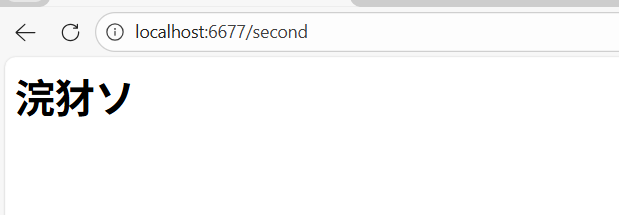
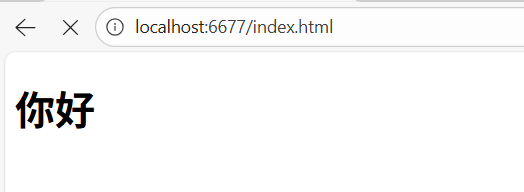
手写Tomcat:深入理解Servlet容器工作原理
在Java Web开发中,Tomcat作为最常用的Servlet容器,其工作原理是每个Java开发人员都应该掌握的核心知识。本文将带领大家通过手写一个简易版的Tomcat,深入剖析Servlet容器的工作原理。我们将按照代码结构,逐个解析每个Java类的实现。
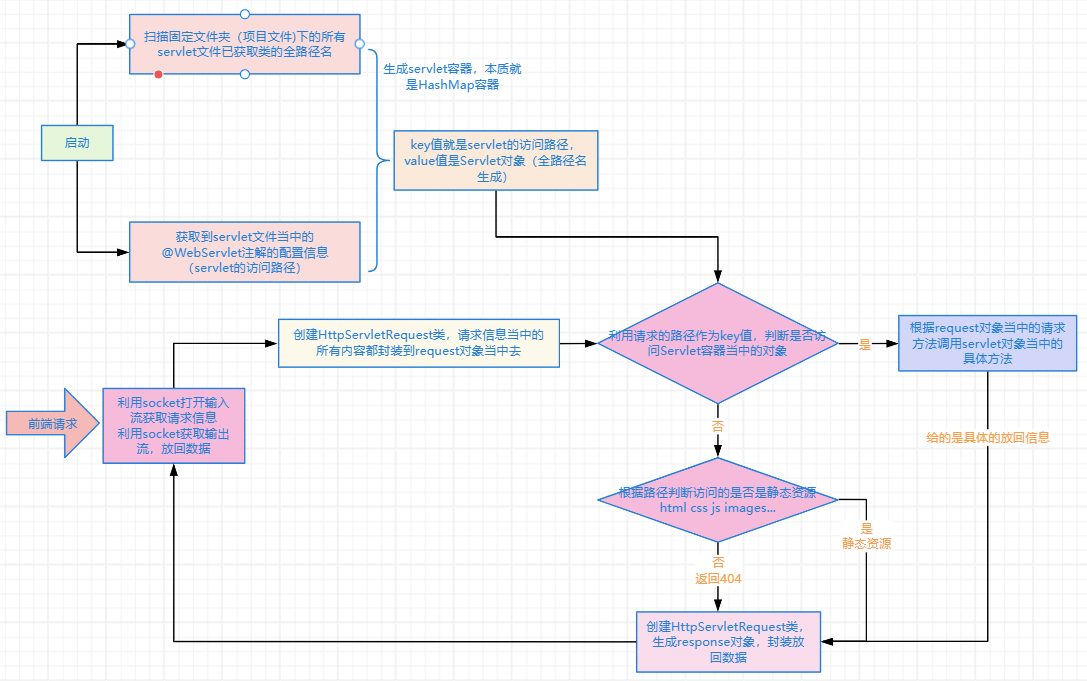
手写Tomcat流程分析图
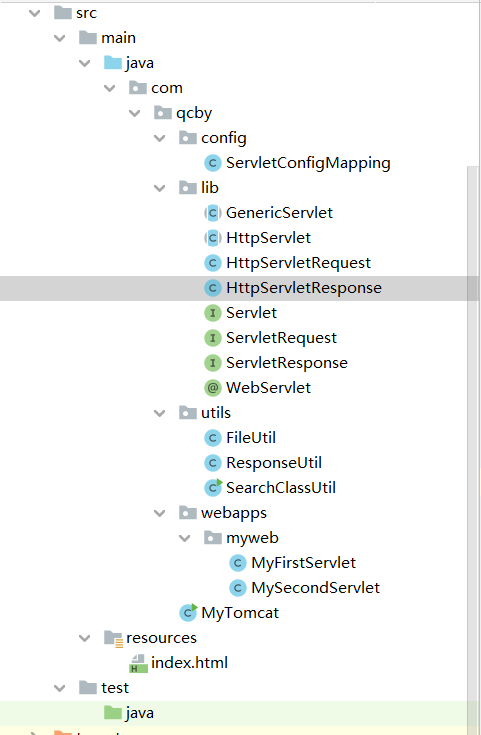
项目结构概览
1. ServletConfigMapping类 - Servlet配置映射
java
package com.qcby.config;

import com.qcby.lib.HttpServlet;
import com.qcby.lib.WebServlet;
import com.qcby.utils.SearchClassUtil;

import java.lang.reflect.InvocationTargetException;
import java.util.HashMap;
import java.util.List;
import java.util.Map;

public class ServletConfigMapping {
    public static Map<String, HttpServlet> classmapping=new HashMap<>();

    static {
        //通过反射获取路径呗
        List<String>paths= SearchClassUtil.searchClass("com.qcby.webapps.myweb");
        for(String path:paths){
            try {
                Class clazz=Class.forName(path);
                WebServlet webServlet=(WebServlet) clazz.getAnnotation(WebServlet.class);
                String value=webServlet.value();
                HttpServlet httpServlet=(HttpServlet) clazz.getDeclaredConstructor().newInstance();
                classmapping.put(value,httpServlet);
            } catch (ClassNotFoundException e) {
                e.printStackTrace();
            } catch (InvocationTargetException e) {
                e.printStackTrace();
            } catch (InstantiationException e) {
                e.printStackTrace();
            } catch (IllegalAccessException e) {
                e.printStackTrace();
            } catch (NoSuchMethodException e) {
                e.printStackTrace();
            }
        }
    }
}核心功能:
- 在静态块中初始化Servlet容器
- 使用反射扫描指定包下的所有类
- 获取@WebServlet注解中的路径配置
- 创建Servlet实例并存入HashMap容器
2. GenericServlet类 - Servlet通用抽象类
java
package com.qcby.lib;

public abstract class GenericServlet implements Servlet{

    @Override
    public void init() {

    }

    @Override
    public abstract void service(ServletRequest req, ServletResponse resp) throws Exception;

    @Override
    public void destroy() {

    }
}核心功能:
- 实现了Servlet接口的基本生命周期方法
- 提供了默认的空实现(init和destroy)
- 将service方法声明为抽象方法,由子类实现
3. HttpServlet类 - HTTP Servlet抽象类
java
package com.qcby.lib;

public abstract class HttpServlet extends GenericServlet{
    public abstract void doGet(ServletRequest req, ServletResponse resp) throws Exception;
    public abstract void doPost(ServletRequest req, ServletResponse resp) throws Exception;

    @Override
    public void service(ServletRequest req, ServletResponse resp) throws Exception {
        if(req.getMethod().equals("GET")){
            this.doGet(req,resp);
            //这个地址就是子类对象的地址
        }else{
            this.doPost(req,resp);
        }
    }
}核心功能:
- 扩展了GenericServlet,专门处理HTTP协议
- 定义了doGet和doPost两个抽象方法
- 实现了service方法,根据请求方法分发到具体的处理方法
4. HttpServletRequest类 - HTTP请求对象
java
package com.qcby.lib;

public class HttpServletRequest implements ServletRequest{
    private String method;
    private String path;
    @Override
    public String getMethod() {
        return method;
    }

    @Override
    public String getPath() {
        return path;
    }

    @Override
    public void setMethod(String method) {
        this.method=method;
    }

    @Override
    public void setPath(String path) {
        this.path=path;

    }
}核心功能:
- 封装HTTP请求信息
- 提供getter和setter方法访问请求方法和路径
- 实现了ServletRequest接口
5. HttpServletResponse类 - HTTP响应对象
java
package com.qcby.lib;

import java.io.File;
import java.io.OutputStream;

import com.qcby.utils.FileUtil;
import com.qcby.utils.ResponseUtil;

public class HttpServletResponse implements ServletResponse {
    private OutputStream outputStream;

    @Override
    public OutputStream getOutputStream() {
        return this.outputStream;
    }

    @Override
    public void setOutputStream(OutputStream outputStream) {
        this.outputStream=outputStream;
    }


    //还有两个方法 返回静态资源  返回动态资源   说白了都是outputStream.write();  写入输出流进行字节输出  参数是一个字节数组
    @Override
    public void append(String content) throws Exception {
        this.outputStream.write(content.getBytes());
    }
    public void returnStatic(String path) throws Exception {
        //利用file工具包  找到path  在工具包里利用 输出流write
        String resoucePath = FileUtil.getResoucePath(path);
        File file=new File(resoucePath);
        FileUtil.writeFile(file,outputStream);
    }
}核心功能:
- 封装HTTP响应信息
- 管理输出流
- 提供append方法写入动态内容
- 提供returnStatic方法返回静态资源
6. Servlet接口 - Servlet标准接口
java
package com.qcby.lib;

public interface Servlet {
    public void init();
    public void service(ServletRequest req, ServletResponse resp) throws Exception;
    public void destroy();

}核心功能:
- 定义了Servlet的生命周期方法
- 标准化Servlet的行为规范
7. ServletRequest接口 - 请求接口
java
package com.qcby.lib;

public interface ServletRequest {
    public String getMethod();
    public String getPath();
    public void setMethod(String method);
    public void setPath(String path);
}核心功能:
- 定义了请求对象的基本操作
- 提供获取和设置请求方法和路径的方法
8. ServletResponse接口 - 响应接口
java
package com.qcby.lib;

import java.io.OutputStream;

public interface ServletResponse {
    public OutputStream getOutputStream();
    public void setOutputStream(OutputStream outputStream);
    public void append(String content) throws Exception;
}核心功能:
- 定义了响应对象的基本操作
- 管理输出流和内容写入
9. WebServlet注解 - Servlet配置注解
java
package com.qcby.lib;

import java.lang.annotation.ElementType;
import java.lang.annotation.Retention;
import java.lang.annotation.RetentionPolicy;
import java.lang.annotation.Target;

@Retention(RetentionPolicy.RUNTIME)
@Target(ElementType.TYPE)
public @interface WebServlet {
    String value();  //定义注解的参数吧    传过来的是 访问路径
}核心功能:
- 运行时保留的注解
- 只能用于类上
- 包含一个value参数,用于指定Servlet的访问路径
10. FileUtil类 - 文件工具类
java
package com.qcby.utils;

import java.io.*;

/**
 * 该类的主要作用是进行读取文件
 */
public class FileUtil {

    public  static  boolean witeFile(InputStream inputStream, OutputStream outputStream){
        boolean success = false ;
        BufferedInputStream bufferedInputStream ;
        BufferedOutputStream bufferedOutputStream;

        try {
            bufferedInputStream = new BufferedInputStream(inputStream);
            bufferedOutputStream = new BufferedOutputStream(outputStream);
            bufferedOutputStream.write(ResponseUtil.responseHeader200.getBytes());

            int count = 0;
            while (count == 0){
                count = inputStream.available();
            }
            int fileSize = inputStream.available();
            long written = 0;
            int beteSize = 1024;
            byte[] bytes = new byte[beteSize];
            while (written < fileSize){
                if(written + beteSize > fileSize){
                    beteSize = (int)(fileSize - written);
                    bytes = new byte[beteSize];
                }
                bufferedInputStream.read(bytes);
                bufferedOutputStream.write(bytes);
                bufferedOutputStream.flush();
                written += beteSize;
            }
            success = true;

        } catch (IOException e) {
            e.printStackTrace();
        }
        return success;
    }

    public static boolean writeFile(File file,OutputStream outputStream) throws Exception{
        return witeFile(new FileInputStream(file),outputStream);
    }


    public static String getResoucePath(String path){
        String resource = FileUtil.class.getResource("/").getPath();
        return resource + "\\" + path;
    }

}核心功能:
- 提供文件读取和写入功能
- 支持大文件分块读取
- 获取资源文件路径
11. ResponseUtil类 - 响应工具类
java
package com.qcby.utils;

public class ResponseUtil {
    public static String responseHeader200 = "HTTP/1.1 200 OK\r\n" +
            "Content-Type: text/html\r\n" +
            "Connection: keep-alive\r\n" +
            "Content-Length: %d\r\n" +
            "\r\n";
    public static String responseHeader404 = "HTTP/1.1 404 NOT FOUND\r\n" +
            "Content-Type: text/html\r\n" +
            "Connection: keep-alive\r\n" +
            "Content-Length: %d\r\n" +
            "\r\n";

    public static String getResponseHeader200(String content){
        return "HTTP/1.1 200 \r\n" +
                "Content-Type:text/html \r\n"+"\r\n" + content;
    }
}核心功能:
- 提供标准的HTTP响应头
- 简化响应消息的构建
12. SearchClassUtil类 - 类搜索工具类
java
package com.qcby.utils;

import java.io.File;
import java.util.ArrayList;
import java.util.List;

/**
 * 扫描指定包,获取该包下所有的类的全路径信息
 */
public class SearchClassUtil {
    public static List<String> classPaths = new ArrayList<String>();

    public static List<String> searchClass(String path){
        //需要扫描的包名
        String basePack = path;
        //将获取到的包名转换为路径
        String classPath = SearchClassUtil.class.getResource("/").getPath();
        basePack =  basePack.replace(".", File.separator);
        String searchPath = classPath + basePack;
        doPath(new File(searchPath),classPath);
        //这个时候我们已经得到了指定包下所有的类的绝对路径了。我们现在利用这些绝对路径和java的反射机制得到他们的类对象
        return classPaths;
    }

    /**
     * 该方法会得到所有的类,将类的绝对路径写入到classPaths中
     * @param file
     */
    private static void doPath(File file,String classpath) {
        if (file.isDirectory()) {//文件夹
            //文件夹我们就递归
            File[] files = file.listFiles();
            for (File f1 : files) {
                doPath(f1,classpath);
            }
        } else {//标准文件
            //标准文件我们就判断是否是class文件
            if (file.getName().endsWith(".class")) {
                String path = file.getPath().replace(classpath.replace("/","\\").
                                replaceFirst("\\\\",""),"").replace("\\",".").
                        replace(".class","");
                //如果是class文件我们就放入我们的集合中。
                classPaths.add(path);
            }
        }
    }

    public static void main(String[] args) {
        List<String> classes = SearchClassUtil.searchClass("com.qcby.webapps.myweb");
        for (String s: classes) {
            System.out.println(s);
        }
    }
}核心功能:
- 递归扫描指定包下的所有.class文件
- 获取类的全限定名
- 支持包名到路径的转换
13. MyFirstServlet类 - 第一个Servlet示例
java
package com.qcby.webapps.myweb;

import com.qcby.lib.HttpServlet;
import com.qcby.lib.ServletResponse;
import com.qcby.lib.ServletRequest;
import com.qcby.lib.WebServlet;
import com.qcby.utils.ResponseUtil;

@WebServlet("/first")
public class MyFirstServlet extends HttpServlet {
    @Override
    public void doGet(ServletRequest req, ServletResponse resp) throws Exception {
        System.out.println("接收到了get请求,正在处理");
        resp.append(ResponseUtil.getResponseHeader200("<h1>你好</h1>"));
    }

    @Override
    public void doPost(ServletRequest req, ServletResponse resp) throws Exception {
        System.out.println("接收到了post请求,正在处理");
        resp.append(ResponseUtil.getResponseHeader200("<h1>你好</h1>"));
    }
}核心功能:
- 使用@WebServlet注解配置访问路径为"/first"
- 实现了doGet和doPost方法
- 处理HTTP GET和POST请求
14. MySecondServlet类 - 第二个Servlet示例
java
package com.qcby.webapps.myweb;

import com.qcby.lib.HttpServlet;
import com.qcby.lib.ServletResponse;
import com.qcby.lib.ServletRequest;
import com.qcby.lib.WebServlet;
import com.qcby.utils.ResponseUtil;

@WebServlet("/second")
public class MySecondServlet extends HttpServlet {
    @Override
    public void doGet(ServletRequest req, ServletResponse resp) throws Exception {
        System.out.println("接收到了get请求,正在处理");
        resp.append(ResponseUtil.getResponseHeader200("<h1>你好</h1>"));
    }

    @Override
    public void doPost(ServletRequest req, ServletResponse resp) throws Exception {
        System.out.println("接收到了Post请求,正在处理");
        resp.append(ResponseUtil.getResponseHeader200("<h1>你好</h1>"));
    }
}核心功能:
- 使用@WebServlet注解配置访问路径为"/second"
- 实现了doGet和doPost方法
- 处理HTTP GET和POST请求
15. MyTomcat类 - Tomcat主启动类
java
package com.qcby;

import com.qcby.lib.HttpServlet;
import com.qcby.lib.HttpServletRequest;
import com.qcby.lib.HttpServletResponse;
import com.qcby.utils.ResponseUtil;

import java.io.IOException;
import java.io.InputStream;
import java.net.ServerSocket;
import java.net.Socket;

import static com.qcby.config.ServletConfigMapping.classmapping;

public class MyTomcat {
    private static HttpServletRequest httpServletRequest=new HttpServletRequest();
    private static HttpServletResponse httpServletResponse=new HttpServletResponse();
    public static final Integer PROT=6677;
    public static void start() throws Exception {
        ServerSocket serverSocket=new ServerSocket(PROT);
        while(true){
            Socket socket = serverSocket.accept(); //得到socket对象
            //获取输入流
            InputStream stream= socket.getInputStream();   //此时是 01
            httpServletResponse.setOutputStream(socket.getOutputStream());
            handler(stream);

        }
    }
    public static void handler(InputStream stream) throws Exception {
        int count=0;
        while(count==0){
            count=stream.available();
        }
        byte[] bytes=new byte[count];
        int read= stream.read(bytes);
        String msg=new String(bytes,0,read);
        //截取
        String firstLine=msg.split("\n")[0];
        String method=firstLine.split("\\s")[0];
        String path=firstLine.split("\\s")[1];
        System.out.println("method:"+method+" path:"+path);
        httpServletRequest.setMethod(method);
        httpServletRequest.setPath(path);
        //对path进行判断
        if(path==""){
            System.out.println("是空请求");
//            httpServletResponse.append(ResponseUtil.responseHeader404);
        }else if(classmapping.get(path)!=null){
            HttpServlet httpServlet=classmapping.get(path);   //我在栈空间设置一个父类引用  指向  子类对象
            httpServlet.service(httpServletRequest,httpServletResponse);
        }else{
            //处理静态资源
            httpServletResponse.returnStatic(path);
        }
    }
    public static void main(String[] args) throws Exception {
        start();
    }
}核心功能:
- 启动Socket服务器监听6677端口
- 解析HTTP请求报文
- 根据请求路径分发到对应的Servlet或静态资源
- 管理请求-响应处理流程
总结
通过手写这个简易版的Tomcat,我们深入理解了以下核心概念:
- Servlet容器本质:一个以URL路径为key,Servlet实例为value的Map
- 请求响应流程:Socket接收请求 → 解析HTTP报文 → 路由分发 → 处理并返回
- 注解驱动配置:通过反射和注解实现零配置部署
- 静态动态资源分离:统一入口,根据路径判断资源类型
这个简易版Tomcat虽然功能有限,但已经实现了Servlet容器的核心思想。真正的Tomcat在此基础上增加了更多功能,如连接池、会话管理、JSP编译等,但基本原理是相通的。
希望这篇文章能够帮助你深入理解Tomcat和Servlet容器的工作原理!