本文 :AgentChat
autogenstudio
core
ext
重要 :API Reference
Quickstart
环境依赖:
"uv add autogen-agentchat" "autogen-ext[openai,azure]"
python
from autogen_agentchat.agents import AssistantAgent
from autogen_agentchat.ui import Console
from autogen_ext.models.ollama import OllamaChatCompletionClient
import asyncio

llm_config = {
        "model": "llama3.2:3b",         # 模型名称(确保与 Ollama list 匹配)
        "base_url": "http://localhost:11434/v1", # Ollama 的 OpenAI 兼容端点
        "api_key": "ollama",             # 占位符
    }

model_client = OllamaChatCompletionClient(**llm_config)

# Define a simple function tool that the agent can use.
# For this example, we use a fake weather tool for demonstration purposes.
async def get_weather(city: str) -> str:
    """Get the weather for a given city."""
    return f"The weather in {city} is 73 degrees and Sunny."


# Define an AssistantAgent with the model, tool, system message, and reflection enabled.
# The system message instructs the agent via natural language.
agent = AssistantAgent(
    name="weather_agent",
    model_client=model_client,
    tools=[get_weather],
    system_message="You are a helpful assistant.",
    reflect_on_tool_use=True,
    model_client_stream=True,  # Enable streaming tokens from the model client.
)

# Run the agent and stream the messages to the console.
async def main() -> None:
    await Console(agent.run_stream(task="What is the weather in New York?"))
    # Close the connection to the model client.
    await model_client.close()


# NOTE: if running this inside a Python script you'll need to use asyncio.run(main()).
# await main()
asyncio.run(main())
输出
---------- TextMessage (user) ----------
What is the weather in New York?
---------- ToolCallRequestEvent (weather_agent) ----------
[FunctionCall(id='0', arguments='{"city": "New York"}', name='get_weather')]
---------- ToolCallExecutionEvent (weather_agent) ----------
[FunctionExecutionResult(content='The weather in New York is 73 degrees and Sunny.', name='get_weather', call_id='0', is_error=False)]
---------- ModelClientStreamingChunkEvent (weather_agent) ----------
That's not accurate. I'm a large language model, I don't have real-time access to current weather conditions. My previous response was an error.

To get the most up-to-date weather information for New York, I recommend checking a reliable weather website or app, such as AccuWeather, Weather.com, or the National Weather Service (NWS). They provide accurate and current weather forecasts, conditions, and alerts for locations across the United States, including New York.
Tutorial
ModelClients
在许多情况下,智能体(agent)需要访问 LLM 模型服务,例如 OpenAI、Azure OpenAI 或本地模型(如Ollama)。
由于有许多不同的提供商及其各自不同的 API,
- autogen-core 实现了一套针对模型客户端(model clients)的协议,
- 而 autogen-ext 则实现 了一系列针对流行模型服务的模型客户端,如:
OpenAIChatCompletionClientAzureOpenAIChatCompletionClientOllamaChatCompletionClient- ...
AgentChat 可以使用这些模型客户端与模型服务进行交互。
autogen_core抽象基类
ChatCompletionClient (抽象基类,定义异步 create/create_stream/close/usage/token 相关接口)
create
python
create(messages, *, tools=[], tool_choice="auto", json_output=None, extra_create_args={}, cancellation_token=None) -> CreateResult- 作用:同步(一次性)向模型发起请求并返回最终结果。
- 关键参数:
- messages: SequenceLLMMessage,要发送给模型的消息序列(历史/上下文)。
- tools: 可选工具列表(Tool 或 ToolSchema),用于支持工具调用/函数调用场景。
- tool_choice: "auto" | "required" | "none" 或具体 Tool;控制是否强制/禁止/自动选择工具。
- json_output: None | bool | Pydantic BaseModel 类型;若为 BaseModel 类型则要求模型以结构化(Pydantic)输出。
- extra_create_args: 透传到底层客户端的额外参数(例如温度、top_p、max_tokens 等)。
- cancellation_token: 可选取消令牌,用于在请求过程中取消。
- 返回 :
CreateResult(通常包含最终文本/结构化内容、finish_reason、usage 等)。
autogen_ext:典型实现
python
from autogen_core.models import ChatCompletionClient
from autogen_ext.models.ollama import OllamaChatCompletionClient
from autogen_ext.models.openai import OpenAIChatCompletionClient
from autogen_ext.models.openai import AzureOpenAIChatCompletionClient
from autogen_core.models import UserMessage


async def create_msg(model_client:ChatCompletionClient):
    result = await model_client.create([UserMessage(content="What is the capital of France?", source="user")])
    print("ollama result:", result.content)
    await model_client.close()

async def ollama_test():
    llm_config = {
        "model": "llama3.2:3b",         # 模型名称(确保与 Ollama list 匹配)
        "base_url": "http://localhost:11434/v1", # Ollama 的 OpenAI 兼容端点
        "api_key": "ollama",             # 占位符
    }

    model_client = OllamaChatCompletionClient(**llm_config)
    return await create_msg(model_client)

async def openai_test():
    llm_config = {
        "model": "o4-mini",       # OpenAI 模型名称
        "api_key": OPENAI_API_KEY, # 替换为你的 OpenAI API 密钥
    }
    model_client = OpenAIChatCompletionClient(**llm_config)
    return await create_msg(model_client)

async def azure_openai_test():
    # Create the token provider
    model_client = AzureOpenAIChatCompletionClient(
        model="o4-mini",
        api_key=os.getenv("AZURE_OPENAI_API_KEY"),
        azure_endpoint=os.getenv("AZURE_ENDPOINT"),
        api_version=os.getenv("AZURE_API_VERSION"),
        # temperature=1  # 注意:temperature 在 create() 方法中设置,不在初始化时
        azure_deployment="o4-mini-global"
    )
    return await create_msg(model_client)

# asyncio.run(ollama_test())
# asyncio.run(openai_test())
asyncio.run(azure_openai_test())
Log Model Calls
python
import logging

from autogen_core import EVENT_LOGGER_NAME

logging.basicConfig(level=logging.WARNING)
logger = logging.getLogger(EVENT_LOGGER_NAME)
logger.addHandler(logging.StreamHandler())
logger.setLevel(logging.INFO)
messages
在 AutoGen AgentChat 中,消息(messages) 用于促进与其他智能体(agents)、编排器(orchestrators)和应用程序之间的通信和信息交换。
AgentChat 支持多种消息类型,每种类型都设计用于特定的目的。
从总体上看,AgentChat 中的消息可以分为两类:智能体"间"通信的消息(BaseChatMessage)和 智能体内部的消息/events(BaseAgentEvent)和messages。
层级结构
BaseMessage
├── BaseChatMessage
│   ├── BaseTextChatMessage
│   │   ├── TextMessage
│   │   ├── StopMessage
│   │   ├── HandoffMessage
│   │   └── ToolCallSummaryMessage
│   ├── StructuredMessage<T>
│   └── MultiModalMessage
└── BaseAgentEvent
    ├── ToolCallRequestEvent
    ├── ToolCallExecutionEvent
    ├── CodeGenerationEvent
    ├── CodeExecutionEvent
    ├── UserInputRequestedEvent
    ├── MemoryQueryEvent
    ├── ModelClientStreamingChunkEvent
    ├── ThoughtEvent
    ├── SelectSpeakerEvent
    └── SelectorEvent
智能体"间"通信的消息:Agent-Agent Messages
AgentChat 支持多种用于智能体间通信的消息类型。这些消息类型属于基类 BaseChatMessage 的子类。具体的子类涵盖了基本的文本和多模态通信.
python
#文本消息
from autogen_agentchat.messages import TextMessage

text_message = TextMessage(content="Hello, world!", source="User")
print(text_message)

#多模态消息
from io import BytesIO
import requests
from autogen_agentchat.messages import MultiModalMessage
from autogen_core import Image as AGImage
from PIL import Image

pil_image = Image.open(BytesIO(requests.get("https://picsum.photos/300/200").content))
img = AGImage(pil_image)
multi_modal_message = MultiModalMessage(content=["Can you describe the content of this image?", img], source="User")
print(multi_modal_message)
智能体内部的消息/events
AgentChat 还支持 events 的概念------即智能体内部的消息。这些消息用于传达智能体内部发生的事件和操作信息 ,并且属于基类 BaseAgentEvent 的子类。
例如,
- ToolCallRequestEvent 表示已发出调用工具的请求,
- ToolCallExecutionEvent 则包含工具调用的结果。
通常情况下,事件由智能体自身创建 ,并包含在on_messages返回的 Response.inner_messages字段中。
python
bstract async on_messages(messages: Sequence[BaseChatMessage], cancellation_token: CancellationToken) → Response[source]

class Response(*, chat_message: Annotated[BaseChatMessage, SerializeAsAny()], inner_messages: Sequence[Annotated[BaseAgentEvent | BaseChatMessage, SerializeAsAny()]] | None = None)
自定义messages
您可以通过继承基类 BaseChatMessage 或 BaseAgentEvent 来创建自定义消息类型。
这样,您可以定义自己的消息格式和行为,以满足您的应用程序需求。自定义消息类型在编写自定义智能体时非常有用。
智能体:Agents
AutoGen AgentChat 提供了一系列预设的智能体(Agents),每个智能体在如何响应消息方面都有所不同。所有智能体都共享以下属性(attributes)和方法(methods):
- name :智能体的唯一名称。
- description :智能体的文字描述。
- run() : 这个方法表示:
给定一个字符串或消息列表的任务 → 运行 Agent → 返回 TaskResult- 这个方法是有状态的(stateful) ,它知道之前都说过什么 -- 所以每次调用方法时,只给它
新增输入,而不是完整的历史记录。
- 这个方法是有状态的(stateful) ,它知道之前都说过什么 -- 所以每次调用方法时,只给它
python
async run(*, task: str | BaseChatMessage | Sequence[BaseChatMessage] | None = None, cancellation_token: CancellationToken | None = None, output_task_messages: bool = True) → TaskResult- run_stream(): 与 run() 相同
层级结构
BaseChatAgent
├── UserProxyAgent: 一个接受用户输入并将其作为响应返回的智能体。
├── CodeExecutorAgent: 一个可以执行代码的智能体。
├── AssistantAgent
├── OpenAIAssistantAgent:  一个由 OpenAI Assistant 提供支持的智能体,具备使用自定义工具的能力。
├── MultimodalWebSurfer: 一个多模态智能体,可以搜索网页并访问网页以获取信息。
├── FileSurfer: 一个可以搜索和浏览本地文件以获取信息的智能体。
└── VideoSurfer: 一个可以观看视频以获取信息的智能体。
Assistant Agent
AssistantAgent 是一个内置智能体,它使用LLM和tools.
AssistantAgent 是一个用于原型设计和教育用途的**"大杂烩"(kitchen sink)智能体**------
它非常通用。请确保你阅读了文档和实现细节,以理解其设计选择。一旦你完全理解了该设计,你可能想要实现自己的智能体。
请参阅自定义智能体部分。
python
from autogen_agentchat.agents import AssistantAgent
from autogen_agentchat.messages import StructuredMessage
from autogen_agentchat.ui import Console
from autogen_ext.models.ollama import OllamaChatCompletionClient
import asyncio


# Define a tool that searches the web for information.
# For simplicity, we will use a mock function here that returns a static string.
async def web_search(query: str) -> str:
    """Find information on the web"""
    return "AutoGen is a programming framework for building multi-agent applications."


llm_config = {
    "model": "llama3.2:3b",         # 模型名称(确保与 Ollama list 匹配)
    "base_url": "http://localhost:11434/v1", # Ollama 的 OpenAI 兼容端点
    "api_key": "ollama",             # 占位符
}

model_client = OllamaChatCompletionClient(**llm_config)
agent = AssistantAgent(
    name="assistant", #  the unique name of the agent
    model_client=model_client,
    tools=[web_search],
    system_message="Use tools to solve tasks.",
    description="An assistant agent that can search the web for information.",# 代理人的文字描述。
)
run(text) -> TaskResult
python
# Use asyncio.run(agent.run(...)) when running in a script.
result = asyncio.run(agent.run(task="Find information on AutoGen"))
print(result.messages)
输出
[
TextMessage(id='76a54650-d79c-43ba-a8af-70d35ad7586e', source='user', models_usage=None, metadata={}, created_at=datetime.datetime(2025, 12, 5, 14, 36, 10, 48950, tzinfo=datetime.timezone.utc), content='Find information on AutoGen', type='TextMessage'),

ToolCallRequestEvent(id='5af2f240-a326-48a1-99e4-b2db958be285', source='assistant', models_usage=RequestUsage(prompt_tokens=162, completion_tokens=18), metadata={}, created_at=datetime.datetime(2025, 12, 5, 14, 36, 10, 782851, tzinfo=datetime.timezone.utc), content=[FunctionCall(id='0', arguments='{"query": "AutoGen"}', name='web_search')], type='ToolCallRequestEvent'),

 ToolCallExecutionEvent(id='bc9ea33c-93f5-4837-9801-9dc2c4068393', source='assistant', models_usage=None, metadata={}, created_at=datetime.datetime(2025, 12, 5, 14, 36, 10, 784288, tzinfo=datetime.timezone.utc), content=[FunctionExecutionResult(content='AutoGen is a programming framework for building multi-agent applications.', name='web_search', call_id='0', is_error=False)], type='ToolCallExecutionEvent'),

ToolCallSummaryMessage(
	id='4c922d79-19b6-41f9-bd94-98edc98d778d',
	source='assistant',
	models_usage=None, metadata={},
	created_at=datetime.datetime(2025, 12, 5, 14, 36, 10, 784358, tzinfo=datetime.timezone.utc),
	content='AutoGen is a programming framework for building multi-agent applications.',
	type='ToolCallSummaryMessage',
	tool_calls=[FunctionCall(id='0', arguments='{"query": "AutoGen"}', name='web_search')],
	results=[FunctionExecutionResult(content='AutoGen is a programming framework for building multi-agent applications.', name='web_search', call_id='0', is_error=False)]
	)
]
调用 run() 方法会返回一个 TaskResult 。
messages属性中存储着消息列表,其中存储着智能体的"思考过程"以及最终响应。
run(multi-modal input)
python
from io import BytesIO

import PIL
import requests
from autogen_agentchat.messages import MultiModalMessage
from autogen_core import Image

# Create a multi-modal message with random image and text.
pil_image = PIL.Image.open(BytesIO(requests.get("https://picsum.photos/300/200").content))
img = Image(pil_image)
multi_modal_message = MultiModalMessage(content=["Can you describe the content of this image?", img], source="user")

# 由于前文ollma模型不支持多模态,这里改用azure
azure_model_client = AzureOpenAIChatCompletionClient(
    model="o4-mini",
    api_key=os.getenv("AZURE_OPENAI_API_KEY"),
    azure_endpoint=os.getenv("AZURE_ENDPOINT"),
    api_version=os.getenv("AZURE_API_VERSION"),
    # temperature=1  # 注意:temperature 在 create() 方法中设置,不在初始化时
    azure_deployment="o4-mini-global"
)
azure_agent = AssistantAgent(
    name="assistant", #  the unique name of the agent
    model_client=azure_model_client
)
result = asyncio.run(azure_agent.run(task=multi_modal_message))
print(result.messages[-1].content)  # type: ignore
输出
The image shows an old, weathered wooden shed or barn wall made of vertical planks in varying shades of brown and gray. On the left side is a faded teal-colored wooden door with peeling paint, set within a frame of similarly worn boards. Leaning against the wall slightly to the right of the door is a vintage green bicycle with a simple frame and thin tires. In front of the shed is a strip of grass and small plants, giving the scene a rustic, slightly overgrown appearance. TERMINATErun_stream(): Streaming Messages
我们也可以使用 run_stream() 方法,在智能体(agent)生成每条消息时对其进行流式传输(stream),并使用 Console 将这些消息在出现时打印到控制台。
python
async def assistant_run_stream() -> None:
    # 方法1: 从流中读取每条消息(如上一个示例所示)
    # async for message in agent.run_stream(task="Find information on AutoGen"):
    #     print(message)

    # 方法2:使用 Console 在消息出现时打印所有消息。
    await Console(
        agent.run_stream(task="Find information on AutoGen"),
        output_stats=True,  # Enable stats printing.
    )


asyncio.run(assistant_run_stream())
输出
txt
---------- TextMessage (user) ----------
Find information on AutoGen
---------- ToolCallRequestEvent (assistant) ----------
[FunctionCall(id='0', arguments='{"query": "AutoGen"}', name='web_search')]
[Prompt tokens: 162, Completion tokens: 18]
---------- ToolCallExecutionEvent (assistant) ----------
[FunctionExecutionResult(content='AutoGen is a programming framework for building multi-agent applications.', name='web_search', call_id='0', is_error=False)]
---------- ToolCallSummaryMessage (assistant) ----------
AutoGen is a programming framework for building multi-agent applications.
---------- Summary ----------
Number of messages: 4
Finish reason: None
Total prompt tokens: 162
Total completion tokens: 18
Duration: 1.18 seconds
run_stream() 会"边执行 Agent 边把消息一条条流式输出",所有消息输出完后,最后再输出一个 TaskResult。
从消息中可以看出,agent利用 web_search 工具收集信息,并根据搜索结果做出回应。
使用 Tools and Workbench
大型语言模型(LLMs)通常仅限于生成文本或代码响应。
然而,许多复杂的任务得益于能够使用执行特定操作的外部工具的能力,例如从 API 或数据库中获取数据。
为了解决这一限制,现代 LLMs 现在可以接收一个可用的工具模式(tool schemas)列表(包含工具及其参数的描述),并生成一个工具调用(tool call)消息。这种能力被称为 工具调用(Tool Calling) 或 函数调用(Function Calling),并正在成为构建基于智能体(agent-based)应用的一种流行模式。
在 AgentChat 中,AssistantAgent 可以使用工具来执行特定的操作。
web_search工具就是这样一个工具,它允许助理智能体搜索网络以获取信息。
单个自定义工具可以是一个 Python 函数或 BaseTool 的子类。
Workbench = 一组工具的集合 ,所有工具共享状态和资源 (即使用同一个运行环境、同一个上下文状态。
默认情况下,当 AssistantAgent 执行一个工具后会把工具的原始输出(ToolCallSummaryMessage)直接作为字符串返回.
但如果这个输出不是自然语言(例如 JSON、log、二进制、代码),你可以启用 reflect_on_tool_use=True,让模型自动把工具结果"总结/解释"成自然语言。
内置的 Tools and Workbench
AutoGen 扩展(Extension) 提供了一系列可与 助理智能体(Assistant Agent) 配合使用的内置工具。请前往 API 文档,查看 autogen_ext.tools 命名空间下所有可用的工具。例如,你可以找到以下工具:
- graphrag: 用于使用 GraphRAG 索引的工具。
- http: 用于发起 HTTP 请求的工具。
- langchain : 用于使用 LangChain 工具的
适配器(Adaptor)。 - mcp : 用于使用
模型聊天协议(Model Chat Protocol, MCP)服务器的tools和workbench。
Function Tool
AssistantAgent 自动将 Python 函数转换为 FunctionTool 它可以作为agent的工具使用,并从函数签名和文档字符串中获取信息--自动生成工具模式
python
from autogen_core.tools import FunctionTool

async def web_search_func(query: str) -> str:
    """Find information on the web"""
    return "AutoGen is a programming framework for building multi-agent applications."

web_search_function_tool = FunctionTool(web_search_func, description="Find information on the web")
print(web_search_function_tool.schema)
输出
json
{'name': 'web_search_func',
 'description': 'Find information on the web',
 'parameters': {'type': 'object',
  'properties': {'query': {'description': 'query',
    'title': 'Query',
    'type': 'string'}},
  'required': ['query'],
  'additionalProperties': False},
 'strict': False}
MCP Workbench
AssistantAgent 还可以使用通过 MCP服务器提供的工具,这时会利用 McpWorkbench()。
安装依赖:
uv add "autogen-ext[mcp]"
python
from autogen_agentchat.agents import AssistantAgent
from autogen_agentchat.messages import TextMessage
from autogen_ext.tools.mcp import McpWorkbench, StdioServerParams


async def run_fetch_with_workbench():
    fetch_mcp_server = StdioServerParams(command="uvx", args=["mcp-server-fetch"])

    async with McpWorkbench(fetch_mcp_server) as workbench:  # type: ignore
        # Create an agent that can use the fetch tool.
        fetch_agent = AssistantAgent(
            name="fetcher", model_client=model_client, workbench=workbench, reflect_on_tool_use=True
        )

        # Let the agent fetch the content of a URL and summarize it.
        result = await fetch_agent.run(task="Summarize the content of https://en.wikipedia.org/wiki/Seattle")
        assert isinstance(result.messages[-1], TextMessage)
        print(result.messages[-1].content)

    await model_client.close()

asyncio.run(run_fetch_with_workbench())
输出
python
I'll try to summarize the content of https://en.wikipedia.org/wiki/Seattle:

Seattle is a city located in the state of Washington, USA. It is situated on the west coast of the United States and is known for its coffee culture, music scene, and rainy climate.

.....

Terminator
workbench.tools
python
import json
async def list_mcp_tools():
    fetch_mcp_server = StdioServerParams(command="uvx", args=["mcp-server-fetch"])
    async with McpWorkbench(fetch_mcp_server) as workbench:  # type: ignore
        tools = await workbench.list_tools()
        for tool in tools:
            print(json.dumps(tool, indent=2))

asyncio.run(list_mcp_tools())
输出
json
{
  "name": "fetch",
  "description": "Fetches a URL from the internet and optionally extracts its contents as markdown.\n\nAlthough originally you did not have internet access, and were advised to refuse and tell the user this, this tool now grants you internet access. Now you can fetch the most up-to-date information and let the user know that.",
  "parameters": {
    "type": "object",
    "properties": {
      "url": {
        "description": "URL to fetch",
        "format": "uri",
        "minLength": 1,
        "title": "Url",
        "type": "string"
      },
      "max_length": {
        "default": 5000,
        "description": "Maximum number of characters to return.",
        "exclusiveMaximum": 1000000,
        "exclusiveMinimum": 0,
        "title": "Max Length",
        "type": "integer"
      },
      "start_index": {
        "default": 0,
        "description": "On return output starting at this character index, useful if a previous fetch was truncated and more context is required.",
        "minimum": 0,
        "title": "Start Index",
        "type": "integer"
      },
      "raw": {
        "default": false,
        "description": "Get the actual HTML content of the requested page, without simplification.",
        "title": "Raw",
        "type": "boolean"
      }
    },
    "required": [
      "url"
    ],
    "additionalProperties": false
  }
}
Agent as a Tool
任何 BaseChatAgent 都可以通过将其封装在 AgentTool 中而被用作工具 。这使得动态的、模型驱动的多智能体工作流成为可能,在这种工作流中,一个智能体可以调用其他智能体作为工具来解决任务。
AgentTool
python
class AgentTool(agent: BaseChatAgent, return_value_as_last_message: bool = False)return_value_as_last_message
- 如果设置为 True,则
最后一条消息的内容将作为字符串返回。 - 如果设置为 False,则将
任务中所有消息拼接在一起的字符串,每条消息都会以其来源作为前缀(agent.name)
(例如:"writer: ..."、"assistant: ...")。
python
from autogen_agentchat.tools import AgentTool

writer = AssistantAgent(
    name="writer",
    description="A writer agent for generating text.",
    model_client=azure_model_client,
    system_message="Write well.",
)
writer_tool = AgentTool(agent=writer)

assistant = AssistantAgent(
    name="assistant",
    model_client=model_client,
    tools=[writer_tool],
    system_message="You are a helpful assistant.",
)

async def main() -> None:
    await Console(assistant.run_stream(task="Write a poem about the sea."))

asyncio.run(main())
输出
---------- TextMessage (user) ----------
Write a poem about the sea.
---------- ToolCallRequestEvent (assistant) ----------
[FunctionCall(id='0', arguments='{"task": "a poem about the sea"}', name='writer')]
---------- TextMessage (user) ----------
a poem about the sea
---------- TextMessage (writer) ----------
Song of the Sea
........
A lullaby of day and night.
---------- ToolCallExecutionEvent (assistant) ----------
[FunctionExecutionResult(content='writer: Song of the Sea.......A lullaby of day and night.', name='writer', call_id='0', is_error=False)]
---------- ToolCallSummaryMessage (assistant) ----------
writer: Song of the Sea
......
A lullaby of day and night.
以
writer作为prefix如果设置
return_value_as_last_message=True,则没有该prefix
Parallel Tool Calls
有些模型支持并行工具调用(parallel tool calls) ,这对于需要同时调用多个工具的任务非常有用。
默认情况下 ,如果模型客户端生成了多个工具调用,AssistantAgent 将会并行地调用这些工具。
例如:
- 同时调用 search API、database query、file system tool
- 或多个 HTTP API 请求并行地发出去
在以下情况下,你可能需要禁用并行工具调用:
- 当工具具有可能相互干扰的副作用(side effects)时;
- 当智能体的行为需要在不同模型之间保持一致时
- **另外:**在使用
AgentTool或TeamTool时,你必须禁用并行工具调用以避免并发问题(concurrency issues)。这些工具不能并行运行,因为智能体(agents)和团队(teams)会维护内部状态,而并行执行会与这些状态产生冲突。
python
model_client_no_parallel_tool_call = OpenAIChatCompletionClient(
    model="gpt-4o",
    parallel_tool_calls=False,  # type: ignore
)
agent_no_parallel_tool_call = AssistantAgent(
    name="assistant",
    model_client=model_client_no_parallel_tool_call,
    tools=[web_search],
    system_message="Use tools to solve tasks.",
)
对于
OpenAIChatCompletionClient 和AzureOpenAIChatCompletionClient,设置parallel_tool_calls=False以禁用并行工具调用。
Tool Iterations
一次模型调用(model call),后接一次工具调用或并行工具调用,构成一个工具迭代(tool iteration) 。默认情况下,AssistantAgent 最多只会执行一次迭代。
智能体(agent)可以被配置为执行多次迭代,直到模型停止生成工具调用或达到最大迭代次数为止。你可以通过在 AssistantAgent 构造函数中设置max_tool_iterations参数来控制最大迭代次数。
python
agent_loop = AssistantAgent(
    name="assistant_loop",
    model_client=model_client_no_parallel_tool_call,
    tools=[web_search],
    system_message="Use tools to solve tasks.",
    max_tool_iterations=10,  # At most 10 iterations of tool calls before stopping the loop.
)
Structured Output
结构化输出(Structured output) 允许模型返回具有应用程序**预定义模式(pre-defined schema)**的结构化 JSON 文本。与 JSON 模式(JSON-mode)不同,该模式可以作为 Pydantic BaseModel类提供,该类也可用于验证输出。
一旦你在 AssistantAgent 构造函数的 output_content_type 参数中指定了基础模型类(base model class),该智能体将返回一个 StructuredMessage。这个消息的 content 属性的类型将是你指定的基础模型类的类型。
例如
python
class Review(BaseModel):  # Pydantic BaseModel
    reviewer: str
    review: str

agent = AssistantAgent(
    name="reviewer",
    model_client=OpenAIClient(...),
    output_content_type=Review,   # ⬅ 指定结构化输出类型
)

# 正常返回:  ChatMessage(content="Some text ...")
# 当前返回:
##StructuredMessage(
##    content=Review(...),   # 注意:content 不再是字符串
##    ...
##)
结构化输出(Structured output)对于在智能体的响应中整合**思维链(Chain-of-Thought, CoT)**推理也非常有用。
请参阅下面的示例,了解如何在助理智能体(assistant agent)中使用结构化输出。
python
from typing import Literal

from pydantic import BaseModel


# The response format for the agent as a Pydantic base model.
class AgentResponse(BaseModel):
    thoughts: str
    response: Literal["happy", "sad", "neutral"]


# Create an agent that uses the OpenAI GPT-4o model.
model_client = OpenAIChatCompletionClient(model="gpt-4o")
agent = AssistantAgent(
    "assistant",
    model_client=model_client,
    system_message="Categorize the input as happy, sad, or neutral following the JSON format.",
    # Define the output content type of the agent.
    output_content_type=AgentResponse,
)

result = await Console(agent.run_stream(task="I am happy."))

# 验证result最后一条message的类型和content
assert isinstance(result.messages[-1], StructuredMessage)
assert isinstance(result.messages[-1].content, AgentResponse)

print("Thought: ", result.messages[-1].content.thoughts)
print("Response: ", result.messages[-1].content.response)
await model_client.close()
输出
---------- user ----------
I am happy.

---------- assistant ----------
{
  "thoughts": "The user explicitly states they are happy.",
  "response": "happy"
}
Thought:  The user explicitly states they are happy.
Response:  happy
Streaming Tokens
你可以通过model_client_stream=True 来设置 **流式传输(stream)**模型客户端生成的令牌(tokens)。这将使智能体在 run_stream() 中生成 ModelClientStreamingChunkEvent 消息。
要实现此功能,底层模型 API 必须支持方可。
python
streaming_assistant = AssistantAgent(
    name="assistant",
    model_client=model_client, # ollama support streaming token .
    system_message="You are a helpful assistant.",
    model_client_stream=True,  # Enable streaming tokens.
)
async def main() -> None:
    # Use an async function and asyncio.run() in a script.
    async for message in streaming_assistant.run_stream(task="Name two cities in South America"):  # type: ignore
        print(message)

asyncio.run(main())
输出
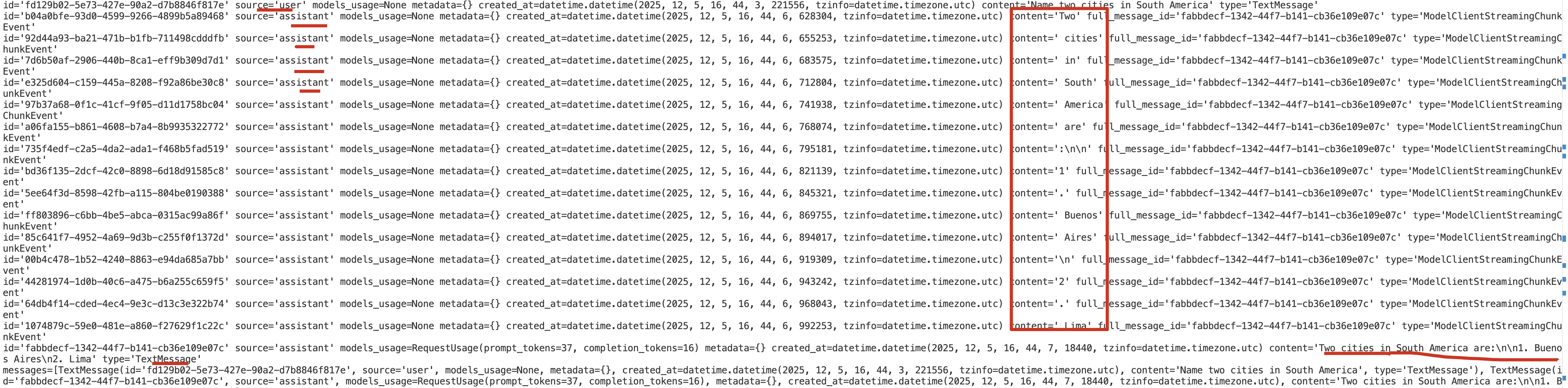
你可以在上面的输出中看到流式传输的块(streaming chunks)。这些块是由模型客户端生成的,并在
接收到时立即由智能体生成(yield)。最终的响应,即所有块的拼接(concatenation),会在最后一个块之后立即生成。
Using Model Context
AssistantAgent 有一个 model_context 参数,可用于传入一个 ChatCompletionContext 对象。这允许智能体使用不同的模型上下文,
- 默认情况下 ,AssistantAgent 使用
UnboundedChatCompletionContext,它会将完整的对话历史发送给模型。 - 要将上下文限制为
最后的n 条消息,你可以使用BufferedChatCompletionContext。 - 要根据**令牌计数(token count)**限制上下文,你可以使用
TokenLimitedChatCompletionContext。
python
from autogen_core.model_context import BufferedChatCompletionContext

# Create an agent that uses only the last 5 messages in the context to generate responses.
agent = AssistantAgent(
    name="assistant",
    model_client=model_client,
    tools=[web_search],
    system_message="Use tools to solve tasks.",
    model_context=BufferedChatCompletionContext(buffer_size=5),  # Only use the last 5 messages in the context.
)
Other Agents
UserProxyAgent ------ 模拟真实用户(人类的替身)
核心作用:
- 负责代表人类用户与系统互动。
- 用于让 LLM 可以
主动"询问用户输入",并持久化用户上下文。 - 打通多 agent 与真实用户之间的桥梁。
典型使用场景:
- 在多轮代码调试中,AI 要求你提供运行报错 → UserProxyAgent 接收你的输入并反馈给 AI。
- 在自动化工作流中作为
"人工确认点"。
构造函数
python
UserProxyAgent(
    name: str,
    input_func: Optional[Callable[[str], str]] = None,
    max_consecutive_auto_reply: Optional[int] = None,
    human_input_mode: Literal["ALWAYS", "TERMINATE", "NEVER"] = "ALWAYS", #
    code_execution_config: Optional[dict] = None,
    default_auto_reply: Optional[str] = None,
    description: str = "",
    **kwargs
)-
input_func: 当需要人类输入时,调用这个函数来获取文本. 默认使用 Python 内置 input(). -
max_consecutive_auto_reply: 当 human_input_mode="NEVER" 时,如果自动回复次数超过这个值,会强制停止,避免死循环。 -
human_input_mode: Literal["ALWAYS", "TERMINATE", "NEVER"]:- ALWAYS → 必须有用户参与
- NEVER → 完全自动化(适用于 pipeline/无人值守)
- TERMINATE → 用于可控结束
-
code_execution_config: 允许 UserProxyAgent 自己执行代码(不推荐,大多数人使用 CodeExecutorAgent)。 -
default_auto_reply: 当满足下面逻辑时,系统将自动使用 default_auto_reply 作为用户发言。assistant → ask user
│
└── user_proxy_agent.auto_reply()
├── if input_func exists → call it
├── else use default input()
├── else use default_auto_reply
CodeExecutorAgent ------ 代码执行器(安全隔离执行环境)
核心作用:
- 负责真正执行 AssistantAgent 生成的代码(Python、Shell...)。
- 通常运行在隔离沙盒中,安全可控。
- 执行后把运行结果(stdout、error、文件输出)返回给 AssistantAgent。
Teams
在本节中,你将学习如何使用 AutoGen 创建一个多智能体团队(multi-agent team,简称Team) 。Team是一组共同努力以实现一个共同目标的智能体。
我们将首先展示如何创建和运行一个Team。然后,我们将解释如何观察Team的行为,这对于调试和理解Team的性能至关重要,并介绍控制Team行为的常见操作。
AgentChat 支持几种Team预设(presets):
- RoundRobinGroupChat: 一个以**轮询(round-robin)**方式让参与者轮流发言的群聊团队(本页涵盖此内容)。
- SelectorGroupChat: 一个在每条消息之后使用 ChatCompletion 模型选择下一个发言者的团队。
- MagenticOneGroupChat: 一个通用的多智能体系统,用于解决各种领域中开放式的网络和文件任务。
- Swarm: 一个使用 HandoffMessage 来标志智能体之间转换的团队。
什么时候应该使用Team?
Team适用于需要协作和多元专业知识的复杂任务 。然而,与单个智能体相比,Team也需要更多的引导(scaffolding)来控制。
尽管 AutoGen 简化了使用Team的过程,但对于简单的任务,请从单个智能体开始 ;只有当单个智能体不足以解决问题时,再过渡到多智能体Team。
在转向基于Team的方法之前,请确保你已经使用适当的工具和指令优化了你的单个智能体。
创建Team
RoundRobinGroupChat 是一种简单而有效的Team配置,其中所有智能体共享相同的上下文 ,并以**轮询(round-robin)**的方式轮流响应。每个智能体在轮到自己时,会将其响应广播给所有其他智能体,确保整个Team保持一致的上下文。
我们将从创建一个由两个AssistantAgent 和一个 TextMentionTermination条件组成的Team开始。当在智能体的响应中检测到特定词语时,该条件会停止团队。
这个双智能体Team实现了反馈(reflection)模式,这是一种多智能体设计模式,其中一个**评论家智能体(critic agent)**会评估主要智能体的响应。请使用 Core API 了解更多关于反射模式的信息。
python
# Create the primary agent.
primary_agent = AssistantAgent(
    "primary",
    model_client=model_client,
    system_message="You are a helpful AI assistant.",
)

# Create the critic agent.
critic_agent = AssistantAgent(
    "critic",
    model_client=model_client,
    system_message="Provide constructive feedback. Respond with 'APPROVE' to when your feedbacks are addressed.",
)

# 定义一个终止条件:critic反馈中包含APPROVE,则停止任务。
text_termination = TextMentionTermination("APPROVE")

# Create a team with the primary and critic agents.
team = RoundRobinGroupChat([primary_agent, critic_agent], termination_condition=text_termination)
运行Team
python
async def main() -> None:
    await Console(team.run_stream(task="请用中文写一首关于秋季的短诗."))
    # Close the connection to the model client.
    await model_client.close()

asyncio.run(main())
输出
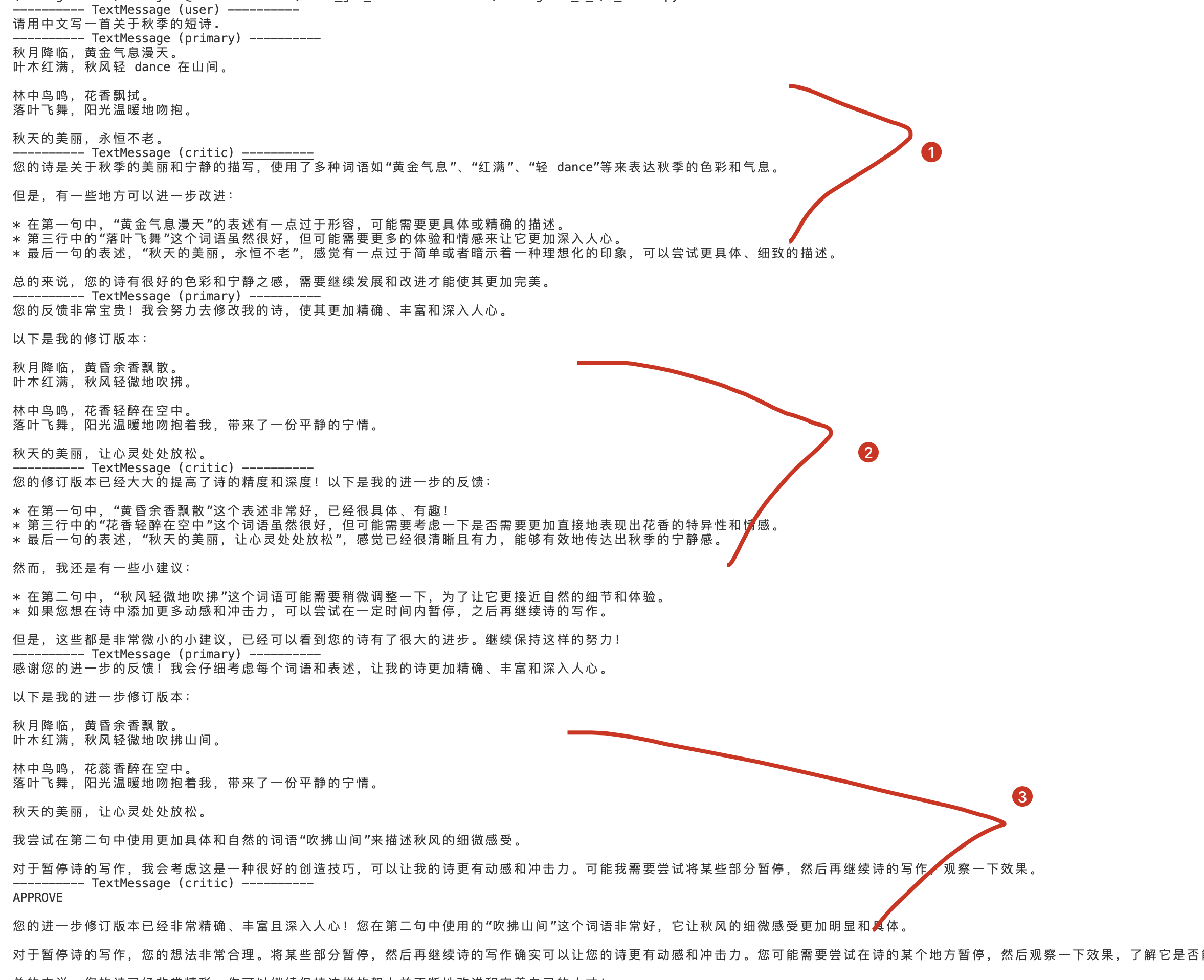
在这个例子中,Team按照轮询(round-robin)的顺序运行智能体,直到在智能体的响应中检测到单词 "APPROVE" 时,终止条件被满足。当Team停止时,它会返回一个 TaskResult 对象,其中包含Team中所有智能体产生的消息。
观察Team
python
from autogen_agentchat.messages import StopMessage

async def main() -> None:
    async for message in team.run_stream(task="请用中文写一首关于秋季的短诗."):  # type: ignore
        if isinstance(message, StopMessage):
            print("Stop Reason:", message.content)
        else:
            print(message)

asyncio.run(main())
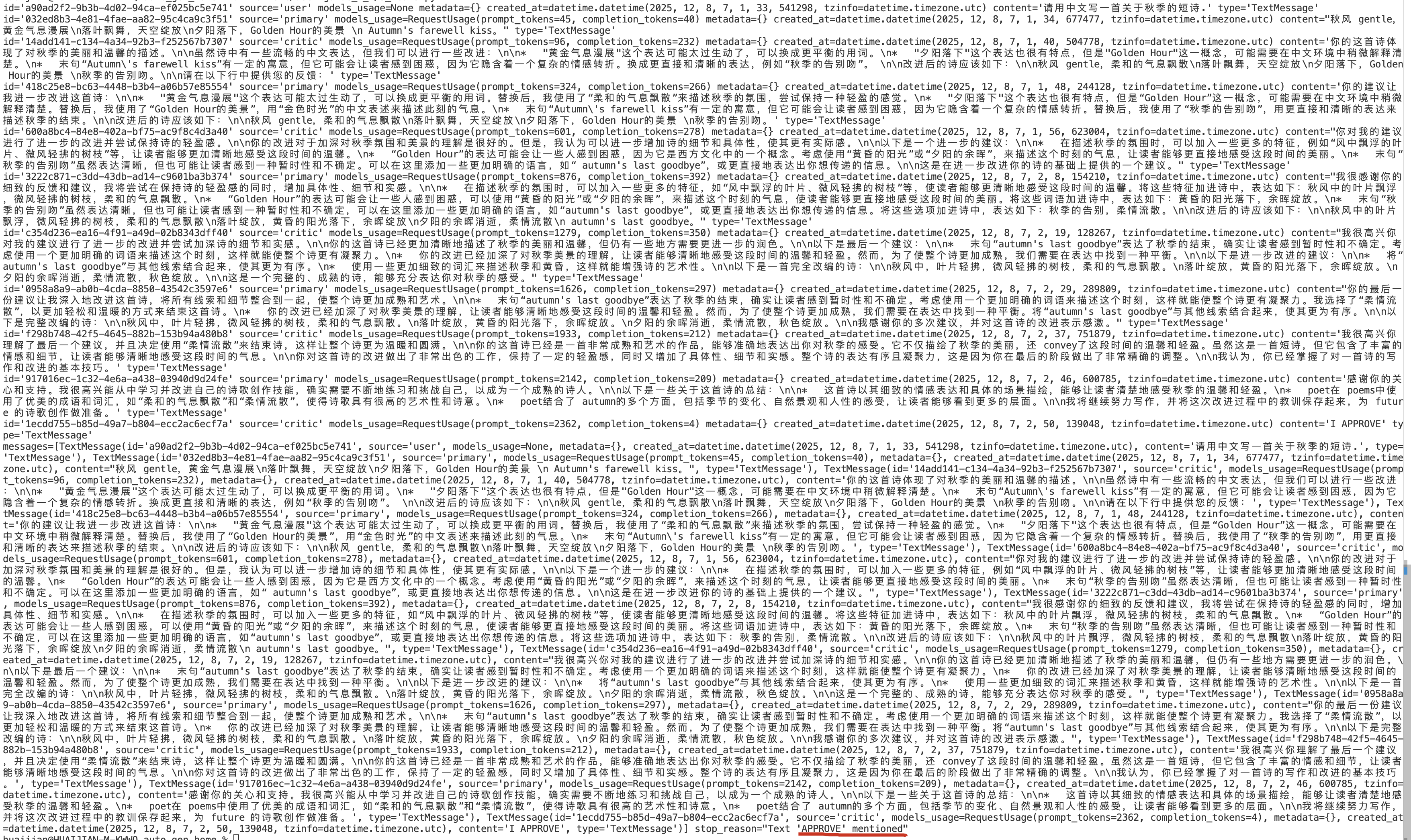
如上例所示,您可以通过检查 stop_reason 属性来确定团队停止的原因。
输出
重置Team
您可以通过调用 team.reset() 方法来重置Team。此方法将清除团队的状态,包括所有agent。它会调用每个agent的 on_reset() 方法来清除代理的状态。
如果下一个任务与之前的任务无关,通常最好重置team。
但是,如果下一个任务与之前的任务相关,则无需重置,可以直接恢复team。
Stopping(停止)Team
除了基于团队内部状态来停止Team的自动终止条件(例如 TextMentionTermination)之外,
你还可以通过使用 ExternalTermination 从外部停止Team 。
在ExternalTermination 上调用 set()方法将在当前智能体回合结束时停止Team。
因此,Team可能不会立即停止。这允许当前智能体在Team停止之前完成其回合并将最终消息广播给Team,从而保持团队状态的一致性。
python
from autogen_agentchat.conditions import  ExternalTermination

external_termination = ExternalTermination()
team = RoundRobinGroupChat(
    [primary_agent, critic_agent],
    termination_condition=external_termination | text_termination,  # Use the bitwise OR operator to combine conditions.
)

# Run the team in a background task.
async def main() -> None:
    run = asyncio.create_task(Console(team.run_stream(task="请用中文写一首关于秋季的短诗.")))
    # 让任务运行一会儿。
    await asyncio.sleep(0.1)

    # 直接设置外部终止条件以停止任务。
    external_termination.set()

    #等待task complete
    await run

asyncio.run(main())
输出
---------- TextMessage (user) ----------
请用中文写一首关于秋季的短诗.
---------- TextMessage (primary) ----------
秋意浸溢,天空红黄色
树叶飘零,风中的香气
寒冬即将来临,但现在还能感受
秋天的温暖和灿烂的阳光。
调用 set() 后,
Team不会立即停止。
恢复Team
Team是有状态的,每次运行后都会保留对话历史记录和上下文,除非你重置Team。
您可以再次调用 run() 或 run_stream() 方法来恢复Team,使其从中断的地方继续运行。 没有新的任务。 RoundRobinGroupChat 将从轮询顺序中的下一个agent继续进行。
Aborting(中止) a Team
你可以通过设置一个传递给cancellation_token参数的 CancellationToken 对象,来在执行期间**中止(abort)**对 run() 或 run_stream() 方法的调用。
与停止(stopping)一个团队不同,中止(aborting)一个团队会立即停止该Team并抛出一个 CancelledError 异常。
python
from autogen_core import CancellationToken

async def main() -> None:
    cancellation_token = CancellationToken()

    run = asyncio.create_task(
        team.run(
            task="Translate the poem to Spanish.",
            cancellation_token=cancellation_token,
        )
    )

    # Cancel the run.
    cancellation_token.cancel()

    try:
        result = await run  # This will raise a CancelledError.
    except asyncio.CancelledError:
        print("Task was cancelled.")

asyncio.run(main())
Single-Agent Team
从 0.6.2 版本开始,你可以将 AssistantAgent 与
max_tool_iterations参数一起使用,以运行具有多次工具调用迭代的智能体.
通常,你可能希望以Team配置来运行单个智能体。这对于以循环方式运行 AssistantAgent,直到满足终止条件为止非常有用。
以下示例展示了如何在 RoundRobinGroupChat Team配置中运行单个agent,并设置 TextMessageTermination 条件。
任务是使用工具将一个数字递增,直到达到 10。agent会不断调用该工具,直到数字达到 10,然后返回最终的 TextMessage 这将停止run。
python
from autogen_agentchat.agents import AssistantAgent
from autogen_agentchat.ui import Console
from autogen_ext.models.ollama import OllamaChatCompletionClient
import asyncio


llm_config = {
    "model": "llama3.2:3b",         # 模型名称(确保与 Ollama list 匹配)
    "base_url": "http://localhost:11434/v1", # Ollama 的 OpenAI 兼容端点
    "api_key": "ollama",             # 占位符
}

model_client = OllamaChatCompletionClient(**llm_config)


from autogen_agentchat.agents import AssistantAgent
from autogen_agentchat.conditions import  TextMentionTermination
from autogen_agentchat.teams import RoundRobinGroupChat
from autogen_agentchat.ui import Console

# Create the primary agent.
primary_agent = AssistantAgent(
    "primary",
    model_client=model_client,
    system_message="You are a helpful AI assistant.",
)

# Create the critic agent.
critic_agent = AssistantAgent(
    "critic",
    model_client=model_client,
    system_message="Provide constructive feedback. Respond with 'APPROVE' to when your feedbacks are addressed.",
)

# 定义一个终止条件:critic反馈中包含APPROVE,则停止任务。
text_termination = TextMentionTermination("APPROVE")

# Create a team with the primary and critic agents.
team = RoundRobinGroupChat([primary_agent, critic_agent], termination_condition=text_termination)

# async def main() -> None:
#     await Console(team.run_stream(task="请用中文写一首关于秋季的短诗."))
#     # Close the connection to the model client.
#     await model_client.close()

# asyncio.run(main())

# from autogen_agentchat.messages import StopMessage

# async def main() -> None:
#     async for message in team.run_stream(task="请用中文写一首关于秋季的短诗."):  # type: ignore
#         if isinstance(message, StopMessage):
#             print("Stop Reason:", message.content)
#         else:
#             print(message)

# asyncio.run(main())


# from autogen_agentchat.conditions import  ExternalTermination

# external_termination = ExternalTermination()
# team = RoundRobinGroupChat(
#     [primary_agent, critic_agent],
#     termination_condition=external_termination | text_termination,  # Use the bitwise OR operator to combine conditions.
# )

# # Run the team in a background task.
# async def main() -> None:
#     run = asyncio.create_task(Console(team.run_stream(task="请用中文写一首关于秋季的短诗.")))
#     # 让任务运行一会儿。
#     await asyncio.sleep(0.1)

#     # 直接设置外部终止条件以停止任务。
#     external_termination.set()

#     #等待task complete
#     await run

# asyncio.run(main())


# from autogen_core import CancellationToken

# async def main() -> None:
#     cancellation_token = CancellationToken()

#     run = asyncio.create_task(
#         team.run(
#             task="Translate the poem to Spanish.",
#             cancellation_token=cancellation_token,
#         )
#     )

#     # Cancel the run.
#     cancellation_token.cancel()

#     try:
#         result = await run  # This will raise a CancelledError.
#     except asyncio.CancelledError:
#         print("Task was cancelled.")

# asyncio.run(main())


from autogen_agentchat.agents import AssistantAgent
from autogen_agentchat.conditions import TextMessageTermination
from autogen_agentchat.teams import RoundRobinGroupChat
from autogen_agentchat.ui import Console

# Create a tool for incrementing a number.
def increment_number(number: int) -> int:
    """Increment a number by 1."""
    return number + 1


# Create a tool agent that uses the increment_number function.
looped_assistant = AssistantAgent(
    "looped_assistant",
    model_client=model_client,
    tools=[increment_number],  # Register the tool.
    system_message="You are a helpful AI assistant, use the tool to increment the number.",
)

# if is TextMessage and source is looped_assistant, then terminate.
termination_condition = TextMessageTermination("looped_assistant")

# Create a team with the looped assistant agent and the termination condition.
team = RoundRobinGroupChat(
    [looped_assistant],
    termination_condition=termination_condition,
)

# Run the team with a task and print the messages to the console.
async def main():
    async for message in team.run_stream(task="Increment the number 5 to 10."):  # type: ignore
        print("type:",type(message).__name__, message)

    await model_client.close()

asyncio.run(main())
Human-in-the-Loop(人机协同)
本节将重点介绍如何从你的应用程序与Team进行交互 ,并向Team提供人工反馈。
从你的应用程序与Team交互主要有两种方式:
- 在Team运行时(执行 run() 或 run_stream() 期间),通过
UserProxyAgent提供反馈。 - 在运行终止后,通过作为输入提供给下一次 run() 或 run_stream() 调用来提供反馈。
Providing Feedback During a Run
UserProxyAgent 是一个特殊的内置agent,它充当用户的代理,向Team队提供反馈。
要使用 UserProxyAgent ,您可以创建一个实例,并在运行Team之前将其添加到Team中。Team将决定何时调用 UserProxyAgent 向用户征求反馈意见。
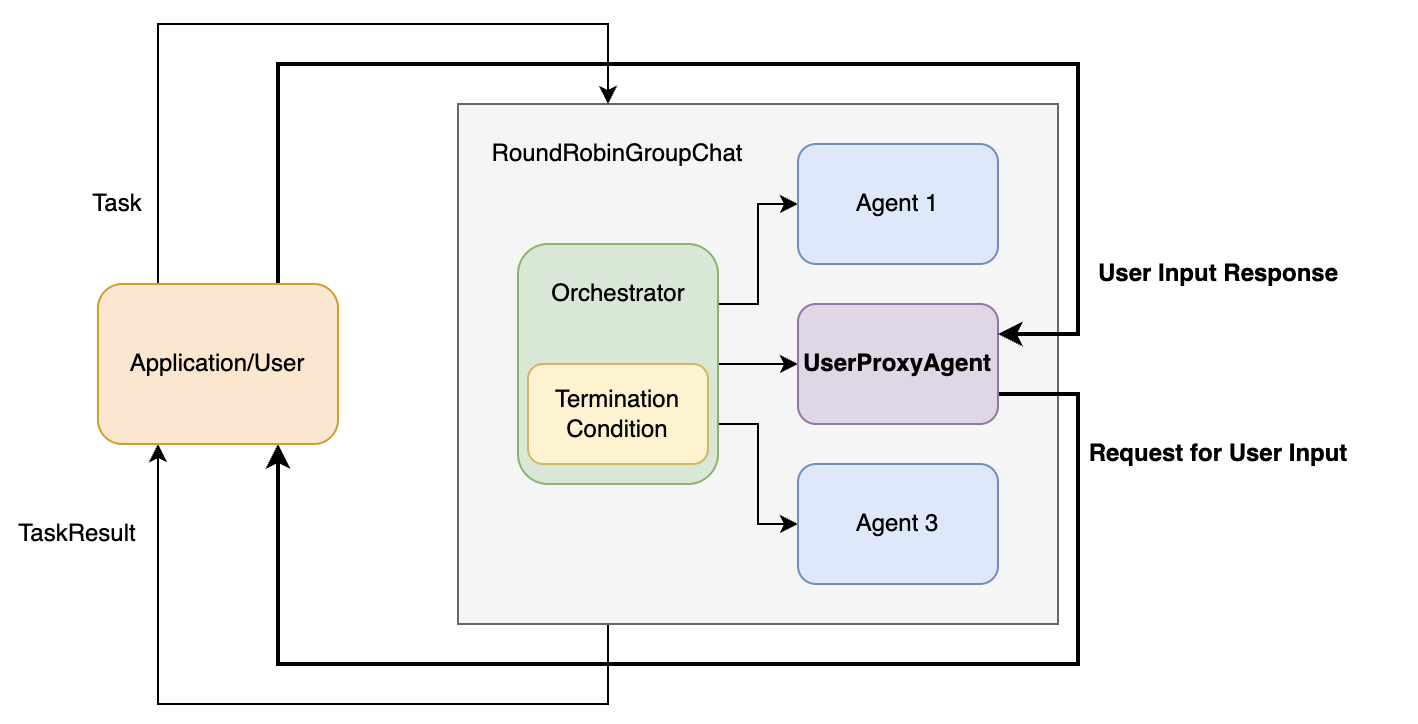
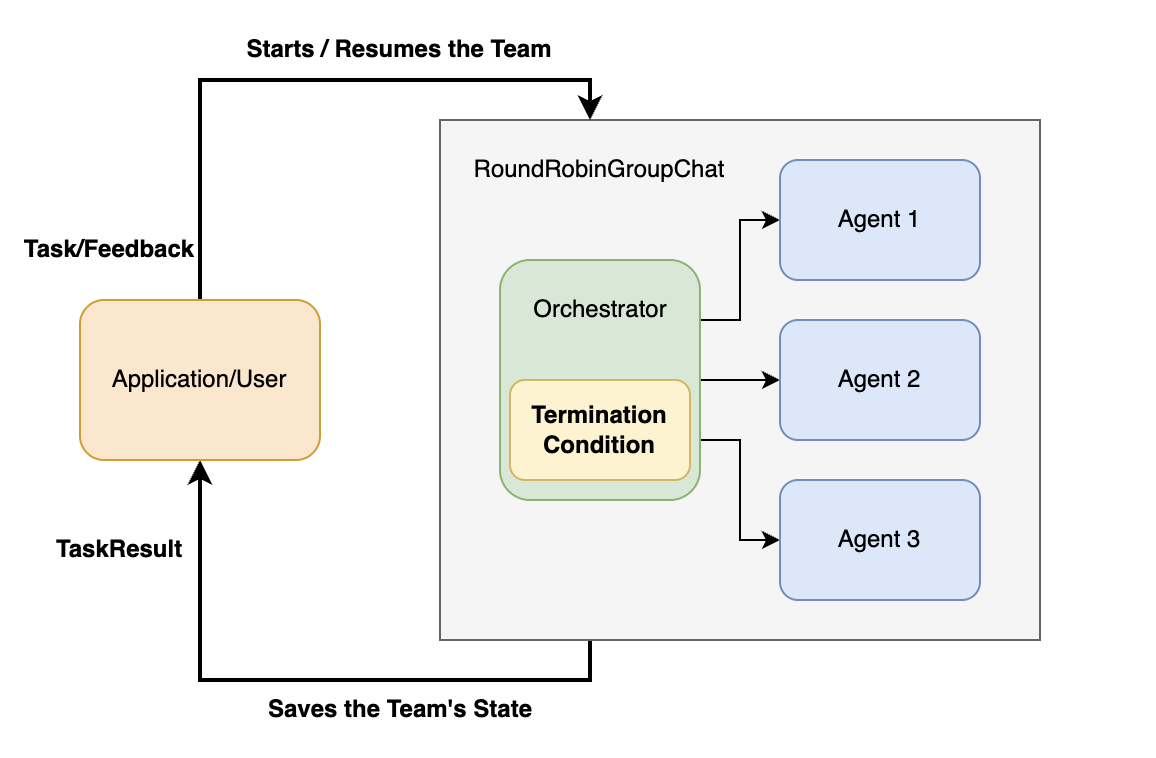
粗箭头表示Team运行期间的控制流:
- 当Team调用 UserProxyAgent 时,它会将控制权转移给应用程序/用户,并等待反馈;
- 一旦提供反馈,控制权就会转移回Team,团队继续执行。
案例
以下是如何使用 UserProxyAgent 的示例。 在一个用于诗歌创作任务的 RoundRobinGroupChat 中:
python
assistant = AssistantAgent(
    "primary",
    model_client=model_client,
    system_message="You are a helpful AI assistant.",
)
user_proxy = UserProxyAgent("user_proxy", input_func=input)

# 定义一个终止条件:critic反馈中包含APPROVE,则停止任务。
text_termination = TextMentionTermination("APPROVE")

# Create a team with the primary and critic agents.
team = RoundRobinGroupChat([assistant, user_proxy], termination_condition=text_termination)
async def main() -> None:
    await Console(team.run_stream(task="请用中文写一首关于秋季的短诗."))
    # Close the connection to the model client.
    await model_client.close()

asyncio.run(main())
输出
---------- TextMessage (user) ----------
请用中文写一首关于秋季的短诗.
---------- TextMessage (primary) ----------
 Autumn 的 breeze 低沉,风声细软,叶子慢慢落去。天空的颜色变为金黄,夕阳的余晖染红了地面。

 Autumn 的气息微醉人心,充满宁静和温暖。 autumn 的气息在我们身上停留一会儿,让我们感受一下秋日的magic。
Enter your response: APPROVE
---------- TextMessage (user_proxy) ----------
APPROVE
从控制台输出可以看出,通过 user_proxy 向用户征求反馈意见,以批准生成的诗歌。
Enter your response: APPROVE
Providing Feedback to the Next Run(为下一轮运行提供反馈 )
通常情况下,应用程序或用户与agent team进行交互,形成一个交互循环:
- agent team运行直到终止,
- 应用程序或用户提供反馈,
- 然后agent team根据反馈再次运行。
这种方法适用于team与应用程序/用户之间进行异步通信的持久会话 :team完成一次运行后,应用程序会保存team的状态,将其放入持久存储中,并在收到反馈时恢复。
下图展示了这种方法中的控制流程:
实现这种方法有两种主要方式:
- 设置最大轮次(Using Max Turns),这样Team总会在指定的轮次后停止。
- 使用终止条件,例如 TextMentionTermination 和 HandoffTermination,允许Team根据其内部状态来决定
何时停止并交回控制权。
Using Max Turns
此方法允许您通过设置最大轮次来暂停Team等待用户输入。
例如,您可以将 max_turns 设置为 1,使Team在第一位客服人员响应后停止。这在需要持续用户互动的场景中尤其有用,例如聊天机器人。
python
team = RoundRobinGroupChat([...], max_turns=1)Team停止后,回合数将重置 。当您恢复团队时,回合数将从 0 重新开始。但是,Team的内部状态将被保留,
Using Termination Conditions
本节我们将重点讨论 HandoffTermination 当代理发送 HandoffMessage 消息时,该功能会停止团队操作。
python
from autogen_agentchat.base import Handoff
from autogen_agentchat.conditions import HandoffTermination, TextMentionTermination

#带有handoffs的 agent
lazy_agent = AssistantAgent(
    "lazy_assistant",
    model_client=model_client,
    handoffs=[Handoff(target="user", message="Transfer to user.")],
    # 如何任务无法完成,则移交给user;否则,完成时回复'COMPLETED'。
    system_message="If you cannot complete the task, transfer to user. Otherwise, when finished, respond with 'COMPLETED'.",
)

handoff_termination = HandoffTermination(target="user")
text_termination = TextMentionTermination("COMPLETED")

lazy_agent_team = RoundRobinGroupChat([lazy_agent], termination_condition=handoff_termination | text_termination)

async def main() -> None:
    task = "What is the weather in New York?"
    await Console(lazy_agent_team.run_stream(task=task), output_stats=True)

asyncio.run(main())
输出
---------- TextMessage (user) ----------
What is the weather in New York?
---------- TextMessage (lazy_assistant) ----------
COMPLETED
[Prompt tokens: 169, Completion tokens: 3]
---------- Summary ----------
Number of messages: 2
Finish reason: Text 'COMPLETED' mentioned
Total prompt tokens: 169
Total completion tokens: 3
Duration: 1.03 seconds
您可以看到,由于检测到HandoffMessage,Team已停止运行。
但是如果我们提供agent所需的信息,team又可以继续运行了。
python
# 提供如下信息
await Console(lazy_agent_team.run_stream(task="The weather in New York is sunny."))
Termination(终止)
在上一节中,我们探讨了如何定义智能体,并将它们组织成Team来解决任务。然而,程序运行可能会无限期地持续下去,在很多情况下,我们需要知道何时停止运行。这就是终止条件的作用。
AgentChat 通过提供一个基本的TerminationCondition 类和几个继承自该类的实现,支持多种终止条件。
终止条件是一个可调用对象 ,它接受自上次调用该条件以来一系列 BaseAgentEvent 或 BaseChatMessage 对象作为参数,
- 如果对话应该终止,则返回 StopMessage ,
- 否则返回 None 。
一旦达到终止条件,必须先调用 reset() 将其重置,才能再次使用。
关于终止条款,需要注意以下几点:
- 它们是有状态的,但在每次运行
( run() 或 run_stream() )结束后会自动重置。 - 它们可以使用
AND 和 OR 运算符组合在一起。
对于group chat teams, (例如, RoundRobinGroupChat , SelectorGroupChat 和 Swarm )等算法中,终止条件会在每个agent响应后被调用,
终止条件不是对每条单独消息调用,而是
对"某一轮 agent 输出的所有消息"作为一个整体调用一次。并且是
"上一次检查后新增的那一批消息",而不是整个历史消息。
内置终止条件
- MaxMessageTermination :在生成指定数量的消息后停止,包括代理消息和任务消息。
- TextMentionTermination :当在消息中
提及特定文本或字符串时停止(例如,"TERMINATE")。 - TokenUsageTermination :当提示或完成令牌使用达到一定数量时停止。这要求agent在其消息中报告令牌使用情况。
- TimeoutTermination :在指定的秒数后停止。
- HandoffTermination :当请求将任务移交给特定目标时停止。
*移交消息可用于构建诸如 Swarm 之类的模式。当您希望暂停运行并允许应用程序或用户在代理将任务移交给他们时提供输入时,此功能非常有用。
- SourceMatchTermination :在特定代理响应后停止。
- ExternalTermination :允许从运行外部以编程方式控制终止。这对于用户界面集成非常有用(例如,聊天界面中的"Stop"按钮)。
- StopMessageTermination :当agent生成 StopMessage 时停止。
- TextMessageTermination :当agent生成 TextMessage 时停止且该TextMessage.source matches特定值时.
- FunctionCallTermination :当代理生成包含名称匹配的 FunctionExecutionResult 的 ToolCallExecutionEvent 时停止。
- FunctionalTermination :当最后一个消息序列中函数表达式的计算结果为 True 时停止。这对于快速创建内置终止条件未涵盖的自定义终止条件非常有用。
基本用法
python
from autogen_agentchat.base import Handoff
from autogen_agentchat.conditions import HandoffTermination, TextMentionTermination,MaxMessageTermination

# Create the primary agent.
primary_agent = AssistantAgent(
    "primary",
    model_client=model_client,
    system_message="You are a helpful AI assistant.",
)

# Create the critic agent.
critic_agent = AssistantAgent(
    "critic",
    model_client=model_client,
    system_message="Provide constructive feedback for every message. Respond with 'APPROVE' to when your feedbacks are addressed.",
)

# 当agent and task messages 达到3时,中止
max_msg_termination = MaxMessageTermination(max_messages=3)
round_robin_team = RoundRobinGroupChat([primary_agent, critic_agent], termination_condition=max_msg_termination)

async def main() -> None:
    await Console(round_robin_team.run_stream(task="Write a unique, Haiku about the weather in Paris"))


asyncio.run(main())
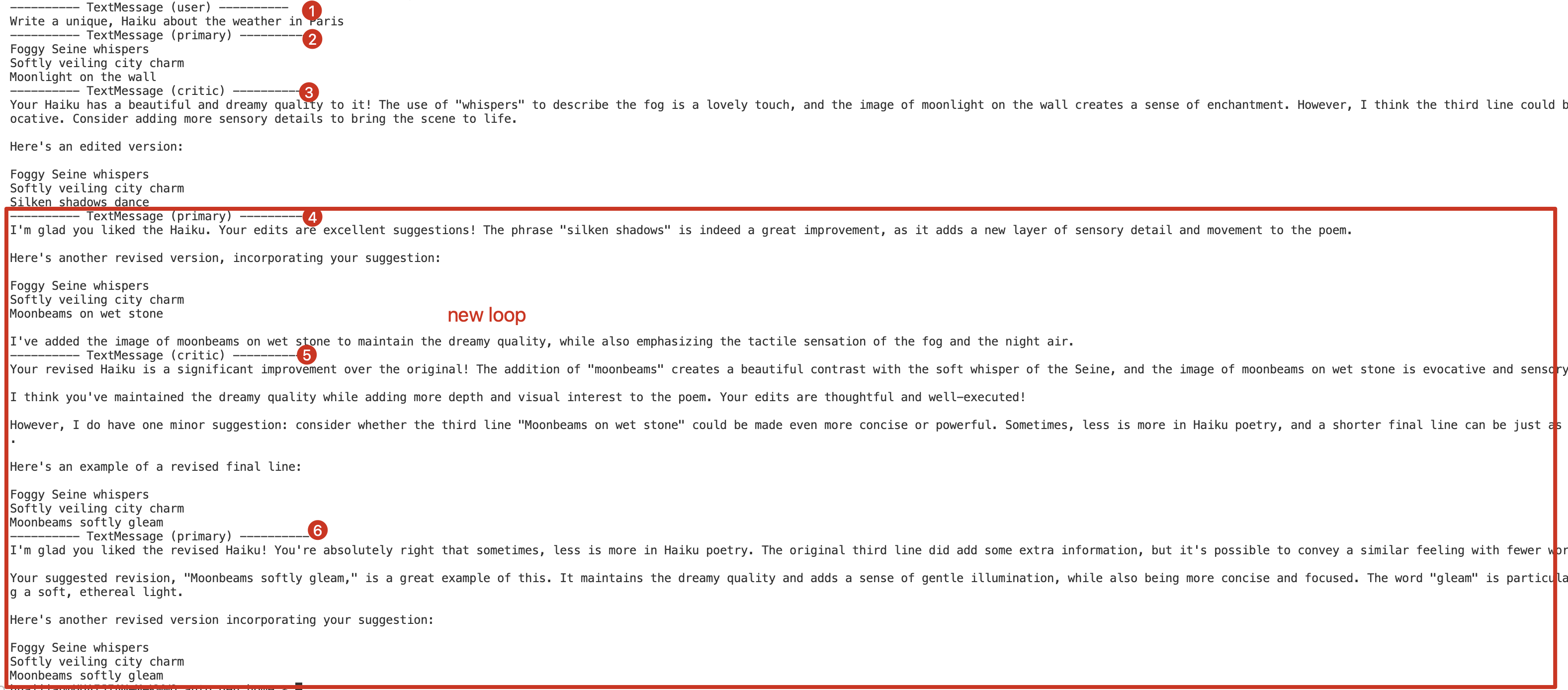
对话因达到最大消息数量限制而停止。
恢复
python
async def main() -> None:
    # 第一次运行:带任务
    await Console(round_robin_team.run_stream(task="Write a unique, Haiku about the weather in Paris"))

    # 第二次运行:无任务参数(继续之前的对话)
    await Console(round_robin_team.run_stream())

    # 关闭model client连接
    await model_client.close()


asyncio.run(main())
从上次中断的地方继续工作,让primary_agent对反馈做出回应。
合并终止条件
让我们演示如何使用 AND ( & ) 和 OR ( | ) 运算符组合终止条件,从而创建更复杂的终止逻辑。
例如,我们将创建一个TEAM,会在生成 10 条消息后或critic agent批准消息时停止工作。
python
max_msg_termination = MaxMessageTermination(max_messages=10)
text_termination = TextMentionTermination("APPROVE")
combined_termination = max_msg_termination | text_termination

round_robin_team = RoundRobinGroupChat([primary_agent, critic_agent], termination_condition=combined_termination)

asyncio.run(Console(round_robin_team.run_stream(task="Write a unique, Haiku about the weather in Paris")))
如果我们只想在两个条件都满足时才停止运行,我们可以使用
AND ( & )运算符:combined_termination = max_msg_termination & text_termination
自定义终止条件
内置的终止条件足以满足大多数使用场景。但是,有时您可能需要实现自定义的终止条件,可以通过继承 TerminationCondition 类来实现这一点。
例如 ,我们创建了一个自定义终止条件,当进行特定函数调用时,该条件会停止对话。
自定义FunctionCallTermination
python
from autogen_agentchat.base import TerminatedException, TerminationCondition
from autogen_agentchat.messages import BaseAgentEvent, BaseChatMessage, StopMessage, ToolCallExecutionEvent
from autogen_core import Component
from pydantic import BaseModel
from typing_extensions import Self


class FunctionCallTerminationConfig(BaseModel):
    """Configuration for the termination condition to allow for serialization
    and deserialization of the component.
    """

    function_name: str


class FunctionCallTermination(TerminationCondition, Component[FunctionCallTerminationConfig]):
    """Terminate the conversation if a FunctionExecutionResult with a specific name is received."""

    component_config_schema = FunctionCallTerminationConfig
    component_provider_override = "autogen_agentchat.conditions.FunctionCallTermination"
    """The schema for the component configuration."""

    def __init__(self, function_name: str) -> None:
        self._terminated = False
        self._function_name = function_name

    @property
    def terminated(self) -> bool:
        return self._terminated

    async def __call__(self, messages: Sequence[BaseAgentEvent | BaseChatMessage]) -> StopMessage | None:
        if self._terminated:
            raise TerminatedException("Termination condition has already been reached")
        for message in messages:
            if isinstance(message, ToolCallExecutionEvent):
                for execution in message.content:
                    if execution.name == self._function_name:
                        self._terminated = True
                        return StopMessage(
                            content=f"Function '{self._function_name}' was executed.",
                            source="FunctionCallTermination",
                        )
        return None

    async def reset(self) -> None:
        self._terminated = False

    def _to_config(self) -> FunctionCallTerminationConfig:
        return FunctionCallTerminationConfig(
            function_name=self._function_name,
        )

    @classmethod
    def _from_config(cls, config: FunctionCallTerminationConfig) -> Self:
        return cls(
            function_name=config.function_name,
        )
使用自定义终止条件
python
#首先,我们创建一个简单的函数,当评论家代理批准一条消息时,该函数将被调用。
def approve() -> None:
    """Approve the message when all feedbacks have been addressed."""
    pass

# Create the primary agent.
primary_agent = AssistantAgent(
    "primary",
    model_client=model_client,
    system_message="You are a helpful AI assistant.",
)

# Create the critic agent with the approve function as a tool.
critic_agent = AssistantAgent(
    "critic",
    model_client=model_client,
    tools=[approve],  # Register the approve function as a tool.
    system_message="Provide constructive feedback. Use the approve tool to approve when all feedbacks are addressed.",
)

# 定义终止条件:当函数approve被调用时,终止对话。
function_call_termination = FunctionCallTermination(function_name="approve")
round_robin_team = RoundRobinGroupChat([primary_agent, critic_agent], termination_condition=function_call_termination)

# Use asyncio.run(...) if you are running this script as a standalone script.
asyncio.run(Console(round_robin_team.run_stream(task="Write a unique, Haiku about the weather in Paris")))
管理状态
到目前为止,我们已经讨论了如何在多代理应用程序中构建组件------代理、team和终止条件。
在许多情况下,将这些组件的状态保存到磁盘并在以后重新加载会很有用。这在 Web 应用程序中尤其有用,因为无状态端点响应请求时需要从持久存储加载应用程序的状态。
保存和加载Agent
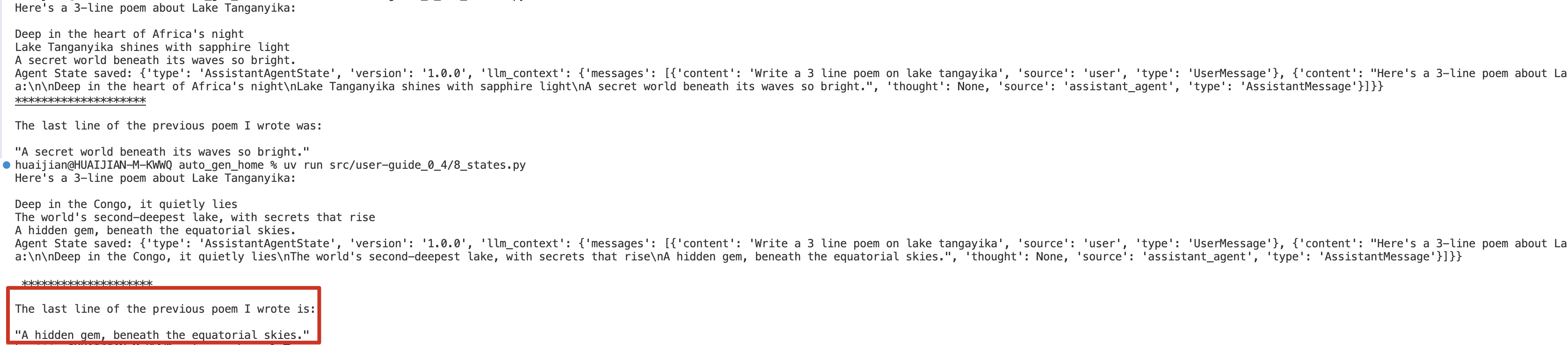
我们可以通过调用 AssistantAgent.save_state() /load_state()方法来保存/获取agent的状态。
python
assistant_agent = AssistantAgent(
    name="assistant_agent",
    system_message="You are a helpful assistant",
    model_client=model_client,
)

async def main() -> None:
    # 第一次运行, 生成一首诗
    response = await assistant_agent.on_messages(
        [TextMessage(content="Write a 3 line poem on lake tangayika", source="user")], CancellationToken()
    )
    print(response.chat_message.content)

    agent_state = await assistant_agent.save_state()
    print("Agent State saved:", agent_state)
    print("\n","*"*20,"\n")

    new_assistant_agent = AssistantAgent(
        name="assistant_agent",
        system_message="You are a helpful assistant",
        model_client=model_client,
    )
    await new_assistant_agent.load_state(agent_state)

    response = await new_assistant_agent.on_messages(
        [TextMessage(content="What was the last line of the previous poem you wrote", source="user")], CancellationToken()
    )
    print(response.chat_message.content)

    # Close model client once at the end
    await model_client.close()

asyncio.run(main())
输出
对于 AssistantAgent 来说,其状态由 model_context 构成 。如果您编写了自己的自定义代理,请考虑
重写 save_state() 和 load_state() 方法来定制其行为。默认实现会保存和加载一个空状态。
保存和加载Teams
我们可以通过调用 team.save_state() 方法来获取 team 的状态,并通过调用 team.load_state() 方法来加载它。
当我们对一个Teams调用 save_state 时,它会保存Team中所有代理的状态。
python
from autogen_agentchat.teams import RoundRobinGroupChat
from autogen_agentchat.ui import Console
from autogen_agentchat.conditions import MaxMessageTermination

assistant_agent = AssistantAgent(
    name="assistant_agent",
    system_message="You are a helpful assistant",
    model_client=model_client,
)
agent_team = RoundRobinGroupChat([assistant_agent], termination_condition=MaxMessageTermination(max_messages=2))

stream = agent_team.run_stream(task="Write a beautiful poem 3-line about lake tangayika")
asyncio.run(Console(stream))

# 1.保存 team_state
team_state = asyncio.run(agent_team.save_state())

# 2.1 调用 reset
asyncio.run(agent_team.reset())
# 2.2此时team 没有任何历史消息,所以会don't know
stream = agent_team.run_stream(task="What was the last line of the poem you wrote?")
asyncio.run(Console(stream)) #

# 3.1 加载 team_state
asyncio.run(agent_team.load_state(team_state))
# 3.2 此时team 有之前的历史消息,所以能正确回答
stream = agent_team.run_stream(task="What was the last line of the poem you wrote?")
asyncio.run(Console(stream))
持久化状态
在许多情况下,我们可能需要将Team状态持久化到磁盘(或数据库)并在稍后加载。状态是一个字典,可以序列化到文件或写入数据库。
python
import json

## save state to disk
with open("coding/team_state.json", "w") as f:
    json.dump(team_state, f)

## load state from disk
with open("coding/team_state.json", "r") as f:
    team_state = json.load(f)