目录
介绍
之前的文章Java导出写入固定Excel模板数据里演示了导出固定excel模板数据的方式,但是导出的模板数据还是有些小问题,比如使用占位符导出的数据,如果导出的指定占位符的sheet页集合数据为空集合,此时就会出现占位符在模板数据里的情况,也就是该sheet页面的占位符还在,没有清除占位符,这个一般在使用中是比较不太合适的,比如:
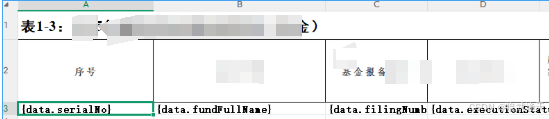
这里传入空集合数据时,渲染出来的excel文件就会单留占位符数据在这里,显得比较突兀
本篇文章直接对工具类进行封装,并且解决这个问题,而且针对一些比较复杂的excel进行处理,比如第一行的数据为sheet页的标题,第二行才为表头,我们渲染数据应该是要从第三行数据进行渲染
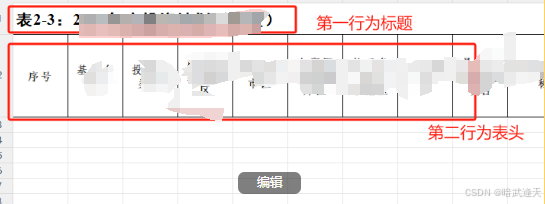
还会对读取excel的监听器进行封装,也是封装为通用的读取监听器来进行使用
这里使用的是阿里的easyExcel进行封装使用,依赖如下:
java
  <dependency>
     <groupId>com.alibaba</groupId>
     <artifactId>easyexcel</artifactId>
     <version>3.3.2</version>
  </dependency>
通用读取工具
平常在使用阿里的easyExcel时,需要对单个sheet页进行梳理,书写对应实体和对应数据监听器,这里直接封装为一个通用的监听器进行使用
java
import java.util.ArrayList;
import java.util.List;
import java.util.Map;

import com.alibaba.excel.context.AnalysisContext;
import com.alibaba.excel.event.AnalysisEventListener;

/**
 * @author 武天
 * 通用excel监听器2
 * @date 2023/7/25 14:10
 */
public class ObjectExcelListener<T> extends AnalysisEventListener<T> {


    List<T> addList = new ArrayList<>();

    /**
     * 每解析一行都会回调invoke()方法
     * @param context 内容
     */

    @Override
    public void doAfterAllAnalysed(AnalysisContext context) {
        //解析结束销毁不用的资源
        //注意不要调用datas.clear(),否则getDatas为null
    }


    @Override
    public void invoke(T t, AnalysisContext analysisContext) {
        addList.add(t);
    }

    /**
     * 返回数据
     *
     * @return 返回读取的数据集合
     **/
    public List<T> getDatas() {
        return addList;
    }

    /**
     * 设置读取的数据集合
     *
     * @param datas 设置读取的数据集合
     **/
    public void setDatas(List<T> datas) {
        this.addList = datas;
    }

    @Override
    public void invokeHeadMap(Map<Integer, String> headMap, AnalysisContext context) {
        System.out.println("✅ 实际读取到的表头(列索引 -> 表头名):");
        headMap.forEach((index, name) ->
            System.out.println("  列 " + index + ": \"" + name + "\""));
    }
}
使用时需要传入对应数据的建表实体进行使用
准备一个有数据的excel文件,表头注意是在第二行,在使用工具时需制定对应表头所在行
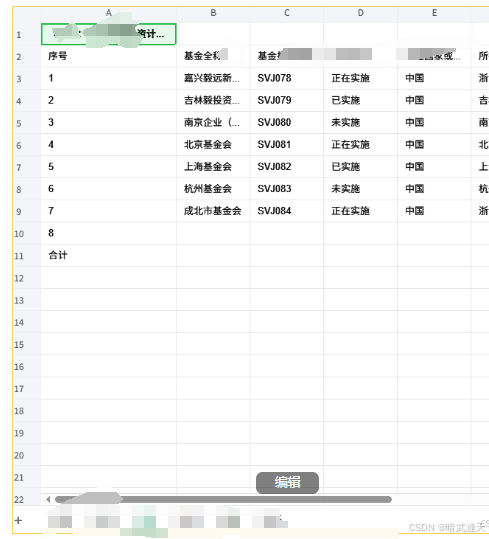
封装对应实体(只展示部分字段演示即可):
java
import java.math.BigDecimal;

import com.alibaba.excel.annotation.ExcelProperty;

import lombok.Data;


@Data
public class FundDetail {


    @ExcelProperty("序号")
    private String serialNo;

    @ExcelProperty("基金全称")
    private String fundFullName;

    @ExcelProperty("基金报备编号")
    private String filingNumber;

    @ExcelProperty("执行状态")
    private String executionStatus;

    @ExcelProperty("所在国家或地区")
    private String countryOrRegion;

    @ExcelProperty("所在省市区")

    private String provinceCityDistrict;


}
测试运行
java
import java.util.List;

import com.alibaba.excel.EasyExcel;

import net.coding.excelUtils.entity.FundDetail;
import net.coding.excelUtils.listener.ObjectExcelListener;

public class Test {

    public static void main(String[] args) {
        String fileName = "/workspace/spring-boot-cloud-studio-demo/src/main/java/net/coding/excelUtils/templates/投资基金.xlsx";
        ObjectExcelListener objectExcelListener = new ObjectExcelListener();
            EasyExcel.read(fileName, FundDetail.class, objectExcelListener)
                    .sheet(2) // sheet页索引
                    .headRowNumber(2) // 指定表头所在行
                    .doRead();
        List<FundDetail> connectors = objectExcelListener.getDatas();
        System.out.println("我要的数据====>"+connectors);
    }
}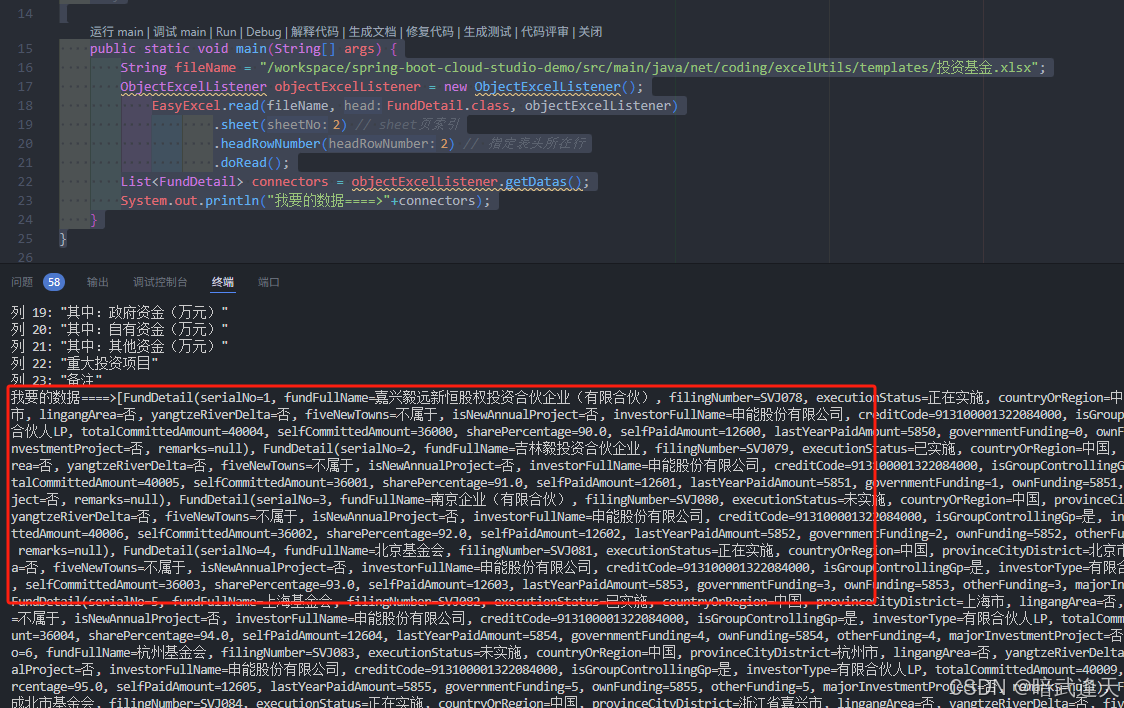
可以看到数据都正常打印拿取到了
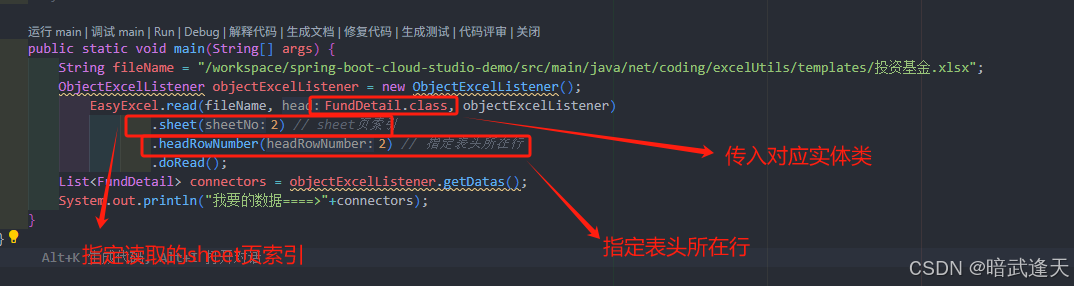
注意这里制定读取的sheet页索引,也可以直接传入sheet页名字进行读取
比如:.sheet('sheetName')
通用写入工具
注解表头映射工具
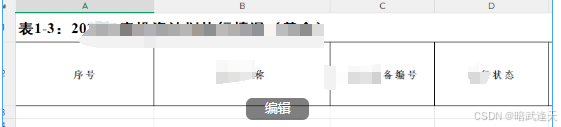
传统方式还是根据easyExcel的注解映射表头进行映射,但是传统的方式是直接根据实体属性的注解进行导出数据的,这里需要根据固定模板的表头进行映射,而且表头还不在第一行,也是需要指定表头行进行数据渲染
比如excel文件为:
直接上工具类代码
java
import org.apache.poi.ss.usermodel.*;
import org.apache.poi.xssf.usermodel.XSSFWorkbook;

import java.io.*;
import java.lang.reflect.Field;
import java.math.BigDecimal;
import java.util.*;

/**
 *
 */
public class ExcelWriteUtil {

    // ==================== 对外暴露的核心方法(直接接收样式参数,支持空集合) ====================
    public static <T> void writeExcelByTemplate(String templatePath, String outputPath,
                                                int sheetIndex, int startRow,
                                                List<T> dataList,
                                                BorderStyle borderStyle,
                                                IndexedColors bgColor,
                                                HorizontalAlignment horizontalAlign,
                                                VerticalAlignment verticalAlign,
                                                String fontName,
                                                short fontSize,
                                                boolean fontBold,
                                                short fontColor,
                                                boolean wrapText) {
        // 校验基础参数
        File templateFile = new File(templatePath);
        if (!templateFile.exists()) {
            throw new RuntimeException("模板文件不存在:" + templatePath);
        }
        if (sheetIndex < 0) {
            throw new IllegalArgumentException("Sheet索引不能为负数");
        }
        if (startRow < 0) {
            throw new IllegalArgumentException("数据起始行号不能为负数");
        }

        // 处理空集合:直接复制模板文件到输出路径,不写入任何数据
        if (dataList == null || dataList.isEmpty()) {
            copyTemplateFile(templatePath, outputPath);
            System.out.println(" 数据列表为空,已直接复制模板文件到:" + outputPath);
            return;
        }

        Workbook workbook = null;
        FileInputStream fis = null;
        FileOutputStream fos = null;

        try {
            fis = new FileInputStream(templateFile);
            workbook = new XSSFWorkbook(fis);
            Sheet sheet = workbook.getSheetAt(sheetIndex);
            if (sheet == null) {
                throw new RuntimeException("模板中不存在索引为" + sheetIndex + "的Sheet");
            }

            // 核心:直接在当前Workbook创建样式(不依赖任何高版本API)
            CellStyle dataCellStyle = createStyleDirectly(
                    workbook,
                    borderStyle,
                    bgColor,
                    horizontalAlign,
                    verticalAlign,
                    fontName,
                    fontSize,
                    fontBold,
                    fontColor,
                    wrapText
            );

            // 反射获取列映射
            Class<?> clazz = dataList.get(0).getClass();
            Map<Integer, Field> columnFieldMap = getColumnFieldMap(clazz);

            // 逐行写入数据+应用样式
            int currentRowNum = startRow;
            for (T data : dataList) {
                Row row = sheet.getRow(currentRowNum);
                if (row == null) {
                    row = sheet.createRow(currentRowNum);
                }

                for (Map.Entry<Integer, Field> entry : columnFieldMap.entrySet()) {
                    int colIndex = entry.getKey();
                    Field field = entry.getValue();
                    Object fieldValue = getFieldValue(data, field);
                    Cell cell = setCellValue(row, colIndex, fieldValue);
                    cell.setCellStyle(dataCellStyle); // 应用样式
                }
                currentRowNum++;
            }

            // 写入输出文件
            File outputFile = new File(outputPath);
            if (!outputFile.getParentFile().exists()) {
                outputFile.getParentFile().mkdirs();
            }
            fos = new FileOutputStream(outputFile);
            workbook.write(fos);

            System.out.println(String.format(" Excel写入成功!输出路径:%s,写入数据条数:%d",
                    outputPath, dataList.size()));

        } catch (Exception e) {
            throw new RuntimeException("Excel模板写入失败", e);
        } finally {
            // 关闭资源
            try {
                if (fis != null) fis.close();
                if (fos != null) fos.close();
                if (workbook != null) workbook.close();
            } catch (IOException e) {
                e.printStackTrace();
            }
        }
    }

    /**
     * 重载方法:使用默认样式(边框+居中+微软雅黑10号黑字),支持空集合
     */
    public static <T> void writeExcelByTemplate(String templatePath, String outputPath,
                                                int sheetIndex, int startRow,
                                                List<T> dataList) {
        // 调用核心方法,传入默认样式参数
        writeExcelByTemplate(
                templatePath, outputPath, sheetIndex, startRow, dataList,
                BorderStyle.THIN,
                IndexedColors.WHITE,
                HorizontalAlignment.CENTER,
                VerticalAlignment.CENTER,
                "微软雅黑",
                (short) 10,
                false,
                IndexedColors.BLACK.getIndex(),
                false
        );
    }

    // ==================== 私有方法:复制模板文件(空集合时调用) ====================
    private static void copyTemplateFile(String templatePath, String outputPath) {
        FileInputStream fis = null;
        FileOutputStream fos = null;
        try {
            // 创建输出目录
            File outputFile = new File(outputPath);
            if (!outputFile.getParentFile().exists()) {
                outputFile.getParentFile().mkdirs();
            }
            // 复制模板文件到输出路径
            fis = new FileInputStream(templatePath);
            fos = new FileOutputStream(outputPath);
            byte[] buffer = new byte[1024];
            int len;
            while ((len = fis.read(buffer)) != -1) {
                fos.write(buffer, 0, len);
            }
        } catch (IOException e) {
            throw new RuntimeException("复制模板文件失败:" + e.getMessage(), e);
        } finally {
            try {
                if (fis != null) fis.close();
                if (fos != null) fos.close();
            } catch (IOException e) {
                e.printStackTrace();
            }
        }
    }

    // ==================== 核心:直接创建样式(无任何高版本API) ====================
    private static CellStyle createStyleDirectly(Workbook workbook,
                                                 BorderStyle borderStyle,
                                                 IndexedColors bgColor,
                                                 HorizontalAlignment horizontalAlign,
                                                 VerticalAlignment verticalAlign,
                                                 String fontName,
                                                 short fontSize,
                                                 boolean fontBold,
                                                 short fontColor,
                                                 boolean wrapText) {
        CellStyle style = workbook.createCellStyle();

        // 1. 边框
        style.setBorderTop(borderStyle);
        style.setBorderBottom(borderStyle);
        style.setBorderLeft(borderStyle);
        style.setBorderRight(borderStyle);
        style.setTopBorderColor(IndexedColors.BLACK.getIndex());
        style.setBottomBorderColor(IndexedColors.BLACK.getIndex());
        style.setLeftBorderColor(IndexedColors.BLACK.getIndex());
        style.setRightBorderColor(IndexedColors.BLACK.getIndex());

        // 2. 背景色:如果是白色,设置为无填充(透明)
        if (bgColor == IndexedColors.WHITE) {
            style.setFillPattern(FillPatternType.NO_FILL); // 无背景色(关键)
        } else {
            style.setFillForegroundColor(bgColor.getIndex());
            style.setFillPattern(FillPatternType.SOLID_FOREGROUND);
        }

        // 3. 对齐方式
        style.setAlignment(horizontalAlign);
        style.setVerticalAlignment(verticalAlign);
        style.setWrapText(wrapText);

        // 4. 字体
        Font font = workbook.createFont();
        font.setFontName(fontName);
        font.setFontHeightInPoints(fontSize);
        font.setBold(fontBold);
        font.setColor(fontColor);
        style.setFont(font);

        return style;
    }

    // ==================== 私有通用方法 ====================
    private static <T> Map<Integer, Field> getColumnFieldMap(Class<T> clazz) {
        Map<Integer, Field> columnFieldMap = new TreeMap<>();
        Field[] fields = clazz.getDeclaredFields();
        for (Field field : fields) {
            ExcelColumn excelColumn = field.getAnnotation(ExcelColumn.class);
            if (excelColumn != null) {
                field.setAccessible(true);
                columnFieldMap.put(excelColumn.columnIndex(), field);
            }
        }
        if (columnFieldMap.isEmpty()) {
            throw new RuntimeException("实体类" + clazz.getName() + "未配置@ExcelColumn注解");
        }
        return columnFieldMap;
    }

    private static Object getFieldValue(Object obj, Field field) {
        try {
            return field == null ? "" : field.get(obj);
        } catch (IllegalAccessException e) {
            return "";
        }
    }

    private static Cell setCellValue(Row row, int colIndex, Object value) {
        Cell cell = row.getCell(colIndex);
        if (cell == null) {
            cell = row.createCell(colIndex);
        }
        if (value == null || value.toString().isEmpty()) {
            cell.setCellValue("");
        } else if (value instanceof String) {
            cell.setCellValue((String) value);
        } else if (value instanceof BigDecimal) {
            cell.setCellValue(((BigDecimal) value).doubleValue());
        } else if (value instanceof Double) {
            cell.setCellValue((Double) value);
        } else if (value instanceof Integer) {
            cell.setCellValue((Integer) value);
        } else if (value instanceof Long) {
            cell.setCellValue((Long) value);
        } else if (value instanceof Boolean) {
            cell.setCellValue((Boolean) value);
        } else {
            cell.setCellValue(value.toString());
        }
        return cell;
    }

    // ========== 保留原有无模板方法 ==========
    public static <T> void writeExcel(String outputPath, String sheetName, List<T> dataList, Class<T> clazz) {
        if (dataList == null || dataList.isEmpty()) {
            throw new IllegalArgumentException("数据不能为空");
        }
        File outputFile = new File(outputPath);
        if (!outputFile.getParentFile().exists()) {
            outputFile.getParentFile().mkdirs();
        }
        com.alibaba.excel.EasyExcel.write(outputPath, clazz)
                .autoCloseStream(true)
                .sheet(sheetName == null ? "Sheet1" : sheetName)
                .doWrite(dataList);
    }

    public static <T> void writeExcel(String outputPath, List<T> dataList, Class<T> clazz) {
        writeExcel(outputPath, "Sheet1", dataList, clazz);
    }
}
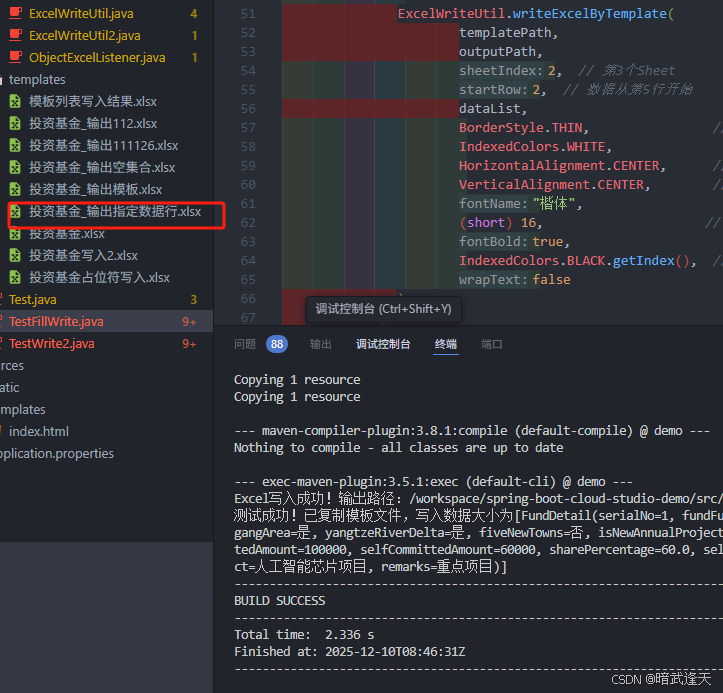
测试:
java
import net.coding.excelUtils.entity.FundDetail;
import net.coding.excelUtils.listener.ExcelWriteUtil;

import java.io.IOException;
import java.math.BigDecimal;
import java.util.ArrayList;
import java.util.List;

import org.apache.poi.ss.usermodel.*;

public class TestFillWrite {
    public static void main(String[] args) throws IOException {
        // ========== 核心配置(3.3.2专属) ==========
        String path = "/workspace/spring-boot-cloud-studio-demo/src/main/java/net/coding/excelUtils/templates/";
        String templatePath = path+"投资基金_输出模板.xlsx"; // 你的模板文件
        String outputPath = path+"投资基金_输出指定数据行.xlsx"; // 输出文件
           // 1. 构造测试数据
           List<FundDetail> dataList = new ArrayList<>();
           FundDetail item1 = new FundDetail();
           item1.setSerialNo("1");
           item1.setFundFullName("科技创新基金");
           item1.setFilingNumber("SVJ2025001");
           item1.setExecutionStatus("执行中");
           item1.setCountryOrRegion("中国");
           item1.setProvinceCityDistrict("上海市");
           item1.setLingangArea("是");
           item1.setYangtzeRiverDelta("是");
           item1.setFiveNewTowns("否");
           item1.setIsNewAnnualProject("是");
           item1.setInvestorFullName("XX投资集团");
           item1.setCreditCode("91310000MA1FL12345");
           item1.setIsGroupControllingGp("是");
           item1.setInvestorType("国有企业");
           item1.setTotalCommittedAmount(new BigDecimal("100000"));
           item1.setSelfCommittedAmount(new BigDecimal("60000"));
           item1.setSharePercentage(60.0);
           item1.setSelfPaidAmount(new BigDecimal("30000"));
           item1.setLastYearPaidAmount(new BigDecimal("20000"));
           item1.setGovernmentFunding(new BigDecimal("10000"));
           item1.setOwnFunding(new BigDecimal("20000"));
           item1.setOtherFunding(BigDecimal.ZERO);
           item1.setMajorInvestmentProject("人工智能芯片项目");
           item1.setRemarks("重点项目");
           dataList.add(item1);


           try {
               // 传入空集合测试
               ExcelWriteUtil.writeExcelByTemplate(
                       templatePath,
                       outputPath,
                       2,  // 第3个Sheet
                       2,  // 数据从第5行开始
                       dataList,
                       BorderStyle.THIN,                // 细边框
                       IndexedColors.WHITE,               // 无背景色
                       HorizontalAlignment.CENTER,      // 水平居中
                       VerticalAlignment.CENTER,        // 垂直居中
                       "楷体",                          // 楷体字体
                       (short) 16,                     // 16号字
                       true,                           // 加粗
                       IndexedColors.BLACK.getIndex(),  // 黑色字体
                       false                           // 不自动换行
               );

               System.out.println(" 测试成功!已复制模板文件,写入数据大小为"+dataList);

           } catch (Exception e) {
               System.err.println(" 写入失败:" + e.getMessage());
               e.printStackTrace();
           }
    }
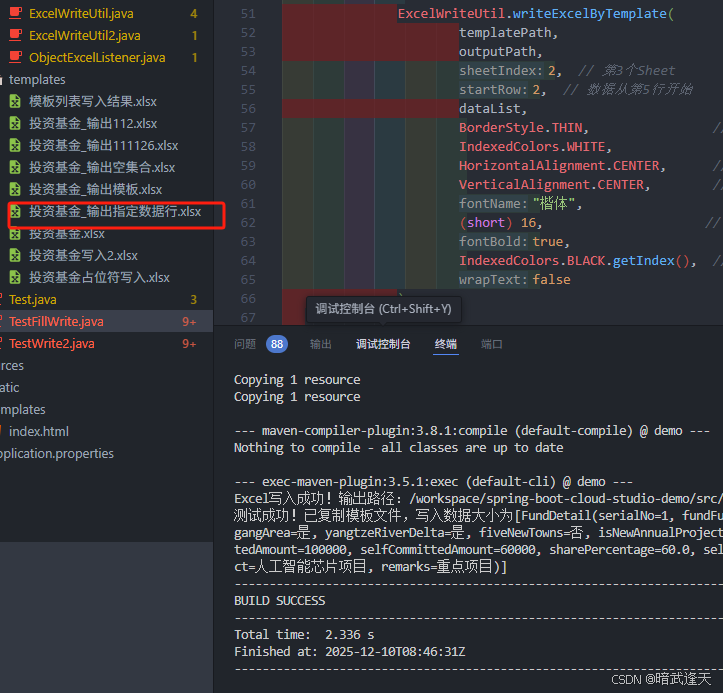
}
打开查看数据:
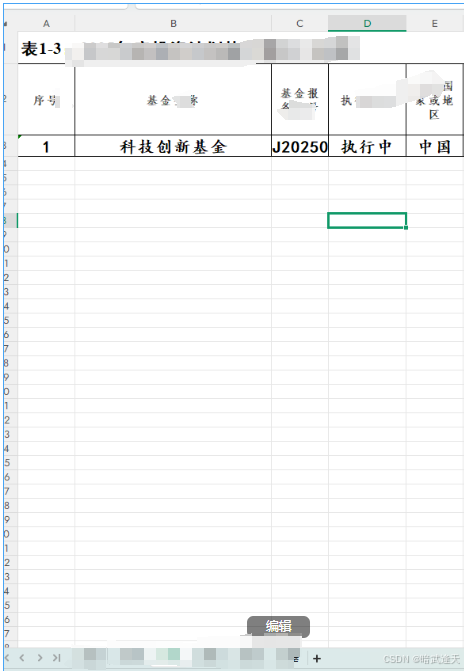
可以看到数据都已经成功渲染
这个优势就是可以直接使用easyExcel提供的注解进行配置,我们指定映射的表头行即可,不用额外处理占位符的问题
占位符映射工具
占位符需要提前在excel模板里进行设置占位符进行处理
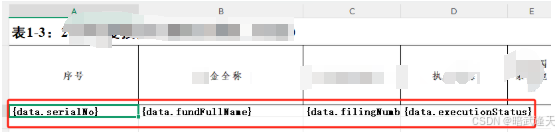
但是当有空集合数据时,占位符还是会进行保留,这次直接封装通用工具类来处理这个问题
java
package com.hongyin.util;

import com.alibaba.excel.EasyExcel;
import com.alibaba.excel.ExcelWriter;
import com.alibaba.excel.write.metadata.WriteSheet;
import com.alibaba.excel.write.metadata.fill.FillConfig;
import com.alibaba.excel.write.metadata.fill.FillWrapper;
import org.apache.commons.collections4.CollectionUtils;
import org.apache.commons.lang3.StringUtils;
import org.slf4j.Logger;
import org.slf4j.LoggerFactory;
import org.apache.poi.ss.usermodel.*;
import org.apache.poi.xssf.usermodel.XSSFWorkbook;

import java.io.*;
import java.lang.reflect.Field;
import java.util.*;
import java.util.regex.Pattern;

/**
 * :修复SheetData构造器报错 + 支持Sheet名称/索引双匹配 + 空集合处理 + 精准样式
 * 兼容JDK8 + EasyExcel 3.3.2
 */
public class ExcelLocalPlaceholderFillUtil {
    private static final Logger log = LoggerFactory.getLogger(ExcelLocalPlaceholderFillUtil.class);
    public static final String DEFAULT_LIST_PLACEHOLDER_PREFIX = "data";
    private static final FillConfig DEFAULT_VERTICAL_FILL_CONFIG;
    private static final Pattern PLACEHOLDER_PATTERN = Pattern.compile("\\{\\s*" + DEFAULT_LIST_PLACEHOLDER_PREFIX + "\\.[^}]+\\}");

    static {
        DEFAULT_VERTICAL_FILL_CONFIG = new FillConfig();
        DEFAULT_VERTICAL_FILL_CONFIG.setDirection(com.alibaba.excel.enums.WriteDirectionEnum.VERTICAL);
    }

    // ========== 样式配置类 ==========
    public static class StyleConfig {
        // 单元格样式
        private BorderStyle borderStyle = BorderStyle.THIN;
        private IndexedColors borderColor = IndexedColors.BLACK;
        private IndexedColors bgColor = IndexedColors.WHITE;
        private HorizontalAlignment horizontalAlign = HorizontalAlignment.CENTER;
        private VerticalAlignment verticalAlign = VerticalAlignment.CENTER;
        private boolean wrapText = false;
        // 字体样式
        private String fontName = "微软雅黑";
        private short fontSize = 10;
        private boolean fontBold = false;
        private IndexedColors fontColor = IndexedColors.BLACK;

        public StyleConfig() {}

        // Getter & Setter
        public BorderStyle getBorderStyle() { return borderStyle; }
        public void setBorderStyle(BorderStyle borderStyle) { this.borderStyle = borderStyle; }
        public IndexedColors getBorderColor() { return borderColor; }
        public void setBorderColor(IndexedColors borderColor) { this.borderColor = borderColor; }
        public IndexedColors getBgColor() { return bgColor; }
        public void setBgColor(IndexedColors bgColor) { this.bgColor = bgColor; }
        public HorizontalAlignment getHorizontalAlign() { return horizontalAlign; }
        public void setHorizontalAlign(HorizontalAlignment horizontalAlign) { this.horizontalAlign = horizontalAlign; }
        public VerticalAlignment getVerticalAlign() { return verticalAlign; }
        public void setVerticalAlign(VerticalAlignment verticalAlign) { this.verticalAlign = verticalAlign; }
        public boolean isWrapText() { return wrapText; }
        public void setWrapText(boolean wrapText) { this.wrapText = wrapText; }
        public String getFontName() { return fontName; }
        public void setFontName(String fontName) { this.fontName = fontName; }
        public short getFontSize() { return fontSize; }
        public void setFontSize(short fontSize) { this.fontSize = fontSize; }
        public boolean isFontBold() { return fontBold; }
        public void setFontBold(boolean fontBold) { this.fontBold = fontBold; }
        public IndexedColors getFontColor() { return fontColor; }
        public void setFontColor(IndexedColors fontColor) { this.fontColor = fontColor; }
    }

    // ========== Sheet匹配实体(支持名称/索引) ==========
    public static class SheetData {
        // Sheet名称(优先级高于索引)
        private String sheetName;
        // Sheet索引(名称为空时使用)
        private int sheetIndex;
        // 填充数据
        private List<?> dataList;

        // 构造器1:按名称匹配
        public SheetData(String sheetName, List<?> dataList) {
            this.sheetName = sheetName;
            this.sheetIndex = -1;
            this.dataList = dataList;
        }

        // 构造器2:按索引匹配
        public SheetData(int sheetIndex, List<?> dataList) {
            this.sheetName = null;
            this.sheetIndex = sheetIndex;
            this.dataList = dataList;
        }

        // Getter & Setter
        public String getSheetName() { return sheetName; }
        public void setSheetName(String sheetName) { this.sheetName = sheetName; }
        public int getSheetIndex() { return sheetIndex; }
        public void setSheetIndex(int sheetIndex) { this.sheetIndex = sheetIndex; }
        public List<?> getDataList() { return dataList; }
        public void setDataList(List<?> dataList) { this.dataList = dataList; }
    }

    // ========== 核心方法1:兼容原有Map<String, List<?>>(按名称匹配) ==========
    public static <T> void fillAndWriteToLocal(String templatePath, String outputPath,
                                               T singleData, Map<String, List<?>> multiSheetDataMap,
                                               String listPrefix, StyleConfig styleConfig) throws IOException {
        // 转换为SheetData列表
        List<SheetData> sheetDataList = new ArrayList<>();
        if (multiSheetDataMap != null && !multiSheetDataMap.isEmpty()) {
            for (Map.Entry<String, List<?>> entry : multiSheetDataMap.entrySet()) {
                sheetDataList.add(new SheetData(entry.getKey(), entry.getValue()));
            }
        }
        // 调用核心方法2
        fillAndWriteToLocal(templatePath, outputPath, singleData, sheetDataList, listPrefix, styleConfig);
    }

    // ========== 核心方法2:新增支持SheetData列表(名称/索引双匹配) ==========
    public static <T> void fillAndWriteToLocal(String templatePath, String outputPath,
                                               T singleData, List<SheetData> sheetDataList,
                                               String listPrefix, StyleConfig styleConfig) throws IOException {
        // 1. 参数校验
        if (StringUtils.isBlank(templatePath) || StringUtils.isBlank(outputPath)) {
            throw new IllegalArgumentException("模板/输出路径不能为空");
        }
        String prefix = StringUtils.isBlank(listPrefix) ? DEFAULT_LIST_PLACEHOLDER_PREFIX : listPrefix;
        StyleConfig finalStyle = styleConfig == null ? new StyleConfig() : styleConfig;

        // 2. 预处理空集合:为空集合填充空对象(清除占位符)
        List<SheetData> processedSheetDataList = processEmptySheetData(sheetDataList);

        // 3. 读取模板,获取Sheet名称-索引映射(用于索引转名称)
        Map<Integer, String> sheetIndexToNameMap = getSheetIndexToNameMap(templatePath);
        Map<String, Integer> sheetNameToIndexMap = new HashMap<>();
        for (Map.Entry<Integer, String> entry : sheetIndexToNameMap.entrySet()) {
            sheetNameToIndexMap.put(entry.getValue(), entry.getKey());
        }

        // 4. 识别模板中的占位符行(按名称)
        Map<String, Set<Integer>> placeholderRowMap = new HashMap<>();
        for (SheetData sheetData : processedSheetDataList) {
            String sheetName = getSheetName(sheetData, sheetIndexToNameMap);
            if (sheetName == null) {
                log.warn("Sheet不存在:名称={}, 索引={}", sheetData.getSheetName(), sheetData.getSheetIndex());
                continue;
            }
            if (!placeholderRowMap.containsKey(sheetName)) {
                placeholderRowMap.put(sheetName, getTemplatePlaceholderRows(templatePath, sheetName, prefix));
            }
        }

        // 5. 记录模板原有单元格(排除占位符行)
        Map<String, Set<String>> templateCellMap = new HashMap<>();
        for (String sheetName : placeholderRowMap.keySet()) {
            templateCellMap.put(sheetName, getTemplateCellMapExcludePlaceholder(templatePath, sheetName, placeholderRowMap.get(sheetName)));
        }

        // 6. EasyExcel填充数据(支持名称/索引)
        File tempFile = File.createTempFile("excel_temp_", ".xlsx");
        try {
            ExcelWriter writer = EasyExcel.write(tempFile)
                    .withTemplate(new File(templatePath))
                    .inMemory(true)
                    .build();

            // 填充单数据
            if (singleData != null) {
                writer.fill(singleData, EasyExcel.writerSheet().build());
            }

            // 填充多Sheet列表(支持名称/索引)
            if (processedSheetDataList != null && !processedSheetDataList.isEmpty()) {
                for (SheetData sheetData : processedSheetDataList) {
                    String sheetName = getSheetName(sheetData, sheetIndexToNameMap);
                    if (sheetName == null) {
                        continue;
                    }
                    int sheetIndex = sheetNameToIndexMap.get(sheetName);
                    List<?> dataList = sheetData.getDataList();

                    WriteSheet sheet = EasyExcel.writerSheet(sheetIndex, sheetName).build();
                    writer.fill(new FillWrapper(prefix, dataList), DEFAULT_VERTICAL_FILL_CONFIG, sheet);
                }
            }
            writer.finish();

            // 7. 精准设置样式
            setPreciseCellStyle(tempFile, outputPath, finalStyle, templateCellMap, placeholderRowMap);

            log.info("导出成功!路径:{}", outputPath);
        } finally {
            // 删除临时文件
            tempFile.delete();
        }
    }

    // ========== 重载方法 ==========
    // 重载1:默认前缀+样式
    public static <T> void fillAndWriteToLocal(String templatePath, String outputPath,
                                               T singleData, List<SheetData> sheetDataList) throws IOException {
        fillAndWriteToLocal(templatePath, outputPath, singleData, sheetDataList, DEFAULT_LIST_PLACEHOLDER_PREFIX, new StyleConfig());
    }

    // 重载2:兼容原有Map,默认前缀+样式
    public static <T> void fillAndWriteToLocal(String templatePath, String outputPath,
                                               T singleData, Map<String, List<?>> multiSheetDataMap) throws IOException {
        fillAndWriteToLocal(templatePath, outputPath, singleData, multiSheetDataMap, DEFAULT_LIST_PLACEHOLDER_PREFIX, new StyleConfig());
    }

    // ========== 工具方法:获取Sheet名称(兼容名称/索引) ==========
    private static String getSheetName(SheetData sheetData, Map<Integer, String> sheetIndexToNameMap) {
        // 优先使用名称
        if (StringUtils.isNotBlank(sheetData.getSheetName())) {
            for (String name : sheetIndexToNameMap.values()) {
                if (name.equals(sheetData.getSheetName())) {
                    return name;
                }
            }
            return null;
        }
        // 名称为空时使用索引
        int index = sheetData.getSheetIndex();
        return sheetIndexToNameMap.getOrDefault(index, null);
    }

    // ========== 获取模板Sheet索引-名称映射 ==========
    private static Map<Integer, String> getSheetIndexToNameMap(String templatePath) throws IOException {
        Map<Integer, String> map = new HashMap<>();
        Workbook workbook = new XSSFWorkbook(new FileInputStream(templatePath));
        for (int i = 0; i < workbook.getNumberOfSheets(); i++) {
            map.put(i, workbook.getSheetName(i));
        }
        workbook.close();
        return map;
    }

    // ========== 预处理空集合(SheetData版本) ==========
    private static List<SheetData> processEmptySheetData(List<SheetData> originalSheetDataList) {
        if (originalSheetDataList == null || originalSheetDataList.isEmpty()) {
            return new ArrayList<>();
        }

        List<SheetData> processedList = new ArrayList<>();
        for (SheetData sheetData : originalSheetDataList) {
            List<?> dataList = sheetData.getDataList();
            // 空集合:创建空对象
            if (CollectionUtils.isEmpty(dataList)) {
                try {
                    List<Object> emptyList = new ArrayList<>();
                    if (dataList != null && !dataList.getClass().isAssignableFrom(ArrayList.class)) {
                        Object emptyObj = createEmptyObject(dataList);
                        emptyList.add(emptyObj);
                    } else {
                        emptyList.add(new HashMap<String, String>() {{
                            put("serialNo", "");
                            put("fundFullName", "");
                            put("filingNumber", "");
                            put("executionStatus", "");
                            put("remarks", "");
                            put("majorInvestmentProject", "");
                        }});
                    }
                    // ========== 修复:根据类型选择构造器 ==========
                    SheetData newSheetData;
                    if (StringUtils.isNotBlank(sheetData.getSheetName())) {
                        // 按名称构造
                        newSheetData = new SheetData(sheetData.getSheetName(), emptyList);
                    } else {
                        // 按索引构造
                        newSheetData = new SheetData(sheetData.getSheetIndex(), emptyList);
                    }
                    processedList.add(newSheetData);
                } catch (Exception e) {
                    List<String> emptyList = new ArrayList<>();
                    emptyList.add("");
                    // ========== 修复:根据类型选择构造器 ==========
                    SheetData newSheetData;
                    if (StringUtils.isNotBlank(sheetData.getSheetName())) {
                        newSheetData = new SheetData(sheetData.getSheetName(), emptyList);
                    } else {
                        newSheetData = new SheetData(sheetData.getSheetIndex(), emptyList);
                    }
                    processedList.add(newSheetData);
                }
            } else {
                // 非空集合:直接使用
                processedList.add(sheetData);
            }
        }
        return processedList;
    }

    // ========== 识别指定Sheet的占位符行 ==========
    private static Set<Integer> getTemplatePlaceholderRows(String templatePath, String sheetName, String prefix) throws IOException {
        Set<Integer> placeholderRows = new HashSet<>();
        Workbook workbook = new XSSFWorkbook(new FileInputStream(templatePath));
        Sheet sheet = workbook.getSheet(sheetName);
        if (sheet == null) {
            workbook.close();
            return placeholderRows;
        }

        Pattern pattern = Pattern.compile("\\{\\s*" + prefix + "\\.[^}]+\\}");
        for (Row row : sheet) {
            int rowNum = row.getRowNum();
            boolean isPlaceholderRow = false;

            for (Cell cell : row) {
                String cellValue = getCellStringValue(cell);
                if (cellValue != null && pattern.matcher(cellValue).find()) {
                    isPlaceholderRow = true;
                    break;
                }
            }

            if (isPlaceholderRow) {
                placeholderRows.add(rowNum);
            }
        }
        workbook.close();
        return placeholderRows;
    }

    // ========== 记录指定Sheet的模板单元格(排除占位符行) ==========
    private static Set<String> getTemplateCellMapExcludePlaceholder(String templatePath, String sheetName, Set<Integer> placeholderRows) throws IOException {
        Set<String> cellSet = new HashSet<>();
        Workbook workbook = new XSSFWorkbook(new FileInputStream(templatePath));
        Sheet sheet = workbook.getSheet(sheetName);
        if (sheet == null) {
            workbook.close();
            return cellSet;
        }

        for (Row row : sheet) {
            int rowNum = row.getRowNum();
            if (placeholderRows.contains(rowNum)) {
                continue;
            }

            for (Cell cell : row) {
                String cellKey = rowNum + "_" + cell.getColumnIndex();
                cellSet.add(cellKey);
            }
        }
        workbook.close();
        return cellSet;
    }

    // ========== 精准设置样式 ==========
    private static void setPreciseCellStyle(File tempFile, String outputPath,
                                            StyleConfig styleConfig,
                                            Map<String, Set<String>> templateCellMap,
                                            Map<String, Set<Integer>> placeholderRowMap) throws IOException {
        Workbook workbook = new XSSFWorkbook(new FileInputStream(tempFile));
        CellStyle dataCellStyle = createPoiCellStyle(workbook, styleConfig);

        for (int i = 0; i < workbook.getNumberOfSheets(); i++) {
            Sheet sheet = workbook.getSheetAt(i);
            String sheetName = sheet.getSheetName();
            Set<String> templateCells = templateCellMap.getOrDefault(sheetName, new HashSet<>());
            Set<Integer> placeholderRows = placeholderRowMap.getOrDefault(sheetName, new HashSet<>());

            for (Row row : sheet) {
                int rowNum = row.getRowNum();
                for (Cell cell : row) {
                    int colNum = cell.getColumnIndex();
                    String cellKey = rowNum + "_" + colNum;

                    boolean isPlaceholderRow = placeholderRows.contains(rowNum);
                    boolean isNewDataCell = !templateCells.contains(cellKey) && cell.getCellType() != CellType.BLANK;

                    if (isPlaceholderRow || isNewDataCell) {
                        cell.setCellStyle(dataCellStyle);
                    }
                }
            }
        }

        // 写入最终文件
        File outputFile = new File(outputPath);
        if (!outputFile.getParentFile().exists()) {
            outputFile.getParentFile().mkdirs();
        }
        try (FileOutputStream fos = new FileOutputStream(outputFile)) {
            workbook.write(fos);
        }
        workbook.close();
    }

    // ========== POI创建样式 ==========
    private static CellStyle createPoiCellStyle(Workbook workbook, StyleConfig config) {
        CellStyle style = workbook.createCellStyle();

        // 边框
        style.setBorderTop(config.getBorderStyle());
        style.setBorderBottom(config.getBorderStyle());
        style.setBorderLeft(config.getBorderStyle());
        style.setBorderRight(config.getBorderStyle());
        style.setTopBorderColor(config.getBorderColor().getIndex());
        style.setBottomBorderColor(config.getBorderColor().getIndex());
        style.setLeftBorderColor(config.getBorderColor().getIndex());
        style.setRightBorderColor(config.getBorderColor().getIndex());

        // 背景色
        if (config.getBgColor() != IndexedColors.WHITE) {
            style.setFillForegroundColor(config.getBgColor().getIndex());
            style.setFillPattern(FillPatternType.SOLID_FOREGROUND);
        } else {
            style.setFillPattern(FillPatternType.NO_FILL);
        }

        // 对齐
        style.setAlignment(config.getHorizontalAlign());
        style.setVerticalAlignment(config.getVerticalAlign());
        style.setWrapText(config.isWrapText());

        // 字体
        Font font = workbook.createFont();
        font.setFontName(config.getFontName());
        font.setFontHeightInPoints(config.getFontSize());
        font.setBold(config.isFontBold());
        font.setColor(config.getFontColor().getIndex());
        style.setFont(font);

        return style;
    }

    // ========== 反射创建空对象 ==========
    private static Object createEmptyObject(List<?> dataList) throws Exception {
        Class<?> elementClass = dataList.getClass().getGenericSuperclass().getClass();
        if (dataList.size() == 0) {
            return new HashMap<String, String>();
        }
        elementClass = dataList.get(0).getClass();
        Object emptyObj = elementClass.getDeclaredConstructor().newInstance();

        Field[] fields = elementClass.getDeclaredFields();
        for (Field field : fields) {
            field.setAccessible(true);
            Class<?> fieldType = field.getType();
            if (fieldType == String.class) {
                field.set(emptyObj, "");
            } else if (fieldType == Integer.class || fieldType == int.class) {
                field.set(emptyObj, 0);
            } else if (fieldType == Long.class || fieldType == long.class) {
                field.set(emptyObj, 0L);
            } else if (fieldType == Double.class || fieldType == double.class) {
                field.set(emptyObj, 0.0);
            } else {
                field.set(emptyObj, "");
            }
        }
        return emptyObj;
    }

    // ========== 工具方法:获取单元格字符串值 ==========
    private static String getCellStringValue(Cell cell) {
        if (cell == null) {
            return null;
        }
        switch (cell.getCellType()) {
            case STRING:
                return cell.getStringCellValue();
            case NUMERIC:
                return String.valueOf(cell.getNumericCellValue());
            case BOOLEAN:
                return String.valueOf(cell.getBooleanCellValue());
            case FORMULA:
                return cell.getCellFormula();
            default:
                return null;
        }
    }
}
新增自定义注解:
java
import java.lang.annotation.ElementType;
import java.lang.annotation.Retention;
import java.lang.annotation.RetentionPolicy;
import java.lang.annotation.Target;

/**
 * Excel列映射注解(通用)
 * 标记实体类字段对应的Excel模板列号
 */
@Target(ElementType.FIELD)
@Retention(RetentionPolicy.RUNTIME)
public @interface ExcelColumn {
    /**
     * 模板中的列号(从0开始)
     */
    int columnIndex();

    /**
     * 表头名称(用于校验,可选)
     */
    String columnName() default "";
}
实体属性添加自定义注解:
java
import java.math.BigDecimal;

import com.alibaba.excel.annotation.ExcelProperty;

import lombok.Data;
import net.coding.excelUtils.listener.ExcelColumn;


@Data
public class FundDetail {


    @ExcelProperty("序号")
    @ExcelColumn(columnIndex = 0, columnName = "序号")
    private String serialNo;

    @ExcelProperty("基金全称")
    @ExcelColumn(columnIndex = 1, columnName = "基金全称")
    private String fundFullName;

    @ExcelProperty("基金报备编号")
    @ExcelColumn(columnIndex = 2, columnName = "基金报备编号")
    private String filingNumber;

    @ExcelProperty("重大投资项目")
    @ExcelColumn(columnIndex = 22, columnName = "重大投资项目")
    private String majorInvestmentProject;

    @ExcelProperty("备注")
    @ExcelColumn(columnIndex = 23, columnName = "备注")
    private String remarks;
}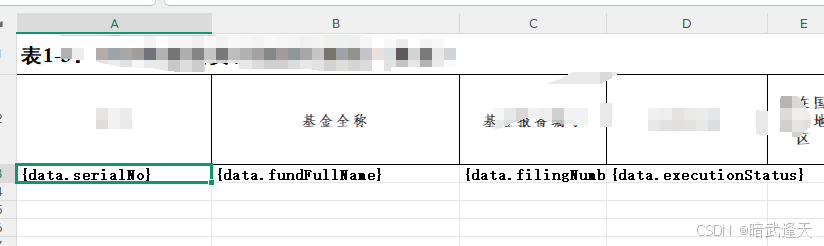
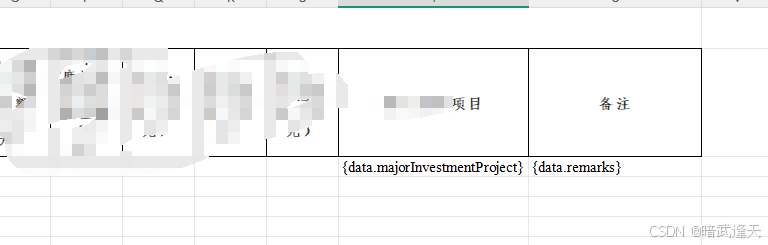
可以看到其中一个sheet页设置的有占位符,在第6个sheet页也设置下占位符
测试:
java
import com.alibaba.excel.write.handler.CellWriteHandler;
import org.apache.poi.ss.usermodel.BorderStyle;
import org.apache.poi.ss.usermodel.HorizontalAlignment;
import org.apache.poi.ss.usermodel.IndexedColors;
import org.apache.poi.ss.usermodel.VerticalAlignment;

import java.util.ArrayList;
import java.util.HashMap;
import java.util.List;
import java.util.Map;

/**
 * EasyExcel 3.3.2 测试类(100%无报错)
 * 注意:所有导入包必须匹配3.3.2版本
 */
public class TestFillWrite {


    public static void main(String[] args) {
        try {
            // 1. 路径配置
            String path = "C:\\Users\\mgl\\Desktop\\文件副本\\";
            String templatePath = path + "投资基金占位符写入模板.xlsx";
            String outputPath = path + "投资基金_索引名称混合版213.xlsx";

            // 2. 测试数据
            List<FundDetail> fundList = new ArrayList<>();
            FundDetail item1 = new FundDetail();
            item1.setSerialNo("1");
            item1.setFundFullName("中国上海基金会");
            item1.setFilingNumber("21654821545465456");
            item1.setExecutionStatus("执行中");
            item1.setRemarks("上海的备注");
            item1.setMajorInvestmentProject("上海的类型");
            fundList.add(item1);

            FundDetail item2 = new FundDetail();
            item2.setSerialNo("2");
            item2.setFundFullName("中国北京基金会");
            item2.setFilingNumber("21487231251315");
            item2.setExecutionStatus("未执行");
            item2.setRemarks("北京的备注");
            item2.setMajorInvestmentProject("北京的类型");
            fundList.add(item2);

            // 3. Sheet数据配置(混合名称/索引)
            List<ExcelLocalPlaceholderFillUtil.SheetData> sheetDataList = new ArrayList<>();
            sheetDataList.add(new ExcelLocalPlaceholderFillUtil.SheetData("25基", fundList)); // 名称
            sheetDataList.add(new ExcelLocalPlaceholderFillUtil.SheetData(5, new ArrayList<>()));      // 索引

            // 4. 样式配置
            ExcelLocalPlaceholderFillUtil.StyleConfig styleConfig = new ExcelLocalPlaceholderFillUtil.StyleConfig();
            //styleConfig.setBorderStyle(BorderStyle.MEDIUM);
            styleConfig.setBorderColor(IndexedColors.BLACK);
            styleConfig.setHorizontalAlign(HorizontalAlignment.CENTER);
            styleConfig.setVerticalAlign(VerticalAlignment.CENTER);
            styleConfig.setWrapText(true);
            styleConfig.setFontName("微软雅黑");
            styleConfig.setFontSize((short) 12);
            styleConfig.setFontBold(true);
            styleConfig.setFontColor(IndexedColors.BLUE);

            // 5. 核心调用
            ExcelLocalPlaceholderFillUtil.fillAndWriteToLocal(
                    templatePath,
                    outputPath,
                    null,
                    sheetDataList,
                    "data",
                    styleConfig
            );

            System.out.println("✅ 导出完成!无构造器报错,功能正常");
        } catch (Exception e) {
            System.err.println("❌ 失败:" + e.getMessage());
            e.printStackTrace();
        }
    }
}
查看效果
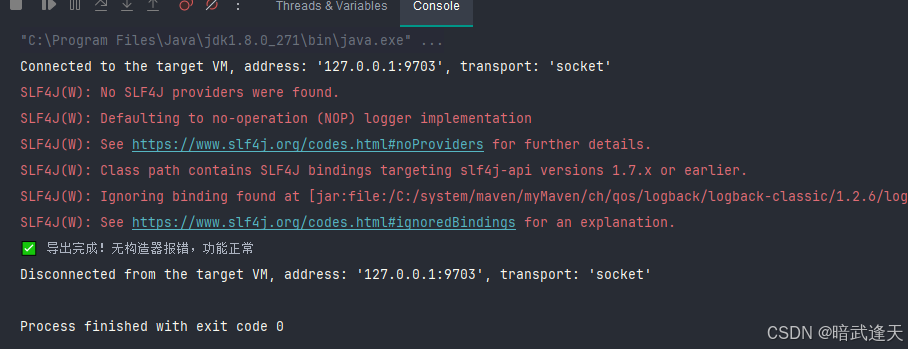
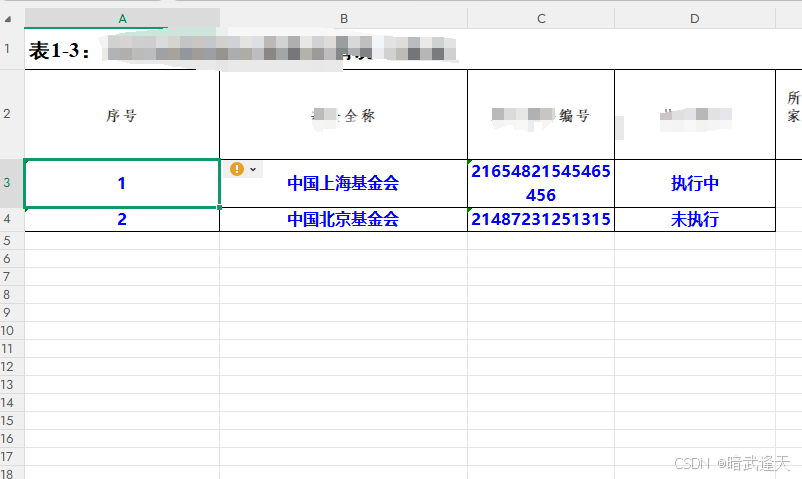
可以看到数据正常渲染,而且可以自定义字体和单元格样式
再看第6个sheet页
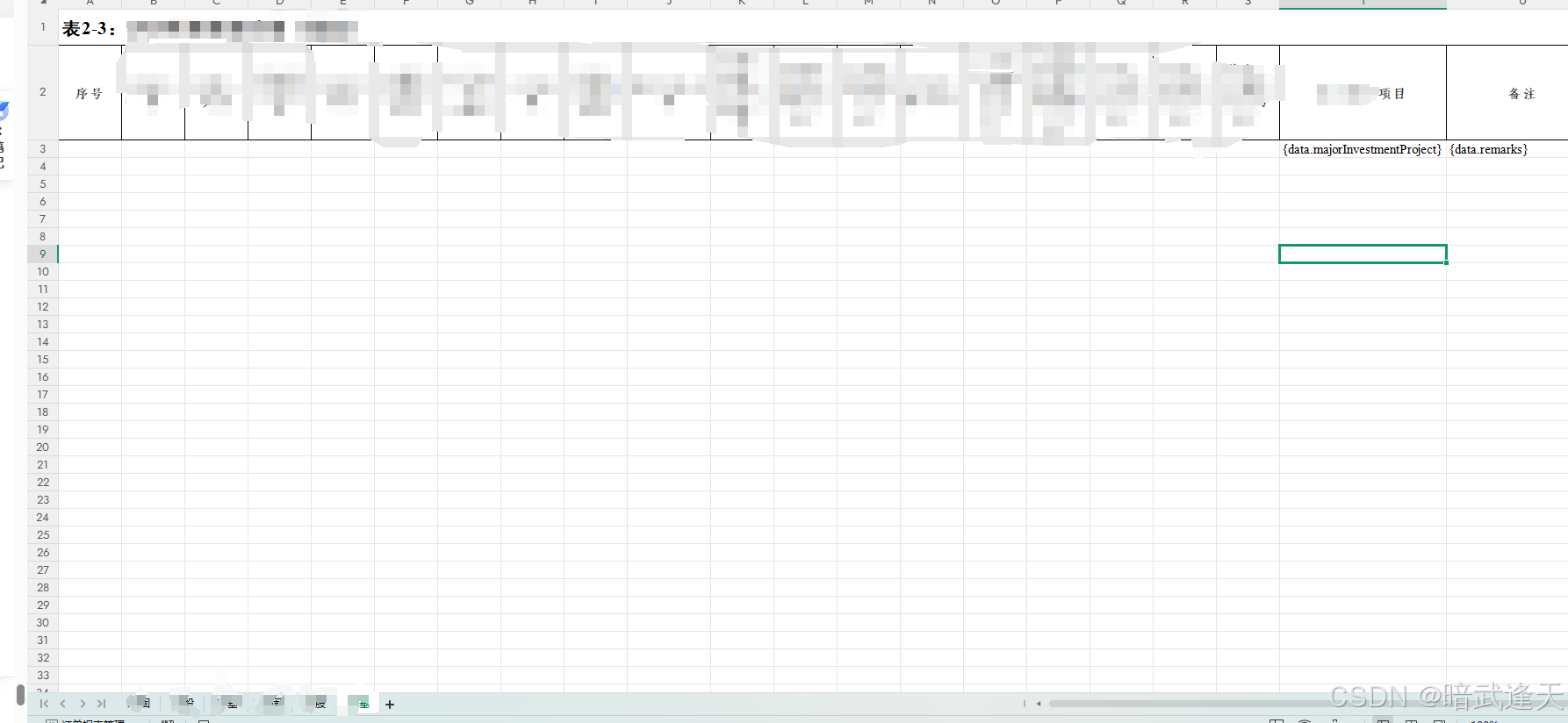
可以看到第6个sheet页原有的占位符也被清掉了.因为我们给第6个sheet页传递的是空集合数据

如果传递的是空集合数据,不需要额外进行处理了,工具类里都已经对sheet页进行处理