Vue 3 Todo List 项目详解
1.图片展示
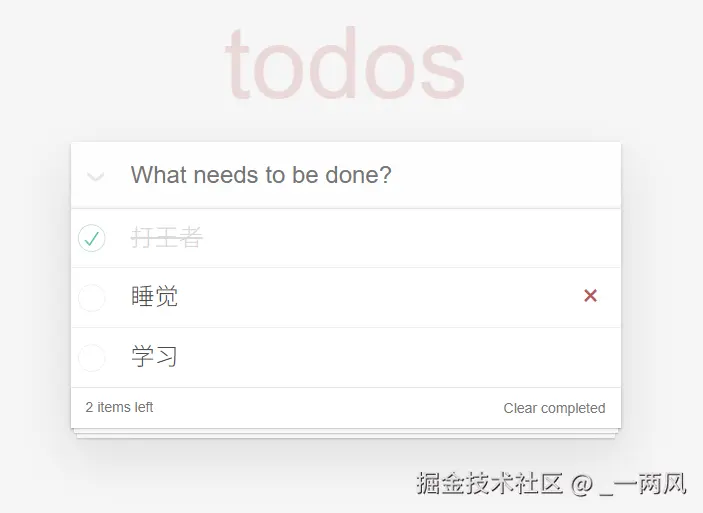
2. 核心数据结构
项目使用 ref 定义了核心的响应式数据 todos。数组中的每一项是一个对象,包含三个关键属性:
id: 唯一标识符(用于 Diff 算法优化)context: 任务文本内容done: 完成状态 (true/false)
JavaScript
const todos = ref([
  { id: 1, context: '打王者', done: false },
  { id: 2, context: '吃饭', done: true },
  // ...
])
3. 功能实现细节
A. 添加任务 (Add Todo)
逻辑:
- 双向绑定 :使用
v-model绑定输入框与newTodoText变量。 - 事件监听 :监听键盘的 Enter 键 (
@keydown.enter)。 - 数据变更 :校验非空后,向
todos数组push新对象,并重置输入框。
亮点 :使用了 nextId 自增变量,确保每个新任务都有独立的 ID,避免渲染时的 Key 冲突。
B. 列表渲染与性能优化
逻辑:
使用 v-for 指令循环渲染列表。
关键点:
必须绑定 :key="todo.id"。Vue 的虚拟 DOM 机制依赖这个 Key 来进行高效的 Diff 对比。如果数据项顺序改变,Vue 可以直接复用 DOM 元素,而不是销毁重建,从而提升性能。
C. 智能状态计算 (Computed)
项目中大量使用了 computed 计算属性,它的优势在于缓存------只有依赖的数据变化时才会重新计算。
-
剩余任务统计 (active):
实时计算 !todo.done 的数量,用于底部显示 "X items left"。
JavaScriptconst active = computed(() => todos.value.filter(todo => !todo.done).length) -
全选/反选 (allDone) - 高级用法:
这是一个可写计算属性 (Writable Computed),它巧妙地实现了双向逻辑:
- 读 (Get) :如果所有任务都完成了,全选框自动勾选。
- 写 (Set) :当你点击全选框时,它触发
set方法,将所有任务的done状态同步为当前全选框的状态。
D. 删除与清理
-
删除单项 :通过
filter过滤掉指定 ID 的任务。 -
清除已完成:通过 filter 过滤掉所有 done 为 true 的任务。
这里的操作都是生成新数组替换旧数组,Vue 的响应式系统会自动检测到引用变化并更新视图。
4. Computed 讲解
计算属性 (Computed Properties):形式上是函数,结果是属性。
核心特性:
- 依赖追踪 :自动感知它所使用的响应式数据(如
ref或reactive)。 - 缓存机制 (Caching) :这是它与普通函数(Methods)最大的区别。如果依赖的数据没变,多次访问
computed会直接返回上一次计算的结果,不会重复执行函数体。
高级用法:可写的计算属性(Getter & Setter)
在 Vue 3 中,计算属性(computed)通常默认为"只读"的(即只传入一个 getter 函数)。但在需要实现双向绑定 的场景下(例如"全选/反选"复选框),我们需要使用它的高级写法 :传入一个包含 get 和 set 的对象。
js
// 引入 computed
import { computed } from 'vue';

// 定义可写的计算属性
const allDone = computed({
  // getter: 读取值(决定全选框是否勾选)
  // 当依赖的 todos 数据变化时,会自动重新计算
  get() {
    // 逻辑:如果列表不为空,且每一项都已完成 (done === true),则返回 true
    return todos.value.length > 0 && todos.value.every(todo => todo.done)
  },

  // setter: 写入值(当用户点击全选框时触发)
  // val 是用户操作后的新值(true 或 false)
  set(val) {
    // 逻辑:遍历所有 todos,将它们的完成状态强制改为当前全选框的状态
    todos.value.forEach(todo => todo.done = val)
  }
})
在 Vue 中:
- 使用 Methods (函数) :
function getActive() { ... }。每次页面重新渲染(哪怕是无关的 DOM 更新),这个函数都会被执行一遍。如果计算量大,会浪费性能。 - 使用 Computed (计算属性) : 只有依赖变了才算。对于像"过滤列表"、"遍历大数组"这种操作,
computed是性能优化的关键。
5. 项目源码 (src/App.vue)
HTML
<script setup>
  import { ref, computed } from 'vue';

  // 1. 响应式数据定义
  const title = ref("todos");
  const newTodoText = ref("");
  const todos = ref([
    { id: 1, context: '打王者', done: false },
    { id: 2, context: '吃饭', done: true },
    { id: 3, context: '睡觉', done: false },
    { id: 4, context: '学习Vue', done: false }
  ])

  let nextId = 5;

  // 2. 计算属性:统计未完成数量
  // 优势:computed 有缓存,性能优于 method
  const active = computed(() => {
    return todos.value.filter(todo => !todo.done).length
  })

  // 计算属性:统计已完成数量(用于控制清除按钮显示)
  const completedCount = computed(() => {
    return todos.value.filter(todo => todo.done).length
  })

  // 3. 核心业务:添加任务
  const addTodo = () => {
    const text = newTodoText.value.trim();
    if (!text) return;
    todos.value.push({
      id: nextId++, // 确保 ID 唯一
      context: text,
      done: false
    });
    newTodoText.value = "";
  }

  // 4. 核心业务:全选/反选 (可写计算属性)
  const allDone = computed({
    get() {
      return todos.value.length > 0 && todos.value.every(todo => todo.done)
    },
    set(val) {
      todos.value.forEach(todo => todo.done =val)
    }
  })

  // 5. 核心业务:删除任务
  const removeTodo = (id) => {
    todos.value = todos.value.filter(item => item.id !== id)
  }

  // 6. 核心业务:清除已完成
  const clearCompleted = () => {
    todos.value = todos.value.filter(todo => !todo.done)
  }
</script>

<template>
  <div class="todoapp">

    <header class="header">
      <h1>{{ title }}</h1>
      <input
        class="new-todo"
        type="text"
        v-model="newTodoText"
        @keydown.enter="addTodo"
        placeholder="What needs to be done?"
        autofocus
      >
    </header>

    <section class="main" v-if="todos.length">
      <input id="toggle-all" class="toggle-all" type="checkbox" v-model="allDone">
      <label for="toggle-all">Mark all as complete</label>

      <ul class="todo-list">
        <li v-for="todo in todos" :key="todo.id" :class="{ completed: todo.done }">
          <div class="view">
            <input class="toggle" type="checkbox" v-model="todo.done">
            <label>{{ todo.context }}</label>
            <button class="destroy" @click="removeTodo(todo.id)"></button>
          </div>
        </li>
      </ul>
    </section>

    <footer class="footer" v-if="todos.length">
      <span class="todo-count">
        <strong>{{ active }}</strong> items left
      </span>

      <button class="clear-completed" @click="clearCompleted" v-show="completedCount > 0">
        Clear completed
      </button>
    </footer>

  </div>
</template>