前言
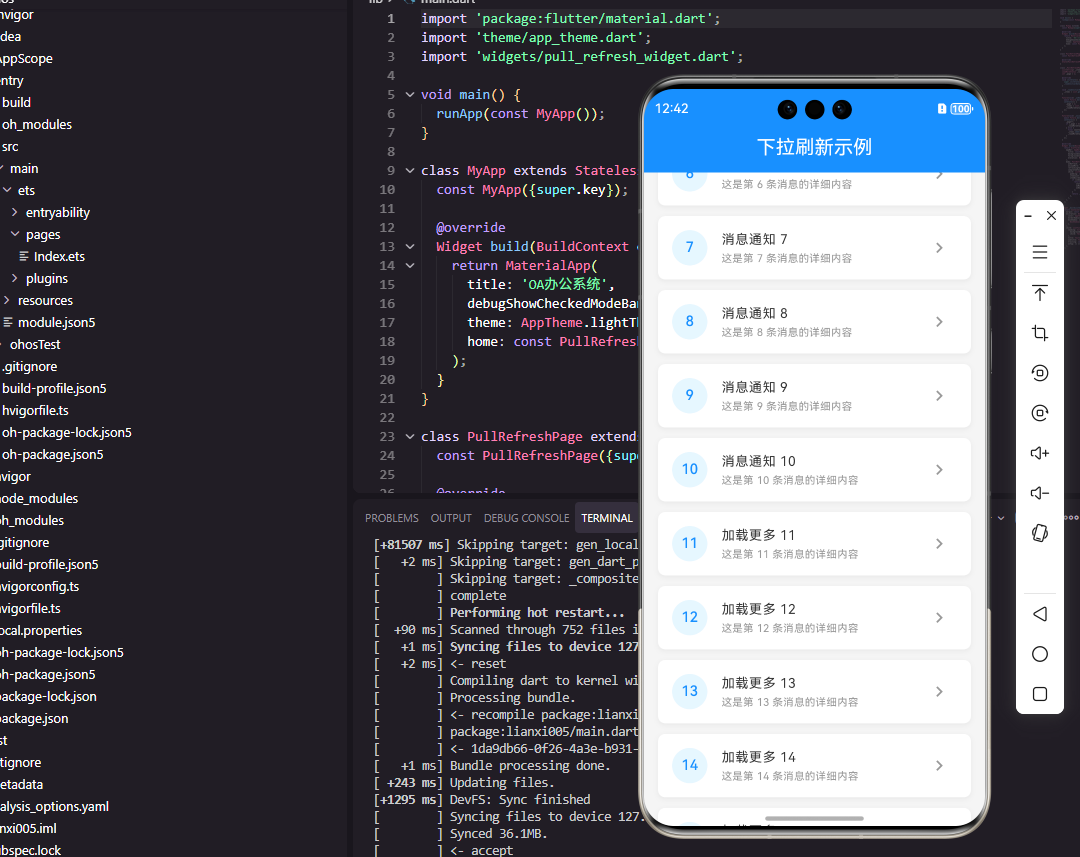
下拉刷新是移动应用中最常见的交互模式之一,它让用户能够通过简单的手势操作获取最新数据。在OA系统中,消息列表、审批列表、任务列表等场景都需要下拉刷新功能。本文将详细介绍如何使用Flutter和OpenHarmony开发一个体验流畅的下拉刷新组件。
组件功能设计
下拉刷新组件需要支持下拉触发刷新、刷新状态指示、刷新完成反馈等功能。组件还需要支持上拉加载更多,实现分页数据的无缝加载。在视觉设计上,需要提供清晰的状态提示,如"下拉刷新"、"释放刷新"、"正在刷新"、"刷新完成"等。
Flutter端实现
下拉刷新组件的基础结构:
dart
class RefreshableList<T> extends StatefulWidget {
  final Future<List<T>> Function() onRefresh;
  final Future<List<T>> Function(int page) onLoadMore;
  final Widget Function(T item) itemBuilder;
  final List<T> initialData;

  const RefreshableList({
    Key? key,
    required this.onRefresh,
    required this.onLoadMore,
    required this.itemBuilder,
    this.initialData = const [],
  }) : super(key: key);

  @override
  State<RefreshableList<T>> createState() => _RefreshableListState<T>();
}
组件使用泛型支持任意数据类型,onRefresh处理下拉刷新,onLoadMore处理上拉加载更多,itemBuilder构建列表项。
状态类中的数据管理:
dart
class _RefreshableListState<T> extends State<RefreshableList<T>> {
  List<T> _data = [];
  bool _isRefreshing = false;
  bool _isLoadingMore = false;
  bool _hasMore = true;
  int _page = 1;

  @override
  void initState() {
    super.initState();
    _data = List.from(widget.initialData);
  }

  Future<void> _handleRefresh() async {
    setState(() => _isRefreshing = true);
    try {
      final newData = await widget.onRefresh();
      setState(() {
        _data = newData;
        _page = 1;
        _hasMore = true;
      });
    } finally {
      setState(() => _isRefreshing = false);
    }
  }
}
状态类管理数据列表、刷新状态、加载更多状态和分页信息。_handleRefresh处理下拉刷新,重置分页状态。
下拉刷新列表构建:
dart
@override
Widget build(BuildContext context) {
  return RefreshIndicator(
    onRefresh: _handleRefresh,
    child: NotificationListener<ScrollNotification>(
      onNotification: (notification) {
        if (notification is ScrollEndNotification &&
            notification.metrics.extentAfter < 100 &&
            !_isLoadingMore &&
            _hasMore) {
          _handleLoadMore();
        }
        return false;
      },
      child: ListView.builder(
        itemCount: _data.length + (_hasMore ? 1 : 0),
        itemBuilder: (context, index) {
          if (index == _data.length) {
            return _buildLoadMoreIndicator();
          }
          return widget.itemBuilder(_data[index]);
        },
      ),
    ),
  );
}
RefreshIndicator提供下拉刷新功能,NotificationListener监听滚动事件实现上拉加载更多。当滚动到底部附近且有更多数据时触发加载。
加载更多处理:
dart
Future<void> _handleLoadMore() async {
  setState(() => _isLoadingMore = true);
  try {
    final newData = await widget.onLoadMore(_page + 1);
    setState(() {
      _data.addAll(newData);
      _page++;
      _hasMore = newData.isNotEmpty;
    });
  } finally {
    setState(() => _isLoadingMore = false);
  }
}

Widget _buildLoadMoreIndicator() {
  return Container(
    padding: EdgeInsets.all(16),
    alignment: Alignment.center,
    child: _isLoadingMore
      ? CircularProgressIndicator()
      : Text('加载更多', style: TextStyle(color: Colors.grey)),
  );
}
_handleLoadMore处理上拉加载更多,将新数据追加到列表末尾。如果返回空数据则标记没有更多数据。加载指示器显示加载状态。
OpenHarmony鸿蒙端实现
下拉刷新组件的基础结构:
typescript
@Component
struct RefreshableList {
  @State data: any[] = []
  @State isRefreshing: boolean = false
  @State isLoadingMore: boolean = false
  @State hasMore: boolean = true
  @State page: number = 1

  private onRefresh: () => Promise<any[]> = async () => []
  private onLoadMore: (page: number) => Promise<any[]> = async () => []
  @BuilderParam itemBuilder: (item: any) => void
}
使用@State管理数据和状态,@BuilderParam接收列表项构建器。
下拉刷新列表构建:
typescript
build() {
  Refresh({ refreshing: $$this.isRefreshing }) {
    List() {
      ForEach(this.data, (item: any, index: number) => {
        ListItem() {
          this.itemBuilder(item)
        }
      })

      if (this.hasMore) {
        ListItem() {
          this.LoadMoreIndicator()
        }
      }
    }
    .onReachEnd(() => {
      if (!this.isLoadingMore && this.hasMore) {
        this.handleLoadMore()
      }
    })
  }
  .onRefreshing(() => {
    this.handleRefresh()
  })
}
Refresh组件提供下拉刷新功能,$$语法双向绑定刷新状态。List的onReachEnd事件在滚动到底部时触发加载更多。
刷新处理:
typescript
private async handleRefresh() {
  try {
    const newData = await this.onRefresh()
    this.data = newData
    this.page = 1
    this.hasMore = true
  } finally {
    this.isRefreshing = false
  }
}
handleRefresh调用刷新回调获取新数据,重置分页状态。finally确保刷新状态被重置。
加载更多处理:
typescript
private async handleLoadMore() {
  this.isLoadingMore = true
  try {
    const newData = await this.onLoadMore(this.page + 1)
    this.data = [...this.data, ...newData]
    this.page++
    this.hasMore = newData.length > 0
  } finally {
    this.isLoadingMore = false
  }
}

@Builder
LoadMoreIndicator() {
  Row() {
    if (this.isLoadingMore) {
      LoadingProgress()
        .width(24)
        .height(24)
      Text('加载中...')
        .fontSize(14)
        .fontColor('#999999')
        .margin({ left: 8 })
    } else {
      Text('上拉加载更多')
        .fontSize(14)
        .fontColor('#999999')
    }
  }
  .width('100%')
  .height(50)
  .justifyContent(FlexAlign.Center)
}
handleLoadMore处理上拉加载更多,使用展开运算符合并数据。LoadMoreIndicator根据加载状态显示不同内容。
自定义刷新头部:
typescript
@Builder
CustomRefreshHeader() {
  Row() {
    if (this.isRefreshing) {
      LoadingProgress()
        .width(24)
        .height(24)
      Text('正在刷新...')
        .fontSize(14)
        .fontColor('#666666')
        .margin({ left: 8 })
    } else {
      Image($r('app.media.arrow_down'))
        .width(20)
        .height(20)
      Text('下拉刷新')
        .fontSize(14)
        .fontColor('#666666')
        .margin({ left: 8 })
    }
  }
  .width('100%')
  .height(60)
  .justifyContent(FlexAlign.Center)
}
自定义刷新头部根据刷新状态显示不同内容,正在刷新时显示加载动画,未刷新时显示下拉提示。
空数据状态:
typescript
@Builder
EmptyState() {
  Column() {
    Image($r('app.media.empty'))
      .width(120)
      .height(120)

    Text('暂无数据')
      .fontSize(14)
      .fontColor('#999999')
      .margin({ top: 16 })

    Button('点击刷新')
      .type(ButtonType.Capsule)
      .height(36)
      .margin({ top: 16 })
      .onClick(() => this.handleRefresh())
  }
  .width('100%')
  .height('100%')
  .justifyContent(FlexAlign.Center)
}
空数据状态显示空状态图片和提示文字,提供刷新按钮让用户手动触发刷新。这种设计提升了空状态下的用户体验。
总结
本文详细介绍了Flutter和OpenHarmony平台上下拉刷新组件的开发方法。下拉刷新是移动应用中最常见的交互模式,需要支持下拉刷新和上拉加载更多两种操作。Flutter使用RefreshIndicator和ScrollNotification实现,鸿蒙使用Refresh组件和onReachEnd事件。开发者需要注意状态管理和分页逻辑的处理。
欢迎加入开源鸿蒙跨平台社区:https://openharmonycrossplatform.csdn.net