欢迎来到UniApp 实战 GitCode系列的第四篇!
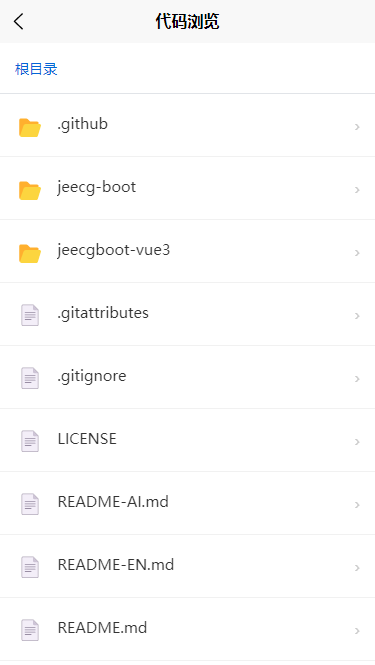
现在的代码仓详情页看起来很像样了,但它还是个"哑巴"------点击文件夹没反应,点击文件也看不见代码。
今天,我们要为这个应用注入灵魂 :实现丝滑的层级导航与代码阅读跳转逻辑。
本期我们将解决两个核心交互痛点:
-
文件夹"无刷新"下钻: 点击文件夹,列表原地更新,顶部出现面包屑,体验如原生 App 般流畅。
-
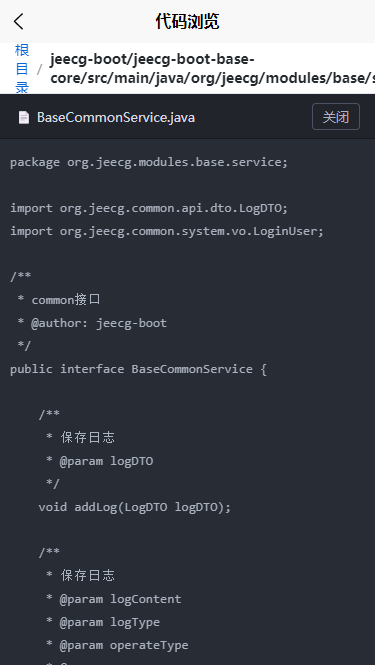
文件"新页面"打开: 点击代码文件,优雅地推入新页面,展示代码详情。
目录
[1. 核心状态定义 (useRepoFiles.js)](#1. 核心状态定义 (useRepoFiles.js))
[1. 面包屑导航栏 (Breadcrumb)](#1. 面包屑导航栏 (Breadcrumb))
[2. 交互逻辑实现](#2. 交互逻辑实现)
[1. 新建页面 /pages/code/read.vue](#1. 新建页面 /pages/code/read.vue)
[Q1: 为什么要用"无刷新"模式浏览文件夹?](#Q1: 为什么要用“无刷新”模式浏览文件夹?)
[Q2: 为什么点击文件要跳转新页面?](#Q2: 为什么点击文件要跳转新页面?)
[Q3: 路径参数传递的坑?](#Q3: 路径参数传递的坑?)
第一部分:设计导航状态机
要实现"无刷新"进入下一级,核心思路是:不要跳转页面(不要用 uni.navigateTo),而是改变数据源。
我们需要一个"大脑"来记住当前我们在哪一层。
1. 核心状态定义 (useRepoFiles.js)
为了逻辑清晰,我们可以把文件获取逻辑抽离成一个 Composable (组合式函数)。
javascript
// composables/useRepoFiles.js
import { ref, computed } from 'vue';

export function useRepoFiles(owner, repo, defaultBranch = 'master') {
  const currentPath = ref(''); // 当前路径,空字符串代表根目录
  const fileList = ref([]);    // 当前路径下的文件列表
  const loading = ref(false);

  // 面包屑数据计算属性
  // 输入: "src/components/Header"
  // 输出: [{name: '根目录', path: ''}, {name: 'src', path: 'src'}, ...]
  const breadcrumbs = computed(() => {
    const parts = currentPath.value ? currentPath.value.split('/') : [];
    const crumbs = [{ name: '根目录', path: '' }];

    let tempPath = '';
    parts.forEach(part => {
      tempPath = tempPath ? `${tempPath}/${part}` : part;
      crumbs.push({ name: part, path: tempPath });
    });

    return crumbs;
  });

  // 获取文件 (核心方法)
  const fetchFiles = async (path = '') => {
    loading.value = true;
    try {
      // 模拟 API 请求 (真实请替换为 uni.request)
      // URL: https://gitcode.com/api/v5/repos/{owner}/{repo}/contents/{path}
      const res = await mockApiRequest(path);

      // 排序:文件夹在文件前面
      fileList.value = res.sort((a, b) =>
        (a.type === b.type ? 0 : a.type === 'tree' ? -1 : 1)
      );

      // 更新当前路径状态
      currentPath.value = path;
    } catch (e) {
      uni.showToast({ title: '获取失败', icon: 'none' });
    } finally {
      loading.value = false;
    }
  };

  return {
    currentPath,
    fileList,
    loading,
    breadcrumbs,
    fetchFiles
  };
}

// 简单的 API 模拟
function mockApiRequest(path) {
  return new Promise(resolve => {
    setTimeout(() => {
      // ...根据 path 返回不同数据的逻辑
      resolve([]);
    }, 300);
  });
}
第二部分:实现文件夹"无刷新"下钻
现在回到 RepoDetail.vue 页面,我们将 UI 与上面的逻辑绑定。
1. 面包屑导航栏 (Breadcrumb)
这是层级导航的视觉核心,用户通过它知道自己在哪里,并能快速返回。
html
<template>
  <view class="container">

    <scroll-view scroll-x class="breadcrumb-bar">
      <view class="crumb-list">
        <view
          v-for="(crumb, index) in breadcrumbs"
          :key="crumb.path"
          class="crumb-item"
          @click="handleNavigate(crumb.path)"
        >
          <text :class="{'active-crumb': index === breadcrumbs.length - 1}">
            {{ crumb.name }}
          </text>
          <text v-if="index < breadcrumbs.length - 1" class="separator">/</text>
        </view>
      </view>
    </scroll-view>

    <view class="file-list">
      <view v-if="loading" class="loading">加载中...</view>

      <view
        v-else
        v-for="file in fileList"
        :key="file.path"
        class="file-row"
        @click="handleFileClick(file)"
      >
        <text class="icon">{{ file.type === 'tree' ? '📂' : '📄' }}</text>
        <text class="name">{{ file.name }}</text>
        <text class="arrow">></text>
      </view>
    </view>

  </view>
</template>
2. 交互逻辑实现
这里是关键!点击文件夹时,我们只更新 currentPath 并重新请求 API ,而不是使用 uni.navigateTo 跳转页面。
javascript
<script setup>
import { onLoad } from '@dcloudio/uni-app';
import { useRepoFiles } from '@/composables/useRepoFiles';

// 1. 初始化 Composable
// 假设 owner 和 repo 从 onLoad 参数获取
const {
  fileList,
  loading,
  breadcrumbs,
  fetchFiles
} = useRepoFiles('dcloud', 'uni-app');

// 2. 页面加载初始化
onLoad(() => {
  fetchFiles(''); // 加载根目录
});

// 3. 核心交互处理
const handleFileClick = (file) => {
  if (file.type === 'tree') {
    // --- 情况 A: 点击文件夹 ---
    // 无刷新进入:直接用 API 获取新路径数据
    // 下一级路径 = 当前文件对象的 path 属性
    fetchFiles(file.path);
  } else {
    // --- 情况 B: 点击文件 ---
    // 新页面打开:跳转到代码阅读页
    openCodeReader(file);
  }
};

// 4. 面包屑点击 (返回上一级/跳转)
const handleNavigate = (targetPath) => {
  fetchFiles(targetPath);
};

// 5. 跳转到代码阅读页
const openCodeReader = (file) => {
  // 必须对路径进行编码,防止路径中包含特殊字符破坏 URL 结构
  const encodedPath = encodeURIComponent(file.path);
  const encodedName = encodeURIComponent(file.name);

  uni.navigateTo({
    url: `/pages/code/read?path=${encodedPath}&name=${encodedName}`
  });
};
</script>
第三部分:文件内容展示 (新页面)
当用户点击文件(如 main.js)时,我们需要一个全新的页面来承载内容。因为代码阅读往往需要全屏沉浸体验。
1. 新建页面 /pages/code/read.vue
这个页面接收上一个页面传来的 path,然后请求文件内容接口(获取 Blob 数据)。
html
<template>
  <view class="code-container">
    <view class="nav-header">{{ fileName }}</view>

    <view v-if="loading" class="loading">正在解码...</view>

    <scroll-view scroll-x scroll-y v-else class="code-box">
      <rich-text :nodes="highlightedCode"></rich-text>
    </scroll-view>
  </view>
</template>

<script setup>
import { ref } from 'vue';
import { onLoad } from '@dcloudio/uni-app';
import { Base64 } from 'js-base64';
// 假设你有一个简单的代码高亮工具函数
import { highlightCode } from '@/utils/highlighter';

const fileName = ref('');
const highlightedCode = ref('');
const loading = ref(true);

onLoad(async (options) => {
  // 1. 接收参数 (记得解码)
  fileName.value = decodeURIComponent(options.name || '');
  const filePath = decodeURIComponent(options.path || '');

  // 2. 请求文件内容
  await fetchFileContent(filePath);
});

const fetchFileContent = async (path) => {
  loading.value = true;
  try {
    // 调用 GitCode/GitHub Blob API
    const res = await uni.request({
      url: `https://gitcode.com/api/v5/repos/.../contents/${path}`
    });

    // 3. 解码 Base64 内容
    const rawContent = Base64.decode(res.data.content);

    // 4. 语法高亮处理 (转成 HTML 字符串)
    highlightedCode.value = highlightCode(rawContent, fileName.value);

  } catch (e) {
    uni.showToast({ title: '读取失败', icon: 'none' });
  } finally {
    loading.value = false;
  }
};
</script>

<style scoped>
.code-box {
  background: #282c34; /* 深色主题背景 */
  min-height: 100vh;
  padding: 20rpx;
}
</style>
深度解析:为什么这么设计?
Q1: 为什么要用"无刷新"模式浏览文件夹?
如果每点一个文件夹都 uni.navigateTo 到一个新页面:
-
栈溢出风险: 小程序限制页面栈深度(通常是 10 层)。如果你的目录有 11 层,用户点到第 11 层就会报错无法跳转。
-
体验割裂: 频繁的页面切换动画会让浏览变得很"重"。原地更新数据(AJAX 风格)才是最符合文件管理器直觉的。
Q2: 为什么点击文件要跳转新页面?
-
沉浸式体验: 代码阅读需要最大的屏幕空间,可能有横屏需求。
-
独立逻辑: 代码阅读页涉及复杂的语法高亮、行号渲染、Raw 模式切换,逻辑很重,适合拆分到独立页面。
Q3: 路径参数传递的坑?
在 uni.navigateTo 中传递 URL 参数时,如果 path 是 src/utils/index.js,里面的 / 会干扰 URL 解析。
必须使用 encodeURIComponent 对参数进行编码,在接收页使用 decodeURIComponent 解码。
总结
今天我们完成了一个类似 GitHub App 的核心导航体验:
-
面包屑导航:不仅好看,还是状态管理的"可视化映射"。
-
数据驱动视图 :通过改变
currentPath驱动列表刷新,避免了页面栈溢出。 -
路由管理:合理区分"页内更新"和"页面跳转"的使用场景。
现在的 GitCode 小程序已经"动"起来了!下一期,我们将挑战更高级的功能:代码文件的语法高亮与行号显示(不仅仅是 rich-text 那么简单哦)!
觉得硬核?点个赞再走吧!