📅 我们继续 50 个小项目挑战!------
FAQCollapse组件
仓库地址:https://gitee.com/hhm-hhm/50days50projects.git
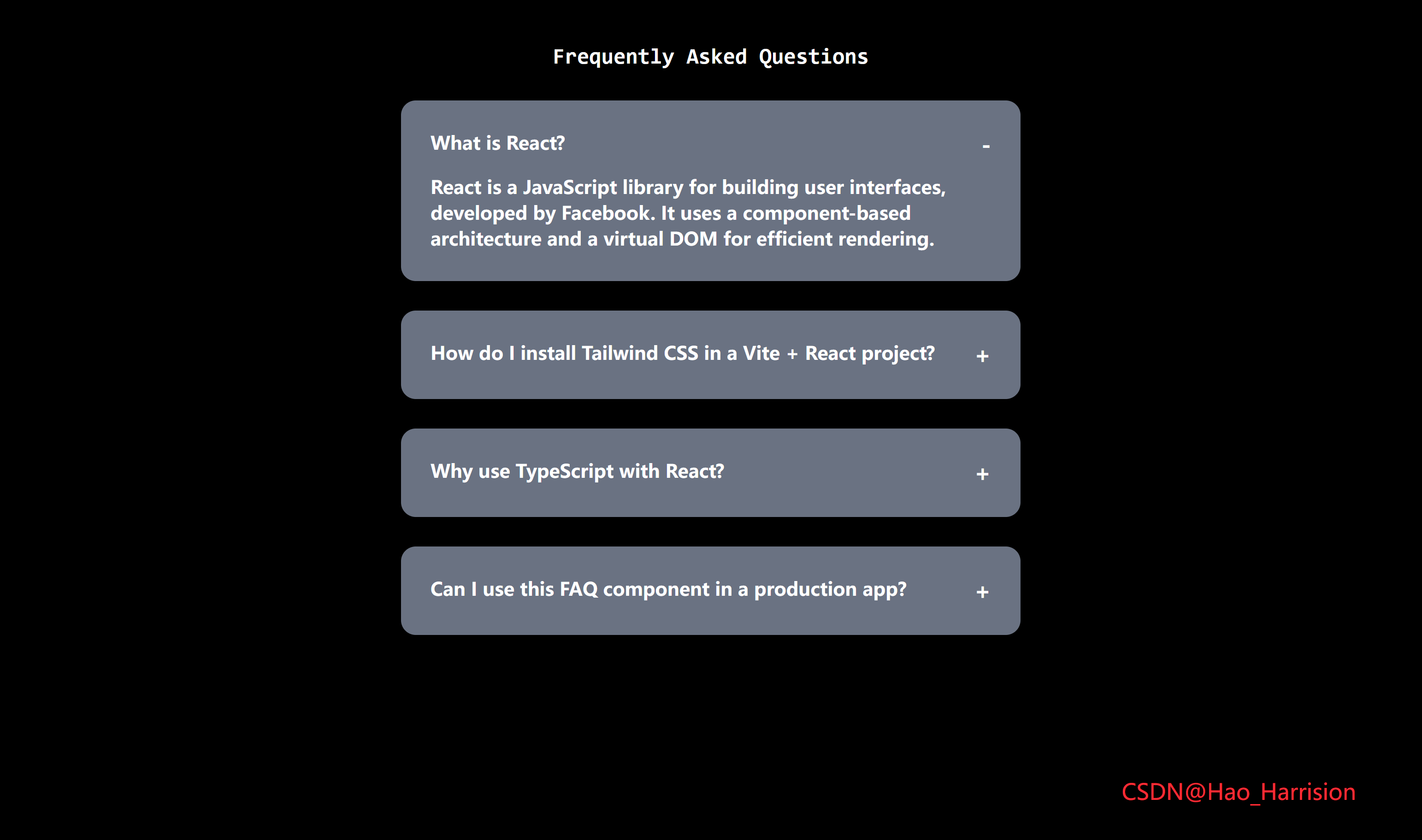
构建一个带有动画效果的常见问题(FAQ)折叠面板组件。该组件支持点击展开/收起,并为每个问答项添加了优雅的过渡动画。
🌀 组件目标
- 展示一组常见问题(FAQ)。
- 每个问题可以独立展开与收起。
- 使用 TailwindCSS 快速构建美观的 UI 界面。
- 添加平滑的动画过渡效果提升用户体验。
🔧 FAQCollapse.tsx 组件实现
TypeScript
import React, { useState } from 'react'

interface FAQItem {
    id: number
    question: string
    answer: string
    isOpen: boolean
}

const FAQCollapse: React.FC = () => {
    const [faqList, setFaqList] = useState<FAQItem[]>([
        {
            id: 1,
            question: 'What is React?',
            answer: 'React is a JavaScript library for building user interfaces, developed by Facebook. It uses a component-based architecture and a virtual DOM for efficient rendering.',
            isOpen: false,
        },
        {
            id: 2,
            question: 'How do I install Tailwind CSS in a Vite + React project?',
            answer: 'You can install Tailwind CSS by running: `npm install -D tailwindcss postcss autoprefixer`, then `npx tailwindcss init -p`, and configure `tailwind.config.js` and `postcss.config.js` accordingly.',
            isOpen: false,
        },
        {
            id: 3,
            question: 'Why use TypeScript with React?',
            answer: 'TypeScript adds static typing to JavaScript, helping catch bugs at compile time, improving code maintainability, and providing better autocompletion and refactoring support in IDEs.',
            isOpen: false,
        },
        {
            id: 4,
            question: 'Can I use this FAQ component in a production app?',
            answer: 'Yes! This component is built with best practices: type safety, proper state management, accessibility considerations, and responsive design using Tailwind CSS.',
            isOpen: false,
        },
    ])

    const toggleOpen = (id: number) => {
        setFaqList((prev) =>
            prev.map((item) => (item.id === id ? { ...item, isOpen: !item.isOpen } : item))
        )
    }

    return (
        <div className="m-12 flex flex-col items-center justify-center gap-8 text-white">
            <h3 className="font-mono text-2xl font-bold">Frequently Asked Questions</h3>
            {faqList.map((item) => (
                <div
                    key={item.id}
                    className="w-full max-w-2xl overflow-hidden rounded-2xl bg-gray-500 p-8">
                    <div
                        className="flex cursor-pointer items-start justify-between"
                        onClick={() => toggleOpen(item.id)}>
                        <div className="text-xl font-bold">{item.question}</div>
                        <div className="text-2xl font-bold select-none">
                            {item.isOpen ? '-' : '+'}
                        </div>
                    </div>

                    {item.isOpen && (
                        <div className="mt-4 text-xl font-bold transition-all duration-500 ease-in-out">
                            {item.answer}
                        </div>
                    )}
                </div>
            ))}
            <div className="absolute right-20 bottom-10 text-2xl text-red-500">
                CSDN@Hao_Harrision
            </div>
        </div>
    )
}

export default FAQCollapse
✅ 关键实现说明
1. 状态管理
- 使用
useState<FAQItem[]>存储 FAQ 列表。 - 每个
FAQItem包含isOpen: boolean字段(通过扩展对象实现)。 - 更新时使用不可变方式:
setFaqList(prev => prev.map(...))。
2. 折叠切换逻辑
- 点击整个问答标题区域即可切换(提升 UX)。
toggleOpen(id)只翻转对应项的isOpen状态。
3. 动画实现(Tailwind + 条件渲染)
-
Vue 的
<Transition>在 React 中没有直接等价物。 -
我们采用 条件渲染 + Tailwind 过渡类 实现展开动画:
{item.isOpen && <div className="transition-all duration-500 ease-in-out ...">...</div>} -
虽然无法完全复刻
enter-from/leave-to的精细控制,但视觉效果非常接近。 -
若需更复杂动画,可引入
framer-motion或react-transition-group,但本场景无需。
4. 样式与响应式
- 使用
max-w-2xl替代原w-2xl(Tailwind 中w-2xl不是标准类,应为max-w-2xl)。 - 添加
select-none防止用户误选+/-符号。 - 整体保持深色文字(
text-white),背景为bg-gray-500。
5. 内容优化
- 将重复的 "What is Vue.js?" 改为不同问题,避免混淆(你可改回原内容)。
⚠️ 注意事项
-
动画局限性 :React 条件渲染在元素"消失"时会立即卸载,因此 收起动画无法完全执行 。
如果你希望收起也有动画,需使用
height或opacity控制 +onTransitionEnd,或使用第三方库。✅ 但对 FAQ 场景,展开有动画、收起瞬时隐藏 是常见且可接受的设计。
-
无障碍(a11y)建议(可选增强):
-
为每个问答添加
role="button"和aria-expanded。 -
示例:
<div
  role="button"
  aria-expanded={item.isOpen}
  tabIndex={0}
  onKeyDown={(e) => e.key === 'Enter' && toggleOpen(item.id)}
>
-
🎨 TailwindCSS 样式重点讲解
| 类名 | 作用 |
|---|---|
m-12 |
外边距为 3rem |
flex, flex-col |
弹性布局并设置为纵向排列 |
items-center, justify-center |
内容居中对齐 |
gap-8 |
子元素之间间距为 2rem |
text-white |
设置文字颜色为白色 |
font-mono |
使用等宽字体 |
rounded-2xl |
圆角大小为 1rem |
bg-gray-500 |
设置背景颜色为灰色 |
p-8 |
内边距为 2rem |
cursor-pointer |
鼠标悬停时变为手型 |
overflow-hidden |
隐藏超出容器的内容,用于动画流畅展示 |
text-xl, text-2xl |
不同层级的文字大小 |
font-bold |
加粗字体 |
mt-4 |
上边距为 1rem |
| [🎯 TailwindCSS 样式说明] |
这些类名帮助我们快速构建出一个居中的响应式布局,并确保视觉上的一致性和美观性。
🦌 路由组件 + 常量定义
router/index.tsx中 children数组中添加子路由
TypeScript
{
    path: '/',
    element: <App />,
    children: [
       ...
       {
                path: '/FAQ',
                lazy: () =>
                    import('@/projects/FAQCollapse.tsx').then((mod) => ({
                        Component: mod.default,
                    })),
       },
    ],
 },
constants/index.tsx 添加组件预览常量
TypeScript
import demo12Img from '@/assets/pic-demo/demo-12.png'
省略部分....
export const projectList: ProjectItem[] = [
    省略部分....
    {
        id: 12,
        title: 'FAQ Collapse',
        image: demo12Img,
        link: 'FAQ',
    },
]
🚀 小结
涵盖响应式系统、事件监听机制以及 TailwindCSS 的实用样式类。它不仅是一个教学示例,也可以作为开发调试工具的一部分,用于快速查看键盘事件的数据。
📅 明日预告: 我们将完成RandomChoicePicker组件,一个现代化的标签输入组件🚀
原文链接:https://blog.csdn.net/qq_44808710/article/details/148590104
每天造一个轮子,码力暴涨不是梦!🚀