一、下载arcgis依赖
# 安装官方发布最新版本
$ npm install @arcgis/core
# 或安装指定版本
$ npm install @arcgis/core@4.24
二、配置路径
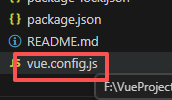
***
resolve: {
      alias: {
        // 若依初始路径
        //'@': resolve('src')

        // 设置路径
        '~': path.resolve(__dirname, './'),
        // 设置别名
        '@': path.resolve(__dirname, './src'),
        // arcgis资源路径
        '@arcgis/core': path.resolve(__dirname, 'node_modules/@arcgis/core')
      }
    },
***
三、arcgis基础组件
components/ArcGisMap/index.vue:
<template>
    <div ref="mapContainer" class="arcgis-map" :style="{ width, height }"></div>
</template>

<script setup name="ArcGISMap">
import { ref, onMounted, onUnmounted, watch, defineProps, defineEmits, defineExpose } from 'vue'
// 核心 ArcGIS 模块
import Map from '@arcgis/core/Map'
import MapView from '@arcgis/core/views/MapView'
import Graphic from '@arcgis/core/Graphic'
import Point from '@arcgis/core/geometry/Point'
import SimpleMarkerSymbol from '@arcgis/core/symbols/SimpleMarkerSymbol'
import ScaleBar from '@arcgis/core/widgets/ScaleBar'
import Popup from '@arcgis/core/widgets/Popup'
// 加载天地图所需图层模块
import WebTileLayer from '@arcgis/core/layers/WebTileLayer'
// 引入 ArcGIS 核心样式
import '@arcgis/core/assets/esri/themes/light/main.css'

// 1. 定义组件属性
const props = defineProps({
    // 地图中心点 [经度, 纬度](GCJ02坐标系)
    center: {
        type: Array,
        default: () => [125.311,43.8698] // 长春市测绘院
    },
    // 初始缩放级别
    zoom: {
        type: Number,
        default: 12
    },
    // 地图宽高
    width: {
        type: String,
        default: '100%'
    },
    height: {
        type: String,
        default: '800px'
    },
    // 天地图密钥(必填)
    tiandituKey: {
        type: String,
        required: true
    },
    // 天地图类型:vec(矢量)、img(影像)、ter(地形)
    tiandituType: {
        type: String,
        default: 'vec',
        validator: (val) => ['vec', 'img', 'ter'].includes(val)
    }
})

// 2. 定义事件
const emit = defineEmits(['mapLoaded', 'mapError'])

// 3. 响应式变量
const mapContainer = ref(null)
let mapInstance = null
let mapViewInstance = null
const isMapLoaded = ref(false)

// 4. 天地图瓦片规则配置(核心:匹配天地图WMTS的tileInfo)

// 5. 初始化天地图图层
const initTiandituLayer = () => {
    const subDomains = ["t0", "t1", "t2", "t3", "t4", "t5", "t6", "t7"];


    // 天地图图层URL配置,tk后面是天地图密钥
    const layerConfig = {
        vec: {
            base: "http://{subDomain}.tianditu.gov.cn/vec_w/wmts?SERVICE=WMTS&REQUEST=GetTile&VERSION=1.0.0&LAYER=vec&STYLE=default&TILEMATRIXSET=w&FORMAT=tiles&TILECOL={col}&TILEROW={row}&TILEMATRIX={level}&tk=7b79e37115f10c512f76cdecda*",
            anno: "http://{subDomain}.tianditu.gov.cn/cva_w/wmts?SERVICE=WMTS&REQUEST=GetTile&VERSION=1.0.0&LAYER=cva&STYLE=default&TILEMATRIXSET=w&FORMAT=tiles&TILECOL={col}&TILEROW={row}&TILEMATRIX={level}&tk=7b79e37115f10c512f76cdecda*"
        },
        img: {
            base: "http://{subDomain}.tianditu.gov.cn/img_w/wmts?SERVICE=WMTS&REQUEST=GetTile&VERSION=1.0.0&LAYER=img&STYLE=default&TILEMATRIXSET=w&FORMAT=tiles&TILECOL={col}&TILEROW={row}&TILEMATRIX={level}&tk=7b79e37115f10c512f76cdecda*",
            anno: "http://{subDomain}.tianditu.gov.cn/cva_w/wmts?SERVICE=WMTS&REQUEST=GetTile&VERSION=1.0.0&LAYER=cva&STYLE=default&TILEMATRIXSET=w&FORMAT=tiles&TILECOL={col}&TILEROW={row}&TILEMATRIX={level}&tk=7b79e37115f10c512f76cdecda*"
        }
    }


    // 创建底图图层(核心:补充tileInfo和spatialReference)
    const baseLayer = new WebTileLayer({
        urlTemplate: layerConfig[props.tiandituType]["base"],
        subDomains: subDomains,
        // tileInfo: tileInfo, // 匹配瓦片规则
        // spatialReference: { wkid: 4490 }, // 匹配天地图坐标系
        title: '天地图底图'
    })

    // 创建注记图层
    const annoLayer = new WebTileLayer({
        urlTemplate: layerConfig[props.tiandituType]["anno"],
        subDomains: subDomains,
        // tileInfo: tileInfo, // 注记图层与底图瓦片规则一致
        // spatialReference: { wkid: 4490 },
        title: '天地图注记'
    })

    return [baseLayer, annoLayer]
}

// 6. 初始化地图
const initMap = async () => {
    try {
        if (!props.tiandituKey) {
            throw new Error('天地图密钥不能为空')
        }

        // 创建天地图图层
        const [baseLayer, annoLayer] = initTiandituLayer()

        // 创建地图实例
        mapInstance = new Map({
            layers: [baseLayer, annoLayer]
        })

        // 创建地图视图(核心:spatialReference改为4490)
        mapViewInstance = new MapView({
            container: mapContainer.value,
            map: mapInstance,
            center: props.center,
            zoom: props.zoom,
            // spatialReference: { wkid: 4490 }, // 匹配天地图坐标系
            // rotationEnabled: false,
            popup: new Popup({
                dockEnabled: true,
                dockOptions: { position: 'bottom-right', breakpoint: false }
            })
        })

        // 添加比例尺
        const scaleBar = new ScaleBar({
            view: mapViewInstance,
            unit: 'metric'
        })
        mapViewInstance.ui.add(scaleBar, 'bottom-left')

        // 等待地图加载
        await mapViewInstance.when()
        isMapLoaded.value = true
        emit('mapLoaded', { map: mapInstance, view: mapViewInstance })
        console.log('✅ 天地图初始化完成(4490坐标系)')

        // 添加测试标记(匹配4490坐标系)
        addTestMarker()
    } catch (error) {
        isMapLoaded.value = false
        emit('mapError', error)
        console.error('❌ 天地图初始化失败:', error)
    }
}

// 7. 添加测试标记(适配4490坐标系)
const addTestMarker = () => {
    if (!mapViewInstance) return

    const point = new Point({
        longitude: props.center[0],
        latitude: props.center[1],
        spatialReference: { wkid: 4490 } // 标记点坐标系匹配地图
    })

    const markerSymbol = new SimpleMarkerSymbol({
        color: [226, 119, 40],
        outline: { color: [255, 255, 255], width: 2 },
        size: 14,
        style: 'circle'
    })

    const markerGraphic = new Graphic({
        geometry: point,
        symbol: markerSymbol,
        attributes: {
            name: '测试标记点',
            desc: 'Vue3 + 天地图(4490坐标系)测试',
            address: '北京市东城区'
        }
    })

    mapViewInstance.graphics.add(markerGraphic)

    // 点击弹窗逻辑不变
    mapViewInstance.on('click', async (event) => {
        const hitResult = await mapViewInstance.hitTest(event)
        if (hitResult.results.length) {
            const graphic = hitResult.results[0].graphic
            if (graphic.attributes) {
                mapViewInstance.popup.open({
                    location: event.mapPoint,
                    title: graphic.attributes.name,
                    content: `
            <div style="padding: 8px 0;">
              <p>描述:${graphic.attributes.desc}</p>
              <p>地址:${graphic.attributes.address}</p>
              <p>坐标:${event.mapPoint.longitude.toFixed(6)}, ${event.mapPoint.latitude.toFixed(6)}</p>
            </div>
          `
                })
            }
        } else {
            mapViewInstance.popup.close()
        }
    })
}

// 8. 监听属性变化
watch([() => props.center, () => props.zoom], ([newCenter, newZoom]) => {
    if (mapViewInstance && isMapLoaded.value) {
        mapViewInstance.goTo({ center: newCenter, zoom: newZoom }, {
            animate: true,
            duration: 800
        })
    }
}, { deep: true })

watch(() => props.tiandituType, async (newType) => {
    if (mapInstance && isMapLoaded.value) {
        mapInstance.layers.removeAll()
        const [baseLayer, annoLayer] = initTiandituLayer()
        mapInstance.layers.addMany([baseLayer, annoLayer])
        console.log(`✅ 天地图切换为:${newType === 'vec' ? '矢量' : newType === 'img' ? '影像' : '地形'}`)
    }
})

// 9. 生命周期
onMounted(() => {
    if (mapContainer.value) initMap()
    else console.error('地图容器DOM不存在')
})

onUnmounted(() => {
    if (mapViewInstance) mapViewInstance.destroy()
    mapInstance = null
    mapViewInstance = null
    isMapLoaded.value = false
})

// 10. 暴露方法
defineExpose({
    mapViewInstance,
    isMapLoaded,
    getCurrentCenter: () => {
        if (isMapLoaded.value && mapViewInstance) {
            return {
                longitude: mapViewInstance.center.longitude,
                latitude: mapViewInstance.center.latitude
            }
        }
        return null
    }
})
</script>

<style scoped>
.arcgis-map {
    border: 1px solid #e5e7eb;
    border-radius: 4px;
    box-sizing: border-box;
    z-index: 1000;
    position: relative;
}

:deep(.esri-popup) {
    --esri-popup-background-color: #fff;
    --esri-popup-border-color: #e5e7eb;
    --esri-popup-title-color: #303133;
    --esri-popup-content-color: #606266;
}

:deep(.esri-scale-bar) {
    background-color: rgba(255, 255, 255, 0.8);
    border-radius: 4px;
}

:deep(.esri-layer) {
    opacity: 1 !important;
}
</style>
views/zmap/index.vue:
<template>
    <div class="app-container">
        <!-- 页面头部 -->
        <div class="page-header">
            <el-page-header content="天地图测试页" @back="goBack"></el-page-header>
            <el-divider></el-divider>
            <el-card shadow="hover" class="control-card">
                <el-row :gutter="16" align="middle">
                    <!-- 天地图类型切换 -->
                    <el-col :span="6">
                        <el-form-item label="天地图类型:">
                            <el-select v-model="tiandituType" @change="handleTiandituTypeChange">
                                <el-option label="矢量地图" value="vec"></el-option>
                                <el-option label="影像地图" value="img"></el-option>
                            </el-select>
                        </el-form-item>
                    </el-col>
                    <!-- 其他控件不变 -->
                    <el-col :span="7">
                        <el-form-item label="中心点(经,纬):">
                            <el-input v-model="centerInput" @change="handleCenterChange" clearable></el-input>
                        </el-form-item>
                    </el-col>
                    <el-col :span="5">
                        <el-form-item label="缩放级别:">
                            <el-input-number v-model="zoomLevel" :min="1" :max="20" @change="handleZoomChange"></el-input-number>
                        </el-form-item>
                    </el-col>
                    <el-col :span="6">
                        <el-button type="primary" @click="resetMap">重置地图</el-button>
                        <el-button type="success" @click="getCurrentCenter">获取当前中心</el-button>
                    </el-col>
                </el-row>
            </el-card>
        </div>

        <!-- 天地图组件(核心:传入你的天地图密钥) -->
        <ArcGISMap
            ref="mapRef"
            :center="mapCenter"
            :zoom="zoomLevel"
            :tianditu-key="'574e0a9ee38998d3ff466ae67*'"
        :tianditu-type="tiandituType"
        height="800px"
        @mapLoaded="handleMapLoaded"
        @mapError="handleMapError"
        ></ArcGISMap>
    </div>
</template>

<script setup name="MapTest">
import { ref } from 'vue'
import { ElMessage } from 'element-plus'
import { useRouter } from 'vue-router'
import ArcGISMap from '@/components/ArcGISMap'

const router = useRouter()
// 核心配置:替换为你申请的天地图密钥!!!
const tiandituKey = ref('你的天地图密钥')
const tiandituType = ref('vec') // 默认矢量地图
const mapCenter = ref([125.311,43.8698])
const zoomLevel = ref(12)
const centerInput = ref('125.311,43.8698')
const mapRef = ref(null)

// 切换天地图类型
const handleTiandituTypeChange = (val) => {
    ElMessage.success(`已切换为:${val === 'vec' ? '矢量地图' : val === 'img' ? '影像地图' : '地形地图'}`)
}

// 其他方法(goBack/handleCenterChange/getCurrentCenter 等)不变
const goBack = () => router.back()
const handleCenterChange = () => {
    const [lng, lat] = centerInput.value.split(',').map(Number)
    if (isNaN(lng) || isNaN(lat) || lng < -180 || lng > 180 || lat < -90 || lat > 90) {
        ElMessage.error('请输入合法经纬度!')
        centerInput.value = `${mapCenter.value[0]},${mapCenter.value[1]}`
        return
    }
    mapCenter.value = [lng, lat]
    ElMessage.success(`中心点更新为:${lng.toFixed(6)}, ${lat.toFixed(6)}`)
}
const handleZoomChange = (val) => ElMessage.success(`缩放级别:${val}`)
const resetMap = () => {
    mapCenter.value = [125.311,43.8698]
    zoomLevel.value = 12
    tiandituType.value = 'vec'
    centerInput.value = '125.311,43.8698'
    ElMessage.success('地图已重置!')
}
const getCurrentCenter = () => {
    const center = mapRef.value?.getCurrentCenter()
    if (!center) {
        ElMessage.warning('地图未加载完成!')
        return
    }
    const centerStr = `${center.longitude.toFixed(6)},${center.latitude.toFixed(6)}`
    mapCenter.value = [center.longitude, center.latitude]
    centerInput.value = centerStr
    ElMessage.success(`当前中心点:${centerStr}`)
}
const handleMapLoaded = () => ElMessage.success('✅ 天地图加载成功!')
const handleMapError = (err) => {
    console.error(err)
    ElMessage.error('❌ 天地图加载失败!')
}
</script>

<style scoped>
.app-container {
    padding: 20px;
    height: 100vh;
    box-sizing: border-box;
    background-color: #f9f9f9;
}
.page-header { margin-bottom: 20px; }
.control-card { margin-bottom: 16px; }
:deep(.el-form-item) { margin-bottom: 0; }
</style>
permission.js添加例外,不要登陆就可访问:
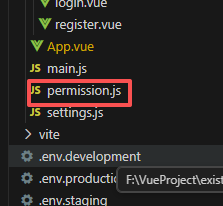
//修改前
const whiteList = ['/login', '/register']

//修改后
const whiteList = ['/login', '/register','/zmap']访问地址(根据自己的ip地址):http://localhost/zmap