VSCode GCC/CLANG stm32开发插件配置
STM32CubeCLT:https://www.st.com.cn/zh/development-tools/stm32cubeclt.html
- STM32CubeCLT是意法半导体(STMicroelectronics)推出的命令行工具集,主要面向第三方IDE提供商和持续集成开发者,支持在非ST原生环境中使用STM32芯片的开发工具。 可以通过
STM32CubeCLT一站式安装.
-
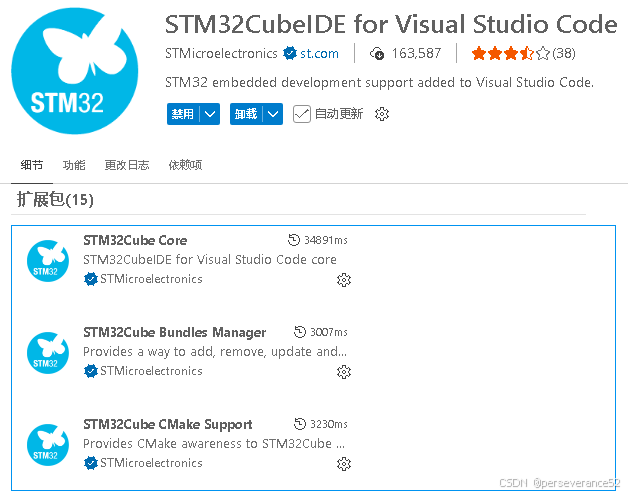
如果自定义安装,可以直接选择在VSCode中,搜索
STM32CUBE,找到STM32CubeIDE for Visual Studio Code插件进行安装。
-
编译器和调试器安装
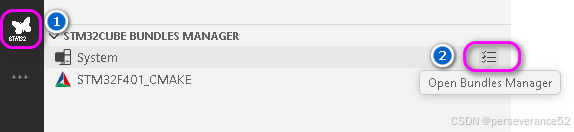
编译器可以二选一:GCC和clang,具体使用哪一个,还与自己配置的STM32CubeMX工程有关。
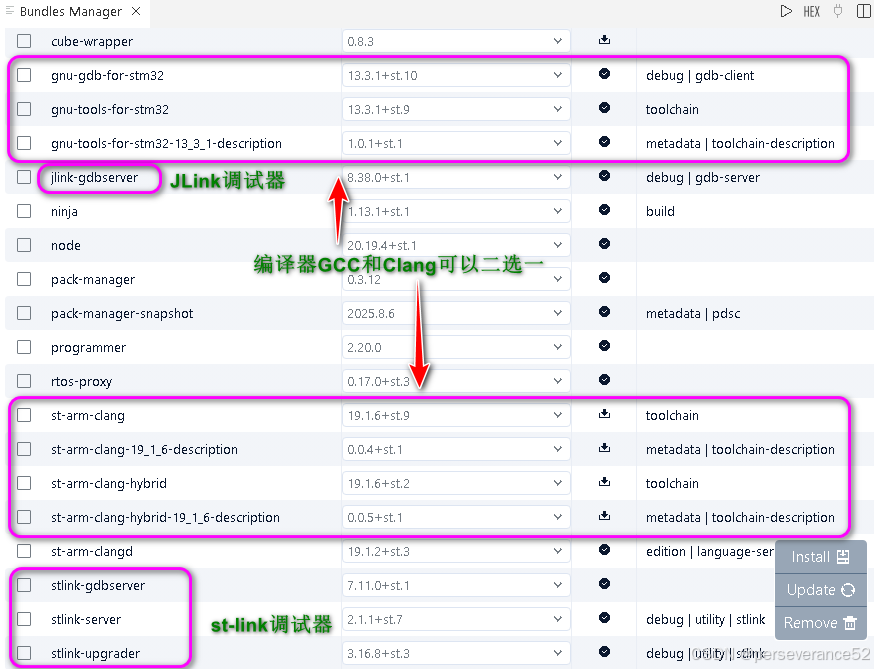
调试器配置
在项目文件夹下的.vscode文件夹内,配置(launch.json)和创建调试器任务(task.json)
- launch.json:
c
{
    "version": "0.2.0",
    "configurations": [
        {
            "name": "STM32 Debug (ST-LINK)",
            "type": "cppdbg",
            "request": "launch",
            "program": "${workspaceFolder}/build/Debug/STM32F401_CMAKE.elf",
            "args": [],
            "stopAtEntry": true,
            "cwd": "${workspaceFolder}",
            "environment": [],
            "externalConsole": false,
            "MIMode": "gdb",
            "miDebuggerPath": "arm-none-eabi-gdb",
            "debugServerPath": "openocd",
            "debugServerArgs": "-f interface/stlink.cfg -f target/stm32f4x.cfg",
            "serverStarted": "Listening on port .* for gdb connections",
            "filterStderr": true,
            "preLaunchTask": "Build Project (Debug)",
            "setupCommands": [
                {
                    "description": "Enable pretty-printing for gdb",
                    "text": "-enable-pretty-printing",
                    "ignoreFailures": true
                },
                {
                    "description": "Set Disassembly Flavor to Intel",
                    "text": "-gdb-set disassembly-flavor intel",
                    "ignoreFailures": true
                }
            ]
        },
        {
            "name": "STM32 Debug (J-LINK)",
            "type": "cppdbg",
            "request": "launch",
            "program": "${workspaceFolder}/build/Debug/STM32F401_CMAKE.elf",
            "args": [],
            "stopAtEntry": true,
            "cwd": "${workspaceFolder}",
            "environment": [],
            "externalConsole": false,
            "MIMode": "gdb",
            "miDebuggerPath": "arm-none-eabi-gdb",
            "debugServerPath": "openocd",
            "debugServerArgs": "-f interface/jlink.cfg -f target/stm32f4x.cfg -c \"adapter speed 2000\"",
            "serverStarted": "Listening on port .* for gdb connections",
            "filterStderr": true,
            "preLaunchTask": "Build Project (Debug)",
            "setupCommands": [
                {
                    "description": "Enable pretty-printing for gdb",
                    "text": "-enable-pretty-printing",
                    "ignoreFailures": true
                },
                {
                    "description": "Set Disassembly Flavor to Intel",
                    "text": "-gdb-set disassembly-flavor intel",
                    "ignoreFailures": true
                }
            ]
        },
        {
            "name": "STM32 Debug (DAP-LINK)",
            "type": "cppdbg",
            "request": "launch",
            "program": "${workspaceFolder}/build/Debug/STM32F401_CMAKE.elf",
            "args": [],
            "stopAtEntry": true,
            "cwd": "${workspaceFolder}",
            "environment": [],
            "externalConsole": false,
            "MIMode": "gdb",
            "miDebuggerPath": "arm-none-eabi-gdb",
            "debugServerPath": "openocd",
            "debugServerArgs": "-f interface/cmsis-dap.cfg -c \"adapter speed 2000\" -f target/stm32f4x.cfg",
            "serverStarted": "Listening on port .* for gdb connections",
            "filterStderr": true,
            "preLaunchTask": "Build Project (Debug)",
            "setupCommands": [
                {
                    "description": "Enable pretty-printing for gdb",
                    "text": "-enable-pretty-printing",
                    "ignoreFailures": true
                },
                {
                    "description": "Set Disassembly Flavor to Intel",
                    "text": "-gdb-set disassembly-flavor intel",
                    "ignoreFailures": true
                }
            ]
        }
    ]
}- task.json
可以根据自己的实际硬件进行配置,我这里配置了3中调试器
c
{
    "version": "2.0.0",
    "tasks": [
        {
            "label": "Build Project (Release)",
            "type": "shell",
            "command": "cmake",
            "args": [
                "--build",
                "build/Release",
                "--target",
                "all"
            ],
            "group": "build",
            "presentation": {
                "echo": true,
                "reveal": "always",
                "focus": false,
                "panel": "shared",
                "showReuseMessage": true,
                "clear": false
            },
            "problemMatcher": [
                "$gcc"
            ]
        },
        {
            "label": "Build Project (Debug)",
            "type": "shell",
            "command": "cmake",
            "args": [
                "--build",
                "build/Debug",
                "--target",
                "all"
            ],
            "group": "build",
            "presentation": {
                "echo": true,
                "reveal": "always",
                "focus": false,
                "panel": "shared",
                "showReuseMessage": true,
                "clear": false
            },
            "problemMatcher": [
                "$gcc"
            ]
        },
        {
            "label": "Clean Build",
            "type": "shell",
            "command": "rm",
            "args": [
                "-rf",
                "build"
            ],
            "group": "build",
            "presentation": {
                "echo": true,
                "reveal": "always",
                "focus": false,
                "panel": "shared",
                "showReuseMessage": true,
                "clear": false
            }
        },
        {
            "label": "Flash with ST-LINK",
            "type": "shell",
            "command": "openocd",
            "args": [
                "-f", "interface/stlink.cfg",
                "-f", "target/stm32f4x.cfg",
                "-c", "program build/Release/STM32F401_CMAKE.elf verify reset exit"
            ],
            "group": "build",
            "dependsOn": "Build Project (Release)",
            "presentation": {
                "echo": true,
                "reveal": "always",
                "focus": false,
                "panel": "shared",
                "showReuseMessage": true,
                "clear": false
            },
            "problemMatcher": []
        },
        {
            "label": "Flash with J-LINK (SWD)",
            "type": "shell",
            "command": "openocd",
            "args": [
                "-f", "interface/jlink.cfg",
                "-f", "target/stm32f4x.cfg",
                "-c", "adapter speed 2000",
                "-c", "program build/Release/STM32F401_CMAKE.elf verify reset exit"
            ],
            "group": "build",
            "dependsOn": "Build Project (Release)",
            "presentation": {
                "echo": true,
                "reveal": "always",
                "focus": false,
                "panel": "shared",
                "showReuseMessage": true,
                "clear": false
            },
            "problemMatcher": []
        },
        {
            "label": "Flash with DAP-LINK",
            "type": "shell",
            "command": "openocd",
            "args": [
                "-f", "interface/cmsis-dap.cfg",
                "-c", "adapter speed 2000",
                "-f", "target/stm32f4x.cfg",
                "-c", "program build/Release/STM32F401_CMAKE.elf verify reset exit"
            ],
            "group": "build",
            "dependsOn": "Build Project (Release)",
            "presentation": {
                "echo": true,
                "reveal": "always",
                "focus": false,
                "panel": "shared",
                "showReuseMessage": true,
                "clear": false
            },
            "problemMatcher": []
        },
        {
            "label": "Debug with ST-LINK (GDB)",
            "type": "shell",
            "command": "openocd",
            "args": [
                "-f", "interface/stlink.cfg",
                "-f", "target/stm32f4x.cfg"
            ],
            "group": "none",
            "isBackground": true,
            "presentation": {
                "echo": true,
                "reveal": "always",
                "focus": false,
                "panel": "shared",
                "showReuseMessage": true,
                "clear": false
            },
            "problemMatcher": []
        },
        {
            "label": "Debug with J-LINK (GDB)",
            "type": "shell",
            "command": "openocd",
            "args": [
                "-f", "interface/jlink.cfg",
                "-f", "target/stm32f4x.cfg",
                "-c", "adapter speed 2000"
            ],
            "group": "none",
            "isBackground": true,
            "presentation": {
                "echo": true,
                "reveal": "always",
                "focus": false,
                "panel": "shared",
                "showReuseMessage": true,
                "clear": false
            },
            "problemMatcher": []
        },
        {
            "label": "Debug with DAP-LINK (GDB)",
            "type": "shell",
            "command": "openocd",
            "args": [
                "-f", "interface/cmsis-dap.cfg",
                "-c", "adapter speed 2000",
                "-f", "target/stm32f4x.cfg"
            ],
            "group": "none",
            "isBackground": true,
            "presentation": {
                "echo": true,
                "reveal": "always",
                "focus": false,
                "panel": "shared",
                "showReuseMessage": true,
                "clear": false
            },
            "problemMatcher": []
        },
        {
            "label": "Test Connection (ST-LINK)",
            "type": "shell",
            "command": "openocd",
            "args": [
                "-f", "interface/stlink.cfg",
                "-f", "target/stm32f4x.cfg",
                "-c", "init",
                "-c", "exit"
            ],
            "group": "test",
            "presentation": {
                "echo": true,
                "reveal": "always",
                "focus": false,
                "panel": "shared",
                "showReuseMessage": true,
                "clear": false
            }
        },
        {
            "label": "Test Connection (J-LINK)",
            "type": "shell",
            "command": "openocd",
            "args": [
                "-f", "interface/jlink.cfg",
                "-f", "target/stm32f4x.cfg",
                "-c", "adapter speed 2000",
                "-c", "init",
                "-c", "exit"
            ],
            "group": "test",
            "presentation": {
                "echo": true,
                "reveal": "always",
                "focus": false,
                "panel": "shared",
                "showReuseMessage": true,
                "clear": false
            }
        },
        {
            "label": "Test Connection (DAP-LINK)",
            "type": "shell",
            "command": "openocd",
            "args": [
                "-f", "interface/cmsis-dap.cfg",
                "-c", "adapter speed 2000",
                "-f", "target/stm32f4x.cfg",
                "-c", "init",
                "-c", "exit"
            ],
            "group": "test",
            "presentation": {
                "echo": true,
                "reveal": "always",
                "focus": false,
                "panel": "shared",
                "showReuseMessage": true,
                "clear": false
            }
        },
        {
            "label": "OpenOCD Version",
            "type": "shell",
            "command": "openocd",
            "args": [
                "--version"
            ],
            "group": "test",
            "presentation": {
                "echo": true,
                "reveal": "always",
                "focus": false,
                "panel": "shared",
                "showReuseMessage": true,
                "clear": false
            }
        }
    ]
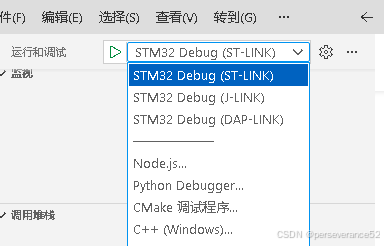
}- 配置好task.json后,在状态栏上会显示相对应的调试器,可以很方便的在编译完成后,直接点击状态栏对应的调试器按钮下载程序或进入调试模式。

📗STM32CubeMX配置
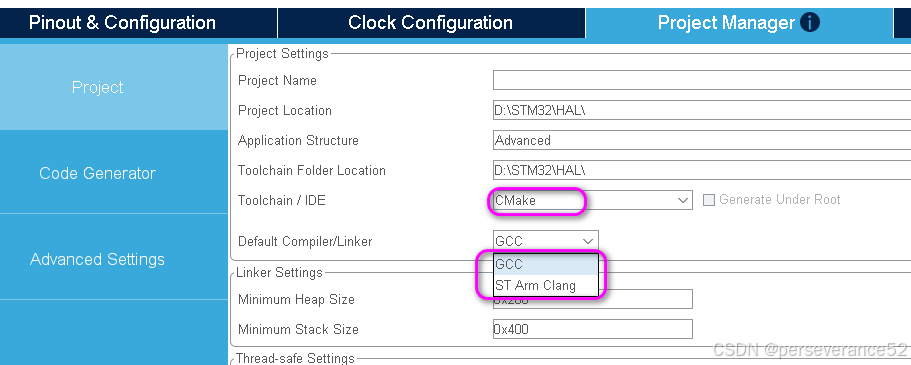
- 工程输出类型,选择CMake工程。
- 编译器选择,根据自己上所安装的编译器,进行选择
GCC或者ST Arm Clang:
烧录和调试
- ARM调试必须安装的依赖插件:
Cortex-Debug。
- 🔨如果配置task.json文件,那么下载和调试,可以直接点击状态条上对应的调试器按钮,即可进入调试或下载程序操作。
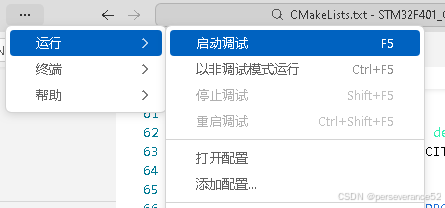
- 如果没有创建task.json文件,那么通过菜单-运行-启动调试,或者按快捷键F5.
- bash终端烧录命令:
- 🔧 依赖提前下载了Openocd,并添加到系统环境变量中。
- JLink烧录命令:
c
openocd -f interface/jlink.cfg -f target/stm32f4x.cfg -c "adapter speed 2000" -c "program build/Release/STM32F401_CMAKE.elf verify reset exit"
- DAP-LINK烧录命令
c
openocd -f interface/cmsis-dap.cfg -f target/stm32f4x.cfg -c "adapter speed 2000" -c "program build/Release/STM32F401_CMAKE.elf verify reset exit"
- ST-LINK烧录命令
c
openocd -f interface/stlink.cfg -f target/stm32f4x.cfg -c "adapter speed 2000" -c "program build/Release/STM32F401_CMAKE.elf verify reset exit"- bash终端终端自动检测调试器下载的
run.sh文件:bash终端执行:run.sh文件
c
#!/bin/bash
echo "Detecting debugger type..."

# 尝试DAP-LINK
if openocd -f interface/cmsis-dap.cfg -c "shutdown" &>/dev/null; then
    echo "DAP-LINK detected, flashing..."
    openocd -f interface/cmsis-dap.cfg -f target/stm32f4x.cfg -c "adapter speed 2000" -c "program build/Release/STM32F401_CMAKE.elf verify reset exit"
# 尝试ST-LINK
elif openocd -f interface/stlink.cfg -c "shutdown" &>/dev/null; then
    echo "ST-LINK detected, flashing..."
    openocd -f interface/stlink.cfg -f target/stm32f4x.cfg -c "adapter speed 2000" -c "program build/Release/STM32F401_CMAKE.elf verify reset exit"
else
    echo "No supported debugger detected. Please connect DAP-LINK or ST-LINK."
    exit 1
fi- cmd终端命令批处理命令:
- flash_daplink.bat
c
@echo off
echo Flashing with DAP-LINK...
openocd -f interface/cmsis-dap.cfg -f target/stm32f4x.cfg -c "adapter speed 2000" -c "program build\Release\STM32F401_CMAKE.elf verify reset exit"
pause
- flash_stlink.bat
c
@echo off
echo Flashing with ST-LINK...
openocd -f interface/stlink.cfg -f target/stm32f4x.cfg -c "adapter speed 2000" -c "program build\Release\STM32F401_CMAKE.elf verify reset exit"
pause
🧬生成对应的.bin和.hex文件
默认编译完成后生成的烧录文件格式只有.elf文件,在CMakeList.txt文件中添加如下配置,用于编译完成后自动转换.bin和.hex文件:
c
# 添加生成bin文件的构建后命令
add_custom_command(TARGET ${CMAKE_PROJECT_NAME} POST_BUILD
    COMMAND ${CMAKE_OBJCOPY} -O binary $<TARGET_FILE:${CMAKE_PROJECT_NAME}> ${CMAKE_PROJECT_NAME}.bin
    COMMENT "生成bin文件: $<TARGET_FILE:${CMAKE_PROJECT_NAME}>.bin"
    VERBATIM
)

# 添加生成hex文件的构建后命令
add_custom_command(TARGET ${CMAKE_PROJECT_NAME} POST_BUILD
    COMMAND ${CMAKE_OBJCOPY} -O ihex $<TARGET_FILE:${CMAKE_PROJECT_NAME}> ${CMAKE_PROJECT_NAME}.hex
    COMMENT "生成hex文件: $<TARGET_FILE:${CMAKE_PROJECT_NAME}>.hex"
    VERBATIM
)
📑JLink调试器补充说明
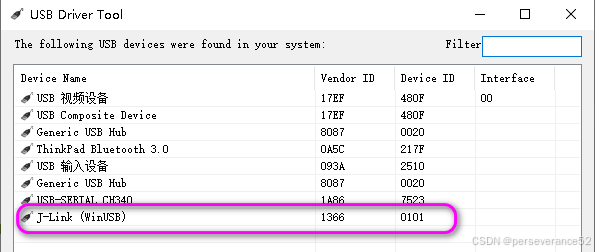
- openocd下载插件配合JLink调试器使用时,需要将驱动变更为
WinUSB模式。
- JLink驱动更换工具:
UsbDriverTool:https://visualgdb.com/UsbDriverTool/zadig:https://zadig.akeo.ie/
个人推荐使用UsbDriverTool,变更驱动类型,可以很方便恢复原来的的驱动类型。
- ✨如果需要回到Keil MDK环境下使用JLink又需要将
WinUSB驱动卸载掉才能使能。