需求背景:
由于本人一名 SAP 开发人员,对 Flutter 并不熟悉。在维护遗留的 Flutter 应用时,希望借助自己熟悉的 SAPUI5 技术栈,将基于 SAPUI5 开发的 Web 应用集成到现有 Flutter 应用中。未来新增的功能也将统一采用 SAPUI5 实现。
Flutter通过webview调用SAPUI5写的web应用
Dart
import 'package:flutter/material.dart';
import 'package:webview_flutter/webview_flutter.dart';
import 'package:provider/provider.dart';
import '../provider/user_model.dart';
import '../common/business_type.dart';

class SapFioriPage extends StatefulWidget {
  final String url;

  // 设置默认URL,以防调用时未提供URL参数
  SapFioriPage({Key key, this.url}) : super(key: key);

  @override
  _SapFioriPageState createState() => _SapFioriPageState();
}

class _SapFioriPageState extends State<SapFioriPage> {
  WebViewController _controller;
  bool _canGoBack = false;
  int _currentIndex = 0;

  @override
  void initState() {
    super.initState();
  }

  @override
  Widget build(BuildContext context) {
    return Scaffold(
      resizeToAvoidBottomInset: true,
      // appBar: AppBar(
      //   title: Text("SAP Fiori"),
      //   // leading: IconButton(
      //   //   icon: Icon(Icons.close),
      //   //   onPressed: () {
      //   //     Navigator.pop(context);
      //   //   },
      //   // ),
      // ),
      body: WebView(
        // 使用传入的URL或默认URL
        initialUrl: widget.url ?? 'http://你的ip:端口/zfiori_stock/index.html',
        javascriptMode: JavascriptMode.unrestricted,
        gestureNavigationEnabled: true,
        onWebViewCreated: (WebViewController controller) {
          _controller = controller;
        },
        onPageStarted: (String url) {
          print('页面开始加载: $url');
        },
        onPageFinished: (String url) {
          print('页面加载完成: $url');
        },
      ),
      bottomNavigationBar: BottomNavigationBar(
        //底部导航栏的创建需要对应的功能标签作为子项,这里我就写了3个,每个子项包含一个图标和一个title。
        items: [
          BottomNavigationBarItem(
              icon: Icon(
                Icons.arrow_back,
              ),
              title: new Text(
                '返回(F9)',
              )),
          BottomNavigationBarItem(
              icon: Icon(
                Icons.keyboard_return,
              ),
              title: new Text(
                '退出(F10)',
              )),
        ],
        //这是底部导航栏自带的位标属性,表示底部导航栏当前处于哪个导航标签。给他一个初始值0,也就是默认第一个标签页面。
        currentIndex: _currentIndex,
        //这是点击属性,会执行带有一个int值的回调函数,这个int值是系统自动返回的你点击的那个标签的位标
        onTap: (int i) {
          //进行状态更新,将系统返回的你点击的标签位标赋予当前位标属性,告诉系统当前要显示的导航标签被用户改变了。
          setState(() {
            _currentIndex = i;
          });
          UserModel userModel = Provider.of<UserModel>(context, listen: false);
          if (i == 0) {
            userModel.sapGotoPage(context, main_page);
          } else if (i == 1) {
            userModel.sapGotoPage(context, login_page);
          }
        },
      ),
    );
  }

  @override
  void dispose() {
    super.dispose();
  }
}
效果
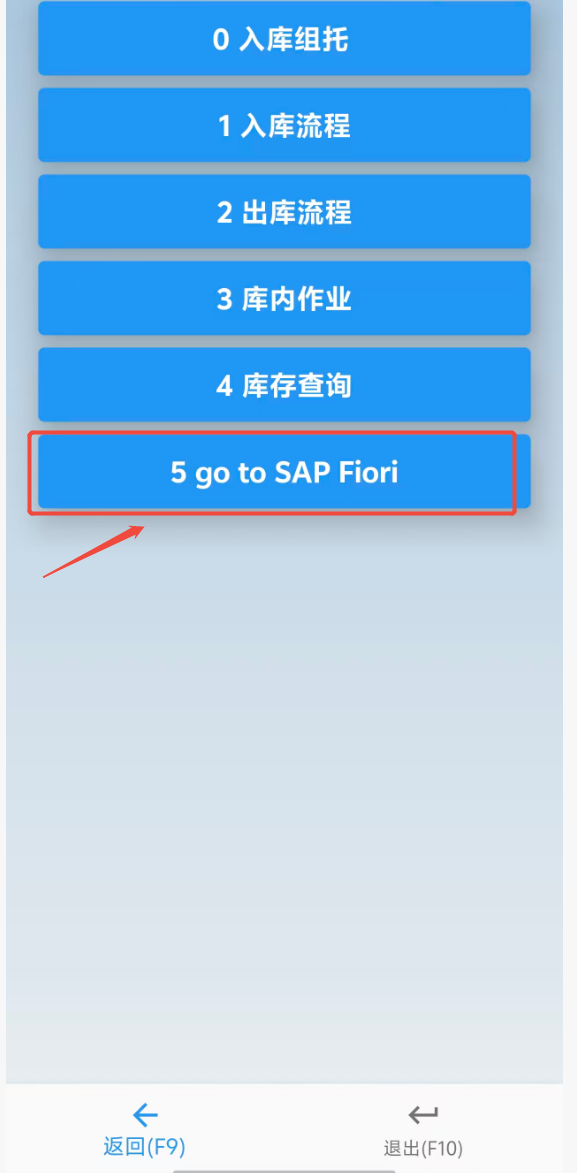
Flutter APP上点击按钮 
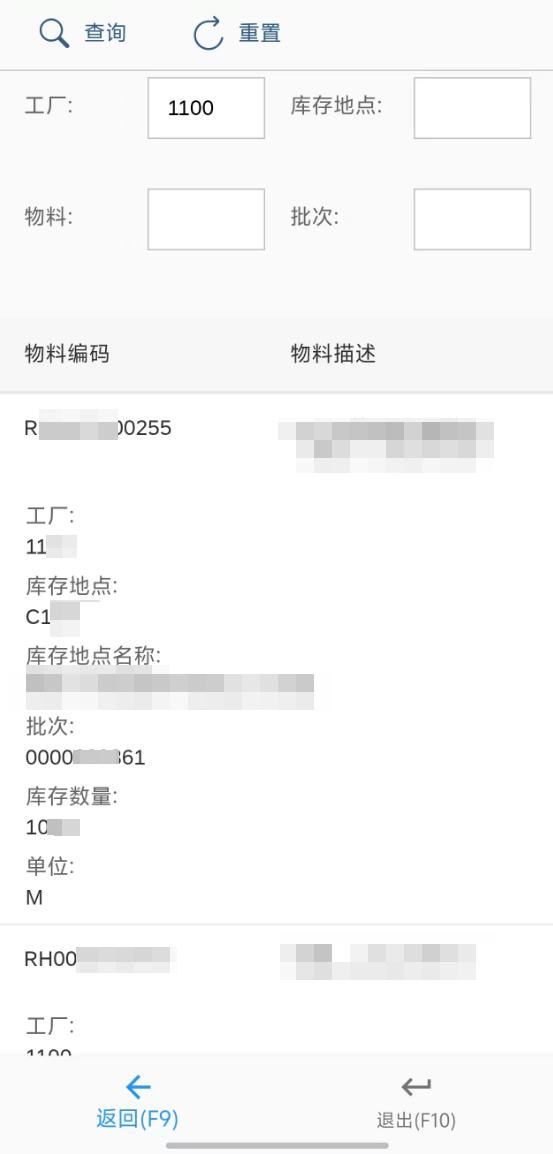
跳转到SAPUI5页面
坑1:真机上 WebView 输入框不弹键盘
原因
Flutter 1.22 + webview_flutter 使用 Virtual Display 组合方式,在部分真机与输入法冲突。Activity 未设为 adjustResize,或布局禁止调整。
修复1
android/app/src/main/AndroidManifest.xml (line 1) 的 <activity android:name=".MainActivity"> 添加:
android:windowSoftInputMode="adjustResize"
确保 android:hardwareAccelerated="true"
XML
<manifest xmlns:android="http://schemas.android.com/apk/res/android"
    package="com.example.flutterDemo01">
    <!-- io.flutter.app.FlutterApplication is an android.app.Application that
         calls FlutterMain.startInitialization(this); in its onCreate method.
         In most cases you can leave this as-is, but you if you want to provide
         additional functionality it is fine to subclass or reimplement
         FlutterApplication and put your custom class here. -->
    <application
        android:name="io.flutter.app.FlutterApplication"
        android:icon="@mipmap/ic_launcher"
        android:label="flutterDemo01"
        android:usesCleartextTraffic="true"
        android:networkSecurityConfig="@xml/network_security_config">
        <activity
            android:name=".MainActivity"
            android:exported="true"
            android:configChanges="orientation|keyboardHidden|keyboard|screenSize|smallestScreenSize|locale|layoutDirection|fontScale|screenLayout|density|uiMode"
            android:hardwareAccelerated="true"
            android:launchMode="singleTop"
            android:theme="@style/LaunchTheme"
            android:windowSoftInputMode="adjustResize">
            <!-- Specifies an Android theme to apply to this Activity as soon as
                 the Android process has started. This theme is visible to the user
                 while the Flutter UI initializes. After that, this theme continues
                 to determine the Window background behind the Flutter UI. -->
            <meta-data
                android:name="io.flutter.embedding.android.NormalTheme"
                android:resource="@style/NormalTheme" />
            <!-- Displays an Android View that continues showing the launch screen
                 Drawable until Flutter paints its first frame, then this splash
                 screen fades out. A splash screen is useful to avoid any visual
                 gap between the end of Android's launch screen and the painting of
                 Flutter's first frame. -->
            <meta-data
                android:name="io.flutter.embedding.android.SplashScreenDrawable"
                android:resource="@drawable/launch_background" />
            <intent-filter>
                <action android:name="android.intent.action.MAIN" />
                <category android:name="android.intent.category.LAUNCHER" />
            </intent-filter>
        </activity>
        <!-- Don't delete the meta-data below.
             This is used by the Flutter tool to generate GeneratedPluginRegistrant.java -->
        <meta-data
            android:name="flutterEmbedding"
            android:value="2" />
    </application>

    <uses-permission android:name="android.permission.READ_PHONE_STATE" />
    <uses-permission android:name="android.permission.INTERNET" />
    <uses-permission android:name="android.permission.ACCESS_NETWORK_STATE" />
    <uses-permission android:name="android.permission.ACCESS_WIFI_STATE" />

</manifest>
修复2
启用 Hybrid Composition(改善输入法与焦点):
在 lib/main.dart (line 1)(runApp 前):
import 'dart:io';
import 'package:webview_flutter/webview_flutter.dart';
void main() {
if (Platform.isAndroid) {
WebView.platform = SurfaceAndroidWebView();
}
runApp(MyApp());
}
Dart
import 'package:flutter/material.dart';
import 'dart:io';
import 'package:webview_flutter/webview_flutter.dart';
import 'package:flutterDemo01/pages/splash_page.dart';
import 'package:bot_toast/bot_toast.dart';
import 'package:fluro/fluro.dart' as fluro;
import 'package:flutterDemo01/route/routes.dart';
import 'application.dart';
import 'package:provider/provider.dart';
import 'package:flutterDemo01/provider/user_model.dart';
import 'package:flutter_localizations/flutter_localizations.dart';

void main() {
  // 新版本初始化需求
  WidgetsFlutterBinding.ensureInitialized();
  if (Platform.isAndroid) {
    // 启用 Hybrid Composition,解决部分真机输入法/焦点问题
    WebView.platform = SurfaceAndroidWebView();
  }
  fluro.Router router = fluro.Router();
  Routes.configureRoutes(router);
  Application.router = router;
  Application.initSp();
  runApp(MultiProvider(providers: [
    ChangeNotifierProvider<UserModel>.value(
      value: UserModel(),
    ),
  ], child: MyApp()));
}

class MyApp extends StatelessWidget {
  @override
  Widget build(BuildContext context) {
    return BotToastInit(
      child: MaterialApp(
        title: '仓库PDA系统',
        theme: ThemeData(
          primarySwatch: Colors.blue,
        ),
        home: SplashPage(title: '仓库PDA系统'),
        navigatorObservers: [BotToastNavigatorObserver()],
        onGenerateRoute: Application.router.generator,
        // 恢复使用动画主页
        localizationsDelegates: [
          // ... app-specific localization delegate[s] here
          // TODO: uncomment the line below after codegen
          // AppLocalizations.delegate,
          GlobalMaterialLocalizations.delegate,
          GlobalWidgetsLocalizations.delegate,
          GlobalCupertinoLocalizations.delegate,
        ],
        supportedLocales: [
          const Locale('en', ''), // English, no country code
          const Locale('zh', ''), // Arabic, no country code
        ],
      ),
    );
  }
}
修复3
页面层级上,保证 Scaffold(resizeToAvoidBottomInset: true),避免外层 GestureDetector 抢占触控。
在 sap_fiori_page.dart (line 1) :
WebView(
initialUrl: 'http://你的ip:端口/zfiori_stock/index.html',
javascriptMode: JavascriptMode.unrestricted,
gestureNavigationEnabled: true,
)
坑2:模拟器中 SAPUI5 后端请求失败,待解决
尝试过解决方案,都没解决
怀疑是模拟器网络问题,现在真机能运行,不着急,待后续研究
启用明文 HTTP:
android/app/src/main/AndroidManifest.xml (line 1) 的 <application> 增加:android:usesCleartextTraffic="true"。
使用域名白名单:
android/app/src/main/AndroidManifest.xml (line 1) 增加 android:networkSecurityConfig="@xml/network_security_config",
并创建 android/app/src/main/res/xml/network_security_config.xml (line 1):
<?xml version="1.0" encoding="utf-8"?>
<network-security-config>
<domain-config cleartextTrafficPermitted="true">
<domain includeSubdomains="true">192.168.1.177</domain>
</domain-config>
</network-security-config>