目录
- 一、Vue的生命周期阶段
- 二、生命周期钩子函数
-
- 1、创建阶段
-
- 1、beforeCreate
- [2、created (常用)](#2、created (常用))
- 2、挂载阶段
-
- 1、beforeMount
- [2、 mounted](#2、 mounted)
- 3、更新阶段
- 4、销毁阶段
一、Vue的生命周期阶段
vue生命周期分为四个阶段
第一阶段(创建阶段):beforeCreate,created
第二阶段(挂载阶段):beforeMount(render),mounted
第三阶段(更新阶段):beforeUpdate,updated
第四阶段(销毁阶段):beforeDestroy,destroyed

二、生命周期钩子函数
1、创建阶段
1、beforeCreate
在实例初始化之后,进行数据侦听和事件/侦听器的配置之前同步调用。
作用核心:初始化Vue实例的响应式系统
javascript
beforeCreate() {
  // 此时Vue实例的响应式系统还未建立
}
作用:
初始化事件系统和生命周期
数据观测 (data observation) 还未开始
计算属性 (computed) 和方法 (methods) 还未定义
应用场景:
javascript
export default {
  beforeCreate() {
    // ⭐ 场景1:记录性能时间点
    this.$options.startTime = performance.now();

    // ⭐ 场景2:初始化非响应式数据
    this.staticConfig = {
      version: '1.0.0',
      apiBaseUrl: process.env.API_URL
    };

    // ⭐ 场景3:预加载资源(如图片、字体)
    const preloadImages = [
      '/images/loading.gif',
      '/images/error.png'
    ];
    preloadImages.forEach(src => {
      const img = new Image();
      img.src = src;
    });

    // ❌ 不能做的事情:
    // console.log(this.message); // undefined
    // this.fetchData(); // undefined
  }
}
2、created (常用)
在实例创建完成后被立即同步调用。在这一步中,实例已完成对选项的处理,意味着以下内容已被配置完毕:数据侦听、计算属性、方法、事件/侦听器的回调函数。然而,挂载阶段还没开始,且 $el property 目前尚不可用。
解释:在这个阶段,可以访问到数据了,但是页面当中真实dom节点还是没有渲染出来,在这个钩子函数里面,可以进行相关初始化事件的绑定、发送请求操作。
javascript
created() {
  // 此时响应式系统已建立完成
}
作用:
数据观测已完成
属性和方法已配置
计算属性已计算
但DOM还未生成 ,$el属性不可用
应用场景:
javascript
export default {
  data() {
    return {
      user: null,
      settings: {},
      productList: []
    };
  },

  created() {
    //  场景1:发起异步数据请求(最常用)
    this.fetchInitialData();

    //  场景2:从本地存储读取数据
    this.loadFromLocalStorage();

    //  场景3:初始化组件状态
    this.initComponentState();

    //  场景4:设置事件总线监听
    this.setupEventBusListeners();

    //  场景5:初始化第三方服务配置
    this.initThirdPartyServices();
  },

  methods: {
    async fetchInitialData() {
      try {
        // 并行请求多个接口
        const [userRes, settingsRes, productsRes] = await Promise.all([
          axios.get('/api/user/profile'),
          axios.get('/api/user/settings'),
          axios.get('/api/products')
        ]);

        this.user = userRes.data;
        this.settings = settingsRes.data;
        this.productList = productsRes.data;
      } catch (error) {
        this.handleError(error);
      }
    },

    loadFromLocalStorage() {
      // 从本地存储恢复状态
      const savedCart = localStorage.getItem('shoppingCart');
      if (savedCart) {
        this.cartItems = JSON.parse(savedCart);
      }

      // 读取用户偏好
      const theme = localStorage.getItem('theme') || 'light';
      this.currentTheme = theme;
    },

    initComponentState() {
      // 根据URL参数初始化
      const query = this.$route.query;
      if (query.category) {
        this.activeCategory = query.category;
      }

      // 设置默认值
      this.pagination = {
        page: 1,
        pageSize: 20,
        total: 0
      };
    },

    setupEventBusListeners() {
      // 监听全局事件
      this.$eventBus.$on('user-logged-in', this.handleUserLogin);
      this.$eventBus.$on('notification', this.showNotification);
    },

    initThirdPartyServices() {
      // 初始化分析工具
      if (window.analytics) {
        window.analytics.identify(this.userId);
      }

      // 初始化错误监控
      if (window.Sentry) {
        window.Sentry.configureScope(scope => {
          scope.setUser({ id: this.userId });
        });
      }
    }
  }
}
核心要点:
可以访问所有响应式数据
适合数据初始化工作
不能操作DOM
请求数据的最佳时机(减少白屏时间)
2、挂载阶段
1、beforeMount
作用核心:将模板编译并挂载到真实DOM
在挂载开始之前被调用:相关的 render 函数首次被调用。
解释:代表dom马上就要被渲染出来了,但是却还没有真正的渲染出来,这个钩子函数与created钩子函数用法基本一致,可以进行相关初始化事件的绑定、发送ajax操作。
2、 mounted
挂载阶段的最后一个钩子函数,数据挂载完毕,真实dom元素也已经渲染完成了,这个钩子函数内部可以做一些实例化相关的操作
javascript
mounted() {
  // DOM已挂载完成,可以操作DOM
}
作用:
虚拟DOM已挂载到真实DOM
$el属性可用
组件已完全渲染
应用场景:
javascript
export default {
  mounted() {
    //  场景1:操作DOM元素(最常见)
    this.initDOMOperations();

    //  场景2:初始化第三方库(需要DOM)
    this.initThirdPartyLibraries();

    //  场景3:添加事件监听器
    this.bindEventListeners();

    //  场景4:执行依赖DOM的异步操作
    this.performDOMDependentAsyncTasks();

    //  场景5:测量DOM元素尺寸
    this.measureDOMElements();
  },

  methods: {
    initDOMOperations() {
      // 1. 聚焦输入框
      if (this.$refs.searchInput) {
        this.$refs.searchInput.focus();
        this.$refs.searchInput.select();
      }

      // 2. 设置滚动位置
      const savedScroll = sessionStorage.getItem('scrollPosition');
      if (savedScroll && this.$refs.scrollContainer) {
        this.$refs.scrollContainer.scrollTop = parseInt(savedScroll);
      }

      // 3. 动态修改样式
      this.$el.classList.add('loaded');
      this.$refs.header.style.backgroundColor = this.themeColor;
    },

    initThirdPartyLibraries() {
      // 1. 初始化图表库(ECharts/Chart.js)
      if (this.$refs.chart) {
        this.chartInstance = echarts.init(this.$refs.chart);
        this.chartInstance.setOption(this.chartOptions);
      }

      // 2. 初始化地图(百度地图/高德地图)
      if (this.$refs.mapContainer) {
        this.map = new AMap.Map(this.$refs.mapContainer, {
          zoom: 12,
          center: [116.397428, 39.90923]
        });
      }

      // 3. 初始化富文本编辑器
      if (this.$refs.editor) {
        this.editor = new Editor({
          el: this.$refs.editor,
          content: this.content
        });
      }

      // 4. 初始化代码编辑器
      if (this.$refs.codeEditor) {
        this.codeMirror = CodeMirror.fromTextArea(this.$refs.codeEditor, {
          mode: 'javascript',
          theme: 'material',
          lineNumbers: true
        });
      }
    },

    bindEventListeners() {
      // 1. 窗口大小变化监听
      window.addEventListener('resize', this.handleResize);

      // 2. 全局键盘事件
      document.addEventListener('keydown', this.handleGlobalKeydown);

      // 3. 滚动事件监听
      window.addEventListener('scroll', this.handleScroll, { passive: true });

      // 4. 鼠标事件
      this.$el.addEventListener('mouseenter', this.handleMouseEnter);
      this.$el.addEventListener('mouseleave', this.handleMouseLeave);
    },

    performDOMDependentAsyncTasks() {
      // 1. 延迟加载图片
      this.$nextTick(() => {
        const lazyImages = this.$el.querySelectorAll('img[data-src]');
        lazyImages.forEach(img => {
          img.src = img.dataset.src;
        });
      });

      // 2. 执行动画
      setTimeout(() => {
        this.$el.classList.add('animate-in');
      }, 100);
    },

    measureDOMElements() {
      // 1. 获取元素尺寸
      if (this.$refs.container) {
        const rect = this.$refs.container.getBoundingClientRect();
        this.containerWidth = rect.width;
        this.containerHeight = rect.height;
      }

      // 2. 计算响应式布局
      this.calculateResponsiveLayout();
    }
  },

  beforeDestroy() {
    // 🧹 必须清理!!!
    // 1. 移除事件监听
    window.removeEventListener('resize', this.handleResize);
    document.removeEventListener('keydown', this.handleGlobalKeydown);

    // 2. 销毁第三方库实例
    if (this.chartInstance) {
      this.chartInstance.dispose();
    }
    if (this.map) {
      this.map.destroy();
    }
    if (this.editor) {
      this.editor.destroy();
    }

    // 3. 清理定时器
    clearTimeout(this.animationTimer);
  }
}
3、更新阶段
1、beforeUpdate
在数据发生改变后,DOM 被更新之前被调用。这里适合在现有 DOM 将要被更新之前访问它,比如移除手动添加的事件监听器。
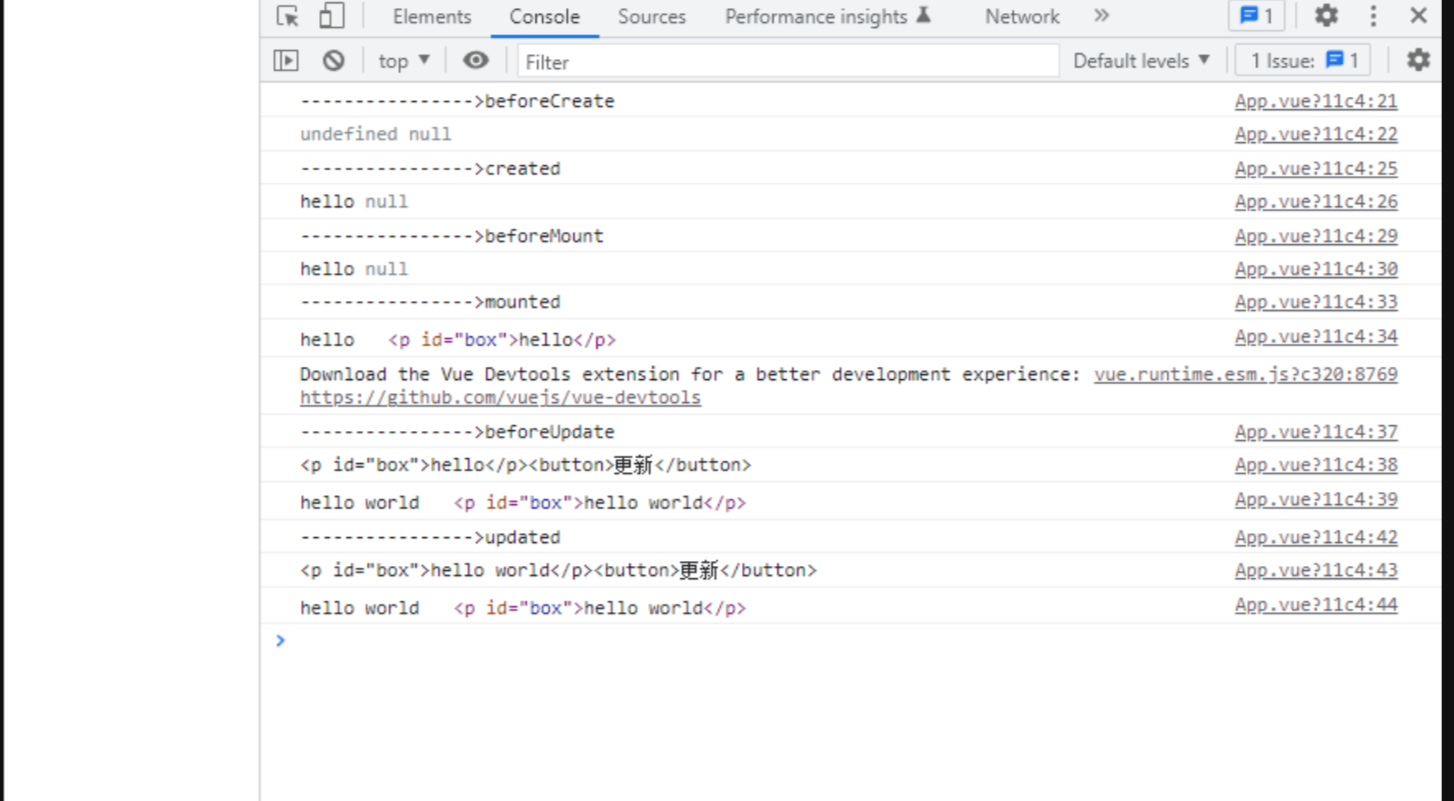
解释:这个钩子函数初始化的不会执行,当组件挂载完毕的时候,并且当数据改变的时候,才会立马执行,这个钩子函数获取dom的内容是更新之前的内容
javascript
beforeUpdate() {
  // 数据已变化,DOM更新前
}
作用:
检测到数据变化
重新计算虚拟DOM
但还未更新真实DOM
应用场景:
javascript
export default {
  data() {
    return {
      messages: [],
      scrollPosition: 0
    };
  },

  beforeUpdate() {
    // ⭐ 场景1:保存DOM状态(如滚动位置)
    if (this.$refs.messageList) {
      this.scrollPosition = this.$refs.messageList.scrollTop;
      this.scrollHeight = this.$refs.messageList.scrollHeight;
    }

    // ⭐ 场景2:检查数据变化类型
    if (this.messages.length !== this.previousMessageCount) {
      this.hasNewMessages = true;
    }
    this.previousMessageCount = this.messages.length;

    // ⭐ 场景3:性能监控
    if (this.$options.performanceLogging) {
      console.time('dom-update');
    }

    // ⭐ 场景4:取消不必要的操作
    if (this.isScrolling) {
      console.log('正在滚动,延迟DOM更新');
    }

    // ❌ 不要在这里修改正在更新的数据
    // this.messages.push('新消息'); // 会导致无限循环
  }
}
2、updated
在数据更改导致的虚拟 DOM 重新渲染和更新完毕之后被调用。
当这个钩子被调用时,组件 DOM 已经更新,所以你现在可以执行依赖于 DOM 的操作。然而在大多数情况下,你应该避免在此期间更改状态。如果要相应状态改变,通常最好使用计算属性或 watcher 取而代之。
javascript
updated() {
  // DOM已更新完成
}
作用:
虚拟DOM的差异已应用到真实DOM
DOM更新完成
组件重新渲染完成
应用场景:
javascript
export default {
  updated() {
    // ⭐ 场景1:恢复DOM状态(如滚动位置)
    if (this.$refs.messageList && this.hasNewMessages) {
      // 保持滚动在底部(聊天应用场景)
      this.$refs.messageList.scrollTop = this.$refs.messageList.scrollHeight;
      this.hasNewMessages = false;
    }

    // ⭐ 场景2:更新第三方库
    if (this.chartInstance && this.chartDataChanged) {
      this.chartInstance.setOption({
        series: [{ data: this.chartData }]
      });
      this.chartDataChanged = false;
    }

    // ⭐ 场景3:执行DOM更新后的操作
    this.performPostUpdateOperations();

    // ⭐ 场景4:触发过渡动画
    if (this.shouldAnimate) {
      this.$nextTick(() => {
        this.$el.classList.add('update-complete');
      });
    }

    // ⭐ 场景5:性能日志
    if (this.$options.performanceLogging) {
      console.timeEnd('dom-update');
      console.log(`DOM更新完成,耗时: ${performance.now() - this.updateStartTime}ms`);
    }

    // ❌ 重要警告:避免在此修改响应式数据!
    // 错误示例:
    // if (this.count < 10) {
    //   this.count++; // 会导致无限更新循环!
    // }

    // ✅ 正确做法:使用条件判断 + $nextTick
    if (this.shouldAutoIncrement && this.count < this.maxCount) {
      this.$nextTick(() => {
        this.count++;
      });
    }
  },

  methods: {
    performPostUpdateOperations() {
      // 1. 高亮新增项
      const newItems = this.$el.querySelectorAll('.item-new');
      newItems.forEach(item => {
        item.classList.add('highlight');
        setTimeout(() => {
          item.classList.remove('item-new');
        }, 1000);
      });

      // 2. 更新工具提示位置
      if (this.tooltips) {
        this.tooltips.forEach(tooltip => tooltip.updatePosition());
      }

      // 3. 触发自定义事件
      this.$emit('dom-updated', {
        timestamp: Date.now(),
        elementCount: this.$el.children.length
      });
    }
  }
}
4、销毁阶段
作用核心:清理资源,防止内存泄漏
1、beforeDestroy
实例销毁之前调用。在这一步,实例仍然完全可用。
当组件销毁的时候,就会触发这个钩子函数代表销毁之前,可以做一些善后操作,可以清除一些初始化事件、定时器相关的东西。
javascript
beforeDestroy() { // Vue 2
beforeUnmount() { // Vue 3
  // 实例销毁前,实例仍然完全可用
}
作用:
实例即将 销毁
但所有功能仍然可用
最后的机会进行清理工作
应用场景:
javascript
export default {
  data() {
    return {
      resources: {
        timers: [],
        listeners: [],
        connections: []
      }
    };
  },

  beforeDestroy() {
    // 🧹 资源清理清单:

    // 1. 清理定时器
    this.resources.timers.forEach(timerId => {
      clearInterval(timerId);
      clearTimeout(timerId);
    });

    // 2. 移除事件监听器
    this.resources.listeners.forEach(({ target, event, handler }) => {
      target.removeEventListener(event, handler);
    });

    // 3. 关闭WebSocket/SSE连接
    if (this.websocket && this.websocket.readyState === WebSocket.OPEN) {
      this.websocket.close(1000, '组件销毁');
    }

    if (this.eventSource) {
      this.eventSource.close();
    }

    // 4. 取消HTTP请求
    if (this.currentRequest) {
      this.currentRequest.cancel('组件销毁,请求已取消');
    }

    // 5. 清理第三方库实例
    this.cleanupThirdPartyLibraries();

    // 6. 清理DOM引用
    this.$refs = {};

    // 7. 移除全局状态引用
    this.removeGlobalReferences();

    // 8. 保存状态到本地存储
    this.saveStateToStorage();

    // 9. 发送销毁日志
    this.logDestruction();
  },

  methods: {
    cleanupThirdPartyLibraries() {
      // 清理各种第三方库
      const libraries = [
        'chartInstance', 'mapInstance', 'editorInstance',
        'playerInstance', 'pdfViewer', 'codeMirror'
      ];

      libraries.forEach(libName => {
        if (this[libName] && typeof this[libName].destroy === 'function') {
          this[libName].destroy();
          this[libName] = null;
        }
      });
    },

    removeGlobalReferences() {
      // 从全局对象中移除引用
      if (window.activeComponents) {
        const index = window.activeComponents.indexOf(this);
        if (index > -1) {
          window.activeComponents.splice(index, 1);
        }
      }

      // 清除全局事件处理器
      delete window[`${this._uid}_resize_handler`];
    },

    saveStateToStorage() {
      // 保存需要持久化的状态
      if (this.shouldPersistState) {
        const stateToSave = {
          formData: this.formData,
          filters: this.activeFilters,
          pagination: this.pagination
        };

        localStorage.setItem(
          `component_state_${this.componentId}`,
          JSON.stringify(stateToSave)
        );
      }
    },

    logDestruction() {
      // 发送销毁统计
      navigator.sendBeacon('/api/component-lifecycle', JSON.stringify({
        component: this.$options.name,
        instanceId: this._uid,
        lifespan: Date.now() - this.createdAt,
        event: 'beforeDestroy'
      }));
    }
  }
}
2、destroyed
实例销毁后调用。该钩子被调用后,对应 Vue 实例的所有指令都被解绑,所有的事件监听器被移除,所有的子实例也都被销毁。
Vue实例失去活性,完全丧失功能
javascript
destroyed() { // Vue 2
unmounted() { // Vue 3
  // 实例已完全销毁
}
作用:
实例已销毁
所有事件监听器已移除
所有子实例已销毁
所有指令已解绑
应用场景:
javascript
export default {
  destroyed() {
    // ⭐ 场景1:最终清理确认
    console.assert(this.resources.timers.length === 0, '还有未清理的定时器');
    console.assert(this.resources.listeners.length === 0, '还有未清理的事件监听');

    // ⭐ 场景2:触发父组件回调
    this.$emit('component-destroyed', {
      instanceId: this._uid,
      name: this.$options.name
    });

    // ⭐ 场景3:更新应用级状态
    if (this.$root) {
      this.$root.activeComponentCount--;
    }

    // ⭐ 场景4:性能分析记录
    if (window.performanceMonitor) {
      window.performanceMonitor.recordComponentLifecycle(
        this.$options.name,
        'destroyed',
        performance.now() - this.createdAt
      );
    }

    // ❌ 此时不能访问实例数据
    // console.log(this.message); // undefined 或报错

    // ⭐ 场景5:内存泄漏检测辅助
    if (process.env.NODE_ENV === 'development') {
      // 在开发环境帮助检测内存泄漏
      console.log(`组件 ${this.$options.name} 已销毁,检查是否有内存泄漏`);
    }
  },

  created() {
    // 记录创建时间,用于计算生命周期时长
    this.createdAt = performance.now();
  }
}
javascript
<template>
  <div id="app">
    <p id="box">{{msg}}</p>
    <button @click="change">更新</button>
  </div>
</template>

<script>
export default {
  data () {
    return {
      msg: 'hello'
    }
  },
  methods: {
    change () {
      this.msg = 'hello world'
    }
  },
  beforeCreate () {
    console.log('---------------->beforeCreate')
    console.log(this.msg, document.getElementById('box'))
  },
  created () {
    console.log('---------------->created')
    console.log(this.msg, document.getElementById('box'))
  },
  beforeMount () {
    console.log('---------------->beforeMount')
    console.log(this.msg, document.getElementById('box'))
  },
  mounted () {
    console.log('---------------->mounted')
    console.log(this.msg, document.getElementById('box'))
  },
  beforeUpdate () {
    console.log('---------------->beforeUpdate')
    console.log(this.$el.innerHTML)
    console.log(this.msg, document.getElementById('box'))
  },
  updated () {
    console.log('---------------->updated')
    console.log(this.$el.innerHTML)
    console.log(this.msg, document.getElementById('box'))
  }
}
</script>
当页面初始化挂载完成之后,
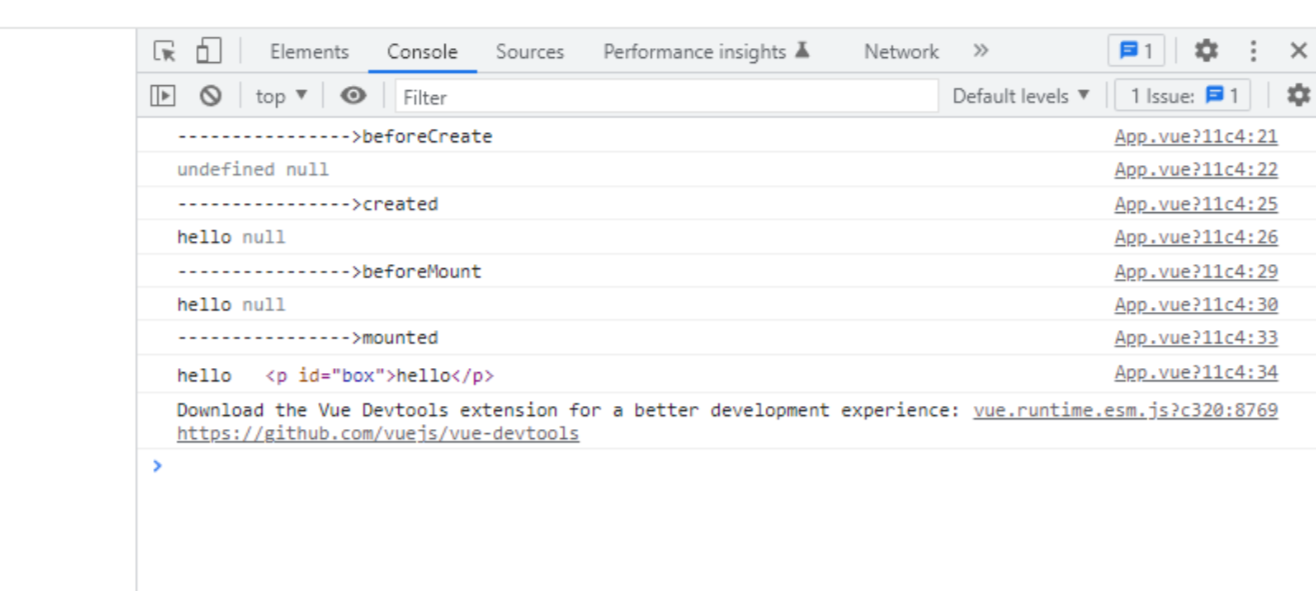
当数据改变之后又会触发beforeUpdate,updated两个钩子函数