Pynq中SD卡写入image - Writing an SD Card Image
工具准备
SD卡,
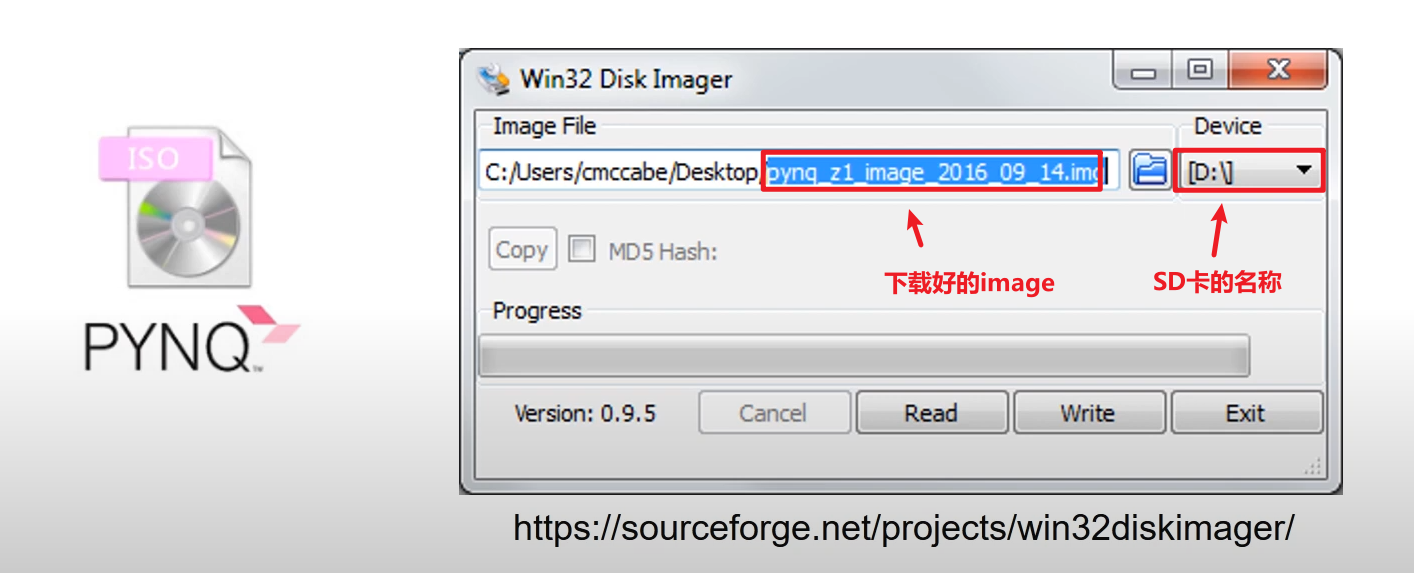
win32disk: https://sourceforge.net/projects/win32diskimager/
烧录步骤
帖子1:官方文档内容
Windows
Insert the Micro SD card into your SD card reader and check which drive letter was assigned. You can find this by opening Computer/My Computer in Windows Explorer.
Download the Win32DiskImager utility from the Sourceforge Project page
Extract the Win32DiskImager executable from the zip file and run the Win32DiskImager utility as administrator. (Right-click on the file, and select Run as administrator.)
Select the PYNQ-Z1 image file (.img).
Select the drive letter of the SD card. Be careful to select the correct drive. If you select the wrong drive you can overwrite data on that drive. This could be another USB stick, or memory card connected to your computer, or your computer's hard disk.
帖子2:官方视频操作
操作过程记录