Docker+Nginx+Node.js 全栈容器化部署
通过 Docker Compose 统一编排 Nginx、Node.js 服务,实现前后端分离部署。前端使用 Unity WebGL 创建交互式界面,后端基于 Node.js 提供 REST API 通信。重点讲解网络配置、反向代理策略、端口映射、跨域处理等实战中遇到的问题及解决方案,为应用部署提供完整参考。
当部署到部署到服务器的时候不知道服务的ip地址,可以使用nginx代理服务,然后使用请求的时候使用路径请求,然后ngixn返回服务器信息。
可以在nginx的docker-compose的环境配置中写好ip和端口这样就可以不修改conf文件了。
docker配置
项目路径
docker_net_work_test/           # 项目根目录
├── nginx/                     # Nginx 服务目录
│   ├── html/                  # WebGL 前端文件
│   │   ├── Build/            # Unity WebGL 构建输出
│   │   ├── StreamingAssets/  # Unity 流媒体资源
│   │   └── index.html        # 入口 HTML 文件
│   ├── Dockerfile            # Nginx 镜像构建文件
│   └── nginx.conf            # Nginx 配置文件
├── node/                      # Node.js 后端服务目录
│   ├── node_modules/         # Node.js 依赖包
│   ├── .env                  # 环境变量配置
│   ├── app.js               # Node.js 主应用文件
│   ├── Dockerfile           # Node.js 镜像构建文件
│   ├── package.json         # Node.js 项目配置
│   └── package-lock.json    # 依赖锁文件
├── docker-compose.nginx.yml  # Nginx 服务编排配置
└── docker-compose.node.yml   # Node.js 服务编排配置
项目运行
先运行node服务
docker-compose -f docker-compose.node.yml up -d
运行nginx服务
docker-compose -f docker-compose.nginx.yml up -d
前端页面:
nodejs服务
nodejs服务配置
docker-compose.node.yml
yml
services:
  node:
    build: ./node            # 基于node目录下的 Dockerfile 构建镜像
    container_name: node-app # 容器运行时的名字
    ports:
      - "13000:13000"        # 宿主机:容器 端口映射
    networks:
      - backend               # 定义属于的网络名称, backend 网络

networks:
  backend:
    name: backend-net          # 网络名称
app.js
js
/********************************************************************
 *  - HTTP 13000  (/ /api/health)
 *  依赖:npm i  morgan cors dotenv
 *******************************************************************/

require('dotenv').config();
const http = require('http');
const express = require('express');
const cors = require('cors');
const morgan = require('morgan');

/* ------------------ 配置 ------------------ */
const HTTP_HOST = process.env.HTTP_HOST || '0.0.0.0';
const HTTP_PORT = process.env.HTTP_PORT || 13000;
const NODE_ENV = process.env.NODE_ENV || 'development';


/* ------------------ Express ------------------ */
const app = express();

// CORS 配置
if (['localhost', 'development', 'dev'].includes(NODE_ENV)) {
	app.use(cors());
	console.log('(本地调试)/(开发),使用跨域');
} else if (['production', 'pro'].includes(NODE_ENV)) {
	console.log('生产环境不使用跨域');
} else {
	app.use(cors());
	console.log('未知环境使用跨域');
}

// 日志中间件
morgan.token('date', () => new Date().toLocaleString('zh-CN'));
app.use(morgan(':method :url code:status contentLength:res[content-length] - :response-time ms :date'));
app.use(express.json());

/* ------------------ 路由 ------------------ */
app.get('/api/config', (req, res) => {
	console.log('headers:', req.headers);

	// 1. 优先用代理头
	let port = req.get('X-Real-Port') || req.get('X-Forwarded-Port');

	// 2. 代理头都没有 → 从 Referer 提取
	if (!port) {
		const referer = req.get('Referer');
		const m = referer && referer.match(/:(\d+)\//);
		port = m ? m[1] : (req.secure ? 443 : 80);
	}

	const proto = req.get('X-Forwarded-Proto') || req.protocol;
	const host = req.get('X-Forwarded-Host') || req.get('Host');
	const hostWithPort = host.includes(':') ? host : `${host}:${port}`;
	const baseUrl = `${proto}://${hostWithPort}`;

	res.json({
		success: true,
		baseUrl,
		host: hostWithPort,
		proto,
		environment: NODE_ENV
	});
});

// 请求方式测试使用api
app.get('/api/health', (req, res) => res.json({ success: true, message: '服务健康', environment: NODE_ENV, timestamp: new Date().toISOString() }));
app.get('/', (req, res) => res.json({ success: true, message: 'HTTP 服务正常', environment: NODE_ENV, paths: { http: '/', config: '/api/config', health: '/api/health', post: '/post', put: '/put', delete: '/delete' } }));
app.post('/post', (req, res) => res.json({ success: true, method: 'POST', message: 'POST 通道正常', timestamp: new Date().toISOString(), body: req.body }));
app.put('/put', (req, res) => res.json({ success: true, method: 'PUT', message: 'PUT 通道正常', timestamp: new Date().toISOString(), body: req.body }));
app.delete('/delete', (req, res) => res.json({ success: true, method: 'DELETE', message: 'DELETE 通道正常', timestamp: new Date().toISOString() }));
app.use((req, res) => res.status(404).json({ success: false, message: '路由不存在', path: req.path }));


/* ------------------ 创建 HTTP 服务器 ------------------ */
const httpServer = http.createServer(app);

/* ------------------ 启动 HTTP ------------------ */
httpServer.listen(HTTP_PORT, HTTP_HOST, () => {
	console.log(`🚀 HTTP 服务 http://${HTTP_HOST}:${HTTP_PORT}`);
	console.log(`⚡ 环境 ${NODE_ENV}`);
	console.log(`📡 可用路由:`);
	console.log(`   GET  /              - 服务状态`);
	console.log(`   GET  /api/config    - 配置信息`);
	console.log(`   GET  /api/health    - 健康检查`);
	console.log(`   POST /post          - POST 测试`);
	console.log(`   PUT  /put           - PUT 测试`);
	console.log(`   DELETE /delete      - DELETE 测试`);
});
Dockerfile
dockerfile
FROM node:22-alpine
WORKDIR /app
COPY app.js .
RUN npm i express morgan cors dotenv
EXPOSE 13000
CMD ["node","app.js"]使用node:22-alpine 镜像,拷贝node下的app.js到app文件夹下,并安装包,暴露端口是13000,与docker-compose中的端口暴露的一致。并启动服务。
package.json
{
  "name": "unity-webgl-server",
  "version": "1.0.0",
  "main": "app.js",
  "scripts": {
    "start": "node app.js",
    "dev": "nodemon app.js"
  },
  "dependencies": {
    "aedes": "^0.51.3",
    "cors": "^2.8.5",
    "dotenv": "^17.2.3",
    "express": "^4.18.2",
    "morgan": "^1.10.1",
    "websocket-stream": "^5.5.2",
    "ws": "^8.13.0"
  },
  "devDependencies": {
    "nodemon": "^3.0.1"
  }
}
.env
env
HTTP_HOST=0.0.0.0
HTTP_PORT=13000

# 应用配置(localhost/development/production)
NODE_ENV=localhost
nginx配置
配置ngixn,并将html文件拷贝的到容器中,使用外部的配置文件,端口暴露58231对外,8080使用docker内部的端口,网络使用和node在同一个网络下。
docker-compose.nginx.yml
yml
services:
  nginx:
    build: ./nginx    # 构建镜像
    container_name: nginx-web
    ports:
      - "58231:8080"   # 宿主机 58231 映射到容器 8080
    networks:
      - backend       # 跟 node 同一网络

networks:
  backend:
    name: backend-net #复用网络
    external: true    # 不新建网络
Dockerfile
dockerfile
FROM nginxinc/nginx-unprivileged:1.29.0-alpine3.22
COPY nginx.conf /etc/nginx/nginx.conf
COPY html/ /usr/share/nginx/html/
USER root使用nginxinc/nginx-unprivileged:1.29.0-alpine3.22 镜像,可以使用自己的镜像。
拷贝nginx.conf,拷贝html 文件
使用root权限。
nginx.conf
conf
worker_processes  1;

events {
    worker_connections  1024;
}

http {
    # 引入MIME类型映射表
    include       mime.types;

    default_type  application/octet-stream;
    # 开启零拷贝发送文件
    sendfile        on;

    keepalive_timeout  65;

    # 虚拟主机配置
    server {
        # 监听端口
        listen       8080;
        # 服务绑定地址:允许所有地址访问
        server_name  0.0.0.0;


        # Docker容器内Node服务反向代理
        location /docker_s/ {
            # 代理转发地址:指向Docker内的node-app服务(13000端口)
            proxy_pass http://node-app:13000/;

            # 传递客户端真实访问端口(优先取上层Nginx的X-Real-Port,无则用当前服务端口)
proxy_set_header X-Forwarded-Port  $http_x_real_port$server_port;
proxy_set_header X-Real-Port       $http_x_real_port$server_port;


            proxy_set_header Host              $host;
            proxy_set_header X-Real-IP         $remote_addr;
            proxy_set_header X-Forwarded-For   $proxy_add_x_forwarded_for;
            proxy_set_header X-Forwarded-Proto $scheme;
        }

        # 直接使用nginx提供API配置信息
        location = /nginx_s/api/config {
            set $api_proto "http";
            set $api_port "58231";
            set $api_env "production";
            set $api_host "$host:$api_port";

            # 设置响应头为JSON格式
            add_header Content-Type application/json;


 return 200 "{ \
    \"success\":true, \
    \"baseUrl\":\"$api_proto://$api_host\", \
    \"host\":\"$api_host\", \
    \"proto\":\"$api_proto\", \
    \"environment\":\"$api_env\" \
}";
        }


        # 前端静态资源入口
        location / {
            # 静态资源根目录
            root   /usr/share/nginx/html;
            # 默认索引文件
            index  index.html index.htm;
            # SPA路由兼容:匹配不到文件时重定向到index.html
            try_files $uri $uri/ /index.html;
        }


        # # 5xx服务器错误页面配置
        # error_page   500 502 503 504  /50x.html;
        # location = /50x.html {
        #     root   html;
        # }
    }
}
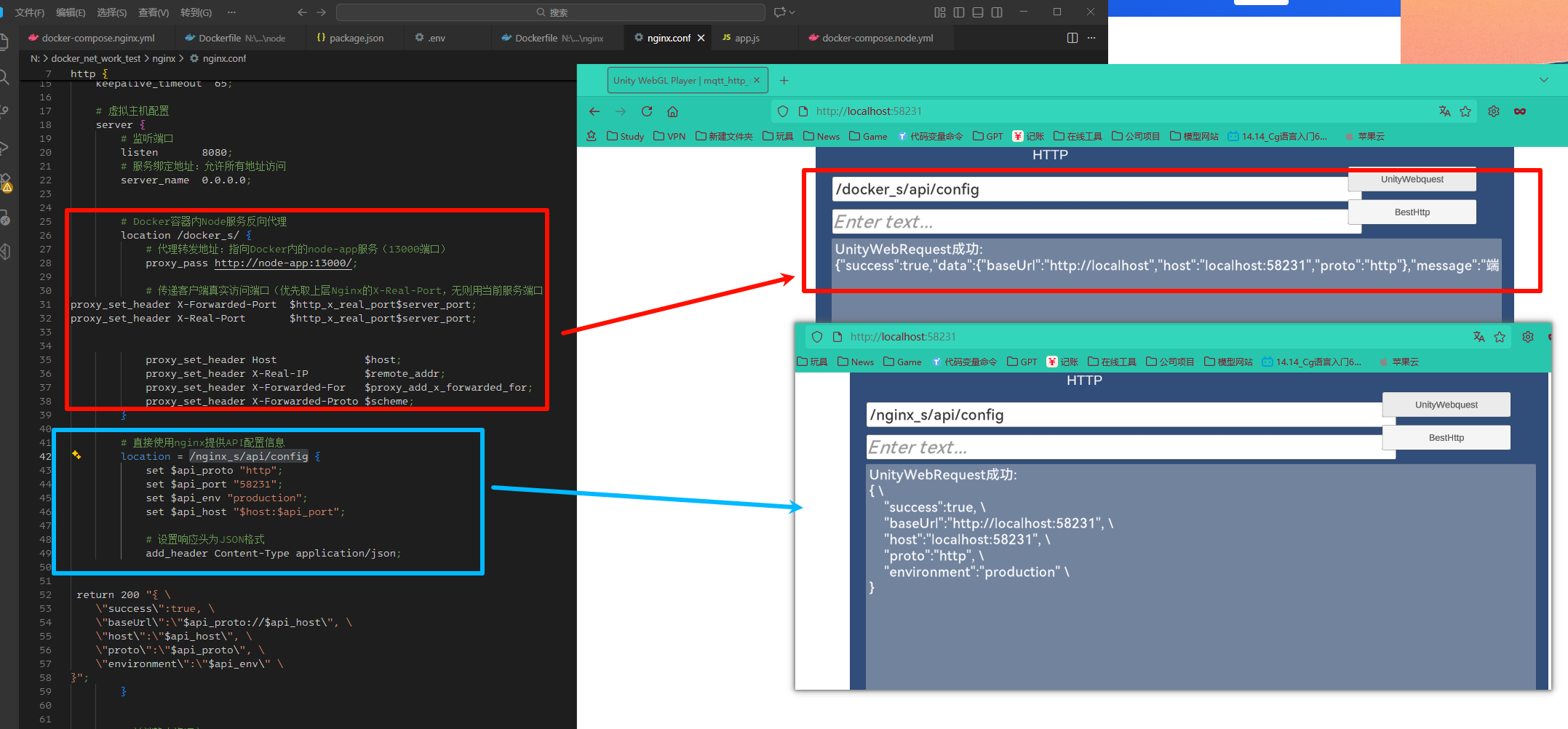
location /docker_s/ { 返回将请求反向代理到容器内部的服务器。这里要使用docker的容器名称, 虽然在一个网络里面,使用localhost会访问nginx的本机,而不是访问的实际的服务。
location = /nginx_s/api/config { 在nginx中直接返回,因为有时候会获取不到服务的ip地址。
unity代码
unity 使用tmp,使用unitybesthttpv3 进行网络通信。
besthttpv3 不支持路由请求,所以使用unitywebrequest请求获取服务地址,然后在使用unitybesthttpv3进行请求。
csharp
using UnityEngine;
using UnityEngine.UI;
using UnityEngine.Networking;
using System.Collections;
using Best.HTTP;
using TMPro;

namespace Assets
{
    internal class http_test_unityrequest : MonoBehaviour
    {
        [SerializeField] public TMP_InputField urlInputField_unity;
        [SerializeField] public TMP_InputField urlInputField_besthttp;
        [SerializeField] public Button unityWebRequestButton;
        [SerializeField] public Button bestHttpRequestButton;
        [SerializeField] public TMP_Text responseText;

        private void Start()
        {
            unityWebRequestButton.onClick.AddListener(() => StartCoroutine(SendUnityWebRequest()));
            bestHttpRequestButton.onClick.AddListener(() => StartCoroutine(SendBestHTTPRequest()));
        }

        private IEnumerator SendUnityWebRequest()
        {
            responseText.text = $"UnityWebRequest: 请求中...";
            using (UnityWebRequest request = UnityWebRequest.Get(urlInputField_unity.text))
            {
                yield return request.SendWebRequest();
                responseText.text = request.result != UnityWebRequest.Result.Success
                    ? $"UnityWebRequest错误:\n{request.error}\n{request.downloadHandler?.text}"
                    : $"UnityWebRequest成功:\n{request.downloadHandler?.text}";
            }
        }

        private IEnumerator SendBestHTTPRequest()
        {
            responseText.text = $"BestHTTP: 请求中...";
            bool requestCompleted = false;
            string result = "";

            new HTTPRequest(new System.Uri(urlInputField_besthttp.text), (req, res) =>
            {
                result = res == null ? "请求失败:响应为空"
                    : !res.IsSuccess ? $"BestHTTP错误:\n{res.Message}\n{res.DataAsText}"
                    : $"BestHTTP成功:\n{res.DataAsText}";
                requestCompleted = true;
            }).Send();

            while (!requestCompleted) yield return null;
            responseText.text = result;
        }
    }
}
测试html代码
<!DOCTYPE html>
<html lang="zh-CN">
<head>
    <meta charset="UTF-8">
    <meta name="viewport" content="width=device-width, initial-scale=1.0">
    <title>GET请求发送器</title>
</head>
<body>
    <h1>GET请求发送器</h1>

    <div>
        <label for="urlInput">请输入请求路径:</label>
        <br>
        <input type="text" id="urlInput" placeholder="/api/" size="40" value="/api/">
    </div>

    <br>

    <button onclick="sendGetRequest()">发送GET请求</button>

    <br><br>

    <div id="responseArea">
        <h3>响应结果:</h3>
        <pre id="responseText">等待请求...</pre>
    </div>

    <script>
        function sendGetRequest() {
            const urlInput = document.getElementById('urlInput');
            const responseText = document.getElementById('responseText');

            const path = urlInput.value.trim();

            if (!path) {
                responseText.textContent = '错误: 请输入有效的路径';
                return;
            }

            console.log('请求路径:', path);
            responseText.textContent = `正在请求: ${path}`;

            // 直接获取响应,不做任何状态判断
            fetch(path)
                .then(response => {
                    console.log('响应状态:', response.status, response.statusText);
                    console.log('响应URL:', response.url);

                    // 无论什么状态码,都返回响应文本
                    return response.text().then(text => {
                        return {
                            status: response.status,
                            statusText: response.statusText,
                            headers: Object.fromEntries([...response.headers.entries()]),
                            url: response.url,
                            body: text
                        };
                    });
                })
                .then(result => {
                    // 显示完整的响应信息
                    responseText.textContent =
`响应状态: ${result.status} ${result.statusText}
响应URL: ${result.url}

响应头:
${JSON.stringify(result.headers, null, 2)}

响应体:
${result.body}`;
                })
                .catch(error => {
                    responseText.textContent = `请求异常: ${error.message}`;
                });
        }

        document.addEventListener('DOMContentLoaded', function() {
            document.getElementById('urlInput').value = '/api/';
        });
    </script>
</body>
</html>
项目测试
运行项目后访问http://localhost:58231/ 然后发送请求进行测试,可以转到不同的location块。
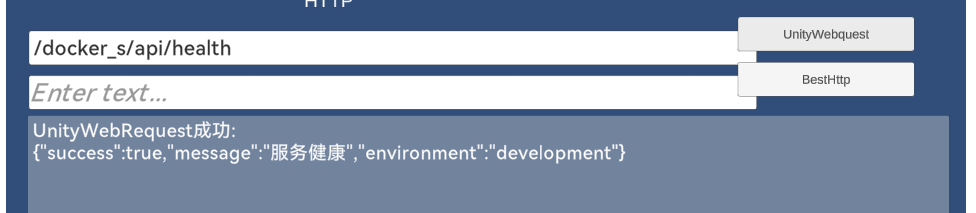
转发docker_s/api/health
使用besthttpV3进行请求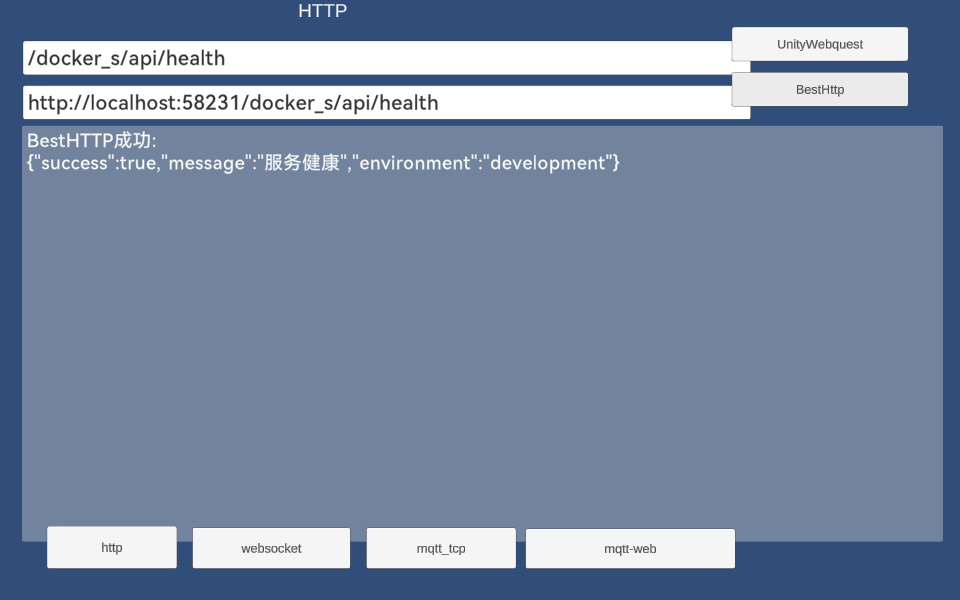
网络命令
网络与容器关系命令
$net='backend-net'; write-host "网络名称: $net"; docker network inspect $net -f '{{range .Containers}}{{.Name}}{{println}}{{end}}' | Where-Object { $_ -ne '' } | ForEach-Object { $cid = docker ps -q --no-trunc --filter name=$_; if ($cid) { write-host "容器名称: $_ 容器ID: $($cid.Substring(0,12))" } }可以查看网络下有那些容器。
输出
PS C:\Users\GoodCooking> $net='backend-net'; write-host "网络名称: $net"; docker network inspect $net -f '{{ra
nge .Containers}}{{.Name}}{{println}}{{end}}' | Where-Object { $_ -ne '' } | ForEach-Object { $cid = docker ps
 -q --no-trunc --filter name=$_; if ($cid) { write-host "容器名称: $_   容器ID: $($cid.Substring(0,12))" } }
网络名称: backend-net
容器名称: node-app   容器ID: 53a5b8a00a08
容器名称: nginx-web   容器ID: e7ad62d8745b
PS C:\Users\GoodCooking>