一、什么是单元测试
对我们前端来说,单元测试是针对 前端最小可测试单元(如独立函数、单个组件、自定义Hooks等)的自动测试;
其核心就是隔离外部的依赖(如接口、父组件、DOM环境),验证这些单元再不同的输入或者场景下的行为或者表现是否完全符合预期,确保每个模块在单独运行时候准确无误。
二、前置工作
在我们react的开发场景下,测试react的组件和hooks我们使用到的包是@testing-library/react,测试用例则通过jest来实现。
2.1、依赖安装
1、Create React App (CRA)项目
通过这个指令创建的项目自带测试环境,内置了Jest和@testing-library/react,就不需要我们去手动配置了,可以直接使用
ts
// 创建项目
npx create-react-app --template=typescript my-project
cd my-project
// 启动测试
npm run test
2、自定义配置项目 (vite/nextnext.js/手动搭建)
需要手动安装依赖
ts
// 核心依赖
npm install --save-dev jest @testing-library/react @testing-library/jest-dom @testing-library/user-event


// 其他辅助性的依赖
npm install --save-dev babel-jest @babel/core @babel/preset-env @nanel/preset-react // Babel转译(js项目)


npm install --save-dev ts-jest @types/jest @types/testing-library/react @types/testting-library/jest-dom //TS项目


npm install --save-dev jsdom  //模拟浏览器环境(Vite 项目需要额外安装)
2.2、核心配置
1、jest.config.js
我们需要在根目录创建jest.config.js文件,核心的配置如下:
ts
module.export = {
testEnvironment: 'jsdom', // 模拟浏览器环境(替代真实dom)
testMatch: [
'**/__tests__/**/*.+(js|jsx|ts|tsx)',
'**/?(*.)+(spec|test).+(js|jsx|ts|tsx)'
],// 测试文件匹配规则
moduleFileExtensions: ['js', 'jsx', 'ts', 'tsx', 'json', 'node'],// 模块文件扩展名,可以解决导入时省略后缀的问题
transform:{
'^.+\.(js|jsx)$': 'babel-jest', // JS/JSX 用 babel-jest 转译
'^.+\.(ts|tsx)$': 'ts-jest', // TS/TSX 用 ts-jest 转译
// 或者
'^.+\.(ts|tsx)$': ['ts-jest', {
tsconfig: 'tsconfig.test.json', // 指定测试环境的ts配置文件
isolatedModules: true, // 开启独立模块转译模式
}],
}, // 转译规则 ts和js需要转译为jest能够识别的代码
transformIgnorePatterns: ['/node_modules/(?!(some-esm-library)/)'], //忽略node_modules转译(除了需要转译的第三方库)
setupFilesAfterEnv: ['<rootDir>/src/setupTests.js'], //测试前执行的文件
moduleNameMapper: {
'^@/(.*)$': '<rootDir>/src/$1',
'\.(css|less|scss)$': 'identity-obj-proxy', // 模拟样式文件导入
} //模块路径别名(与项目 webpack/Vite 配置一致)
}2、Babel配置
一般是.babelrc 或者babel.config.json
js项目需要配置Babel以支持React喝ES6+语法
ts
{
  "presets": [
    ["@babel/preset-env", { "targets": { "node": "current" } }],
    "@babel/preset-react"
  ]
}
3、TS项目配置
我们需要在文件tsconfig.json 中添加Jest类型支持
ts
{
  "compilerOptions": {
    // ...其他配置
    "types": ["jest", "@testing-library/jest-dom", "@testing-library/react"]
  }
}
4、全局匹配器引入
在src/setupTests.js中全局引入@testing-library/jest-dom的匹配器,例如toBeInTheDocument,这样可以避免每个测试文件都重复导入
arduino
// src/setupTests.js
import '@testing-library/jest-dom';
import '@testing-library/user-event'; // 模拟用户交互,例如点击、输入
三、基本使用
3.1、命名规范
一般我们的单元测试文件会与组件文件同,一般命名为:组件名.test.jsx/tsx 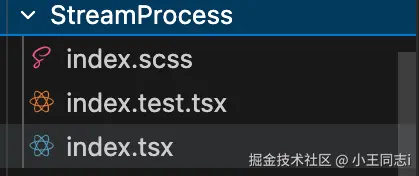
也可以建立一个统一的文件夹: tests
3.2、核心API
下面我会标注API的功能和来源(搞清来自哪里)
3.2.1、组件渲染与DOM操作
与 Jest 配合,测试React组件的渲染和用户交互
1、render()
- 来源:React Testing Library
- 作用:渲染组件到虚拟DOM,返回包含容器(container)和查询方法的对象,是组件测试入口
ts
// 渲染按钮组件并验证内容
import { render, screen } from '@testing-library/react';
import Button from './Button';


test('渲染按钮并显示正确文本', () => {
  // 渲染组件
  render(<Button label="提交" />);
  // 验证文本存在
  expect(screen.getByText('提交')).toBeInTheDocument();
});
2、act(fn)
- 来源:React Testing Library
- 作用:包裹着组件渲染/更新逻辑,模拟React再浏览器中的真实的渲染流程。(处理同步/异步更新,避免测试警告)
ts
// 用act包裹组件更新
import { act, render } from '@testing-library/react';
import Counter from './Counter';


test('更新计数器状态', () => {
  const { getByText } = render(<Counter />);

  act(() => {
    // 模拟点击更新状态(触发组件重新渲染)
    getByText('+').click();
  });

  expect(getByText('1')).toBeInTheDocument();
});
3.2.2、事件触发
模拟用户的交互行为(点击、输入等),测试组件响应逻辑
1、fireEvent.事件名(元素, 事件参数)
- 来源:React Testing library
- 作用:触发指定元素的DOM事件(如点击、输入、选择),模拟用户操作
ts
// 模拟点击按钮和输入框输入
import { render, screen, fireEvent } from '@testing-library/react';
import InputForm from './InputForm';


test('输入文本并提交', () => {
  render(<InputForm />);
  const input = screen.getByRole('textbox');
  const submitBtn = screen.getByRole('button', { name: /提交/i });

  // 模拟输入文本
  fireEvent.change(input, { target: { value: '测试内容' } });
  // 模拟点击提交
  fireEvent.click(submitBtn);

  // 验证提交后显示输入内容
  expect(screen.getByText('你输入的是:测试内容')).toBeInTheDocument();
});
2、createEvent.事件名(元素,事件参数)
- 来源:React Testing Library
- 作用:创建事件对象(通常会配合着fireEvent使用,现在推进直接使用fireEvent简化写法)
ts
// 创建点击事件并触发
import { render, screen, fireEvent, createEvent } from '@testing-library/react';
import Button from './Button';


test('创建并触发点击事件', () => {
  render(<Button label="点击我" />);
  const button = screen.getByRole('button');

  // 创建点击事件
  const clickEvent = createEvent.click(button);
  // 触发事件
  fireEvent(button, clickEvent);

  expect(screen.getByText('已点击')).toBeInTheDocument();
});
3.2.3、元素查询(screen对象方法)
从渲染后的DOM中查询元素,基于用户可见的内容(文本、角色等)。
1、同步查询(一般用于立即渲染的元素)
- screen.getByRole(role, options):按可访问性角色,如button,list查询
- screen.getByText(text, options):按文本内容查询
- screen.getByTestId(testId):按data-testid属性查询(需要给组件添加data-testid)
ts
// 同步查询元素
import { render, screen } from '@testing-library/react';
import UserCard from './UserCard';


test('查询用户卡片元素', () => {
  render(<UserCard name="张三" id="user-123" />);

  // 按角色查询(卡片通常是div,role需手动指定)
  const card = screen.getByRole('article'); // 假设组件有role="article"

  // 按文本查询
  const userName = screen.getByText('张三');

  // 按testid查询(组件:<div data-testid="user-card" />)
  const cardByTestId = screen.getByTestId('user-card');

  expect(card).toBeInTheDocument();
  expect(userName).toBeInTheDocument();
  expect(cardByTestId).toBeInTheDocument();
});
2、异步查询(顾名思义。查询异步渲染的元素,如请求接口后显示)
- screen.findByRole(role, options):异步按角色查询,返回promise
- screen,findByText(text, options):异步按照文本查询,返回promise
ts
// 异步查询加载后的元素
import { render, screen } from '@testing-library/react';
import UserList from './UserList';


// 测试需用async/await
test('异步加载用户列表', async () => {
  render(<UserList />);

  // 等待列表加载完成(假设接口返回后显示"用户列表"标题)
  const listTitle = await screen.findByText('用户列表');
  // 等待列表项渲染(假设角色为listitem)
  const listItems = await screen.findByRole('listitem');

  expect(listTitle).toBeInTheDocument();
  expect(listItems).toBeInTheDocument();
});
3.2.4、异步处理
处理组件中的异步操作(如状态更新、接口请求),确保断言再条件满足后执行
1、waitFor(fn, { timeout })
- 来源:React Testing Library
- 作用:反复执行回调函数,直到不抛出错误,默认超时1000ms,可以自定义,用于等待异步完成
ts
// 等待异步操作完成后断言
import { render, screen, waitFor } from '@testing-library/react';
import AsyncData from './AsyncData';


test('等待异步数据加载', async () => {
  render(<AsyncData />);

  // 等待数据加载完成(最多等3秒)
  await waitFor(() => {
    expect(screen.getByText('加载完成')).toBeInTheDocument();
    expect(screen.getByRole('table')).toBeInTheDocument();
  }, { timeout: 3000 });
});
3.2.5、Hook测试
测试自定义Hook的逻辑(状态、副作用等)
1、renderHook(() => useCustomHook(...args))
- 来源:React Testing Library
- 作用:执行自定义Hook,返回包含Hook返回值的对象(result.current),用于验证Hook行为。
ts
// 测试自定义计数器Hook
import { renderHook, act } from '@testing-library/react';
// 返回:{ count,increment,decrement }
import useCounter from './useCounter';


test('计数器Hook逻辑', () => {
  // 执行Hook,初始值为0
  const { result } = renderHook(() => useCounter(0));

  // 初始状态验证
  expect(result.current.count).toBe(0);

  // 触发Hook更新(调用increment方法)
  act(() => {
    result.current.increment();
  });

  // 更新后状态验证
  expect(result.current.count).toBe(1);
});
3.2.6、测试用例基础
用于定义测试用例和测试套件,是所有测试的基础。
1、describe(name, fn)
- 来源:Jest
- 作用:定义测试套件(一组相关的测试用例),用于组织测试结构、
ts
// 定义"按钮组件"测试套件
describe('Button组件', () => {
  // 测试用例写在这里
});
2、test(name, fn, timeout) / it(name, fn, timeout)
- 来源:Jest
- 作用:定义单个测试用例(test和it完全等价,可以互换使用)timeout为超时时间,一般默认5000ms
ts
// 定义"按钮渲染"测试用例
test('按钮应显示正确文本', () => {
  // 测试逻辑
});


// 等价于
it('按钮应显示正确文本', () => {
  // 测试逻辑
});
3.2.7、断言匹配器(Jest + 扩展)
用于验证测试结果是否符合预期,分为Jest原生匹配器和扩展匹配器:
1、Jest原生核心匹配器
- expect(value).toBe(expected):严格相等(===),适用于基本类型和引用类型
- expect(value).toEqual(expected):深度相等,适用于对象、数组
- expect(value).toBeTruthy() / toBeFalsy():验证值是否为真 / 假 (类似if判断)
- expect(value).toBeNull() / tobeUndefined():验证值是否为 null / undefined
- expect(array).toContain(item):验证数组是否包含指定元素
- expect(fn).toThrow(error):验证函数是否抛出指定错误
ts
// Jest原生断言
test('基本断言示例', () => {
  // 基本类型相等
  expect(1 + 1).toBe(2);

  // 对象深度相等
  expect({ name: 'test' }).toEqual({ name: 'test' });

  // 布尔判断
  expect(0).toBeFalsy();
  expect(1).toBeTruthy();

  // 数组包含
  expect([1, 2, 3]).toContain(2);

  // 函数抛错
  const throwFn = () => { throw new Error('出错了'); };
  expect(throwFn).toThrow('出错了');
});
2、扩展匹配器(@testing-library / jest-dom)
- expect(element):toBeInTheDocument():元素是否在DOM中
- expect(element):toHaveTextContent(text):元素是否包含指定文本
- expect(element):toBeDisabled():元素是否禁用
- expect(element):toHaveValue(value):输入框是否有指定值
ts
// 扩展断言(需导入@testing-library/jest-dom)
import '@testing-library/jest-dom';


test('DOM元素断言', () => {
  const input = document.createElement('input');
  input.value = 'test';
  input.disabled = true;

  expect(input).toHaveValue('test');
  expect(input).toBeDisabled();
});
3.2.8、模拟(Mock)功能 (Jest)核心
用于模拟函数,模块或者API,隔离测试目标(不依赖真实的实现)
1、jest.fn(implementation)
- 来源:Jest
- 作用:创建模拟函数,可以自定义实现逻辑,用于验证调用次数、参数等。
ts
// 模拟函数及验证
test('模拟函数调用', () => {
  // 创建模拟函数
  const mockFn = jest.fn((a, b) => a + b);

  // 调用函数
  mockFn(1, 2);
  mockFn(3, 4);

  // 验证调用次数
  expect(mockFn).toHaveBeenCalledTimes(2);

  // 验证第一次调用的参数
  expect(mockFn).toHaveBeenCalledWith(1, 2);

  // 验证返回值
  expect(mockFn.mock.results[0].value).toBe(3); // 1+2=3
});
2、jest.mock(modulePath, factory)
- 来源:Jest
- 作用:模拟整个模块(如工具函数、API请求哭),替换真实模块为模拟实现
ts
// 模拟API请求模块
// 假设api.js有getUser方法:export const getUser = () => fetch(...);


// 测试文件中模拟api.js
jest.mock('./api', () => ({
  getUser: jest.fn(() => Promise.resolve({ id: 1, name: '模拟用户' }))
}));


import { getUser } from './api';


test('模拟API请求', async () => {
  const user = await getUser();
  expect(getUser).toHaveBeenCalledTimes(1);
  expect(user).toEqual({ id: 1, name: '模拟用户' });
});
3.2.9、异步测试处理(Jest核心)
Jest提供了多种方式处理异步代码(Promise、async/await、回调)
1、Promise处理
- 返回Promise,Jest会等待其resolve或者reject
ts
test('测试Promise', () => {
  return new Promise((resolve) => {
    setTimeout(() => {
      expect(1 + 1).toBe(2);
      resolve();
    }, 100);
  });
});
2、async/await
- 用async声明测试函数,await等待异步操作
ts
test('测试async/await', async () => {
  const fetchData = async () => 'data';
  const result = await fetchData();
  expect(result).toBe('data');
});
3、回调函数(done参数)
- 传入done参数,Jest会等待 done() 调用才结束测试
ts
test('测试回调函数', (done) => {
  setTimeout(() => {
    expect(1 + 1).toBe(2);
    done(); // 必须调用,否则超时
  }, 100);
});
3.2.10、生命周期钩子(Jest核心)
用于在测试前/后执行setup(准备)或teardown(清理)操作
| API | 作用 |
|---|---|
| beforeEach(fn, timeout) | 每个测试用例执行前运行(如初始化数据、渲染组件) |
| afterEach(fn, timeout) | 每个测试用例执行后运行(如清理DOM、重置模拟函数) |
| beforeAll(fn, timeout) | 整个测试套件执行前运行一次(如连接数据库) |
| afterAll(fn, timeout) | 整个测试套件执行后运行一次(如断开数据库连接) |
ts
// 生命周期钩子
describe('计数器测试', () => {
  let counter;

  // 整个套件前初始化
  beforeAll(() => {
    console.log('测试套件开始');
  });

  // 每个用例前重置计数器
  beforeEach(() => {
    counter = 0;
  });

  test('计数器+1', () => {
    counter += 1;
    expect(counter).toBe(1);
  });

  test('计数器+2', () => {
    counter += 2;
    expect(counter).toBe(2);
  });

  // 每个用例后打印结果
  afterEach(() => {
    console.log(`当前计数器: ${counter}`);
  });

  // 整个套件后清理
  afterAll(() => {
    console.log('测试套件结束');
  });
});
3.2.11、快照测试(也是Jest核心)
用于捕获组件的渲染结果或者数据结构,确保不会意外变更
1、expect(value).toMatchSnapshot(snapshotName)
ts
import { render } from '@testing-library/react';
import UserCard from './UserCard';


test('用户卡片快照', () => {
  const { asFragment } = render(<UserCard name="张三" age={20} />);
  // 生成快照(首次运行创建,后续运行对比)
  expect(asFragment()).toMatchSnapshot();
});
一个简单的demo
例如我们有一个process组件
ts
import React from 'react'
import './index.scss'
import { StreamProcessProps } from '@/types/SuperAI/StreamProcess'

const StreamProcess = (props: StreamProcessProps) => {
  const { text, isShow = true, classNames = '', customStyle } = props || {}
  return (
    isShow ? <div className={`animText ${classNames} `} style={customStyle}>{text}</div> : null
  )
}

export default React.memo(StreamProcess)

// SteamProcessProps
interface StreamProcessProps {
  text: string;
  isShow?: boolean;
  classNames?: string;
  customStyle?: React.CSSProperties;
}
这个组件的单元测试我们也有一个demo
ts
import React from 'react';
import { render, screen } from '@testing-library/react';
import StreamProcess from './index';
import { StreamProcessProps } from '@/types/SuperAI/StreamProcess';
// 基础测试数据
const baseProps: StreamProcessProps = {
text: '测试文本',
};
describe('StreamProcess 组件', () => {
// 1. 条件渲染逻辑
describe('条件渲染', () => {
it('当 isShow 为 true 时,应渲染包含 text 的 div', () => {
render(<StreamProcess {...baseProps} isShow={true} />);
// 验证元素存在且内容正确
const element = screen.getByText('测试文本');
expect(element).toBeInTheDocument();
expect(element.tagName).toBe('DIV');
});
it('当 isShow 为 false 时,不应渲染任何内容', () => {
const { container } = render(<StreamProcess {...baseProps} isShow={false} />);
// 验证容器内无内容
expect(container.firstChild).toBeNull();
});
it('当未传入 isShow 时,默认渲染(isShow 默认为 true)', () => {
render(<StreamProcess {...baseProps} />); // 不传入 isShow
expect(screen.getByText('测试文本')).toBeInTheDocument();
});
});
// 2. 类名合并逻辑
describe('类名合并', () => {
it('应包含默认类名 animText', () => {
render(<StreamProcess {...baseProps} />);
const element = screen.getByText('测试文本');
expect(element).toHaveClass('animText');
});
it('应合并默认类名与自定义 classNames', () => {
render(<StreamProcess {...baseProps} classNames="custom-class another-class" />);
const element = screen.getByText('测试文本');
// 验证同时包含默认类和自定义类(忽略拼接时的空格细节)
expect(element).toHaveClass('animText');
expect(element).toHaveClass('custom-class');
expect(element).toHaveClass('another-class');
});
it('当 classNames 为空时,仅保留默认类名', () => {
render(<StreamProcess {...baseProps} classNames="" />);
const element = screen.getByText('测试文本');
expect(element).toHaveClass('animText');
// 排除其他多余类名(允许末尾空格导致的空字符串,但 classList 会忽略)
expect(element.classList).toHaveLength(1);
});
});
// 3. 自定义样式应用
describe('自定义样式', () => {
it('应正确应用 customStyle 中的样式', () => {
const customStyle: React.CSSProperties = {
color: 'red',
fontSize: '16px',
backgroundColor: '#fff',
};
render(<StreamProcess {...baseProps} customStyle={customStyle} />);
const element = screen.getByText('测试文本');
// 验证每个样式是否生效
expect(element).toHaveStyle({
color: 'red',
fontSize: '16px',
backgroundColor: '#fff',
});
});
it('当未传入 customStyle 时,无额外样式', () => {
const { container } = render(<StreamProcess {...baseProps} />);
const element = container.firstChild as HTMLElement;
// 验证无自定义样式
expect(element.style.cssText).toBe('');
expect(element.hasAttribute('style')).toBe(false);
});
});
// 4. 文本内容展示
describe('文本内容渲染', () => {
it('应正确渲染普通文本', () => {
render(<StreamProcess {...baseProps} text="普通文本内容" />);
expect(screen.getByText('普通文本内容')).toBeInTheDocument();
});
it('应正确渲染空文本(仍显示 div)', () => {
const { container } = render(<StreamProcess {...baseProps} text="" />);
const element = container.firstChild as HTMLElement;
// 元素存在,但内容为空
expect(element).toBeInTheDocument();
expect(element).toBeEmptyDOMElement();
expect(element).toHaveClass('animText');
});
it('应正确渲染包含特殊字符的文本(不解析 HTML)', () => {
const specialText = '<script>alert("xss")</script> World ';
const { container } = render(<StreamProcess {...baseProps} text={specialText} />);
// 验证特殊字符作为文本渲染,而非 HTML 解析
expect(screen.getByText(specialText)).toBeInTheDocument();
// 验证未生成 script 标签(防 XSS 检查)
expect(container.querySelector('script')).not.toBeInTheDocument();
});
it('应正确渲染 Unicode 字符和多行文本', () => {
const unicodeText = '你好,世界!Привет мир\n第二行文本';
const { container } = render(<StreamProcess {...baseProps} text={unicodeText} />);
// 检查元素是否存在且包含预期内容
const element = container.firstChild as HTMLElement;
expect(element).toBeInTheDocument();
expect(element.textContent).toBe(unicodeText);
});
});
// 5. 边界情况
describe('边界情况', () => {
it('当 props 为 undefined 时,应该容错', () => {
// 根据类型定义,props 不应为 undefined,我们看看容错
const { container } = render(<StreamProcess {...(undefined as any)} />);
// 此时 text 为 undefined,isShow 默认为 true,会渲染 div 但内容为 'undefined'
expect(container.firstChild).toBeInTheDocument();
expect(container.firstChild?.textContent).toBe('');
});
it('当 props 为 null 时 ', () => {
const { container } = render(<StreamProcess {...(null as any)} />);
expect(container.firstChild).toBeInTheDocument();
expect(container.firstChild?.textContent).toBe('');
});
it('当 props 为空对象时', () => {
const { container } = render(<StreamProcess {...({} as any)} />);
expect(container.firstChild).toBeInTheDocument();
expect(container.firstChild?.textContent).toBe('');
});
it('当 text 为 undefined 时', () => {
const { container } = render(<StreamProcess {...(undefined as any)} />);
expect(container.firstChild).toBeInTheDocument();
expect(container.firstChild?.textContent).toBe('');
});
});
});四、最后
编写一个高质量的单元测试必定会花费大量时间,但是其能够从底层保证我们的代码质量、降低研发全流程成本,提前暴露问题,降低修复成本,同时防止回归缺陷,并且能够倒逼我们优化代码设计,看似增加了开发工作量,却在后续的迭代、维护、协作中持续降低成本。
特别是对于组件库,工具函数,hooks这类长期稳定的功能,一个高质量的单元测试非常有必要。
更何况是现在AI工具如此发达的背景下,单元测试的时间成本也能大幅度降低。
如果有不对的地方欢迎大佬指出!!