Java Buildpack Reference
Java 构建包参考
This reference documentation offers an in-depth description of the behavior and configuration options of the Paketo Java Buildpack(opens in a new tab). For explanations of how to use the buildpack for several common use-cases, see the Paketo Java Buildpack How To documentation.
本参考文档提供了对这种行为的详细描述。 以及配置选项 Paketo Java 构建包。有关如何在几种常见用例中使用此构建包的说明,请参阅 Paketo Java 构建包使用方法文档 。
The Paketo Java Buildpack(opens in a new tab) allows users to create an image containing a JVM application from a precompiled artifact or directly from source.
Paketo Java Buildpack 允许用户从预编译产物或直接从源代码创建包含 JVM 应用程序的映像。
The Java Buildpack is a composite buildpack and each step in a build is handled by one of its components. For a full set of configuration options and capabilities see the homepages for the component buildpacks.
Java 构建包是一个复合构建包 ,构建过程中的每个步骤都由其组件之一处理。有关完整的配置选项和功能,请参阅各个组件构建包的主页。
About the JVM
关于 JVM
The Java Buildpack uses the BellSoft Liberica(opens in a new tab) implementations of the JRE and JDK. JVM installation is handled by the BellSoft Liberica Buildpack(opens in a new tab). The JDK will be installed in the build container but only the JRE will be contributed to the application image.
Java 构建包使用 BellSoft Liberica 实现的 JRE 和 JDK。JVM 的安装由 BellSoft Liberica 构建包负责。JDK 将安装在构建容器中,但只有 JRE 会被添加到应用程序镜像中。
See the homepage(opens in a new tab) for the BellSoft Liberica Buildpack for a full set of configuration options.
有关完整的配置选项,请参阅 BellSoft Liberica Buildpack 的主页。
Memory Calculator 记忆计算器
The Java Memory Calculator is a tool used by the Paketo Java Buildpack to provide an optimized memory configuration for Java applications running in containers with enforced memory limits.
Java 内存计算器是 Paketo Java 构建包使用的工具,用于为在具有强制内存限制的容器中运行的 Java 应用程序提供优化的内存配置。
This section describes the algorithm that is responsible for providing this memory configuration, including the inputs used and their default values.
本节介绍负责提供此内存配置的算法,包括所使用的输入及其默认值。
Heap 堆
The Heap memory value, ultimately supplied as the -Xmx JVM flag, is calculated using the following formula:
堆内存值最终以 -Xmx JVM 标志的形式提供,其计算公式如下:
Heap = Total Container Memory - Non-Heap - Headroom
The Total Container Memory value is the total memory available to the application, typically the value of the memory limit set for the container.
容器总内存值是应用程序可用的总内存,通常是为容器设置的内存限制值。
The Non-Heap value is calculated by the algorithm using the following formula.
非堆值由算法使用以下公式计算得出。
Non-Heap = Direct Memory + Metaspace + Reserved Code Cache + (Thread Stack * Thread Count)
Headroom is a percentage of the container's total memory that can be excluded from the memory calculator's algorithm and left for non-JVM operations. This defaults to 0.
内存余量是指容器总内存中可以从内存计算算法中排除并留给非 JVM 操作的百分比。默认值为 0。
Non-Heap 非堆
The below table lists the component parts of the Non-Heap value, the equivalent JVM flags, and their defaults. Where one exists, the JVM default value is used.
下表列出了非堆值的各个组成部分、对应的 JVM 标志及其默认值。如果存在默认值,则使用 JVM 默认值。
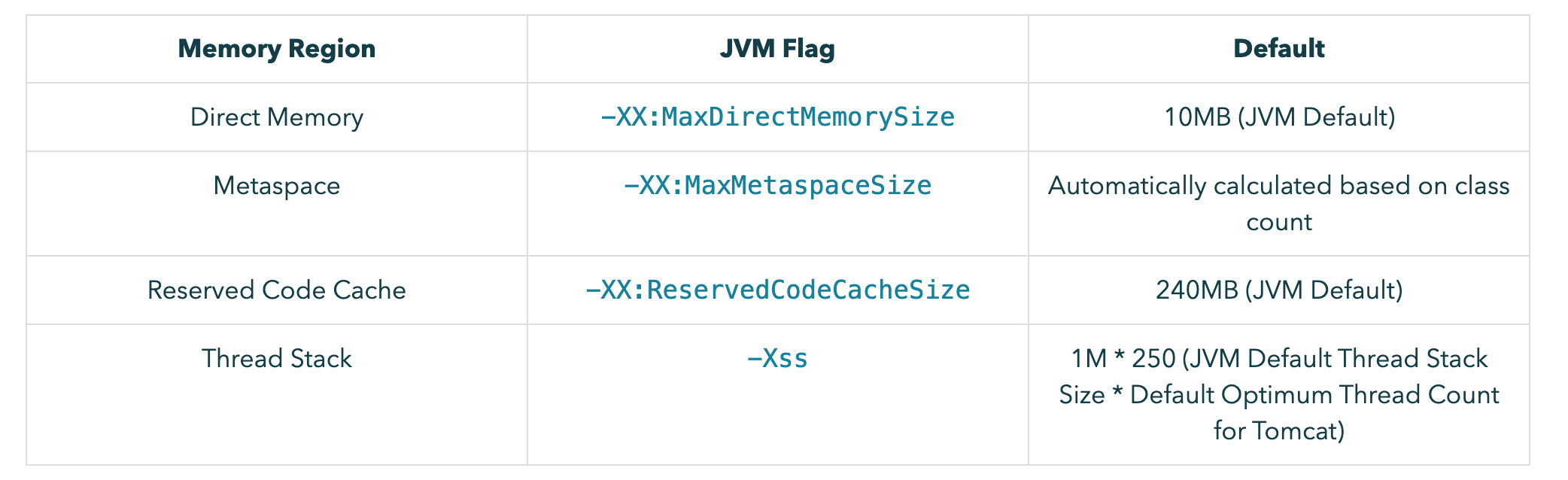
The outputs of the tool are the above JVM flags and their calculated values.
该工具的输出结果为上述 JVM 标志及其计算值。
The remaining memory left after totalling these values is assigned to the -Xmx flag as Heap. All flags and values are then appended to JAVA_TOOL_OPTIONS when the application image is run.
将这些值相加后剩余的内存分配给 -Xmx 标志,作为堆内存。所有标志和值在应用程序映像运行时都会附加到 JAVA_TOOL_OPTIONS 中。
Notes 笔记
It is not recommended to set the Heap memory value directly using the -Xmx flag
不建议直接使用 -Xmx 标志设置堆内存值。
The non-heap value calculated by the tool remains fixed for a constant application. Therefore, setting -Xmx directly could either:
该工具计算出的非堆值在应用程序持续运行时保持不变 。因此,直接设置 -Xmx 参数可能会导致以下两种情况:
Cause the total memory (Heap + Non-Heap) to exceed the container limit if set too high, or
如果设置过高,会导致总内存(堆内存+非堆内存)超过容器限制;
Force a lower limit on Heap size than would be necessary after calculation, wasting memory.
强制设置比计算后实际需要的更小的堆大小限制,造成内存浪费。
Adjusting container memory limits
调整容器内存限制
Decreasing the container memory limit will result in a reduced heap (-Xmx) size.
降低容器内存限制将导致堆( -Xmx )大小减小。
Similarly, increasing container memory limit beyond a known application's non-heap (fixed) size will assign all of the increased value to Heap (-Xmx).
类似地,将容器内存限制增加到超过已知应用程序的非堆(固定)大小,会将所有增加的值分配给堆( -Xmx )。
Overriding Defaults 覆盖默认值
It is possible to override the calculated or default values specified above in the non-heap table, however the runtime consequences of adjusting these values should be considered. For more information on how to configure these explicitly, see the How-To section Configure The JVM at Runtime.
虽然可以覆盖上述非堆表中指定的计算值或默认值,但应考虑调整这些值对运行时的影响。有关如何显式配置这些值的更多信息,请参阅"操作指南"部分的"运行时配置 JVM" 。
Java Application Servers
Java 应用服务器
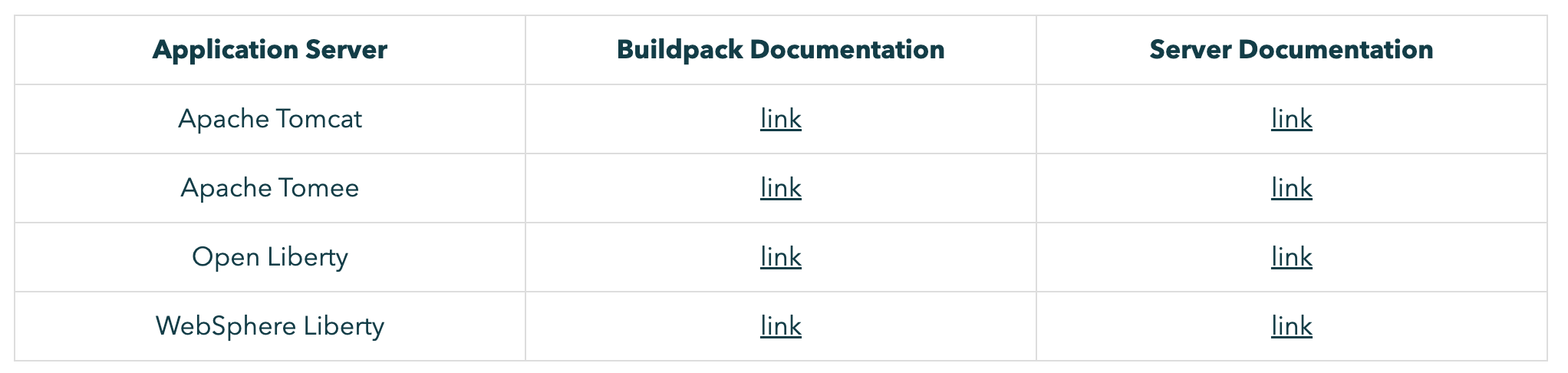
The Paketo Java buildpack supports multiple application servers. Each application server has different capabilities and configuration options. The following are a list of supported application servers and links to reference documentation for each one.
Paketo Java 构建包支持多种应用服务器。每种应用服务器的功能和配置选项各不相同。以下列出了支持的应用服务器以及指向每种应用服务器的参考文档链接。
Spring Boot Applications
Spring Boot 应用程序
If the application uses Spring Boot the Spring Boot Buildpack(opens in a new tab) will enhance the resulting image by adding additional metadata to the image config, applying Boot-specific performance optimizations, and enabling runtime auto-configuration.
如果应用程序使用 Spring Boot,则 Spring Boot 构建包将通过向镜像配置添加额外的元数据、应用特定于 Boot 的性能优化以及启用运行时 auto-configuration. 来增强生成的镜像。
Additional Metadata 附加元数据
The Spring Boot Buildpack adds the following additional image labels:
Spring Boot 构建包会添加以下额外的镜像标签:
org.opencontainers.image.title - set to the value of Implementation-Title from MANIFEST.MF.
org.opencontainers.image.title - 设置为 MANIFEST.MF 中的 Implementation-Title 的值。
org.opencontainers.image.version - set to the values of Implementation-Version from MANIFEST.MF.
org.opencontainers.image.version - 设置为 MANIFEST.MF 中的 Implementation-Version 值。
org.springframework.boot.version - set to the value of Spring-Boot-Version from MANIFEST.MF.
org.springframework.boot.version - 设置为 MANIFEST.MF 中的 Spring-Boot-Version 值。
org.springframework.cloud.dataflow.spring-configuration-metadata.json - containing configuration metadataspring boot configuration metadata.
org.springframework.cloud.dataflow.spring-configuration-metadata.json - 包含配置元数据spring boot 配置元数据。
org.springframework.cloud.dataflow.spring-configuration-metadata.json - containing dataflow-configuration-metadata.properties, if present.
org.springframework.cloud.dataflow.spring-configuration-metadata.json - 包含 dataflow-configuration-metadata.properties (如果存在)。
In addition, the buildpack will add an entry with name dependencies to the Bill-of-Materials listing the application dependencies.
此外,构建包会在物料清单中添加一个名为 dependencies 的条目,列出应用程序依赖项。
Optimizations 优化
The Spring Boot Buildpack can apply domain-specific knowledge to optimize the performance of Spring Boot applications. For example, if the buildpack detects that the application is a reactive web application the thread count will be reduced to 50 from a default of 250.
Spring Boot 构建包可以利用领域特定知识来优化 Spring Boot 应用程序的性能。例如,如果构建包检测到应用程序是响应式 Web 应用程序,则会将线程数从默认的 250 减少到 50 。
Components 成分
The following component buildpacks compose the Java Buildpack. Buildpacks are listed in the order they are executed.
以下组件构建包构成 Java 构建包。构建包按执行顺序排列。