目录
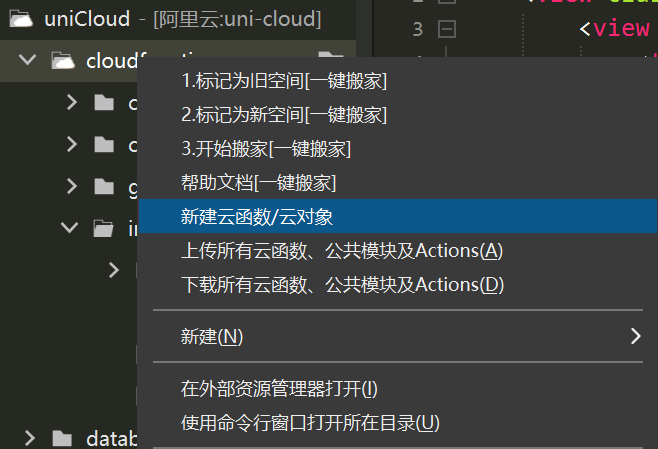
1.创建云对象
const FormData = require('form-data');

// 获取 access_token 的函数
async function getAccessToken(appid, secret) {
    const res = await uniCloud.httpclient.request(
        `https://api.weixin.qq.com/cgi-bin/token?grant_type=client_credential&appid=${appid}&secret=${secret}`,
        {
            method: 'GET',
            dataType: 'json'
        }
    );
    if (res.status === 200 && res.data.access_token) {
        return res.data.access_token;
    } else {
        console.log('获取 access_token 失败:', res.data.errmsg);
        return null;
    }
}

// 检测是否有敏感词
exports.checkText = async function(access_token, content) {
    const res = await uniCloud.httpclient.request(
        `https://api.weixin.qq.com/wxa/msg_sec_check?access_token=${access_token}`,
        {
            method: 'POST',
            data: {
                content: content
            },
            contentType: 'json',
            dataType: 'json'
        }
    );
    if (res.status === 200 && res.data.errcode === 0) {
        return {
            code: 0,
            msg: '没有敏感词'
        };
    } else if (res.data.errcode === 40001) {
        // access_token 无效,重新获取
        const newAccessToken = await getAccessToken('你的appid', '你的secret');
        if (newAccessToken) {
            return await this.checkText(newAccessToken, content);
        }
    }
    console.log('接口返回错误信息:', res.data.errmsg);
    return {
        code: -1,
        msg: '含有敏感词'
    };
};


exports.main = async function(params) {
    let newParams = params.params ? params.params[0] : params;
    if (newParams && newParams.action === 'getAccessToken') {
        return await getAccessToken(newParams.appid, newParams.secret);
    } else(newParams && newParams.action === 'checkText') {
        return await this.checkText(newParams.access_token, newParams.content);
    }
    console.log('未匹配到正确的 action');
    return {
        code: -1,
        msg: '未指定正确的操作'
    };
};
2.编辑文本
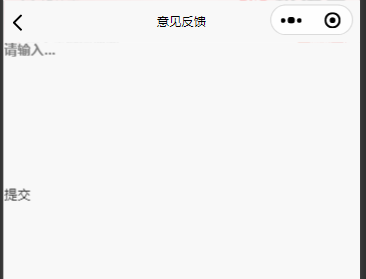
基础代码
<template>
	<view>
		<textarea placeholder="请输入..." maxlength="140" v-model="content"></textarea>

		<view class="footers" @click="submitBtn()">
			<view>提交</view>
		</view>
	</view>
</template>

<script>
	export default {
		data() {
			return {
				content: '',
				accessToken: ''
			}
		},
		onLoad() {

		},
		methods: {

			submitBtn() {
				if (this.content == '') {
					uni.showToast({
						title: '请输入反馈内容',
						icon: 'none',
						duration: 1000
					});
					return
				}

			}
		}
	}
</script>
3.编写vue调用云函数检验
<template>
    <view class="wraps">
        <view class="boxs">
            <textarea placeholder="请输入..." maxlength="140" v-model="content"></textarea>
        </view>

        <view class="footers" @click="submitBtn()">
            <view>提交反馈</view>
        </view>
    </view>
</template>

<script>
export default {
    data() {
        return {
            content: '',
            appid: '你的appid',
            secret: '你的secret'
        };
    },
    onLoad() {},
    methods: {
        async submitBtn() {
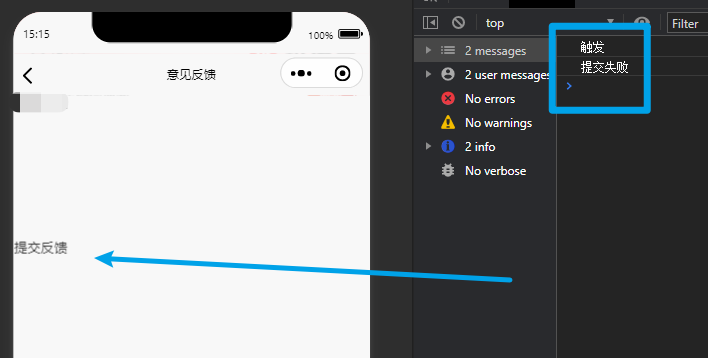
			console.log('触发')
            if (this.content === '') {
                uni.showToast({
                    title: '请输入反馈内容',
                    icon: 'none',
                    duration: 1000
                });
                return;
            }
            const cloudObj = uniCloud.importObject('你的云对象名称');
            const res = await cloudObj.main({
                action: 'checkText',
                appid: this.appid,
                secret: this.secret,
                content: this.content
            });
            if (res.code === 0) {
               console.log('提交成功')
            } else {
               console.log('提交失败')
            }
        }
    }
};
</script>
4.演示结果