先上图打包 100m大小和时间37秒


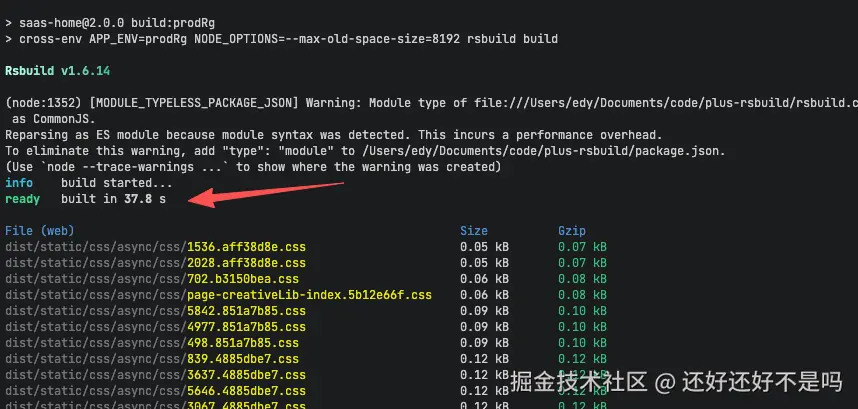
升级后打包37秒
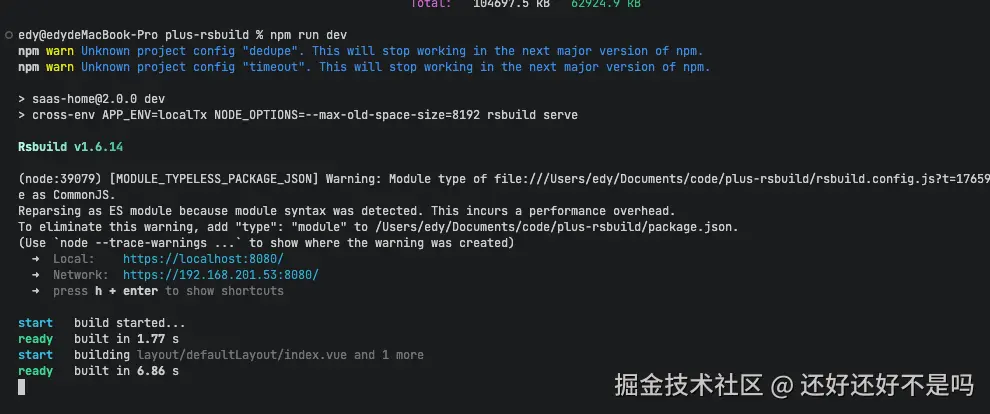
启动项目2秒左右 打开第一次页面7秒左右后续正常访问 总的9秒左右 和vite差不多项目很大
先上vue-cli 升级示例项目 github.com/1438343098/...
贴配置
javascript
import { defineConfig } from '@rsbuild/core'
import { pluginVue2 } from '@rsbuild/plugin-vue2'
import { pluginBabel } from '@rsbuild/plugin-babel'
import { pluginVue2Jsx } from '@rsbuild/plugin-vue2-jsx'
import { pluginNodePolyfill } from '@rsbuild/plugin-node-polyfill'
import { pluginBasicSsl } from '@rsbuild/plugin-basic-ssl'
import path from 'path'
const resolve = dir => path.resolve(__dirname, dir)

export default defineConfig({
  plugins: [
    pluginNodePolyfill(),
    pluginBabel({
      // 处理子包
      include: [/src/, /@kuaizi\/saas-components/],
      babelLoaderOptions: {
        presets: [['@babel/preset-env', { targets: 'defaults' }]]
      }
    }),
    pluginVue2(),
    // jsx
    pluginVue2Jsx(),
    // ssl
    pluginBasicSsl()
  ],
  source: {
    entry: {
      index: './src/main.js'
    },
    // 对齐process.env
    define: {
      ...(function () {
        return Object.fromEntries(
          Object.entries(process.env).map(([key, value]) => [
            `process.env.${key}`,
            JSON.stringify(value)
          ])
        )
      })()
    }
  },
  // @符号
  resolve: {
    alias: {
      '@': path.resolve(__dirname, 'src'),
      // 兼容vue cdn注入和
      vue$: require.resolve('vue/dist/vue.runtime.esm.js')
      // vuex$: require.resolve('vuex')
    }
  },
  html: {
    template: './public/index.html',
    // 注入环境变量
    templateParameters: (compilation, assets, assetTags) => {
      return {
        // 兼容 Vue CLI 的 htmlWebpackPlugin 语法 之前webpack 的html直接写这里就不需要修改html了
        htmlWebpackPlugin: {
          options: {
            title: 'test',
            assetPrefix: assets.publicPath
          }
        },
        autoprefixer: {
          browsers: ['> 1%', 'last 2 versions', 'not dead']
        }
      }
    }
  },
  output: {
    cssModules: {
      auto: /\.module\.(css|less|scss|sass)$/,
      localIdentName: '[local]--[hash:base64:5]'
    }
  },
  // Vue 2 项目需要关闭 experiments.css
  experiments: {
    css: false
  },
  // 关闭性能提示 一些日志可以点开查看
  performance: {
    hints: false
  },
  server: {
    // https: true 如果需要https
  },
  tools: {
    rspack(config, { addRules }) {
      // externals 兼容cdn注入
      // config.externals = {
      //   vue: 'Vue',
      //   vuex: 'Vuex',
      //   'vue-router': 'VueRouter',
      //   'vue-i18n': 'VueI18n',
      //   'element-ui': 'ELEMENT',
      //   axios: 'axios'
      // }

      config.module.rules = (config.module.rules || []).filter(rule => {
        return !(rule.test && rule.test.toString().includes('less'))
      })

      // 全局css变量注入
      const lessVars = {
        colorPrimary: '#0066ff',
        colorPrimaryLight8: '#d4e7ff',
        colorSuccess: '#3ec07d',
        colorWarning: '#f97c56',
        colorDanger: '#f56c6c',
        colorBg: 'white',
        colorBorder: '#999',
        colorText: '#777b7e',
        colorTitle: '#1d2328',
        colorDark: 'rgba(0, 0, 0, 0.75)',
        headerHeight: '64px',
        minWidth: '1200px',
        sideBarWidth: '210px',
        font: '14px',
        fontSmall: '12px',
        bg: 'white'
      }
      // svg + rules 和less处理
      addRules([
        {
          test: /\.less$/,
          oneOf: [
            {
              // 处理 <style module lang="less">
              resourceQuery: /module/,
              use: [
                'vue-style-loader',
                {
                  loader: 'css-loader',
                  options: {
                    modules: {
                      localIdentName: '[local]--[hash:base64:5]'
                    }
                  }
                },
                'postcss-loader',
                {
                  loader: 'less-loader',
                  options: {
                    lessOptions: {
                      javascriptEnabled: true,
                      globalVars: lessVars
                    }
                    // additionalData: sharedLessImports
                  }
                }
              ]
            },
            {
              // 普通 less
              use: [
                'vue-style-loader',
                'css-loader',
                // 需要有postcss.config.js
                'postcss-loader',
                {
                  loader: 'less-loader',
                  options: {
                    lessOptions: {
                      javascriptEnabled: true,
                      globalVars: lessVars
                    }
                    // 注入所有style 顶部的 css代码例如 @import "${resolve('src/style/theme.less')}";
                    // additionalData: sharedLessImports
                  }
                }
              ]
            }
          ]
        },
        {
          test: /\.svg$/,
          include: [resolve('src/asset/icons/svg')],
          use: [
            {
              loader: require.resolve('svg-sprite-loader'),
              options: {
                symbolId: 'icon-[name]'
              }
            }
          ]
        }
      ])
    }
  }
})
升级遇到的坑详解
- module不通过问题
javascript
    去除官方的import { pluginLess } from '@rsbuild/plugin-less'
     //pluginLess()
    改成'vue-style-loader','vue-style-loader', 'css-loader', 'postcss-loader',
    这几个都集合
    这个也需要 关闭
     // Vue 2 项目需要关闭 experiments.css
  experiments: {
    css: false
},- jsx 编译问题 安装 import { pluginVue2Jsx } from '@rsbuild/plugin-vue2-jsx'
3.不想改原来的webpack页面就这样子修改
css
    // 兼容 Vue CLI 的 htmlWebpackPlugin 语法
        htmlWebpackPlugin: {
          options: {
            title: 'Kuaizi™ - 内容商业一站式AI应用平台',
            cdn,
            kzCDN: process.env.VUE_APP_CDN_URL,
            npsId: process.env.VUE_APP_NPS_ID || '',
            personalNpsId: process.env.VUE_APP_PERSONAL_NPS_ID || '',
            kzENVScript,
            assetPrefix: process.env.VUE_APP_CDN_URL
              ? `${process.env.VUE_APP_CDN_URL}/plus`
              : '/',
            content: ''
          }
        }
4.处理项目里面大量的process 问题
javascript
 source: {
    entry: {
      index: './src/main.js'
    },
    // 对齐process.env
    define: {
      ...(function () {
        return Object.fromEntries(
          Object.entries(process.env).map(([key, value]) => [
            `process.env.${key}`,
            JSON.stringify(value)
          ])
        )
      })()
    }
  },