上图先
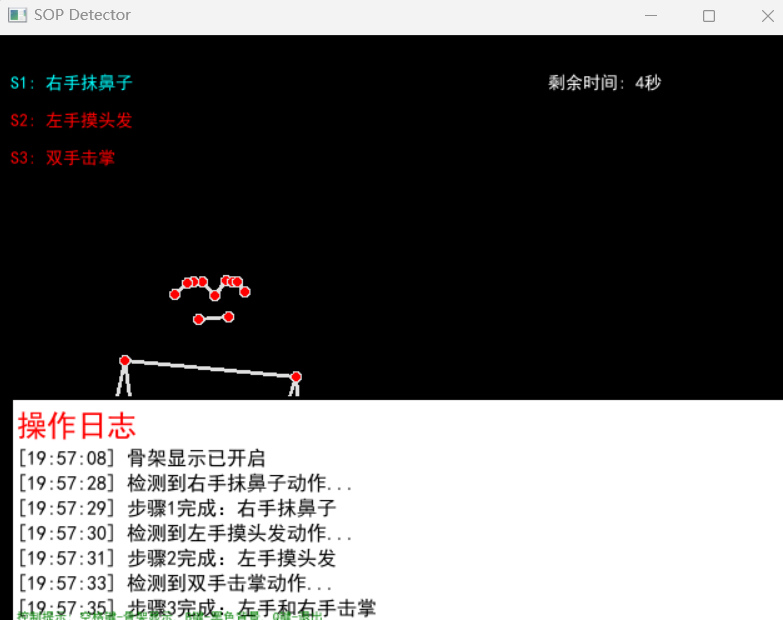
python
# -*- coding: utf-8 -*-
import cv2
import mediapipe as mp
import numpy as np
import time
import sys
import os
import tempfile
import subprocess

# 解决中文显示问题 - 使用Pillow确保中文正确显示
def cv2_puttext_chinese(img, text, position, font_scale, color, thickness):
    """
    使用Pillow库在OpenCV图像上显示中文
    """
    try:
        from PIL import Image, ImageDraw, ImageFont

        # 确保颜色格式正确
        if isinstance(color, tuple) and len(color) == 3:
            # OpenCV是BGR格式,需要转换为RGB
            color_rgb = (color[2], color[1], color[0])
        else:
            color_rgb = (255, 255, 255)

        # 将OpenCV图像转换为PIL图像
        img_pil = Image.fromarray(cv2.cvtColor(img, cv2.COLOR_BGR2RGB))
        draw = ImageDraw.Draw(img_pil)

        # 确定字体大小
        font_size = int(font_scale * 20)  # 调整比例以匹配cv2.putText

        # 尝试使用系统中常见的中文字体
        font_paths = [
            "C:/Windows/Fonts/simhei.ttf",      # 黑体
            "C:/Windows/Fonts/msyh.ttc",        # 微软雅黑
            "C:/Windows/Fonts/msyhbd.ttc",      # 微软雅黑粗体
            "C:/Windows/Fonts/simsun.ttc",      # 宋体
            "C:/Windows/Fonts/arial.ttf",       # 英文备选
        ]

        font = None
        for font_path in font_paths:
            try:
                if os.path.exists(font_path):
                    font = ImageFont.truetype(font_path, font_size)
                    break
            except Exception:
                continue

        # 如果没有找到合适的字体,使用默认字体
        if font is None:
            font = ImageFont.load_default()

        # 绘制中文文本
        draw.text(position, text, font=font, fill=color_rgb)

        # 转换回OpenCV格式
        img = cv2.cvtColor(np.array(img_pil), cv2.COLOR_RGB2BGR)
        return img
    except ImportError:
        # 如果PIL不可用,使用简单的英文替代
        english_map = {
            "右手抹鼻子": "Right hand to nose",
            "左手摸头发": "Left hand to hair",
            "双手击掌": "Hands clap",
            "SOP完成!": "SOP Complete!",
            "剩余时间": "Time left",
            "秒": "s"
        }

        for chinese, english in english_map.items():
            text = text.replace(chinese, english)

        cv2.putText(img, text, position, cv2.FONT_HERSHEY_SIMPLEX,
                   font_scale, color, thickness, cv2.LINE_AA)
        return img
    except Exception as e:
        # 其他错误情况下,使用英文替代
        english_map = {
            "右手抹鼻子": "Right hand to nose",
            "左手摸头发": "Left hand to hair",
            "双手击掌": "Hands clap",
            "SOP完成!": "SOP Complete!",
            "剩余时间": "Time left",
            "秒": "s"
        }

        for chinese, english in english_map.items():
            text = text.replace(chinese, english)

        cv2.putText(img, text, position, cv2.FONT_HERSHEY_SIMPLEX,
                   font_scale, color, thickness, cv2.LINE_AA)
        return img

class SOPDetector:
    def __init__(self):
        # 初始化MediaPipe姿势检测
        self.mp_pose = mp.solutions.pose
        self.pose = self.mp_pose.Pose(
            static_image_mode=False,
            model_complexity=1,
            smooth_landmarks=True,
            enable_segmentation=False,
            smooth_segmentation=True,
            min_detection_confidence=0.5,
            min_tracking_confidence=0.5
        )

        self.mp_drawing = mp.solutions.drawing_utils

        # 定义关键点索引
        self.NOSE = 0
        self.LEFT_EAR = 7
        self.RIGHT_EAR = 8
        self.LEFT_WRIST = 15
        self.RIGHT_WRIST = 16

        # SOP状态
        self.current_step = 0
        self.steps_completed = [False, False, False]
        self.step_start_time = time.time()
        self.step_timeout = 10  # 每个步骤的超时时间(秒)

        # 动作持续时间参数
        self.action_duration_required = 1.5  # 每个动作需要维持的时间(秒)
        self.action_start_time = None  # 记录当前动作开始的时间

        # 动作检测阈值
        self.NOSE_TOUCH_DISTANCE = 0.1
        self.HAIR_TOUCH_DISTANCE = 0.15
        self.HANDS_CLAP_DISTANCE = 0.1

        # 显示控制
        self.show_skeleton = True  # 是否显示骨架
        self.black_background = False  # 是否显示黑色背景
        self.window_name = 'SOP Detector'  # 窗口名称

        # 操作日志
        self.logs = []  # 存储日志记录
        self.max_log_lines = 8  # 最大显示日志行数

    def calculate_distance(self, point1, point2):
        """计算两个关键点之间的欧几里得距离"""
        return np.sqrt((point1.x - point2.x)**2 + (point1.y - point2.y)**2)

    def add_log(self, event):
        """添加操作日志"""
        timestamp = time.strftime("%H:%M:%S", time.localtime())
        log_entry = f"[{timestamp}] {event}"
        self.logs.append(log_entry)

        # 保持日志行数不超过最大限制
        if len(self.logs) > self.max_log_lines:
            self.logs = self.logs[-self.max_log_lines:]

        # 同时在控制台输出
        print(log_entry)

    def detect_step1_right_hand_nose(self, landmarks):
        """检测步骤1:右手抹鼻子"""
        nose = landmarks[self.NOSE]
        right_wrist = landmarks[self.RIGHT_WRIST]

        distance = self.calculate_distance(nose, right_wrist)
        return distance < self.NOSE_TOUCH_DISTANCE

    def detect_step2_left_hand_hair(self, landmarks):
        """检测步骤2:左手摸头发"""
        left_ear = landmarks[self.LEFT_EAR]
        left_wrist = landmarks[self.LEFT_WRIST]

        distance = self.calculate_distance(left_ear, left_wrist)
        return distance < self.HAIR_TOUCH_DISTANCE

    def detect_step3_hands_clap(self, landmarks):
        """检测步骤3:左手和右手击掌"""
        left_wrist = landmarks[self.LEFT_WRIST]
        right_wrist = landmarks[self.RIGHT_WRIST]

        distance = self.calculate_distance(left_wrist, right_wrist)
        return distance < self.HANDS_CLAP_DISTANCE

    def check_timeout(self):
        """检查当前步骤是否超时"""
        if time.time() - self.step_start_time > self.step_timeout:
            print(f"步骤 {self.current_step + 1} 超时,请重新开始")
            self.current_step = 0
            self.steps_completed = [False, False, False]
            self.step_start_time = time.time()
            return True
        return False

    def update_sop_state(self, landmarks):
        """更新SOP状态"""
        if self.check_timeout():
            return

        # 检查当前步骤是否完成
        if self.current_step == 0 and not self.steps_completed[0]:
            if self.detect_step1_right_hand_nose(landmarks):
                if self.action_start_time is None:
                    # 动作开始,记录时间
                    self.action_start_time = time.time()
                    self.add_log("检测到右手抹鼻子动作...")
                elif time.time() - self.action_start_time >= self.action_duration_required:
                    # 动作维持了足够时间,标记完成
                    self.steps_completed[0] = True
                    self.current_step = 1
                    self.step_start_time = time.time()
                    self.action_start_time = None  # 重置动作计时器
                    self.add_log("步骤1完成:右手抹鼻子")
            else:
                # 动作中断,重置计时器
                if self.action_start_time is not None:
                    self.action_start_time = None
                    self.add_log("右手抹鼻子动作中断,请重新执行")

        elif self.current_step == 1 and not self.steps_completed[1]:
            if self.detect_step2_left_hand_hair(landmarks):
                if self.action_start_time is None:
                    # 动作开始,记录时间
                    self.action_start_time = time.time()
                    self.add_log("检测到左手摸头发动作...")
                elif time.time() - self.action_start_time >= self.action_duration_required:
                    # 动作维持了足够时间,标记完成
                    self.steps_completed[1] = True
                    self.current_step = 2
                    self.step_start_time = time.time()
                    self.action_start_time = None  # 重置动作计时器
                    self.add_log("步骤2完成:左手摸头发")
            else:
                # 动作中断,重置计时器
                if self.action_start_time is not None:
                    self.action_start_time = None
                    self.add_log("左手摸头发动作中断,请重新执行")

        elif self.current_step == 2 and not self.steps_completed[2]:
            if self.detect_step3_hands_clap(landmarks):
                if self.action_start_time is None:
                    # 动作开始,记录时间
                    self.action_start_time = time.time()
                    self.add_log("检测到双手击掌动作...")
                elif time.time() - self.action_start_time >= self.action_duration_required:
                    # 动作维持了足够时间,标记完成
                    self.steps_completed[2] = True
                    self.current_step = 3
                    self.action_start_time = None  # 重置动作计时器
                    self.add_log("步骤3完成:左手和右手击掌")
                    self.add_log("恭喜!所有SOP步骤完成!")
            else:
                # 动作中断,重置计时器
                if self.action_start_time is not None:
                    self.action_start_time = None
                    self.add_log("双手击掌动作中断,请重新执行")

    def draw_landmarks_and_info(self, image, landmarks):
        """绘制关键点和状态信息"""
        # 创建黑色背景图像
        height, width, _ = image.shape
        black_bg = np.zeros((height, width, 3), dtype=np.uint8)

        # 选择显示背景
        display_image = black_bg if self.black_background else image.copy()

        # 绘制姿势关键点(如果启用)
        if self.show_skeleton:
            self.mp_drawing.draw_landmarks(
                display_image, landmarks, self.mp_pose.POSE_CONNECTIONS)

        # 添加状态信息

        # 当前步骤信息
        step_texts = [
            "S1: 右手抹鼻子",
            "S2: 左手摸头发",
            "S3: 双手击掌"
        ]

        for i, text in enumerate(step_texts):
            color = (0, 255, 0) if self.steps_completed[i] else (0, 0, 255)
            if i == self.current_step and not self.steps_completed[i]:
                color = (255, 255, 0)  # 黄色表示当前步骤

            # 使用中文显示函数
            display_image = cv2_puttext_chinese(display_image, text, (10, 30 + i*30),
                                      0.7, color, 2)

        # 显示动作持续时间进度
        if self.current_step < 3 and not self.steps_completed[self.current_step] and self.action_start_time is not None:
            elapsed_action_time = time.time() - self.action_start_time
            progress = min(elapsed_action_time / self.action_duration_required, 1.0)

            # 绘制进度条
            bar_width = 200
            bar_height = 20
            x_start = 10
            y_start = 120

            # 背景
            cv2.rectangle(display_image, (x_start, y_start), (x_start + bar_width, y_start + bar_height), (50, 50, 50), -1)
            # 进度
            cv2.rectangle(display_image, (x_start, y_start), (x_start + int(bar_width * progress), y_start + bar_height), (0, 255, 255), -1)
            # 边框
            cv2.rectangle(display_image, (x_start, y_start), (x_start + bar_width, y_start + bar_height), (255, 255, 255), 2)

            # 显示进度文字
            progress_text = f"动作持续中: {elapsed_action_time:.1f}/{self.action_duration_required:.1f}秒"
            display_image = cv2_puttext_chinese(display_image, progress_text, (10, 155), 0.6, (255, 255, 255), 2)

        # 剩余时间
        if self.current_step < 3:
            remaining_time = self.step_timeout - (time.time() - self.step_start_time)
            time_text = f"剩余时间: {max(0, int(remaining_time))}秒"
            display_image = cv2_puttext_chinese(display_image, time_text, (width - 200, 30),
                                      0.7, (255, 255, 255), 2)

        # 完成状态
        if all(self.steps_completed):
            display_image = cv2_puttext_chinese(display_image, "SOP完成!", (width//2 - 100, 50),
                                      1.5, (0, 255, 0), 3)

        # 添加操作日志显示
        log_height = 180  # 增加日志区域高度
        log_start_y = display_image.shape[0] - log_height
        log_text_color = (0, 0, 0)  # 黑色文字

        # 绘制日志背景
        log_bg_top_left = (10, log_start_y - 10)
        log_bg_bottom_right = (display_image.shape[1] - 10, display_image.shape[0] - 10)
        cv2.rectangle(display_image, log_bg_top_left, log_bg_bottom_right, (255, 255, 255), -1)  # 白色背景
        cv2.rectangle(display_image, log_bg_top_left, log_bg_bottom_right, (0, 0, 0), 2)  # 黑色边框

        # 绘制日志标题
        display_image = cv2_puttext_chinese(display_image, "操作日志", (15, log_start_y), 1.2, (0, 0, 255), 2)  # 红色标题

        # 绘制日志内容
        for i, log in enumerate(self.logs):
            y_pos = log_start_y + 30 + (i * 20)
            display_image = cv2_puttext_chinese(display_image, log, (15, y_pos), 0.8, log_text_color, 1)

        # 添加控制提示(放在日志区域内)
        control_text = "控制提示: 空格键-骨架显示, B键-黑色背景, Q键-退出"
        display_image = cv2_puttext_chinese(display_image, control_text, (15, display_image.shape[0] - 20), 0.5, (0, 128, 0), 1)

        return display_image

    def run_detection(self):
        """运行SOP检测"""
        cap = cv2.VideoCapture(0)

        self.add_log("SOP实时侦测系统启动")
        self.add_log("请按以下顺序完成动作:")
        self.add_log("1. 右手抹鼻子")
        self.add_log("2. 左手摸头发")
        self.add_log("3. 双手击掌")
        self.add_log("按'q'键退出程序")

        while cap.isOpened():
            ret, frame = cap.read()
            if not ret:
                break

            # 转换BGR到RGB
            rgb_frame = cv2.cvtColor(frame, cv2.COLOR_BGR2RGB)

            # 姿势检测
            results = self.pose.process(rgb_frame)

            display_frame = frame.copy()
            if results.pose_landmarks:
                # 更新SOP状态
                self.update_sop_state(results.pose_landmarks.landmark)

                # 绘制关键点和信息
                display_frame = self.draw_landmarks_and_info(frame, results.pose_landmarks)

            # 显示帧
            cv2.imshow(self.window_name, display_frame)

            # 键盘事件处理
            key = cv2.waitKey(1) & 0xFF

            # 按'q'退出
            if key == ord('q'):
                break
            # 按空格键切换骨架显示
            elif key == ord(' '):
                self.show_skeleton = not self.show_skeleton
                status = "开启" if self.show_skeleton else "关闭"
                self.add_log(f"骨架显示已{status}")
            # 按'b'键切换黑色背景
            elif key == ord('b') or key == ord('B'):
                self.black_background = not self.black_background
                status = "开启" if self.black_background else "关闭"
                self.add_log(f"黑色背景已{status}")

        cap.release()
        cv2.destroyAllWindows()

def main():
    detector = SOPDetector()
    detector.run_detection()

if __name__ == "__main__":
    main()