效果图:
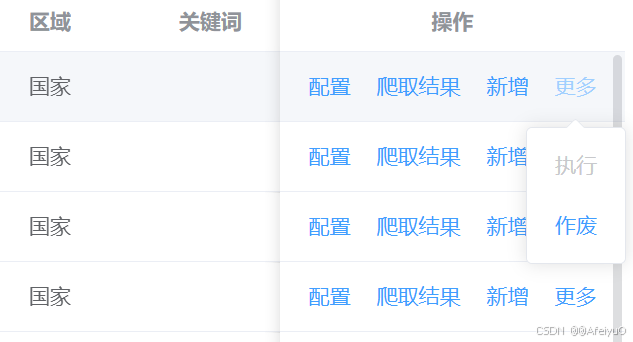
界面引用
html
<template>
  <div>
    <AvueRightButton
      :button-list="[
        {
          label: '配置',
          onClick: () => {},
        },
        {
          label: '新增模块',
          onClick: () => {},
        },
        {
          label: '爬取结果',
          onClick: () => {},
        },
        {
          label: '新增',
          onClick: () => {},
        },
        {
          label: '执行',
          disabled: true,
          type: 'info',
        },
        {
          label: '作废',
          onClick: () => {},
        },
      ]"
    />
  </div>
</template>
<script lang="ts" setup>
import AvueRightButton from "../../components/AvueRightButton/index.vue";
</script>
<style scoped lang="scss"></style>
组件
html
<template>
    <div style="display: flex;align-items: center;">
        <el-button v-for="item in flatBtns" :key="item.label" :disabled="item.disabled" link :type="item.type || 'primary'"
        @click="onClick(item)"> {{ item.label }}</el-button>
        <el-dropdown v-if="moreBtns.length > 0" style="margin-left:12px;">
            <el-button link type="primary">更多</el-button>
            <template #dropdown>
                <el-dropdown-menu>
                <div v-for="item in moreBtns" :key="item.label">
                    <el-dropdown-item>
                    <el-button :disabled="item.disabled" link :type="item.type || 'primary'" @click="onClick(item)"> {{ item.label }}
                    </el-button>
                    </el-dropdown-item>
                </div>
                </el-dropdown-menu>
            </template>
        </el-dropdown>
    </div>
</template>
<script setup lang="ts">
import { PropType, ref, watch } from 'vue';

defineOptions({
  name: 'AvueRightButton',
});
const props = defineProps({
  buttonList: {
    default: () => [],
    type: Array as PropType<any[]>
  },
});
const flatBtns = ref<any[]>([]);
const moreBtns = ref<any[]>([]);
watch(
  () => props.buttonList,
  (newList) => {
    const showBtns = newList?.filter((b: any) => (b.vAcl || b.vAcl === undefined) && b.vIf !== false);
    if (showBtns.length > 0) {
      if (showBtns.length <= 4) {
        flatBtns.value = showBtns;
        moreBtns.value = [];
      } else {
        flatBtns.value = showBtns.slice(0, 3);
        moreBtns.value = showBtns.slice(3);
      }
    }else {
      flatBtns.value = [];
      moreBtns.value = [];
    }
  },
  { deep: true, immediate: true },
);
function onClick(item: any) {
  item.onClick();
}
</script>

<style lang="scss" scoped></style>