需求:
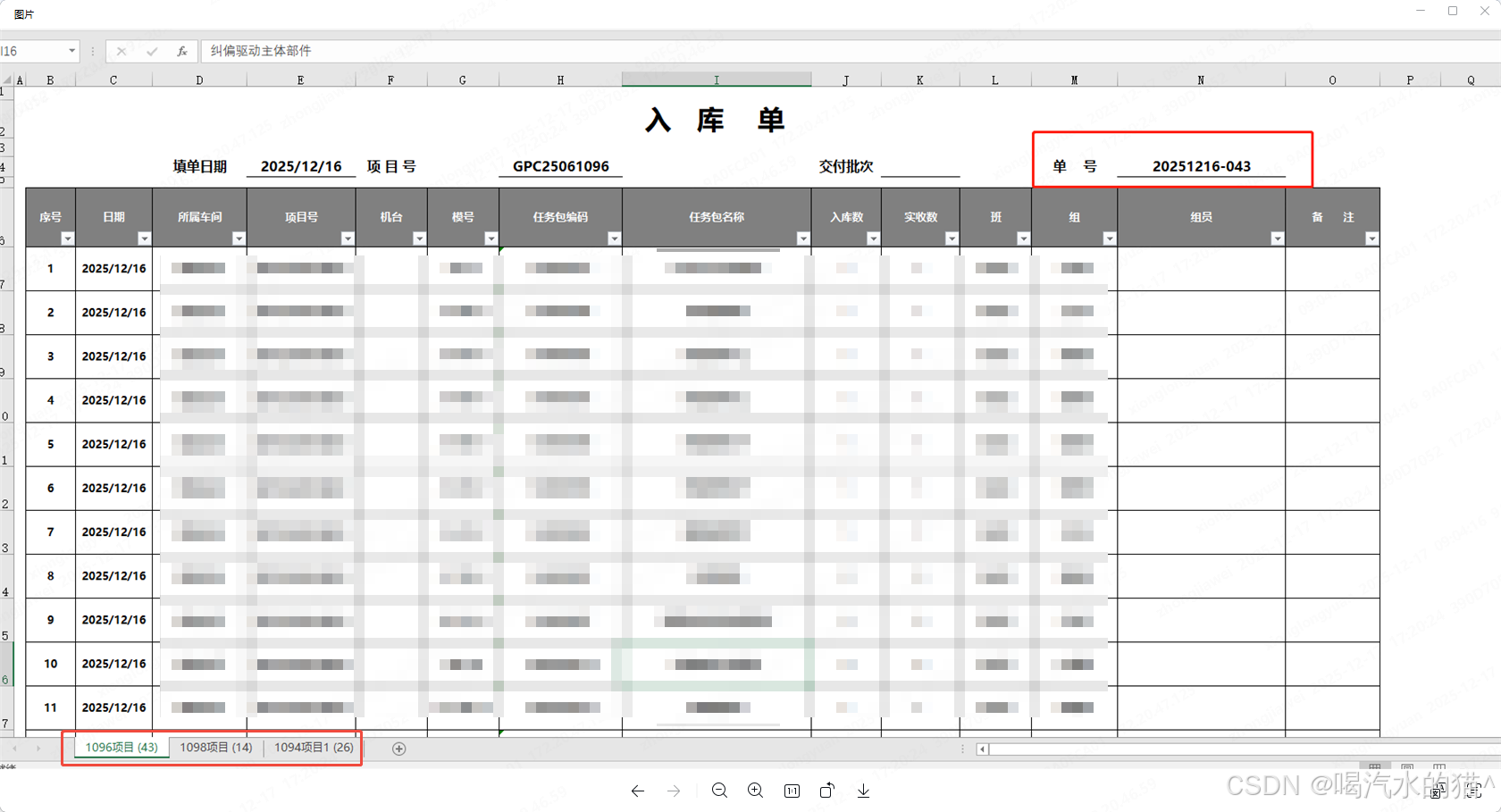
1、根据如下图片,导出同样格式的excel文件。
2、并且list实体集合有项目号,根据项目号区分导出不同sheet页。项目号格式:G10086B1,G10087B1,去掉最后两位B1或B2在区分,比如G10086,G10086为一个sheet页。G10087又为一个新的sheet页。
一、依赖引入(Maven)
xml
<dependency>
    <groupId>org.apache.poi</groupId>
    <artifactId>poi</artifactId>
    <version>5.2.5</version>
</dependency>
<dependency>
    <groupId>org.apache.poi</groupId>
    <artifactId>poi-ooxml</artifactId>
    <version>5.2.5</version>
</dependency>
二、完整的实体类定义
java
import lombok.Data;
import java.io.Serializable;

/**
 - 入库单实体类(完全对应Excel表格字段)
 */
@Data
public class WarehouseIn implements Serializable {
    private static final long serialVersionUID = 1L;

    // 1. 序号(Excel第1列,导出时自动生成,无需手动设置)
    private Integer serialNo;

    // 2. 日期(Excel第2列)
    private String date;

    // 3. 所属车间(Excel第3列)
    private String workshop;

    // 4. 项目号(Excel第4列,格式如GPC25061095B2,用于分组Sheet)
    private String projectNo;

    // 5. 机台(Excel第5列)
    private String machine;

    // 6. 模号(Excel第6列)
    private String modelNo;

    // 7. 任务包编码(Excel第7列)
    private String taskPackageCode;

    // 8. 任务包名称(Excel第8列)
    private String taskPackageName;

    // 9. 入库数量(Excel第9列)
    private Integer inStockQty;

    // 10. 实收数(Excel第10列)
    private Integer actualReceivedQty;

    // 11. 班(Excel第11列,如:早班/中班/晚班)
    private String workShift;

    // 12. 组(Excel第12列,如:1组/2组)
    private String workGroup;

    // 13. 组员(Excel第13列,如:张三/李四)
    private String groupMember;

    // 14. 备注(Excel第14列)
    private String remarks;

    // 扩展字段(Excel中隐藏的辅助字段,用于填充表头信息)
    // 填单日期(Excel表头-填单日期)
    private String fillDate;

    // 交付批次(Excel表头-交付批次,如:第二批(2+2))
    private String deliveryBatch;

    // 单号(Excel表头-单号,如:GEN2025131)
    private String orderNo;
}
实体类说明:
- 字段对应关系:每个字段与 Excel 表格列完全对齐,字段名采用「业务语义 + 字段类型」命名,便于理解和维护。
- 扩展字段:fillDate(填单日期)、deliveryBatch(交付批次)、orderNo(单号)是 Excel 表头的动态信息,实体类中新增这些字段用于填充,避免硬编码。
- 序列化:实现Serializable接口,支持分布式场景下的数据传输(如 Redis 缓存、RPC 调用)。
- Lombok 注解:使用@Data自动生成getter/setter/toString等方法,简化代码。
三、代码实现
1、导出工具
java
import org.apache.poi.ss.usermodel.*;
import org.apache.poi.ss.util.CellRangeAddress;
import org.apache.poi.xssf.usermodel.XSSFWorkbook;

import java.io.OutputStream;
import java.util.List;
import java.util.Map;
import java.util.stream.Collectors;

public class ExcelExportUtil {

			/**
	     * 生产入库单导出
	     */
	    @Override
	    public void exportWarehouseInExcel(OutputStream outputStream, List<StockInEntity> list) throws IOException {
	        // 按项目号分组(去掉最后两位,如GPC25061095B2 → GPC25061095)
	        Map<String, List<StockInEntity>> groupByProject = list.stream()
	                .filter(item -> isValidProjectNumber(item.getProjectNumber()))
	                .collect(Collectors.groupingBy(item -> truncateProjectNumber(item.getProjectNumber())));

	        // 创建Workbook并自动关闭
	        try (Workbook workbook = new XSSFWorkbook()) {

	            // 为每个分组创建Sheet
	            for (Map.Entry<String, List<StockInEntity>> entry : groupByProject.entrySet()) {
	                String sheetName = entry.getKey() + "项目"; // Sheet名(如GPC25061095项目)
	                Sheet sheet = workbook.createSheet(sheetName);
	                List<StockInEntity> sheetData = entry.getValue();

	                // 构建当前Sheet的入库单内容
	                buildStockInEntitySheet(sheet, sheetData);
	            }

	            // 写出Excel
	            workbook.write(outputStream);
	        }
	    }

	    // 判断项目编号是否合法
	    private boolean isValidProjectNumber(String projectNo) {
	        return projectNo != null && projectNo.length() >= 2;
	    }


	    // 截取项目编号(去掉最后两位)
	    private String truncateProjectNumber(String projectNo) {
	        if (!isValidProjectNumber(projectNo)) {
	            throw new IllegalArgumentException("Invalid project number: " + projectNo);
	        }
	        return projectNo.substring(0, projectNo.length() - 2);
	    }

	    /**
	     * 构建单个Sheet的入库单格式
	     */
	    private static void buildStockInEntitySheet(Sheet sheet, List<StockInEntity> data) {
	        // 指定时区
	        ZoneId zoneId = ZoneId.of("Asia/Shanghai");
	        // 获取指定时区的当前日期
	        DateTimeFormatter formatter = DateTimeFormatter.ofPattern("yyyy/MM/dd");
	        String formattedDate = LocalDate.now(zoneId).format(formatter);

	        // ========== 设置列宽 ==========
	        int[] columnWidths = {2500, 3500, 5000, 6000, 4000, 4500, 5500, 6500, 3000, 3000, 3000, 3000, 7000, 3000};
	        for (int i = 0; i < columnWidths.length; i++) {
	            sheet.setColumnWidth(i, columnWidths[i]);
	        }

	        // ==========  创建样式 ==========
	        Workbook workbook = sheet.getWorkbook();
	        // 标题样式(居中、加粗)
	        CellStyle titleStyle = workbook.createCellStyle();
	        Font titleFont = workbook.createFont();
	        titleFont.setBold(true);
	        titleFont.setFontHeightInPoints((short) 16);
	        titleStyle.setFont(titleFont);
	        titleStyle.setAlignment(HorizontalAlignment.CENTER);
	        titleStyle.setVerticalAlignment(VerticalAlignment.CENTER);

	        // 表头样式(灰色背景、居中)
	        CellStyle headerStyle = workbook.createCellStyle();
	        Font headerFont = workbook.createFont();
	        headerFont.setBold(true);
	        headerFont.setColor(IndexedColors.WHITE.getIndex());
	        headerStyle.setFont(headerFont);
	        headerStyle.setFillForegroundColor(IndexedColors.GREY_25_PERCENT.getIndex());
	        headerStyle.setFillPattern(FillPatternType.SOLID_FOREGROUND);
	        headerStyle.setAlignment(HorizontalAlignment.CENTER);
	        headerStyle.setVerticalAlignment(VerticalAlignment.CENTER);
	        headerStyle.setBorderTop(BorderStyle.THIN);
	        headerStyle.setBorderBottom(BorderStyle.THIN);
	        headerStyle.setBorderLeft(BorderStyle.THIN);
	        headerStyle.setBorderRight(BorderStyle.THIN);

	        // 内容样式(居中、边框)
	        CellStyle contentStyle = workbook.createCellStyle();
	        Font row4Font = workbook.createFont();
	        row4Font.setBold(true);
	        contentStyle.setFont(row4Font);
	        contentStyle.setAlignment(HorizontalAlignment.CENTER);
	        contentStyle.setVerticalAlignment(VerticalAlignment.CENTER);
	        contentStyle.setBorderTop(BorderStyle.THIN);
	        contentStyle.setBorderBottom(BorderStyle.THIN);
	        contentStyle.setBorderLeft(BorderStyle.THIN);
	        contentStyle.setBorderRight(BorderStyle.THIN);

	        // ==========  构建Sheet内容 ==========
	        // 第1行:入库单标题(合并单元格)
	        Row row1 = sheet.createRow(0);
	        Cell cell1 = row1.createCell(0);
	        cell1.setCellValue("入库单");
	        cell1.setCellStyle(titleStyle);
	        sheet.addMergedRegion(new CellRangeAddress(0, 0, 0, 13)); // 合并A1-N1

	        // 第2行:填单日期、项目号等信息(合并单元格)
	        CellStyle row2Style = workbook.createCellStyle();
	        Font row2Font = workbook.createFont();
	        row2Font.setUnderline(Font.U_SINGLE); // 单下划线(也可以用U_DOUBLE表示双下划线)
	        row2Font.setBold(true);
	        row2Style.setFont(row2Font);
	        row2Style.setFillForegroundColor(IndexedColors.WHITE.getIndex());
	        row2Style.setFillPattern(FillPatternType.SOLID_FOREGROUND);
	        row2Style.setAlignment(HorizontalAlignment.CENTER);
	        row2Style.setVerticalAlignment(VerticalAlignment.CENTER);
	        // 创建行并设置高度
	        Row row2 = sheet.createRow(1);
	        row2.setHeightInPoints((short) 35);
	        // 填单日期(A2-B2)
	        Cell cell2A = row2.createCell(0);
	        cell2A.setCellValue("填单日期:" + formattedDate);
	        cell2A.setCellStyle(row2Style);
	        sheet.addMergedRegion(new CellRangeAddress(1, 1, 0, 1));
	        // 项目号(C2-F2)
	        Cell cell2C = row2.createCell(2);
	        cell2C.setCellValue("项目号:" + data.get(0).getProjectNumber().substring(0, data.get(0).getProjectNumber().length() - 2));
	        cell2C.setCellStyle(row2Style);
	        sheet.addMergedRegion(new CellRangeAddress(1, 1, 2, 5));
	        // 交付批次(G2-J2)
	        Cell cell2G = row2.createCell(6);
	        cell2G.setCellValue("交付批次:" + data.get(0).getDeliveryBatch());
	        cell2G.setCellStyle(row2Style);
	        sheet.addMergedRegion(new CellRangeAddress(1, 1, 6, 9));
	        // 单号(K2-N2)
	        Cell cell2K = row2.createCell(10);
	        cell2K.setCellValue("单号:" + data.get(0).getInputNo());
	        cell2K.setCellStyle(row2Style);
	        sheet.addMergedRegion(new CellRangeAddress(1, 1, 10, 13));

	        // 第3行:表头(序号、日期、所属车间...)
	        Row row3 = sheet.createRow(2);
	        row3.setHeightInPoints((short) 50);
	        String[] headers = {"序号", "日期", "所属车间", "项目号", "机台", "模号", "任务包编码", "任务包名称", "入库数量", "实收数", "班", "组", "组员", "备注"};
	        for (int i = 0; i < headers.length; i++) {
	            Cell cell = row3.createCell(i);
	            cell.setCellValue(headers[i]);
	            cell.setCellStyle(headerStyle);
	        }

	        // 第4行及以后:数据行
	        for (int i = 0; i < data.size(); i++) {
	            StockInEntity item = data.get(i);
	            Row row = sheet.createRow(3 + i);
	            row.setHeightInPoints((short) 45);

	            // 序号
	            Cell cell0 = row.createCell(0);
	            cell0.setCellValue(i + 1);
	            cell0.setCellStyle(contentStyle);

	            // 日期
	            Cell cell11 = row.createCell(1);
	            cell11.setCellValue(item.getCreateTime().format(formatter));
	            cell11.setCellStyle(contentStyle);

	            // 所属车间
	            Cell cell2 = row.createCell(2);
	            cell2.setCellValue(item.getReceiveDeptName());
	            cell2.setCellStyle(contentStyle);

	            // 项目号
	            Cell cell3 = row.createCell(3);
	            cell3.setCellValue(item.getProjectNumber());
	            cell3.setCellStyle(contentStyle);

	            // 机台
	            Cell cell4 = row.createCell(4);
	            cell4.setCellValue(item.getMachine());
	            cell4.setCellStyle(contentStyle);

	            // 模号
	            Cell cell5 = row.createCell(5);
	            cell5.setCellValue(item.getModelNo());
	            cell5.setCellStyle(contentStyle);

	            // 任务包编码
	            Cell cell6 = row.createCell(6);
	            cell6.setCellValue(item.getMaterialCode());
	            cell6.setCellStyle(contentStyle);

	            // 任务包名称
	            Cell cell7 = row.createCell(7);
	            cell7.setCellValue(item.getMaterialName());
	            cell7.setCellStyle(contentStyle);

	            // 入库数量
	            Cell cell8 = row.createCell(8);
	            cell8.setCellValue(String.valueOf(item.getQty()));
	            cell8.setCellStyle(contentStyle);

	            // 实收数
	            Cell cell9 = row.createCell(9);
	            cell9.setCellValue(String.valueOf(item.getQty()));
	            cell9.setCellStyle(contentStyle);

	            // 班、组、组员、备注(示例中为空,可根据实际数据填充)
	            for (int j = 10; j < 14; j++) {
	                Cell cell = row.createCell(j);
	                cell.setCellStyle(contentStyle);
	            }
	        }
	    }
    }
2、使用示例(Web 场景)
在 Controller 中调用工具类,导出 Excel:
java
import org.springframework.web.bind.annotation.GetMapping;
import org.springframework.web.bind.annotation.RestController;

import javax.servlet.http.HttpServletResponse;
import java.io.OutputStream;
import java.net.URLEncoder;
import java.util.List;

@RestController
public class ExportController {

    /**
     * 生产入库单导出
     */
    @PostMapping("/exportProInput")
    public void exportProInput(HttpServletResponse response, InputQueryDTO input) {
        List<StockInEntity> list = baseService.selectProInput(input);
        PaAssert.isError(CollUtil.isEmpty(list), "导出数据不能为空");
        try {
            // 设置响应头
            response.setContentType("application/vnd.openxmlformats-officedocument.spreadsheetml.sheet");
            String fileName = URLEncoder.encode("入库单.xlsx", "UTF-8");
            response.setHeader("Content-Disposition", "attachment; filename=" + fileName);
            // 导出Excel
            OutputStream outputStream = response.getOutputStream();
            baseService.exportWarehouseInExcel(outputStream, list);
            outputStream.flush();
        } catch (IOException e) {
            e.printStackTrace();
            throw new BaseException("导出失败");
        }
    }

    // 模拟数据(实际从数据库查询)
    private List<StockInEntity> getWarehouseInData() {
        // 示例数据,实际替换为业务数据
        StockInEntity= new StockInEntity();
        item1.setProjectNo("GPC25061095B2");
        item1.setDate("2025/12/16");
        item1.setWorkshop("精密装配");
        item1.setMachine("J20-04");
        item1.setModel("5400002400");
        item1.setTaskCode("导向压销部件2");
        item1.setTaskName("导向压销部件2");
        item1.setInQty(2);
        item1.setActualQty(2);

        // 可添加更多数据...
        return List.of(item1, item1); // 示例中重复添加,实际替换为真实数据
    }
}
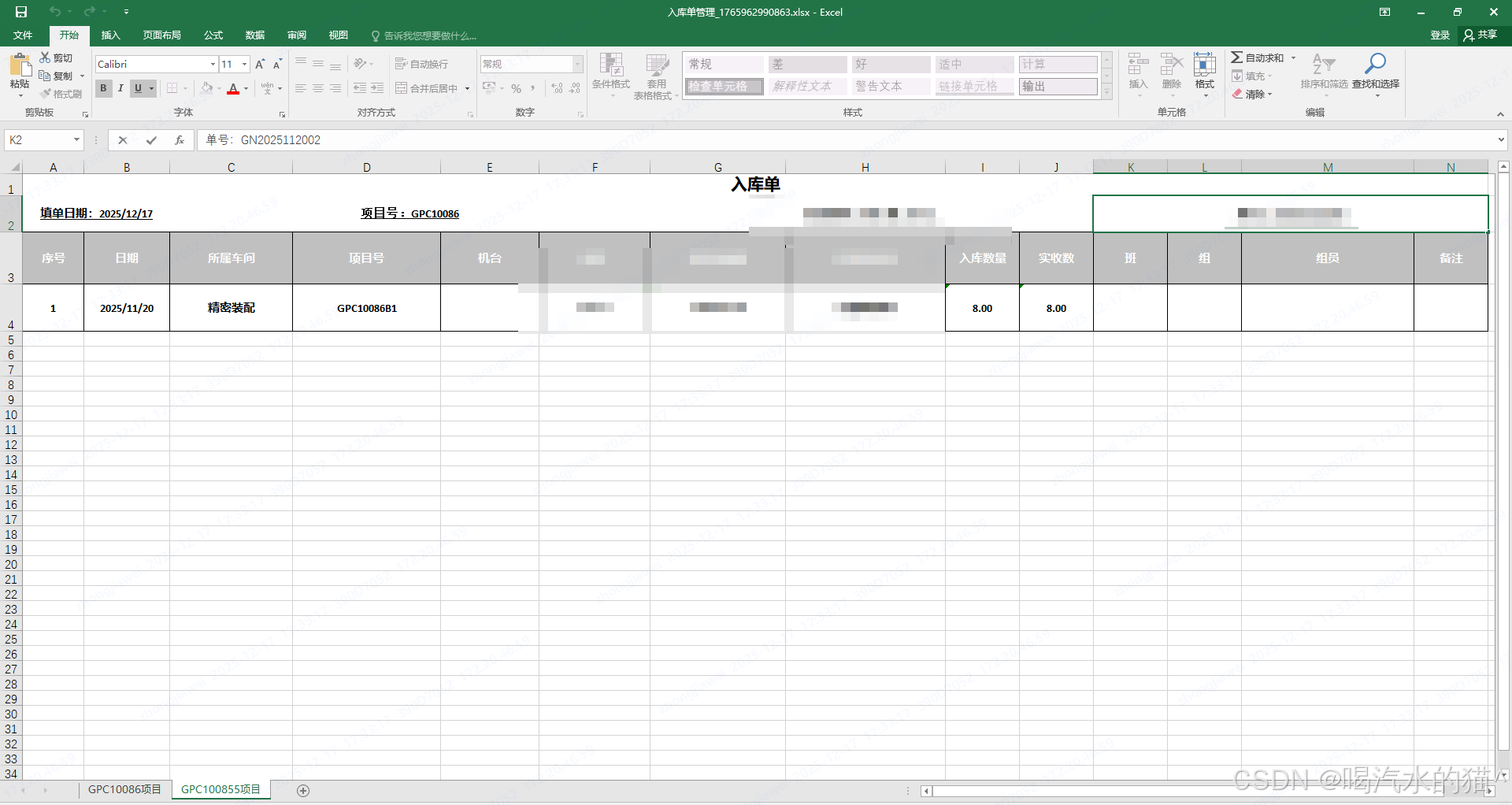
四、导出效果
总结
- Sheet 分组逻辑:通过projectNo.substring(0, projectNo.length() - 2)截取项目号前缀,实现同一前缀的记录分到同一个 Sheet。
- 格式还原:通过单元格合并、样式设置(背景色、边框、对齐方式)还原示例中的Excel 格式。
- 动态数据:代码中 "填单日期、交付批次、单号" 为固定值,实际应从业务数据中动态获取(可在实体类中添加对应字段)。