接上文《芋道框架下的进销存升级(二):Yudao-ERP2打印模板管理的设计与实现》继续升级,本次升级内容主要是实现Excel高性能异步导出或导入。
先看效果:
Yudao-ERP2异步导出/导入Excel的设计与实现
一、后端改造
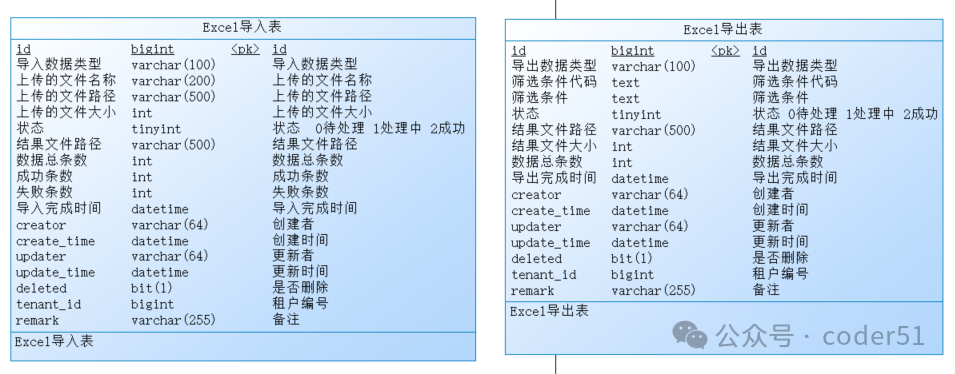
1. 新增Excel导出/导入表,用芋道框架自带的代码生成功能生成crud代码
2. 实现异步导出逻辑
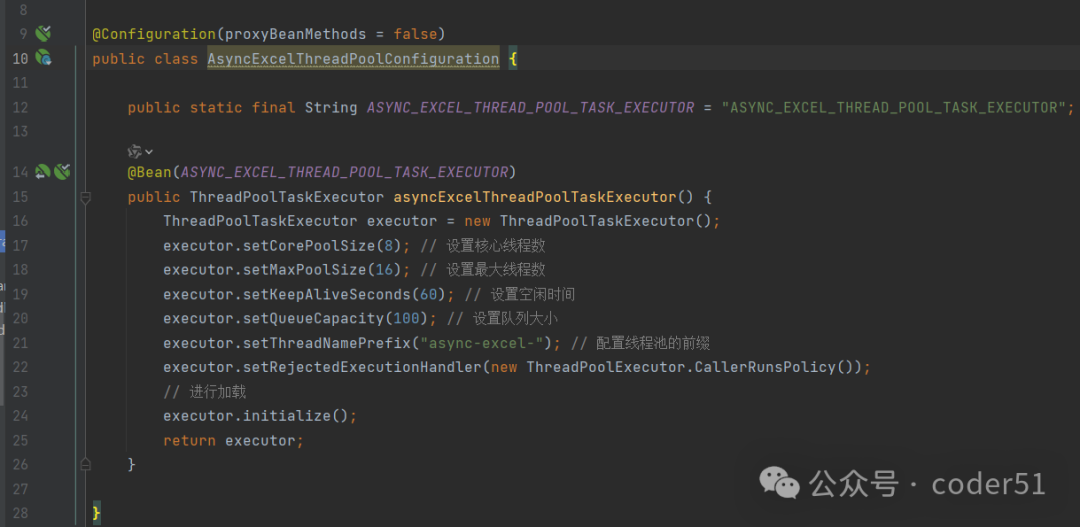
① 定义一个线程池
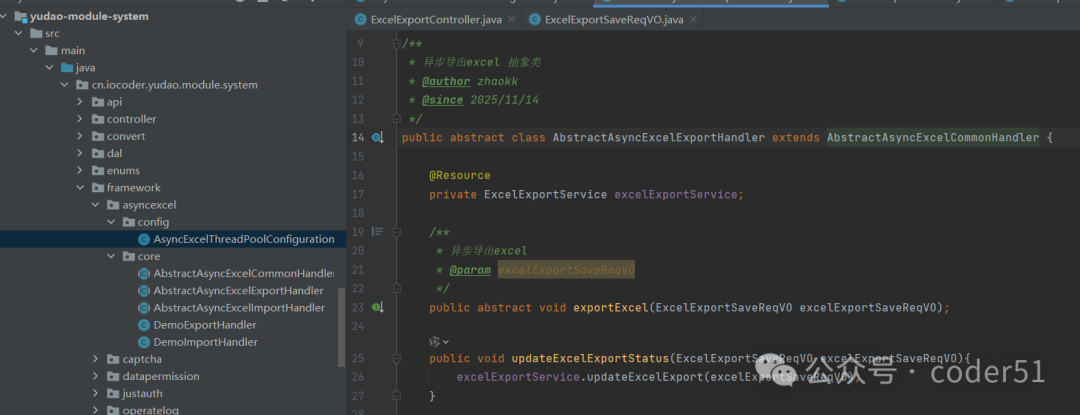
② 定义一个导出excel抽象类
③ 每一个具体的导出业务定义一个handler类且继承抽象类,该handler内实现异步导出业务,生成excel导出文件,更新异步导出任务状态等,最关键一点,该handler使用@Component注解声明为Spring容器管理的Bean。
java
@Component
@Slf4j
public class DemoExportHandler extends AbstractAsyncExcelExportHandler{

    @Override
    @Async(ASYNC_EXCEL_THREAD_POOL_TASK_EXECUTOR)
    public void exportExcel(ExcelExportSaveReqVO excelExportSaveReqVO) {
        // 1. 更新状态为处理中
        updateExcelExportStatus(new ExcelExportSaveReqVO(
                excelExportSaveReqVO.getId(),
                ImportExportStatusEnum.PROCESS.getStatus()
                )
        );

        // 2. 导出数据
        String resultFilePath = "";
        int dataNum = 0;
        int status = ImportExportStatusEnum.FAIL.getStatus();
        int fileSize = 0;
        String remark = "";

        try {
            List<Map<String, Object>> exportDataList = new ArrayList();
            if (!exportDataList.isEmpty()) {
                byte[] excelContent = new byte[1024];
                fileSize = excelContent.length;
                resultFilePath = saveExcelFile(excelContent, getDateTimeFileName("导出示例", "xlsx"));
                status = ImportExportStatusEnum.SUCCESS.getStatus();
                dataNum = exportDataList.size();
            }else{
                remark = "没有数据";
            }
        } catch (Exception e) {
            log.error("导出失败", e);
            remark = ExceptionUtil.stacktraceToString(e);
        }

        // 3. 更新状态为处理完成
        updateExcelExportStatus(new ExcelExportSaveReqVO(
                        excelExportSaveReqVO.getId(),
                        status,
                        resultFilePath,
                        fileSize,
                        dataNum,
                        remark
                )
        );
    }

}
④ 定义一个统一的创建异步导出Excel任务的接口,该接口的其中一个入参定义为业务类型,对应参数值为handler的Bean名。
java
@Tag(name = "管理后台 - Excel导出")
@RestController
@RequestMapping("/system/excel-export")
@Validated
public class ExcelExportController {

    @Resource
    private ExcelExportService excelExportService;

    @PostMapping("/create")
    @Operation(summary = "创建Excel导出")
    @PreAuthorize("@ss.hasPermission('system:excel-export:create')")
    public CommonResult<Long> createExcelExport(@Valid @RequestBody ExcelExportSaveReqVO createReqVO) {
        return success(excelExportService.createExcelExport(createReqVO));
    }
}
java
@Service
@Validated
public class ExcelExportServiceImpl implements ExcelExportService {

    @Resource
    private ExcelExportMapper excelExportMapper;

    @Override
    public Long createExcelExport(ExcelExportSaveReqVO createReqVO) {
        if(!SpringUtil.getApplicationContext().containsBean(createReqVO.getDataType())){
            throw exception(EXCEL_EXPORT_TYPE_NOT_EXISTS);
        }

        // 插入
        ExcelExportDO excelExport = BeanUtils.toBean(createReqVO, ExcelExportDO.class);
        excelExport.setStatus(ImportExportStatusEnum.WAIT_PROCESS.getStatus());
        excelExportMapper.insert(excelExport);

        AbstractAsyncExcelExportHandler asyncExcelExportHandler = SpringUtil.getBean(createReqVO.getDataType());
        createReqVO.setId(excelExport.getId());
        asyncExcelExportHandler.exportExcel(createReqVO);

        // 返回
        return excelExport.getId();
    }

    @Override
    public void updateExcelExport(ExcelExportSaveReqVO updateReqVO) {
        // 校验存在
        validateExcelExportExists(updateReqVO.getId());
        if(updateReqVO.getRemark() != null && updateReqVO.getRemark().length() > ExcelExportSaveReqVO.REMARK_MAX_LENGTH){
            updateReqVO.setRemark(updateReqVO.getRemark().substring(0, ExcelExportSaveReqVO.REMARK_MAX_LENGTH));
        }
        // 更新
        ExcelExportDO updateObj = BeanUtils.toBean(updateReqVO, ExcelExportDO.class);
        excelExportMapper.updateById(updateObj);
    }

    @Override
    public void deleteExcelExport(Long id) {
        // 校验存在
        validateExcelExportExists(id);
        // 删除
        excelExportMapper.deleteById(id);
    }

    @Override
        public void deleteExcelExportListByIds(List<Long> ids) {
        // 删除
        excelExportMapper.deleteByIds(ids);
        }


    private void validateExcelExportExists(Long id) {
        if (excelExportMapper.selectById(id) == null) {
            throw exception(EXCEL_EXPORT_NOT_EXISTS);
        }
    }

    @Override
    public ExcelExportDO getExcelExport(Long id) {
        return excelExportMapper.selectById(id);
    }

    @Override
    public PageResult<ExcelExportDO> getExcelExportPage(ExcelExportPageReqVO pageReqVO) {
        return excelExportMapper.selectPage(pageReqVO);
    }

}
这样便实现了一个简单的,统一的,解耦的,高性能的,异步的导出Excel功能,统一的创建导出任务接口,统一的Excel导出下载页面,不同的业务实现导出只需继承抽象类实现导出逻辑即可。
异步导入Excel同理。
二、前端改造
1. 在业务功能页面,增加"异步导出"按钮,例如采购订单页面如下所示:
javascript
<el-button
          type="success"
          plain
          @click="handleAsyncExport"
          :loading="exportLoading"
          v-hasPermi="['erp:purchase-order:export']"
        >
          <Icon icon="ep:download" class="mr-5px" /> 异步导出
        </el-button>

 /** 异步导出按钮操作 */
const handleAsyncExport = async () => {
  try {
    // 导出的二次确认
    await message.exportConfirm()
    let filterCondition = ''
    Object.entries(queryParams).forEach((key) => {
      if(queryParamFieldName[key[0]] && key[1] && key[1].length){
        filterCondition += `${queryParamFieldName[key[0]]}:${key[1]};`
      }
    })
    if(filterCondition.length){
      filterCondition = filterCondition.substring(0, filterCondition.length-1)
    }
    // 发起导出
    exportLoading.value = true
    const data = {
      dataType: EXCEL_EXPORT_TYPE.PURCHASE_ORDER,
      filterConditionCode: JSON.stringify(queryParams),
      filterCondition: filterCondition
    } as ExcelExport
    await ExcelExportApi.createExcelExport(data)
    message.success(t('common.exportSuccess'))
  } catch {
  } finally {
    exportLoading.value = false
  }
}

export enum EXCEL_EXPORT_TYPE {
  PURCHASE_ORDER = 'erpPurchaseOrderExportHandler',
  DEMO = 'demoExportHandler',
}

const queryParams = reactive({
  pageNo: 1,
  pageSize: 10,
  no: undefined,
  supplierId: undefined,
  productId: undefined,
  orderTime: [],
  status: undefined,
  remark: undefined,
  creator: undefined,
  inStatus: undefined,
  returnStatus: undefined
})
const queryParamFieldName = reactive({
  no: '订单单号',
  supplierId: '供应商ID',
  productId: '产品ID',
  orderTime: '订单时间',
  status: '状态',
  remark: '备注',
  creator: '创建人',
  inStatus: '入库数量',
  returnStatus: '退货数量'
})
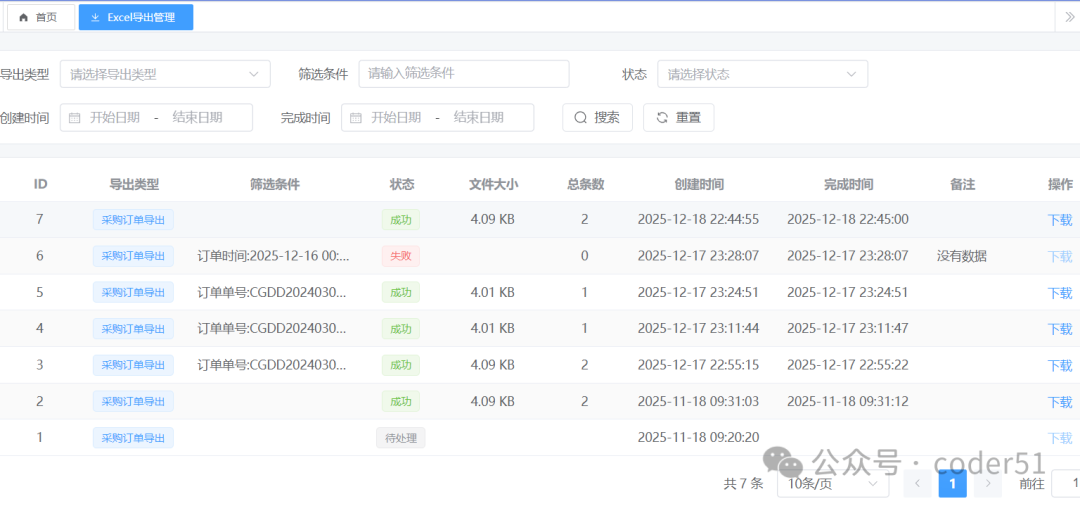
2. Excel导出下载页面
即用芋道框架自带的代码生成功能生成的Excel导出表的前端代码
src\views\system\excelexport\index.vue
详见源码,地址如下: