背景需求
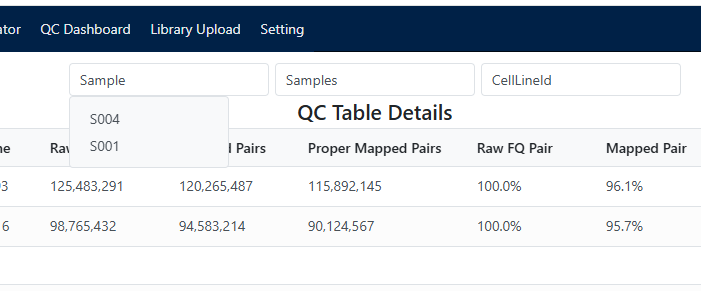
最近在开发一个Odoo项目时,客户提出了一个特定的搜索需求:希望在列表页面中展示多个多选下拉框作为过滤条件。用户选中任意下拉选项时,列表需要实时查询并显示对应的结果。
这种设计相较于Odoo原生搜索更为直观,特别是当用户需要同时基于多个维度筛选数据时,操作更加便捷。
Odoo原生搜索的局限性
Odoo作为一款国际化的开源ERP系统,其搜索功能设计理念与国内用户的使用习惯存在一定差异:
- 搜索模式单一:默认采用"搜索框+预设过滤器"的模式
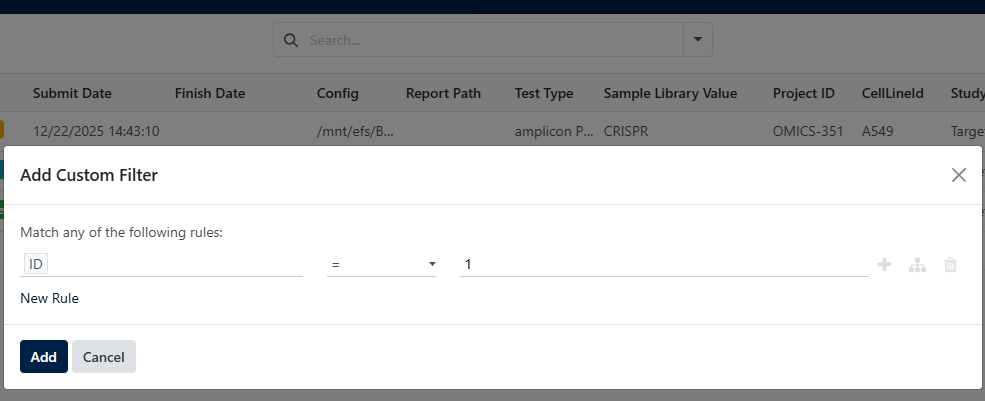
- 多条件过滤不够直观:需要点击过滤器图标,在弹出窗口中配置多个条件
- 用户体验差异:国外用户习惯文本搜索+条件组合,国内用户更习惯可视化的多选过滤
解决方案:自定义控件开发
面对这种需求差异,我们决定采用Odoo的自定义开发能力。Odoo提供了灵活的扩展机制,特别是基于QWeb模板引擎,我们可以通过以下方式实现自定义搜索控件:
- 自定义多选下拉框组件
- 集成到搜索面板
- 重写列表视图控制器
- 动态构建搜索条件
完整方案实现
1. 多选下拉框组件 (XML模板)
首先需要在XML文件中定义自定义下拉框控件视图(multi_select_widget.xml):
<?xml version="1.0" encoding="UTF-8"?>
<templates xml:space="preserve">
    <t t-name="multi_select" owl="1">
        <div class="multiselect-container" t-ref="multi_select_dropdown">
            <div class="form-control" t-on-click="toggleDropdown">
                <span t-if="state.selected.size === 0">
                    <t t-esc="props.placeholder || 'Select options'"/>
                </span>
                <div t-if="state.selected.size === 1" class="selected-options" >
                    <span class="badge bg-primary me-1"
                              t-esc="[...state.selected][0]"/>
                </div>
                <div t-if="state.selected.size > 1" class="selected-options" >
                    <span class="badge bg-primary me-1">已选择<t t-esc="state.selected.size"></t>个<t t-esc="props.fieldName"/></span>
                </div>
            </div>

            <div t-if="state.isOpen" class="dropdown-menu show">
                <t t-foreach="props.options" t-as="option" t-key="option">
                    <a href="#" class="dropdown-item"
                       t-att-class="{'active': state.selected.has(option)}"
                       t-on-click="(ev) => this.selectOption(option, ev)">
                        <t t-esc="option"/>
                    </a>
                </t>
            </div>
            <style>
                .multiselect-container{
                    margin: 3px;
                    width: 200px;
                }
            </style>
        </div>
    </t>
</templates>
2. 多选下拉框组件逻辑 (JavaScript)
业务逻辑我们用js来实现(multi_select_widget.js)
import { Component, useState, useRef, onMounted, onWillUnmount } from "@odoo/owl";

export class MultiSelectField extends Component {
    static template = "multi_select";
    static props = {
        options: Array,
        placeholder: { type: String, optional: true },
        fieldName: String,
        onChange: Function,
    };

    setup() {
        this.dropdownRef = useRef("multi_select_dropdown");
        this.state = useState({
            isOpen: false,
            selected: new Set(),
        });

        this.clickOutsideHandler = null;
        this.keydownHandler = null;

        onMounted(() => {
            this.setupEventListeners();
        });

        onWillUnmount(() => {
            this.cleanupEventListeners();
        });
    }

    toggleDropdown() {
        this.state.isOpen = !this.state.isOpen;
    }

    selectOption = (option, ev) => {
        if (this.state.selected.has(option)) {
            this.state.selected.delete(option);
        } else {
            this.state.selected.add(option);
        }
        this.props.onChange(this.props.fieldName, [...this.state.selected]);
    }

    setupEventListeners() {
        this.clickOutsideHandler = (event) => {
            if (!this.dropdownRef || !this.dropdownRef.el) return;

            if (!this.dropdownRef.el.contains(event.target)) {
                this.state.isOpen = false;
            }
        }

        this.keydownHandler = (event) => {
            if (event.key === 'Escape' && this.state.isOpen) {
                event.preventDefault();
                event.stopPropagation();
                event.stopImmediatePropagation();
                this.state.isOpen = false;
            }
        }

        document.addEventListener('mousedown', this.clickOutsideHandler, true);
        document.addEventListener('touchstart', this.clickOutsideHandler, true);
        document.addEventListener('keydown', this.keydownHandler, true);
    }

    cleanupEventListeners() {
        if (this.clickOutsideHandler) {
            document.removeEventListener('mousedown', this.clickOutsideHandler, true);
            document.removeEventListener('touchstart', this.clickOutsideHandler, true);
        }

        if (this.keydownHandler) {
            document.removeEventListener('keydown', this.keydownHandler, true);
        }

        this.clickOutsideHandler = null;
        this.keydownHandler = null;
    }
}
3.自定义搜索面板 (XML模板)
同样定义一个xml(search_widget.xml)
<?xml version="1.0" encoding="UTF-8"?>
<templates xml:space="preserve">
    <t t-name="custom_search_panel" owl="1">
        <div class="custom-search-panel" t-att-data-loading="state.loading">
            <!-- 加载状态 -->
            <t t-if="state.loading">
                <div class="loading-state text-center p-3">
                    <i class="fa fa-spinner fa-spin me-2"></i>
                    <span>正在加载数据...</span>
                </div>
            </t>

            <!-- 错误状态 -->
            <t t-if="state.error">
                <div class="error-state alert alert-warning m-3">
                    <i class="fa fa-exclamation-triangle me-2"></i>
                    <span t-esc="state.error"></span>
                </div>
            </t>

            <!-- 正常状态 -->
            <t t-if="!state.loading and !state.error">
                <div class="search-filters-container">
                    <!-- 多选下拉框组件 -->
                    <MultiSelectField
                        fieldName="field_a"
                        options="state.dropdownData.field_a"
                        placeholder="'字段A筛选'"
                        onChange="(field, values) => handleSelection(field, values)"
                    />

                    <MultiSelectField
                        fieldName="field_b"
                        options="state.dropdownData.field_b"
                        placeholder="'字段B筛选'"
                        onChange="(field, values) => handleSelection(field, values)"
                    />

                    <MultiSelectField
                        fieldName="field_c"
                        options="state.dropdownData.field_c"
                        placeholder="'字段C筛选'"
                        onChange="(field, values) => handleSelection(field, values)"
                    />
                </div>
            </t>

            <style>
                .custom-search-panel {
                    padding: 16px;
                    background: #f8f9fa;
                    border-bottom: 1px solid #dee2e6;
                }

                .search-filters-container {
                    display: flex;
                    flex-wrap: wrap;
                    align-items: center;
                    gap: 12px;
                }

                .loading-state {
                    color: #6c757d;
                }

                .error-state {
                    max-width: 600px;
                    margin: 0 auto;
                }
            </style>
        </div>
    </t>
</templates>
4.搜索面板业务逻辑 (JavaScript)
search_widget.js
import { Component, useState, onWillStart } from "@odoo/owl";
import { registry } from "@web/core/registry";
import { useService } from "@web/core/utils/hooks";
import { MultiSelectField } from "./multi_select_widget";

export class CustomSearchPanel extends Component {
    static template = "custom_search_panel";
    static components = { MultiSelectField };

    setup() {
        // 获取服务
        this.ormService = useService("orm");

        // 初始化响应式状态
        this.state = useState({
            dropdownData: {
                field_a: [],
                field_b: [],
                field_c: [],
            },
            selectedValues: {
                field_a: [],
                field_b: [],
                field_c: [],
            },
            loading: false,
            error: null,
        });

        // 组件挂载前加载数据
        onWillStart(async () => {
            await this.loadDropdownData();
        });
    }

    // 加载下拉框数据
    loadDropdownData = async () => {
        this.state.loading = true;
        this.state.error = null;

        try {
            // 调用后端方法获取下拉框数据
            const dropdownData = await this.ormService.call(
                "your.model.name",  // 替换为实际模型名
                "get_filter_dropdown_data",  // 后端方法名
                [],
                {}
            );

            this.state.dropdownData = dropdownData;
        } catch (error) {
            console.error("加载下拉框数据失败:", error);
            this.state.error = "加载筛选数据失败,请稍后重试";
        } finally {
            this.state.loading = false;
        }
    }

    // 处理选择变化
    handleSelection = async (fieldName, selectedValues) => {
        // 更新选中值
        this.state.selectedValues[fieldName] = selectedValues;

        // 生成搜索条件
        const domain = this.generateSearchDomain();

        // 触发搜索更新
        this.triggerSearchUpdate(domain);
    }

    // 生成搜索条件
    generateSearchDomain() {
        const domain = [];

        Object.entries(this.state.selectedValues).forEach(([field, values]) => {
            if (values && values.length > 0) {
                // 使用 'in' 操作符支持多选
                domain.push([field, 'in', values]);
            }
        });

        return domain;
    }

    // 触发搜索更新
    triggerSearchUpdate(domain) {
        // 更新搜索模型
        this.env.searchModel.updateDomain(domain);

        // 发送自定义事件通知列表刷新
        this.env.bus.trigger('custom_search:updated', {
            domain,
            timestamp: Date.now()
        });
    }
}

// 注册组件
registry.category("view_components").add("custom_search_panel", CustomSearchPanel);
5.自定义列表控制器 (JavaScript)
import { registry } from "@web/core/registry";
import { listView } from "@web/views/list/list_view";
import { ListController } from "@web/views/list/list_controller";
import { CustomSearchPanel } from "./search_widget";
import { useBus } from "@web/core/utils/hooks";

// 扩展原生列表控制器
export class CustomListController extends ListController {
    static components = {
        ...ListController.components,
        SearchPanel: CustomSearchPanel,  // 替换搜索组件
    };

    static template = "web.ListView";

    setup() {
        super.setup();

        // 监听自定义搜索事件
        useBus(this.env.bus, "custom_search:updated", (ev) => {
            this.handleCustomSearch(ev.detail.domain);
        });
    }

    // 处理自定义搜索
    async handleCustomSearch(domain) {
        try {
            // 显示加载状态
            this.model.isLoading = true;
            this.render();

            // 加载数据
            await this.model.load({ domain });

            // 更新分页信息
            if (this.model.data) {
                this.model.pager.limit = this.model.data.length;
            }
        } catch (error) {
            console.error("搜索数据失败:", error);
        } finally {
            this.model.isLoading = false;
            this.render();
        }
    }
}

// 注册自定义列表视图
registry.category("views").add("custom_multi_select_list", {
    ...listView,
    Controller: CustomListController,
    display: {
        controlPanel: {
        'bottom-left': false,
        'bottom-right': false,
        },
    },
});
6.后端数据接口 (Python)
# models/your_model.py
from odoo import models, fields, api

class YourModel(models.Model):
    _name = 'your.model.name'
    _description = '示例模型'

    # 定义字段
    field_a = fields.Selection([
        ('option1', '选项1'),
        ('option2', '选项2'),
        ('option3', '选项3'),
    ], string='字段A')

    field_b = fields.Char(string='字段B')
    field_c = fields.Many2one('related.model', string='字段C')

    # 获取下拉框数据的方法
    @api.model
    def get_filter_dropdown_data(self):
        """返回所有下拉框的选项数据"""
        return {
            'field_a': self._get_field_a_options(),
            'field_b': self._get_field_b_options(),
            'field_c': self._get_field_c_options(),
        }

    def _get_field_a_options(self):
        """获取字段A的选项"""
        return [
            display_value
            for value, display_value in self._fields['field_a'].selection
        ]

    def _get_field_b_options(self):
        """获取字段B的去重值"""
        records = self.search_read(
            [('field_b', '!=', False)],
            ['field_b'],
            limit=100
        )
        return sorted(list(set([
            record['field_b']
            for record in records
            if record['field_b']
        ])))

    def _get_field_c_options(self):
        """获取字段C的关联选项"""
        related_records = self.env['related.model'].search_read(
            [],
            ['name'],
            limit=50
        )
        return [record['name'] for record in related_records]
7. 视图配置 (XML)
<?xml version="1.0" encoding="UTF-8"?>
<odoo>

    <!-- 自定义列表视图 -->
    <record id="view_custom_list" model="ir.ui.view">
        <field name="name">your.model.custom.list</field>
        <field name="model">your.model.name</field>
        <field name="arch" type="xml">
            <list js_class="custom_multi_select_list">
                <field name="name" string="名称"/>
                <field name="field_a" string="字段A"/>
                <field name="field_b" string="字段B"/>
                <field name="field_c" string="字段C"/>
                <!-- 其他字段 -->
            </list>
        </field>
    </record>
</odoo>