文章目录
- 安装Harbor私有镜像仓库指南
-
- 前言
- 环境准备
- 一、安装Docker
-
- [1. 添加Docker仓库](#1. 添加Docker仓库)
- [2. 安装Docker CE](#2. 安装Docker CE)
- [3. 启动Docker服务并设置开机自启](#3. 启动Docker服务并设置开机自启)
- [4. 验证Docker安装](#4. 验证Docker安装)
- 二、系统设置
-
- [1. 关闭防火墙](#1. 关闭防火墙)
- [2. 关闭SE Linux](#2. 关闭SE Linux)
- 三、安装Harbor
-
- [1. 下载Harbor安装包](#1. 下载Harbor安装包)
- [2. 解压安装包](#2. 解压安装包)
- [3. 配置Harbor](#3. 配置Harbor)
- [4. 创建数据存储目录](#4. 创建数据存储目录)
- [5. 准备Harbor安装](#5. 准备Harbor安装)
- [7. 安装Harbor](#7. 安装Harbor)
- 四、配置Docker客户端信任Harbor
-
- [1. 修改Docker服务配置文件](#1. 修改Docker服务配置文件)
- [2. 配置Docker加速器(可选)](#2. 配置Docker加速器(可选))
- [3. 重启Docker服务](#3. 重启Docker服务)
- 五、访问和测试Harbor
-
- [1. 访问Harbor Web界面](#1. 访问Harbor Web界面)
- [2. 新建项目](#2. 新建项目)
- [3. 推送镜像](#3. 推送镜像)
-
- [4. Docker客户端登录Harbor](#4. Docker客户端登录Harbor)
- [5. 测试推送镜像](#5. 测试推送镜像)
- [6. 测试拉取镜像](#6. 测试拉取镜像)
- 六、Harbor常用管理命令
- 七、报错信息
-
- [执行 `./prepare` 报错](#执行
./prepare报错) - 解决:配置加速器
- [执行 `./prepare` 报错](#执行
安装Harbor私有镜像仓库指南
前言
Harbor是一个开源的容器镜像仓库,用于存储和管理Docker镜像。本文将详细介绍如何在CentOS Stream 8系统上安装和配置Harbor私有镜像仓库。
环境准备
- CentOS Stream 8 (64位)
- root或sudo权限用户
一、安装Docker
1. 添加Docker仓库
bash
# 配置 yum 源
[root@localhost ~]# rm -rf /etc/yum.repos.d/*.repo
[root@localhost yum.repos.d]# ls
[root@localhost yum.repos.d]# curl -o /etc/yum.repos.d/CentOS-Base.repo https://mirrors.aliyun.com/repo/Centos-vault-8.5.2111.repo
  % Total    % Received % Xferd  Average Speed   Time    Time     Time  Current
                                 Dload  Upload   Total   Spent    Left  Speed
100  2495  100  2495    0     0   9596      0 --:--:-- --:--:-- --:--:--  9596
[root@localhost yum.repos.d]# sed -i -e '/mirrors.cloud.aliyuncs.com/d' -e '/mirrors.aliyuncs.com/d' /etc/yum.repos.d/CentOS-Base.repo
[root@localhost yum.repos.d]# dnf clean all
0 files removed
[root@localhost yum.repos.d]# dnf makecache
CentOS-8.5.2111 - Base - mirrors.aliyun.com                                                             9.2 MB/s | 4.6 MB     00:00
CentOS-8.5.2111 - Extras - mirrors.aliyun.com                                                            47 kB/s |  10 kB     00:00
CentOS-8.5.2111 - AppStream - mirrors.aliyun.com                                                         11 MB/s | 8.4 MB     00:00
Metadata cache created.
[root@localhost yum.repos.d]#
# 安装必要的一些系统工具
[root@localhost ~]# yum install -y yum-utils
...省略N
[root@localhost ~]# yum-config-manager --add-repo https://mirrors.aliyun.com/docker-ce/linux/centos/docker-ce.repo
Adding repo from: https://mirrors.aliyun.com/docker-ce/linux/centos/docker-ce.repo
[root@localhost ~]#
[root@localhost ~]# ls /etc/yum.repos.d/
CentOS-Base.repo  docker-ce.repo
[root@localhost ~]#
2. 安装Docker CE
bash
# 查找Docker-CE的版本
[root@localhost ~]# yum list docker-ce.x86_64 --showduplicates | sort -r
docker-ce.x86_64                3:26.1.3-1.el8                  docker-ce-stable
docker-ce.x86_64                3:26.1.2-1.el8                  docker-ce-stable
docker-ce.x86_64                3:26.1.1-1.el8                  docker-ce-stable
docker-ce.x86_64                3:26.1.0-1.el8                  docker-ce-stable
docker-ce.x86_64                3:26.0.2-1.el8                  docker-ce-stable
...省略

# 安装Docker
[root@localhost ~]# yum install docker-ce
3. 启动Docker服务并设置开机自启
bash
[root@localhost ~]# systemctl start docker.service
[root@localhost ~]#
[root@localhost ~]# systemctl enable  docker.service
Created symlink /etc/systemd/system/multi-user.target.wants/docker.service → /usr/lib/systemd/system/docker.service.
[root@localhost ~]#
[root@localhost ~]# systemctl status docker.service
● docker.service - Docker Application Container Engine
   Loaded: loaded (/usr/lib/systemd/system/docker.service; enabled; vendor preset: disabled)
   Active: active (running) since Sat 2025-12-20 03:09:08 EST; 11s ago
     Docs: https://docs.docker.com
 Main PID: 13515 (dockerd)
    Tasks: 9
   Memory: 33.8M
...省略
4. 验证Docker安装
bash
[root@localhost ~]# docker -v
Docker version 26.1.3, build b72abbb
[root@localhost ~]#
[root@localhost ~]# rpm -qa | grep docker
docker-buildx-plugin-0.14.0-1.el8.x86_64
docker-compose-plugin-2.27.0-1.el8.x86_64
docker-ce-cli-26.1.3-1.el8.x86_64
docker-ce-26.1.3-1.el8.x86_64
[root@localhost ~]#
二、系统设置
1. 关闭防火墙
shell
[root@localhost ~]# systemctl stop firewalld.service
[root@localhost ~]#
[root@localhost ~]# systemctl disable firewalld.service
Removed /etc/systemd/system/multi-user.target.wants/firewalld.service.
Removed /etc/systemd/system/dbus-org.fedoraproject.FirewallD1.service.
[root@localhost ~]#
2. 关闭SE Linux
shell
[root@localhost ~]# setenforce 0
[root@localhost ~]# sed -i '/SELINUX=/s/SELINUX=enforcing/SELINUX=disabled/' /etc/selinux/config
三、安装Harbor
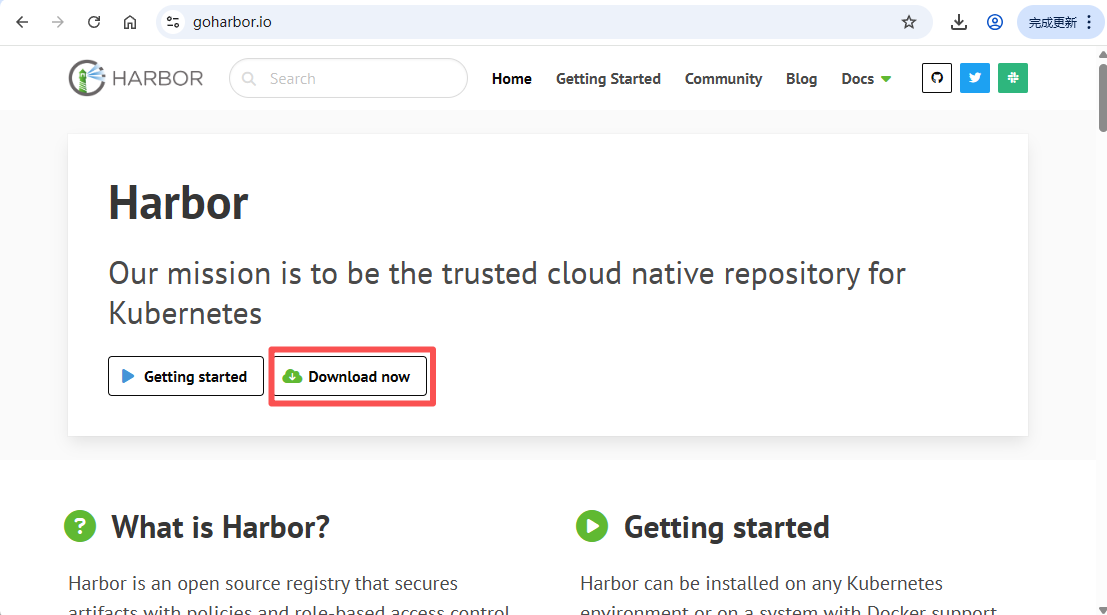
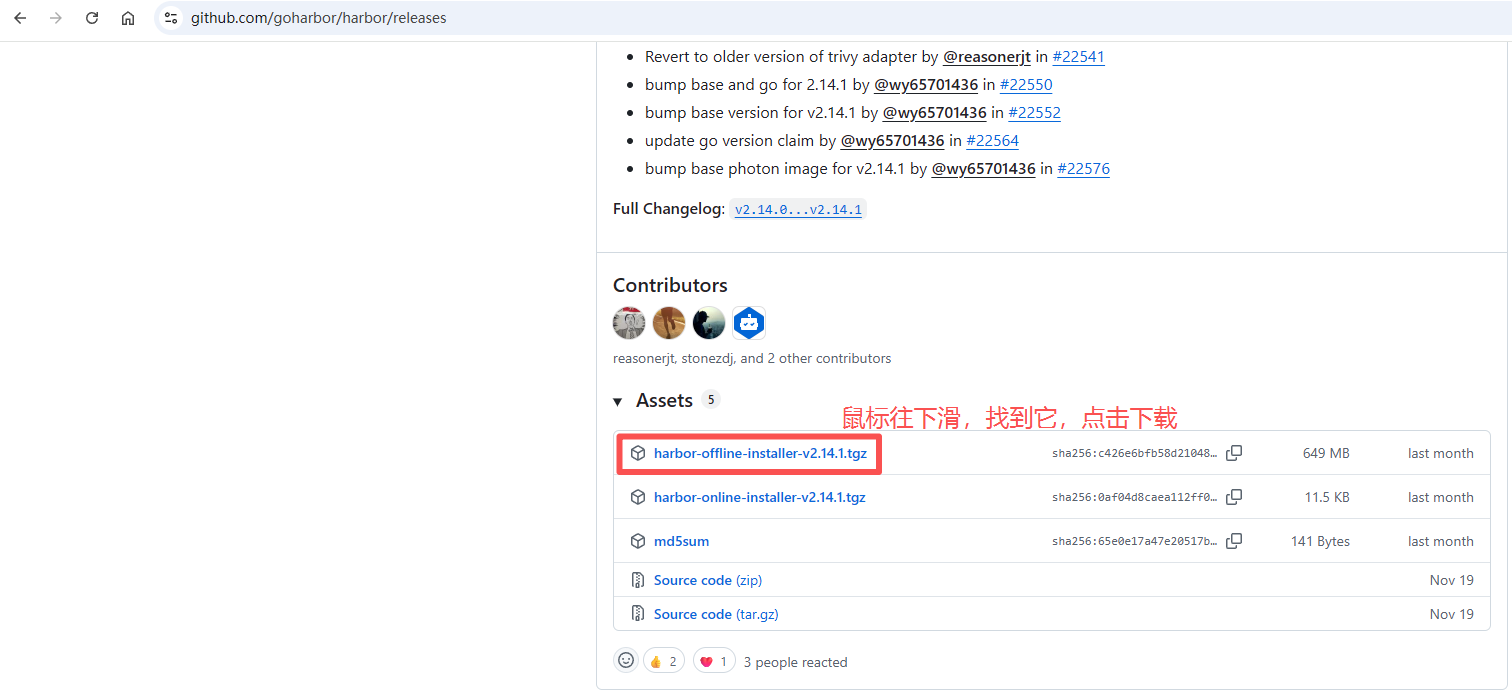
1. 下载Harbor安装包
bash
[root@localhost ~]# wget https://github.com/goharbor/harbor/releases/download/v2.14.1/harbor-offline-installer-v2.14.1.tgz
--2025-12-20 03:39:45--  https://github.com/goharbor/harbor/releases/download/v2.14.1/harbor-offline-installer-v2.14.1.tgz
Resolving github.com (github.com)... 20.205.243.166
Connecting to github.com (github.com)|20.205.243.166|:443... connected.
HTTP request sent, awaiting response... 302 Found
Location: https://release-assets.githubusercontent.com/github-production-release-asset/50613991/01508bef-5c2c-40bb-bc66-f40e34ad2cae?sp=r&sv=2018-11-09&sr=b&spr=https&se=2025-12-20T09%3A14%3A21Z&rscd=attachment%3B+filename%3Dharbor-offline-installer-v2.14.1.tgz&rsct=application%2Foctet-stream&skoid=96c2d410-5711-43a1-aedd-ab1947aa7ab0&sktid=398a6654-997b-47e9-b12b-9515b896b4de&skt=2025-12-20T08%3A13%3A28Z&ske=2025-12-20T09%3A14%3A21Z&sks=b&skv=2018-11-09&sig=m0q7k4Y9%2FC%2FfWBdM%2B%2BHZCo1d%2FRwMUghmT75rYiKnYww%3D&jwt=eyJ0eXAiOiJKV1QiLCJhbGciOiJIUzI1NiJ9.eyJpc3MiOiJnaXRodWIuY29tIiwiYXVkIjoicmVsZWFzZS1hc3NldHMuZ2l0aHVidXNlcmNvbnRlbnQuY29tIiwia2V5Ijoia2V5MSIsImV4cCI6MTc2NjIyMzU4NSwibmJmIjoxNzY2MjE5OTg1LCJwYXRoIjoicmVsZWFzZWFzc2V0cHJvZHVjdGlvbi5ibG9iLmNvcmUud2luZG93cy5uZXQifQ.3unTrlFSO_v5b30v1WXVNE6dDlpQzyCYKWzOxPImfxw&response-content-disposition=attachment%3B%20filename%3Dharbor-offline-installer-v2.14.1.tgz&response-content-type=application%2Foctet-stream [following]
--2025-12-20 03:39:46--  https://release-assets.githubusercontent.com/github-production-release-asset/50613991/01508bef-5c2c-40bb-bc66-f40e34ad2cae?sp=r&sv=2018-11-09&sr=b&spr=https&se=2025-12-20T09%3A14%3A21Z&rscd=attachment%3B+filename%3Dharbor-offline-installer-v2.14.1.tgz&rsct=application%2Foctet-stream&skoid=96c2d410-5711-43a1-aedd-ab1947aa7ab0&sktid=398a6654-997b-47e9-b12b-9515b896b4de&skt=2025-12-20T08%3A13%3A28Z&ske=2025-12-20T09%3A14%3A21Z&sks=b&skv=2018-11-09&sig=m0q7k4Y9%2FC%2FfWBdM%2B%2BHZCo1d%2FRwMUghmT75rYiKnYww%3D&jwt=eyJ0eXAiOiJKV1QiLCJhbGciOiJIUzI1NiJ9.eyJpc3MiOiJnaXRodWIuY29tIiwiYXVkIjoicmVsZWFzZS1hc3NldHMuZ2l0aHVidXNlcmNvbnRlbnQuY29tIiwia2V5Ijoia2V5MSIsImV4cCI6MTc2NjIyMzU4NSwibmJmIjoxNzY2MjE5OTg1LCJwYXRoIjoicmVsZWFzZWFzc2V0cHJvZHVjdGlvbi5ibG9iLmNvcmUud2luZG93cy5uZXQifQ.3unTrlFSO_v5b30v1WXVNE6dDlpQzyCYKWzOxPImfxw&response-content-disposition=attachment%3B%20filename%3Dharbor-offline-installer-v2.14.1.tgz&response-content-type=application%2Foctet-stream
Resolving release-assets.githubusercontent.com (release-assets.githubusercontent.com)... 185.199.108.133, 185.199.109.133, 185.199.110.133
Connecting to release-assets.githubusercontent.com (release-assets.githubusercontent.com)|185.199.108.133|:443... failed: Connection refused.
Connecting to release-assets.githubusercontent.com (release-assets.githubusercontent.com)|185.199.109.133|:443... connected.
HTTP request sent, awaiting response... 200 OK
Length: 680961237 (649M) [application/octet-stream]
Saving to: 'harbor-offline-installer-v2.14.1.tgz'

harbor-offline-installer-v2.14.1. 100%[============================================================>] 649.42M  9.95MB/s    in 77s

2025-12-20 03:41:24 (8.47 MB/s) - 'harbor-offline-installer-v2.14.1.tgz' saved [680961237/680961237]

[root@localhost ~]# ls -l harbor-offline-installer-v2.14.1.tgz
-rw-r--r--. 1 root root 680961237 Nov 24 06:19 harbor-offline-installer-v2.14.1.tgz
[root@localhost ~]#
2. 解压安装包
bash
[root@localhost ~]# tar xf harbor-offline-installer-v2.14.1.tgz
[root@localhost ~]# cd harbor/
3. 配置Harbor
bash
[root@localhost harbor]# cp harbor.yml.tmpl harbor.yml
[root@localhost harbor]# vim harbor.yml
关键配置修改:
yaml
[root@localhost harbor]# vim harbor.yml
# Configuration file of Harbor

# The IP address or hostname to access admin UI and registry service.
# DO NOT use localhost or 127.0.0.1, because Harbor needs to be accessed by external clients.
hostname: 192.168.100.147  # 替换为你的服务器IP或域名

# http related config
http:   # 如果使用HTTPS,可配置https部分
  # port for http, default is 80. If https enabled, this port will redirect to https port
  port: 5000

# 注释掉 https
# https related config
# https:
  # https port for harbor, default is 443
  # port: 443
  # The path of cert and key files for nginx
  # certificate: /your/certificate/path
  # private_key: /your/private/key/path
  # enable strong ssl ciphers (default: false)
  # strong_ssl_ciphers: false

# # Harbor will set ipv4 enabled only by default if this block is not configured
# # Otherwise, please uncomment this block to configure your own ip_family stacks
# ip_family:
#   # ipv6Enabled set to true if ipv6 is enabled in docker network, currently it affected the nginx related component
#   ipv6:
#     enabled: false
#   # ipv4Enabled set to true by default, currently it affected the nginx related component
#   ipv4:
#     enabled: true

# # Uncomment following will enable tls communication between all harbor components
# internal_tls:
#   # set enabled to true means internal tls is enabled
#   enabled: true
#   # put your cert and key files on dir
#   dir: /etc/harbor/tls/internal


# Uncomment external_url if you want to enable external proxy
# And when it enabled the hostname will no longer used
# external_url: https://reg.mydomain.com:8433

# The initial password of Harbor admin
# It only works in first time to install harbor
# Remember Change the admin password from UI after launching Harbor.
harbor_admin_password: Harbor12345  # 修改为强密码
重要提示:
- 如果使用HTTP而非HTTPS,需在
/etc/docker/daemon.json中配置insecure-registries - 确保
hostname不是127.0.0.1或localhost
4. 创建数据存储目录
bash
[root@localhost ~]# mkdir -p /data/harbor5. 准备Harbor安装
bash
[root@localhost harbor]# pwd
/root/harbor
[root@localhost harbor]# ls
common.sh  harbor.v2.14.1.tar.gz  harbor.yml  harbor.yml.tmpl  install.sh  LICENSE  prepare
[root@localhost harbor]# ./prepare
prepare base dir is set to /root/harbor
Unable to find image 'goharbor/prepare:v2.14.1' locally
v2.14.1: Pulling from goharbor/prepare
a9ffbefd365d: Pull complete
4c0a27a77286: Pull complete
1a87069e7898: Pull complete
2e7dbc0dff4d: Pull complete
790260bd2a26: Pull complete
933b1fe8973f: Pull complete
e07144a1f50b: Pull complete
57189dc4764b: Pull complete
8b1fd2616544: Pull complete
8cad672804d2: Pull complete
Digest: sha256:b70b9bca2d11f5debd8a6c99006677da9e343259f0343cd180e0e3c453d0b41d
Status: Downloaded newer image for goharbor/prepare:v2.14.1
WARNING:root:WARNING: HTTP protocol is insecure. Harbor will deprecate http protocol in the future. Please make sure to upgrade to https
Generated configuration file: /config/portal/nginx.conf
Generated configuration file: /config/log/logrotate.conf
Generated configuration file: /config/log/rsyslog_docker.conf
Generated configuration file: /config/nginx/nginx.conf
Generated configuration file: /config/core/env
Generated configuration file: /config/core/app.conf
Generated configuration file: /config/registry/config.yml
Generated configuration file: /config/registryctl/env
Generated configuration file: /config/registryctl/config.yml
Generated configuration file: /config/db/env
Generated configuration file: /config/jobservice/env
Generated configuration file: /config/jobservice/config.yml
copy /data/secret/tls/harbor_internal_ca.crt to shared trust ca dir as name harbor_internal_ca.crt ...
ca file /hostfs/data/secret/tls/harbor_internal_ca.crt is not exist
copy  to shared trust ca dir as name storage_ca_bundle.crt ...
copy None to shared trust ca dir as name redis_tls_ca.crt ...
Generated and saved secret to file: /data/secret/keys/secretkey
Successfully called func: create_root_cert
Generated configuration file: /compose_location/docker-compose.yml
Clean up the input dir
[root@localhost harbor]# docker images
REPOSITORY         TAG       IMAGE ID       CREATED       SIZE
goharbor/prepare   v2.14.1   a348ca801d59   4 weeks ago   197MB
[root@localhost harbor]#
7. 安装Harbor
bash
[root@localhost harbor]# ./install.sh

[Step 0]: checking if docker is installed ...

Note: docker version: 26.1.3

[Step 1]: checking docker-compose is installed ...

Note: Docker Compose version v2.27.0

[Step 2]: loading Harbor images ...
69ced5930fe4: Loading layer [==================================================>]  9.179MB/9.179MB
3746c16404bc: Loading layer [==================================================>]  4.096kB/4.096kB
b4358af0ace4: Loading layer [==================================================>]  3.072kB/3.072kB
a70c4f830bf4: Loading layer [==================================================>]  155.3MB/155.3MB
3e5aacdd52e8: Loading layer [==================================================>]  16.48MB/16.48MB
3e2a126092f4: Loading layer [==================================================>]  172.7MB/172.7MB
Loaded image: goharbor/trivy-adapter-photon:v2.14.1
6319cad573c2: Loading layer [==================================================>]  11.63MB/11.63MB
b24e988851bd: Loading layer [==================================================>]  39.87MB/39.87MB
473bd7a46f13: Loading layer [==================================================>]  4.608kB/4.608kB
996e0cb80574: Loading layer [==================================================>]   40.8MB/40.8MB
Loaded image: goharbor/harbor-exporter:v2.14.1
fd2c0489bed7: Loading layer [==================================================>]  8.682MB/8.682MB
bc5d8810ce04: Loading layer [==================================================>]  4.096kB/4.096kB
31f24110042c: Loading layer [==================================================>]  18.96MB/18.96MB
92709ccbcdaa: Loading layer [==================================================>]  3.072kB/3.072kB
aa16caf8a5d5: Loading layer [==================================================>]  39.07MB/39.07MB
cb29080e92a6: Loading layer [==================================================>]  58.96MB/58.96MB
Loaded image: goharbor/harbor-registryctl:v2.14.1
Loaded image: goharbor/prepare:v2.14.1
8a99ca8f2eb9: Loading layer [==================================================>]  132.3MB/132.3MB
0ef898a3b014: Loading layer [==================================================>]  3.584kB/3.584kB
66c80c3b472c: Loading layer [==================================================>]  3.072kB/3.072kB
84c6aa27973d: Loading layer [==================================================>]   2.56kB/2.56kB
6c5f9a18fcd5: Loading layer [==================================================>]  3.072kB/3.072kB
04765615ef98: Loading layer [==================================================>]  3.584kB/3.584kB
de111a068a2b: Loading layer [==================================================>]  20.48kB/20.48kB
Loaded image: goharbor/harbor-log:v2.14.1
08b973a02e3e: Loading layer [==================================================>]  11.63MB/11.63MB
c4e877487aa9: Loading layer [==================================================>]  3.584kB/3.584kB
060eb5b1d14c: Loading layer [==================================================>]   2.56kB/2.56kB
4f3bfcfd4a90: Loading layer [==================================================>]  63.08MB/63.08MB
ed97b393a921: Loading layer [==================================================>]  64.01MB/64.01MB
Loaded image: goharbor/harbor-jobservice:v2.14.1
80e5a0037ff8: Loading layer [==================================================>]  16.64MB/16.64MB
dc5f31d0d66a: Loading layer [==================================================>]  117.6MB/117.6MB
f039ad06c4d9: Loading layer [==================================================>]  3.072kB/3.072kB
38bcbc0daf03: Loading layer [==================================================>]   59.9kB/59.9kB
f432673f527e: Loading layer [==================================================>]  61.95kB/61.95kB
Loaded image: goharbor/redis-photon:v2.14.1
04a5d0b93c84: Loading layer [==================================================>]  119.4MB/119.4MB
Loaded image: goharbor/nginx-photon:v2.14.1
983a770e51d3: Loading layer [==================================================>]  8.682MB/8.682MB
9a2f7edb09e9: Loading layer [==================================================>]  4.096kB/4.096kB
3e4ce2a1dae0: Loading layer [==================================================>]  3.072kB/3.072kB
1281c4618058: Loading layer [==================================================>]  18.96MB/18.96MB
6fffed6a6b8c: Loading layer [==================================================>]  19.89MB/19.89MB
Loaded image: goharbor/registry-photon:v2.14.1
32ae5b9cd191: Loading layer [==================================================>]  119.4MB/119.4MB
ab1dd6675525: Loading layer [==================================================>]  6.985MB/6.985MB
900c3eaf3b86: Loading layer [==================================================>]  253.4kB/253.4kB
cbf19a3d571d: Loading layer [==================================================>]  1.539MB/1.539MB
Loaded image: goharbor/harbor-portal:v2.14.1
7d713c0f3954: Loading layer [==================================================>]  11.63MB/11.63MB
7b412a03d8ca: Loading layer [==================================================>]  3.584kB/3.584kB
22369415b39c: Loading layer [==================================================>]   2.56kB/2.56kB
9b94bc671e19: Loading layer [==================================================>]  75.45MB/75.45MB
3de05960e248: Loading layer [==================================================>]  5.632kB/5.632kB
3d2414ebf58a: Loading layer [==================================================>]  130.6kB/130.6kB
7cffbccff026: Loading layer [==================================================>]  209.9kB/209.9kB
49dbd54c115b: Loading layer [==================================================>]  76.72MB/76.72MB
dcb5b633bb2a: Loading layer [==================================================>]   2.56kB/2.56kB
Loaded image: goharbor/harbor-core:v2.14.1
6d3e649ecb85: Loading layer [==================================================>]  16.64MB/16.64MB
871466b16534: Loading layer [==================================================>]  182.6MB/182.6MB
6fae127e9825: Loading layer [==================================================>]  26.71MB/26.71MB
ba7d9110bba7: Loading layer [==================================================>]   11.9MB/11.9MB
8141e416675c: Loading layer [==================================================>]   5.12kB/5.12kB
187d048030de: Loading layer [==================================================>]  6.144kB/6.144kB
9f19c39e3c58: Loading layer [==================================================>]  3.072kB/3.072kB
d8ba3a470105: Loading layer [==================================================>]  2.048kB/2.048kB
fc590a59656f: Loading layer [==================================================>]   2.56kB/2.56kB
9c5b420a224a: Loading layer [==================================================>]  14.85kB/14.85kB
Loaded image: goharbor/harbor-db:v2.14.1


[Step 3]: preparing environment ...

[Step 4]: preparing harbor configs ...
prepare base dir is set to /root/harbor
WARNING:root:WARNING: HTTP protocol is insecure. Harbor will deprecate http protocol in the future. Please make sure to upgrade to https
Clearing the configuration file: /config/portal/nginx.conf
Clearing the configuration file: /config/log/logrotate.conf
Clearing the configuration file: /config/log/rsyslog_docker.conf
Clearing the configuration file: /config/nginx/nginx.conf
Clearing the configuration file: /config/core/env
Clearing the configuration file: /config/core/app.conf
Clearing the configuration file: /config/registry/passwd
Clearing the configuration file: /config/registry/config.yml
Clearing the configuration file: /config/registryctl/env
Clearing the configuration file: /config/registryctl/config.yml
Clearing the configuration file: /config/db/env
Clearing the configuration file: /config/jobservice/env
Clearing the configuration file: /config/jobservice/config.yml
Generated configuration file: /config/portal/nginx.conf
Generated configuration file: /config/log/logrotate.conf
Generated configuration file: /config/log/rsyslog_docker.conf
Generated configuration file: /config/nginx/nginx.conf
Generated configuration file: /config/core/env
Generated configuration file: /config/core/app.conf
Generated configuration file: /config/registry/config.yml
Generated configuration file: /config/registryctl/env
Generated configuration file: /config/registryctl/config.yml
Generated configuration file: /config/db/env
Generated configuration file: /config/jobservice/env
Generated configuration file: /config/jobservice/config.yml
copy /data/secret/tls/harbor_internal_ca.crt to shared trust ca dir as name harbor_internal_ca.crt ...
ca file /hostfs/data/secret/tls/harbor_internal_ca.crt is not exist
copy  to shared trust ca dir as name storage_ca_bundle.crt ...
copy None to shared trust ca dir as name redis_tls_ca.crt ...
loaded secret from file: /data/secret/keys/secretkey
Generated configuration file: /compose_location/docker-compose.yml
Clean up the input dir


Note: stopping existing Harbor instance ...


[Step 5]: starting Harbor ...
[+] Running 10/10
 ✔ Network harbor_harbor        Created                                                                                           0.1s
 ✔ Container harbor-log         Started                                                                                           0.7s
 ✔ Container harbor-portal      Started                                                                                           2.0s
 ✔ Container registryctl        Started                                                                                           2.4s
 ✔ Container registry           Started                                                                                           2.1s
 ✔ Container redis              Started                                                                                           2.6s
 ✔ Container harbor-db          Started                                                                                           2.3s
 ✔ Container harbor-core        Started                                                                                           3.6s
 ✔ Container harbor-jobservice  Started                                                                                           4.7s
 ✔ Container nginx              Started                                                                                           4.9s
✔ ----Harbor has been installed and started successfully.----
[root@localhost harbor]#
安装成功提示:
✔ ----Harbor has been installed and started successfully.----四、配置Docker客户端信任Harbor
1. 修改Docker服务配置文件
在 ExecStart= 添加 --insecure-registry=192.168.100.147:5000 参数,允许Docker客户端与私有镜像仓库(IP: 192.168.100.147:5000)建立不安全连接(跳过HTTPS证书验证)
shell
[root@localhost harbor]# vim /usr/lib/systemd/system/docker.service
[Unit]
Description=Docker Application Container Engine
Documentation=https://docs.docker.com
After=network-online.target docker.socket firewalld.service containerd.service time-set.target
Wants=network-online.target containerd.service
Requires=docker.socket

[Service]
Type=notify
# the default is not to use systemd for cgroups because the delegate issues still
# exists and systemd currently does not support the cgroup feature set required
# for containers run by docker
ExecStart=/usr/bin/dockerd -H fd:// --containerd=/run/containerd/containerd.sock --insecure-registries=192.168.100.147:5000
ExecReload=/bin/kill -s HUP $MAINPID
TimeoutStartSec=0
RestartSec=2
Restart=always
...省略N
2. 配置Docker加速器(可选)
- 因为私有镜像仓库用不到外网,所以此处就不配置华为云镜像加速器了
bash
vim /etc/docker/daemon.json添加以下内容:
json
[root@localhost ~]# cat /etc/docker/daemon.json
{
  "registry-mirrors": [ "https://448b823acc1c4d5b8cf5c81ea9bfce60.mirror.swr.myhuaweicloud.com" ]
}
[root@localhost ~]#
3. 重启Docker服务
bash
[root@localhost harbor]# systemctl daemon-reload
[root@localhost harbor]# systemctl restart docker
五、访问和测试Harbor
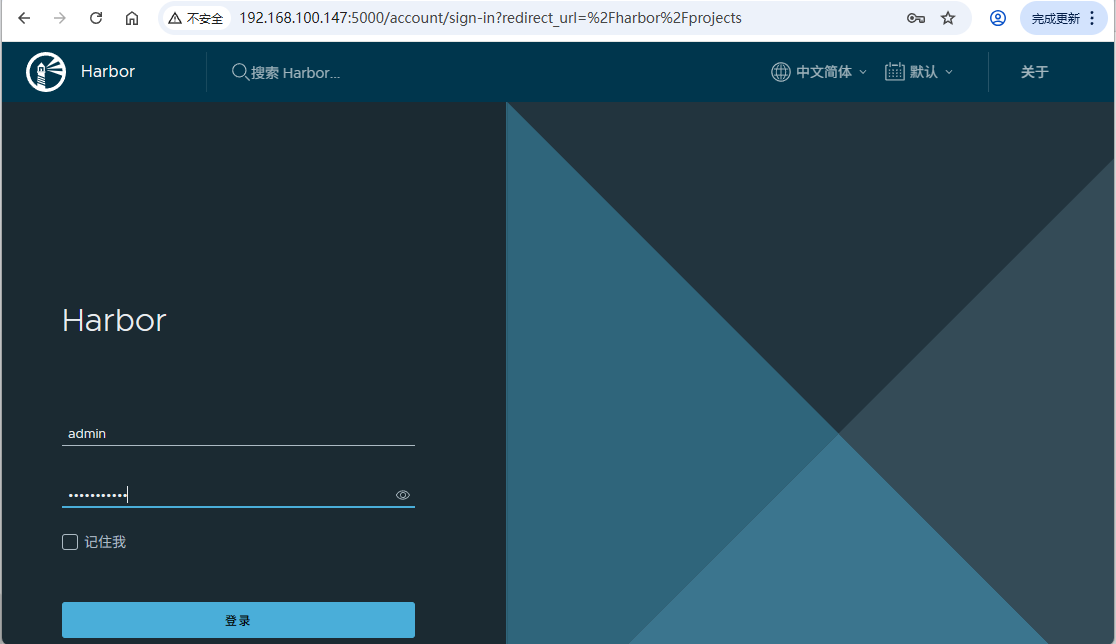
1. 访问Harbor Web界面
在浏览器中访问:http://192.168.100.147:5000
默认登录信息:
- 用户名: admin
- 密码: 你设置的harbor_admin_password
2. 新建项目
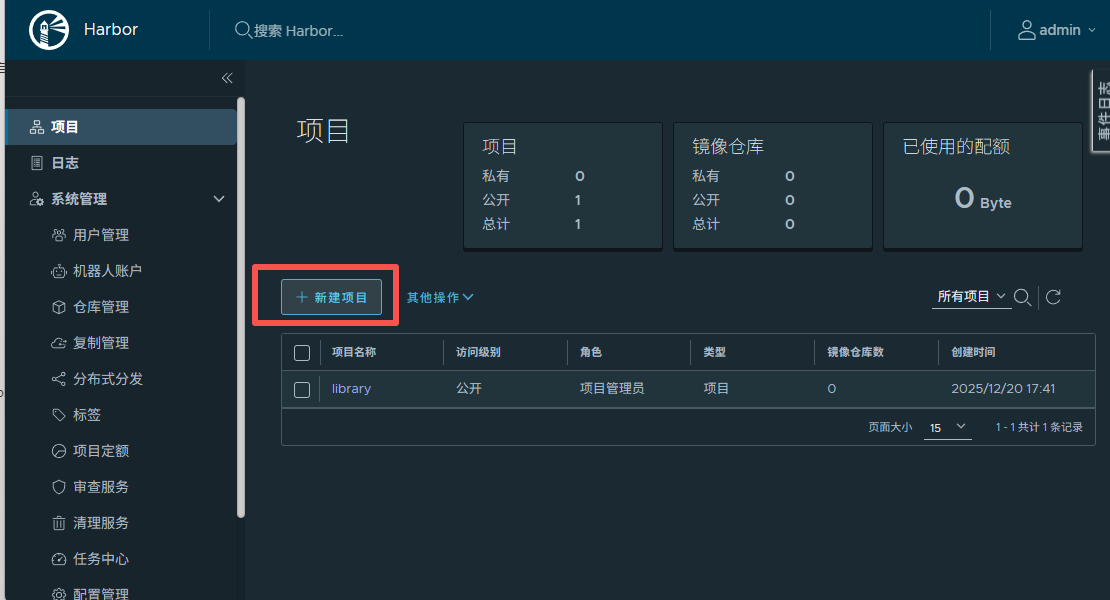
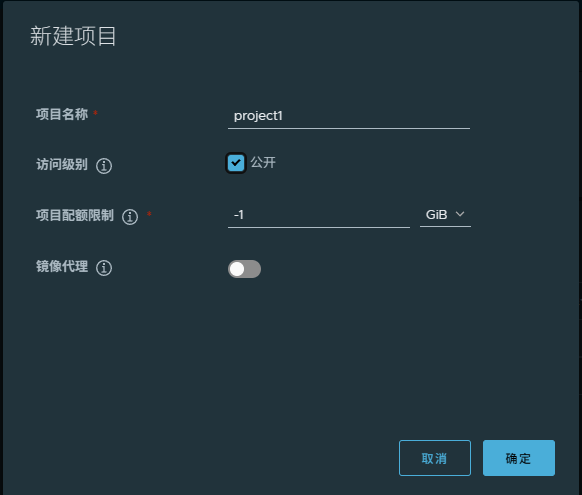
- 项目名称跟阿里云的命名空间和华为云的组织是一个意思
- 公开:就是公司内网都可以访问私有镜像仓库
- 存储容量默认 -1表示大小没有限制
3. 推送镜像

shell
# 从 docker 拉取 nginx 镜像
[root@localhost ~]# docker pull nginx
Using default tag: latest
latest: Pulling from library/nginx
1733a4cd5954: Pull complete
5b219a92f92a: Pull complete
ee3a09d2248a: Pull complete
7382b41547b8: Pull complete
9ee60c6c0558: Pull complete
114e699da838: Pull complete
5b5fa0b64d74: Pull complete
Digest: sha256:fb01117203ff38c2f9af91db1a7409459182a37c87cced5cb442d1d8fcc66d19
Status: Downloaded newer image for nginx:latest
docker.io/library/nginx:latest
[root@localhost ~]# docker images | grep nginx
nginx                           latest    576306625d79   10 days ago   152MB
goharbor/nginx-photon           v2.14.1   021984c1f38b   4 weeks ago   158MB
[root@localhost ~]#
4. Docker客户端登录Harbor
bash
[root@localhost ~]# docker login 192.168.100.147:5000
Username: admin
Password:
WARNING! Your password will be stored unencrypted in /root/.docker/config.json.
Configure a credential helper to remove this warning. See
https://docs.docker.com/engine/reference/commandline/login/#credentials-store

Login Succeeded
[root@localhost ~]#
5. 测试推送镜像
bash
# 为镜像打标签
[root@localhost ~]# docker tag nginx:latest 192.168.100.147:5000/project1/nginx:latest
[root@localhost ~]# docker images | grep nginx
192.168.100.147:5000/project1/nginx   latest    576306625d79   10 days ago   152MB
nginx                                 latest    576306625d79   10 days ago   152MB
goharbor/nginx-photon                 v2.14.1   021984c1f38b   4 weeks ago   158MB
[root@localhost ~]#

# 推送镜像
[root@localhost ~]# docker push 192.168.100.147:5000/project1/nginx:latest
The push refers to repository [192.168.100.147:5000/project1/nginx]
8921786c2de3: Pushed
08ba9962589f: Pushed
6e32bc56a725: Pushed
6898c33749d5: Pushed
69f56ce8c461: Pushed
20cf308e6957: Pushed
77a2b55fbe8b: Pushed
latest: digest: sha256:460a7081b2a0e17940688563b294c03f326cd96dc43d768691f58abb50f7746f size: 1778
[root@localhost ~]#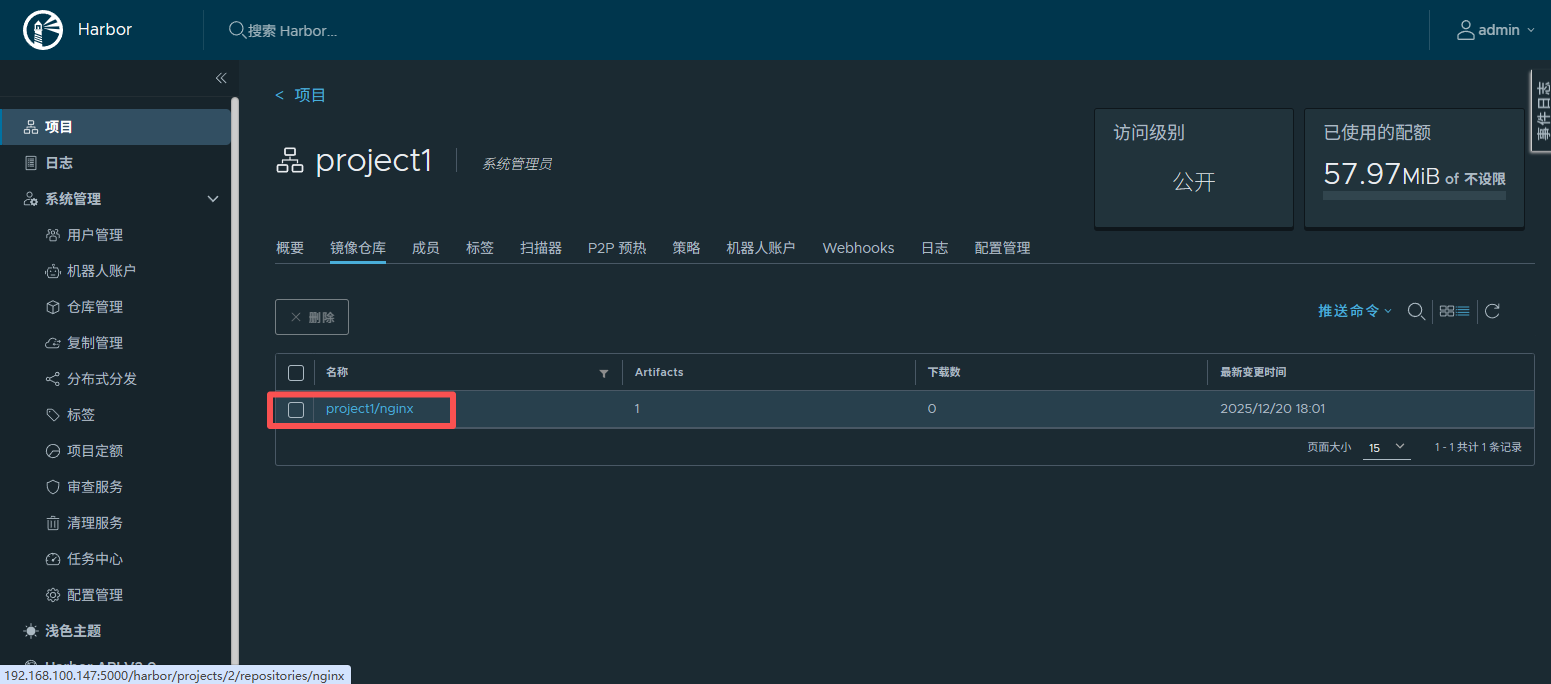
6. 测试拉取镜像
shell
# 删除掉 nginx 镜像
[root@localhost ~]# docker rmi nginx:latest 192.168.100.147:5000/project1/nginx:latest
Untagged: nginx:latest
Untagged: nginx@sha256:fb01117203ff38c2f9af91db1a7409459182a37c87cced5cb442d1d8fcc66d19
Untagged: 192.168.100.147:5000/project1/nginx:latest
Untagged: 192.168.100.147:5000/project1/nginx@sha256:460a7081b2a0e17940688563b294c03f326cd96dc43d768691f58abb50f7746f
Deleted: sha256:576306625d797a52045ad158b601d5a011f7a7f16e4ccc909809f02dd6047c37
Deleted: sha256:b97c52357821ac794246c890299695624c55b94551032ab74b9de33af039834d
Deleted: sha256:c8b5930fc7001a520bb8b378e277b64a877b8e7bbcf2b812a9a45e5dd7ac6f36
Deleted: sha256:596475b6a963eaebf8d0e020364fbd3edcc4b008e041ef0b18e78d5686b6fa08
Deleted: sha256:b30188818a3abd03efb99369c740d650c14ea93d2e20bbbbd5283082b647f287
Deleted: sha256:bd1491aa457e9bcc06fdde660276d1338fdeedc53de2eeee16343de184c40e54
Deleted: sha256:28717e334a4a71473fd8c28a688e704e2f3aa05b5efff1b17be9e10f374a872c
Deleted: sha256:77a2b55fbe8b9984ce0af3ffc0b0ab62507668e63306ec161a585e587a3eb164
[root@localhost ~]# docker images
REPOSITORY                      TAG       IMAGE ID       CREATED       SIZE
goharbor/harbor-exporter        v2.14.1   b17feded299c   4 weeks ago   131MB
goharbor/redis-photon           v2.14.1   7c5bd068b0bb   4 weeks ago   172MB
goharbor/trivy-adapter-photon   v2.14.1   50f45016f507   4 weeks ago   393MB
goharbor/harbor-registryctl     v2.14.1   843c26ac80f4   4 weeks ago   166MB
goharbor/registry-photon        v2.14.1   a73ac978bd0c   4 weeks ago   87.4MB
goharbor/nginx-photon           v2.14.1   021984c1f38b   4 weeks ago   158MB
goharbor/harbor-log             v2.14.1   d54bee81690c   4 weeks ago   170MB
goharbor/harbor-jobservice      v2.14.1   259194ced7a0   4 weeks ago   177MB
goharbor/harbor-core            v2.14.1   741c39eff996   4 weeks ago   203MB
goharbor/harbor-portal          v2.14.1   7903b5b8a6cf   4 weeks ago   166MB
goharbor/harbor-db              v2.14.1   db932026f91d   4 weeks ago   273MB
goharbor/prepare                v2.14.1   a348ca801d59   4 weeks ago   197MB
[root@localhost ~]#

# 拉取 nginx 镜像
[root@localhost ~]# docker pull 192.168.100.147:5000/project1/nginx:latest
latest: Pulling from project1/nginx
5ba766340b3d: Pull complete
5b219a92f92a: Pull complete
ee3a09d2248a: Pull complete
7382b41547b8: Pull complete
9ee60c6c0558: Pull complete
114e699da838: Pull complete
5b5fa0b64d74: Pull complete
Digest: sha256:460a7081b2a0e17940688563b294c03f326cd96dc43d768691f58abb50f7746f
Status: Downloaded newer image for 192.168.100.147:5000/project1/nginx:latest
192.168.100.147:5000/project1/nginx:latest
[root@localhost ~]# docker images
REPOSITORY                            TAG       IMAGE ID       CREATED       SIZE
192.168.100.147:5000/project1/nginx   latest    576306625d79   10 days ago   152MB
goharbor/harbor-exporter              v2.14.1   b17feded299c   4 weeks ago   131MB
goharbor/redis-photon                 v2.14.1   7c5bd068b0bb   4 weeks ago   172MB
goharbor/trivy-adapter-photon         v2.14.1   50f45016f507   4 weeks ago   393MB
goharbor/harbor-registryctl           v2.14.1   843c26ac80f4   4 weeks ago   166MB
goharbor/registry-photon              v2.14.1   a73ac978bd0c   4 weeks ago   87.4MB
goharbor/nginx-photon                 v2.14.1   021984c1f38b   4 weeks ago   158MB
goharbor/harbor-log                   v2.14.1   d54bee81690c   4 weeks ago   170MB
goharbor/harbor-jobservice            v2.14.1   259194ced7a0   4 weeks ago   177MB
goharbor/harbor-core                  v2.14.1   741c39eff996   4 weeks ago   203MB
goharbor/harbor-portal                v2.14.1   7903b5b8a6cf   4 weeks ago   166MB
goharbor/harbor-db                    v2.14.1   db932026f91d   4 weeks ago   273MB
goharbor/prepare                      v2.14.1   a348ca801d59   4 weeks ago   197MB
[root@localhost ~]#
六、Harbor常用管理命令
启动Harbor
bash
[root@localhost ~]# cd /root/harbor/
[root@localhost harbor]# docker compose up -d
[+] Running 9/9
 ✔ Container harbor-log         Started                                                                                           0.5s
 ✔ Container harbor-db          Started                                                                                           1.9s
 ✔ Container registryctl        Started                                                                                           2.0s
 ✔ Container harbor-portal      Started                                                                                           1.7s
 ✔ Container redis              Started                                                                                           2.0s
 ✔ Container registry           Started                                                                                           1.8s
 ✔ Container harbor-core        Started                                                                                           3.2s
 ✔ Container nginx              Started                                                                                           4.3s
 ✔ Container harbor-jobservice  Started                                                                                           4.1s
[root@localhost harbor]#
[root@localhost harbor]# ss -antl
State    Recv-Q   Send-Q     Local Address:Port       Peer Address:Port   Process
LISTEN   0        128              0.0.0.0:22              0.0.0.0:*
LISTEN   0        128              0.0.0.0:5000            0.0.0.0:*
LISTEN   0        128            127.0.0.1:1514            0.0.0.0:*
LISTEN   0        128                 [::]:22                 [::]:*
LISTEN   0        128                 [::]:5000               [::]:*
[root@localhost harbor]#
停止Harbor
bash
[root@localhost ~]# cd /root/harbor/
[root@localhost harbor]# ss -antl
State          Recv-Q          Send-Q                   Local Address:Port                   Peer Address:Port         Process
LISTEN         0               128                            0.0.0.0:22                          0.0.0.0:*
LISTEN         0               128                            0.0.0.0:5000                        0.0.0.0:*
LISTEN         0               128                          127.0.0.1:1514                        0.0.0.0:*
LISTEN         0               128                               [::]:22                             [::]:*
LISTEN         0               128                               [::]:5000                           [::]:*

[root@localhost harbor]# docker compose stop
[+] Stopping 9/9
 ✔ Container registryctl        Stopped                                                                                           0.2s
 ✔ Container nginx              Stopped                                                                                           0.2s
 ✔ Container harbor-jobservice  Stopped                                                                                           0.2s
 ✔ Container harbor-portal      Stopped                                                                                           0.1s
 ✔ Container harbor-core        Stopped                                                                                           0.2s
 ✔ Container harbor-db          Stopped                                                                                           0.2s
 ✔ Container registry           Stopped                                                                                           0.1s
 ✔ Container redis              Stopped                                                                                           0.2s
 ✔ Container harbor-log         Stopped                                                                                          10.1s
[root@localhost harbor]# ss -antl
State          Recv-Q          Send-Q                   Local Address:Port                   Peer Address:Port         Process
LISTEN         0               128                            0.0.0.0:22                          0.0.0.0:*
LISTEN         0               128                               [::]:22                             [::]:*
暂停Harbor
bash
cd /root/harbor/
docker compose pause
七、报错信息
执行 ./prepare 报错
shell
[root@localhost harbor]# ./prepare
prepare base dir is set to /root/harbor
Unable to find image 'goharbor/prepare:v2.14.1' locally
docker: Error response from daemon: Get "https://registry-1.docker.io/v2/": net/http: request canceled while waiting for connection (Client.Timeout exceeded while awaiting headers).
See 'docker run --help'.
解决:配置加速器
shell
[root@localhost ~]# cat /etc/docker/daemon.json
{
  "registry-mirrors": [ "https://448b823acc1c4d5b8cf5c81ea9bfce60.mirror.swr.myhuaweicloud.com" ]
}
[root@localhost ~]# systemctl restart docker.service