概念:GridView 是 Flutter 中用于创建网格布局的滚动组件,类似于表格但支持滚动。
四种创建方式
①GridView.count - 固定列数,适合简单布局
②GridView.extent - 固定最大宽度,适合简单布局
③GridView.builder - 动态创建,适合大量数据
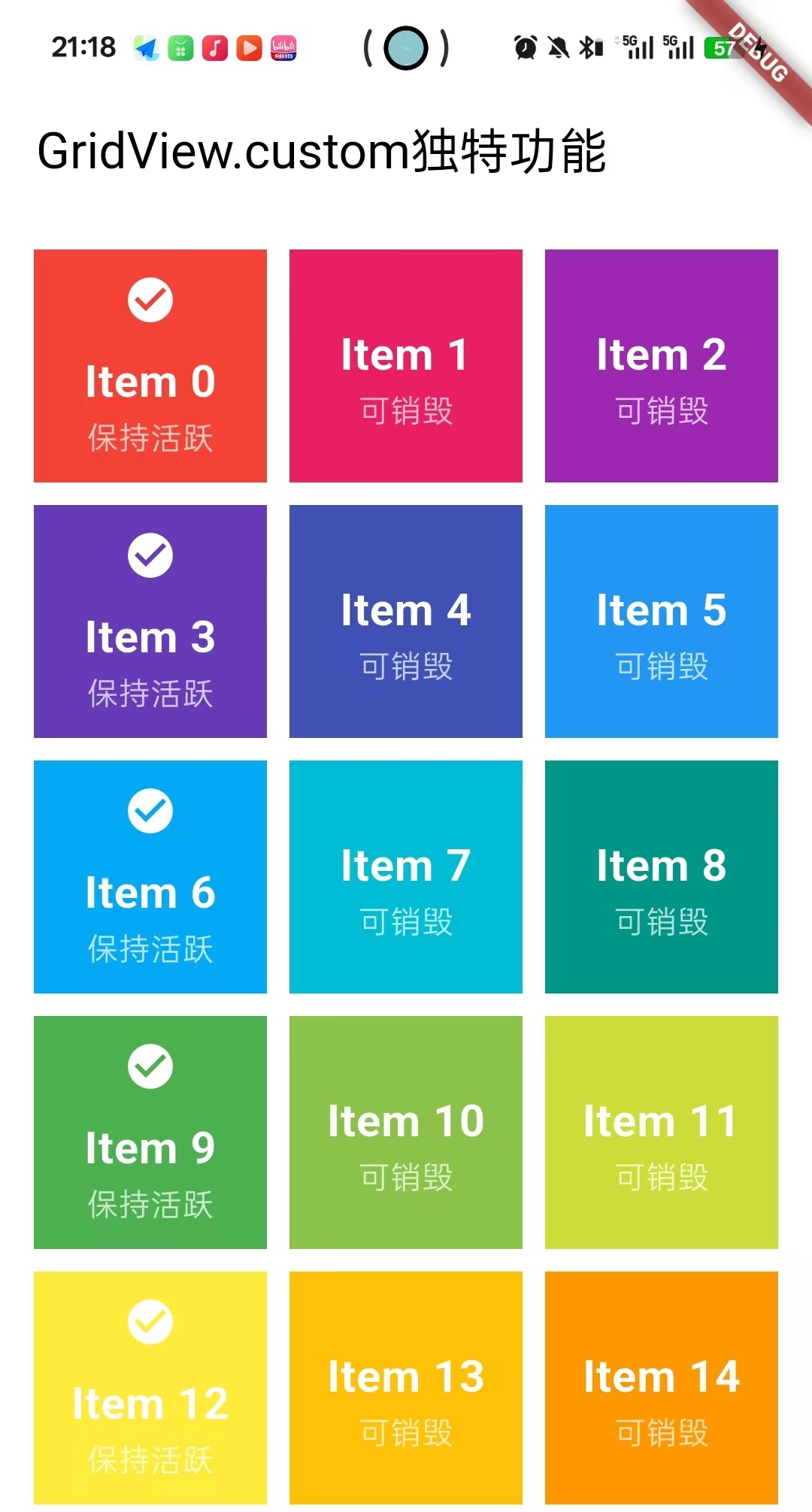
④GridView.custom - 完全自定义,适合复杂需求
当需要瀑布流UI时需要使用到第三方库
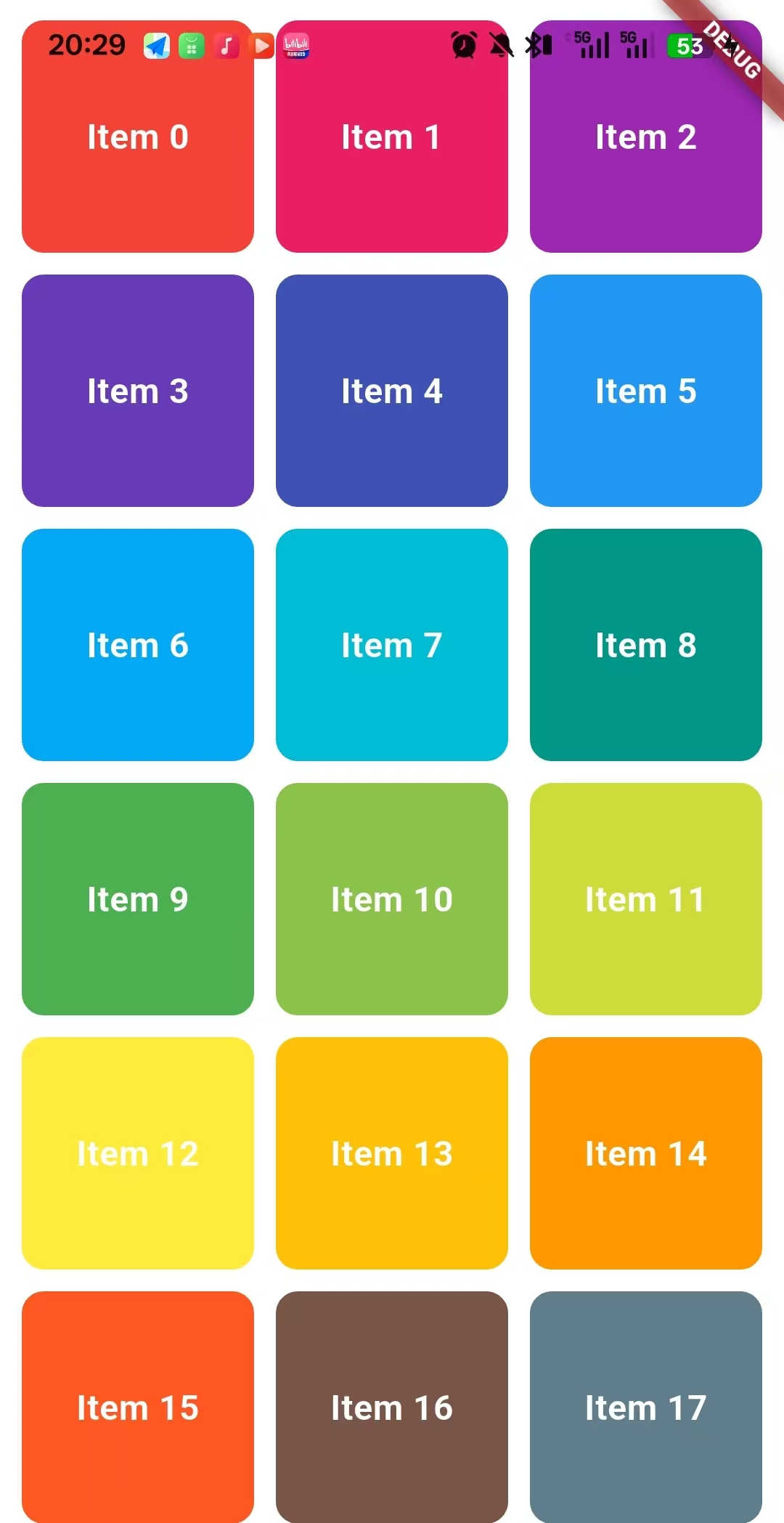
1.GridView.count - 固定列数
Dart
GridView.count(
        crossAxisCount: 3,// 每行3列

        crossAxisSpacing: 10,// 列间距

        mainAxisSpacing: 10,// 行间距

        padding: EdgeInsets.all(10),// 内边距

        childAspectRatio: 1,//子项的宽高比

        children: List.generate(20, (index) {
          return Container(
            decoration: BoxDecoration(
              color: Colors.primaries[index % Colors.primaries.length],
              borderRadius: BorderRadius.circular(10),
            ),
            child: Center(
              child: Text(
                'Item $index',
                style: TextStyle(
                  color: Colors.white,
                  fontSize: 16,
                  fontWeight: FontWeight.bold,
                ),
              ),
            ),
          );
        }),
      )
效果图
2.GridView.extent - 固定最大宽度
Dart
GridView.extent(
        maxCrossAxisExtent: 150, // 每个格子最大宽度150
        crossAxisSpacing: 8, //列间距
        mainAxisSpacing: 8,//行间距
        padding: EdgeInsets.all(12),
        children: List.generate(15, (index) {
          return Card(
            elevation: 3,
            child: Column(
              mainAxisAlignment: MainAxisAlignment.center,
              children: [
                Icon(
                  Icons.star,
                  size: 40,
                  color: Colors.amber,
                ),
                SizedBox(height: 8),
                Text(
                  '产品 $index',
                  style: TextStyle(
                    fontWeight: FontWeight.bold,
                  ),
                ),
                Text(
                  '\$${(index + 1) * 9.99}',
                  style: TextStyle(
                    color: Colors.green,
                    fontSize: 14,
                  ),
                ),
              ],
            ),
          );
        }),
      ),
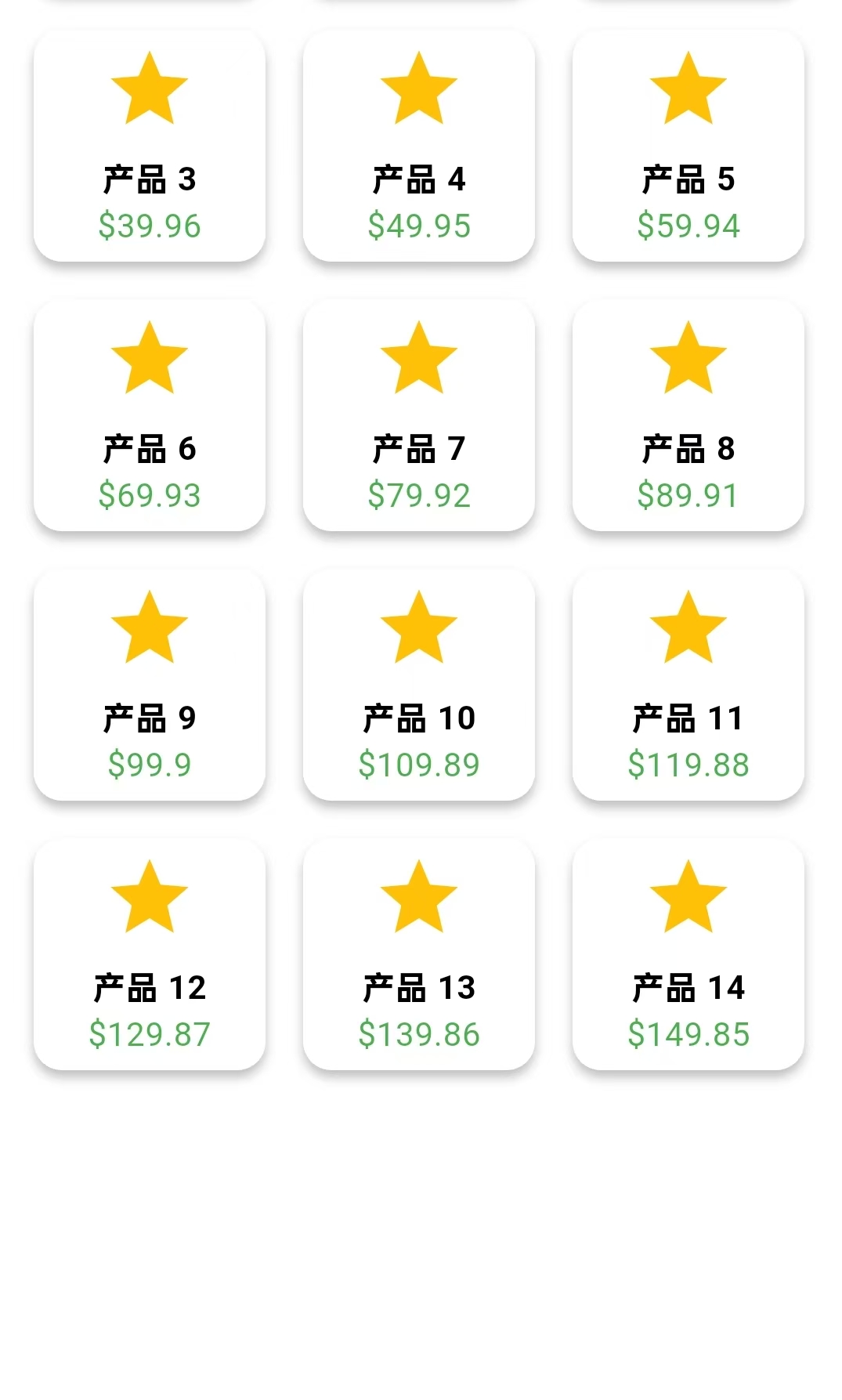
效果图
3.GridView.builder
Dart
import 'dart:async';
import 'package:flutter/cupertino.dart';
import 'package:flutter/material.dart';
import 'package:my_flutter/time_page.dart';

//产品类
class Product {
  final String name; //名字
  final double price; //价钱
  final String imageUrl;//图片

  Product({required this.name, required this.price, required this.imageUrl});
}


class HomePage extends StatefulWidget {
  const HomePage({super.key});

  @override
  State<StatefulWidget> createState() => _HomePageState();
}

class _HomePageState extends State<HomePage> {


  // 准备数据
  final List<Product> products = List.generate(20, (index) {
    return Product(
      name: '商品 $index',
      price: (index + 1) * 10.0,
      imageUrl: 'https://picsum.photos/seed/$index/200/200',
    );
  });

  @override
  Widget build(BuildContext context) {
    return MaterialApp(
      home: Scaffold(
        body: GridView.builder(
          gridDelegate: SliverGridDelegateWithFixedCrossAxisCount(
            crossAxisCount: 2, // 每行2列
            crossAxisSpacing: 8,//列间距
            mainAxisSpacing: 8,//行间距
            childAspectRatio: 0.6, // 宽高比(宽/高)
          ),
          padding: EdgeInsets.all(8),
          itemCount: products.length, // 总项数
          itemBuilder: (context, index) { //构建单个子项

            final product = products[index];

            return Card(
              elevation: 2, //阴影大小
              shape: RoundedRectangleBorder( //卡片形状
                borderRadius: BorderRadius.circular(12),
              ),
              child: InkWell(//点击效果
                borderRadius: BorderRadius.circular(12),
                onTap: () {
                  print('点击了:${product.name}');
                },
                child: Column(
                  crossAxisAlignment: CrossAxisAlignment.start,
                  children: [

                    // 图片区域
                    ClipRRect(
                      borderRadius: BorderRadius.vertical(
                        top: Radius.circular(12),
                      ),
                      child: Image.network(
                        product.imageUrl,
                        height: 120,
                        width: double.infinity,
                        fit: BoxFit.cover,
                        errorBuilder: (context, error, stackTrace) { //错误时显示占位图
                          return Container(
                            height: 120,
                            color: Colors.grey[200],
                            child: Icon(Icons.broken_image),
                          );
                        },
                      ),
                    ),

                    // 商品信息
                    Padding(
                      padding: EdgeInsets.all(12),
                      child: Column(
                        crossAxisAlignment: CrossAxisAlignment.start,
                        children: [
                          //商品名称
                          Text(
                            product.name,
                            style: TextStyle(
                              fontWeight: FontWeight.bold,
                              fontSize: 14,
                            ),
                            maxLines: 1,
                            overflow: TextOverflow.ellipsis,
                          ),
                          SizedBox(height: 4),
                          //价格
                          Text(
                            '\$${product.price.toStringAsFixed(2)}',
                            style: TextStyle(
                              color: Colors.red,
                              fontWeight: FontWeight.bold,
                              fontSize: 16,
                            ),
                          ),
                          SizedBox(height: 8),

                          //评分和购物车按钮
                          Row(
                            children: [
                              //评分星星
                              Icon(Icons.star, color: Colors.amber, size: 16),
                              Icon(Icons.star, color: Colors.amber, size: 16),
                              Icon(Icons.star, color: Colors.amber, size: 16),
                              Icon(Icons.star, color: Colors.amber, size: 16),
                              Icon(Icons.star_half, color: Colors.amber, size: 16),
                              Spacer(),
                              //购物车按钮
                              IconButton(
                                icon: Icon(Icons.add_shopping_cart, size: 20),
                                onPressed: () {},
                                padding: EdgeInsets.zero,
                              ),
                            ],
                          ),
                        ],
                      ),
                    ),
                  ],
                ),
              ),
            );
          },
        ),
      ),
    );
  }
}
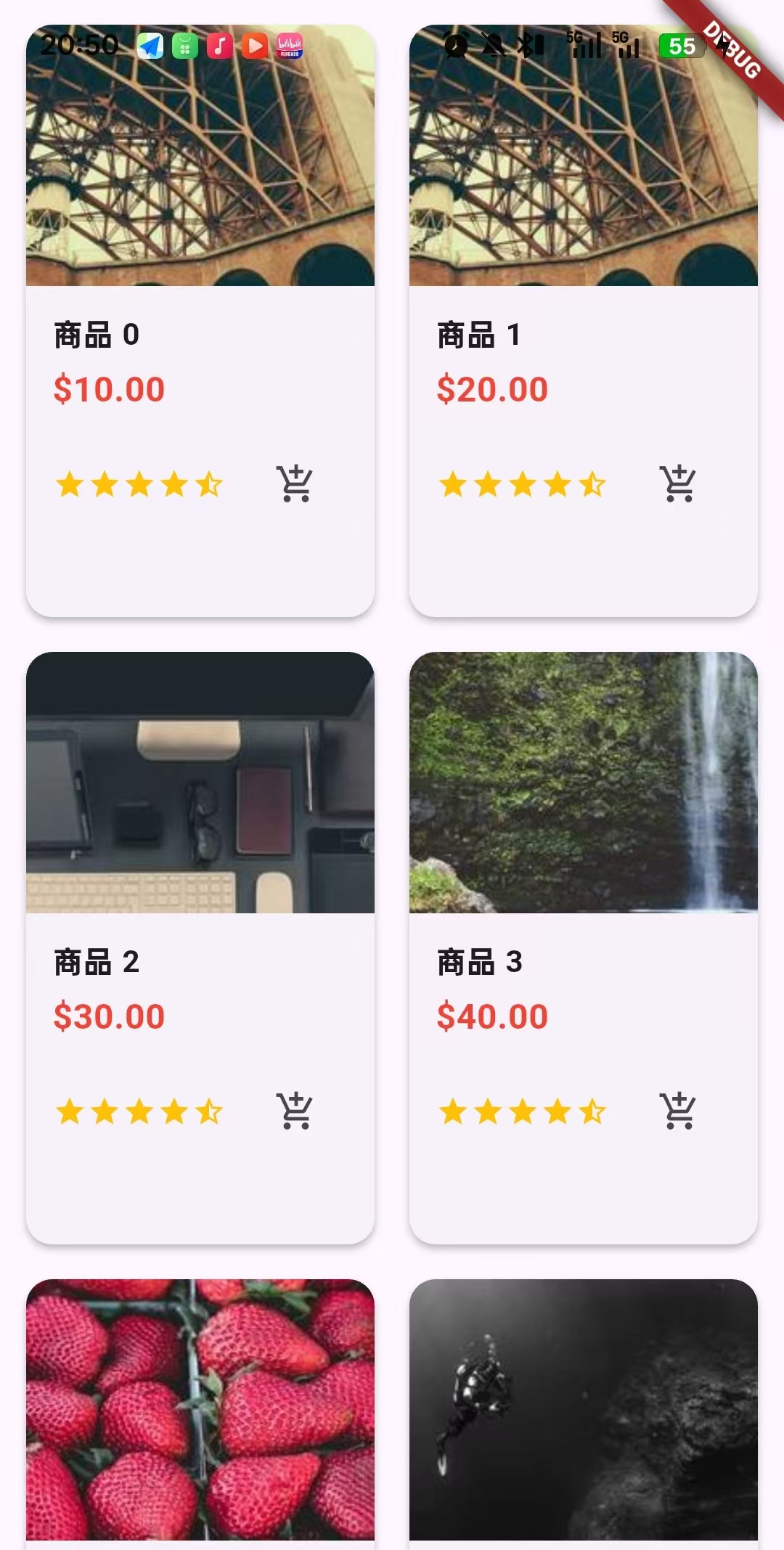
效果图
4.GridView.custom
Dart
import 'package:flutter/material.dart';

class HomePage extends StatefulWidget {
  const HomePage({super.key});

  @override
  State<StatefulWidget> createState() => _HomePageState();
}

class _HomePageState extends State<HomePage> {

  // ================1. 自定义的SliverChildDelegate ================================
  late final SliverChildDelegate delegate = SliverChildBuilderDelegate(
        (BuildContext context, int index) {

      // 使用自定义的KeepAlive包装器
      return _CustomKeepAliveWidget(
        key: ValueKey(index), // 为每个项提供唯一key
        index: index, //传递索引给自定义组件
      );
    },
    childCount: 30, //项目个数


    // 1. findChildIndexCallback - 查找特定子项的索引
    findChildIndexCallback: (Key key) {
      if (key is ValueKey<int>) {
        return key.value;
      }
      return null;
    },

    // 2. addSemanticIndexes - 语义索引
    addSemanticIndexes: true,

    // 3. semanticIndexCallback - 自定义语义索引
    semanticIndexCallback: (Widget widget, int localIndex) {
      return localIndex;
    },
  );

  //=========================2.自定义的KeepAlive包装器===============================
  Widget _CustomKeepAliveWidget({required Key key, required int index}) {
    return KeepAlive(
      key: key,
      keepAlive: index % 3 == 0, // 每3个项目保持一个活跃状态
      child: Container(

        color: Colors.primaries[index % Colors.primaries.length], //颜色计算
        child: Column(
          mainAxisAlignment: MainAxisAlignment.center,
          children: [

            // 显示保持状态的信息
            if (index % 3 == 0) //条件显示图标
              Icon(Icons.check_circle, color: Colors.white),
            SizedBox(height: 10),

            //文本
            Text(
              'Item $index',
              style: TextStyle(
                fontSize: 20,
                color: Colors.white,
                fontWeight: FontWeight.bold,
              ),
            ),

            //状态文本
            Text(
              index % 3 == 0 ? '保持活跃' : '可销毁',
              style: TextStyle(color: Colors.white70),
            ),
          ],
        ),
      ),
    );
  }

  // ==========================3. 自定义的SliverGridDelegate==============================
  late final SliverGridDelegate gridDelegate = SliverGridDelegateWithFixedCrossAxisCount(
    crossAxisCount: 3,
    crossAxisSpacing: 10,
    mainAxisSpacing: 10,
    // childAspectRatio: 1.0, // 固定比例
  );

  @override
  Widget build(BuildContext context) {
    return Scaffold(
      appBar: AppBar(
        title: Text('GridView.custom独特功能'),
      ),
      body: GridView.custom(

        gridDelegate: gridDelegate, //控制怎么布局

        childrenDelegate: delegate, //控制构建什么

        // 高级滚动控制
        physics: const AlwaysScrollableScrollPhysics(
          parent: BouncingScrollPhysics(),
        ),

        // 性能优化
        cacheExtent: 500,

        // 语义化支持
        semanticChildCount: 30,

        // 自定义padding
        padding: EdgeInsets.all(15),

        // 反向滚动(如果需要)
        reverse: false,

        // 主滚动方向
        scrollDirection: Axis.vertical,

        // 是否根据内容收缩
        shrinkWrap: false,
      ),
    );
  }
}

// 自定义KeepAlive组件 - 展示高级状态管理
class KeepAlive extends StatefulWidget {
  final Widget child;
  final bool keepAlive;

  const KeepAlive({
    Key? key,
    required this.child,
    required this.keepAlive,
  }) : super(key: key);

  @override
  _KeepAliveState createState() => _KeepAliveState();
}

class _KeepAliveState extends State<KeepAlive>
    with AutomaticKeepAliveClientMixin {

  @override
  bool get wantKeepAlive => widget.keepAlive;

  @override
  Widget build(BuildContext context) {
    super.build(context); // 必须调用
    return widget.child;
  }
}
效果图