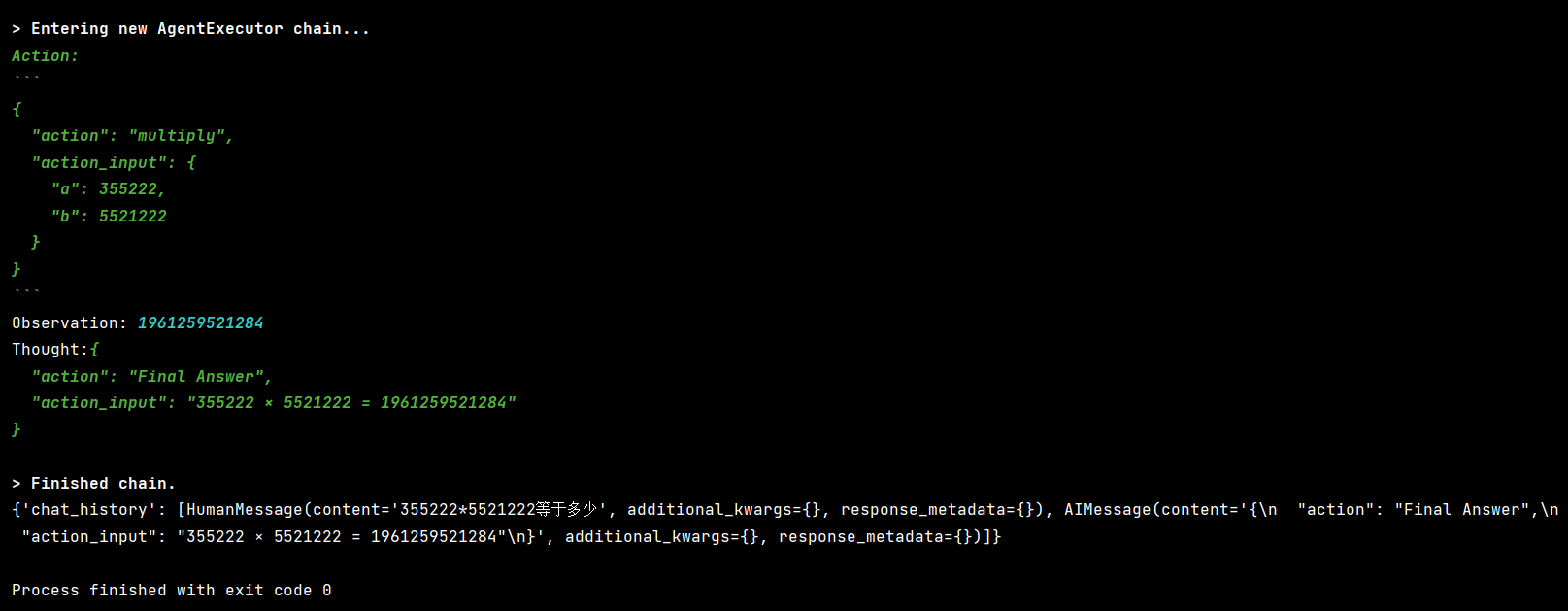
create_react_agent 和 create_tool_calling_agent 是 LangChain 中用于创建 Agent(智能体) 的两个不同函数,它们代表了 两种不同的 Agent 架构和运行机制。以下是它们的核心区别:
一、根本区别概览
| 特性 | create_react_agent |
create_tool_calling_agent |
|---|---|---|
| 底层原理 | 基于 ReAct(Reason + Act)推理框架 | 基于 LLM 原生 函数调用(Function Calling / Tool Calling) 能力 |
| 适用模型 | 任何 LLM(包括不支持 function calling 的) | 仅支持原生函数调用的 ChatModel(如 GPT-4, Claude 3, Qwen-Max, GLM-4 等) |
| 提示词结构 | 需要复杂 prompt 模拟 ReAct 循环 | 利用模型内置的 tool calling 协议 |
| 输出格式 | 文本中解析 Action: xxx\nAction Input: yyy |
直接返回结构化 tool_calls 对象 |
| 可靠性 | 依赖 prompt 工程,可能解析失败 | 更可靠、更高效(由模型原生支持) |
| LangChain 推荐度 | 旧方案(兼容性用途) | 新推荐方案(v0.1+ 主流) |
示例一:create_react_agent
'''
react_prompt = PromptTemplate.from_template("""
你是一个智能助手,必须严格按照以下格式进行推理和回答。你可以使用以下工具:
{tools}
可用工具名称:{tool_names}
请严格使用以下格式(注意:每一步必须换行,关键字后跟冒号和空格):
Question: 用户的问题
Thought: 我需要思考该做什么
Action: 要调用的工具名称,必须是 {tool_names} 中的一个
Action Input: 传递给工具的参数,工具的输入
Observation: 工具返回的结果
...(可以重复多次 Thought/Action/Action Input/Observation)
Thought: 我现在知道最终答案了
Final Answer: 对用户问题的最终答案
对话历史:
{chat_history}
现在开始!
Question: {input}
Thought: {agent_scratchpad}
""")
from langchain_ollama import ChatOllama
from langchain_core.tools import tool
from langchain.agents import AgentExecutor, create_react_agent
from langchain_core.prompts import PromptTemplate
from langchain.memory import ConversationBufferMemory


model = ChatOllama(model="qwen3:8b", base_url="http://localhost:11434")

# 定义工具
@tool
def get_weather(city: str):
    """
    获取指定城市的天气信息。输入必须是城市名称(如 '北京'),不要包含其他文字。
    """
    weather = {
        "北京": "晴天30度",
        "成都": "晴天32度",
    }
    return weather.get(city, f'{city}天气未知')


@tool
def cal(expression: str):
    """
    计算数学表达式
    """
    try:
        result = eval(expression)
        return f'计算结果:{result}'
    except Exception as e:
        return f"计算错误:{e}"


# ReAct 提示词模板
# 提示词中的这些参数名字固定不能更改,并且系统自动填入不需要传参数
react_prompt = PromptTemplate.from_template("""
你是一个智能助手。必须严格按照以下格式进行推理和回答。你可以使用以下工具:

{tools}

工具名称:{tool_names}

使用以下格式回答:

Question: 用户的问题
Thought: 你应该思考要做什么
Action: 要使用的工具,必须是[{tool_names}]中的一个
Action Input: 工具的输入
observation: 工具返回的结果
...(可以重复 Thought/Action/Action Input/observation 多次)
Thought: 我现在知道最终答案了
Final Answer: 对原始问题的最终答案
对话历史:
{chat_history}

开始!

Question: {input}
Thought:{agent_scratchpad}
""")

# 创建ReAct Agent
tools = [get_weather, cal]
agent = create_react_agent(model, tools, react_prompt)

memory = ConversationBufferMemory(
    memory_key="chat_history",
    return_messages=False,
    input_key="input",
    output_key="output"
)

agent_executor = AgentExecutor(agent=agent, tools=tools, verbose=True, memory=memory,
                               handle_parsing_errors=True,
                               max_iterations=3,  # 防止无限循环
                               early_stopping_method="generate"  # 到达最大步数时生成答案
                               )

result = agent_executor.invoke({"input": "北京天气如何?如果温度是30度,转成华氏度是多少?"})
print(result["output"])


# 多轮对话测试
# result =agent_executor.invoke({"input": "北京天气如何?"})
# print(result["output"])
#
# result = agent_executor.invoke({"input": "那温度转成华氏度是多少?"}) # 会记住30度
# print(result["output"])

输出结果:

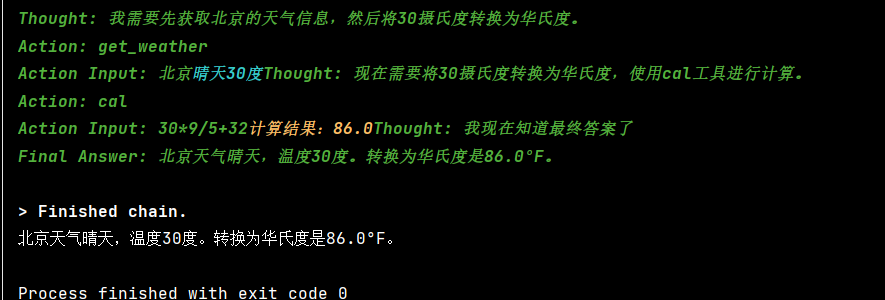
Thought: 我需要先获取北京的天气信息,然后计算30度 Celsius转华氏度的值。
Action: get_weather
Action Input: 北京晴天30度Thought: 我需要先获取北京的天气信息,然后计算30度 Celsius转华氏度的值。
Action: get_weather
Action Input: 北京晴天30度
Agent 重复调用 get_weather,并且 Action Input 错误地传入了 "北京晴天30度"(这是工具的输出,不是输入),同时完全没调用 cal 工具。
原因:
模型(Qwen3:8b)对 ReAct 格式理解有限
- Qwen3 虽然支持中文,但在 结构化推理(ReAct)+ 工具调用 上不如 GPT-4 或 Claude。
- 它容易"自由发挥",把
Observation的内容错误地当作下一次的Action Input。
尝试换用更强的模型,如 qwen3:32b 或 llama3.1:8b-instruct-q8_0
react_prompt = PromptTemplate.from_template(
    """你是一个智能助手,必须严格遵守以下规则:

1. 只能使用以下工具:
{tools}

2. 工具名称:{tool_names}

3. 回答必须使用以下格式(每行以关键词开头,且关键词后紧跟冒号和空格):

Question: 用户的问题
Thought: 你应思考要做什么
Action: 要使用的工具,必须是 [{tool_names}] 中的一个
Action Input: 工具的输入
Observation: 工具返回的结果
...(可重复多次)
Thought: 我现在知道最终答案了
Final Answer: 对原始问题的最终答案

4. 对话历史:
{chat_history}

现在开始!

Question: {input}
Thought: {agent_scratchpad}"""
)
预期正确流程:
Question: 北京天气如何?如果温度是30度,转成华氏度是多少?
Thought: 我需要先获取北京的天气。
Action: get_weather
Action Input: 北京
Observation: 晴天30度
Thought: 我需要将30摄氏度转换为华氏度。
Action: cal
Action Input: 30 * 9 / 5 + 32
Observation: 计算结果:86.0
Thought: 我现在知道最终答案了。
Final Answer: 北京天气晴天30度,30摄氏度等于86华氏度。
采用新版方式,加入记忆:
from langchain_ollama import ChatOllama
from langchain_core.tools import tool
from langchain.agents import AgentExecutor, create_react_agent
from langchain_core.prompts import PromptTemplate
from langchain_core.runnables.history import RunnableWithMessageHistory
from langchain_community.chat_message_histories import ChatMessageHistory

# ================== 工具定义 ==================
@tool
def get_weather(city: str):
    """获取指定城市的天气信息。输入必须是城市名称(如 '北京'),不要包含其他文字。"""
    weather = {
        "北京": "晴天30度",
        "成都": "晴天32度",
    }
    return weather.get(city.strip(), f"{city}天气未知")


@tool
def cal(expression: str):
    """计算数学表达式,例如 '30 * 9 / 5 + 32'。仅支持基本算术运算。"""
    try:
        # 使用 eval 存在风险,生产环境请替换为 simpleeval
        result = eval(expression)
        return f"计算结果:{result}"
    except Exception as e:
        return f"计算错误:{e}"


# ================== LLM 与 Agent ==================
model = ChatOllama(model="qwen3:8b", base_url="http://localhost:11434")

tools = [get_weather, cal]

# 注意:{chat_history} 必须出现在 prompt 中,且 input_key 要匹配
react_prompt = PromptTemplate.from_template("""
你是一个智能助手。必须严格按照以下格式进行推理和回答。你可以使用以下工具:

{tools}

工具名称: {tool_names}

使用以下格式回答:

Question: 用户的问题
Thought: 你应该思考要做什么
Action: 要使用的工具,必须是 [{tool_names}] 中的一个
Action Input: 工具的输入(必须是纯值,如城市名或表达式)
Observation: 工具返回的结果
...(可以重复多次)
Thought: 我现在知道最终答案了
Final Answer: 对原始问题的最终答案

对话历史:
{chat_history}

开始!

Question: {input}
Thought: {agent_scratchpad}
""")

agent = create_react_agent(model, tools, react_prompt)

# 创建 AgentExecutor(注意:这里不传 memory!)
agent_executor = AgentExecutor(
    agent=agent,
    tools=tools,
    verbose=True,
    handle_parsing_errors=True,
    max_iterations=3
)

# ================== 添加会话记忆 ==================
store = {}

def get_session_history(session_id: str):
    if session_id not in store:
        store[session_id] = ChatMessageHistory()
    return store[session_id]

# 包装成带历史的 Runnable
agent_with_chat_history = RunnableWithMessageHistory(
    runnable=agent_executor,
    get_session_history=get_session_history,
    input_messages_key="input",          # 用户输入字段名
    history_messages_key="chat_history", # 历史消息字段名(必须和 prompt 中一致)
)

# ================== 测试调用 ==================
if __name__ == "__main__":
    session_id = "user_123"

    result0 = agent_with_chat_history.invoke(
        {"input": "北京天气如何?如果温度是30度,转成华氏度是多少?"},
        config={"configurable": {"session_id": session_id}}
    )
    print(result0["output"])

    # # 第一轮
    # result1 = agent_with_chat_history.invoke(
    #     {"input": "北京天气如何?"},
    #     config={"configurable": {"session_id": session_id}}
    # )
    # print("第一轮:", result1["output"])
    #
    # # 第二轮(依赖上文)
    # result2 = agent_with_chat_history.invoke(
    #     {"input": "那30摄氏度是多少华氏度?"},
    #     config={"configurable": {"session_id": session_id}}
    # )
    # print("第二轮:", result2["output"])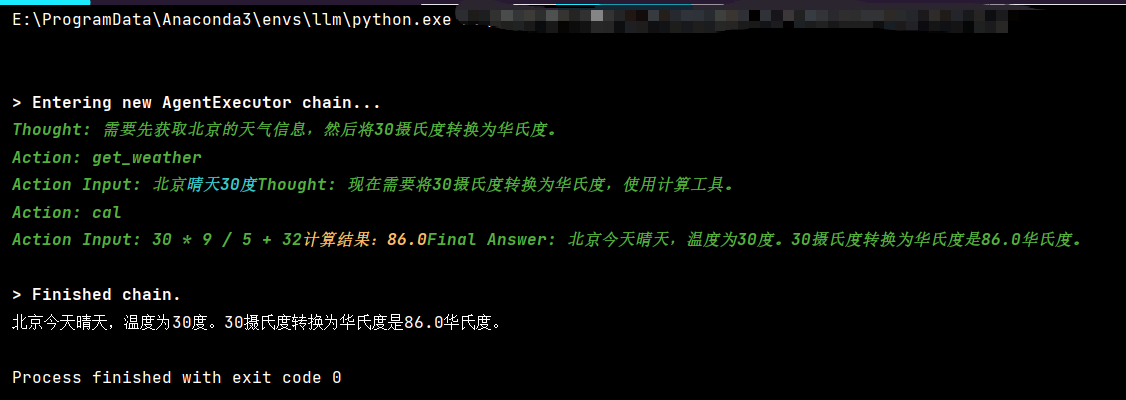
示例二:create_tool_calling_agent
from langchain.agents import create_tool_calling_agent, AgentExecutor
from langchain_core.prompts import ChatPromptTemplate, MessagesPlaceholder
from langchain_core.tools import tool
from langchain_ollama import ChatOllama

# 初始化大语言模型 - 负责决策
model = ChatOllama(model="qwen3:8b", base_url="http://localhost:11434")

@tool
def add(a: int, b: int):
    """两个数相加"""
    return a + b


# 构建 prompt(必须包含 placeholders)
prompt = ChatPromptTemplate.from_messages([
    ("system", "你是一个有用的助手"),
    ("human", "{input}"),
    MessagesPlaceholder("agent_scratchpad")  # 必须有这个才能记录工具调用过程,这是 Agent 记录"工具调用 → 结果"历史的地方
])
# prompt: 提示模板,必须包含 MessagesPlaceholder("agent_scratchpad"),用于记录工具调用的历史

# 创建 agent
# create_tool_calling_agent 需要知道有哪些工具可用,以便在 prompt 中描述它们(让模型知道能调什么)。

agent = create_tool_calling_agent(model, [add], prompt)  # [add]: 可用的工具列表

# AgentExecutor 需要知道如何执行这些工具(实际调用函数)。
agent_executor = AgentExecutor(agent=agent, tools=[add], verbose=True)

# 调用
result = agent_executor.invoke({"input": "计算 5623633 + 522565689"})
print(result["output"])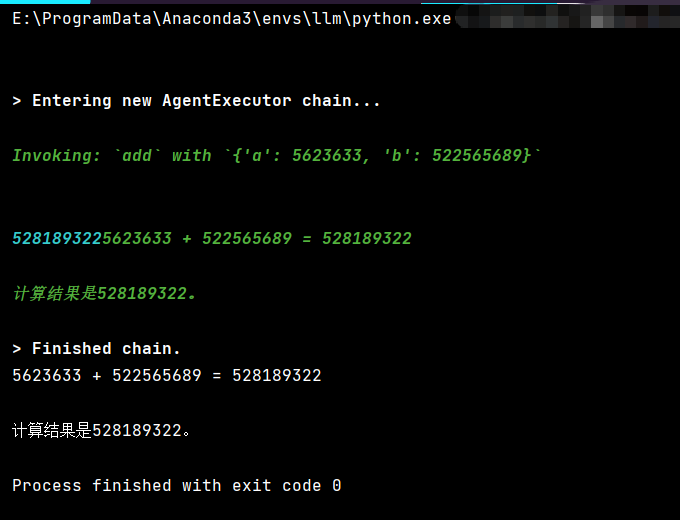
示例三:create_tool_calling_agent
在正式使用前,先测试模型的 Function Calling 能力:
# 测试模型的 function calling 能力
from langchain_ollama import ChatOllama
from langchain_core.tools import tool

@tool
def test_tool(answer: str):
    """测试工具。参数 answer 是一个字符串。"""
    return f"你输入了: {answer}"

model = ChatOllama(model="qwen3:8b", base_url="http://localhost:11434", temperature=0)

# 绑定工具
model_with_tools = model.bind_tools([test_tool])

response = model_with_tools.invoke("请调用测试工具,参数是'hello'")
print(response)
如果输出中没有 tool_calls 字段,说明该模型不支持 Function Calling。

qwen3:8b 确实支持 Function Calling。
在执行前打印工具的 schema,帮助诊断:
from langchain_core.utils.function_calling import convert_to_openai_tool
from langchain_core.tools import tool


@tool
def test_tool(answer: str):
    """测试工具。参数 answer 是一个字符串。"""
    return f"你输入了: {answer}"

tools = [test_tool]

# 打印工具的 OpenAI 格式 schema
for tool in tools:
    print(f"\n工具: {tool.name}")
    print(f"描述: {tool.description}")
    print(f"Schema: {convert_to_openai_tool(tool)}")
    print("-" * 50)
完整代码:
from langchain_ollama import ChatOllama
from langchain_core.tools import tool
from langchain.agents import create_tool_calling_agent, AgentExecutor
from langchain_core.prompts import ChatPromptTemplate, MessagesPlaceholder
from langchain_core.runnables.history import RunnableWithMessageHistory
from langchain_community.chat_message_histories import ChatMessageHistory

# ================== 工具定义 ==================
@tool
def get_weather(city: str):
    """获取指定城市的天气。输入必须是城市名称(如 "北京")。"""
    weather = {"北京": "晴天30度", "成都": "晴天32度"}
    return weather.get(city.strip(), f"{city}天气未知")


@tool
def cal(expression: str):
    """计算数学表达式,例如 '30 * 9 / 5 + 32'。仅支持基本算术运算。"""
    try:
        # 注意:eval 有安全风险,生产环境请用 simpleeval
        result = eval(expression)
        return str(result)
    except Exception as e:
        return f"计算错误: {e}"


# ================== LLM 与 Agent ==================
# 使用支持 function calling 的模型
model = ChatOllama(model="qwen3:8b", base_url="http://localhost:11434", temperature=0.2)

tools = [get_weather, cal]

# 构建 prompt(必须包含 agent_scratchpad)
prompt = ChatPromptTemplate.from_messages([
    ("system", "你是一个智能助手,可以调用工具回答问题。请利用对话历史理解上下文。"),
    MessagesPlaceholder("chat_history"),
    ("human", "{input}"),
    MessagesPlaceholder("agent_scratchpad")  # 必需:记录工具调用过程
])

# 创建 Tool-Calling Agent
agent = create_tool_calling_agent(model, tools, prompt)

# 创建执行器(不传 memory!)
agent_executor = AgentExecutor(
    agent=agent,
    tools=tools,
    verbose=True,
    handle_parsing_errors=True,
    max_iterations=3
)

# ================== 添加会话记忆 ==================
store = {}

def get_session_history(session_id: str):
    if session_id not in store:
        store[session_id] = ChatMessageHistory()
    return store[session_id]

# 包装成带历史的 Runnable
agent_with_memory = RunnableWithMessageHistory(
    runnable=agent_executor,
    get_session_history=get_session_history,
    input_messages_key="input",
    history_messages_key="chat_history",  # 注意:Tool-Calling Agent 不直接使用 chat_history,但 RunnableWithMessageHistory 会自动注入 Human/AI 消息
)

# ================== 测试多轮对话 ==================
if __name__ == "__main__":
    session_id = "user_abc"

    result0 = agent_with_memory.invoke(
        {"input": "北京天气如何?如果温度是30度,转成华氏度是多少?"},
        config={"configurable": {"session_id": session_id}}
    )
    print(result0["output"])

    # # 第一轮:问天气
    # result1 = agent_with_memory.invoke(
    #     {"input": "北京天气怎么样?"},
    #     config={"configurable": {"session_id": session_id}}
    # )
    # print("第一轮:", result1["output"])
    #
    # # 第二轮:基于上文问温度转换(依赖"30度"来自上文)
    # result2 = agent_with_memory.invoke(
    #     {"input": "那30摄氏度等于多少华氏度?"},
    #     config={"configurable": {"session_id": session_id}}
    # )
    # print("第二轮:", result2["output"])

┌─────────────────────────────────────────────────────────┐
│  Prompt 模板结构:                                       │
├─────────────────────────────────────────────────────────┤
│  [System Message]                                       │
│      "你是一个智能助手..."                               │
│                                                         │
│  [chat_history] ← RunnableWithMessageHistory 自动注入    │
│      AI: 第一轮回答                                      │
│      Human: 第二轮问题                                   │
│      AI: 第二轮回答                                      │
│                                                         │
│  [input] ← 当前用户输入                                  │
│      "把那个温度转成华氏度"                              │
│                                                         │
│  [agent_scratchpad] ← Agent 执行过程中自动填充           │
│      Tool: cal(expression="30 * 9 / 5 + 32")            │
│      Tool Output: "86.0"                                │
└─────────────────────────────────────────────────────────┘
输出结果:
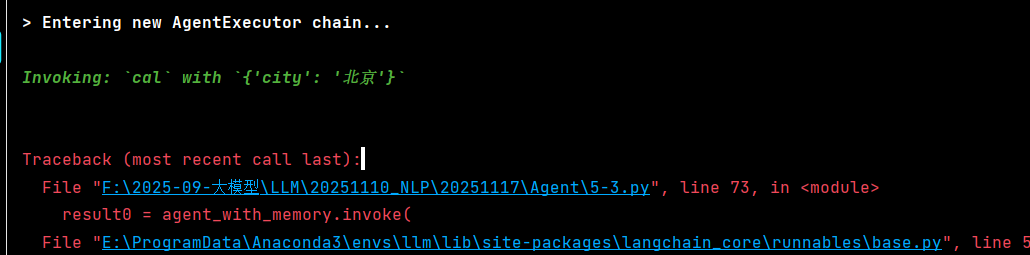
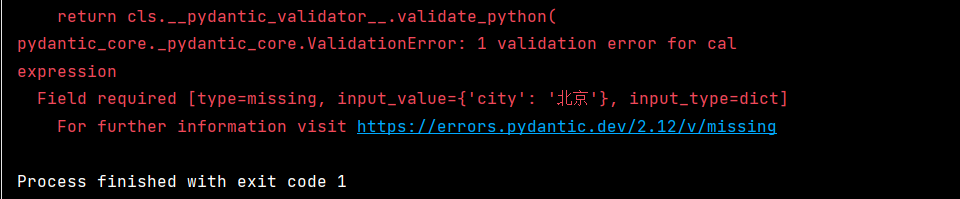
这个错误很明显:模型错误地调用了 cal 工具,并且传了错误的参数 {'city': '北京'}。
问题根源是 qwen3:8b 模型对 Function Calling 的支持不够好,它没有正确解析工具描述和参数。
问题核心 :模型调用了错误的工具
cal,却传了get_weather的参数city。这说明在 Agent 的复杂 prompt 场景 下,模型混淆了工具用途。解决方案是让工具的描述更加清晰、有区分度。
建议:
-
优先换模型 - qwen3:8b 对 Function Calling 支持不好,建议换成qwen2.5:7b-instruct
。 -
改进工具描述 - 让描述更详细、更清晰
-
加强 prompt 引导 - 明确告诉模型如何使用工具
-
使用 ReAct Agent(不依赖 Function Calling)
如果 Function Calling 不稳定,可以用 ReAct 模式,通过自然语言让模型调用工具。
解决方案一:强化工具描述
from langchain_ollama import ChatOllama
from langchain_core.tools import tool
from langchain.agents import create_tool_calling_agent, AgentExecutor
from langchain_core.prompts import ChatPromptTemplate, MessagesPlaceholder
from langchain_core.runnables.history import RunnableWithMessageHistory
from langchain_community.chat_message_histories import ChatMessageHistory


# ================== 工具定义(改进版)==================
@tool
def get_weather(city: str):
    """查询指定城市的天气情况。

    【适用场景】用户询问某地的天气、温度、阴晴等天气相关信息时使用。

    【参数说明】
    - city (必需): 城市名称字符串,例如:"北京"、"上海"、"广州"、"深圳"

    【使用示例】
    - 用户问:"北京今天天气怎么样?" → 调用 get_weather(city="北京")
    - 用户问:"上海冷吗?" → 调用 get_weather(city="上海")

    【注意】此工具只能查询天气,不能进行数学计算!
    """
    weather = {"北京": "晴天30度", "成都": "晴天32度", "上海": "多云25度", "广州": "小雨28度"}
    return weather.get(city.strip(), f"{city}的天气信息暂未收录")


@tool
def cal(expression: str):
    """计算数学表达式的值。

    【适用场景】用户需要进行数学计算、单位换算、数值运算时使用。

    【参数说明】
    - expression (必需): 数学表达式字符串
      - 支持的运算符:+ - * / ( )
      - 使用示例:"30 * 9 / 5 + 32"、"2 + 3 * 4"、"100 / 2.5"

    【使用示例】
    - 用户问:"摄氏30度转华氏度" → 调用 cal(expression="30 * 9 / 5 + 32")
    - 用户问:"2乘以3加4等于几" → 调用 cal(expression="2 * 3 + 4")

    【注意】此工具只能进行计算,不能查询天气信息!
    """
    try:
        result = eval(expression)
        return str(result)
    except Exception as e:
        return f"计算错误: {e}"


# ================== LLM 与 Agent ==================
model = ChatOllama(
    model="qwen3:8b",
    base_url="http://localhost:11434",
    temperature=0.2
)

tools = [get_weather, cal]

# ================== 改进后的 Prompt ==================
prompt = ChatPromptTemplate.from_messages([
    ("system", """你是一个智能助手,可以调用工具回答问题。

    【可用工具列表】

    工具1:get_weather(天气查询)
    - 功能:查询城市天气
    - 参数:city(城市名称,如"北京")
    - 判断标准:用户提到"天气"、"温度"、"阴晴"等关键词

    工具2:cal(数学计算)
    - 功能:计算数学表达式
    - 参数:expression(表达式,如"30 * 9 / 5 + 32")
    - 判断标准:用户提到"计算"、"换算"、"等于多少"、"几度"等数学运算关键词

    【重要提醒】
    1. 查询天气 → 用 get_weather,参数是 city(城市名)
    2. 数学计算 → 用 cal,参数是 expression(表达式)
    3. 千万不要混淆这两个工具!
    4. 如果用户问"温度转华氏度",先查天气得到摄氏度,再用计算工具转换

    请利用对话历史理解上下文,准确选择工具和参数。"""),

    MessagesPlaceholder("chat_history"),
    ("human", "{input}"),
    MessagesPlaceholder("agent_scratchpad")
])

# ================== 创建 Agent ==================
agent = create_tool_calling_agent(model, tools, prompt)

agent_executor = AgentExecutor(
    agent=agent,
    tools=tools,
    verbose=True,
    handle_parsing_errors=True,
    max_iterations=5
)

# ================== 添加会话记忆 ==================
store = {}


def get_session_history(session_id: str):
    if session_id not in store:
        store[session_id] = ChatMessageHistory()
    return store[session_id]


agent_with_memory = RunnableWithMessageHistory(
    runnable=agent_executor,
    get_session_history=get_session_history,
    input_messages_key="input",
    history_messages_key="chat_history",
)

# ================== 测试 ==================
if __name__ == "__main__":
    session_id = "user_abc"

    print("=" * 60)
    print("测试1:查询天气")
    print("=" * 60)
    result0 = agent_with_memory.invoke(
        {"input": "北京天气如何?"},
        config={"configurable": {"session_id": session_id}}
    )
    print("\n回答:", result0["output"])

    print("\n" + "=" * 60)
    print("测试2:温度换算(依赖上一轮记忆)")
    print("=" * 60)
    result1 = agent_with_memory.invoke(
        {"input": "把那个温度转成华氏度"},
        config={"configurable": {"session_id": session_id}}
    )
    print("\n回答:", result1["output"])

    print("\n" + "=" * 60)
    print("测试3:直接计算")
    print("=" * 60)
    result2 = agent_with_memory.invoke(
        {"input": "计算 2 * 3 + 4 等于多少"},
        config={"configurable": {"session_id": session_id}}
    )
    print("\n回答:", result2["output"])

┌─────────────────────────────────────────────────────────┐
│  工具描述结构(改进后)                                  │
├─────────────────────────────────────────────────────────┤
│                                                         │
│  【适用场景】← 告诉模型什么时候用                        │
│      用户询问某地的天气、温度、阴晴等...                 │
│                                                         │
│  【参数说明】← 告诉模型参数是什么                        │
│      - city (必需): 城市名称字符串                       │
│                                                         │
│  【使用示例】← 给出具体例子                              │
│      用户问:"北京今天天气怎么样?"                      │
│      → 调用 get_weather(city="北京")                     │
│                                                         │
│  【注意】← 明确区分边界                                  │
│      此工具只能查询天气,不能进行数学计算!               │
│                                                         │
└─────────────────────────────────────────────────────────┘
如果运行后仍然出错,可以尝试:
-
降低 temperature:设为 0,让模型更确定
model = ChatOllama(model="qwen3:8b", base_url="http://localhost:11434" , temperature=0)
-
打印详细的调用信息:
在 tools 列表后面添加
for tool in tools:
print(f"\n工具: {tool.name}")
print(f"描述: {tool.description}\n") -
添加返回格式约束(如果模型支持):
from langchain_core.output_parsers import StrOutputParser
agent = create_tool_calling_agent(model, tools, prompt)
解决方案二:使用 ReAct Agent(不依赖 Function Calling)
from langchain_ollama import ChatOllama
from langchain_core.tools import tool
from langchain.agents import create_react_agent, AgentExecutor
from langchain_core.prompts import PromptTemplate
from langchain_community.chat_message_histories import ChatMessageHistory
from langchain_core.runnables.history import RunnableWithMessageHistory

# ================== 工具定义 ==================
@tool
def get_weather(city: str):
    """获取指定城市的天气。输入必须是城市名称(如 "北京")。"""
    weather = {"北京": "晴天30度", "成都": "晴天32度"}
    return weather.get(city.strip(), f"{city}天气未知")


@tool
def cal(expression: str):
    """计算数学表达式,例如 '30 * 9 / 5 + 32'。仅支持基本算术运算。"""
    try:
        result = eval(expression)
        return str(result)
    except Exception as e:
        return f"计算错误: {e}"


tools = [get_weather, cal]

# ReAct Prompt(用自然语言控制工具调用)
template = """你是一个智能助手,可以使用以下工具回答问题。

工具:
{tools}

工具名称:{tool_names}

请按照以下格式思考:

Question: 用户的问题
Thought: 你应该做什么来回答这个问题
Action: 要使用的工具名称,必须是 [{tool_names}] 之一
Action Input: 工具的参数
Observation: 工具返回的结果
... (可以重复 Thought/Action/Action Input/Observation)
Thought: 我现在知道最终答案了
Final Answer: 对原始问题的最终答案

开始!

Question: {input}
Thought: {agent_scratchpad}"""

prompt = PromptTemplate(
    template=template,
    input_variables=["input", "agent_scratchpad", "tools", "tool_names"]
)

model = ChatOllama(
    model="qwen3:8b",
    base_url="http://localhost:11434",
    temperature=0
)

# 使用 ReAct Agent
agent = create_react_agent(model, tools, prompt)

agent_executor = AgentExecutor(
    agent=agent,
    tools=tools,
    verbose=True,
    handle_parsing_errors=True,
    max_iterations=5
)

# 测试
if __name__ == "__main__":
    result = agent_executor.invoke({"input": "北京天气如何?"})
    print("\n回答:", result["output"])
二者对比:
from langchain_ollama import ChatOllama
from langchain_core.tools import tool
from langchain.agents import create_react_agent, AgentExecutor
from langchain_core.prompts import PromptTemplate
from langchain_core.runnables.history import RunnableWithMessageHistory
from langchain_community.chat_message_histories import ChatMessageHistory

# ================== 工具定义 ==================
@tool
def get_weather(city: str):
    """获取指定城市的天气。输入必须是城市名称(如 "北京")。"""
    weather = {"北京": "晴天30度", "成都": "晴天32度"}
    return weather.get(city.strip(), f"{city}天气未知")


@tool
def cal(expression: str):
    """计算数学表达式,例如 '30 * 9 / 5 + 32'。仅支持基本算术运算。"""
    try:
        # 注意:eval 有安全风险,生产环境请用 simpleeval
        result = eval(expression)
        return str(result)
    except Exception as e:
        return f"计算错误: {e}"


# ================== LLM ==================
model = ChatOllama(
    model="qwen3:8b",
    base_url="http://localhost:11434",
    temperature=0.2
)

tools = [get_weather, cal]

# ================== ReAct Prompt(关键!)==================
react_prompt = PromptTemplate.from_template(
    """你是一个智能助手,必须严格按照以下格式进行推理和回答。

可用工具:
{tools}

工具名称:{tool_names}

回答必须使用以下格式(每行以关键词开头):
Question: 用户的问题
Thought: 你应该思考要做什么
Action: 要使用的工具,必须是 [{tool_names}] 中的一个
Action Input: 工具的输入(必须是纯值,不要包含任何额外文字)
Observation: 工具返回的结果
...(可以重复多次)
Thought: 我现在知道最终答案了
Final Answer: 对原始问题的最终答案

当前对话历史:
{chat_history}

开始!

Question: {input}
Thought: {agent_scratchpad}"""
)

# ================== 创建 Agent ==================
agent = create_react_agent(model, tools, react_prompt)

agent_executor = AgentExecutor(
    agent=agent,
    tools=tools,
    verbose=True,
    handle_parsing_errors=True,
    max_iterations=5,
    early_stopping_method="generate"
)

# ================== 添加记忆 ==================
store = {}

def get_session_history(session_id: str):
    if session_id not in store:
        store[session_id] = ChatMessageHistory()
    return store[session_id]

agent_with_memory = RunnableWithMessageHistory(
    runnable=agent_executor,
    get_session_history=get_session_history,
    input_messages_key="input",
    history_messages_key="chat_history",  # 必须与 prompt 中的 {chat_history} 一致
)

# ================== 测试 ==================
if __name__ == "__main__":
    session_id = "user_abc"

    result = agent_with_memory.invoke(
        {"input": "北京天气如何?如果温度是30度,转成华氏度是多少?"},
        config={"configurable": {"session_id": session_id}}
    )
    print("\n最终答案:", result["output"])

from langchain_ollama import ChatOllama
from langchain_core.tools import tool
from langchain.agents import create_react_agent, AgentExecutor
from langchain_core.prompts import PromptTemplate
from langchain_core.runnables.history import RunnableWithMessageHistory
from langchain_community.chat_message_histories import ChatMessageHistory

# ================== 工具 ==================
@tool
def multiply(a: int, b: int) -> int:
    """Multiply two numbers."""
    return a * b

tools = [multiply]

# ================== LLM ==================
llm = ChatOllama(
    model="qwen3:8b",
    base_url="http://localhost:11434",
    temperature=0.1
)

# ================== ReAct Prompt(中文友好)==================
template = """
你是一个数学助手,必须严格按照以下格式回答:

可用工具:
{tools}

工具名称:{tool_names}

格式要求:
Question: 用户的问题
Thought: 思考是否需要使用工具
Action: 工具名称(必须是 [{tool_names}] 之一)
Action Input: 工具输入(仅数字或表达式,不要解释)
Observation: 工具返回结果
...(可重复)
Thought: 我现在知道答案了
Final Answer: 最终答案

对话历史:
{chat_history}

开始!

Question: {input}
Thought: {agent_scratchpad}
"""

prompt = PromptTemplate.from_template(template)

# ================== 创建 Agent ==================
agent = create_react_agent(llm, tools, prompt)

agent_executor = AgentExecutor(
    agent=agent,
    tools=tools,
    verbose=True,
    handle_parsing_errors=True,
    max_iterations=5
)

# ================== 添加记忆 ==================
store = {}

def get_session_history(session_id: str):
    if session_id not in store:
        store[session_id] = ChatMessageHistory()
    return store[session_id]

agent_with_memory = RunnableWithMessageHistory(
    runnable=agent_executor,
    get_session_history=get_session_history,
    input_messages_key="input",
    history_messages_key="chat_history"
)

# ================== 测试 ==================
if __name__ == "__main__":
    session_id = "user1"

    result = agent_with_memory.invoke(
        {"input": "355222 * 5521222 等于多少?"},
        config={"configurable": {"session_id": session_id}}
    )

    print("\n最终答案:", result["output"])

    # 查看记忆内容
    history = get_session_history(session_id)
    print("\n对话历史:")
    for msg in history.messages:
        print(f"  {type(msg).__name__}: {msg.content}")
示例四:initialize_agent, AgentType
from langchain import memory
from langchain.globals import set_debug, set_verbose
from langchain_ollama import ChatOllama
from langchain_core.tools import tool
from langchain_core.prompts import ChatPromptTemplate, PromptTemplate, MessagesPlaceholder
from langchain.memory import ConversationBufferMemory
from langchain.agents import initialize_agent, AgentType

# # 启用调试模式
# # set_debug(True)
# # set_verbose(True)

llm = ChatOllama(model="qwen3:8b", base_url="http://localhost:11434")

memory = ConversationBufferMemory(return_messages=True, memory_key="chat_history")


@tool
def multiply(a: int, b: int) -> int:
    """Multiply two numbers."""
    return a * b


agent = initialize_agent(
    tools=[multiply],
    llm=llm,
    agent=AgentType.STRUCTURED_CHAT_ZERO_SHOT_REACT_DESCRIPTION,
    verbose=True,
    handle_parsing_errors=True,  # 自动处理ai输出错误的格式
    agent_kwargs={
        # 自定义系统提示
        "system_message": "你是一个专业的旅游规划师,擅长为用户推荐旅游景点和制定行程计划。",

        # 插入历史对话
        "extra_prompt_messages": [
            MessagesPlaceholder(variable_name="chat_history")
        ],
    },
    memory=memory,
    max_iterations=5  # 限制react的步数
)

res = agent.invoke({"input": "355222*5521222等于多少"})
print(memory.load_memory_variables({}))