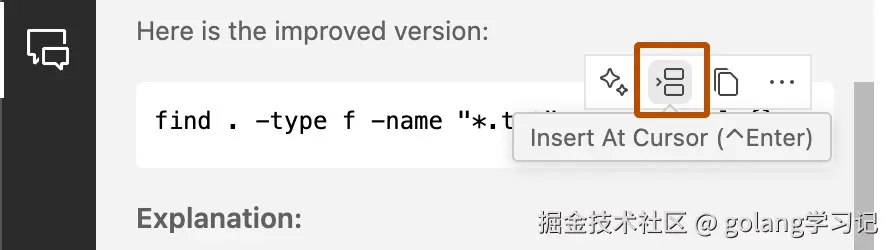
▲ Copilot 支持一键"预览 → 应用"重构建议,安全高效
🔍 为什么重构比写新代码更重要?
根据《重构:改善既有代码的设计》作者 Martin Fowler 的定义:
"重构是在不改变软件可观察行为的前提下,调整其内部结构,以提升可读性、可维护性与扩展性。"
但人工重构成本高、易出错------
✅ Copilot 的出现让重构从"高风险操作"变为"日常习惯" 。
本文将教你:
- 掌握 10 种高频重构场景的 Copilot 实战技巧;
- 将它们封装为 自定义
/指令 (如/extract,/inline),像调用函数一样调用重构动作; - 避开常见陷阱,确保重构零回归。
🛠️ 一、Copilot 重构基础:三步走工作流
所有重构操作,建议遵循以下标准化流程:
| 步骤 | 操作 | 快捷键(VS Code) | 目的 |
|---|---|---|---|
| 1. 理解 | 选中代码 → /explain |
Ctrl+i → /explain |
明确当前逻辑,避免误改 |
| 2. 重构 | 输入精准指令(如 /extract) |
Ctrl+i → /extract |
生成重构建议 |
| 3. 验证 | 单元测试 + 手动抽查 | --- | 确保行为不变 |
⚠️ 黄金法则 :Copilot 是"建议者",你才是"决策者"。永远执行 本地测试后再提交。
📚 二、10 大 Copilot 重构技巧实战 + / 指令封装
我们按重构复杂度排序,每项含:场景描述 → 原始代码 → / 指令 → 重构结果 → 注意事项。
1️⃣ /explain:理解即重构第一步 ✅
场景 :接手遗留代码,不知其意。
操作 :选中任意代码块 → Ctrl+i → 输入 /explain
效果:Copilot 自动生成自然语言解释,支持 Markdown 表格/流程图式描述。
js
// 选中以下函数 → /explain
function calc(x, y) {
  return x > 0 ? (y || 1) * Math.sqrt(x) : NaN;
}
➡️ 返回:
"若
x > 0,则返回y(若未定义则默认为 1)乘以√x;否则返回NaN。疑似实现'带默认权重的平方根缩放'。"
📌 提示 :解释过长时点 View in Chat 可以展开阅读。
2️⃣ /extract:提取函数(消除重复/提升可读)🔥
场景 :一段逻辑重复出现,或函数过长。
指令 :/extract function <name> 或 /extract(让 Copilot 命名)
js
// 原始:重复计算
let tax1 = price1 * 0.08;
let tax2 = price2 * 0.08;
→ 选中 price * 0.08 → Ctrl+i → /extract calculateTax
➡️ 输出:
js
function calculateTax(price) {
  return price * 0.08;
}
let tax1 = calculateTax(price1);
let tax2 = calculateTax(price2);
✅ 支持变体:
/extract const→ 提取为常量/extract interface→ 从对象字面量生成 TS interface
3️⃣ /inline:内联变量/函数(简化过度抽象)
场景 :单次使用的变量或 trivial 函数,增加阅读跳转。
指令 :光标置于变量/函数 → Ctrl+i → /inline
ts
const url = buildUrl(host, path);
fetch(url);
// → /inline url
fetch(buildUrl(host, path));
💡 适用:临时变量、仅 return 的 getter、调试用中间变量。
4️⃣ /switch:if-else → switch(提升分支可读性)
场景 :多分支等值判断(尤其字符串/enum)。
指令 :光标置于函数 → /switch [language](如 /switch java21)
java
// 原始
if (animal.equals("Dog")) return "Bark";
else if (animal.equals("Cat")) return "Meow";
// → /switch java21
➡️ 输出(含 null 安全 + 模式匹配):
java
return switch (animal) {
  case null -> "Unknown";
  case String a when a.equalsIgnoreCase("Dog") -> "Bark";
  case String a when a.equalsIgnoreCase("Cat") -> "Meow";
  default -> "Unknown";
};
📌 支持 TS/JS 的 switch + exhaustive check,Python 的 match-case。
5️⃣ /optimize:性能优化(算法/IO/循环)⚡
场景 :低效循环、N+1 查询、重复计算。
指令 :选中代码 → /optimize
bash
# 原始:调用 N 次 wc
for file in $(find . -name "*.log"); do
  wc -l "$file"
done
→ /optimize
➡️ 输出:
bash
find . -name "*.log" -exec wc -l {} +
# ✅ 批量传参,减少 fork 开销
✅ 典型优化方向:
- 循环 → 向量化 / 内置方法(
.map()→.reduce()) - 同步 → 异步批处理(如
Promise.all) - 磁盘 IO → 缓存 / 流式处理
6️⃣ /concise:精简冗余代码(变量/结构/注释)
场景 :过度声明、中间变量、模板式代码。
指令 :选中 → /concise 或 /shorten
py
def get_area(l, w):
    area = l * w
    return area  # → /concise
# → 直接 return l * w
📌 常见优化:
- 删除无用
let temp = ...; return temp; - 合并连续
.then()→async/await - 内联简单 ternary 表达式
7️⃣ /split:拆分巨型函数(单一职责原则)
场景 :函数 > 50 行,混合"数据清洗+计算+输出"。
指令 :光标置于函数 → /split into <n> functions
py
def process_order(data):
  # 1. validate
  # 2. calc tax
  # 3. persist
  # 4. notify
→ /split into 4 functions
➡️ 输出:
py
def validate_order(data): ...
def calculate_tax(order): ...
def persist_order(order): ...
def notify_user(order): ...
def process_order(data):
  order = validate_order(data)
  order = calculate_tax(order)
  persist_order(order)
  notify_user(order)
✅ 额外技巧:/split with pipeline 可生成函数式链式调用。
8️⃣ /rename:智能重命名(语义化符号)
平台支持 :VS Code / Visual Studio(需语言服务支持)
操作 :光标置于变量/函数 → F2 → Copilot 下拉建议
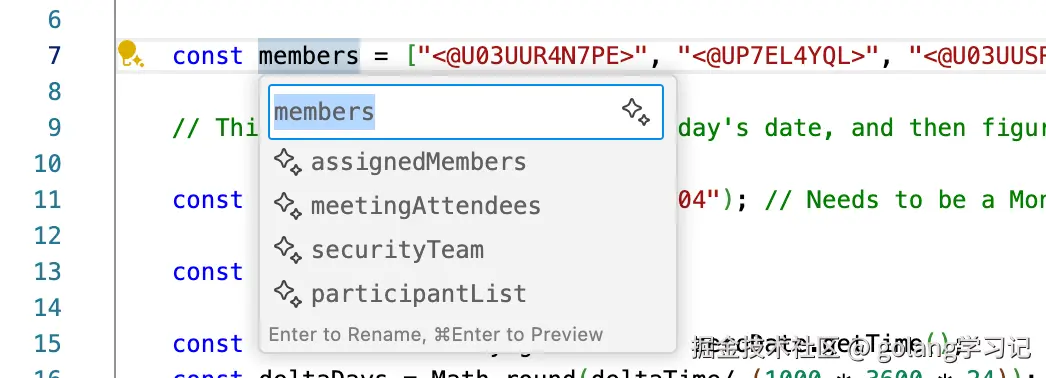
js
let d = new Date(); // → F2 → 建议:`currentDate`, `timestamp`, `now`📌 命名原则:Copilot 会结合上下文(如 d.getMonth() → 倾向 currentDate 而非 date)
9️⃣ /test:为重构生成测试用例(安全兜底)🛡️
场景 :重构前快速补齐测试覆盖。
指令 :光标置于函数 → /test [framework](如 /test jest)
ts
function add(a: number, b: number): number { return a + b; }
→ /test vitest
➡️ 输出:
ts
import { describe, it, expect } from 'vitest';
import { add } from './math';

describe('add', () => {
  it('adds positive numbers', () => {
    expect(add(2, 3)).toBe(5);
  });
  it('handles negatives', () => {
    expect(add(-1, 1)).toBe(0);
  });
  it('handles zero', () => {
    expect(add(0, 5)).toBe(5);
  });
});
✅ 强烈建议 :重构前执行 /test → 运行测试 → 重构 → 再运行 → 确认绿灯。
🔟 /docs:补充文档与类型(提升可维护性)
场景 :无注释函数 / JS 项目需 TS 类型。
指令 :光标置于函数 → /docs 或 /types
js
// 原始
function resize(img, w, h) { ... }
→ /docs jsdoc + types
➡️ 输出:
ts
/**
 * Resizes an image to the specified dimensions
 * @param {HTMLImageElement} img - The source image element
 * @param {number} w - Target width (pixels)
 * @param {number} h - Target height (pixels)
 * @returns {HTMLCanvasElement} Resized image as canvas
 */
function resize(img: HTMLImageElement, w: number, h: number): HTMLCanvasElement {
  // ...
}
✅ 支持:JSDoc、TS 类型注解、Python docstring、Java @param。
🧰 三、高级技巧:打造你的 Copilot 重构快捷指令集
重复输入长提示?不如封装为 / 指令 !
虽 Copilot 目前不支持用户自定义 /cmd,但可通过 预设提示模板 实现等效效果。
✅ 推荐个人指令集
| 指令别名 | 实际输入内容 | 用途 |
|---|---|---|
/extract |
extract selected code into a new function named: |
快速提取函数 |
/inline |
inline this variable/function safely |
内联简化 |
/switch |
convert if-else chain to switch/match, use modern syntax for [lang] |
分支优化 |
/opt-loop |
optimize this loop: avoid repeated work, use built-in methods |
循环提速 |
/test-cover |
generate unit tests for edge cases: null, empty, large input |
测试兜底 |
/doc-ts |
add JSDoc + TypeScript type annotations |
类型增强 |
/rename-verb |
suggest 3 verb-based names for this function |
动词化命名 |
/split-pipe |
split into pure functions and compose with pipeline |
函数式重构 |
💡 技巧 :在 VS Code 中用 Snippets (
File > Preferences > Configure User Snippets)创建快捷输入:
json
"copilot-extract": {
  "prefix": "cext",
  "body": "/extract $1"
}
输入 cext + Tab → 自动补全 /extract ,光标定位到 $1 处填函数名。
⚠️ 四、避坑指南:Copilot 重构的 5 大禁忌
| 陷阱 | 风险 | 规避方案 |
|---|---|---|
| 1. 盲目接受 | 逻辑变更(如边界条件丢失) | ✅ 重构前后跑测试;✅ 用 git diff 逐行审查 |
| 2. 忽略副作用 | 提取函数时未传递依赖(如 this、闭包变量) |
✅ 用 /explain 确认上下文;✅ 优先提取无副作用(pure)逻辑 |
| 3. 过度重构 | 为"简洁"牺牲可读性(如嵌套 ternary) | ✅ 遵循团队规范;✅ 优先"清晰"而非"简短" |
| 4. 类型污染 | TS 中生成 any / 隐式 any |
✅ 开启 strict: true;✅ 用 /types 主动加注 |
| 5. 忘记兼容性 | 用新语法(如 ?.、??)破坏旧环境 |
✅ 明确目标环境;✅ 用 /compat es2020 指定语法级别 |
🌟 五、结语:重构即日常,Copilot 是你的"结对程序员"
"优秀的程序员不是写更少的 bug,而是让 bug 更难藏身。 "
------ 而重构,正是照亮代码角落的那束光。
GitHub Copilot 将 Martin Fowler 的重构手册变成了 可执行的对话 。
当你熟练使用 /extract、/switch、/test 这些"语言级指令",
你便拥有了一个不知疲倦、精通 Clean Code 的结对程序员。