基于spring web实现简单分片上传demo
我的场景:调用三方系统一直...报错,为了了解分片,自己写一个分片、从而大概猜测是谁的问题。
controller
import org.springframework.web.bind.annotation.*;
import org.springframework.web.multipart.MultipartFile;

import java.io.*;
import java.nio.file.*;
import java.util.Arrays;
import java.util.Comparator;
import java.util.stream.Stream; // 必须导入这个

@RestController
@RequestMapping("/upload")
@CrossOrigin
public class ChunkUploadController {

    private static final String UPLOAD_DIR = "upload_data";

    @PostMapping("/chunk")
    public String uploadChunk(@RequestParam("file") MultipartFile file,
                              @RequestParam("chunkNumber") int chunkNumber,
                              @RequestParam("totalChunks") int totalChunks,
                              @RequestParam("identifier") String identifier,
                              @RequestParam("filename") String filename) throws IOException {

        // 【关键修改】使用 toAbsolutePath() 获取绝对路径
        Path chunkDir = Paths.get(UPLOAD_DIR, "temp", identifier).toAbsolutePath();


        if (!Files.exists(chunkDir)) {
            Files.createDirectories(chunkDir);
        }

        Path chunkPath = chunkDir.resolve("chunk-" + chunkNumber);
        file.transferTo(chunkPath.toFile());
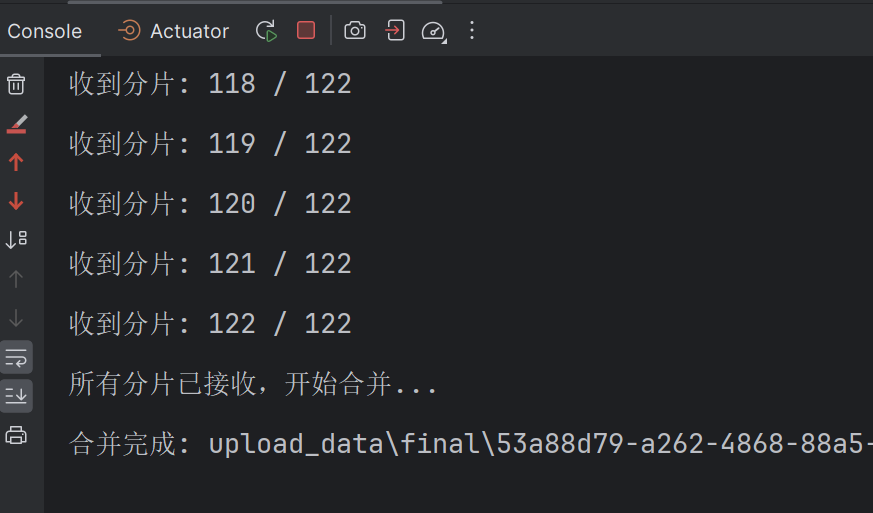
        System.out.println("收到分片: " + chunkNumber + " / " + totalChunks);

        if (isAllChunksUploaded(chunkDir, totalChunks)) {
            return mergeChunks(chunkDir, filename, identifier);
        }

        return "Chunk " + chunkNumber + " uploaded.";
    }

    /**
     * JDK 8 修正版:将 var 替换为 Stream<Path>
     */
    private boolean isAllChunksUploaded(Path chunkDir, int totalChunks) {
        // Files.list 返回的是 Stream<Path>,且实现了 AutoCloseable,需要 try-with-resources 关闭流
        try (Stream<Path> list = Files.list(chunkDir)) {
            return list.count() == totalChunks;
        } catch (IOException e) {
            return false;
        }
    }

    private String mergeChunks(Path chunkDir, String filename, String identifier) throws IOException {
        System.out.println("所有分片已接收,开始合并...");

        Path targetFile = Paths.get(UPLOAD_DIR, "final", identifier + "_" + filename);
        if (!Files.exists(targetFile.getParent())) {
            Files.createDirectories(targetFile.getParent());
        }

        File[] chunks = chunkDir.toFile().listFiles();
        if (chunks != null) {
            // JDK 8 写法:Comparator
            Arrays.sort(chunks, new Comparator<File>() {
                @Override
                public int compare(File o1, File o2) {
                    String name1 = o1.getName();
                    String name2 = o2.getName();
                    int n1 = Integer.parseInt(name1.substring(name1.lastIndexOf("-") + 1));
                    int n2 = Integer.parseInt(name2.substring(name2.lastIndexOf("-") + 1));
                    return Integer.compare(n1, n2);
                }
            });

            // 合并文件
            try (OutputStream out = new BufferedOutputStream(Files.newOutputStream(targetFile, StandardOpenOption.CREATE, StandardOpenOption.APPEND))) {
                for (File chunk : chunks) {
                    Files.copy(chunk.toPath(), out);
                }
            }
        }

        System.out.println("合并完成: " + targetFile.toString());

        // 合并完成后清理临时目录(可选)
        // deleteDirectory(chunkDir.toFile());

        return "File uploaded and merged successfully: " + targetFile.toString();
    }
}
调用客户端client代码
import org.springframework.core.io.FileSystemResource;
import org.springframework.http.HttpEntity;
import org.springframework.http.HttpHeaders;
import org.springframework.http.MediaType;
import org.springframework.util.LinkedMultiValueMap;
import org.springframework.util.MultiValueMap;
import org.springframework.web.client.RestTemplate;

import java.io.*;
import java.util.UUID;

public class ChunkUploadClient {

    private static final String UPLOAD_URL = "http://localhost:8080/upload/chunk";
    private static final int CHUNK_SIZE = 20 * 1024 * 1024; // 定义分片大小: 2MB

    public static void main(String[] args) {
        // 1. 准备要上传的文件 (请修改为你电脑上真实存在的文件路径)
        File sourceFile = new File("C:\\Users\\qinqin\\Desktop\\附件落地测试\\test.zip");

        if (!sourceFile.exists()) {
            System.err.println("测试文件不存在,请修改路径!");
            return;
        }

        // 2. 计算总分片数
        long fileSize = sourceFile.length();
        int totalChunks = (int) Math.ceil((double) fileSize / CHUNK_SIZE);

        // 生成一个唯一标识,代表这次上传任务
        String identifier = UUID.randomUUID().toString();
        String filename = sourceFile.getName();

        System.out.println("开始上传文件: " + filename);
        System.out.println("文件大小: " + fileSize + " bytes, 总分片数: " + totalChunks);

        RestTemplate restTemplate = new RestTemplate();

        // 3. 开始切片并上传
        try (RandomAccessFile raf = new RandomAccessFile(sourceFile, "r")) {
            byte[] buffer = new byte[CHUNK_SIZE];
            int bytesRead;
            int chunkNumber = 1;

            while ((bytesRead = raf.read(buffer)) != -1) {
                // 如果是最后一片,可能不满CHUNK_SIZE,需要截取
                if (bytesRead < CHUNK_SIZE) {
                    byte[] temp = new byte[bytesRead];
                    System.arraycopy(buffer, 0, temp, 0, bytesRead);
                    uploadChunk(restTemplate, temp, chunkNumber, totalChunks, identifier, filename);
                } else {
                    uploadChunk(restTemplate, buffer, chunkNumber, totalChunks, identifier, filename);
                }

                chunkNumber++;
            }
        } catch (Exception e) {
            e.printStackTrace();
        }
    }

    private static void uploadChunk(RestTemplate restTemplate, byte[] fileBytes, int chunkNumber, int totalChunks, String identifier, String filename) throws IOException {
        // 构造临时文件用于封装进 MultipartFile (RestTemplate 需要 Resource)
        // 在实际生产的Client中,通常不需要落盘,直接用 ByteArrayResource,
        // 但为了模拟名为"file"的文件流,这里创建临时文件是最通用的做法
        File tempChunkFile = File.createTempFile("client-chunk-", ".tmp");
        try (FileOutputStream fos = new FileOutputStream(tempChunkFile)) {
            fos.write(fileBytes);
        }

        // 构造请求体
        MultiValueMap<String, Object> body = new LinkedMultiValueMap<>();
        body.add("file", new FileSystemResource(tempChunkFile));
        body.add("chunkNumber", chunkNumber);
        body.add("totalChunks", totalChunks);
        body.add("identifier", identifier);
        body.add("filename", filename);

        HttpHeaders headers = new HttpHeaders();
        headers.setContentType(MediaType.MULTIPART_FORM_DATA);

        HttpEntity<MultiValueMap<String, Object>> requestEntity = new HttpEntity<>(body, headers);

        // 发送请求
        String response = restTemplate.postForObject(UPLOAD_URL, requestEntity, String.class);
        System.out.println("分片 " + chunkNumber + " 响应: " + response);

        // 清理客户端临时文件
        tempChunkFile.delete();
    }
}