Windows Forms 多语言开发指南
1. 项目概述
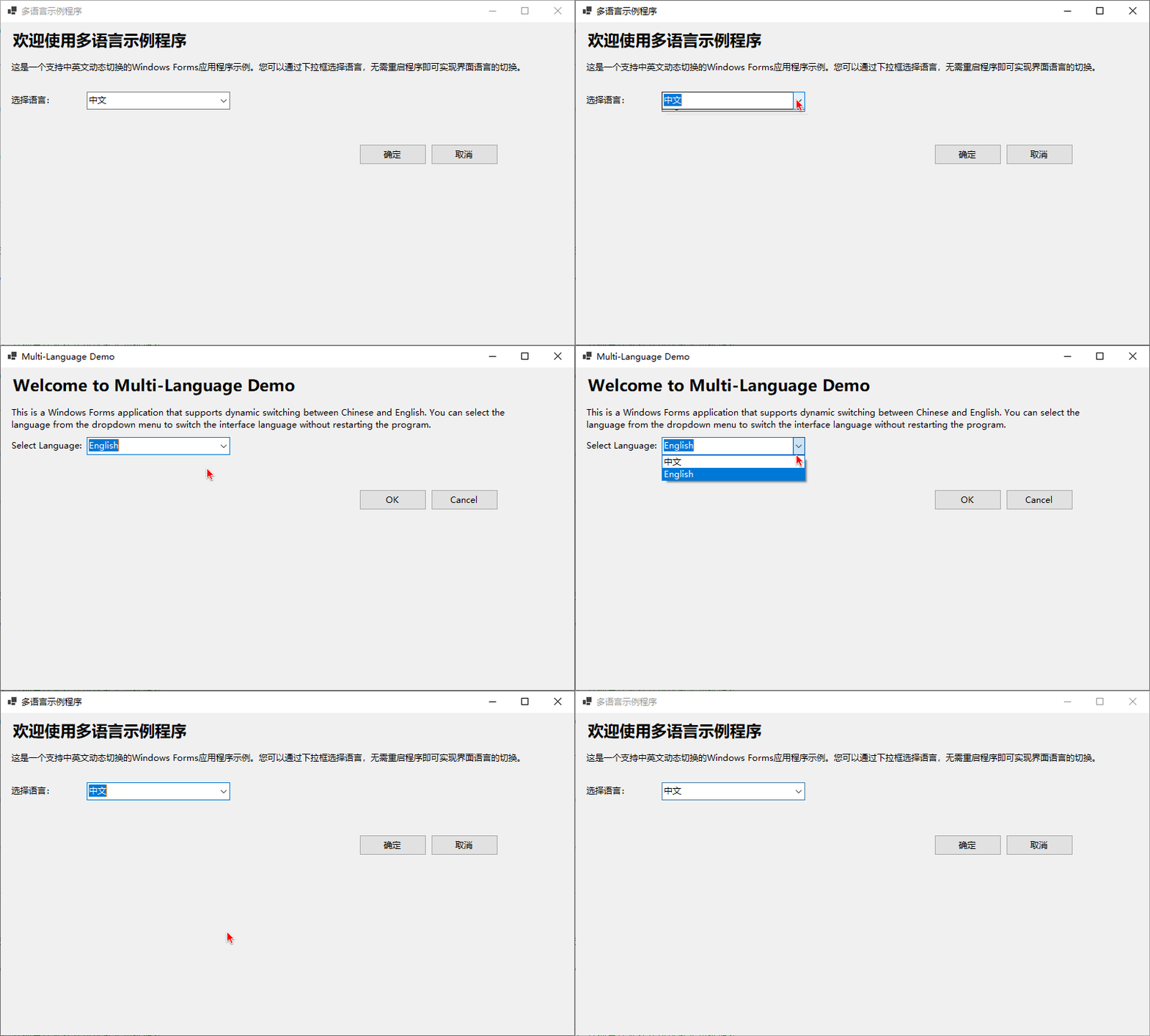
本指南介绍如何在 Windows Forms 应用程序中实现多语言支持,包括资源文件配置、语言切换功能和异常处理等内容。
2. 项目结构
MultiLanguageForm/
├── Form1.cs              # 主窗体代码
├── Form1.Designer.cs     # 主窗体设计代码
├── Program.cs            # 程序入口
└── Properties/
    ├── Resources.resx    # 默认资源文件
    ├── Resources.zh-CN.resx  # 中文资源文件
    └── Resources.en-US.resx  # 英文资源文件
3. 资源文件配置
3.1 创建资源文件
- 在 Visual Studio 中,右键点击项目 → 添加 → 新建项 → 资源文件,命名为
Resources.resx(默认资源文件) - 再次添加资源文件,命名为
Resources.zh-CN.resx(中文资源) - 再次添加资源文件,命名为
Resources.en-US.resx(英文资源)
3.2 添加资源内容
在资源文件中添加需要本地化的文本资源,确保所有资源文件使用相同的键名:
| 键名 | 中文值 | 英文值 |
|---|---|---|
| FormTitle | 多语言示例程序 | Multi-Language Demo |
| WelcomeText | 欢迎使用多语言示例程序 | Welcome to Multi-Language Demo |
| DescriptionText | 这是一个支持中英文动态切换的Windows Forms应用程序示例。您可以通过下拉框选择语言,无需重启程序即可实现界面语言的切换。 | This is a Windows Forms application demo that supports dynamic switching between Chinese and English. You can select language from the dropdown menu to change the interface language without restarting the program. |
| SelectLanguage | 选择语言: | Select Language: |
| OKButton | 确定 | OK |
| CancelButton | 取消 | Cancel |
| ChineseOption | 中文 | Chinese |
| EnglishOption | English | English |
| OKMessage | 您点击了确定按钮! | You clicked the OK button! |
| InformationTitle | 信息 | Information |
4. 主窗体代码实现
4.1 定义全局变量
csharp
// 当前资源管理器
private ResourceManager resourceManager;
// 当前语言文化
private CultureInfo currentCulture;
4.2 构造函数初始化
csharp
public Form1()
{
    InitializeComponent();

    // 初始化资源管理器
    resourceManager = new ResourceManager("MultiLanguageForm.Properties.Resources", typeof(Form1).Assembly);

    // 默认使用中文
    currentCulture = new CultureInfo("zh-CN");

    // 更新界面语言
    UpdateUI();
}
4.3 更新界面方法
csharp
// 更新界面语言
private void UpdateUI()
{
    try
    {
        // 移除事件处理程序以避免无限循环
        comboBoxLanguage.SelectedIndexChanged -= comboBoxLanguage_SelectedIndexChanged;

        // 更新窗口标题
        this.Text = resourceManager.GetString("FormTitle", currentCulture) ?? "Multi-Language Demo";

        // 更新标签文本
        labelWelcome.Text = resourceManager.GetString("WelcomeText", currentCulture) ?? "Welcome";
        labelDescription.Text = resourceManager.GetString("DescriptionText", currentCulture) ?? "Description";
        labelSelectLanguage.Text = resourceManager.GetString("SelectLanguage", currentCulture) ?? "Select Language:";

        // 更新按钮文本
        buttonOK.Text = resourceManager.GetString("OKButton", currentCulture) ?? "OK";
        buttonCancel.Text = resourceManager.GetString("CancelButton", currentCulture) ?? "Cancel";

        // 更新下拉框文本
        comboBoxLanguage.Items.Clear();
        comboBoxLanguage.Items.Add(resourceManager.GetString("ChineseOption", currentCulture) ?? "中文");
        comboBoxLanguage.Items.Add(resourceManager.GetString("EnglishOption", currentCulture) ?? "English");

        // 设置当前选中的语言
        comboBoxLanguage.SelectedIndex = currentCulture.Name == "zh-CN" ? 0 : 1;

        // 重新添加事件处理程序
        comboBoxLanguage.SelectedIndexChanged += comboBoxLanguage_SelectedIndexChanged;
    }
    catch (Exception ex)
    {
        MessageBox.Show($"更新界面语言失败: {ex.Message}", "错误", MessageBoxButtons.OK, MessageBoxIcon.Error);
    }
}
4.4 语言切换事件
csharp
// 语言切换事件
private void comboBoxLanguage_SelectedIndexChanged(object sender, EventArgs e)
{
    // 根据选择切换语言
    if (comboBoxLanguage.SelectedIndex == 0)
    {
        currentCulture = new CultureInfo("zh-CN");
    }
    else
    {
        currentCulture = new CultureInfo("en-US");
    }

    // 更新界面语言
    UpdateUI();
}
5. 程序入口与异常处理
5.1 Program.cs 代码
csharp
using System;
using System.Windows.Forms;

namespace MultiLanguageForm;

static class Program
{
    [STAThread]
    static void Main()
    {
        try
        {
            // 初始化应用配置
            ApplicationConfiguration.Initialize();

            // 启动主窗体
            Application.Run(new Form1());
        }
        catch (Exception ex)
        {
            // 显示错误对话框
            MessageBox.Show($"程序启动失败: {ex.Message}", "错误", MessageBoxButtons.OK, MessageBoxIcon.Error);
        }
    }
}
6. 常见问题与解决方案
6.1 无限循环问题
问题 :设置 comboBoxLanguage.SelectedIndex 时触发 SelectedIndexChanged 事件,导致 UpdateUI 方法无限循环调用。
解决方案 :在 UpdateUI 方法中,先移除事件处理程序,设置完成后再重新添加:
csharp
// 移除事件处理程序以避免无限循环
comboBoxLanguage.SelectedIndexChanged -= comboBoxLanguage_SelectedIndexChanged;

// 设置当前选中的语言
comboBoxLanguage.SelectedIndex = currentCulture.Name == "zh-CN" ? 0 : 1;

// 重新添加事件处理程序
comboBoxLanguage.SelectedIndexChanged += comboBoxLanguage_SelectedIndexChanged;
6.2 资源文件未找到
问题:运行时出现 "无法找到资源文件" 异常。
解决方案:确保资源管理器初始化时使用正确的资源名称:
csharp
resourceManager = new ResourceManager("MultiLanguageForm.Properties.Resources", typeof(Form1).Assembly);6.3 资源字符串为空
问题:获取的资源字符串为 null。
解决方案:使用空值合并运算符提供默认值:
csharp
this.Text = resourceManager.GetString("FormTitle", currentCulture) ?? "Multi-Language Demo";7. 最佳实践
- 资源键命名规范 :使用有意义的键名,如
WelcomeText而不是Text1 - 空值处理:始终为资源字符串提供默认值
- 异常处理:添加完善的异常处理
- 测试:在不同语言环境下测试应用程序
- 资源管理:定期更新和维护资源文件
8. 扩展功能
8.1 支持更多语言
添加新语言只需创建对应的资源文件:
- 日语:
Resources.ja-JP.resx - 法语:
Resources.fr-FR.resx - 德语:
Resources.de-DE.resx
8.2 保存用户语言偏好
可以使用配置文件或注册表保存用户的语言偏好:
csharp
// 保存语言设置
Properties.Settings.Default.Language = currentCulture.Name;
Properties.Settings.Default.Save();

// 加载语言设置
string savedLanguage = Properties.Settings.Default.Language;
if (!string.IsNullOrEmpty(savedLanguage))
{
    currentCulture = new CultureInfo(savedLanguage);
}
9. 总结
本指南介绍了如何在 Windows Forms 应用程序中实现多语言支持,包括资源文件配置、语言切换功能和异常处理等内容。通过遵循本指南,您可以快速开发支持多语言的 Windows Forms 应用程序。
文档版本 :1.0
适用框架:.NET 9.0 Windows Forms