一、背景
在鸿蒙APP开发过程中,为了让用户有更好的视觉体验,提供了沉浸式页面的实现,主要有两种实现方案,整理了两种方案的用法及使用场景
二、概念
沉浸式页面指页面内容延伸至状态栏 / 底部导航栏区域,同时保证核心内容不被系统栏遮挡的布局形式
官方提供了两种实现方案:
方案一:使用Window.setWindowLayoutFullScreen()方法设置窗口为全屏模式。
方案二:设置组件的expandSafeArea属性,扩展组件的安全区域到状态栏和导航栏,从而实现沉浸式。
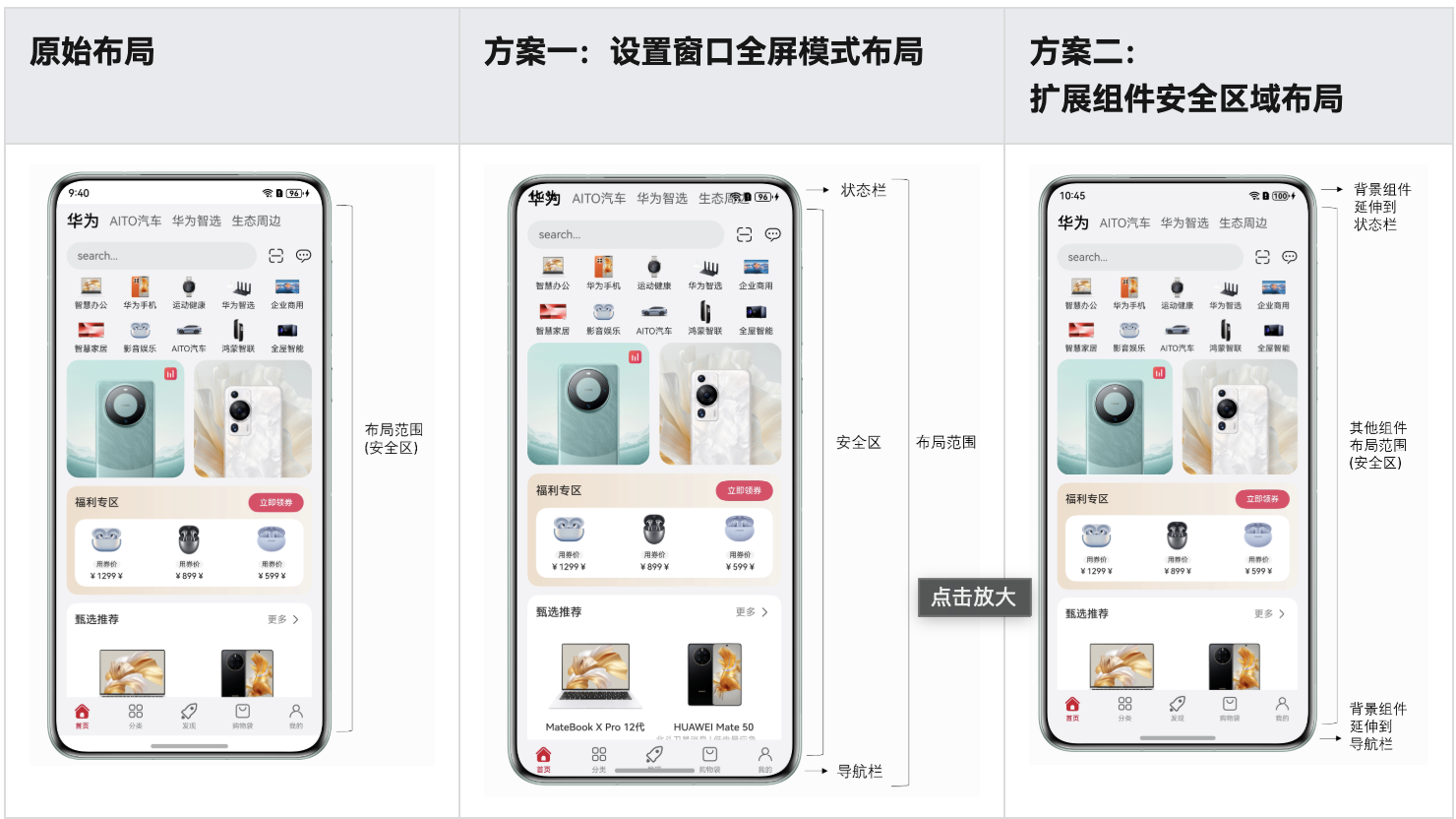
三、两种方案具体实现
3.1、方案1:窗口全屏 + 手动安全区域管理
核心逻辑:通过设置窗口全屏,手动获取状态栏 / 导航栏高度,再通过布局属性(如padding)避开系统栏区域。
3.1.1、实现步骤
步骤 1:窗口初始化时设置全屏 + 获取安全区域高度
在UIAbility的窗口创建阶段,设置窗口全屏,并读取状态栏 / 导航栏的安全区域高度(存入全局存储):
TypeScript
  // 窗口创建初始化
  onWindowCreateInit(windowStage: window.WindowStage) {
    windowStage.getMainWindow(async (err: BusinessError, data) => {
      if (err.code) {
        console.error(`Failed to obtain the main window. Cause code: ${err.code}, message: ${err.message}`);
        return;
      }
      let windowClass: window.Window = data
      // 1. 设置窗口全屏(内容延伸到系统栏)
      try {
        await windowClass.setWindowLayoutFullScreen(true)
      } catch (error) {
        console.error('Failed to setting the full screen. Cause: ' + JSON.stringify(err));
      }
      // 2. 获取状态栏/导航栏高度(转成vp单位)
      try {
        let statusBarArea = windowClass.getWindowAvoidArea(window.AvoidAreaType.TYPE_SYSTEM);
        let navBarArea = windowClass.getWindowAvoidArea(window.AvoidAreaType.TYPE_NAVIGATION_INDICATOR);
        let uiContext = windowStage.getMainWindowSync().getUIContext();
        //顶部导航栏高度,存入全局存储(供页面调用)
        const statusBarHeight = uiContext.px2vp(statusBarArea.topRect.height)
        AppStorageV2.connect(Number, 'statusBarHeight', () => new Number(statusBarHeight))
        //底部导航栏高度,存入全局存储(供页面调用)
        const navBarHeight = uiContext.px2vp(navBarArea.topRect.height)
        AppStorageV2.connect(Number, 'navigationBarHeight', () => new Number(navBarHeight))
      } catch (exception) {
        console.error(`Failed to obtain the area. Cause code: ${exception.code}, message: ${exception.message}`);
      }

      //在页面显示或隐藏时,设置状态栏内容的颜色
      windowClass.setWindowSystemBarProperties({
        statusBarContentColor: '#ffffff'
      }).catch((err: BusinessError) => {
        console.error('Failed to setting the system bar properties. Cause: ' + JSON.stringify(err));
      });
    })
  }
窗口创建阶段引入窗口创建初始化逻辑
TypeScript
  onWindowStageCreate(windowStage: window.WindowStage): void {
    // Main window is created, set main page for this ability
    // 初始化保存窗口数据,沉浸式页面实现,状态栏样式设置
    EntryManager.getInstance().onWindowCreateInit(windowStage)
    windowStage.loadContent('pages/Index', (err) => {
      if (err.code) {
        hilog.error(DOMAIN, 'testTag', 'Failed to load the content. Cause: %{public}s', JSON.stringify(err));
        return;
      }
      hilog.info(DOMAIN, 'testTag', 'Succeeded in loading the content.');
    });
  }
步骤 2:页面中手动添加安全区域间距
通过工具类读取全局存储的高度,用padding避开状态栏:
TypeScript
// Index页面:手动设置顶部padding
@Entry
@Component
struct Index {
  build() {
    Navigation() {
      Button('跳转到login组件')
    }
    // 手动添加状态栏高度的padding,避免内容被遮挡
    .padding({ top: AppStorage.get('statusBarHeight') as number })
    .width('100%').height('100%');
  }
}3.2、方案2:expandSafeArea自动扩展安全区域
核心逻辑:利用鸿蒙的expandSafeArea属性,将当前组件延伸到状态栏和导航栏,不影响其他组件的布局范围,其他组件仍在安全区域内进行布局
3.2.1、实现步骤
步骤 1:开启窗口全屏(恢复setWindowLayoutFullScreen(true))
TypeScript
 onWindowStageCreate(windowStage: window.WindowStage): void {
    windowStage.getMainWindow(async (err, windowClass) => {
      if (err.code) return;
      // 必须开启窗口全屏,否则内容无法延伸到系统栏
      await windowClass.setWindowLayoutFullScreen(true);
    });
    windowStage.loadContent('pages/Index', (err) => {
      if (err.code) {
        hilog.error(DOMAIN, 'testTag', 'Failed to load the content. Cause: %{public}s', JSON.stringify(err));
        return;
      }
      hilog.info(DOMAIN, 'testTag', 'Succeeded in loading the content.');
    });
  }
步骤 2:让页面内容触及状态栏(比如把 Text 放在 Column 顶部)
修改myPage的布局,让内容顶在页面最上方,触发 "状态栏遮挡" 场景:
TypeScript
@Builder
export function myPageBuilder() {
  myPage();
}

@ComponentV2
export struct myPage {
  build() {
    NavDestination() {
      Column() { // 内容靠顶部对齐
        Text('myPage页面呀')
          .fontColor(Color.White)
          .margin({ top: 0 }) // 顶在Column最上方
      }
      .backgroundColor(Color.Green)
      // 情况1:不加expandSafeArea(内容会被状态栏遮挡)
      // .width('100%').height('100%')

      // 情况2:加expandSafeArea(内容自动避开状态栏)
      .expandSafeArea([SafeAreaType.SYSTEM], [SafeAreaEdge.TOP])
      .width('100%').height('100%')
      .border({ width: 2, color: Color.Blue })
    }
    .hideToolBar(true)
    .hideTitleBar(true)
  }
}