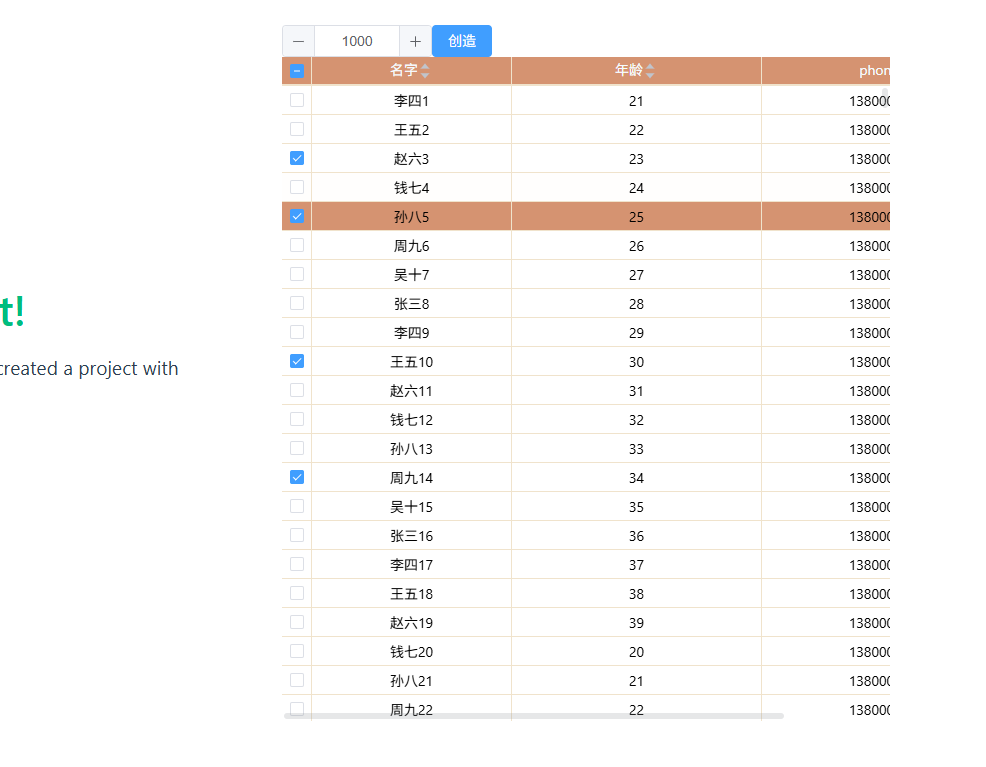
2.使用cellRenderer,headerCellRenderer构造表格的头部和表结构
<template>
  <div>
    <el-input-number
    v-model="total"
  ></el-input-number>
    <el-button type="primary" @click="initData">创造</el-button>
      <div style="height: 685px">
        <el-auto-resizer>
          <template #default="{ height, width }">
            <el-table-v2
            highlight-current-row
              header-class="table_header"
              class="custom-table"
              :row-class="rowClass"
              :row-height="29"
              :estimated-row-height="29"
              :columns="columns"
              :data="tableData"
              :width="width"
              :height="height"
              fixed
            />
          </template>
        </el-auto-resizer>
      </div>


  </div>
</template>

<script setup >
import { onMounted } from "vue";
import { ref, unref,reactive,h  } from "vue";
import { ElCheckbox, ElButton,ElMessage } from "element-plus";

import { CaretTop, CaretBottom } from "@element-plus/icons-vue";


const parameColums = [

{
      "key": "name",
      "title": "名字",
      "dataKey": "name",
      "width": 200,
      "align": "center",
      "sortable": true
  },
  {
    "key": "age",
    "title": "年龄",
    "dataKey": "age",
    "width": 250,
    "align": "center",
    "sortable": true
},
  {
      "key": "phone",
      "title": "phone",
      "dataKey": "phone",
      "width": 250,
      "align": "center",
      "sortable": true
  },
]
const queryParams = ref({
  pageNum: 1,
  pageSize: 100000,
  orderByColumn: null,
  isAsc: null,
  isToUnder: "1",
  // orderByChinese:"1",

  url: 'tablelistUrL',
});
const total = ref(1000)
// 表格数据
const tableData = ref([]);
// 选中状态
const selectedRowKeys = ref(new Set());
const selectedRows = ref([]);
const getTestData=()=>{
  const data = []
  const names = ['张三', '李四', '王五', '赵六', '钱七', '孙八', '周九', '吴十']
  const positions = ['前端工程师', '后端工程师', 'UI设计师', '产品经理', '测试工程师', '运维工程师', '项目经理']
  const departments = ['技术部', '产品部', '设计部', '市场部', '销售部', '人事部']

  for (let i = 1; i <= total.value; i++) {
    const nameIndex = i % names.length
    const positionIndex = i % positions.length
    const deptIndex = i % departments.length

    data.push({
      deviceId: i,
      name: names[nameIndex] + i,
      gender: i % 2 === 0 ? '男' : '女',
      age: 20 + (i % 20),
      position: positions[positionIndex],
      department: departments[deptIndex],
      phone: `138${String(10000000 + i).slice(1)}`,
      hireDate: `202${i % 4}-${String((i % 12) + 1).padStart(2, '0')}-${String((i % 28) + 1).padStart(2, '0')}`,
      status: i % 3 === 0 ? '在职' : (i % 3 === 1 ? '离职' : '休假')
    })
  }
  return data
}
function applySorting(data) {
  const { orderByColumn, isAsc } = queryParams.value

  // 如果没有排序要求,返回原始数据
  if (!orderByColumn || !isAsc) {
    return data
  }

  // 创建数据副本以避免修改原始数据
  const sortedData = [...data]

  // 根据字段进行排序
  sortedData.sort((a, b) => {
    let valueA = a[orderByColumn]
    let valueB = b[orderByColumn]

    // 如果是age字段,确保转换为数字进行比较
    if (orderByColumn === 'age') {
      valueA = Number(valueA)
      valueB = Number(valueB)
    }

    // 如果是phone字段,直接比较字符串
    if (orderByColumn === 'phone') {
      // 直接比较字符串即可
    }

    // 根据排序方向返回值
    if (isAsc === 'asc') {
      return valueA > valueB ? 1 : (valueA < valueB ? -1 : 0)
    } else if (isAsc === 'desc') {
      return valueA < valueB ? 1 : (valueA > valueB ? -1 : 0)
    }

    return 0
  })

  return sortedData
}

function initData() {
  //造假数据
 const data = getTestData()
  //模拟后端排序
  const sortedData = applySorting(data)
  console.log('sortedData',sortedData)
  tableData.value = sortedData
  if (data.length<1500) {
    const validDeviceIDs = new Set(
          tableData.value
            .filter((item) => item.deviceId !== undefined)
            .map((item) => item.deviceId)
        );

        selectedRowKeys.value = new Set(
          [...selectedRowKeys.value].filter((key) => validDeviceIDs.has(key))
        );
        updateSelectedRows();
  } else {
    ElMessage.error("为避免数据量过大,请填后查询!");
    tableData.value = [];
    clearSelection();
  }
}


// 全选/取消全选当前页
const handleSelectAll = (checked) => {
  if (checked) {
    // 获取当前页的数据ID

    selectedRowKeys.value = new Set(
      tableData.value.map((item) => item.deviceId)
    );
  } else {
    // 获取当前页的数据ID
    // clearSelection()
    selectedRowKeys.value.clear();
  }
  updateSelectedRows();
};

// 更新选中的行数据
const updateSelectedRows = () => {

  selectedRows.value = tableData.value.filter((item) =>
    selectedRowKeys.value.has(item.deviceId)
  );
};

const getSortAsc = (isAsc) => {

  queryParams.value.isAsc = queryParams.value.isAsc === isAsc ? null : isAsc;
};
// 单行选择
const handleSelect = (rowId, checked) => {
  if (checked) {
    selectedRowKeys.value.add(rowId);
  } else {
    selectedRowKeys.value.delete(rowId);
  }
  updateSelectedRows();
};
const currentIndex = ref(null)
// 行点击事件
const handleRowClick = ({rowIndex}) => {

  currentIndex.value = rowIndex


};

// 清空选择
const clearSelection = () => {
  selectedRowKeys.value.clear();
  selectedRows.value = [];
};

initColumns();

function initColumns(params) {
  parameColums.forEach((item, index) => {
    if (item.sortable === true) {
      parameColums[index].headerCellRenderer = ({ column }) => {
        return h("div", { class: "sortable-header" }, [
          h("span", column.title),
          h("div", { class: "sort_icon_box" }, [
            h(CaretTop, {
              class: [
                "sort-icon",
                "sort-icon-top",
                "sort-caret ascending",
                queryParams.value.sortColumn === item.key &&
                queryParams.value.isAsc === "asc"
                  ? "active"
                  : "",
              ],
              onClick: (e) => {
                e.stopPropagation();
                handleSortChange({
                  column,
                  key: item.key,
                  order: "asc",
                });
              },
            }),
            h(CaretBottom, {
              class: [
                "sort-icon",
                "sort-icon-bottom",
                queryParams.value.sortColumn === item.key &&
                queryParams.value.isAsc === "desc"
                  ? "active"
                  : "",
              ],
              onClick: (e) => {
                e.stopPropagation();
                handleSortChange({
                  column,
                  key: item.key,
                  order: "desc",
                });
              },
            }),
          ]),
        ]);
      };
    }
    parameColums[index].cellRenderer = ({ rowData, column,rowIndex }) => {
        return h("div", { style: "width:100%",     onClick: (e) => {
                e.stopPropagation();
                handleRowClick({
                  rowIndex

                });
              }, }, [
          h("span",  rowData[item.key]),

        ]);
      };

  });
}

// 表格列定义
const columns = reactive([
  ...[
    {
      key: "selection",
      width: 30,

      align: "center",
      cellRenderer: ({ rowData }) => {
        return h(ElCheckbox, {
          modelValue: selectedRowKeys.value.has(rowData.deviceId),
          "onUpdate:modelValue": (val) => handleSelect(rowData.deviceId, val),
          onClick: (e) => e.stopPropagation(), // 阻止事件冒泡,避免触发行点击
        });
      },
      headerCellRenderer: () => {
        // 检查当前页是否全部选中

        let allSelected = false;
        if (selectedRowKeys.value.length === 0) {
          allSelected = false;
        } else if (selectedRowKeys.value.length === tableData.value.length) {
          allSelected = true;
        }

        return h(ElCheckbox, {
          modelValue: allSelected,
          "onUpdate:modelValue": handleSelectAll,
          indeterminate: selectedRowKeys.value.size > 0 && !allSelected,
        });
      },
    },
  ],

  ...parameColums,
]);

const handleSortChange = ({ column, key, order }) => {
  queryParams.value.sortColumn = key
  if (key) {
    getSortAsc(order);
    if (queryParams.value.isAsc) {
        queryParams.value.orderByColumn = key;
      queryParams.value.nullLast = true;
    } else {
      queryParams.value.orderByColumn = undefined;
      queryParams.value.nullLast = undefined;
    }
  }
  initData();
};
const rowClass = ({ rowIndex,row }) => {
  if (rowIndex ===  currentIndex.value) {
    return 'table-v2_row_active'
  } else {
    return ''
  }
  return ''
}
</script>

<style scoped>

  /* 头部图标 */
.tablev2_box {
  height: 400px;
  width: 100%;
}
:deep(.sortable-header) {
  display: flex;
  align-items: center;
  justify-content: space-between;
  cursor: pointer;
  user-select: none;
  color: var(--custom-head-color);
}

:deep(.sort-icon) {
  width: 14px;
  height: 14px;
  color: #c0c4cc;
  transition: color 0.2s;
  position: absolute;
}
:deep(.sort-icon-top) {
 border-bottom-color: var(--el-text-color-placeholder);
    top: 3px;
}

:deep(.sort-icon-bottom) {
  border-top-color: var(--el-text-color-placeholder);
    bottom: 3px;
}


:deep(.sort-icon.active) {
  color: #409eff;
}

:deep(.el-table-v2__sort-icon) {
  display: none !important;
}
:deep(.sort_icon_box) {
  height: 29px;
  flex-direction: column;
  display: flex;
  width: 15px;
  color: #a8abb2;
  padding-top: 3px;
  cursor: pointer;
  position: relative;

}

</style>
<style  scoped>


:deep(.el-table-v2) {
  --table-border-color: #f0e3cc; /* 自定义边框颜色变量 */
  --row-height: 29px;
  --custom-head-color:#f6fcff;
  --custom-head-bgcolor:#d59371;
  --custom-table-bgcolor:#ffffff;
  --custom-table-color:#000;
  --table-cell-hover:#fee4d7;
}
:deep(.el-table-v2__body) {
    background: var(--custom-table-bgcolor) !important;
    color: var(--custom-table-color);
  }
:deep(.el-table-v2) {
  border-color: var(--table-border-color);
}

:deep(.el-empty__image) {
  opacity: 0 !important;
}


:deep(.el-table-v2__row) {
  height: var(--row-height) !important;
  min-height: var(--row-height) !important;
  max-height: var(--row-height) !important;
  line-height: var(--row-height) !important; /* 确保文字垂直居中 */
  border: 0 solid  var(--table-border-color) !important;
  background-color: var(--custom-table-bgcolor) !important;
}

:deep(.el-table-v2__row:hover) {
  background: var(--table-cell-hover) !important;
}
:deep(.table-v2_row_active) {
  background: var(--custom-head-bgcolor) !important;
}
:deep(.el-table-v2__row-cell) {
  padding: 0 !important;
  border-bottom: var(--el-table-border);
  border-right: var(--el-table-border);
  border-color:  var(--table-border-color);
}


:deep(.el-table-v2__header) {
  height: "32px!important";
  border: 0 solid  var(--table-border-color) !important;
  line-height: "32px";
}
:deep(.el-table-v2__header-row) {
  border-color: var(--table-border-color);
  height: var(--row-height) !important ;
}
:deep(.el-table-v2__header-wrapper) {
  height: var(--row-height) !important ;
}
:deep(.el-table-v2__header-cell) {
  background-color: var(--custom-head-bgcolor) !important;
  border-bottom: var(--el-table-border);
  border-right: var(--el-table-border);
  border-color: var(--table-border-color);
  padding: 0 !important;
  color: var( --custom-head-color);
}
</style>
  <style>
.hover_row_pointer:hover {
  cursor: pointer;
}
</style>
  <style scoped>
:deep(.el-table-v2) {
  row-gap: 0 !important;
  gap: 0 !important;
}
</style>