1. IntersectionObserver API(现代推荐方案)
实现原理: 通过观察目标元素与视窗的交叉状态,自动触发回调函数。
代码示例:
javascript
const images = document.querySelectorAll('img[data-src]');
const imageObserver = new IntersectionObserver((entries) => {
  entries.forEach(entry => {
    if (entry.isIntersecting) {
      const img = entry.target;
      img.src = img.dataset.src;
      img.removeAttribute('data-src');
      imageObserver.unobserve(img);
    }
  });
}, { rootMargin: '50px' });

images.forEach(img => imageObserver.observe(img));
优点:
✅ 原生浏览器支持,性能最优
✅ 异步执行,不阻塞主线程
✅ 支持阈值配置和根元素偏移
✅ 代码简洁,易于维护
✅ 支持所有现代浏览器(IE需polyfill)
缺点:
❌ IE不原生支持(需polyfill)
❌ 部分复杂场景配置需要理解
2. 传统滚动监听 + getBoundingClientRect
实现原理: 监听滚动事件,通过getBoundingClientRect()计算元素位置。
代码示例:
javascript
function lazyLoadTraditional() {
  const images = document.querySelectorAll('img[data-src]');
  const windowHeight = window.innerHeight;

  images.forEach(img => {
    const rect = img.getBoundingClientRect();
    if (rect.top < windowHeight + 100) {
      img.src = img.dataset.src;
      img.removeAttribute('data-src');
    }
  });
}

// 添加防抖优化
const debouncedLazyLoad = debounce(lazyLoadTraditional, 100);
window.addEventListener('scroll', debouncedLazyLoad);
window.addEventListener('resize', debouncedLazyLoad);
优点:
✅ 兼容性好(支持所有浏览器)
✅ 无需额外依赖
✅ 控制精细,可自定义计算逻辑
缺点:
❌ 频繁触发,性能较差
❌ 需要手动优化(防抖/节流)
❌ 代码相对复杂
❌ 计算可能引起重排
3. offsetTop/scrollTop 计算
实现原理: 通过元素相对于文档的偏移位置计算。
代码示例:
javascript
function lazyLoadOffset() {
  const images = document.querySelectorAll('img[data-src]');
  const scrollTop = window.pageYOffset || document.documentElement.scrollTop;
  const windowHeight = window.innerHeight;

  images.forEach(img => {
    if (img.offsetTop < scrollTop + windowHeight + 200) {
      img.src = img.dataset.src;
      img.removeAttribute('data-src');
    }
  });
}
优点:
✅ 兼容性极好
✅ 计算相对简单
缺点:
❌ 准确性受布局影响
❌ 频繁重排影响性能
❌ 需要处理多种滚动容器
4. 基于 CSS 的 content-visibility
实现原理: 利用CSS新特性延迟渲染不可见内容。
代码示例:
javascript
.lazy-container {
  content-visibility: auto;
  contain-intrinsic-size: 0 500px; /* 预估高度 */
}

/* 图片完全加载后移除占位 */
img:not([src]) {
  background: #f0f0f0;
}
优点:
✅ 性能优秀(浏览器原生优化)
✅ 简单易用
✅ 适用于大量列表
缺点:
❌ 兼容性一般(Chrome 85+)
❌ 不是专门为懒加载设计
❌ 需要预估内容尺寸
5. 第三方库方案
常见库:
lozad.js(基于IntersectionObserver) lazysizes(功能全面) vanilla-lazyload(轻量级)
代码示例(lozad.js):
javascript
import lozad from 'lozad';

const observer = lozad('.lozad', {
  rootMargin: '100px',
  loaded: (el) => {
    el.classList.add('loaded');
  }
});
observer.observe();
优点:
✅ 功能丰富(支持背景图、iframe等)
✅ 自动降级处理
✅ 社区维护,测试充分
✅ 支持多种加载策略
缺点:
❌ 增加包体积
❌ 学习第三方API
❌ 可能包含不需要的功能
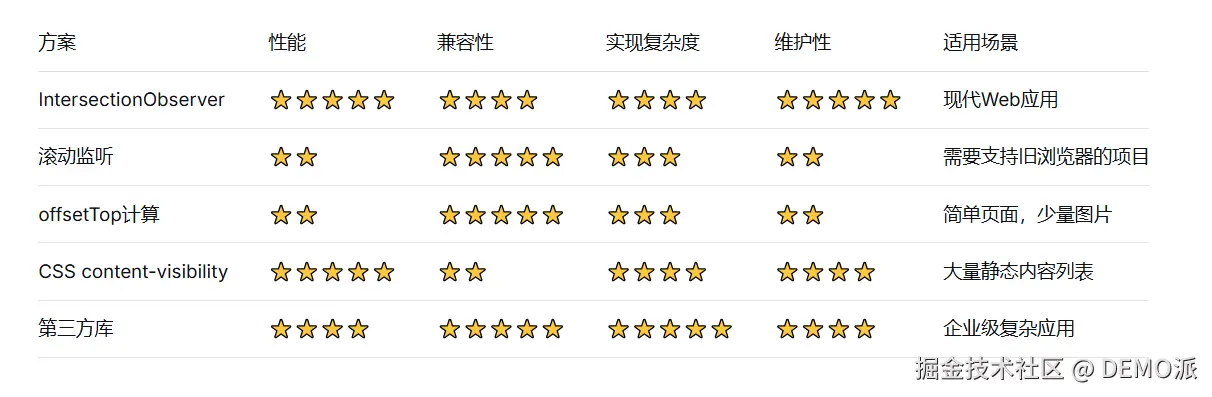
方案详细对比
建议与最佳实践
推荐方案选择
1. 首选方案:IntersectionObserver + 优雅降级
javascript
// 示例:带降级的实现
const lazyLoad = (() => {
  if ('IntersectionObserver' in window) {
    // 使用IntersectionObserver
    return (images) => {
      const observer = new IntersectionObserver((entries) => {
        entries.forEach(entry => {
          if (entry.isIntersecting) {
            loadImage(entry.target);
            observer.unobserve(entry.target);
          }
        });
      }, { rootMargin: '50px' });

      images.forEach(img => observer.observe(img));
    };
  } else {
    // 降级到传统方案
    return (images) => {
      const lazyLoadTraditional = debounce(() => {
        const windowHeight = window.innerHeight;
        images.forEach(img => {
          const rect = img.getBoundingClientRect();
          if (rect.top < windowHeight + 100) {
            loadImage(img);
          }
        });
      }, 100);

      window.addEventListener('scroll', lazyLoadTraditional);
      window.addEventListener('resize', lazyLoadTraditional);
      lazyLoadTraditional(); // 初始执行
    };
  }
})();
2. 关键优化建议:
占位符:使用固定宽高比容器避免布局抖动
渐进加载:先加载低质量占位图(LQIP)
错误处理:添加加载失败的回退方案
预加载:提前加载即将进入视口的图片
3. HTML标记示例:
javascript
<div class="image-container" style="aspect-ratio: 16/9;">
  <img
    data-src="image.jpg"
    data-srcset="image-small.jpg 300w, image-large.jpg 800w"
    data-sizes="auto"
    alt="描述文本"
    class="lazy-image"
    width="800"
    height="450"
  >
  <!-- 低质量占位 -->
  <div class="lazy-placeholder"></div>
</div>
4. 性能监控:
javascript
// 监控图片加载性能
const perfObserver = new PerformanceObserver((list) => {
  list.getEntries().forEach(entry => {
    console.log('Lazy-loaded image timing:', {
      name: entry.name,
      duration: entry.duration,
      startTime: entry.startTime
    });
  });
});
perfObserver.observe({ entryTypes: ['resource'] });
总结
-
对于现代应用:IntersectionObserver是首选方案,提供最佳性能和开发体验。
-
需要兼容旧浏览器:使用IntersectionObserver polyfill或第三方库(如lazysizes)自动处理降级。
-
简单页面/少量图片:传统的滚动监听方案仍然可用,但必须添加防抖/节流优化。
-
内容密集型页面:考虑结合CSS content-visibility和懒加载,获得双重性能提升。
-
企业级项目:评估使用成熟的第三方库,节省开发时间,获得更多高级功能。
