Pinia 是 Vue3 官方推荐的状态管理库(替代 Vuex),相比 Vuex 更简洁、轻量化,原生支持组合式 API,无嵌套模块限制,且完美兼容 Vue DevTools。下面时pinia官方的介绍:
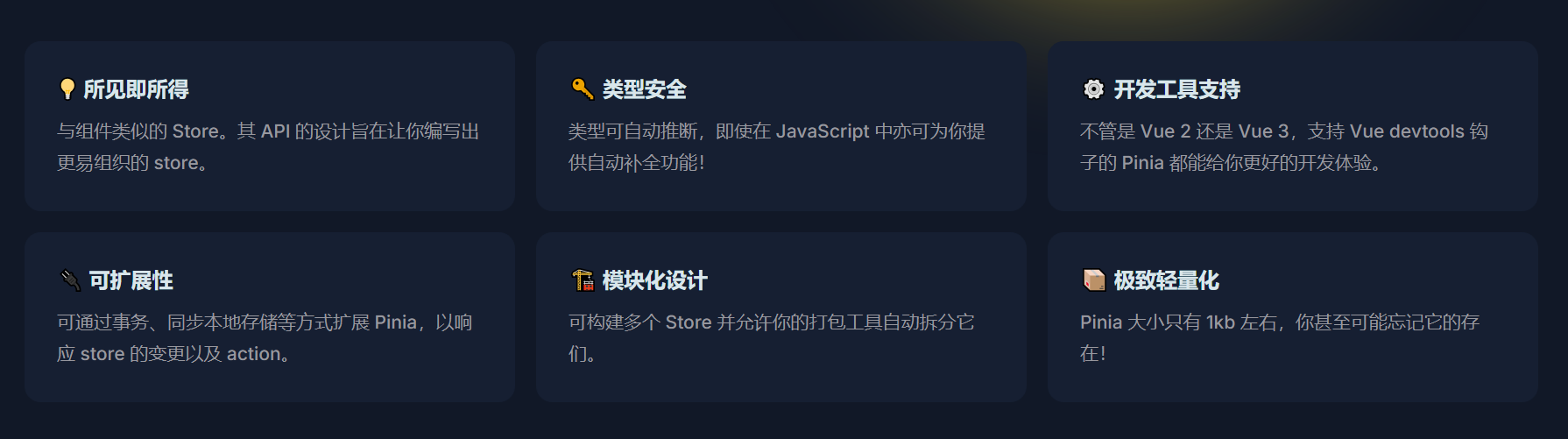
下面介绍一下 Pinia这款状态管理工具的完整用法,实际项目在的大多数场景可以直接照着代码改一下就可以用了。
一、核心优势(为什么选 Pinia)
- 无需嵌套模块,天然支持「扁平化模块化」;
- 抛弃
mutation(仅需state/getters/actions),简化状态修改逻辑; - 原生支持 TypeScript,类型提示更友好;
- 支持组合式 API(
setup)和选项式 API 两种写法; - 体积更小(约 1KB),性能更优;
- 完美兼容 Vue DevTools(支持时间旅行、状态追踪)。
二、基础安装
bash
# npm
npm install pinia

# yarn
yarn add pinia

# pnpm
pnpm add pinia
三、全局挂载 Pinia 实例
在 main.js 中创建并挂载 Pinia 实例(所有组件可共享 Store):
javascript
// src/main.js (Vue3 + Vite)
import { createApp } from 'vue';
import { createPinia } from 'pinia'; // 导入 Pinia
import App from './App.vue';

const app = createApp(App);
const pinia = createPinia(); // 创建 Pinia 实例
app.use(pinia); // 挂载到 Vue 应用
app.mount('#app');
四、定义 Store(核心)
Pinia 中「Store」是状态管理的核心单元,每个业务模块(如用户、购物车)对应一个独立的 Store。
支持两种写法:选项式 API(类似 Vuex) 和 组合式 API(更灵活)。
1. 选项式 API 写法(推荐新手)
javascript
// src/stores/counterStore.js
import { defineStore } from 'pinia';

// 第一个参数:Store 唯一标识(必须唯一),第二个参数:配置对象
export const useCounterStore = defineStore('counter', {
  // 1. 状态:返回初始值的函数(类似 Vue 的 data)
  state: () => ({
    count: 0,
    title: 'Pinia 计数器',
    userInfo: { name: '张三', age: 20 }
  }),

  // 2. 计算属性:类似 Vue 的 computed,缓存结果
  getters: {
    // 基础用法:基于 state 计算
    doubleCount: (state) => state.count * 2,

    // 依赖其他 getter(通过 this 访问)
    doubleCountPlusOne() {
      return this.doubleCount + 1;
    },

    // 带参数的 getter(返回函数)
    getCountByMultiplier: (state) => (multiplier) => {
      return state.count * multiplier;
    }
  },

  // 3. 方法:支持同步/异步,修改状态(类似 Vue 的 methods)
  actions: {
    // 同步修改
    increment() {
      this.count++; // 直接修改 state,无需 mutation
    },

    // 带参数的同步方法
    incrementBy(num) {
      this.count += num;
    },

    // 异步方法(如接口请求)
    async fetchData() {
      const res = await fetch('https://api.example.com/count');
      const data = await res.json();
      this.count = data.count; // 异步修改状态
    },

    // 调用其他 action
    async fetchAndIncrement() {
      await this.fetchData(); // 调用自身异步 action
      this.increment(); // 调用同步 action
    }
  }
});
2. 组合式 API 写法(推荐 Vue3 组合式项目)
更灵活,可复用组合式函数(composables):
javascript
// src/stores/counterStore.js
import { defineStore } from 'pinia';
import { ref, computed } from 'vue';

// 组合式 API 写法:返回函数
export const useCounterStore = defineStore('counter', () => {
  // 1. 状态:等价于 state(用 ref/reactive 定义)
  const count = ref(0);
  const title = ref('Pinia 计数器');
  const userInfo = ref({ name: '张三', age: 20 });

  // 2. 计算属性:等价于 getters(用 computed 定义)
  const doubleCount = computed(() => count.value * 2);
  const doubleCountPlusOne = computed(() => doubleCount.value + 1);
  const getCountByMultiplier = (multiplier) => count.value * multiplier;

  // 3. 方法:等价于 actions(普通函数)
  const increment = () => {
    count.value++;
  };
  const incrementBy = (num) => {
    count.value += num;
  };
  const fetchData = async () => {
    const res = await fetch('https://api.example.com/count');
    const data = await res.json();
    count.value = data.count;
  };

  // 必须返回需要暴露的状态/方法
  return {
    count,
    title,
    userInfo,
    doubleCount,
    doubleCountPlusOne,
    getCountByMultiplier,
    increment,
    incrementBy,
    fetchData
  };
});
五、组件中使用 Store
1. 基础使用(组合式 API 组件)
vue
<!-- src/components/Counter.vue -->
<template>
  <div>
    <h3>{{ counterStore.title }}</h3>
    <p>当前计数:{{ counterStore.count }}</p>
    <p>双倍计数:{{ counterStore.doubleCount }}</p>
    <p>三倍计数:{{ counterStore.getCountByMultiplier(3) }}</p>

    <button @click="counterStore.increment">+1</button>
    <button @click="counterStore.incrementBy(5)">+5</button>
    <button @click="counterStore.fetchData">异步获取计数</button>
    <button @click="resetCount">重置计数</button>
  </div>
</template>

<script setup>
// 1. 导入 Store 函数
import { useCounterStore } from '@/stores/counterStore';

// 2. 创建 Store 实例(Pinia 会自动复用单例,多次调用也返回同一个实例)
const counterStore = useCounterStore();

// 3. 直接修改状态(Pinia 默认允许,可通过严格模式禁止)
const resetCount = () => {
  counterStore.count = 0;
};
</script>
2. 解构 Store 保持响应式(关键)
直接解构 Store 会丢失响应式,需用 storeToRefs 辅助:
vue
<script setup>
import { useCounterStore } from '@/stores/counterStore';
import { storeToRefs } from 'pinia'; // 导入辅助函数

const counterStore = useCounterStore();

// 错误:解构后丢失响应式
// const { count, doubleCount } = counterStore;

// 正确:用 storeToRefs 解构,保留响应式
const { count, doubleCount, title } = storeToRefs(counterStore);

// actions 方法无需解构(本身是函数,不涉及响应式)
const { increment, fetchData } = counterStore;
</script>

<template>
  <div>
    <p>{{ title }}</p>
    <p>{{ count }}</p>
    <p>{{ doubleCount }}</p>
    <button @click="increment">+1</button>
    <button @click="fetchData">异步获取</button>
  </div>
</template>
3. 选项式 API 组件中使用
vue
<script>
import { useCounterStore } from '@/stores/counterStore';
import { mapState, mapActions } from 'pinia'; // 导入映射辅助函数

export default {
  computed: {
    // 映射 state/getters 到计算属性
    ...mapState(useCounterStore, ['count', 'doubleCount', 'title'])
  },
  methods: {
    // 映射 actions 到方法
    ...mapActions(useCounterStore, ['increment', 'fetchData'])
  },
  mounted() {
    console.log(this.count); // 访问状态
    this.increment(); // 调用方法
  }
};
</script>
六、模块化(多 Store 管理)
Pinia 天然支持模块化,每个业务模块对应一个独立的 Store,无需嵌套:
src/stores/
├── counterStore.js  // 计数器 Store
├── userStore.js     // 用户 Store
├── cartStore.js     // 购物车 Store
示例:用户 Store
javascript
// src/stores/userStore.js
import { defineStore } from 'pinia';

export const useUserStore = defineStore('user', {
  state: () => ({
    token: '',
    userInfo: null,
    permissions: []
  }),
  actions: {
    // 登录
    async login(username, password) {
      const res = await fetch('/api/login', {
        method: 'POST',
        body: JSON.stringify({ username, password })
      });
      const data = await res.json();
      this.token = data.token;
      this.userInfo = data.userInfo;
      this.permissions = data.permissions;
    },
    // 退出登录
    logout() {
      this.token = '';
      this.userInfo = null;
      this.permissions = [];
    }
  }
});
组件中按需导入多 Store
vue
<script setup>
import { useCounterStore } from '@/stores/counterStore';
import { useUserStore } from '@/stores/userStore';

const counterStore = useCounterStore();
const userStore = useUserStore();

// 调用不同 Store 的方法
const handleLogin = async () => {
  await userStore.login('admin', '123456');
  counterStore.increment();
};
</script>
七、进阶用法
1. 状态持久化(本地存储)
安装插件 pinia-plugin-persistedstate,可以实现 Store 状态自动持久化到 localStorage/sessionStorage:
bash
npm install pinia-plugin-persistedstate
javascript
// src/main.js
import { createApp } from 'vue';
import { createPinia } from 'pinia';
import piniaPluginPersistedstate from 'pinia-plugin-persistedstate'; // 导入插件
import App from './App.vue';

const pinia = createPinia();
pinia.use(piniaPluginPersistedstate); // 注册插件

const app = createApp(App);
app.use(pinia);
app.mount('#app');
在 Store 中开启持久化:
javascript
// 选项式 API 写法
export const useUserStore = defineStore('user', {
  state: () => ({ token: '', userInfo: null }),
  actions: { /* ... */ },
  persist: true, // 开启持久化(默认存储到 localStorage)
});

// 自定义持久化配置
export const useCartStore = defineStore('cart', {
  state: () => ({ items: [] }),
  persist: {
    key: 'cart-store', // 自定义存储键名
    storage: sessionStorage, // 存储到 sessionStorage
    paths: ['items'], // 仅持久化 items 字段(默认全量)
  },
});
2. Store 间通信
一个 Store 可直接调用另一个 Store 的状态/方法:
javascript
// src/stores/cartStore.js
import { defineStore } from 'pinia';
import { useUserStore } from './userStore'; // 导入其他 Store

export const useCartStore = defineStore('cart', {
  state: () => ({ items: [] }),
  actions: {
    async addItem(item) {
      const userStore = useUserStore(); // 创建其他 Store 实例
      if (!userStore.token) {
        throw new Error('未登录,无法添加商品');
      }
      // 调用接口添加商品
      await fetch('/api/cart/add', {
        method: 'POST',
        headers: { Authorization: userStore.token },
        body: JSON.stringify(item)
      });
      this.items.push(item);
    }
  }
});
3. 严格模式(禁止直接修改状态)
Pinia 默认允许直接修改 state,开启严格模式后,仅允许通过 actions 修改状态(类似 Vuex 的严格模式):
javascript
// src/main.js
import { createPinia } from 'pinia';

const pinia = createPinia();

// 开启严格模式(仅生产环境建议关闭)
if (import.meta.env.MODE !== 'production') {
  pinia.use(({ store }) => {
    store.$subscribe((mutation, state) => {
      // 检测是否直接修改 state(非 actions 触发)
      if (mutation.type === 'direct') {
        console.warn(`[Pinia 严格模式] 禁止直接修改 ${store.$id} 的状态:${mutation.payload}`);
      }
    });
  });
}
4. 状态重置
调用 $reset() 方法重置 Store 到初始状态:
vue
<script setup>
import { useCounterStore } from '@/stores/counterStore';

const counterStore = useCounterStore();

const resetStore = () => {
  counterStore.$reset(); // 重置所有状态到初始值
};
</script>
5. 批量修改状态
使用 $patch 批量修改状态(性能更优,DevTools 会记录为一次修改):
javascript
// 方式1:对象形式
counterStore.$patch({
  count: 10,
  title: '新标题'
});

// 方式2:函数形式(支持复杂逻辑)
counterStore.$patch((state) => {
  state.count += 5;
  state.userInfo.age += 1;
});
八、调试技巧
-
Vue DevTools:Pinia 完美兼容 DevTools,可在「Pinia」面板查看所有 Store 的状态,支持「时间旅行」(回溯状态修改记录);
-
$subscribe 监听状态变化 :
javascriptconst counterStore = useCounterStore(); // 监听状态变化 counterStore.$subscribe((mutation, state) => { console.log('状态变化:', mutation.type, mutation.payload, state); }); -
$onAction 监听 action 调用 :
javascriptcounterStore.$onAction(({ name, args, after, onError }) => { console.log(`开始执行 action:${name},参数:${args}`); after((result) => { console.log(`action ${name} 执行成功,结果:${result}`); }); onError((error) => { console.error(`action ${name} 执行失败:${error}`); }); });
九、常见问题
- 解构 Store 丢失响应式 :用
storeToRefs解构状态,方法可直接解构; - Store 实例重复创建 :无需担心,Pinia 会自动复用单例,多次调用
useCounterStore()始终返回同一个实例; - TypeScript 类型提示 :选项式 API 自动推导类型,组合式 API 需手动标注(或用
defineStore自动推导); - SSR 适配:Pinia 原生支持 SSR,需在服务端为每个请求创建独立的 Pinia 实例,避免状态污染。
总结
Pinia 的核心用法可总结为:
- 安装并挂载 Pinia 实例;
- 用
defineStore定义 Store(选项式/组合式); - 组件中导入并创建 Store 实例,通过
storeToRefs解构响应式状态; - 用
actions处理同步/异步状态修改,getters处理计算属性; - 多 Store 实现模块化,插件扩展持久化、调试等能力。
相比 Vuex的繁琐,Pinia 更简洁、灵活,是 Vue3 项目状态管理的首选,建议在中大型项目中使用,小型项目可根据项目实际情况选择更加合适的。