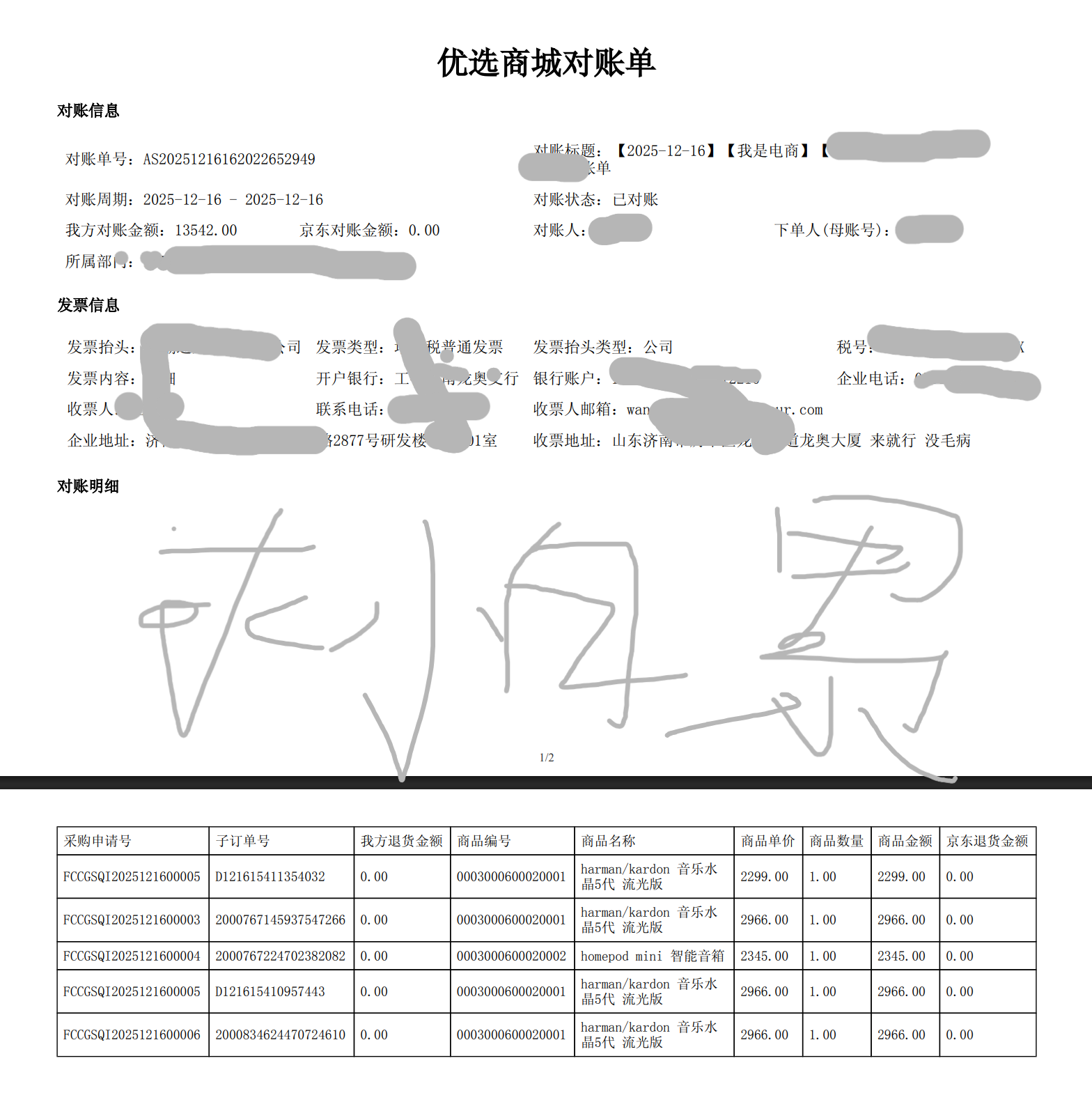
Windows和Linux服务器都能用 也可打成jar包和生成docker镜像
使用都是开源jar包pom.xml中引入
XML
        <dependency>
            <groupId>org.thymeleaf</groupId>
            <artifactId>thymeleaf</artifactId>
        </dependency>
        <dependency>
            <groupId>com.openhtmltopdf</groupId>
            <artifactId>openhtmltopdf-pdfbox</artifactId>
            <version>1.0.10</version>
</dependency>静态资源目录下存放simsun.ttf
如果没有需要下载一个 要不然生成的PDF中文会乱码 放上之后Windows和Linux服务器都兼容
resources\fonts\simsun.ttfHTML模板
html
<!DOCTYPE html>
<html lang="en">
<head>
    <meta charset="UTF-8"/>
    <title>对账信息</title>
    <style>
	  @page {
        size: A4 landscape; /* 横向A4纸张 */
        margin: 10mm;
		@bottom-center {
			content: counter(page)+"/"+counter(pages);
			font-size: 12px;
			color: #333;
		}
    }
    html, body {
            font-family: 'simsun', serif;
			height:auto;
        }
	    #printHtml table th.must div:before {
			margin-right: 3px;
			content: '*';
			color: #ff1818;
			vertical-align: top;
		}

		#printHtml .main {
			width: 1000px;
			margin: Auto;
		}

			#printHtml .main h1{
				text-align: center;
			}

			#printHtml .main h5 {
				margin: 0 0 15px;
				font-size: 16px;
				font-weight: bold;
			}

			#printHtml .main p {
				margin: 0 0 10px;

			}

				#printHtml .main p span {
					margin-right: 20px;
					line-height:24px;
				}

			#printHtml .main table tr th,
			#printHtml .main table tr td {
				padding: 6px;
			}

			#printHtml .main .table-box {
				width: 100%;
				border-collapse: collapse;
				text-align: center;
				margin-bottom:15px;
			}

				#printHtml .main .table-box tbody tr td:nth-child(2) {
					text-align: left;
				}

				#printHtml .main .table-box .w30 {
					width: 30%;
				}

				#printHtml .main .table-box .w40 {
					width: 40%;
				}

				#printHtml .main .table-box .w15 {
					width: 15%;
				}

			#printHtml .main .total {
				margin-top: 30px;
			}

				#printHtml .main .total .sitem {
					margin-bottom: 10px;
				}

					#printHtml .main .total .sitem span {
						color: #000;
						font-weight: bold;
					}

					#printHtml table,
					#printHtml tr,
					#printHtml td,
					#printHtml th,
					#printHtml tbody,
					#printHtml thead,
					#printHtml tfoot {
			page-break-inside: avoid !important;
		}
    </style>
</head>
<body>
	<div id="printHtml">
		<div class="main">
			<h1>优选商城对账单</h1>
			<div>
				<div>
					<h5>对账信息</h5>
					<table>
						<tr>
							<td colspan="2"><span>对账单号:[[${billData.settlementCode}]]</span></td>
							<td colspan="2"><span>对账标题:[[${billData.settlementTitle}]]</span></td>
						</tr>
						<tr>
							<td colspan="2"><span>对账周期:[[${billData.startTime}]] - [[${billData.endTime}]]</span></td>
							<td colspan="2"><span>对账状态:[[${billData.billFlag}]]</span></td>
						</tr>
						<tr>
                            <td style="width: 200px;"><span>我方对账金额:[[${billData.totalAmount}]]</span></td>
							<td style="width: 200px;"><span>京东对账金额:[[${billData.totalneedAmount}]]</span></td>
							<td style="width: 200px;"><span>对账人:[[${billData.creatorName}]]</span></td>
							<td style="width: 200px;"><span>下单人(母账号):[[${billData.creatorName}]]</span></td>
						</tr>
						<tr>
							<td colspan="4"><span>所属部门:[[${billData.subjectAllName}]]</span></td>
						</tr>
					</table>
				</div>
				<br/>
				<div>
					<h5>发票信息</h5>
					<table>
						<tr th:each="item : ${billData.invoiceItems}">
							<table>
								<tr>
									<td><span>发票抬头:</span><span th:text="${item.invoiceTittle}"></span></td>
									<td><span>发票类型:</span><span th:text="${item.invoiceType}"></span></td>
									<td><span>发票抬头类型:</span><span th:text="${item.invoiceTittleType}"></span></td>
									<td><span>税号:</span><span th:text="${item.invoiceTaxCode}"></span></td>
								</tr>
								<tr>
									<td><span>发票内容:</span><span th:text="${item.invoiceContent}"></span></td>
									<td><span>开户银行:</span><span th:text="${item.invoiceBankName}"></span></td>
									<td><span>银行账户:</span><span th:text="${item.invoiceBankAccount}"></span></td>
									<td><span>企业电话:</span><span th:text="${item.invoiceRegisteredPhoneno}"></span></td>
								</tr>
								<tr>
									<td><span>收票人:</span><span th:text="${item.invoiceReceiverName}"></span></td>
									<td><span>联系电话:</span><span th:text="${item.invoiceReceiverPhoneno}"></span></td>
									<td><span>收票人邮箱:</span><span th:text="${item.invoiceReceiverEmail}"></span></td>
									<td><span></span></td>
								</tr>
								<tr>
									<td colspan="2"><span>企业地址:</span><span th:text="${item.invoiceRegisteredAddress}"></span></td>
									<td colspan="2"><span>收票地址:</span><span th:text="${item.invoiceReceiverAddress}"></span></td>
								</tr>
							</table>
						</tr>
					</table>

				</div>
				<br/>
				<div style="font-size: 14px;">
					<h5>对账明细</h5>
					<table style="border-collapse: collapse; border: 1px solid black;">
						<tr>
							<td style="border: 1px solid black;"><span>采购申请号</span></td>
							<td style="border: 1px solid black;"><span>子订单号</span></td>
							<td style="border: 1px solid black;"><span>我方退货金额</span></td>
							<td style="border: 1px solid black;"><span>商品编号</span></td>
							<td style="border: 1px solid black;width: 150px;"><span>商品名称</span></td>
							<td style="border: 1px solid black;"><span>商品单价</span></td>
							<td style="border: 1px solid black;"><span>商品数量</span></td>
							<td style="border: 1px solid black;"><span>商品金额</span></td>
							<td style="border: 1px solid black;"><span>京东退货金额</span></td>
						</tr>
						<tr th:each="item : ${billData.salesorderItems}">
							<td style="border: 1px solid black;"><span th:text="${item.purreqCode}">采购申请号</span></td>
							<td style="border: 1px solid black;"><span th:text="${item.mallSoId}">子订单号</span></td>
							<td style="border: 1px solid black;"><span th:text="${item.selfReturnAmount}">我方退货金额</span></td>
							<td style="border: 1px solid black;"><span th:text="${item.goodsCode}">商品编号</span></td>
							<td style="border: 1px solid black;width: 150px;"><span th:text="${item.goodsName}">商品名称</span></td>
							<td style="border: 1px solid black;"><span th:text="${item.taxInPrice}">商品单价</span></td>
							<td style="border: 1px solid black;"><span th:text="${item.saleQuantity}">商品数量</span></td>
							<td style="border: 1px solid black;"><span th:text="${item.taxInAmount}">商品金额</span></td>
							<td style="border: 1px solid black;"><span th:text="${item.jdReturnAmount}">京东退货金额</span></td>
						</tr>
					</table>
				</div>
			</div>
		</div>
	</div>
</body>
</html>
主要生成数据代码
java
    public String generatePdf2() {
        try {
            log.info("开始生成pdf");
            pdfParam billData = new pdfParam();
            //对账信息
            billData.setSettlementCode("CD001231231211");
            billData.setSettlementTitle("对账单");
            billData.setStartTime("2023-07-01");
            billData.setEndTime("2023-07-31");
            billData.setTotalAmount("1000.00");
            billData.setTotalneedAmount("1000.00");
            billData.setBillFlag("1");
            billData.setCreatorName("创建人");
            //发票信息
            List<pdfParam.InvoiceRequestItem> invoiceItemsList = new ArrayList<>();
            pdfParam.InvoiceRequestItem invoiceItems = new pdfParam.InvoiceRequestItem();
            invoiceItems.setInvoiceTittle("发票抬头");
            invoiceItems.setInvoiceType("发票类型");
            invoiceItems.setInvoiceTittleType("发票抬头类型");
            invoiceItems.setInvoiceTaxCode("发票税号");
            invoiceItems.setInvoiceContent("发票内容");
            invoiceItems.setInvoiceBankName("发票开户银行");
            invoiceItems.setInvoiceBankAccount("发票开户银行账号");
            invoiceItems.setInvoiceRegisteredAddress("发票注册地址");
            invoiceItems.setInvoiceRegisteredPhoneno("发票注册电话");
            invoiceItems.setInvoiceReceiverName("发票收货人");
            invoiceItems.setInvoiceReceiverPhoneno("发票收货人电话");
            invoiceItems.setInvoiceReceiverAddress("发票收货人地址");
            invoiceItems.setInvoiceReceiverEmail("发票收货人邮箱");
            invoiceItemsList.add(invoiceItems);
            billData.setInvoiceItems(invoiceItemsList);
            //订单信息
            List<pdfParam.salesorderItem> salesorderItemsList = new ArrayList<>();
            pdfParam.salesorderItem salesorderItems = new pdfParam.salesorderItem();
            salesorderItems.setPurreqCode("采购申请单号");
            salesorderItems.setMallSoId("商城订单号");
            salesorderItems.setSelfReturnAmount("自营退货金额");
            salesorderItems.setGoodsCode("商品编码");
            salesorderItems.setGoodsName("商品名称");
            salesorderItems.setTaxInPrice("含税单价");
            salesorderItems.setSaleQuantity("销售数量");
            salesorderItems.setTaxInAmount("含税金额");
            salesorderItems.setJdReturnAmount("京东退货金额");
            salesorderItemsList.add(salesorderItems);
            billData.setSalesorderItems(salesorderItemsList);
            // 创建 StringTemplateResolver,用于处理 HTML 字符串
            StringTemplateResolver templateResolver = new StringTemplateResolver();
            templateResolver.setTemplateMode(TemplateMode.HTML);
            // 创建 TemplateEngine 并设置模板解析器
            TemplateEngine templateEngine = new TemplateEngine();
            templateEngine.setTemplateResolver(templateResolver);
            // 定义包含 Thymeleaf 表达式的 HTML 字符串

            // 将以上HTML模板复制到一下字符串内
            String htmlTemplate = "HTML模板";
            // 创建上下文并添加动态数据
            Context context = new Context();
            context.setVariable("billData", billData);
            // 使用 TemplateEngine 处理 HTML 字符串,填充动态数据
            String processedHtml = templateEngine.process(htmlTemplate, context);
            PdfRendererBuilder builder = new PdfRendererBuilder();
            // 使用 ClassPathResource 获取字体文件的输入流
            ClassPathResource fontResource = new ClassPathResource("fonts/simsun.ttf");
            FSSupplier<InputStream> fontSupplier = () -> {
                try {
                    return fontResource.getInputStream();
                } catch (IOException e) {
                    log.error("FSSupplier<InputStream>失败" + e.getMessage());
                    throw new RuntimeException(e);
                }
            };
            builder.useFont(fontSupplier, "simsun");
            builder.useFastMode();
            builder.withHtmlContent(processedHtml, "");
            // 使用内存流生成PDF
            ByteArrayOutputStream pdfOutputStream = new ByteArrayOutputStream();
            builder.toStream(pdfOutputStream);
            builder.run();
            // 将PDF字节数组转换为Base64
            byte[] pdfBytes = pdfOutputStream.toByteArray();
            String base64Pdf = Base64.getEncoder().encodeToString(pdfBytes);
            return base64Pdf;
        } catch (Exception e) {
            log.error("推送Cloud生成对账单pdf失败" + e.getMessage());
            throw new BusinessMallException("推送Cloud生成对账单pdf失败:" + e.getMessage());
        }
    }
如果打包不成功提示错误pom.xml需要做如下修改
XML
              <plugin>
                <groupId>org.apache.maven.plugins</groupId>
                <artifactId>maven-resources-plugin</artifactId>
                <version>3.2.0</version>
                <configuration>
                    <resources>
                        <resource>
                            <directory>src/main/resources</directory>
                            <includes>
                                <include>**/*</include>
                            </includes>
                            <excludes>
                                <exclude>application.yml</exclude>
                            </excludes>
                            <filtering>false</filtering>
                        </resource>
                    </resources>
                </configuration>
            </plugin>
效果图如下